Tag: children

  • Tech Toys Teach the Love of Reading

    Tech Toys Teach the Love of Reading


    Using technology to teach the love of reading isn’t new. Amazon and Barnes and Noble did it with their Kindle and Nook. Now we’re seeing products come out to help children love reading as well. The show floor at CES2020 had several products designed to teach the love of reading. Here are a couple of those products I thought were super unique and cool. 

    Bookinu

    Audiobooks are a great way to consume content while you’re busy doing other things. Reading out loud to your children has been touted as critical for their development. Some products give your kids the ability to hear books being read to them but Bookinu allows the narrator to be you. 

    Bookinu is for children from three to seven years old. It encourages them to love reading through an easy to use app for parents. Moms and dads open the app and read any book they would like into the app. You put a sticker on the book and scan it with the Booking. The Bookinu will then playback your reading of the story through the Bookinu devices so that the child is hearing the book read to them in your voice. It is very easy to use and can be taken anywhere. It can store books internally so that you don’t need a wifi connection to play the content for your child. There is also a headphone jack and a speaker built-in. 

    Dipongo

    “Dipongo is the first creative app for personalized stories mixing both real and virtual worlds.” – Dipongo Website 

    Using voice recognition the app chooses the right story for kids based on their likes and dislikes. You then use tangible objects to influence the story through photos and augmented reality. Kids create, draw, build, and mold to get the story to continue. The story changes somewhat based on what you choose to insert into the narrative. If you build a bridge to get over the valley they’ll cross it. If you take a photo of a plane, they’ll fly across. 

    Stories on Dipongo are co-authored with childhood and creativity professionals. The award-winning app was designed to educate kids on problem-solving, socialization, and contributing to a story. Watching the example on the show floor at CES caused me to smile a silly grin that wouldn’t go away. The cute characters and unique challenges are sure to keep your kids entertained for a long time, all the while teaching them some very useful skills. 

    Counterintuitive? 

    It may seem silly to use technology to try and encourage your kids to love a not so tech-centric activity like reading. Why not harness something they already use to encourage such a helpful skill. If reading out loud to our kids is such a great thing then an app that lets us read to them whenever we would like can only be super helpful. If we don’t allow it to replace the times we sit with them in person it can be a great tool. Using behaviors from Alexa and GoogleAssistant to read to our kids is neat but the voice of their parent isn’t being heard. Bookinu gives loved ones the ability to re-insert themselves into the read-aloud activity that is so beneficial. 

    Giving older kids a way to interact with stories through augmented reality and building with tangible items is a wonderful idea also. This allows them to get lost in storytelling in a way that they may have never before. Storytelling and creativity is critical and will always be skills that kids can harness to be successful in the future. Dipongo gives them a head start on those problem solving and storytelling skills. 

    The goal is to find tech that entices our kids to learn and gives them tools that they’ll need to succeed. There is a lot of tech out there that distracts our children and can even become harmful. I was excited to find these two options that give parents the ability to harness their kids’ love of tech to encourage a love of learning. The love of learning will serve their children well for the rest of their lives. 

  • Be S.A.F.E. Online During the Holidays

    Be S.A.F.E. Online During the Holidays

    **This post is an updated version of an article from 2017. 

    The Holidays are a time of fun, family, faith, and food. Everyone coming together can be super fun for the entire family. There can also be some struggles here and there, especially when it comes to what shows up on the screens in the house. Your younger kids could end up seeing too much social media on their teenage cousin’s smartphone. Uncle so and so can show Youtube videos to some family with adult language and content not noticing the children in the room. Heres a few tips to try and keep your Holiday internet safe and family friendly.

    Protect Your Kids

    Encourage a host home internet filter.

    Ask the family member or friend who’s hosting your festivities if they have some sort of content filter on their wifi. Many routers have a basic filter and some folks may even have another filter system in place. If there isn’t an option, recommend one like Circle. If they don’t have kids or aren’t interested in filtering their wifi long term you can recommend a free trial with something like Mobicip or NetNanny. This usually allows you to use the filter for seven days to a month at no cost. Offer to help them set it up and then you can breathe a little easier when your kids are using their wifi.

    Keep devices with screens in a common area.

    Intentional poor behavior will happen in private. If you keep the screens around everyone else you’re much less likely to have an incident. Make a rule that screens should be kept in the most common area of your Thanksgiving meeting place. The living room full of people or the dining room around a busy table is a great place to let kids spend whatever time on screens you’ve allowed while adult eyes can glance down to see what’s being viewed. This will also keep sneaky cousins from pulling up something age appropriate for their younger family members.

    Talk to your kids.

    Your kids need a safe place. They need to know that if they see something inappropriate online they can come to you and receive no judgment or criticism.  It’s critical that they are allowed to explain what they saw and how it made them feel. Discuss your screen boundaries ahead of time, your kids should know what you expect even if you aren’t able to get the whole extended family onboard with your plan. Tell them if you want them staying off screens completely. Let them know not to look at older kid’s phones or tablets while they play. Think ahead of the likelihood of your kid seeing something they shouldn’t and try to head that off at the pass. Accidents happen but if you and your kids are on guard, you should be able to have fun without too much worry.

    Protect Your Privacy

    Turn off camera location settings.

    Your camera defaults to save your location every time you take a photo. This tags those photos with where you were when you snapped that pic. Then, when you share the image on Instagram, Facebook, or Snapchat your location is uploaded with the image. This means that with the right software your location can be extracted from that photo and used for unseemly reasons. 

    • Go into your settings app and access your “location” settings.
    • Go to the camera app settings under “location” and tell your phone never to use “location” while using your camera.

    Changing these settings will keep your location data off of your pictures.

    Advise family members not to tag their location on their Holiday posts.

    Finally, you’ll want to be careful not to tag your location on your photos. Yes, pictures of the pie, stuffing, turkey, and gravy boat have become as much a part of the holiday tradition as the cornucopia, but when you share it you’ll want to leave the address of the host off of your status update. Sharing your address with public social media posts is never a good idea. This can lead to all kinds of dangers. Imagine the images of all the neat and expensive stuff in the host home. Now imagine you’re a local who likes to break and enter to take things every now and then. What better way to identify a target than creep Instagram holiday posts for the people with the coolest stuff. Then, find the posts with their address tagged on the photo and off you go. Share away, but share with wisdom.

    The holidays should be a time of rejoicing and happiness. We should stuff ourselves with food and enjoy being together. Following these steps can help you stay safe and help keep your holiday party guests safe as well. 

  • Youtube’s New Kids Content Policies Explained

    Youtube’s New Kids Content Policies Explained


    Starting today, all creators are required to mark their content as made for kids or not made for kids in YouTube Studio. -YouTube Creators Email

    YouTube will be limiting the data they collect form videos that are targeting children. This is in effort to comply with the FTC’s demands that they be responsible for the information they gather on their site which lists children among their most frequent audience members. Wording in the email suggests that YouTube is “helping” creators comply with COPPA as well as meeting the demands the Federal Trade Commission put on YouTube as a media company.

    YouTube will use an algorithm to monitor content for child centric content and flag it as such if it is not flagged by the creator of the video. The email reminds creators to be vigilant to properly tag their videos if they are made for children as failure to comply could cause them to be in violation of the FTC’s demands.

    The FTC has outlined what constitutes children’s content and YouTube has that information available on their support page. YouTube’s announcement briefly defines children’s content as:

    • It is directed to children as the primary audience (e.g. videos for preschoolers).
    • It is directed to children but children are a secondary audience (e.g. cartoon video that primarily targets teenagers but is also intended for younger kids).

    YouTube’s guidelines state that they may override content creator’s settings if their content seems to be geared toward kids but isn’t marked as such. This could result in content creators being demonetized or held accountable in some other way for not properly categorizing their content.

    What Parents Should Know

    The FTC fined YouTube for their inability to comply with COPPA and told them they had to have a plan by next year to keep children’s data private on their site. Many thought YouTube Kids was the solution but so few parents actually used the kid version of YouTube so children remain a major audience for YouTube’s main site and app. The information creators give YouTube about their videos and channels will help YouTube know what videos to collect data from that will be used for advertising in the future. Also, the advertising on videos marked as “for children” will be different, focusing on the content of the video as an indicator of the audience rather than viewing data from the viewers themselves.

    These changes, in my opinion, are a step in the right direction for YouTube. Their collection of data from young audiences have been a point of contention for tech safety experts, security and privacy agencies, and family advocacy groups for several years now. The policies handed down by the FTC are in direct response of some of these experts and agencies asking for an investigation into YouTube for their lack of compliance with COPPA.

    As parents we rarely think about our kids digital footprint being collected and used against them but it is happing every time they log on to an app or game. It is important, however, to remember that the trail they leave behind online will follow them for the rest of their lives. The things they buy, the sites they visit, the videos they watch, and the games they play are all being compiled to create a profile on them that will be used to market to them online for years to come. If parents remember that our children’s web traffic is being collected we can take steps to protect them from excessive data collection. Encourage them to use messenger apps that are made just for kids. [Facebook Messenger Kids, not WhatsApp or FB Messenger.] Remind them that what they share online becomes public the moment they share it. Tell them they should only use video and game apps that are intended for children and made by major developers who are more likely to comply with COPPA. Parents are responsible for the safety of their children, as well as their privacy and security so take the steps you can to keep their data private.

  • There is a Child Pornography Ring on YouTube and Everyone’s Making it About the Money

    There is a Child Pornography Ring on YouTube and Everyone’s Making it About the Money

    A YouTuber (sensitive content warning) has found evidence that there is a vast community of child predators and those who watch content that contain child exploitation on YouTube. They are using comment sections and timestamps to lead each other to actual child pornography. They start with a search for a simple popular YouTube trend and then the algorithm that YouTube uses to connect viewers with like content will eventually propose a video of kids that can be considered appealing to these viewers. They then click through in the comments section to parts of the video that seem innocent but are, unfortunately, what these predators have been looking for.

    YouTube’s response didn’t come until after advertisers begin pulling down there ads. They began by removing some of the videos and some of the comments, as well as demonitizing (pausing ad revenue) videos on which these comments are posted. YouTubers are concerned because some of their videos have been or could be demonetized because of a commenter’s words, not something they control. Whether you want to blame the site, the viewers, or the makers of the videos, the fact that the conversation goes strait to money is a serious problem.

    I think the money isn’t the issue. I understand hitting them where it hurts and that YouTube should do something but we have to take some responsibility. I believe we need to have a serious conversation about what types of videos we allow our children to post publicly and we should be very concerned about the types of people who watch these videos. Watch the video above to hear more of my thought son this issue.

    The video to initially expose this issue is below, be warned that it’s disturbing to watch and there is adult language. 


    SENSITIVE CONTENT WARNING!

    .

    .

    .

    .

    .

    .

    .


  • 5 Kinds of Apps Parents Should Look Out For

    5 Kinds of Apps Parents Should Look Out For

    It’s that time again, time for BecauseFamily to release our list of apps you should look out for on your kids phones. Unfortunately things change so fast that is seems silly to just throw a list together and tell you to look for those particular icons. Instead, this is a list of app categories that you should be aware of. Some are very malicious and can be dangerous for your kids, some aren’t inherently dangerous but can have some risk associated with them. The list below is not exhaustive, though, I have included several examples of some of the most popular apps that come up when you search for these particular types of app in the app stores. Hopefully this will help you make quality decisions as to what apps your kids have and don’t have on their devices.

    Photo Vaults

    These apps allow users to store private images and videos behind a password of some kind. Oftentimes hidden behind a calculator, camera, or music icon, these apps are intended to fool people into ignoring them and are disguised well. Of course these apps can pose a problem for parents who are worried about their child(ren) sending or receiving inappropriate images or videos. Having a supposed safe place to hide them could make more kids prone to take the risk. Some examples of photo vault apps include:

    Social Gaming

    Many games come with built in friend messaging and ways to connect with players you didn’t already know. This is considered social gaming and it’s standard with most mobile games. Many games seem like they are intended for a younger audience but are actually played by people of all ages. Language, sexual innuendo, and much more can be expected in these “in-game” chat rooms. Also, predators have been known to use messaging in some of these games to identify, target, and groom their prey. Some examples of these social games are:

    Apps with Disappearing Messages

    Cyberbullying and sexting have become a major issue for many junior high and high school administers. Parents are also concerned that their kids are sending and receiving messages they shouldn’t be distributing. Disappearing messages can encourage more of this behavior since it enhances the sense of anonymity. It’s critical our kids understand that what you send over the internet should always be considered permanent and that just because something said it has disappeared doesn’t mean it’s gone. Some examples of apps that allow you to delete messages after sending are listed below:

    Dating Apps

    Online dating is nothing new, apps that connect singles for chatting, dates, and much more are all the rage as well. Sometimes they become trendy among teens also. The following apps are meant to connect older users for romantic purposes but have no foolproof way to be sure kids don’t use the app:

    Live/Life Streaming Apps

    It seems like every social media platform encourages its users to “go live” as often as possible. Live streaming broadcasts you to all of your followers and allows them to engage through comments and questions. Oftentimes you can even broadcast publicly and allow anyone who would like to watch you. Life-streaming is when kids, teens, and adults broadcast much of every day of their lives. The following apps allow kids to life stream to their audience:


    Try Not to Freak Out

    Please keep in mind that just because you see one of these apps on your kids’ phone or tablet doesn’t mean they are using the app for the wrong reasons. Much of this list is based on a risk that is associated with the app, not an automatic danger as soon as it is installed. We need to be vigilant when it comes to our kids’ online activity. Not because of fear or mistrust but from a place of wisdom. Remember to keep communication open with your kids. You should be a safe place to come if something negative does happen to them online. I never recommend spying on your children without their knowledge and I always recommend over communicating with them about the steps you are taking to keep them safe and what you expect from them while they use their connected devices. Be sure to download the PDF of our internet safety resource list!

  • Time Management Dashboard Coming to Instagram and Facebook

    Time Management Dashboard Coming to Instagram and Facebook

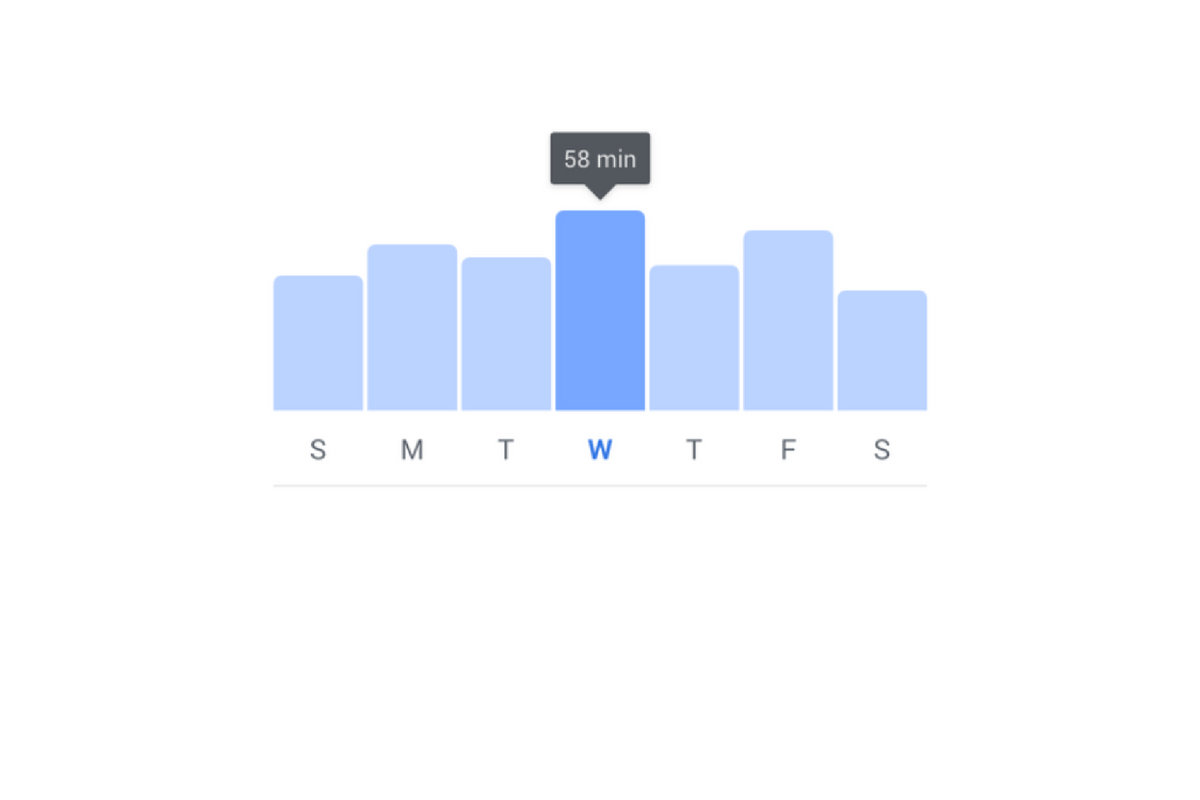
    I have had an extension installed in Google Chrome for a while that limits the amount of time I spend scrolling on Facebook. I can scroll and scroll until eventually hitting a limit that I set for myself. My only frustration is that it didn’t work in the app. Well, now I can breath easier since Facebook is releasing a new system for monitoring and controlling the amount of time you spend in their apps. The folks at Facebook say they want your time in their apps to be interesting and inspiring, not mind-numbing so they’ve introduced some new options and a dashboard.

    The new dashboard will show you how much time you’ve been spending in the app. You’ll also be able to set reminders and schedule a time to turn off notifications. The reports and settings will be found by tapping on the menu on the lower right of the Facebook app and by opening the settings in your Instagram app. You’re looking for the item called “Your Time on Facebook” in the FB app and on Instagram, you’ll open “Your Activity.”

    Facebook is hoping that this will encourage the more thoughtful use of their apps and alleviate the addictive nature of the infinite scrolling social media timeline. Since the “Time Well Spent” movement began, companies have been taking more responsibility to find ways to help people be more intentional with their social media use. The past ten or so years have proven that social media isn’t going away and that folks will use it even to their own detriment.

    NOTE: I, personally, haven’t received the update with these features yet as it is rolling out in batches over the next month or so. As soon as I do, though, you’ll see a tutorial on how to check your time spent and manage your settings on both Instagram and Facebook.

    What Parents Should Know

    This is a good opportunity to discuss the need for online time management with your kids. Since these companies are beginning to take it so seriously, we can use the news to encourage members of our families to do the same. Tell your kids about the features and ask them to use it, even if just to check in on the amount of time they’ve spent. It is amazing what changes you might make when you realize how much of your day is spent mindlessly scrolling a social media feed. If your kids are younger, I advise you to use these and any other resource you can to help them be thoughtful with their time online. Discuss time management with them and help them make healthy decisions so they’ll grow up with good habits.


  • Botley the Screen Free Coding Ed Robot

    Botley the Screen Free Coding Ed Robot

    Coding education was one of the hottest topics at CES2018. The conversation was led by toy makers, psychologists, media producers, and educators alike. They all agree that if your children aren’t learning the basics of programming logic, they’re not laying the foundation that they need to function in the future they will be living in. The other major highlight of CES was the problem with too much screen time. Kids are spending too many hours every day looking at their screens and it isn’t good for their development. These two conversations pose a serious problem. How can our kids learn to program computers if they don’t use any screens? Well, there were some pretty creative answers to that question at CES and BOTLEY was probably my favorite one.

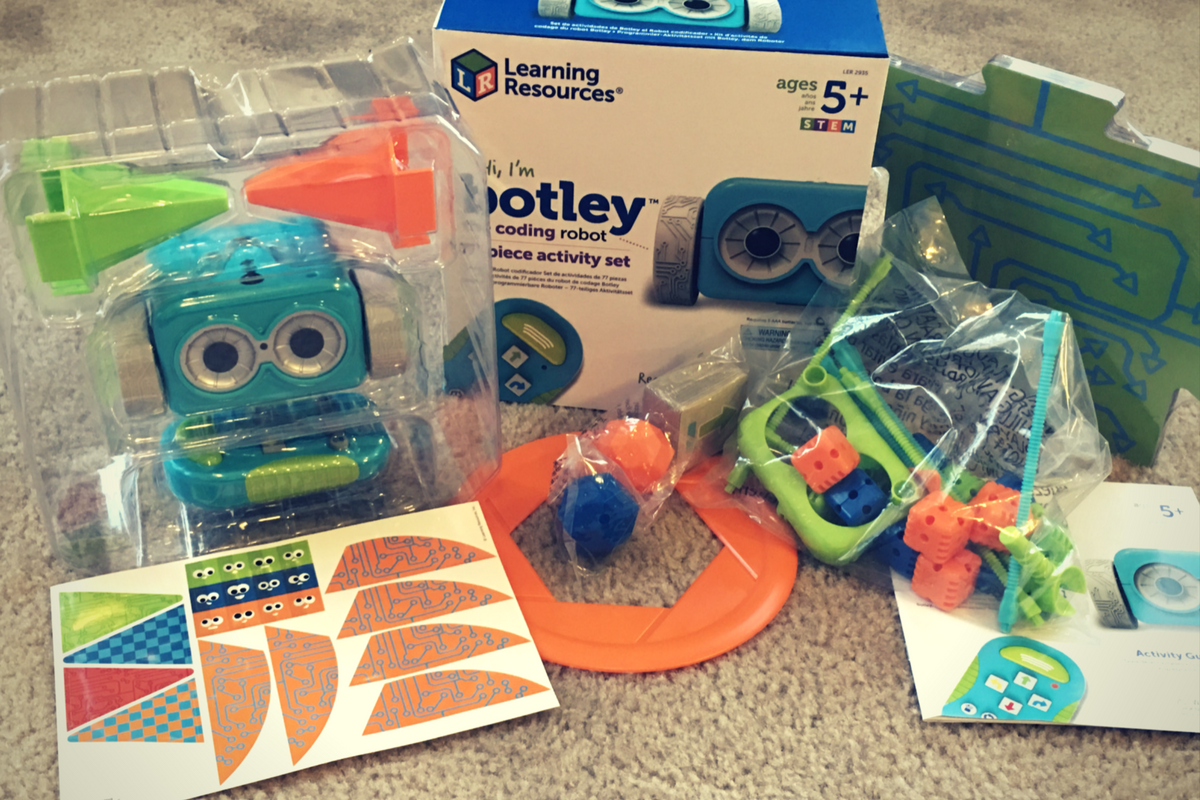
    Botley is a screen-free coding education robot. He can do up to 80 commands issued to him from a single remote control device. He has object recognition and awareness and can trace lines with the sensor on his “belly.” His basic 77 piece set comes with an instruction manual full of tips, tricks, and even a curriculum style guide to help parents set their kids up to learn from the beginnings of coding to more advanced sequences. Best of all, there is no app or software to program him. No screen needed at all.

    His kit contains toys for Botley to play with so that you can create games for him. Have Botley drive over a maze you create with the included puzzle tiles, have him bust through the wall you make from the blocks, or have him push a ball into the goal. All the games advance children through different techniques they can use to program Botley to complete different tasks. These techniques are the basis for the same programming tools used by professionals to create games, websites, and software.

    You can see more about my family’s experience with Botley in the video below. You can get Botley at learningresources.com and tell them FamilyTechBlog.com sent you.


  • Released Today: Facebook Messenger For Kids!

    Released Today: Facebook Messenger For Kids!

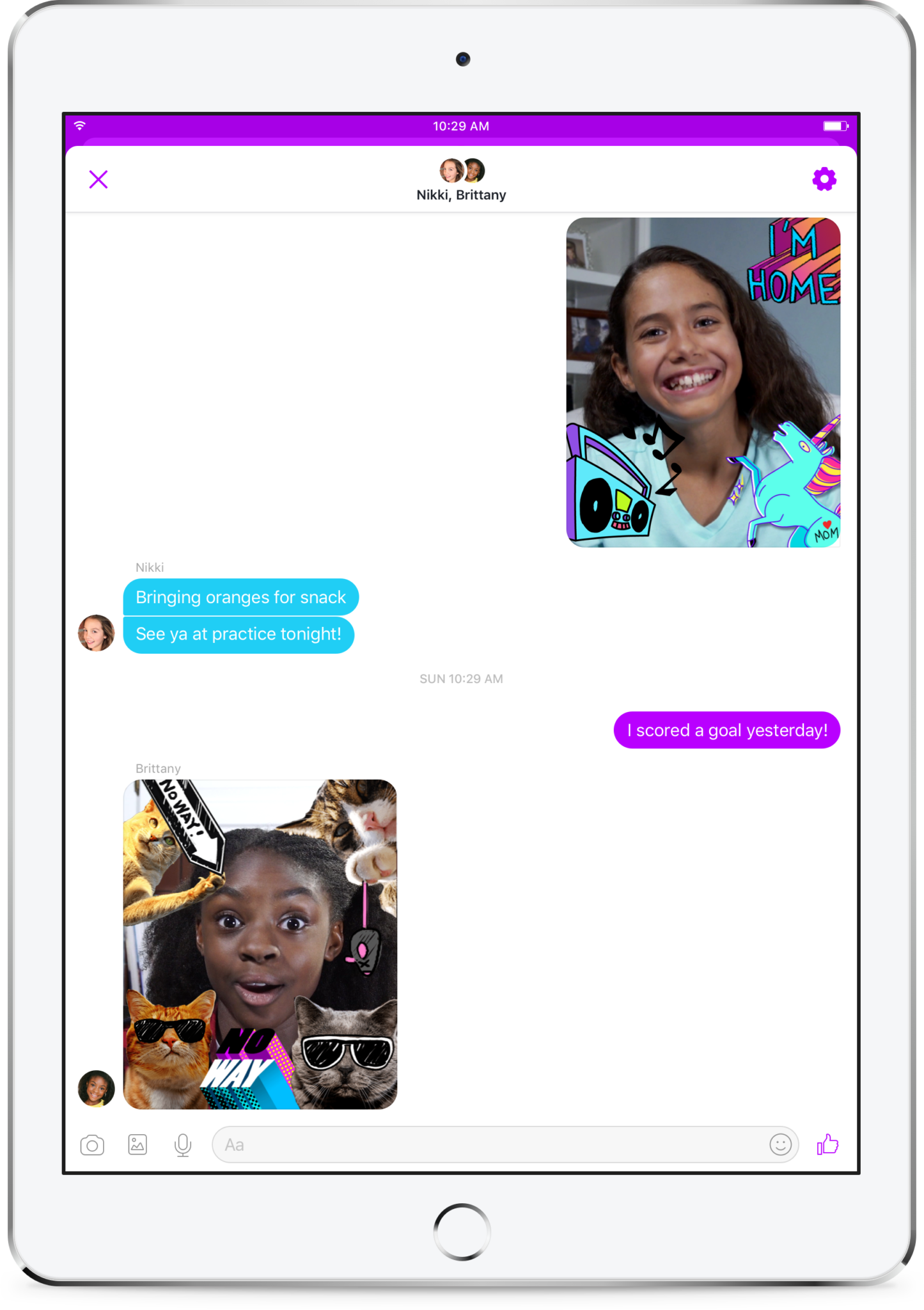
    Kids love social media. They like sending messages to friends and family. They absolutely love using filters and masks to share silly images of themselves. The problem is that social media wasn’t created for kids. It is for grown ups. That makes the social media world dangerous for our -13 kids. Enter Facebook, who is now trying to make social media and messaging safer for our children. Messenger Kids was released in the U.S. today on ios and the new app brings some favorite Facebook messenger features to our youngest family members.

    You set up your child’s account for them and they don’t need a Facebook profile to use Messenger Kids. Once you’ve downloaded the app and logged in with your own Facebook info, it will let you add your kids to the app and then ask them to take a photo and enter some information. Then, as simple as that they’re able to chat with you. To add contacts you search or browse your friend list and give your child permission to contact them by clicking “Add.” It can all be done from your own Facebook settings without access to your child’s device. They can also ask permission to add someone to their messenger app.

    As far as privacy and settings, Facebook has to be pretty specific with their rules. For example, Messenger Kids doesn’t collect ad data, their profile won’t show up in search, there is no advertising within the app, and there is no automatic account upgrade once your kids reach Facebook’s approved age. This is good news and proves that Facebook put some thought and research into what would make the Messenger Kids app fun and safe for kids. Messages don’t disappear and can’t be deleted or hidden. If an inappropriate image is sent, the child can report and the parents will be alerted that their kid has reported something that made them uncomfortable. One of the very few cons of the app is that parents can’t see videos or messages that their kids have sent and received except for taking the device and looking for themselves.  This is also, likely, due to privacy concerns and legal issues but it sure would be nice to at least be able to see messages that have been reported by our kids.

    What Parents to Should Know

    It isn’t very often I can fully recommend an app to parents but so far, I’m feeling like Messenger Kids meets my standards. The GIF options are curated by editors, not an algorithm and the filters are carefully selected and designed just for kids. Control is in the hands of the parent and that is exactly what I’m always wanting to see when it comes to apps designed for kids. The concern about time management does remain, however, so it is important to make sure your children are spending enough time doing other things. Messaging with family and friends can be fun but it is still screen time and it has been proven that kids need more than just screen time as entertainment. Use time management apps or just your own enforcement to be sure that your kids are only using Messenger Kids as long as you’ve decided is healthy.

    It’s great to see an app that brings features that kids love into a safer environment for them. I downloaded this app and have set up an account for my 10-year-old son. He has already enjoyed sending messages, using the camera filters, and even playing an AR game that is included. Why don’t you check the app out too and send me a message or email me and let me know what you think?


  • Social Media News: Youtube, Snapchat, and Instagram Update Information

    Social Media News: Youtube, Snapchat, and Instagram Update Information

    Here’s a rundown of the social media news for this week thus far.

    Snapchat is changing “everything.”

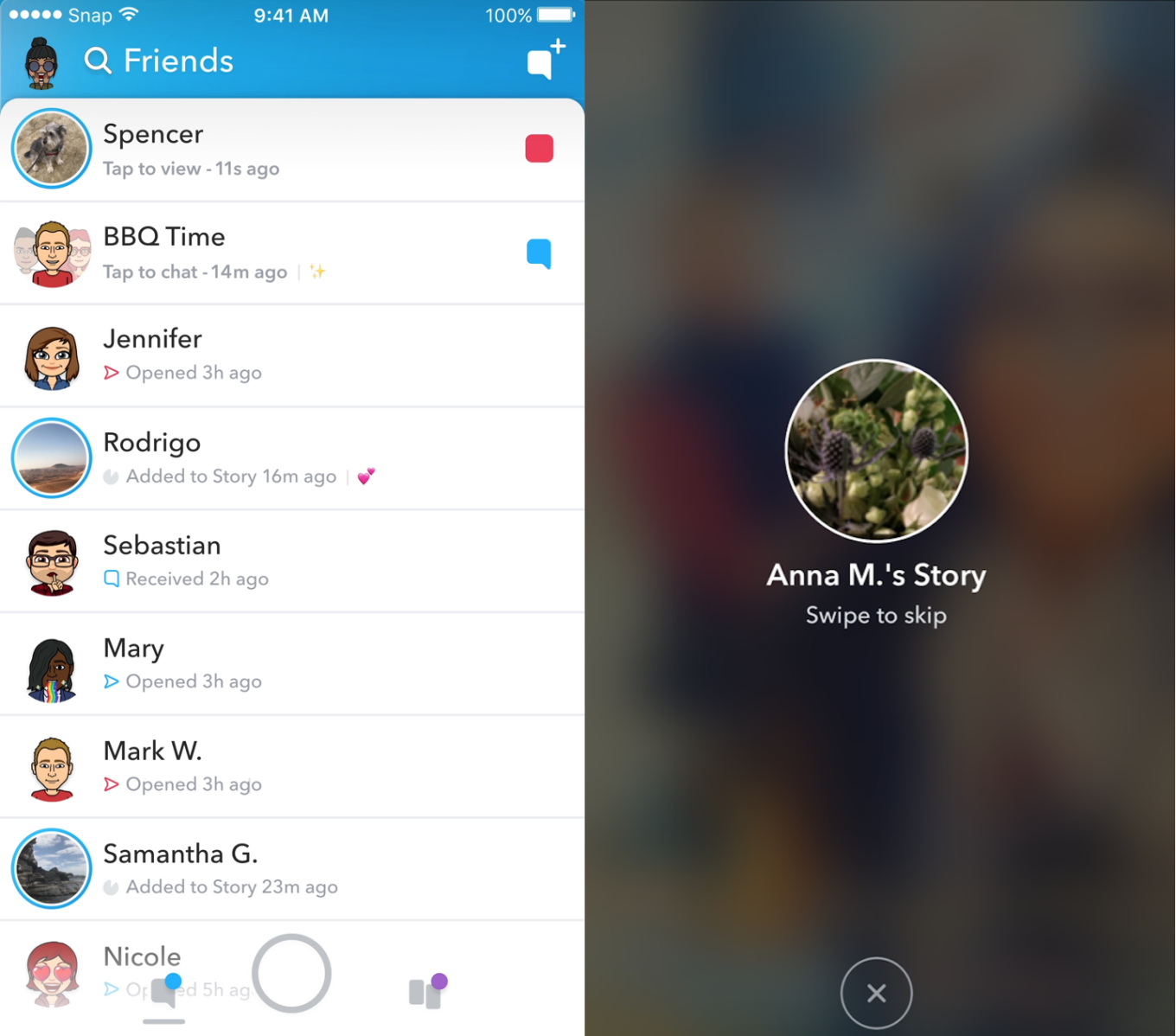
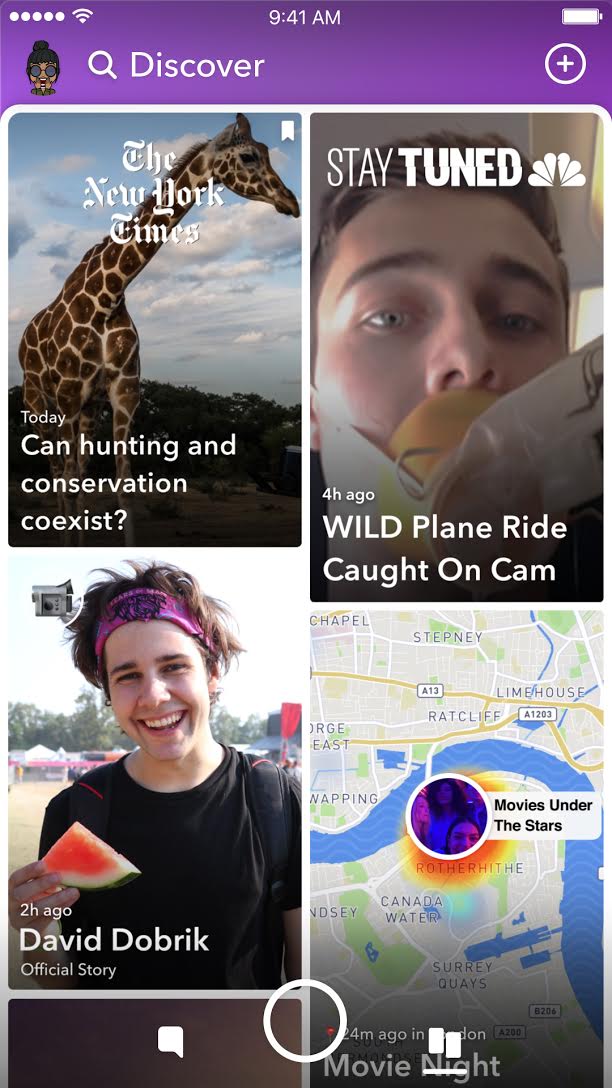
    In an attempt to increase both user numbers and ad revenue, Snapchat is making some major UI (User Interface [the buttons, controls, and setting options on an app or software that allow you to use the app or software.]) changes. In a video by CEO Evan Speigel, he claims that the new Snapchat will separate your social from the media. He says that “your friends aren’t content, they’re relationships” and should be kept separate from the paid advertising and influencer content on the Discover page.

    The app will still feature the “swipe right/swipe left” control style with the left being your friends and right being the Discover page. The Discover page seems to be going through a bit of an upgrade too with animated thumbnails (title images) and including more content from influencers along with the paid media articles. Snap Inc. is hoping this change will make the Snapchat app more appealing to more users and increase buy-in from those who have installed it but don’t use it much. Only time will tell.

    Instagram now lets you ask to join live stories.

    Instagram released the ability to join a friend’s live story just a few weeks ago. The feature has gained some popularity but they’re hoping that the latest addition will make the Live story an even more integral part of the Instagram experience. The latest update allows audience members to request to join a live video on their friend’s Instagram. It isn’t as much an added feature as it is a streamlining of one they released previously.

    Being able to ask to join a live story will increase the visibility of many Instagram accounts and could cause users to spend more time on Instagram. That, at least is what the company is counting on.

    Youtube is soon adding a “stories” type feature of their own.

    The Story feed was started by Snapchat, perfected by Instagram, and flopped on Facebook. Now Youtube wants in on the action. Reels is Youtube’s answer to the latest social trend. This addition lets content creators create quick 30 second vertical videos to keep their followers updated on what’s happening. It lets vloggers and video creators make more content with less commitment.


    The biggest difference from the other Story features is that Youtube’s Reel videos will not disappear and they can make multiple Reel videos. Youtube has been trying to make their app more social and it’s obvious that Reels are a huge step in that direction. They haven’t announced when Reels will be released but you can count on the S.A.F.E. Family Tech Blog to let you know when they do.

    What Parents Should Know

    It’s always important for parents to understand what their kids’ favorite apps are capable of. For many of our children, Social Media apps are the most commonly used. These recent updates should help you be informed about what your children can do with these apps. My advice is always to download these apps for yourself so you can play with all the features. Talk to your kids about what the apps are best used for and what behavior you believe to be healthy or not healthy on social media. Use examples and share about difficult social experiences you’ve had that would have been even worse if they had been online. Strengthen your child’s sense of self-awareness and confidence to ensure they represent themselves in a healthy way online. Most of all, keep an eye on what your kids are posting on their social media accounts and continue to stay informed so that you can be ahead of the social media curve.

  • Partner with BecauseFamily on #GivingTuesday

    Partner with BecauseFamily on #GivingTuesday


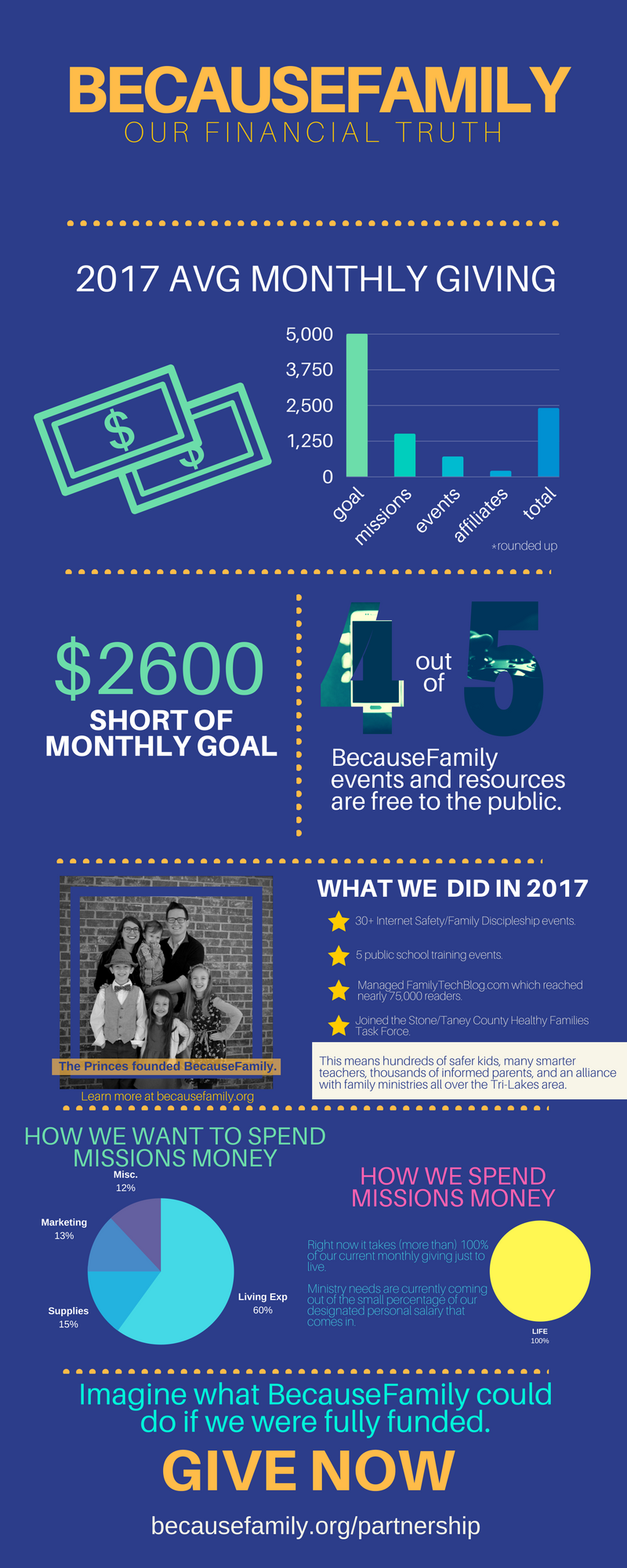
    BecauseFamily exists to inspire and equip parents to be the first influence in the lives of their children. We do that by hosting workshops, seminars, and events. We also do that with this blog. The goal of Family Tech Blog is to help parents be informed about the digital world their kids are growing up in. The blog is free, Living Room Workshops are free, the podcast is free, our YouTube videos are free! All free! We keep them free with the goal of removing any barrier to parents learning the things they need to know to raise digital natives. We can’t keep producing your free content without financial partnership.

    BecauseFamily is a non-profit ministry and can only do what we do because of the generosity of those who give monthly and those who donate at our fundraiser events. Offline, BecauseFamily does even more than what you see on this blog. We are in area schools, educating teachers on how to keep their classroom internet safe. We work with families to set up restrictions and parental controls on their devices. We speak in our area churches and organizations and share the tools and resources we’ve found that can help keep kids S.A.F.E. online. BecauseFamily is working every single day to keep parents informed, teens secure, and kids safe. Your gift to BecauseFamily can help us keep our work going.

    Visit BecauseFamily.org/partnership to sign up to give. Thank you for reading the Family Tech Blog and for sharing this post. We have big plans for our work for families and we can only accomplish these plans with your help.