Tag: apps

  • These Apps Aren’t as Harmless as they Seem

    These Apps Aren’t as Harmless as they Seem

    Our kids use all kinds of different apps for many different reasons. Some for socializing, some for fun, and some for school and productivity. We don’t think twice about letting our kids use Google Documents or even the Bible app. Yet many of these apps aren’t as harmless as they seem. I receive messages from parents a lot asking if I have seen the latest awful thing people have done online. The answer is usually yes, and I am not surprised. For the last five years I’ve been learning about the digital/connected world our kids are growing up in and how it impacts our children and our families.

    Something I’ve learned is that if there is a system or an app that can be exploited to do harm, those who wish to cause harm will use it to do so. You see it yourself in your Facebook comments as some friends think it is the perfect forum for their disruptive thoughts. Worse still is the story from Bark’s project that put a 37 year old mom on instagram posing as a 13 year old girl. The response was shocking with inappropriate pictures and requests filling her direct messages just minutes after posting her first picture. The social function in the YouVersion Bible App being used to groom potential predatory victims. Google docs being used by young people for bullying, secret messaging, and sexting.

    It is shocking but I’m not surprised.

    What is our response to this tendency for people to use something meant for good and using it for the worst intentions. We can’t hide our head in the sand and keep our kids from using technology at all. This just isn’t realistic. We won’t be writing paper letters and saying no to laptops for school projects. The only reasonable response is to take responsibility for our children’s safety ourselves. We can no longer trust the apps that they use blindly, imagining that no harm can come to them simply because the app wasn’t meant for harm.

    We have to help our kids remember that the same stranger danger that is true when you’re six and at the playground is just as real when you’re fifteen and connected in direct messages by people you don’t know. I am not surprised by the nonsense that is happening on these apps. I just know that we, parents, are the only answer. People always find a way to ruin things that were meant for productivity or good. My advice is to talk to your kids. Help them know that. Tell them that if they are contacted by a stranger, even in an app like the Bible App they take caution. Remind them that they should say something if they see bullying online, even in a class Google Document.

    Our children are surrounded by voices telling them all kinds of truths. If you aren’t creating a safe place for them to come and be open with you about their concerns then you’re making it hard for them to live in this connected world. Do your best to be who they need you to be. I’m here to help.

  • Dangerous Random Live Video Chatting Apps are Dominating Social Media

    Dangerous Random Live Video Chatting Apps are Dominating Social Media

    A reader sent me this article written in the Washington Post today and I wanted to post my response. The article outlines the problems that Apple is having keeping “unwanted sexual content” out of apps on their iOS App Store. Apps like Monkey, Yubo, and ChatLive are all apps that allow you to chat live with random people, often only connecting you based on the gender you say you’d like to chat with. The problem with these apps is that most of them have no way to verify your identity, gender, age, or anything. This means that kids who use these apps are chatting with random strangers, many of whom are much older than them and have nefarious intentions.

    The complains in the article are centered specifically around “unwanted sexual material.” As you can imagine, the consequences of this content is often our young kids seeing images of people in mature circumstances whether they were seeking that kind of content or not. When you can just chat with someone randomly, you never know who is going to show up on your screen. When the person that shows up is in a compromising position, you’ve already seen it and it is impossible to unsee it at that point. Our kids are being shown this nonsense and the developers of apps are monetizing some of the only ways you can filter the content. (i.e. Monkey making you spend their in-app currency called “bananas” to select what gender you want to chat with). Those who run the app stores (Google or Apple) often say they do their best to keep apps with inappropriate content off of their stores, especially when it comes to apps that children use, but once they’ve labeled the app 17+ they pretty much shift the responsibility to the adult who is caring for the child.

    The Monkey App will be a Hotbed for Predators

    What Parents Should Know

    Two years ago I wrote an article about the dangers of the app Monkey and how it would become a hotbed for predators and “unwanted sexual content.” Today, Monkey is mentioned in the Washington Post article as one of the main companies with this content in their app, citing: “About 2 percent of all iOS reviews of Monkey, ranked 10th most popular in Apple’s social networking category earlier this month, contained reports of unwanted sexual experiences, according to The Post’s investigation.” Does 2% constitute a “hotbed?” I don’t know. But I will say it is a cause for great concern, especially since this is only a percentage of the reviews that mentioned the problem, mostly parents who saw that their children had been assaulted with adult content in the app. It doesn’t measure those who saw it and didn’t report it for one reason or another. I had been contacted by Allen Loh, head of global expansions for the Holla Group, operators of the Monkey App, six months ago or so and he assured me that they were working to address some of the safety and content concerns within the app. I have reached out again to get updated information about these issues but have not, as of yet, received a response.

    iOS 12’s Screen Time App Changes Everything!| Video

    The only real way to ensure your child is protected from the unwanted content in apps like these is to use the restriction settings built in to your operating system. Apple’s Screen Time has a restrictions setting in which you can set a maximum age rating for apps that your child can download. If your 15 year old has an iPhone, you can set the restriction to 12+ to ensure that apps rated 17+ won’t be available. Android users can use FamilyLink to set App Store restrictions for their younger children. These restrictions, however, will be automatically set to “adult” when your child turns 13.

    As I always say, the most important thing is communication with your child. You have to make them aware of the dangers of chatting with random strangers on the internet. As obviously dangerous as that sounds, these apps are branded and marketed as a fun way to meet new people. They build an environment that is like going to the mall or the movies back in our day, but instead it is all within the anonymity an app. Unfortunately, within an app, the weirdo who wouldn’t go out into public and make advances at your kids is there waiting to find someone he can groom, send adult pictures to, or violate in some other way. Parents need to create a safe space for our kids to come when they feel threatened or violated by someone online or in an app they use. Many of the stories of parents finding unwanted sexual content within an app were made known only because their child knew to come to them when they saw something that made them uncomfortable or feel violated. Do everything you can to protect your children’s hearts, eyes, and minds and then be sure they know they can come to you if something inappropriate comes across their screen.


  • Is Apple Blocking Parental Control Apps Because they are Competitors to Screen Time?

    Is Apple Blocking Parental Control Apps Because they are Competitors to Screen Time?

    The Story So Far

    It is a long and arduous story, the tale of Apple shutting down parental control apps. Some say it was done to protect Apple’s investment in their own Screen Time app while others believe Apple truly has the wellbeing of their customers at heart. It is hard to look at this story from any one angle alone without making a blanket statement about the opposing side. This is why I have taken a look at all sides and wish to help you, parents, understand what is happening in this strange new war.

    Last fall, after announcing the release of iOS 12 which feature their new controls app “Screen Time,” Apple began to deny certain parental control apps access to the app store. Apparently, citing the fact that Apple doesn’t allow apps to use any method to block other apps (a pretty important feature in a parental control software.) Eleven of the top seventeen parental control app developers such as Mobicip, OurPact (the top Parental Control app in the app store,) and Quistudo were all in communications with Apple for months about their apps being removed and what it would take to get reinstated. Apple’s comments seem to have been centered mostly around the removal of apps and the use of something called MDM or Mobile Device Management. They stand on the fact that MDM allows access to information that should remain private. Developers of the Parental Control apps are saying that Apple said nothing about privacy in any of their communication about getting their apps reinstated. This is causing a bit of concern for developers, media, and parents alike.

    Even more information about MDM in the video and podcast.

    Recently, the New York Times released an article about Apple’s removal of the parental control apps from the app store alluding to the possibility that the move was to eliminate competition for Apple’s Screen Time or even to keep people from using apps that cause them to use the iPhones less often. We are obviously getting a lot of they said/they said back and forth with this story and there is more to come (law suits and such) but here is what I think it all means for parents. 

    What Parents Should Know

    Above all it is important for parents to understand that there is no such thing as the perfect parental control app. The free ones are likely selling your data and the paid apps are usually using some sort of loophole to even work properly. Apple uses a pretty closed approach to their app store, only allowing a very small “sandbox” for developers to work in. This causes many of the parental apps in question to fall short of complete and total control. The MDM allowed for a bit more of that control but without that access, many of these apps are simply useless. I do believe that parental control apps should be held responsible for what they do with the data that they collect. Apple takes data security and privacy very seriously. This is what they have said is at the core of their stance against some of these apps. Apple must protect the privacy of their users, it is a major part of their platform and what sets them apart from their competitors.

    Time Management Dashboard Coming to Instagram and Facebook

    What does this mean for us as parents who want to protect our kids? First of all we have to remain vigilant to keep our kids safe online. Use some sort of network level parental controls. Whether you use Circle or something else that is built in to your router, it is a lot easier to set up filters that block your entire network than to set it up on each device. Also, you can just learn and use the built in parental controls that Apple and Android have created. Screen Time isn’t perfect (as I said, none are) but it is pretty good. Use the resources you have as well as a good, healthy environment of conversation and security to keep your kids using tech properly and discussing it with you regularly.

    Until Apple makes it easier for software developers to access user behavior, any built in parental control options will be bettor for iPhone and iPad users. Screen Time is currently a bit limited but is is a lot better than nothing and will work for most families. The best part is that the stance Apple has taken for privacy will also apply to users who have set up Screen Time. Any account that you have set up for your child will be treated as a child’s account and Apple’s terms state that their data will be treated as such also. Maybe your favorite Parental Control app is a part of this whole drama. If so, hang in there and set up something you can use because this whole story isn’t over. I’ll keep you updated as more happens.

    For even more, listen to the podcast episode below:

  • LETS RESEARCH | Predatory Advertising in Preschooler Apps

    LETS RESEARCH | Predatory Advertising in Preschooler Apps

    The Study

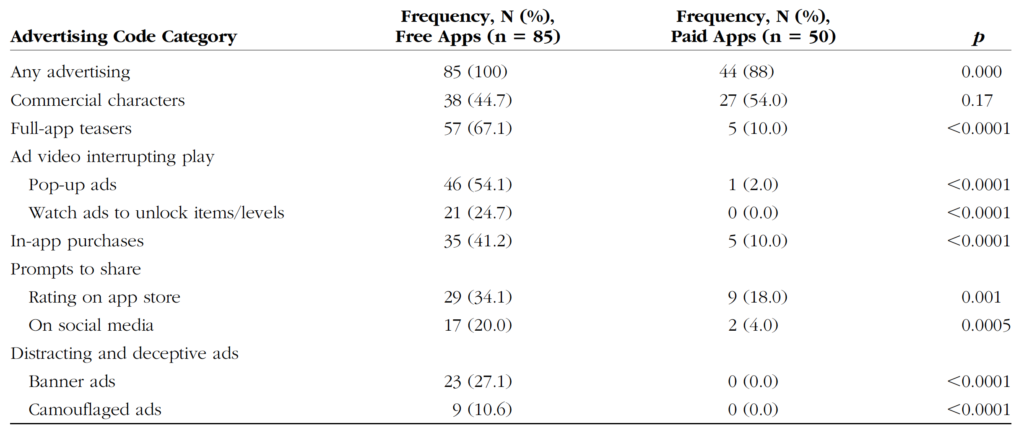
    This review by Wolters Kluwer Health looked at 39 apps that target kids ages 5 and under. They reviewed the different kinds of advertising and manipulation used in the apps to encourage engagement by the young users. Researchers used Android devices and tested the most popular apps in the age category at the time.

    Types of Advertising:

    Commercial Characters – These are apps that are designed around marketing certain characters that your kids may already love. i.e. Daniel Tiger, Mickey Mouse, Bob the Builder, or Hello Kitty.

    App Teasers – Encouragement for kids to unlock the “full version” of the app.

    Ad Videos Interrupting Play – Videos that feature other apps in the marketplace by interrupting your child’s use of the current app and showing videos of gameplay.

    In-App Purchases – Items, levels, or other content that your child can’t use in the app without purchasing them. These may be items that can be used in game, costumes or costume pieces or even in-game currency that can be used to purchase other things in the app.

    Prompts to Share – Encouragement to share the app on social media sites or even just to rate it on the app store.

    Deceptive or Distracting Ads – These ads often trick your child into thinking they are playing another level of the game. Sometimes they look like they are a part of the app your child is using and then open up an app store link when tapped.

    What Parents Should Know

    To get my full thoughts on this research watch the video above. Liking it and sharing with your friends would be super helpful as well. I will say here, though, that it is critical that we as parents understand how these apps are marketing to our children and help our kids understand the difference between something they are playing or learning from and an advertisement. This study also looked at the difference between ads in paid apps vs free apps and educational apps vs entertainment. None of the results are shocking but hopefully, they are a bit eye-opening for parents who allow their kids unsupervised time on screens.


  • 5 Kinds of Apps Parents Should Look Out For

    5 Kinds of Apps Parents Should Look Out For

    It’s that time again, time for BecauseFamily to release our list of apps you should look out for on your kids phones. Unfortunately things change so fast that is seems silly to just throw a list together and tell you to look for those particular icons. Instead, this is a list of app categories that you should be aware of. Some are very malicious and can be dangerous for your kids, some aren’t inherently dangerous but can have some risk associated with them. The list below is not exhaustive, though, I have included several examples of some of the most popular apps that come up when you search for these particular types of app in the app stores. Hopefully this will help you make quality decisions as to what apps your kids have and don’t have on their devices.

    Photo Vaults

    These apps allow users to store private images and videos behind a password of some kind. Oftentimes hidden behind a calculator, camera, or music icon, these apps are intended to fool people into ignoring them and are disguised well. Of course these apps can pose a problem for parents who are worried about their child(ren) sending or receiving inappropriate images or videos. Having a supposed safe place to hide them could make more kids prone to take the risk. Some examples of photo vault apps include:

    Social Gaming

    Many games come with built in friend messaging and ways to connect with players you didn’t already know. This is considered social gaming and it’s standard with most mobile games. Many games seem like they are intended for a younger audience but are actually played by people of all ages. Language, sexual innuendo, and much more can be expected in these “in-game” chat rooms. Also, predators have been known to use messaging in some of these games to identify, target, and groom their prey. Some examples of these social games are:

    Apps with Disappearing Messages

    Cyberbullying and sexting have become a major issue for many junior high and high school administers. Parents are also concerned that their kids are sending and receiving messages they shouldn’t be distributing. Disappearing messages can encourage more of this behavior since it enhances the sense of anonymity. It’s critical our kids understand that what you send over the internet should always be considered permanent and that just because something said it has disappeared doesn’t mean it’s gone. Some examples of apps that allow you to delete messages after sending are listed below:

    Dating Apps

    Online dating is nothing new, apps that connect singles for chatting, dates, and much more are all the rage as well. Sometimes they become trendy among teens also. The following apps are meant to connect older users for romantic purposes but have no foolproof way to be sure kids don’t use the app:

    Live/Life Streaming Apps

    It seems like every social media platform encourages its users to “go live” as often as possible. Live streaming broadcasts you to all of your followers and allows them to engage through comments and questions. Oftentimes you can even broadcast publicly and allow anyone who would like to watch you. Life-streaming is when kids, teens, and adults broadcast much of every day of their lives. The following apps allow kids to life stream to their audience:


    Try Not to Freak Out

    Please keep in mind that just because you see one of these apps on your kids’ phone or tablet doesn’t mean they are using the app for the wrong reasons. Much of this list is based on a risk that is associated with the app, not an automatic danger as soon as it is installed. We need to be vigilant when it comes to our kids’ online activity. Not because of fear or mistrust but from a place of wisdom. Remember to keep communication open with your kids. You should be a safe place to come if something negative does happen to them online. I never recommend spying on your children without their knowledge and I always recommend over communicating with them about the steps you are taking to keep them safe and what you expect from them while they use their connected devices. Be sure to download the PDF of our internet safety resource list!

  • Snapchat Allows Cosmo to Include X-Rated Content in the App

    Snapchat Allows Cosmo to Include X-Rated Content in the App

    *This article is for parents and there is discussion of x-rated content. You have been warned.

    The Snapchat Discover page has been my main source of concern for kids and teens when it comes to the photo-sharing app. I posted a video over a year ago announcing that Snapchat was being added to my uninstall list because of the Discover page. This magazine rack style page featured articles from all kinds of magazines and other publications that highlighted sexuality, drug use, and other adult themes. As I began to understand the discover page, it became obvious to me that this app was intended for adults even though it’s used by High School and even Junior High students all over the country.

    Another Report on Cosmo After Dark

    The latest source of concern with Snapchat for parents is, as I’ve been saying, the Discover page. A new feature from Cosmo, called “Cosmo After Dark” features content that Cosmo themselves calls X-Rated. These articles are about everything from how to masturbate properly, to truth and dare ideas, and pornography site recommendations. I won’t say much more about this because the video below says it all.


    Remember, this video is from a year and a half ago, I saw this content coming from a mile away!


    Parents, PLEASE, pay attention to this news and require your child to uninstall Snapchat NOW. Use your parental control software to block data access to the app, do whatever you can to keep them away from the over-sexualization that social media is instilling in our children. Snapchat has really always been about sex, they seem to be really going for it now with this new “after-hours” content.

  • Top “Family” Android Apps Found to Collect Kids’ Data Without Parental Permission

    Top “Family” Android Apps Found to Collect Kids’ Data Without Parental Permission

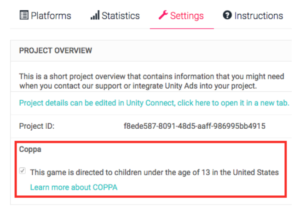
    It’s so nice to just head to the Google Play store and grab a couple of free apps to keep your child busy for a few minutes. There are a lot of free options and Google Play has a “Designated for Families” section to help you know if the app will be safe. Unfortunately, many app developers haven’t been following the rules. Android’s compliance rules are very specific about requiring apps to stay true to the Children’s Online Privacy Protection Act (COPPA.) That means there are certain types of data they aren’t allowed to collect without parental permission and other types they can’t gather at all. A recent research project has found that the majority of these apps ignore the rules of COPPA entirely.

    Overall, roughly 57% of the 5,855 child-directed apps that we analyzed are potentially violating COPPA. – Proceedings on Privacy Enhancing Technologies

    The study found that most apps collect the data of their users, even though the apps are geared towards an audience under 12 years of age. The research group formed from North American and European universities developed an automatic system to study nearly 6,000 apps. They looked at data such as ad tracking, location tracking, ID sharing, and wifi address tracking. Many of the transmissions were unsecured which put data at a greater risk.


    What Parents Should Know

    When an app is free there are some things you need to consider. There’s a reason it is free, not because they want to give you free access but because developers make their money in other ways. Obviously, advertising is one of the ways, the other way is your personal information. Things like your location, device type, web search habits, and internet history are very valuable resources to advertisers. App developers are able to gather this information and sell it for marketing purposes. The common phrase is data is the new currency.

    There are certain laws concerning the collection and use data of people under the age of 13. This study shows that many android app developers are ignoring the rules. This proves that the method of self-regulation may not be viable when it comes to protecting our information and privacy.

    My recommendation is that parents pay very close attention to the privacy practices of the apps they use for their kids. Read the terms and agreements. Read their privacy policies. Most importantly, understand that a free app is free because they are selling something else. Namely, your and your family’s personal information.

  • Google Has Proof they’re Finally Taking App Store Security Seriously

    Google Has Proof they’re Finally Taking App Store Security Seriously

    The Google Play app store has been known to be a bit of the wild wild west. There were copycat apps, apps with adult content, and apps with malware or spyware. Google now has some proof that they’ve been hard at work putting an end to all of the nonsense. In a recent report, Google said they removed more than 700,000 malicious apps last year. That’s 70% more than they removed in 2016. They say that most of the removed apps were copycats and many contained pornography or extreme violence, both of which are against the Play store policies. Most importantly of all, of the apps that were removed, 90% were rejected before they even made it to the store. This means they were never able to deceive users.

    This is very good news for Android users. It means that Google’s algorithms, AI, and “machine learning, techniques are working well and keeping apps that could put your security at risk from ever being installed on your phone. The openness of Google’s play store was always a major reason I wouldn’t own an Android phone. This update, as I said, is proof of how serious Google is taking security. There is still, however, a major risk associated with the use of an Android phone. It is a popular reason some folks prefer Android even though it is against their recommended usage policies. No matter how secure the Google Play store becomes, you aren’t protected if you are downloading apps and other files from other sites and apps. “Sideloading” apps is not recommended by Google and can put your security at risk.

    What Parents Should Know

    I spoke with a mom of a young teenager a few months ago about some strange stats on her monitoring software on his Android phone. It turns out, while she had turned off app downloads to keep him from installing adult apps or time wasters, he had been finding other ways to install apps on his phone. The Google Play Store removing unsecured and malicious apps can keep your kids safe from some of the dangers out there but if they are installing apps in other ways, you’ve lost all confidence that they’re protected. You should have some sort of monitoring software installed. Use something like unGlue, Accountable2You, or Circle to monitor what your kids are doing on their phones and keep an eye out for apps that don’t seem legit.

    A good way to know if they are sideloading apps is by looking for the term “APK Installer” in their recent activity. If you have the phone set to ask for permission or to disallow app installation and you see the “APK Installer” running, they may be sideloading. My advice is to keep an eye out for this and if you see it, ask them about what apps they are using. Maybe even have a look at what is installed on their phone. If you don’t recognize the app, do some research and uninstall it if you don’t approve. Most importantly, talk to your child about the importance of only downloading approved apps from the Google Play store. Let them know is as much about internet privacy and security as it is keeping them away from inappropriate content. Google is doing their part by monitoring and managing their app store, you can do yours as a parent by keeping an eye on what your kids are using on their Android device. 


  • Superzoom on Instagram and Share Links in Snapchat

    Superzoom on Instagram and Share Links in Snapchat

    Every update announced by the developers of the apps your kids use isn’t earth shattering but you should still know what’s going on. This week has been a pretty slow internet safety update week but some teen favorite social media platforms have released some updates in the last couple of days.  These updates are mostly cosmetic seasonal features but they’ll be interesting to your kids so they’re worth learning about.


    Instagram Superzoom

    Remember the dramatic chipmunk? He’s the cute little guy on the youtube video that gave an epic, three-level zoom, dramatic (and comical) look. There was a song and everything. Instagram has added a feature to their camera that can give you that same hilarious zoom in effect. The product manager for Instagram said they’ve seen users making funny “zoom in” videos in their story and wanted to give them a tool to make this easier. The feature zooms into whatever you’ve told the camera to focus on, it will work on the front or rear facing camera, and even features the dramatic orchestration you’d expect to hear from such an epic shot. This feature comes today along with some Halloween filters and masks.

    Snapchat Link Sharing

    Snapchat will now let you share links from other apps in iOS. Pulling up the “share sheet” or sharing menu will now show you the option to share in Snapchat. This is a pretty big change for Snapchat who previously didn’t do much to affect usage outside of the app itself. Links will still open within Snapchat’s web browser but more and more content can now make its way into the app through the accessibility of link sharing. Also, Snapchat is changing the way you view Snaps from within the app by letting you press and hold a friend’s name anywhere in the app to open their Story. Finally, there is a new feature that will allow you to go into “Ghost mode” temporarily, setting your location to stay hidden for 3 hours, 24 hours, or “until I turn it off.”

    What Parents Should Know

    Every update brings more features that our kids love on their social media apps. We should know what these features are and what they mean for how our kids use the app. Camera effects and modes add interest and fun but may cause the young kid you’ve been keeping off of social media to ask you even more if they can join. Truthfully, Snapchat is late in the game when it comes to link sharing. It’s been possible in so pretty much every other social media app out there for a long time. Being able to bring links into Snapchat from any other app increases the potential for it to be used to share different sites between users. This could include sites you’d consider inappropriate. My advice is to turn on built-in filters on your iOS devices as they should make it harder if not impossible to access adult content on any browser on the phone.


  • 5 Apps that are Tech Safety Expert Approved!

    5 Apps that are Tech Safety Expert Approved!

    When I do Digital Boundaries Workshops I begin by sharing all of the dangers of unsupervised internet and mobile device use. I then walk through the best practices for keeping your kids safe in the digital landscape they are navigating. I also, spend a lot of time answering questions. I received a question this week that I hadn’t been asked ever before. “What are some apps that you would recommend for my family.” Huh…I hadn’t thought of that as much. I spend so much time looking at the dangers that are so prevalent online that I often ignore some of the resources that can be fun for families. Here’s a list of five apps that I approve of.

    Social Media

    Instagram

    While I always recommend parents keep to the age restrictions recommended by the terms of agreements on a social media platform (usually 13 plus;) I also know how popular social media is and that your teen is going to want to open an account as soon as you’ll allow them. When you’re ready to give them permission, I recommend you start with Instagram. The first reason is pretty simple. Instagram is easy to monitor. You can easily put your kids’ account(s) on your installation of Instagram and keep close tabs on what they’re doing on it. You can even use that method to be notified when they get a direct message.

    Any social media opens you up for some problems. They say it isn’t great for self image and self esteem and there is always inappropriate content that can be accessed because of the fact the content is posted by users but if you’re going to give in and allow some form of Social Media then Instagram is a better starting point than Snapchat or Twitter. There a a lot of reasons and I’ve written about most of those already.

    Gaming

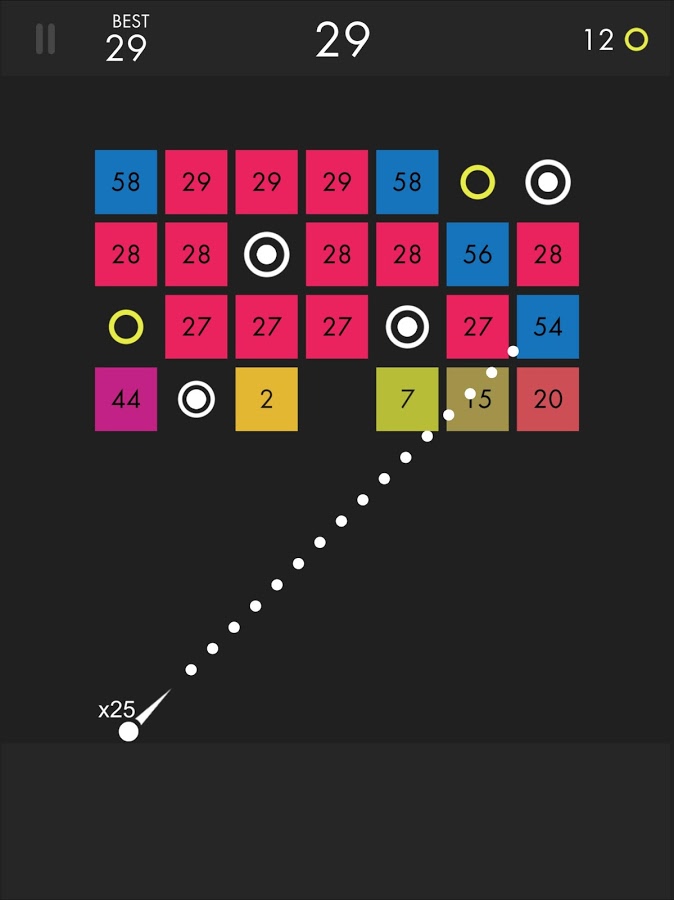
    Ballz

    This game is super fun and addictive. It’s a pretty basic concept. You swipe back and release to launch a ball to bounce around the game-board and break up blocks. The blocks have numbers on them that show how many times you need to hit the block to make it go away. You collect more “ballz” and launch them all at the same time. (I’ve launched as many as 110 at once.) This becomes extremely satisfying when you fire all of the balls towards the blocks and watch the numbers on them decrease as quickly as the block is hit by each ball. Like I said, while it’s satisfying, it’s also very very addicting.

    This game is approved because, while it has ads, the ones I’ve seen have all been for more games by the same developer. This has kept anything inappropriate from creeping up as a banner ad. I approve because it should be pretty safe and because it is just so darn fun to watch all those little balls bounce around and devastate the the game-board full of blocks.

    Research/Education

    Kiddle

    Kiddle isn’t an app. It’s a website. You can very easily save the site to be an icon on the home screen of your phone and then tell your kids to use it as their search engine. I’ve written quite a bit about Kiddle already, so go read about how the search engine works and let your kids research and learn without fear of coming up on anything nasty or scary.

    Entertaiment

    Amazon Prime and Freetime

    Amazon Prime’s kids profiles are some of the best because the shows are curated by human editors. That means that actual people have looked at the shows and determined that they are actually safe for kids. Freetime is a special way to subscribe to only kids content so that you can be sure that they’re not seeing and adult targeted shows. If you don’t have Freetime you won’t have access to kids profiles but you can still set parental controls so that content above a certain age range won’t be accessible without a pin number. Kids can’t see these shows and movies without the pin but they’ll still be able to see the thumbnail image in their “carousel.”

    YouTube Kids

    YouTube kids is a good option simply because of the popularity of YouTube for our children. Kids love watching all different kinds of content on YouTube and YouTube Kids makes it possible to allow them to watch their favorite channels without potentially finding videos that aren’t appropriate for their age. YouTube Kids separates their content by topics like music, education, and shows so kids can find what they want pretty easily. The only downside to YouTube Kids is that it’s monitored with an algorithm and depends on reports from parents to remove suspicious and inappropriate content. This has caused some concern for parents in the past but if you are going to allow you kids to watch YouTube then YouTube Kids is absolutely a better option.

    That Being Said

    I’m not used to thinking about what apps parents should install but I’m grateful for the question this week to give me the idea for this article. Please remember that all of these apps constantly add new content and features and sometimes that makes them less appropriate for kids. As for right now, though, I give these five apps a green light for your kids’ devices as long as you and they use the apps in the way they’re designed to be used.