
We’ve made it to our final vocabulary post. We are visiting gaming again. We discussed several gaming terms in lesson one but I thought we should cover a few more in this final vocabulary lesson. These terms have to do with gaming and monetization (a word you learned in lesson 1.) Learning about how money works in the mobile gaming world can really help you understand how game companies market to your kids. If you aren’t subscribed to the site, be sure to register so that you can access all of the great content in this series and so much more.
F2P
Free to Play games are exactly what they sound like. These are games or apps that you can install and use without any upfront cost. Clash of Clans, Boom Beach, Temple Run, and Jurrasic World are all examples of a free to play game. Pay to play is the opposite of F2P and is when you’re required to pay in order to access the game in the first place.
Freemium
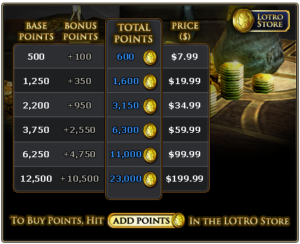 The freemium (free/premium) category is one that most F2P mobile games fit into. This models allows free access to the basic content of the game, maybe the first “chapter” of the story, and then requires you to pay to access the remaining content. Sometimes the entire game is free but you are required to use resources within the game that take time to earn. The freemium model kicks in when you don’t want to wait anymore and so you can pay to gain more of the resources you need and therefore progress through the game faster. The top grossing games in the Apple App Store are freemium games.
Virtual Goods
Virtual goods are non-physical objects or resources that you must use in a game. Usually you can receive these goods as a reward for completion of sections of the games but they also have the resources available for purchase with real currency. You commonly see games offer “deals” on their in game resource to allow you to advance faster into the game. You can play without spending “real” money but it will take more effort than just purchasing that bonus pack of gold and using it to upgrade your buildings instantly.
In 2011 a study found that 2.3 billion dollars was spent by Americans on virtual goods.
Virtual Currency
European central bank defines virtual currency as “a type of unregulated, digital money, which is issued and usually controlled by its developers, and used and accepted among the members of a specific virtual community.” This can vary from money used in-game to only buy products in-game to virtual currency (most commonly bitcoin) used to purchase tangible products. Large companies like Overstock.com and Gyft have recently opened up to allowing payment through bitcoin (a virtual currency.)
Most commonly you’ll experience virtual currency as money earned within a game and then used to buy resources or items in the same game. (i.e. the cake baking app that wants you to pay 99 cents for the entire set of colored candles.) Some games, however, have had their virtual currency make a mark in the real world economy. Folks, while not always legally, can “farm” products and virtual currency within a game and then sell it elsewhere to make real money.
What Parents Should Know
Game and app developers are making billions of dollars from the games we play on our phones and tablets. As, in my opinion, they should. Your job as a parent is to make sure your children don’t spend money on things you don’t approve of. Every app/software store in the devices we use has a way to password protect “in-app purchases.” This tool is very useful in keeping you from opening up that credit card bill and finding that little Johnny has just unloaded $6000 this month on dinosaur food for his T-Rex in the Jurrasic World app. (That really happened.)
I hope the words in these vocabulary lessons have given you some insight into the digital and mobile world your kids are growing up in. Hopefully you can use these terms as tools to help you keep dangerous content and unwanted surprises off of your kids’ smartphones and tablets.
What other series would you like to see on SAFE.BecauseFamily.org? Leave a comment on this post to make some suggestions.