Tag: youtube

  • VIDEO: Three iOS 11 Features Parents Need to Know

    VIDEO: Three iOS 11 Features Parents Need to Know

    More than half of all iPhone users are now using iOS 11 and there are some major changes. The biggest change is the control center. This has become a lot more useful with the iOS 11 update and there are some features that parents should know so that they can use them to further protect their kids.

    Screen Recording

    Screen recording hasn’t been built into iPhone until this update. It’s a way to capture what’s happening on your screen and then save it as a video in your photos. This feature is cool and very useful for projects like making this video but there is a bit of a concern with kids sending messages and them being recorded without their knowledge. Keep your eye on this one.

    Quick Guided Access Button

    Guided access is an awesome way to keep you younger kids safe. The quick access button allows you to get to you GA settings quickly and use the feature to keep your kids safe. Do Not Disturb While Driving

    Do Not Disturb While Driving

    This is one that’s been needed for a while. The Do Not Disturb While Driving feature lets you just tap a simple button in your control center and not be distracted by texts until you turn it off. Pretty good idea, even if it has been a long time coming.

    There are more details and some screen capture of these features in use in the video below:


  • YouTube Rebrand and New Style Is Going Live Today

    YouTube Rebrand and New Style Is Going Live Today

    YouTube has launched an update for their app and their in-browser site. The update features a whole new theme (dark-mode,) a new logo, speed controls, and more compatibility with different video dimensions. The logo and dark mode are welcomed changes among YouTube users and the ability to work better with verticle smartphone videos seems to be a no brainer these days. Much of the update has been available as a beta test for some users but the availability went public today. New gesture controls allow you to fast forward or rewind videos and they’re hinting at the ability to swipe between previous and next videos. Finally, they are continuing to update the app to feature recommended videos on the lower third of the screen during playback. While you may only watch YouTube videos within your Facebook timeline when your friends share them. Your kids are using YouTube every single day and it’s one of the top search engines in the world. This update is a big deal.

    What Parents Should Know

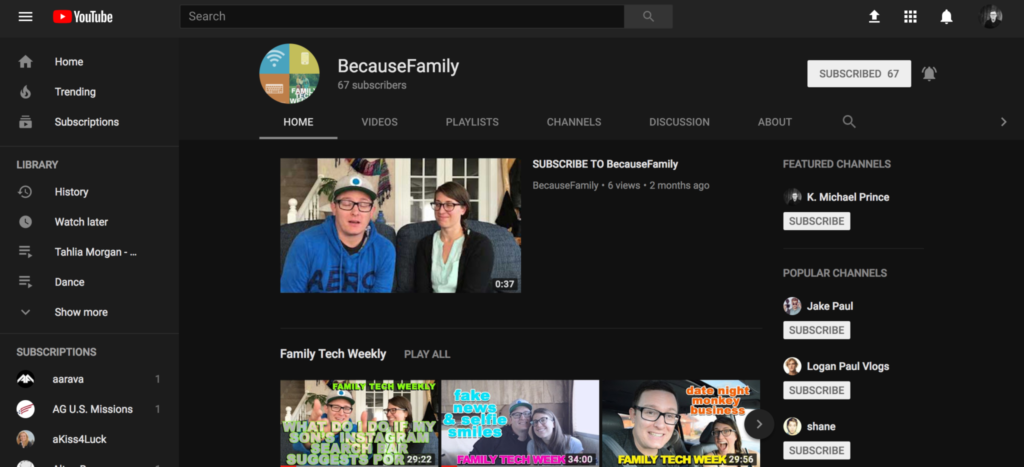
    Many of our kids spend hours per day watching videos on YouTube. Some of them even produce their own content. You can guarantee that they have noticed (or were anticipating) this update. Why not use the knowledge you learned in this article to start up a conversation with them about their activity on the site and app. Ask them about their channel. How many subscribers do they have? What kind of content do they produce? What kind of things do people say in comments? You should know these things and this update is a welcome way to bring up the topic.

    Here is some advice for you to wrap up this article. I recommend subscribing to your kids’ YouTube channel if they have one. If you don’t know if they have one or not you should ask. Even better is the option or logging in to their account on your own device so that you get notifications whenever they get comments and messages. Maybe you could share a channel or account with them. Then you can see their viewing history and know what kinds of videos they are watching based on what’s being recommended by YouTube. Either way, you should be involved with what video content your kids are taking in and producing. Using this latest update to spark the conversation is a great idea.

  • Family Safe Eclipse Coverage

    Family Safe Eclipse Coverage

    Everyone has an idea of how you should safely view today’s eclipse. Use the glasses, don’t use the glasses, use a pinhole projector (we’ve made ours) watch live coverage. However you want to view the eclipse in person, you need to know a few things before choosing which live stream coverage you’re wanting to use. For some reason, those who cover events like the eclipse aren’t always scientists or educators and they may give dumb, or even dangerous advice. They might even have non-age appropriate language or other content in their videos, coverage, or advertising. Here are a few of the channels and videos that we recommend so that you can learn about and enjoy live coverage of today’s total eclipse.

    Live Feed

    NASA: 

    I’m only listing this one option. They have a pre-show with more science facts than you can handle and then live coverage from multiple parts of the country. You know the information and advice will be good because these are some of our country’s absolute best scientists. Enjoy!

    Education:

    National Geographic: https://youtu.be/cxrLRbkOwKs

    Some great educational videos about the eclipse and other science facts. National Geographic is a trusted source for nature and science information and education.

    Sci Show Kids: https://www.youtube.com/channel/UCRFIPG2u1DxKLNuE3y2SjHA

    Sci Show Kids is a great way to teach your kids any scientific information. They have some very good videos about today’s eclipse.

    Sci Show Space: https://www.youtube.com/user/scishowspace/search?query=eclipse

    Sci Show Space has great scientific learning videos as well and is perfect for those who are a bit older. The link above is to a search for the eclipse videos on their channel.


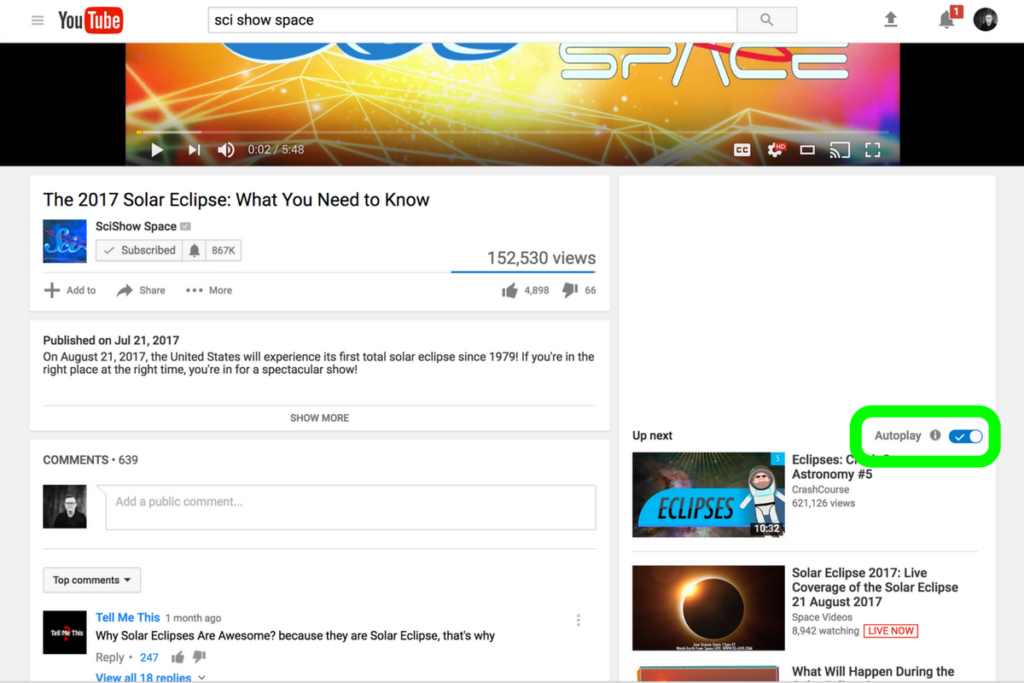
    Be smart about what videos you show your kids and whether or not you allow follow-up videos to autoplay. Turn autoplay off to avoid accidentally exposing them to content you didn’t expect and aren’t ready for them to see. The eclipse is a great opportunity to teach your children some science facts but you have to be wise with what tools you use. Hopefully, the resources listed in this article will give you an idea of where to start. Be safe, and have fun.

  • YouTube Adding Private Messaging

    YouTube Adding Private Messaging

    I spoke to a mother just a few days ago who was lamenting the idea of her son having his own YouTube channel. He didn’t post much but she was concerned about people finding him or learning about him through his videos. She was also concerned about bullying in the comments of his videos which is a real concern since YouTube commenters are notoriously ruthless. YouTube’s most recent update is going to either help solve or intensify these problems.

    YouTube begins rolling out a new update today that will bring private messaging to the video streaming app. The feature is an attempt to keep people on the YouTube app to discuss and share videos they’re viewing on YouTube. Currently, these videos are shared on other social media sites and discussed there but YouTube wants to play a larger role in the social game. Private sharing and chat will allow users to discuss videos and respond with more comments and even reply with another video. The biggest concern with this feature is that you can’t block users who try to contact you. You can, however, deny their requests to chat.

    What Parents Should Know

    Any app that allows private messaging should be taken seriously by parents. Kids of all ages love YouTube and the dangers of allowing them unsupervised access to user uploaded internet videos have been well documented. Adding the ability to send and receive private messages, while it can allow them to discuss videos with people they know without the risk of comment trolls bullying them, provides an opportunity for strangers or who knows who to contact our kids through YouTube. Since predators use social media to learn about and groom their victims, YouTube’s private messages could be a way for those ill meaning individuals to do their work.

    I advise that you allow your kids to watch YouTube on YouTube Kids only. If the videos they like aren’t available there then only let them watch on a browser on a computer. The other option is to share the YouTube account with your children and install the app on your own device. This way you can see who they’re messaging, what they’re talking about, and even be alerted when they receive a new message. I don’t ever recommend spying on your kids. My advice is that you discuss your parental control and monitoring methods with them so they know you’re there to look out for them. You’re supposed to be the safe place.

  • YouTube’s Restricted Mode to Allow Non-Graphic LGBTQ Content

    YouTube’s Restricted Mode to Allow Non-Graphic LGBTQ Content

    Restricted Mode Guidelines for YouTube have been updated to allow for content from the LGBTQ community as long as it doesn’t contain content deemed graphic. YouTube restated their firm support for those in the LGBTQ community and apologized for content from that community being blocked by their previous restriction guidelines. The update has specifically unblocked over 12 million videos that were previously blocked by the restrictions for some reason. The statement says that the goal was never to keep the voices of those in the LGBTQ community silent but only to provide an option to institutions that would prefer to keep the “adult” side of YouTube off their screens.

    Restricted Mode was originally designed as an optional feature for public institutions like libraries and schools to prevent the viewing of mature content on YouTube. But in looking more closely at the feature, we found that there was LGBTQ (and other) content that should have been included in Restricted Mode but was not, like kissing at weddings, personal accounts of difficult events, and speaking out against discrimination. – YouTube Creator Blog

    You can read YouTube’s full statement here. 

    What Parents Should Know

    These different guidelines have taken effect immediately and some previously blocked content will already be available. Parents should know what their kids are watching. This is the only way to uphold the values you have decided your family should live by. YouTube and other companies have an obligation to provide content for every member of their audience. It is not their obligation to keep any message from your child’s ears and mind. Depending on your stance, you should be the one making the decisions for what your children are allowed to watch, whether you use monitoring software or keep your eyes on the content with them.

  • Here’s Why Your Kids Watch Other People Play Video Games

    Here’s Why Your Kids Watch Other People Play Video Games

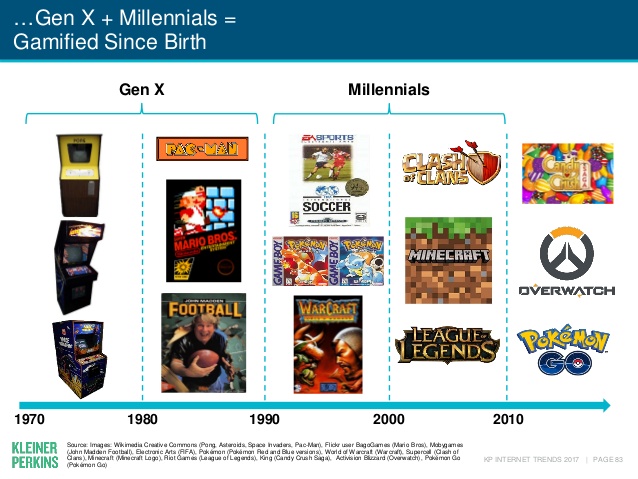
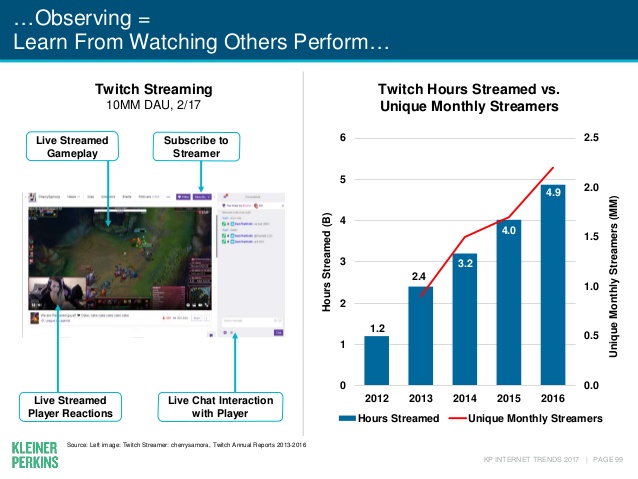
    Watching other people play video games may not be something that you, as a parent, understand. The truth, however, is that it isn’t weird. It’s called esports and its popularity has grown in leaps and bounds. In fact, the recently released Kleiner Perkins 2017 Internet Trends report states that the popularity of esports has grown 40% every year. Also, 40% of the demographic that your kids belong in (millennials) even state that they prefer esports to traditional sports.

    Esports is growing all over the world it allows those with video game skills to test their abilities against the best on our globe. Most esport competitions begin with online qualifying matches and then culminate in an actual tournament style playoff in front of a live, and online audience. You can find an esports league for pretty much any video game you play. There are sports gaming leagues, Role Playing Game leagues, first person shooter game leagues, and even leagues and competitions for the most casual of puzzle games.

    Not all video gaming entertainment is competition based. “Let’s Play” video games on YouTube and LiveStreams on Twitch have also seen a massive increase in popularity. These videos feature gamers playing their favorite games and narrating their experience while thousands of fans watch and comment on the videos. On Twitch, streamers react in real time to the comment section or “twitch chat” allowing them to engage with their viewers and even let those watching help them make in-game decisions and strategies. These Let’s Play gamers build large communities that are extremely faithful and supportive. Many have even been able to make gaming their full time job because of ad revenue and the generosity of their viewing community. 

    What Parents Should Know

    First of all I recommend you take the idea of esports being a fad out of your mind completely. The truth is that esports is simply the next phase of the same video game culture that started while or before you were even a child. When people start to do something that takes any level of skill, opportunities to measure your skill against opponents will soon follow. Then, of course comes the chance to play for money since these competitions will surely draw a crowd who will pay for the privilege to be entertained by your tournament. Just think about poker or chess or cheerleading. These are all things that many start out doing as a hobby but there is a real competitive culture for these activities and therefore, a real industry. Video Gaming is no different.

    As far as your kids’ safety, I recommend that you know what games and gamers they like to watch. Get into that world a little bit for yourself and learn who these people are that your kid is watching play. There are adults that play games you kids love on YouTube but they don’t use very kid friendly language while they play. There are also people on YouTube who play very adult oriented games. You should have a general idea who your kids are viewing and what kind of content they share. The best way to do this is to share their YouTube and Twitch account and keep an eye on who they follow or subscribe to and their viewing history. I know this just adds more pieces to the internet safety puzzle but it’s worth the effort.

  • 5 Apps that are Tech Safety Expert Approved!

    5 Apps that are Tech Safety Expert Approved!

    When I do Digital Boundaries Workshops I begin by sharing all of the dangers of unsupervised internet and mobile device use. I then walk through the best practices for keeping your kids safe in the digital landscape they are navigating. I also, spend a lot of time answering questions. I received a question this week that I hadn’t been asked ever before. “What are some apps that you would recommend for my family.” Huh…I hadn’t thought of that as much. I spend so much time looking at the dangers that are so prevalent online that I often ignore some of the resources that can be fun for families. Here’s a list of five apps that I approve of.

    Social Media

    Instagram

    While I always recommend parents keep to the age restrictions recommended by the terms of agreements on a social media platform (usually 13 plus;) I also know how popular social media is and that your teen is going to want to open an account as soon as you’ll allow them. When you’re ready to give them permission, I recommend you start with Instagram. The first reason is pretty simple. Instagram is easy to monitor. You can easily put your kids’ account(s) on your installation of Instagram and keep close tabs on what they’re doing on it. You can even use that method to be notified when they get a direct message.

    Any social media opens you up for some problems. They say it isn’t great for self image and self esteem and there is always inappropriate content that can be accessed because of the fact the content is posted by users but if you’re going to give in and allow some form of Social Media then Instagram is a better starting point than Snapchat or Twitter. There a a lot of reasons and I’ve written about most of those already.

    Gaming
    Ballz

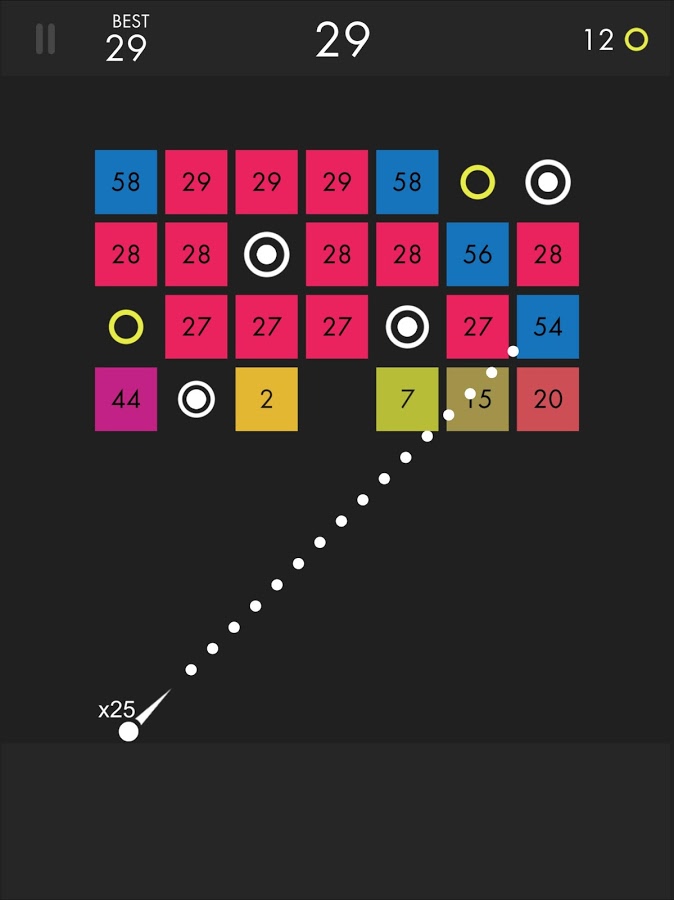
    This game is super fun and addictive. It’s a pretty basic concept. You swipe back and release to launch a ball to bounce around the game-board and break up blocks. The blocks have numbers on them that show how many times you need to hit the block to make it go away. You collect more “ballz” and launch them all at the same time. (I’ve launched as many as 110 at once.) This becomes extremely satisfying when you fire all of the balls towards the blocks and watch the numbers on them decrease as quickly as the block is hit by each ball. Like I said, while it’s satisfying, it’s also very very addicting.

    This game is approved because, while it has ads, the ones I’ve seen have all been for more games by the same developer. This has kept anything inappropriate from creeping up as a banner ad. I approve because it should be pretty safe and because it is just so darn fun to watch all those little balls bounce around and devastate the the game-board full of blocks.

    Research/Education

    Kiddle

    Kiddle isn’t an app. It’s a website. You can very easily save the site to be an icon on the home screen of your phone and then tell your kids to use it as their search engine. I’ve written quite a bit about Kiddle already, so go read about how the search engine works and let your kids research and learn without fear of coming up on anything nasty or scary.

    Entertaiment

    Amazon Prime and Freetime

    Amazon Prime’s kids profiles are some of the best because the shows are curated by human editors. That means that actual people have looked at the shows and determined that they are actually safe for kids. Freetime is a special way to subscribe to only kids content so that you can be sure that they’re not seeing and adult targeted shows. If you don’t have Freetime you won’t have access to kids profiles but you can still set parental controls so that content above a certain age range won’t be accessible without a pin number. Kids can’t see these shows and movies without the pin but they’ll still be able to see the thumbnail image in their “carousel.”

    YouTube Kids

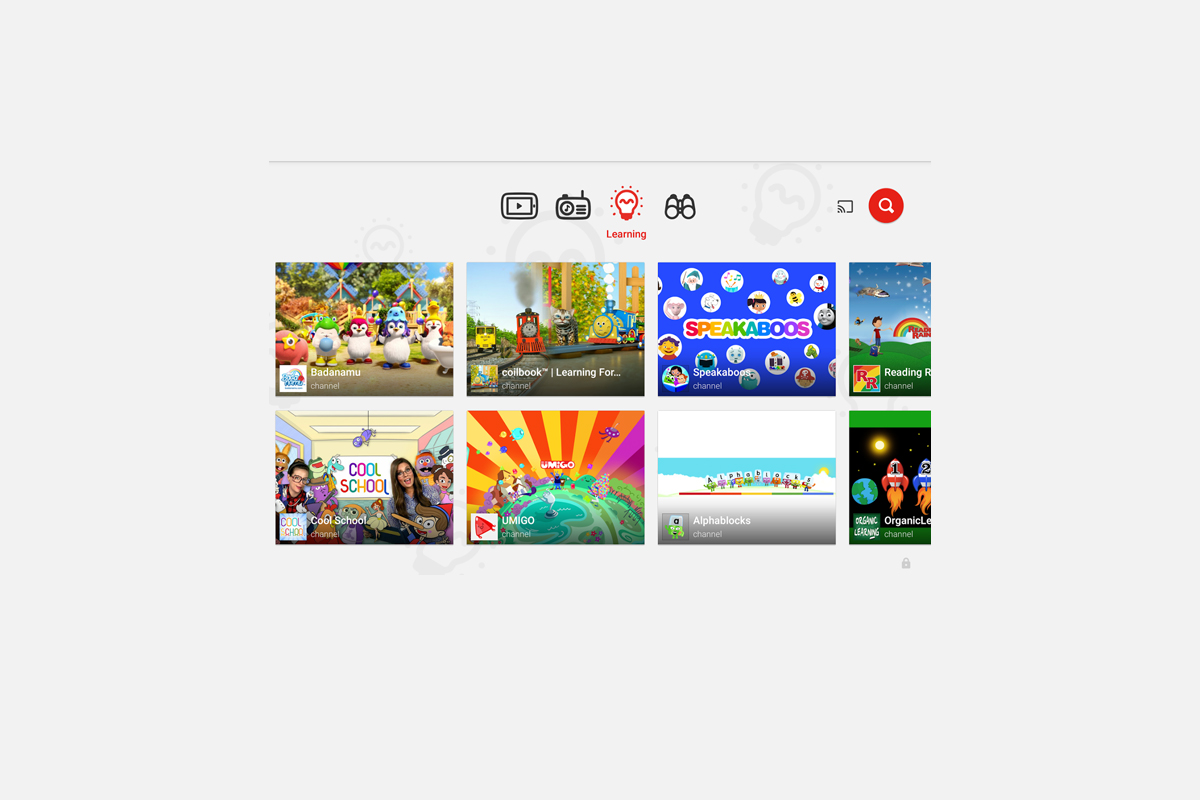
    YouTube kids is a good option simply because of the popularity of YouTube for our children. Kids love watching all different kinds of content on YouTube and YouTube Kids makes it possible to allow them to watch their favorite channels without potentially finding videos that aren’t appropriate for their age. YouTube Kids separates their content by topics like music, education, and shows so kids can find what they want pretty easily. The only downside to YouTube Kids is that it’s monitored with an algorithm and depends on reports from parents to remove suspicious and inappropriate content. This has caused some concern for parents in the past but if you are going to allow you kids to watch YouTube then YouTube Kids is absolutely a better option.

    That Being Said

    I’m not used to thinking about what apps parents should install but I’m grateful for the question this week to give me the idea for this article. Please remember that all of these apps constantly add new content and features and sometimes that makes them less appropriate for kids. As for right now, though, I give these five apps a green light for your kids’ devices as long as you and they use the apps in the way they’re designed to be used.

  • YouTube Kids Coming to Your Smart TV

    YouTube Kids Coming to Your Smart TV

    The kids version of YouTube kids has been talked about a lot. Mostly because of breaches in their algorithm based filtering system. Cartoons are disguised as silly kid shows and take a turn towards the inappropriate. The way YouTube Kids governs their content has been under scrutiny for months with mere apologies as a response. Well, now this service may be coming to your Smart TV.

    Specifically, the app will come to the following TVs: all 2015-2017 LG webOS TVs (via the LG content store); all 2013-2017 Samsung Smart TVs and Blu-ray players (via the Samsung App Store); and, following a firmware update, 2016-2017 Sony TVs (with the exception of Android TV, which is coming soon). – Techcrunch

    YouTube Kids is an effort to allow children to gain access to the content that’s appropriate for them without coming in contact with more inappropriate videos. YouTube has even launched some original content, featuring some successful kid related YouTube entertainers. Millions have adopted this service and use it as a way to entertain their children. As mentioned above, there is always a concern when algorithms are used to filter adult content. I recommend parents eyes are on YouTube Kids often. In fact, I had a little rant about it the other day.

    Follow Us On Facebook

    What Parents Should Know

    As I said, Parents shouldn’t accept YouTube’s algorithm as a foolproof way to keep your kids from seeing something they don’t want them see. There are those out there who disguise their more adult oriented entertainment as kid shows for whatever reason. Moms and dads should be checking in on what their kids are watching. I think the move to smart tvs is a good thing because making the screen bigger allows parents to more easily see what is being viewed. If YouTube Kids is available on your tv, maybe you could let them watch their toy unboxing videos on there next time and peak in on what they’re watching every now and them.

  • PODCAST: Should I Follow My Teen on Social Media?

    PODCAST: Should I Follow My Teen on Social Media?

    Facebook wouldn’t stop talking about augmented reality, the Hooked app is super addictive, and should you follow your kids on social media?

    HUSHATHON :: http://becausefamily.org/hush

    Social Media Links

    Facebook: http://facebook.com/4pointfamilies
    Instagram: http://instagram.com/becausefamily
    Twitter: http://twitter.com/becausefamily

    Newsletter Signup

    Ministry Updates:: http://eepurl.com/R7Btr
    Weekly Blog Posts:: http://eepurl.com/cvnhXD

    Websites

    Ministry Site:: http://becausefamily.org
    Tech Blog:: https://safe.becausefamily.org
    Michael’s Speaking Info:: http://kmichaelprince.org

    Donate and Affiliate Links

    http://BecauseFamily.org/partnership

    Music by Kevin MacLeod at http://Incompetech.com

  • How to Turn on Social Media Post Notifications

    How to Turn on Social Media Post Notifications

    One of the easiest ways to keep track of your kids activities on Social Media is to follow their accounts yourself. Some social media sites make it even easier to monitor by allowing you to turn on notifications. The major social media apps allow it but the way you set each up is very different. The video below is a walkthrough of how to set up post notifications on Instagram, YouTube, Facebook, and Snapchat. Remember that following your kids is good and being notified when they post is even better. Communication is, however, more important than any of it. Be sure to let your kids know you follow them and that you’re getting these notifications. Hopefully the video below will help you out.


    Give us a hand…

    We are currently raising funds to keep these videos and articles free for you to learn and apply. Please consider checking out our fundraiser by clicking the link below. Thank You.

    BECAUSEFAMILY HUSHATHON