Tag: whatsapp

  • WhatsApp Update Brings Thumbprint and FaceID Lock To Private Messenger

    WhatsApp Update Brings Thumbprint and FaceID Lock To Private Messenger

    The private messenger, WhatsApp, has updated recently to allow users to lock the app from prying eyes by using their Touch or Face ID. Private messaging is becoming more important to users these days since the spotlight has been on Facebook and Google for their data mining and sales. WhatsApp has been a mainstay of private messaging for some time now and this new update takes privacy from an algorithmic/software level to a more obvious tangible place. You can now use your FaceID or TouchID, depending on the generation of your iPhone, to lock people out of the WhatsApp software entirely. This will keep people from opening the app and looking through your messages. Currently this feature is available for iOS only but it is rumored to roll out to Android soon.

    What Parents Should Know

    It’s important to know that there are options that allow you to keep an eye on your kids’ messaging without having to physically take their phone from them. However, if the physical approach is your style then this update from WhatsApp could become a problem for you. Messages being locked in this way needn’t deter you from checking up on your child’s messaging activity, though.  You can store your thumbprint in your child’s device so you can unlock it or just make them unlock the app for you when it comes time to inspect their messages.

    I recommend allowing your children to have a feeling of privacy by using some sort of software to monitor their messaging apps instead of taking the device from them every now and then. Not only does that plan give them a feeling of privacy, it is also a far better monitor then your weekly check up. If a message monitoring algorithm like Bark is active it will look at every single message your child sends or receives in real time, notifying you if any of those messages cross the line to dangerous or inappropriate content. Taking the phone from them to monitor it yourself allows messages to be removed before you get around to looking at it.

    I never advise spying on your children without their knowledge. They should know that you are keeping an eye on their messages and how the software works. They should also know what the consequences are if they send messages they shouldn’t be sending. Finally, you should have an open conversation to allow them to feel like they can come to you if they receive a message they are not comfortable with. No matter what you do to monitor your kids messaging, having a culture of transparency and openness in your home is critical.


  • Facebook Stories is Going Public

    Facebook Stories is Going Public

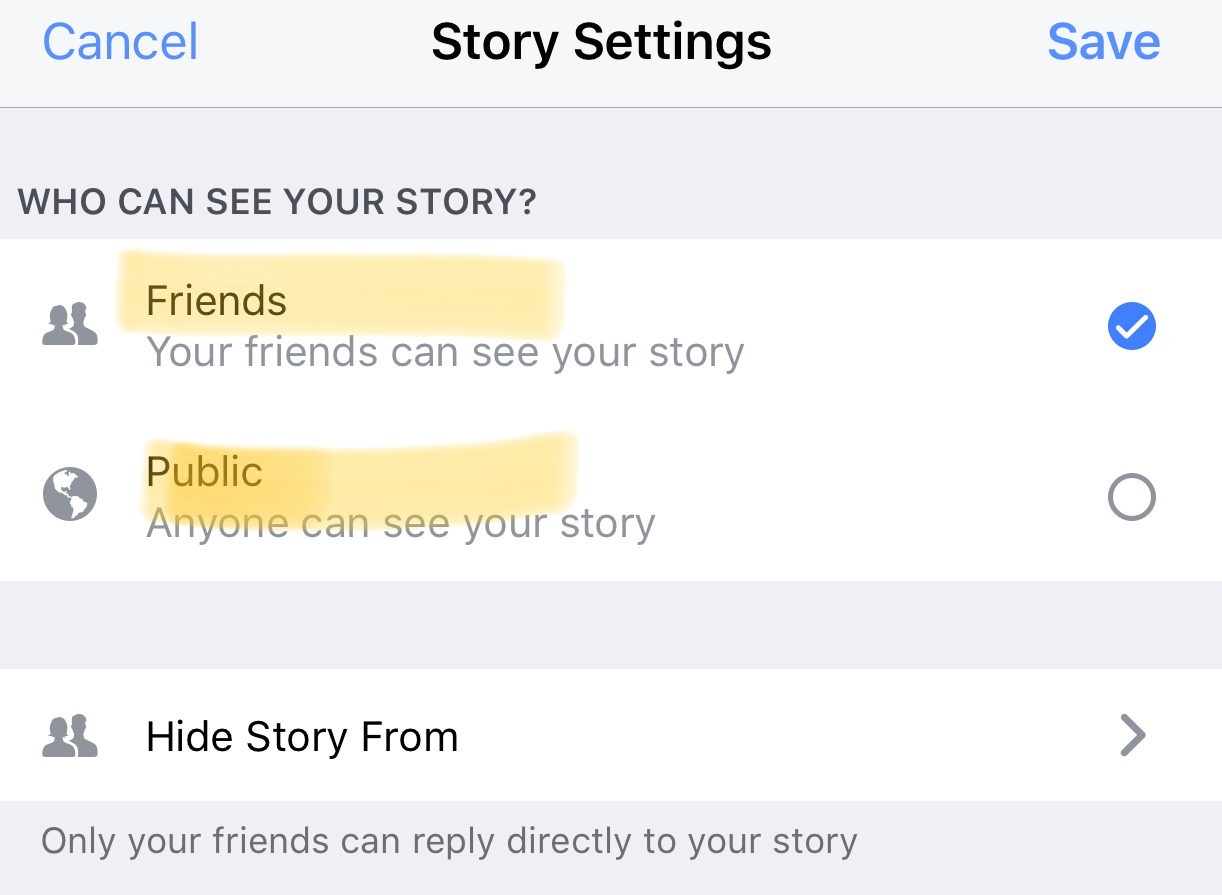
    Instagram, WhatsApp, and Snapchat have proven that 24-hour disappearing story feeds are the latest social media trend. Facebook is trying to increase user-ship of their stories feature by allowing people to post publicly. After a recent Facebook update, you can now change the privacy settings on your story posts to make them visible to anyone on Facebook. 

    Facebook Stories is really the only version of the daily posts feature that has been lagging behind in user-ship. Celebrities and brands will now be able to use Facebook stories to promote publicly just as easily as they can on Instagram and Snapchat. This may be an attempt for Facebook to increase the number of people using their stories feature but it’s likely, also, a way to entice more advertisers into using the feature.

    What Parents Should Know

    Any option to share something publicly should be known to parents. If your kids use Facebook and enjoy posting their daily activities on their Story feed you should know how to check and see if they’re posting publicly. Below is a slideshow of how to check the privacy settings on Facebook Stories.

    Be sure to check out what your kids have been sharing publicly and talk to them about the permanence of anything shared online. It’s also a good idea to talk to them about what to do if they receive contact from people they don’t know on any social media platform. As parents, we are the ones responsible for our kids’ safety and privacy online. Learn the ways these social media services have provided for you to keep them safe and private.

  • WhatsApp Update Adds Video Calling

    WhatsApp Update Adds Video Calling


    We recently wrote about WhatsApp and explained a few things parents should know about the messaging app. Now, a new updated requires we update our information as well. This new update brings video calls to the app that is owned by Facebook.
    Video Chat is Awesome!

    WhatsApp is largely considered safe because of its authentication and encryption settings but with the addition of video calls the app enters a completely new realm. Video calling is very convenient and a great way to stay connected to family and friends that you aren’t always near. Apps like Skype and Facetime have been mainstays in allowing you to use WiFi to talk to someone while looking at their face. Something that is priceless for someone as easily distracted from a phone call as I am. The concern with this new feature, though, is how it could be used by those who have ill intentions.

    What Parents Should Know

    I’ll say it like I do in so many articles, you have to be monitoring what your children do in any messenger app. With new features like GIFs and video calling being added all the time we are just seeing more and more opportunities for our kids to get into trouble. Will all kids use these features for evil? Of course not, but it’s too likely that someone they know (or worse, they don’t know) will be using it to cause harm.

    I don’t necessarily recommend not allowing your teenager to use WhatsApp. I do, however, recommend using something (even if it’s just your own eyes) to monitor what conversations your kids are having. If you aren’t comfortable with video chatting being available to your teen then you need to disable it or ask them to use a different app for messaging.

    We did a whole write-up on some key terms related to messaging. These terms and the rest of the terms in our Mobile Device Vocabulary series are too important to miss. I recommend you subscribe to this site so you can check it out. Only $60 per year will get you full access to this site. Sign up now.

  • What in the What is WhatsApp?

    What in the What is WhatsApp?


    WhatsApp is all over the tech news sites today with the announcement of GIF support in their app. This is pretty cool news for users of WhatsApp but as parents keeping an eye on our children’s online activity this news makes it more and more interesting to our kids. So, what is WhatsApp and what should parents know? (more…)