Tag: video

  • Snap INC and NBC are Working on Snapchat Scripted Shows

    Snap INC and NBC are Working on Snapchat Scripted Shows

    While our TVs are getting more and more similar to our computers and our Computers are being used to watch TV, Snapchat is taking steps to make their Social Media platform another major purveyor of original video content. Snap INC announced today that they’re joining with NBC to turn your phone into another TV. Since everyone’s eyes are always on their phones, NBC sees an opportunity to put their content on what people are already viewing.

    Snap Inc, the company that owns Snapchat is launching its first scripted series with NBCUniversal and the Duplass Brothers’ Production company, Donut. Not only are they working on scripted shows, they’re also building a studio to be ready to film content made to fit the vertical format of a Snapchat story. 

    What Parents Should Know

    There was a time when we were super careful what we allowed our kids to watch. If the shows are on the Social Media apps they are already using for hours every day, it’s going to get more difficult to keep tabs on what content they’re watching. Moms and dads should be aware of what shows are being produced for Snapchat, Musical.ly, Facebook, YouTube, and any other video streaming service.

    The Duplass’ brothers are known for producing more mature content so the fact that their company is working on this shows provides evidence that Snap INC is trying to appeal to a more adult audience. This could pose a problem for those with younger teens who use Snapchat. My advice is to keep your eyes on the shows that are being released and talk to your kids about what they’re watching on their phones. Screen or WiFi/Data bedtimes are a good idea, as are time limits. Whether you use something like Circle or GoogleWiFi to set your bedtimes or use the more manual, “phones in the basket” approach, you should be aware of how much time is spent watching shows, and what shows are being watched.


  • Musical.ly Updates Adds “Watch Next” Recommendations

    Musical.ly Updates Adds “Watch Next” Recommendations

    Musical.ly announced earlier this summer that they are going to be featuring original shows from networks like NBC, Seventeen Magazine, and Viacom. We’ve written before about how we don’t like their lack of age verification even though the CEO seems to think it’s no big deal. The lip-syncing video app’s newest update will put more previously unseen and original content in front of your kids. The updates include a “Watch Next” feature that will use what’s called “computer vision” to see what they are watching and make a decision about what other videos (original content or user generated) to recommend they view next.

    The No. 1 goal of the new app design is to make “a wide range of content more accessible,” Hofmann said. – Variety.com

    This update also includes a new look and feel to the app and some new ways to personalize your profile page. The most interesting addition, from a parental control standpoint, is the idea that an algorithm is going to be recommending more videos for your kids to watch.

    What Parents Should Know

    This feature isn’t entirely new to streaming apps. You’ve seen Netflix, Amazon, Hulu, and YouTube feature videos or shows that they think you might enjoy. Their recommendations are based on what you’ve been watching, just like those in the Musical.ly app. The concern, here, is some of what may be available on Musical.ly and the fact that most parents don’t keep an eye on what their kids do on the app. 

    I still don’t recommend parents allow this app on their kids’ and young teenager’s phones because of the lack of age verification. It’s still on our uninstall list and will remain there until they take the risk of predators contacting kids on this app more seriously.

  • YouTube Kids Adding Original Shows and SmartTV Support

    YouTube Kids Adding Original Shows and SmartTV Support

    YouTube Kids has now been around for over two years. I’m still amazed how many parents don’t know about the curated kids streaming app. It is a pretty good safe alternative to YouTube’s more open and unsecure content. An announcement today could make YouTube Kids an even better option for your family.

    Today YouTube announced that they are going to launch four new original shows on the kids app. The shows will use people who already have a strong YouTube presence and be available only to YouTube RED subscribers. Shows like “Fruit Ninja; Frenzy Force” will be designed for younger kids while there will be a couple of shows, such as “Hyperlinked” (starring tween YouTube Music stars L2M) that are geared for children a bit older. There are more shows scheduled for the lineup and they range from animated cartoons to unscripted reality shows.

    Along with this announcement, YouTube has said they will soon be rolling out support for YouTube Kids to be viewed on SmartTVs from Samsung and LG. This will mean that content from YouTube Kids can come to life on a larger screen and be viewed more easily by more of the family at the same time. It seems that YouTube is really working to become a major player in the streaming entertainment world. New YouTube Red shows are coming out all the time and you can see many YouTube stars being interviewed on more mainstream media talk shows like Jimmy Fallon to promote YouTube’s original content. We are entering a new age in digital entertainment so be ready and pay attention.

    What Parents Should Know

    YouTube Kids is a good option for parents whose children enjoy watching videos on the streaming service. It’s a lot better than the YouTube app in which they can be as few as two clicks away from some type of violent or inappropriate adult content. While YouTube Kids is better, it isn’t without it’s faults. You will still want to put your eyes on what your children are watching every now and then. The original content means that, if you’re a RED subscriber, you will have a bit more than the clips from PBS shows, lets play, toy unboxing, and science videos. That’s a good thing but you’ll want to be aware of which shows are designed for what age audience. The trend is for messages in kids entertainment to lean towards kids a few years older than the target age of the shows.  That means you young daughter could be watching a show by music sensation L2M about what it’s like to be in High School. This could lead to eventual trouble if you aren’t aware of the message they are getting from the show.

    I always recommend parents having a total knowledge of what their children are spending their time doing. These original content shows may be designed for children but it’s important to remember that only you can decide if they were designed for your children. Nobody knows your kids like you do so only you can make the right entertainment decision for them. You should just allow unsupervised viewing of anything you’ve never seen, even if it is meant for children. Should your kids watch streaming content on YouTube Kids? If they are already using YouTube then absolutely yes. Should they watch the original content and use your tv to view it like other shows? That’s entirely up to you, just be sure your decision is based on knowledge, not a trust that the term “KIDS” always means safe.

  • VIDEO: How To Set Up Guided Access (iPhone or iPad)

    VIDEO: How To Set Up Guided Access (iPhone or iPad)

    Those of us with smaller children are often less concerned with them looking for something inappropriate online but we want to protect them from seeing something unintentionally. Apple’s iOS devices have a feature built in called Guided Access just for that purpose. This setting will lock your iPhone or iPad to one app disabling the home, volume, and lock buttons. This is a great feature if you’re wanting to allow your kids to use an app but don’t want them to look around on other parts of your phone. This video will help you get Guided Access all set up.

    (more…)

  • DirecTV NOW is Not Family Friendly Yet

    DirecTV NOW is Not Family Friendly Yet


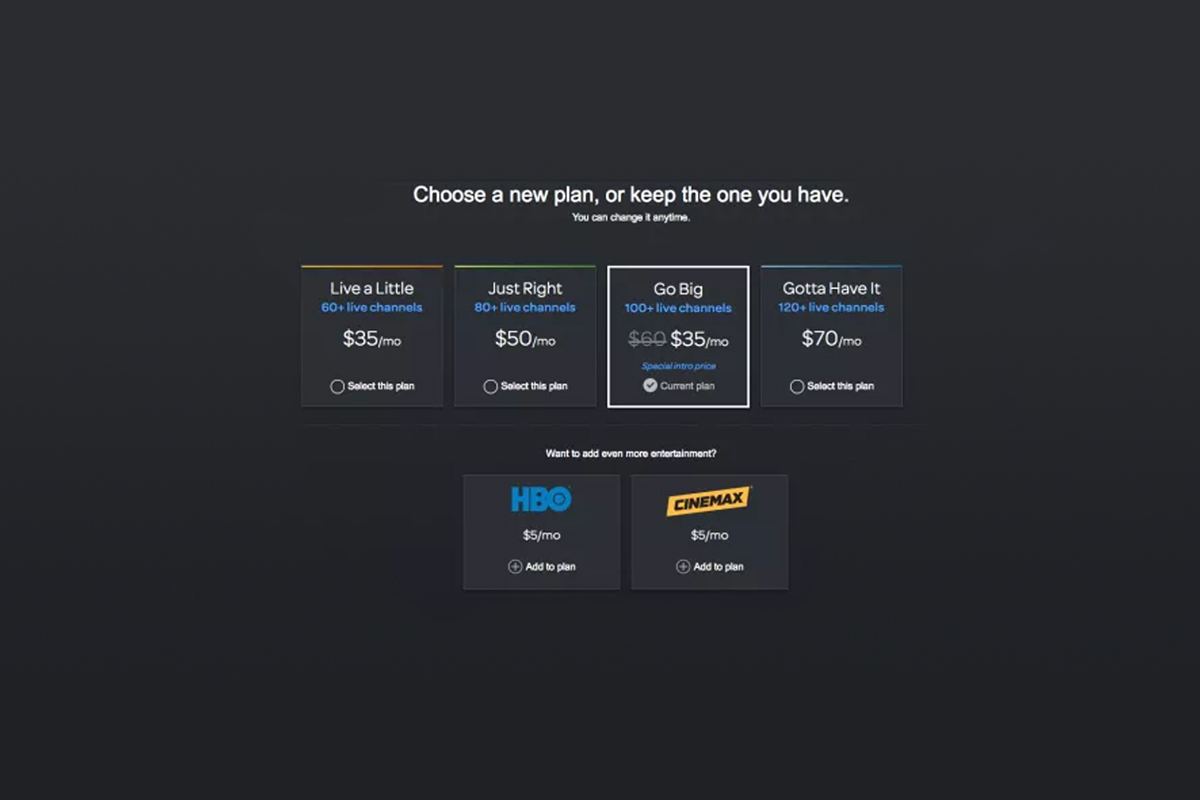
    It’s the future! I have been saying for years that paying for cable tv service is ridiculous. What if I could just stream the channels I want and not have to buy a whole package of useless Home Improvement and Movie Channels? Well, they aren’t exactly there yet but DirecTV is getting closer with DirecTV NOW.  AT&T announced yesterday that they’re offering a television streaming service called DirecTV NOW; it’s available for purchase in bundles starting today, November 30th.

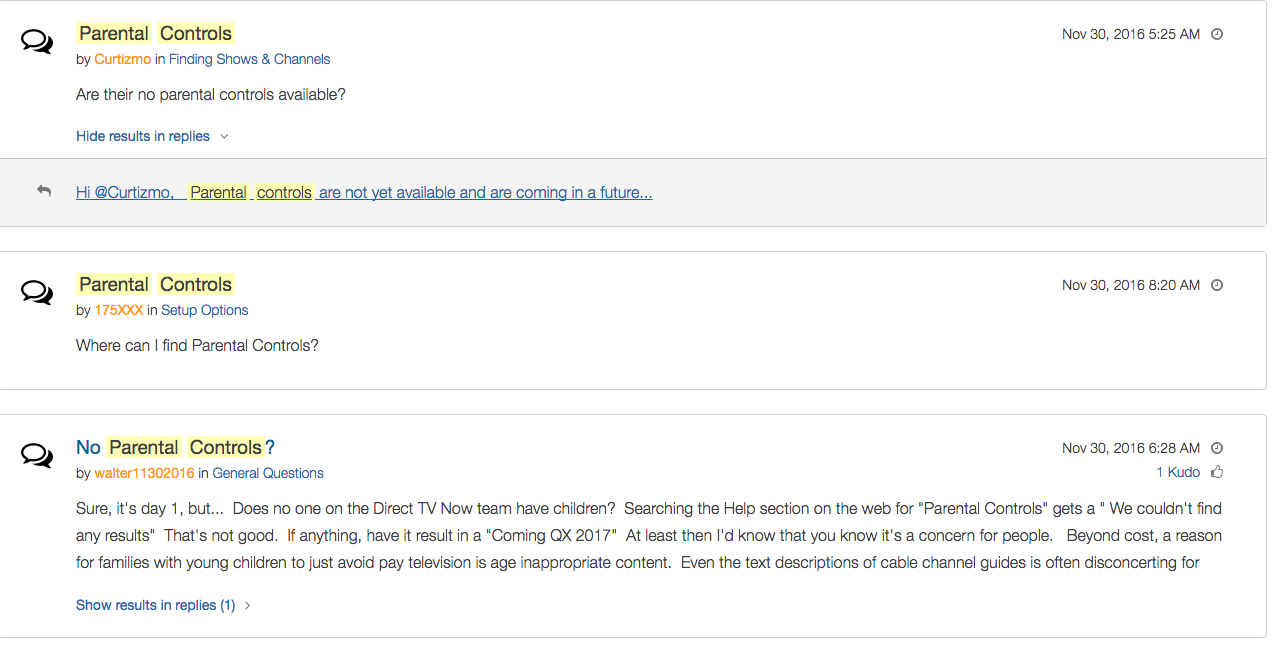
    Yes! It’s exciting to see that our TV options are expanding and even keeping up with the times a bit more. With ChromeCast, Apple TV, RoKu, and mobile access available we are finally being offered a version the tv service we wanted. Unfortunately, however, after some time with my free trial I have noticed that there is absolutely no parental control options built in for DirecTV NOW. I looked at the menus and in my account settings (there’s no option to create separate profiles, i.e. a kid profile, either.) I also tried to find a “block” option per channel to no avail. Then, a search for “parental controls” on the support and FAQ page led to no results and that was pretty much my final clue. There is currently no way to protect your kids from unwanted content on DirecTV NOW.

    That’s a deal breaker for me, especially with so much of what has become acceptable on cable television lately. Sexual activity, language, and increasing violence are mainstays in both broadcast and cable television shows. Even the commercials seem to highlight all of the features we would like to protect our young children from. I guess “keeping up with the times” comes with its costs as well.

    What’s a Parent to Do?

    screenshot-2016-11-30-12-15-35I would say wait. Just wait for a while and I’m betting we will see parental controls rolled out on DirecTV NOW before too long. In fact, a quick search on the AT&T Community Forums showed several concerned parents had already begun asking about this feature and it’s in development.

    DirecTV NOW looks to be a great way to save some money while still getting the entertainment content we want. Thankfully parental controls and content restrictions are becoming commonplace these days and this will be no exception. It is literally “day one” for this service so we’ll give them some time and the benefit of the doubt. You can join the future too if you’d like, I would just recommend keeping your kids off of it until you can set up some restrictions. 

  • VIDEO: FACEBOOK LIVE Q&A

    VIDEO: FACEBOOK LIVE Q&A


    Circle, Accountable2You, YouTube Kids, Young Kids and Internet Safety. All this and more in this Facebook Live video. This #givingtuesday live video was a great way to meet parent’s needs right where they are. Be sure to visit BecauseFamily.org/partnership to learn more about donating.


  • VIDEO TUTORIAL: Setting Restrictions in iOS

    VIDEO TUTORIAL: Setting Restrictions in iOS


    Step one of the BECAUSEFAMILY S.A.F.E. plan is Set Up. Setting up the parental controls on your kids devices is the beginning of this important process. If you need to set up an iphone or ipad this video will walk you through the initial setup of the restrictions. This is a video tutorial available for subscribers. Subscribe below… (more…)

  • Should Your Teen Use Snapchat?

    Should Your Teen Use Snapchat?


    I think Snapchat is a bad idea, and not for the reasons you may think.

    The video below gives a pretty good description of my feelings and what I think parents should do when they see Snapchat on their kids’ phone. (more…)

  • KNOW YOUR MOVIE RATINGS

    KNOW YOUR MOVIE RATINGS


    What’s that movie rated?

    It’s too important to ignore. While we are protecting our children online, we also have to work to protect them from other content they shouldn’t be accessing. That includes movies designed for those above their maturity level. This short feature we did in 2015 unpacks the supposed mystery behind the movie ratings system in order to help parents make quality decisions for their children’s viewing habits. Watch the video below… (more…)