Tag: video

  • New Video Series will Help You Find Your Favorite Parental Control Software

    New Video Series will Help You Find Your Favorite Parental Control Software

    I am asked about new Parental Control software resources all the time. I always look into each one seriously and develop an opinion on them based on what they offer, how easy they are to set up, and how much they cost. I have worked with enough parents to know the barriers that they will allow to keep them from using a software so those issues are always top of mind.

    The Parental Control Research video series will be a way for me to walk parents thought my study of each parental control offering and break down their ability vs their cost to determine their value. Stay tuned to the BecauseFamily YouTube channel and this site to be updated on the weekly episodes of Parental Control Research with Michael.

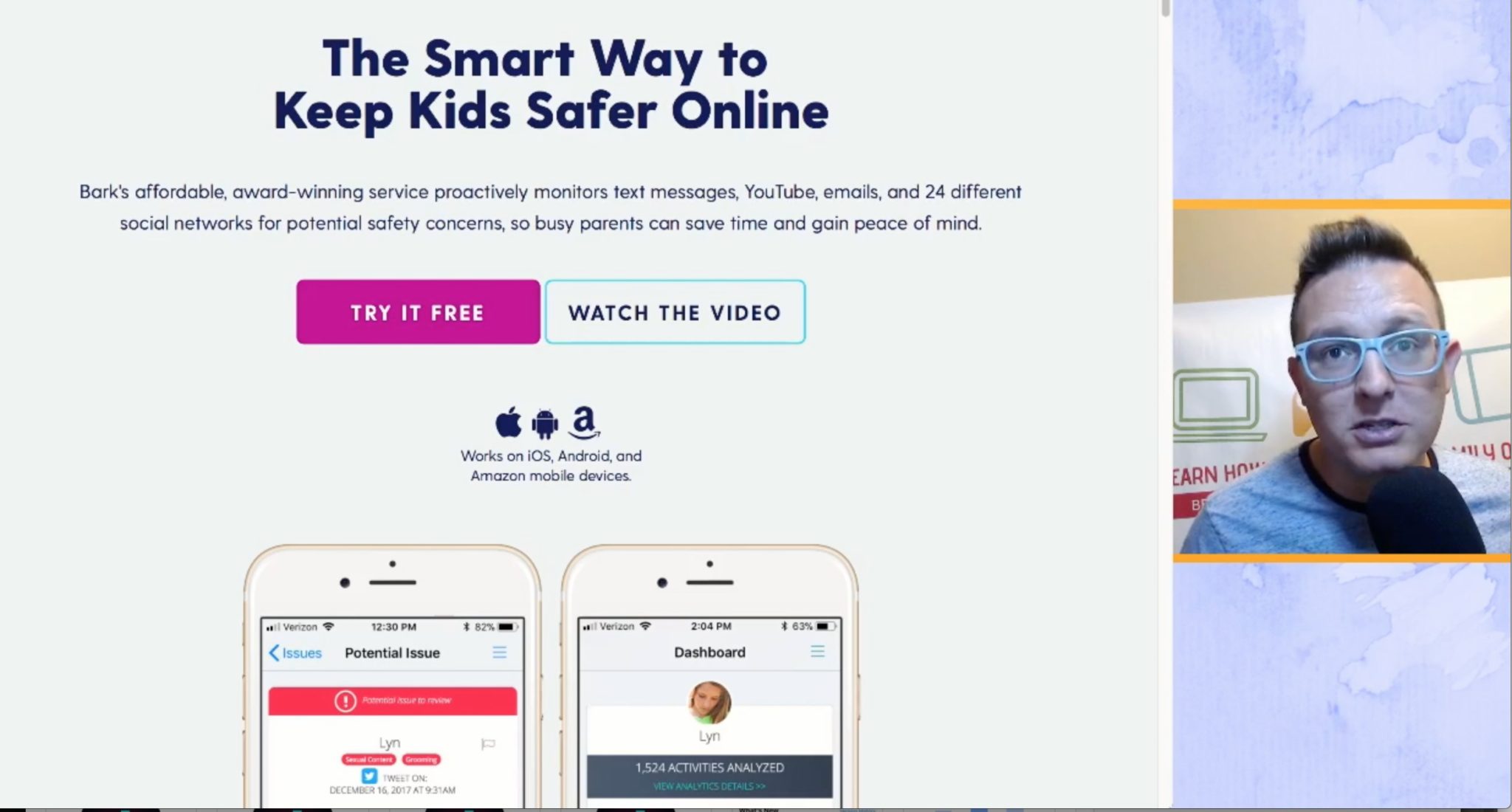
    Episode 1 Features BARK, an algorithm based monitoring software made to keep tabs on what your kids are communicating about in messaging and on social media. I find it to be a simple setup, and an even simpler system to use since it is based on reporting to you, not you going to check the data. 

    You can use our affiliate link to sign up for BARK here. Thank you for reading FamilyTechBlog and for subscribing to our YouTube channel. Think of another software you’d like me to check out? Comment below and I’ll get right on it. We’re doing our best to keep your kids safe by educating you on what’s going on in the online world. 

  • FB Messenger Kids Will Allow Your Child to Send Friend Requests

    FB Messenger Kids Will Allow Your Child to Send Friend Requests

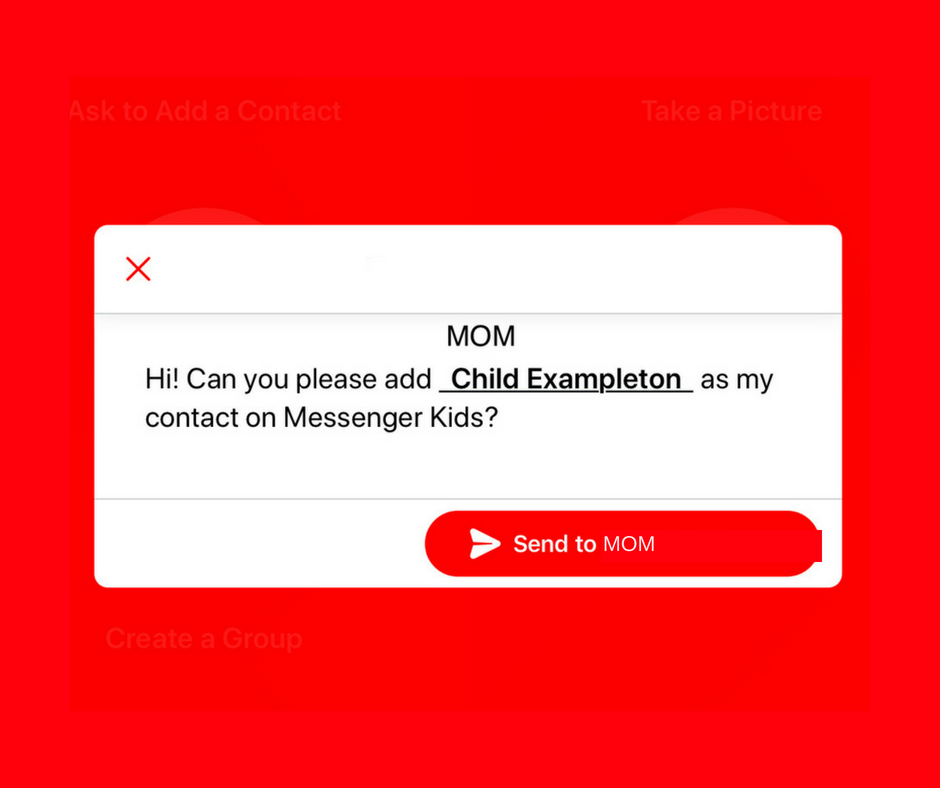
    A parent controlled messenger was the dream of the FB Messenger Kids team when they created their app. They could be finding it a bit tricky to balance the security parents want with the ease of use kids need. Now a code will be available to help your kids identify themselves in the Messenger Kids app. This is a code they can use to send a friend request to other users. Parents will still receive permission requests but it will save the trouble of having to search for the potential contact’s parent’s FB account and send a request.

    Obviously, this method will only work for friends who already use FB Messenger Kids. The code is also an “opt-in” feature, meaning parents will have to turn it on in their own Facebook app for their kids to receive the four-word identifier. The video above features a quick walkthrough of how to turn it on. You can also set up bedtimes in the Messenger Kids controls on your Facebook app’s settings page. 

    What Parents Should Know

    The addition of bedtime settings is a great option for parents whose kids use FB Messenger. The jury is still out on the identifier code, though. It is intended to make adding friends easier but it remains to be seen if that will be the case. Asking your kids to remember their code so they can tell their friends is a bit reminiscent of phone numbers from our own childhoods. If they don’t know their friend’s code, they’ll still receive an option to ask parents to connect them, simply by name. 

    I always recommend limiting screen time for your kids, especially time on social media. The FB Messenger app is still one of the best, most secure options for your kids to keep in touch with friends and family. The stickers, challenges, video chat, and built-in AR games make it a lot of fun albeit easy to throw a lot of time into. This is why the bedtime and screen time limits are so important. 

  • Instagram Has Added 4-Way Group Chat

    Instagram Has Added 4-Way Group Chat

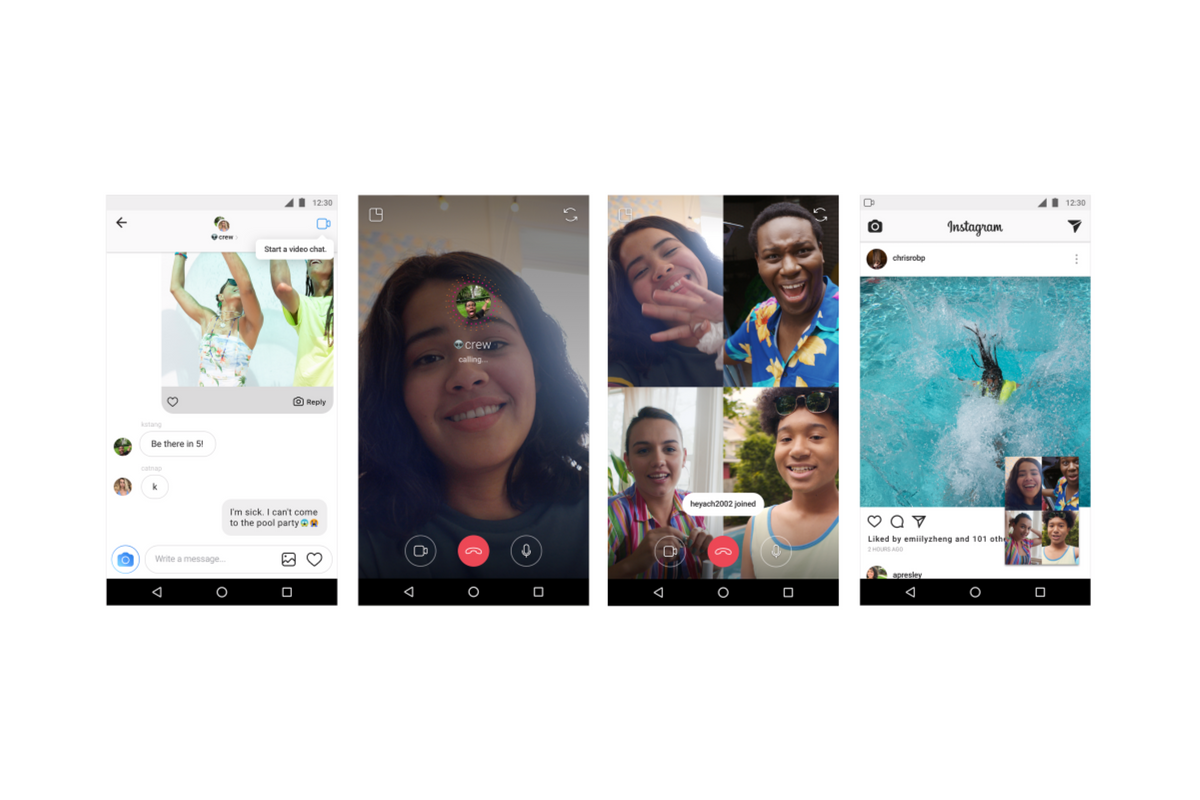
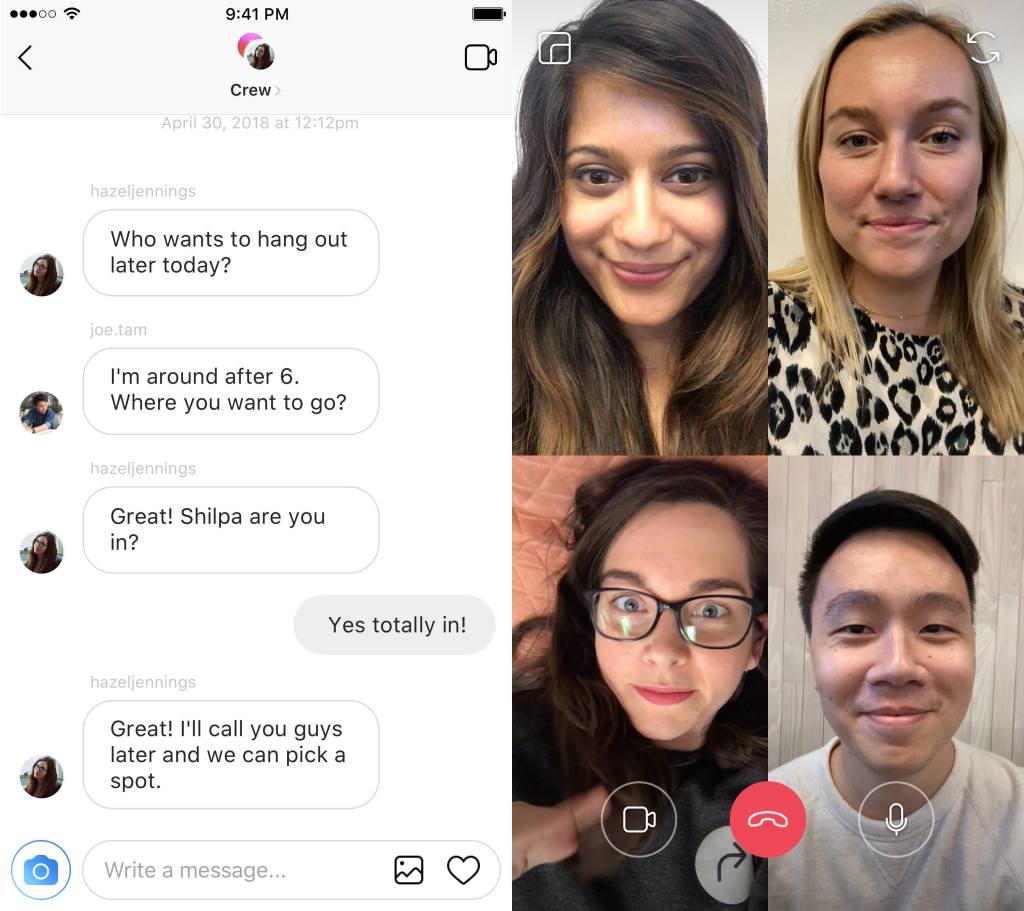
    Available today, Instagram has added a way to chat with your friends while simultaneously creeping the app. Instagram is allowing users to chat with up to four friends over video as well as multitask within the app by minimizing the chat screen. You can call friends directly and they will be notified of the call they can then accept or if they go into your group chat feed and see the icon is blue that means you’re chatting with someone and they can just join.

    Instagram has hit 1 billion users this month and they are doing their best to make it the app that people spend the most of your time in. This update allows users to meet the video chatting need that especially so many young people have and then doubles down with the ability to explore the app while you chat. This makes using Instagram an even more social experience.

    Instagram has also added new camera effects and channels that you can explore that highlight different topics.

    What Parents Should Know

    Video chatting is available in many apps including Snapchat, Facebook, HouseParty, and FaceTime. This is becoming the most common way for our young people to spend time with each other. Retail stores and malls are closing movie theaters are adding features to attract an older audience all because our kids don’t have to go anywhere to spend time with each other.

    Whether this is good or bad is up for you to decide. It is true that studies have been done showing that even video chatting does not meet the same social needs as being in the same room with somebody. So my advice is simply to monitor the amount of time your kids spend on their social media apps. Whether they are chatting with friends, just scrolling through images, or posting their own information. There’s a lot that needs to happen to keep them secure but all experts agree we have to be careful with how much time they spend on their devices.

    UNGLUE CAN HELP!

    Video Chatting Apps You Should Uninstall NOW

  • New Snapchat Feature Enables 16 Person Video Chat

    New Snapchat Feature Enables 16 Person Video Chat

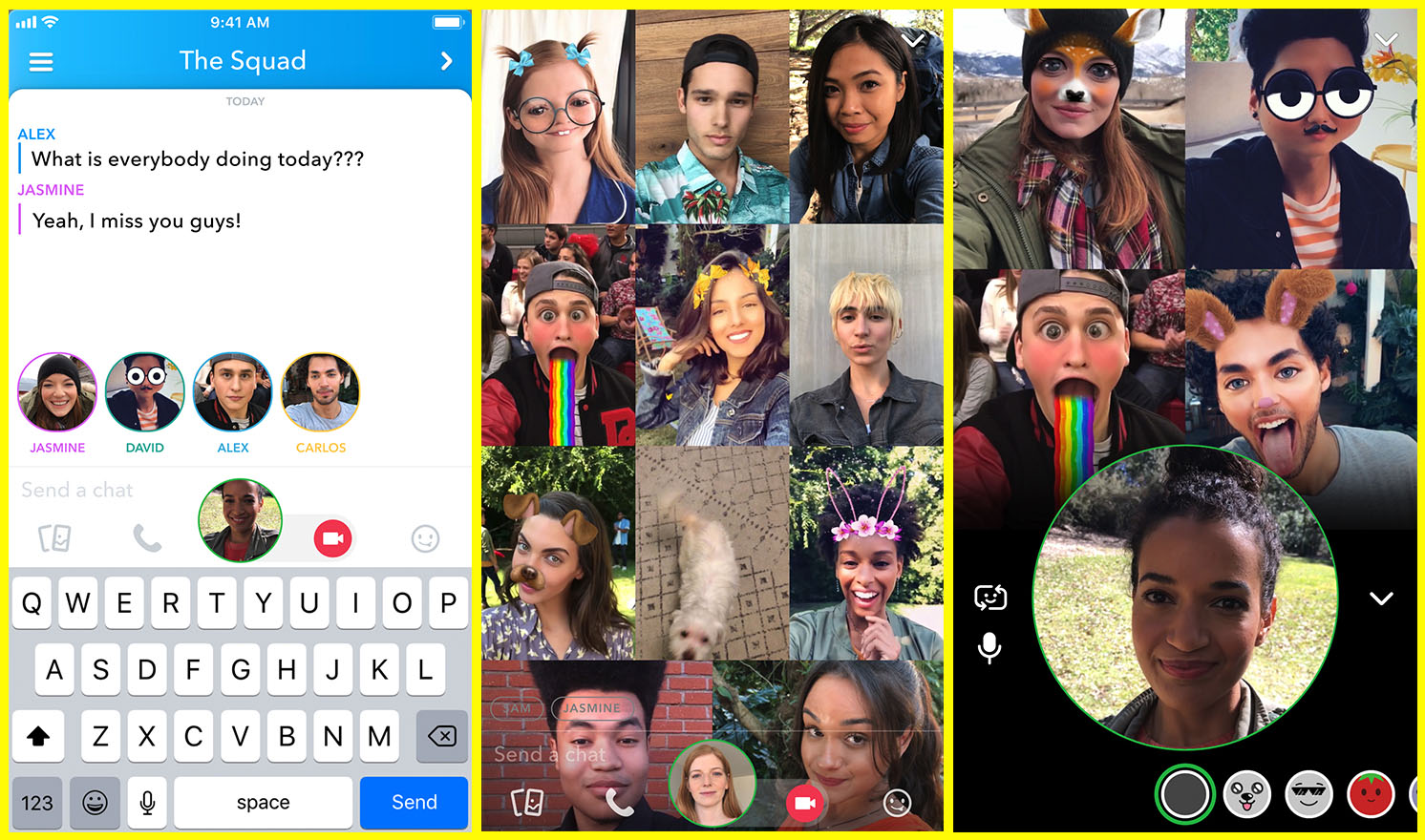
    Group chat has been available for a long while now, even in Snapchat, but now you can hang out with a large group of friends on video without ever leaving home. Snapchat’s new group video chat feature is now available and allows you to include 15 of your friends. You can sign on to a regular chat and add friends as you go or set the chat up with your large group from the beginning. Of course, Snapchat’s AR filters and masks will be available during these chats as well. Another feature that is available with this update is tagging or mentions. You can “@” tag a friend in your posts so they’ll be notified that you’re mentioning them.
    What Parents Should Know

    Parents should already know how much time their kids spend on social media. If unsupervised, they’ll chat with friends and creep their timelines all day long. In fact, many teens say they feel addicted to social media, while not doing anything to curb their own addictions. Addiction isn’t the only problem with extensive social media use. Social contact over our devices has proven to be far less beneficial than face to face interaction. There have been countless studies comparing video chat to actual conversations with someone in person and the conclusion is always the same. Spending time in the same room as someone is better for your development than only texting, calling, or video chatting. Take this excerpt summary from ScienceDirect.com’s 2014 study.

    When engaging in face-to-face communication, social information is conveyed by vocal and visual cues within the context of the situation. Nonverbal communication, defined as communication without words, includes apparent behaviors such as facial expression, eye contact, and tone of voice, as well as less obvious messages such as posture and spatial distance between two or more people (Knapp & Hall, 2010). The understanding of these kinds of nonverbal social cues is particularly important for social interaction because of the need to modify one’s own behavior in response to the reactions of others (Knapp & Hall, 2010). – ScienceDirect.com

    With apps such as Houseparty and Snapchat’s group chat out there, we have to be more intentional than ever about the time our kids spend on their screens. Hanging out with friends through our devices is becoming easier and more acceptable. Kids aren’t going out as much, the malls are closing, arcades are few and far between, and movie theaters are having to serve food like restaurants to attract the older generations because the younger ones aren’t as interested. Why go out when you can stay in and hang out with your friends online? Video chat can be an awesome way to stay in touch with long-distance family or friends but when our kids leave school and go home to do their homework while video chatting with six of their best buds all evening, something is missing from their life experience. We have to monitor their online activity and set time limits. Use unGlue or Circle to set some boundaries. Talk to your kids about the importance of face to face interaction. Don’t deny them opportunities to go spend time with friends (in families you trust). Drive them to that get-together or youth group event. Say yes when a friend wants to come over. Give them opportunities to spend face to face time with friends, outside of school, and you’ll be giving them the best chance you can to develop the skills they need to succeed.
  • PODCAST: Social Media isn’t For the Users Anymore

    PODCAST: Social Media isn’t For the Users Anymore

    Family Tech Update: Entertainment Software Rating Board will Warn Parents of In-Game Purchases in Video Games – Movie Pass Reveals that They Collect Much More of Your Data than You Thought – Netflix Testing “Patches” to Reward Kids’ Binge-Watching – and Social Media isn’t For Users Anymore!

    Show Notes:

    Facebook’s algorithm change
    Instagram never going back to chronological
    Pay for reach…
    For Parents
    there’s a system behind social media
    marketers are paid to manipulate the system
    Companies make decisions based on marketing opportunities
    Social Media isn’t made for the user anymore
    No social media until 17…

    Social Media Links

    Facebook: http://facebook.com/BecauseFamily
    Instagram: http://instagram.com/becausefamily
    Twitter: http://twitter.com/becausefamily

    Newsletter Sign up

    Ministry Updates:: http://eepurl.com/R7Btr
    Weekly Blog Posts:: http://eepurl.com/cvnhXD

    Websites

    Ministry Site:: http://becausefamily.org
    Tech Blog:: https://safe.becausefamily.org
    Michael’s Speaking Info:: http://kmichaelprince.org

    Donate and Affiliate Links

    http://BecauseFamily.org/partnership

    Music Creative Commons

  • TUTORIAL: How to Download All of Your Photos, Videos, and Messages from Facebook at Once

    TUTORIAL: How to Download All of Your Photos, Videos, and Messages from Facebook at Once

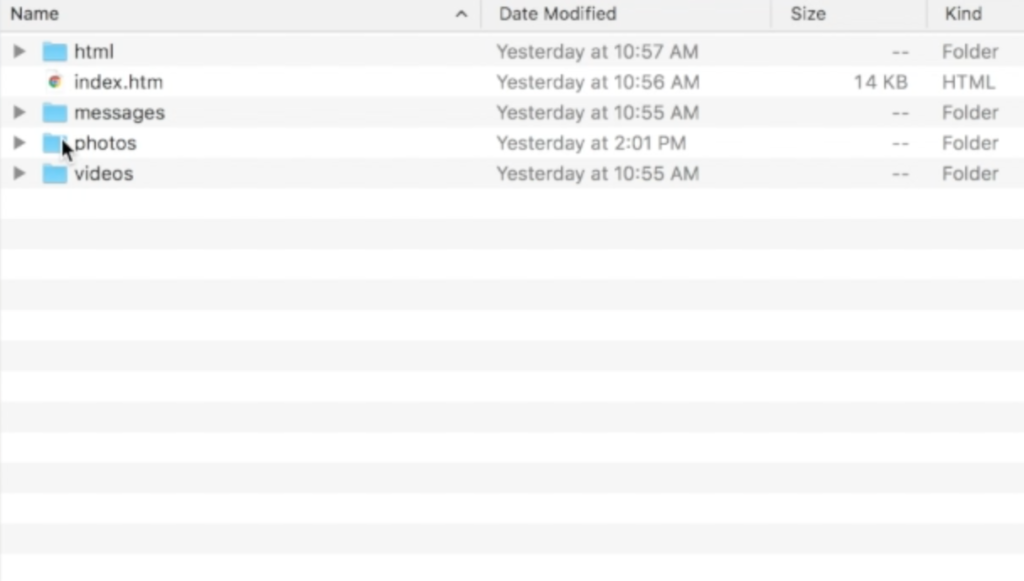
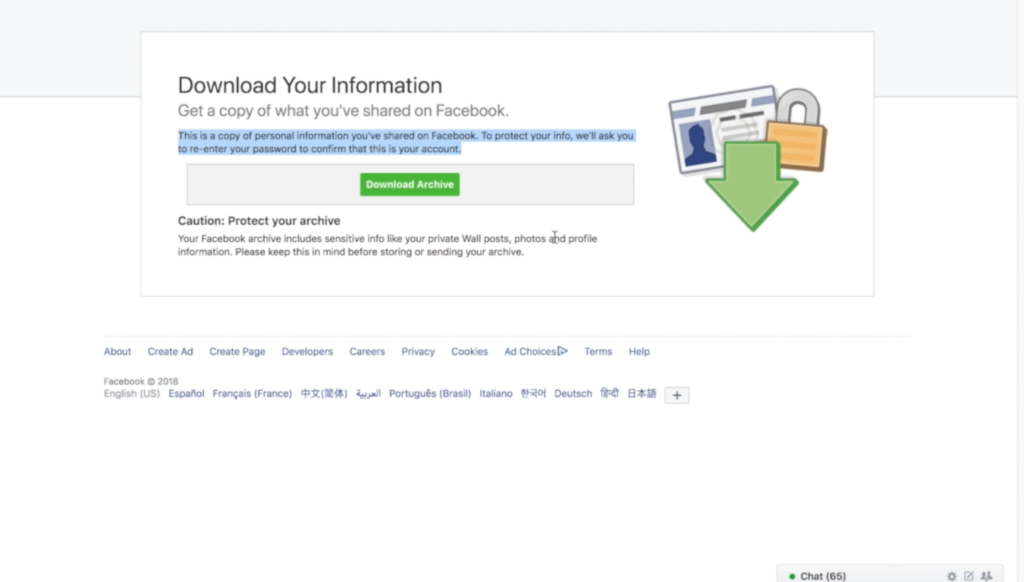
    There could be a number of reasons you’d want to download all of your Facebook data. Maybe you’re making a fresh start but don’t want to lose photos and videos, maybe something’s going on and you need message data downloaded, or maybe you just want to back up all your data for when the giant electromagnetic pulse goes off someday and the internet comes crashing down. Whatever reason you’re interested, here are the simple steps you can take to download all of your Facebook info at once. The tutorial video is at the bottom of this post.


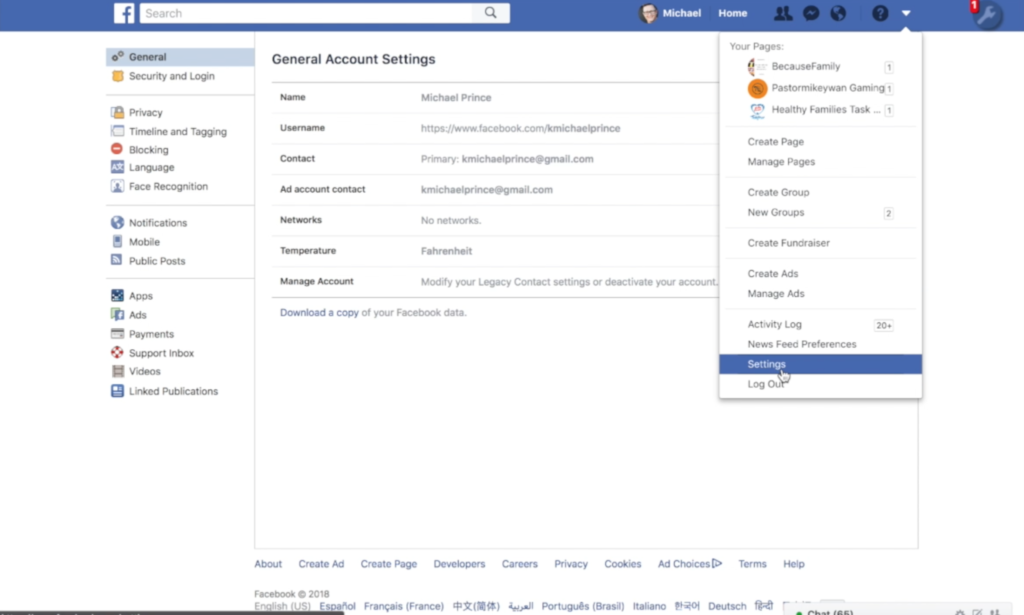
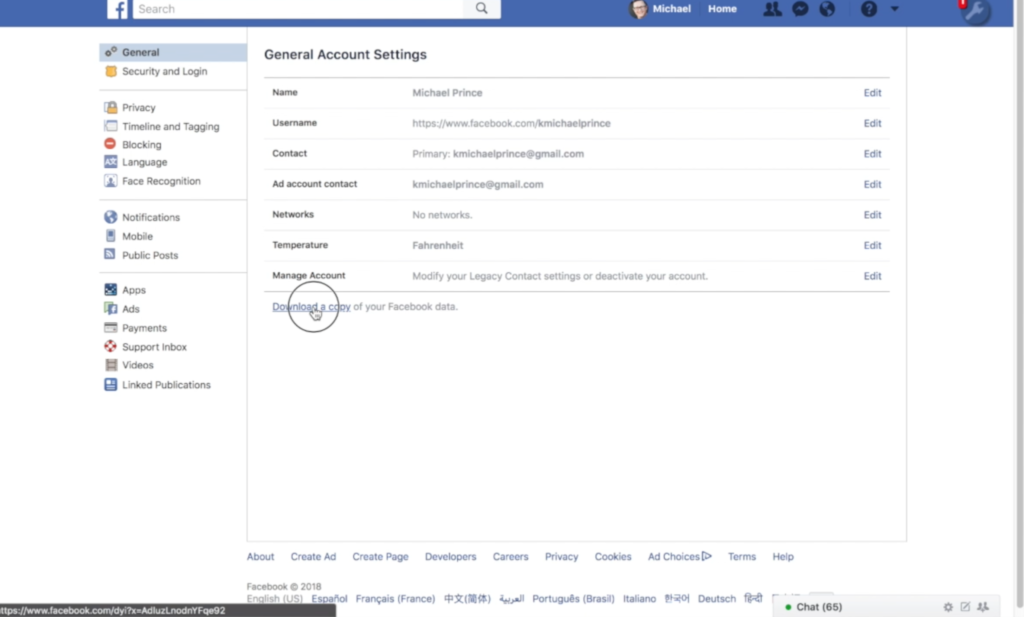
    1. Go to your settings page.


    2. Click on Download a copy Facebook Data


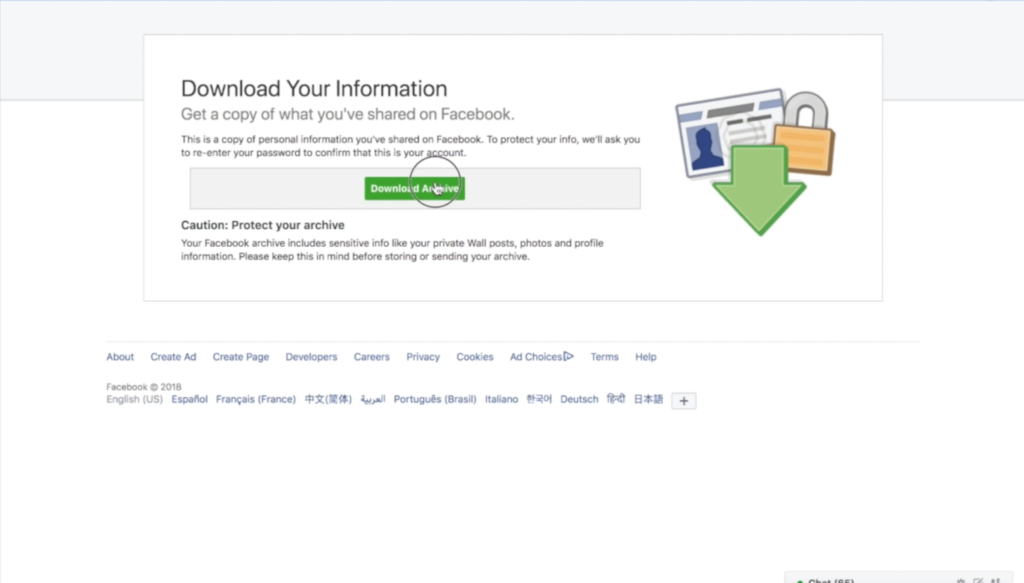
    3. Click download archive.


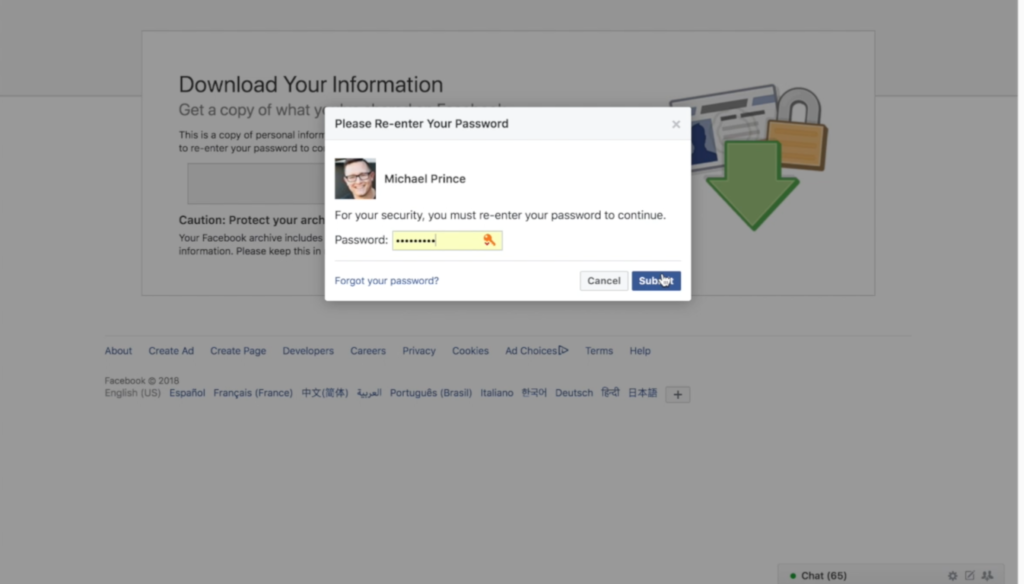
    4. Enter your password and click Submit


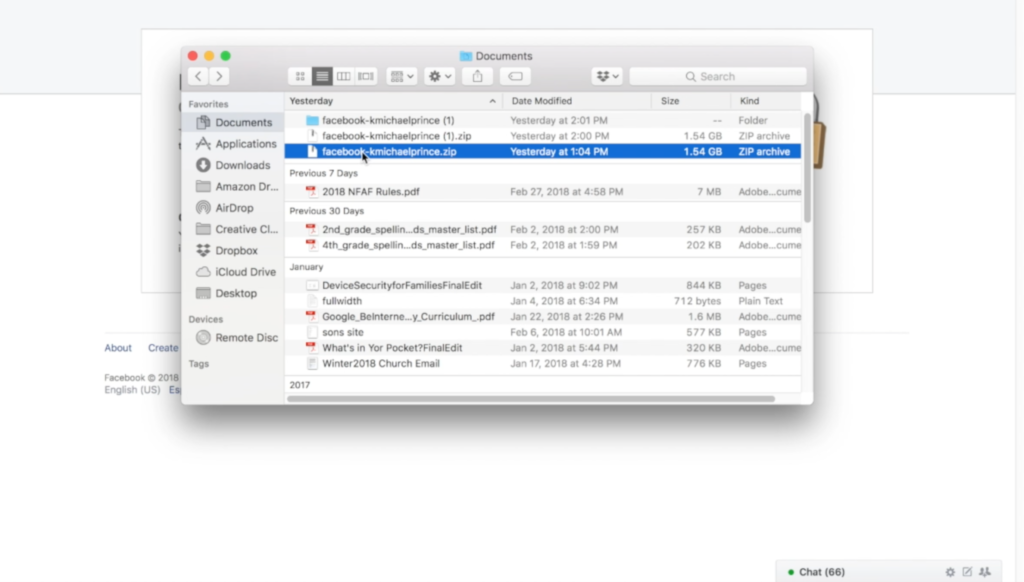
    5. Your data downloads as a zip file.


    6. Once unzipped, you’ll see your files separated into folders.


    7. Keep somewhere safe and share with caution as some of the data is personal.


    There are the instructions. Here’s a video tutorial:


  • PODCAST: Three Apps Your Kids Should Uninstall

    PODCAST: Three Apps Your Kids Should Uninstall

    Family Tech Update: These apps can be seriously dangerous for your kids. Adult content, privacy issues, stranger danger, all kinds of issues here, and some of them are only rated 12+!

    Social Media Links

    Facebook: http://facebook.com/becausefamily
    Instagram: http://instagram.com/becausefamily

    Twitter: http://twitter.com/becausefamily

    Newsletter Sign up

    Ministry Updates:: http://eepurl.com/R7Btr
    Weekly Blog Posts:: http://eepurl.com/cvnhXD

    Websites

    Ministry Site:: http://becausefamily.org
    Tech Blog:: https://safe.becausefamily.org
    Michael’s Speaking Info:: http://becausefamily.org/bookings

    Donate and Affiliate Links

    http://BecauseFamily.org/partnership

    All music/audio effects are public domain.

  • Family Tech Update: “The Time Well Spent Movement” {podcast]

    Family Tech Update: “The Time Well Spent Movement” {podcast]

    There’s a movement to take back our time and curb our tech addictions. What does it mean for families and how can we take charge of tech addictions? Plus: Snaps can be embedded on any site, and coding is king, but not on a screen!

    unGlue Affiliate Link

    Facebook: http://facebook.com/becausefamily
    Instagram: http://instagram.com/becausefamily
    Twitter: http://twitter.com/becausefamily

    Newsletter Sign up

    Ministry Updates:: http://eepurl.com/R7Btr
    Weekly Blog Posts:: http://eepurl.com/cvnhXD

    Websites

    Ministry Site:: http://becausefamily.org
    Tech Blog:: https://safe.becausefamily.org
    Michael’s Speaking Info:: http://kmichaelprince.org

    Donate and Affiliate Links

    http://BecauseFamily.org/partnership


  • The Best Way to Keep Your Kids Safe On Youtube

    The Best Way to Keep Your Kids Safe On Youtube

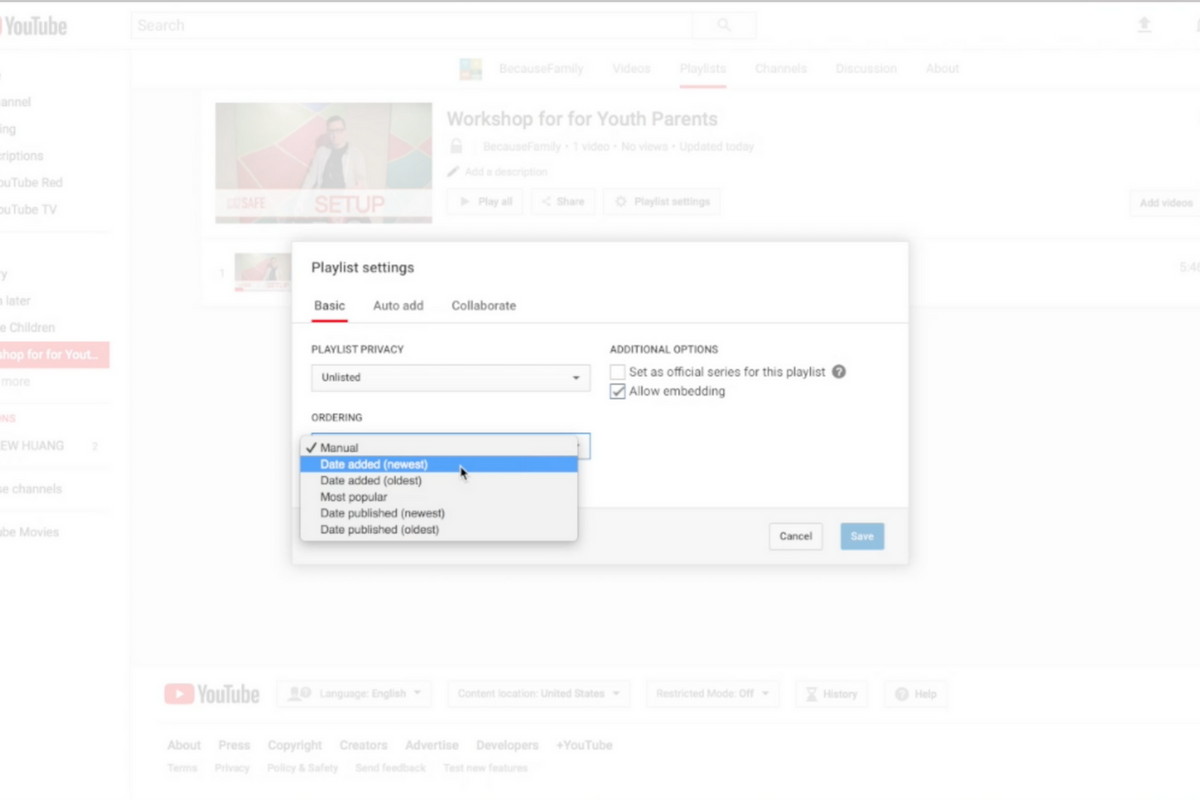
    Parents are always asking me for advice on keeping their kids safe on YouTube. Especially parents of older kids who may feel like YouTube Kids is a bit too young for their liking. I recommend building approved playlists. Find videos on YouTube that you are ok with them watching and put them in a playlist. This will allow them the freedom to watch videos without you pulling up each one while still keeping them safe from happening upon something inappropriate. You can also add playlists to your library that have been created by another channel. Then, you just have to discuss with your kids that they should only watch videos from the playlists you’ve put in the library. This keeps things safe. Watch the video below to learn how to build these playlists and hear more about why it’s a good idea.


    This is also a great idea for teachers and ministers who may want to show videos but don’t want something showing up unintentionally. If you’re playing videos from your playlist, you won’t accidentally show some video you haven’t pre-screened. YouTube can be an awesome tool but there is a lot of content on there that may not be classroom friendly. Use this tutorial to help you set up playlists and keep that stuff off your screen.

    UPDATE: Here’s a video tutorial to help you set up a playlist on the mobile app.

  • VIDEO: Three iOS 11 Features Parents Need to Know

    VIDEO: Three iOS 11 Features Parents Need to Know

    More than half of all iPhone users are now using iOS 11 and there are some major changes. The biggest change is the control center. This has become a lot more useful with the iOS 11 update and there are some features that parents should know so that they can use them to further protect their kids.

    Screen Recording

    Screen recording hasn’t been built into iPhone until this update. It’s a way to capture what’s happening on your screen and then save it as a video in your photos. This feature is cool and very useful for projects like making this video but there is a bit of a concern with kids sending messages and them being recorded without their knowledge. Keep your eye on this one.

    Quick Guided Access Button

    Guided access is an awesome way to keep you younger kids safe. The quick access button allows you to get to you GA settings quickly and use the feature to keep your kids safe. Do Not Disturb While Driving

    Do Not Disturb While Driving

    This is one that’s been needed for a while. The Do Not Disturb While Driving feature lets you just tap a simple button in your control center and not be distracted by texts until you turn it off. Pretty good idea, even if it has been a long time coming.

    There are more details and some screen capture of these features in use in the video below: