Tag: video chat

  • Facebook Messenger Adds Augmented Reality Games as Their Browser Rises to Number Three in the U.S.

    Facebook Messenger Adds Augmented Reality Games as Their Browser Rises to Number Three in the U.S.

    Gaming in Video Chat

    We all love playing “Don’t Smile.” You know, it’s that game where you have to look at your friend until one of you gives in and cracks a grin. First to smile loses. That’s one of the new games offered for you and up to seven of your friends on Facebook Messenger. Except in the AR game, your face becomes a cartoon-like grin to emphasize your good sense of humor and lack of self-control. 

    Facebook is really pushing the video chatting option in their messenger app which is the number two most popular of its kind after (also owned by Facebook.) Using the camera to add graphics to your face for a game is only the beginning as they are working towards AR shopping and have already featured some augmented reality advertising. 

    Browsing the Internet on Facebook

    New research from Mixpanel features Facebook as a major mobile browser competitor in the United States. While Safari (iPhone’s stock browser) and Chrome (Google’s browser offering) remain solid at the one and two spots respectively the browser inside of the Facebook app is interestingly above Firefox, Opera, or any other browser for that matter. 

    A browser is an app you use to surf the internet. One of the main reasons that Facebook’s built-in browser is gaining so many users is the fact that so many of us get our news, media, and entertainment through the social media service nowadays. When you see an article you are interested in and click on it Facebook will take you to that article without leaving the app. That’s their built-in browser. 

    While Facebook has faced scrutiny for their data handling, fake news, and other privacy issues, it is obvious that they still hold a major share of the market where social media is concerned. People are still using Facebook’s app to connect, be informed, and be entertained.

    What Parents Should Know

    Screen time management becomes harder and harder as new features are added to our kids’ favorite apps. The developers of these apps want their users to connect through their app and be as social as possible. They want their app to be the new “hangout” location for those who use their service. Parents still need to be on top of how much time our kids are spending on social media. The dangers of cyberbullying, sexting, contact with predators, and access to inappropriate content increase as our kids spend more time online. Manage their screen time and teach your older kids to have healthy screen time habits. Studies have shown that actual, physical interaction with friends is much healthier than video chat. Encourage and provide safe opportunities for this type of interaction.

    It is also important for parents to know that their kids can access the internet within their favorite social media apps. Facebook, Instagram, and Snapchat all have their own browsers and the data mentioned above highlights the popularity of the ease of use those browsers offer. What they don’t offer are content filters. If your kids can access Facebook, Instagram, or Snapchat they can access all of the internet and to my knowledge, there is no way to filter out adult content within those in-app browsers. Most parental control apps don’t control content within the browsers of social media either. This should be enough for you to only allow your kids to use these apps if they are older, haven’t had problems with accessing adult content in the past, and are mature enough to make healthy browsing choices. 

  • Video Chatting Apps You Should Uninstall NOW

    Video Chatting Apps You Should Uninstall NOW

    Chat Roulette was a challenge that became its own website. The idea was that people could log on to the site and be connected with someone from around the world at random. The website isn’t as popular as it once was but there are many apps that simulate that experience and some of those apps are gaining popularity. Here are some of the ones climbing the app store charts. The ranking listed is for the Social Media category in the iOS App Store as of the publishing date of this article. I’ve only listed the live video or random connection chatting apps in the top fifty.

    Melon #14

    Melon is making the news as the latest video chatting fad. It connects you with new people based on social media friends and offers private messaging, video chat, and a people search feature. It’s gaining popularity and being featured in articles that are blasting it for the frequency of cyberbullying and the high concentration of males looking for girls that will do whatever they ask on camera.


    Live.Me #16

    Live.Me touts the ability to chat with stars and celebrities and broadcast to anyone all over the world. You can find anyone from anywhere or just look to see who is broadcasting around you. There is also the ability to search by topic or interest. Live.Me uses “gifts” and “diamonds” to allow you to share things with other users and even advertises the ability to “date” virtually through the app.


    Monkey #25

    I’ve written about Monkey before. This app was created by a couple of teens who dropped out of high-school to launch a tech startup. It quickly gained a reputation for having too much nudity and not taking some of the responsibility for the content found in the app. This app has been on the FamilyTechBlog uninstall list for a while now.


    MeetMe #35

    Formerly called “MyYearbook,” MeetMe is a app that advertises itself as a way to “meet new people.” The app uses your location to find people near you and information that you’ve entered to connect you with people who share your interests. It’s popular in the app store as it’s been around for quite a while and has the largest fan base. MeetMe offers private chat and video chatting as well as live video broadcasting.


    Climbing the Charts:

    YouNow #52

    Live stream video chat is pretty much all YouNow is about. You can broadcast yourself, find broadcasters, and even join the broadcast as a video guest. The app store listing calls for you to build your fanbase and become a YouNow celebrity. There are some complaints on in the reviews about accounts that have been reported for inappropriate content not being removed because they are popular on YouNow.


    CAM #56

    CAM is popular because it allows you to select the gender you’d like to chat with. It automatically connects you with someone and even automatically texts an invite to everyone on your contacts list without your permission. This practice has caused it to dip in the standings but some continue to use the app because they like the ability to chat or flirt with people they are attracted to.


    What Parents Should Know

    I don’t usually recommend any of these type of app for your teens or kids. Not only is it dangerous to connect with random people who could be broadcasting whatever they’d like for you to see. It’s also a problem because of the potential for predators. Any connection with strangers is dangerous. Some of these apps use your location to connect you and it’s therefore possible to meet people online that you may meet up with later. My advice is to uninstall any of these apps if you see them on your kids phones or tablets. There is no reason to use one of these apps to connect with friends since you can use Instagram or Facebook Messenger to do that now. Uninstall on sight.

  • New Filters, Reactions, and Screenshot Controls in FB Messenger

    New Filters, Reactions, and Screenshot Controls in FB Messenger

    Facebook is updating their camera in Messenger so you can have some new AR filters while video chatting. The first is Filters which will add color schemes and other effects to your video feed. Reactions will allow you to use the like/love/emoji reactions you can use on FB posts to enhance your live video chat experience. Finally the screenshot button will let you take a still image of your chat with a simple tap of the screen instead of having to fumble around with the hardware buttons on your phone.

    Obviously Facebook is doing its best to separate itself from the rest of the video chatting market. These new features make Facebook live video chatting more interesting than Skype or FaceTime and definitely go a long way to compete against Snapchat’s offerings. What will this all mean for our families? Well, the main thing to remember is that your kids should only be chatting with people they know.

    What Parents Should Know

    It’s important that your kids understand the dangers of video chatting with anyone they don’t know. Messenger uses your friends list to populate your contacts so, in theory, your kids should only be chatting with friends. These augmented reality filters and reactions will add to the reasons to want to upgrade a text messaging session to video chat so if you’re against video chatting by principle then you’ll want to keep them off of FB Messenger. I recommend keeping an eye on who your kids have been messaging no matter what platform they use or if it’s by text, images, or videos. You can do this a number of ways but none is better than having their passwords and checking in on their account regularly. As always I recommend you have a conversation with your children about what they are and aren’t allowed to do on messenger and why. Let them know you’re keeping an eye on things and don’t sneak around. You want your kids on your team.

    Want to get exclusive content and support our work to keep you more informed about your kid’s digital culture? You can partner with us at Patreon.com/BecauseFamily.

  • The Monkey App will be a Hotbed for Predators

    The Monkey App will be a Hotbed for Predators

    You can often tell a lot about an app or product by their logo. (See Instagram or YouTube) They often use the small icon to entice you into using their app based on the style or the creative way the image can explain what the app is used for. Sometimes, though, you can be lured into a false sense of security by the playfulness of an app’s logo or icon. Monkey is a perfect example of this. When I saw Monkey listed as number 51 on the app store’s top downloads I was expecting to see some kid’s social media platform that would allow you to chat privately or play games or something. That’s not at all what I found.

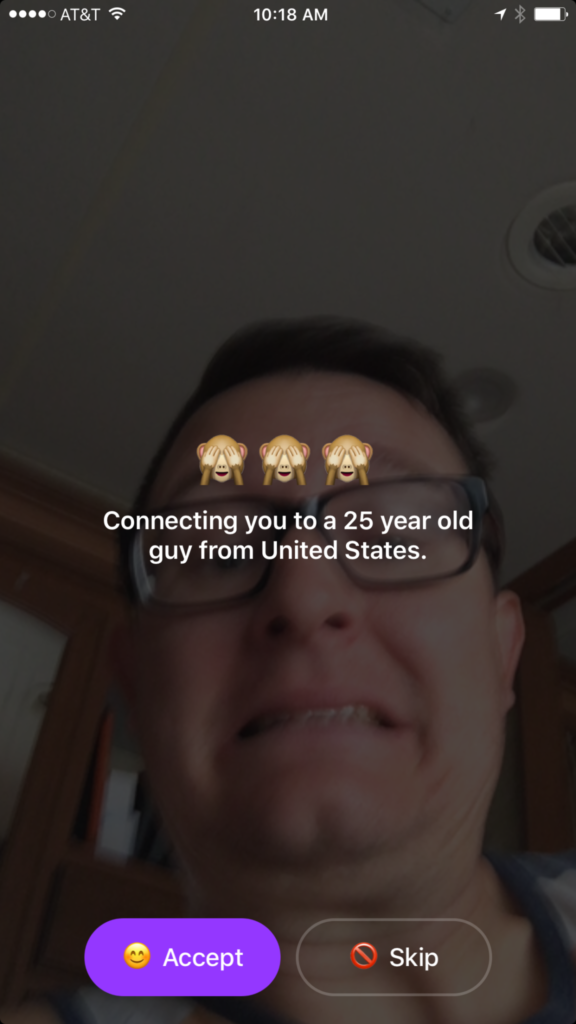
    In reality Monkey is a chat roulette type of video chatting app. Once you’ve downloaded the app it will ask you your age. You set your age to whatever you’d like it to be, provide your phone number and your snapchat username and you’re in. It immediately begins connecting you with someone to video chat with. While it’s connecting it shows your face dimly in the background and says who it’s connecting you to. You have the option to skip the connection or accept. If you accept you’ll be shown their video feed and they’ll see yours. In the short time I tested the app I was connected with all males ranging from ages 22-45.

    Once you have connected with someone a countdown clock begins. You can tap the clock to add time and keep talking but if they don’t tap their clock you’ll be disconnected. This is another “swipe right” concept that gives each user the option to continue the connection with a simple gesture on their smartphone. To be honest I never accepted a connection. I still just don’t get a good feeling about the gamble of finding random video chatting partners. I don’t know what I”ll see when I connect. You also don’t know what your kids might see.


    What Parents Should Know

    The dangers of a roulette style video chat app should be pretty obvious. The potential for unwanted material and contact with dangerous people is real. While there is a report button to flag any inappropriate content, that method takes the “after the damage is done” approach to keeping their app free from pornography and bullying. The app is rated for users aged twelve and over and the terms and agreements explain how the company takes no responsibility for the content that may be displayed on the app.

    YOU FURTHER UNDERSTAND AND ACKNOWLEDGE THAT, WHILE THE SERVICES ARE NOT PROVIDED FOR PORNOGRAPHIC PURPOSES OR FOR MAKING SEXUALLY EXPLICIT CONTENT AVAILABLE, YOU MAY BE EXPOSED TO CONTENT THAT YOU DEEM TO BE OFFENSIVE, INDECENT, OBJECTIONABLE, OR SEXUALLY EXPLICIT, AND YOU AGREE TO WAIVE, AND HEREBY DO WAIVE, ANY LEGAL OR EQUITABLE RIGHTS OR REMEDIES YOU HAVE OR MAY HAVE AGAINST MONKEYSQUAD WITH RESPECT THERETO. – Monkey Terms of Use (All caps theirs.)

    This app was developed by two sixteen year old kids from Australia. They said that they designed the app to allow teens to build more random online relationships. Ben Pasternak and Isaiah Turner told Mashable “…Snapchat is for your real life friends and Monkey is for your internet friends.” These teenagers saw a line between their real world relationships and the ones they could make with people all over the world through the internet. This is exactly what parents need to consider. While living in a more globalized world has many positives there are also very real risks to exposing our young teens and kids to the entire globe. 

    My advice is to put this app on your uninstall list. Never trust an app based on their branding or icon. Have a real conversation with your teen about the potential of seeing body parts or other unsightly things on this app. Remind them of the problem of connecting with random people online. There are always people who will lie about their age or their gender in order to connect with someone they’d like to prey on. Even if they know they’re only going to be connected for a few seconds. Sometimes a few seconds is enough to cause major problems for our young kids. Don’t let the cute monkey emoji logo fool you. Uninstall on sight!


    Does your family have an internet safety plan? Sign up for our email list to get a free checklist that will guide you to family internet security.  

    Get Our Latest Posts in Your Inbox

    * indicates required


  • Should Parents Worry about the Video Messaging/Live Video Craze?

    Should Parents Worry about the Video Messaging/Live Video Craze?

    Periscope, Facebook Live, Twitter, Houseparty, Squad, Instagram, and now here comes Ping Pong. These are all ways to record or live broadcast your life or segments of your life for the entire internet to see. Our teens and young teens are eating up this new live and sometimes raw form of communication. I’ve mentioned Musical.ly a few times in the past and warned parents about some of the risks associated with the app. This week, Musical.ly has announced the release of a their newest application, Ping Pong. This app allows users to record and send video messages much like Snapchat or Instagram Stories.

    Musical.ly launched Live.ly, a live broadcasts app last fall and have seen major success in adoption of the service. In fact, there are many users who are now just live streaming almost every moment of their lives. Users can create their own channel for people to follow and be live online at any given moment. The issue here is that some of Musical.ly and Live.ly’s most popular users are young people who aren’t even old enough to have their own social media page. Apparently that doesn’t bother the CEO of Musical.ly at all.

    While Ping Pong hasn’t fully launched yet (it’s available but you can’t create an account) it is being rolled out soon and will be another app that parents must understand.

    What a Parent Should Know

    Live video and video messaging are now mainstays of the social media your teens and young teens are using every day. It’s important to remember that they are able to broadcast and watch broadcast of everything that happens in their and their friend’s daily lives. For most young people this is going to be trips to the coffee shops, dumb stunts in the gym at school, and evening’s at friend’s houses goofing off. Unfortunately it can mean other, less savory, content as well. These apps are rated for ages 17 and up because the content is provided by the users of the services. This means that parents are expected to be monitoring what their kids are doing on these applications. Allow me to second that expectation. Use monitoring software like TeenSafe and filters like NetNanny to guard your teen from unwanted content. This will protect them while giving them full use of the social media they want to have access too. They will just be using it under your boundaries.

  • Group Video Chat is Everywhere! Now, even in iMessage.

    Group Video Chat is Everywhere! Now, even in iMessage.

    Kik has been popular with kids and pre-teens for some time. It’s a messenger that allows them to chat over wifi using a made up profile or “display name.”  The app recently joined the likes of Snapchat, Instagram, WhatsApp, and FB Messenger by adding group video to the mix.

    Then, a few days ago, a new app called Fam came onto the scene. Fam allows group video chats within iPhone’s iMessage. When iOS 10 released for iPhones it came with the ability to add and utilize apps, stickers, and games within the app itself. This has opened up the ability to put in GIFs, use emojis that aren’t available on your keyboard, and even share music or money with just a few taps in the iMessage app. Now, Fam is capitalizing on those abilities.

    How Does it Work?

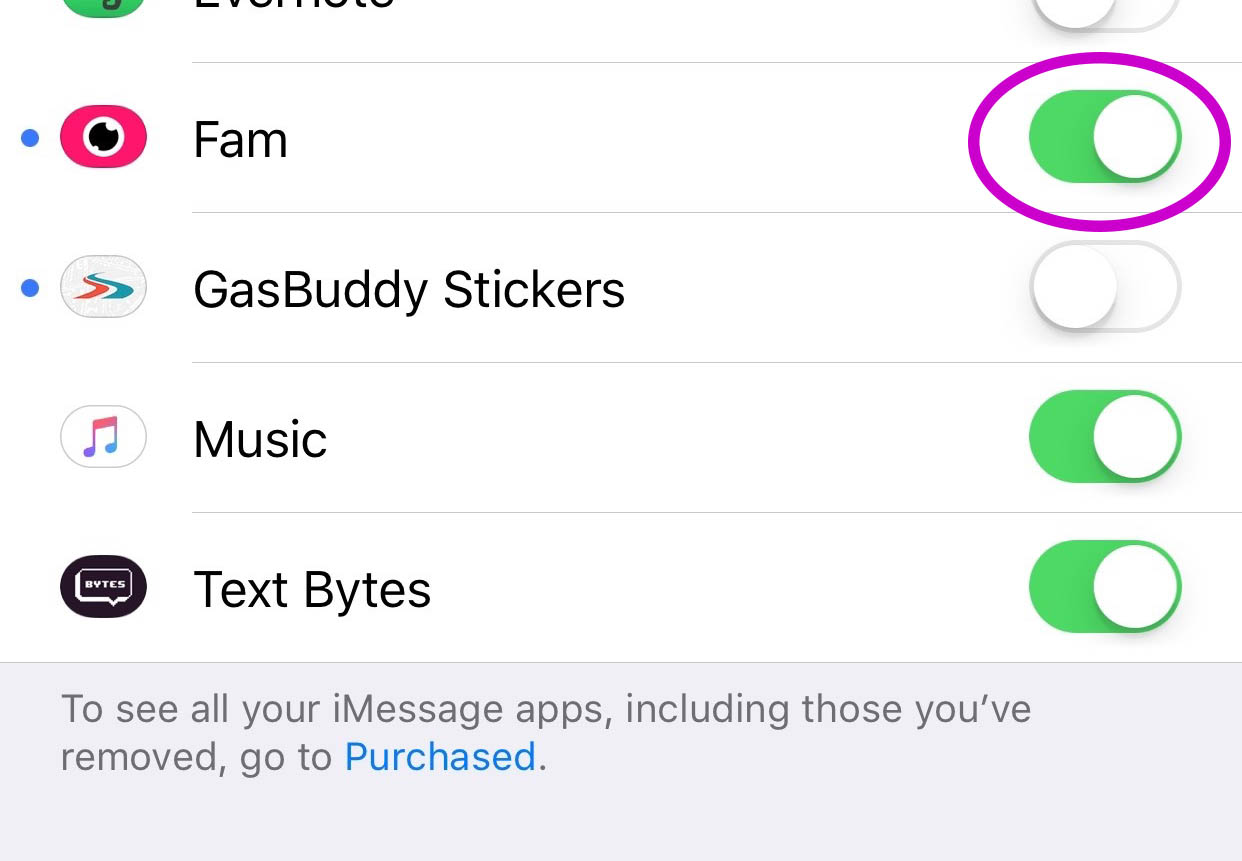
    You’ll have to find the Fam app in the app store and install it. Once it’s on your phone you can activate it by selecting the apps icon next to your text box and then the small icon that looks like a group of app buttons on the bottom left.  Next you’ll tap store, and then the manage tab on the upper right. Once you toggle Fam to be active it will show up within iMessage (your text messaging app) alongside your other apps. Once you have it you just have to tap the “Create Video Chat” button and it will send an invite to up to 8 people in your iMessage thread. (See the gallery below for those instructions with some photos.) If your friends have the app installed then they’ll be able to join right away, otherwise they’ll have to go install and activate the app too.


    What Should Parents Know?

    The dangers with video messaging are pretty obvious. If your teen is wanting to have an inappropriate video conversation with someone there are plenty of options to do that. The truth is that group video has become a mainstay. The conversation in social media and tech circles is that having group video chat available is now expected on any and every social media platform. As a parent we have to understand what apps can do what and know how to disable certain features if you decide it’s best for your family.

    That said, Fam is a pretty neat addition to iMessage. I was excited when they added the ability to put apps in iMessage and apps like Fam are precisely why. This is a way to communicate over video with the folks you contact the most. I will most likely use it, that is, if the people I talk to would be willing to install it.

    I recently spoke to a father who was trying to make the best decision to let his daughter get her cell phone back after losing it due to some behavior her parents didn’t approve of. My recommendation was that they take baby steps and I advised him to not let her have any messaging apps, to only allow her to use the basic text messaging on her phone. There was a time when that would keep you away from a lot of the danger. The dangers of some of those messaging apps is the creation of often anonymous accounts. Your kids may not always know who they’re talking to. A video messaging app in iMessage (which uses only their contacts) can help keep that from being as much of a fear.With apps like Fam stepping into the light, though, I have to emphasise the importance of checking out your child/teen’s phone every now and then. Look at the apps they use and even the apps they use in their messenger. Read through some of their conversations and make sure you know everyone on their contacts lists. If you don’t you should be finding out who they are immediately. Especially since they can now have a video conversation with your kid.

  • Houseparty App Gives Your Teens a Chance to “Unwind” with Friends Online

    Houseparty App Gives Your Teens a Chance to “Unwind” with Friends Online


    Everyone needs their “third place.”

    The third place is explained by sociologists as

    “the coffeehouse, the bar, the mall — a public space for relaxing, socializing, sharing ideas, or goofing off.” –TechCrunch

    Your kids are finding an online version of that public space and it’s in an app called Houseparty. Houseparty is a group live “hangout” or video chat app and it’s been increasingly popular in high schools since May. This app provides a way for teens to connect with friends away from the pressures of school, work, or even parents. It gives them that “third place” to unwind. It gives them an opportunity to be social, but is it really social?

    “Despite the positive impact of emerging communication technologies on scientific research, our results provide striking evidence for the role of physical proximity as a predictor of the impact of collaborations.” – Harvard Medical School

    Relationships are better built in person. More and more research is showing that time spent near your friends is more important even than time spent talking with them. While video chatting allows for group conversation, it doesn’t allow for the mannerism cues and continuous turn taking. (Bejing Normal University) To say that using a video chat to build relationships is good for our kids, or at least better than nothing, is not really accurate.

    How It Works

    screen322x572The Houseparty app uses your contact list to automatically log you in with up to eight friends who are online when you open the app. You don’t set up or invite people to conversations, it just puts you in a room to hangout with whoever is on. So using your contacts list ensures that you’re hopefully only chatting with friends. You may, however, have the contacts of some folks you aren’t interested in chatting with. There is a “stranger danger” feature that will alert the user if someone joins the chat that isn’t on their contact list. This is a pretty good feature.

    What Parents Should Do.

    I think this app is trying to get a lot right. While there can always be concern with video chatting, simply because anything created with good intentions can easily be used to do something inappropriate. Similar to the AfterSchool app, I would say Houseparty is something that parents should be aware of and talk to their kids about but I wouldn’t advise uninstalling on sight, necessarily. Whether or not your are ok with your children building their relationships through online communication is up to you.