Tag: upload

  • How Can Artificial Intelligence Protect My Family?

    How Can Artificial Intelligence Protect My Family?

    How AI Works

    When you think of artificial intelligence it’s natural to imagine Skynet or some similar software that is running things for us some day. While that could be the overall goal someday, right now AI is nowhere near that smart. Currently artificial intelligence isn’t intelligent at all. While it does learn from the input that is fed to it, there is currently no way for AI to decide what it needs to learn on its own. There is a very large gap between software algorithms that can learn and an intelligent software that makes its own decisions.

    At CES in 2018 I watched a robot named Aeolus glide across a room cleaning up. It took it a solid three minutes to move from one side of the makeshift living room, reach down and pick up a wii remote, and roll to the table to set it down. It was nothing like we have been promised by television and movies but I guess it was still cool. What parents should understand is that while the developers of an AI can make promises of their algorithms learning and behaving as if they have intelligence, that is not the same as being actually intelligent. Humans still have to do the thinking.

    While it isn’t foolproof and is definitely not sentient, artificial intelligence is a good tool. There are many ways AI is useful and much of the latest hardware and software use AI  to do some of their most minor functions. Here are some of the interesting ways AI can make your parental control and accountability tools even better.

    Filters

    There was a day when an internet filter depended solely on the web or ip address of the site you were visiting to tell if there would be inappropriate content or not. There was a master list that had to be updated continually with new websites and key words. AI is different than that because the filter is based on images and other content that the AI was “fed” over and over again the algorithm then detects actual images, text, and videos on web pages instead of just the address of the site you are visiting. This can be helpful if a website doesn’t typically contain adult content but a certain article or comment section features material that would cross the line. A traditional filter couldn’t catch that but one that uses an AI can.

    Circle (meetcircle.com) and NetNanny (netnanny.com) are examples of filters that use smart algorithm to block web content.

    Accountability

    Accountability software works very similarly to filters except that when it sees something inappropriate it will not block it but alert whoever is on the list to alert. AI has revolutionized this sort of software because it allows parents to receive only lists of unwanted sites instead of having to sort through everything that has been viewed by the person they are keeping accountable. The software I recommend, Accountable2You (accountable2you.com promo code BecauseFamily,) is updated constantly to allow it’s algorithm to properly and effectively scan for adult content. It works very well. You may get occasional alerts for content that shouldn’t be considered adult, but it’s not too often and it’s worth it for the peace of mind.

    Privacy and Security

    Finally, when we discuss AI and algorithms we must talk about privacy and security. Algorithms may have been the beginning of many of our privacy problems but it may also be providing some solutions. Tools like BitDefender can be used to protect your home network. The AI can tell the difference between forgotten passwords and malicious login attempts. Our home networks are becoming increasingly worthy of being targets of hackers and encrypting your web traffic with AI can protect your from that kind of attack.

    I hear a few different reactions when I talk about artificial intelligence. Most people roll their eyes or glaze over because they aren’t even interested. It’s some tech term that they don’t think they can fully understand so they’d rather not talk about it. The other group is super interested, always wanting to learn more about it and understand it better. These are my nerd friends. I love them. Finally there’s the group that just freaks out. They immediately think of the movies and tv shows and just want to move into the woods and unplug. Which person are you? Are you willing to let AI work to your benefit in your family? Is it all too much for you? Let me know in the comments below.

  • Instagram and Snapchat go Full Consumer Sales, Will Your Kids Migrate?

    Instagram and Snapchat go Full Consumer Sales, Will Your Kids Migrate?

    If it seems like every time you find the social media platform you like it gets ruined by marketers and salespeople that’s because that is exactly what is happening. First it was advertising, random ads showing up in between your friend’s IG Stories about their kids and coffee shop visits, now we’re seeing actual shopping being added to social media. Snapchat and Instagram seem to be going the way of Facebook by adding ways for companies to add products to their stories so you can shop right inside the app. 

    Instagram has expanded their discover section (when you tap the search icon) to include a shopping tab. This tab will be populated with products that are relevant to your activity on Instagram and will lead you to story posts that allow you to tap on products directly to make a purchase. Snapchat is also going to be adding in-app shopping with “Collections.” Collections will show up in between your friend’s stories and on the Discover page. These posts will give you the ability to actually select items you’d like to buy from within the app.

    What Parents Should Know

    You can expect to see these new shopping features roll out on Instagram and Snapchat over the next several days. Some have already been added. Your kids will notice them too and I expect a couple of different responses. First, kids are used to being advertised to. It happens to them all day long every single day. There is advertising in social media, in their games, and between all of the YouTube videos they watch. Many kids won’t be phased and may even find some useful stuff to buy in Instagram or Snapchat. 

    Secondly, I can see kids getting annoyed with the over focus on ads and migrating to a different option for their social media experience. Many kids already enjoy messaging through ad lite options like WhatsApp and Kik. They video chat with their friends through Houseparty, WhatsApp, GroupMe, or WeChat instead of Snapchat, IG, and Facebook messenger. I imagine their social media profiles will become more of a place to present the best versions of themselves instead of where they go to mindlessly scroll a timeline and connect with friends. 

    As parents, we should always know what apps our kids are using to connect with their friends. Do these apps require age verification are the default settings open and public so that anyone on the app can contact our kids? These are the questions we have to ask ourselves and our kids when they move from one social media platform to the other. Instagram is already so full of moms and dads that many kids are setting up secret “spam” accounts to avoid their oversight. The shopping features being added could lead to more kids moving on to other apps. Keep an eye on their downloads and on this site to see what they’re downloading. 

  • Now ANYONE Can Make a Facebook Camera Filter!

    Now ANYONE Can Make a Facebook Camera Filter!

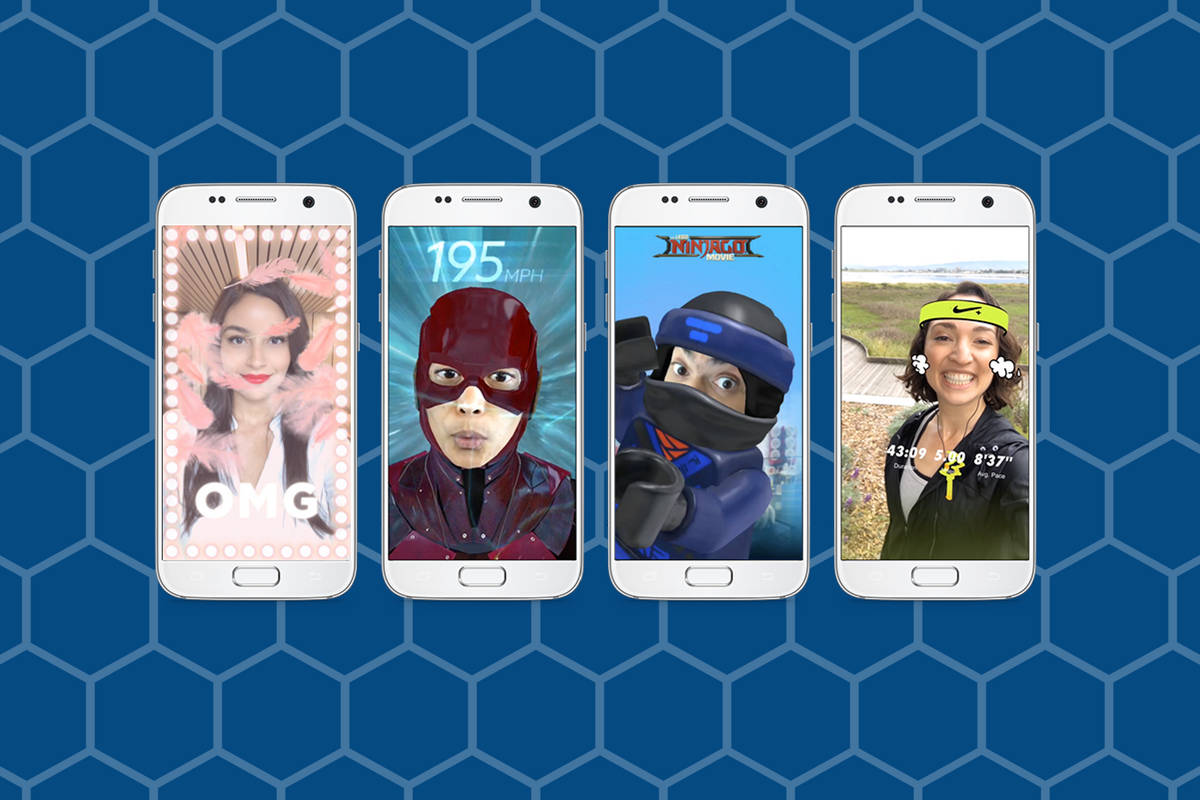
    Augmented Reality (AR) and Location Filters have become a mainstay of the social media camera. Snapchat started and Instagram, Facebook quickly followed suit, and before you know it, we’re all posting images and videos of ourselves with animated beards, mustaches, and hats. Your favorite fancy additions to your photos have always been created by select developers or advertisers so that those who run our favorite social media outlets can keep tabs on what’s being allowed on their platform. That has now, officially, changed. Facebook has opened up their public Filter and AR creator tools.

    “Starting today, we’re expanding availability of the platform and the AR Studio creative tool to everyone.” – https://www.facebook.com/FacebookforDevelopers/

    It’s truly as simple as going to the facebook developers site and downloading the AR software. Making non-AR overlays is even easier. The tool is built into the website. You simply upload your images and move them around wherever you’d like on the screen. You can use the tools to resize and edit your image as well as to remove the background so you get a transparent effect. While making a 3D mask takes some coding and design experience, making an overlay is a pretty simple process that just about anyone should be able to do.


    What Parents Should Know

    Obviously, there is no stopping the “AR train.” We all love taking photos with those crazy filters and it’s so neat to put some strange creature on your countertop and film it playing the guitar. Until now, we could trust that content being posted as filters on the Facebook camera had been created by legitimate developers and didn’t contain anything that wasn’t allowed by Facebook’s guidelines. Allowing public access to these tools basically makes filters and AR User Generated Content. I made one for FamilyTechBlog in about six minutes. There was no approval process (as far as I could tell) which leads me to believe that inappropriate content will only be identified by a “user flag and review” system. This could lead to who knows what kind of violent or adult-oriented filters showing up on our Facebook (and most likely eventually Instagram) camera.

    My advice for parents is to continue to talk to your kids about what content they use and see on their social media accounts. User Generated Content means that most of what has been posted hasn’t been edited or reviewed by anyone who can pull down non-approved posts. Algorithms and a flag system can only get so far in protecting our families from dangerous content. Parents should always be seeing what is posted by their kids and what their kids are seeing in the apps they use.


  • Android’s New Instant Apps Can Undermine Your Monitoring Software

    Android’s New Instant Apps Can Undermine Your Monitoring Software

    If you follow my recommendations on this site you’ve got some sort of monitoring software installed to allow you to see what your kids are doing on their devices. This is important because you can’t help you children navigate the digital world they’re growing up in if you don’t know what they’re doing online. Every now and then, though, a super cool new update comes out for our phones, computers, or tablets that will undermine the goals you have for monitoring your kid’s devices. Android’s “Instant Apps” is one such update.

    Instant apps is a great idea. It’s a really cool way to share new apps and a great way for app developers to give brief access for someone who wants to see something that’s been shared but doesn’t want to download an app to see it. Usually when you see a cool post on social media or someone sends you a link in a direct message you have to use a browser to see the mobile website version of what they’re sharing, Instant Apps makes it easier to see the what’s being shared. For example if I’m creeping Amazon and see the Blu Ray for that super cool movie we saw together and want to share it with you. I can text you a link and when you open it the product will open in the “instant” version of the Amazon app. This will provide you with a much easier and smoother transition to possibly purchasing that product. The instant app permissions won’t allow it to run in the background and will disable some features that would be available if you downloaded the full app but it’s a cool intro to software you haven’t installed yet. Cool idea, yes, but maybe not for our kids.

    What Parents Should Know

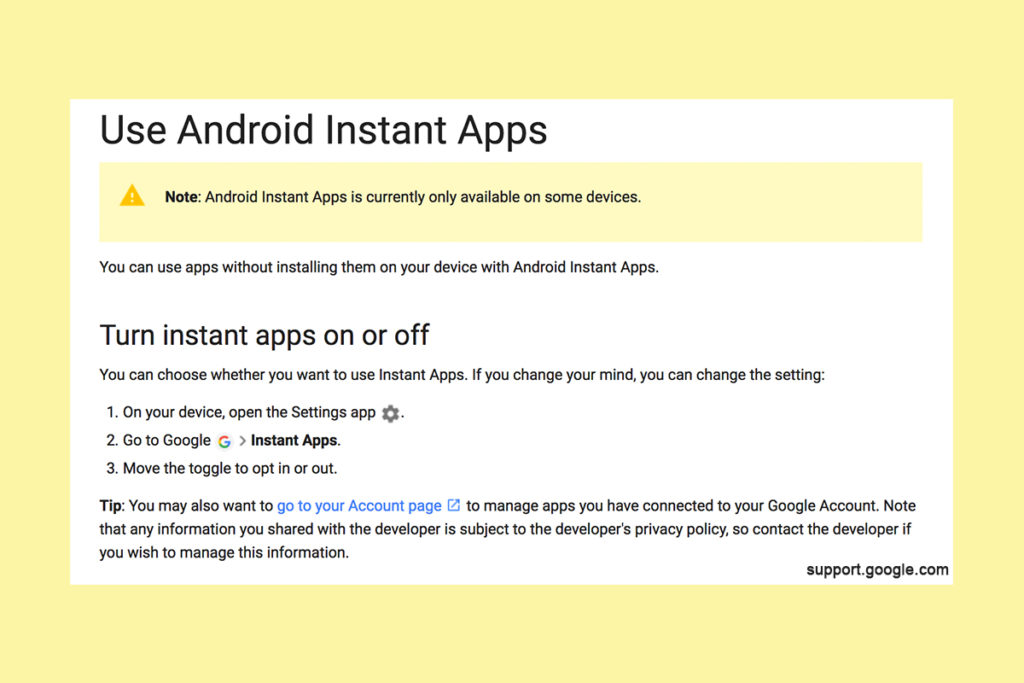
    Being able to see content from an app that isn’t even installed could be troublesome for parents who are trying to monitor their kids online activity. If you have uninstalled apps from your kids’ devices to keep them from seeing what is shared in that app you aren’t going to want them to be able to see the content in instant apps. I recommend disabling Instant Apps in on your kids’ devices if they have it. If you can’t find anything about Instant Apps in the settings of their phone or tablet then it isn’t available for their device and you don’t have to worry about it. If you do see it, follow the steps below to turn it off.


    Whether you’re using an accountability software like Accountable2You, a filter like NetNanny, or monitoring the entire device with something like Mobicip, the Instant App feature could give your child access to the very content you are trying to keep away from them. Be sure to give yourself opportunity to look over their phone or tablet whenever possible and check for the Instant App option. There aren’t very many apps developed with the feature yet but it has been opened up to most developers. More and more apps will be using Instant Apps to allow folks to share content in the near future. Turn it off now and get ahead of the game.