Tag: updates

  • You Should Ditch Your Windows Phone, Microsoft Is!

    You Should Ditch Your Windows Phone, Microsoft Is!

    Yesterday marks Window’s Phone’s “end of support” classification with Microsoft which means they will not be updating the phones anymore, not even for security.  While Windows 10 Mobile is still available there aren’t many phones that are compatible with this OS. What does this mean? It means that if you have a Windows phone, it’s time to switch to Android or iPhone. Security is one of the most important reasons to allow your operating system to update, if those updates aren’t available then all of the personal data you put on your phone is at risk. This is a real problem and not only for Windows phone users.

    There is a new operating system coming for Apple and Android towards the end of the year and you shouldn’t use a phone that will not be included in these major updates. Yes, the new features and designs of these operating systems are cool but they aren’t the only reasons you should tap ok when the update notification pops up. These updates protect your personal data from theft, hacking, phishing, and spamming. Updates to your OS are often responses to new security threats that developers have become aware of so while the notification every few months to instal version 1.2.4.3.2 can be obnoxious it’s too important to ignore.

    Here’s a list of some of the devices that WILL BE recieving the new Android OS called Android O:

    • Pixel
    • Pixel XL
    • Nexus 5X
    • Nexus 6P
    • Pixel C
    • Nexus Player
    • Galaxy S8 and S8+
    • HTC U11 (Maybe older devices but it’s still unclear.)
    • Z-Droid
    • Z Play
    • Moto Z
    • Z Play Droid
    • Z Force Droid ( Verizon exclusive in the USA)
    • Z2 (2017)
    • G4
    • G5 Plus
    • Moto G5
    • G4 Plus
    • G4 Play (Not Confirmed)
    • OnePlus3
    • OnePlus3T
    • OnePlus5 (Rumored)

    Rollout dates for Android O differ for every device and there are some devices who’s companies have yet to confirm an Android O rollout at all.

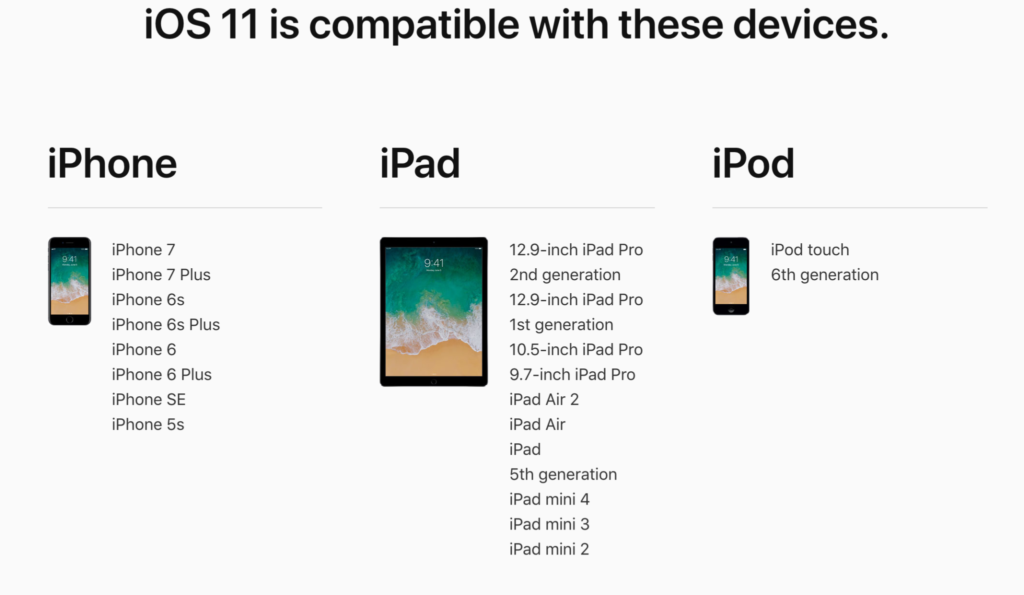
    As for your Apple Device, here’s the list of the phones and tablets that will receive the new iOS 11 update when it’s fully available:

    iPhone

    • iPhone 5s
    • iPhone SE
    • iPhone 6
    • iPhone 6 Plus
    • iPhone 6s
    • iPhone 6s Plus
    • iPhone 7
    • iPhone 7 Plus

    iPad

    • iPad mini 2
    • iPad mini 3
    • iPad mini 4
    • iPad (5th generation)
    • iPad Air
    • iPad Air 2
    • 9.7-inch iPad Pro
    • 12.5-inch iPad Pro
    • 12.9-inch iPad Pro (1st generation)
    • 12.9-inch iPad Pro (2nd generation)

    iPod touch

    • iPod touch (6th generation)

    If your device isn’t going to be updated this fall or early next year it may be time to consider upgrading. While some of the older phones will still get OS updates from time to time it won’t be long before they go the way os Windows Mobile and become more of a risk to use. Yes, I know it can be annoying to get used to a new phone and a new user interface and system but the safety and security is too important to ignore. Just take the leap or, if all else fails, faxing can be a pretty safe way to communicate. I kid because I care.

  • New Operating Systems Coming for iPhone and Android

    New Operating Systems Coming for iPhone and Android

    The last few weeks have been loaded with updates from the two major tech brands in the industry. Google’s I/O event was May 17-19th and they had some major announcements including virtual reality, augmented reality, and a brand new operating system for Android, Android O. Apple’s Worldwide Developer’s Conference (WWDC) was this week, June 5-9th, and they’ve made similar announcements including a new version of their smartphone operating system that they’ve branded iOS 11. These two new systems will run the majority of the newer phones and tablets being released so it’s important to understand what each is offering. Here’s a rundown:

    Android O

    Android’s newest system should be made public this Fall. The most significant features are design changes in the Settings Menu and User Interface (UI.) Many of the smaller changes are things users won’t notice such as changes in how the OS will handle security and background operations, as well as channels or categories for notifications. Also, picture-in-picture support, notification badges that will appear on app icons, and better bluetooth support will definitely be features that makes Android O a step up for it’s users.

    iOS 11

    A new dock, multitasking with drag and drop, a files app, and better Apple Pencil support make iOS 11 a major upgrade for iPad. iPhone users will notice more apps in messenger, an app store that looks and works completely differently, and a new and improved Siri, including a new voice. The control center, the lock-screen, notifications screen, maps, Apple Music, and AirPlay are all getting improvements as well. iOS 11 is also slated to release this fall.


    What Parents Should Know

    There haven’t been any announcements on Parental Control improvements for either of these operating systems. When the test version of iOS 11 is released I’ll be giving it a full look-over and writing a review for you. One thing that parents will enjoy from iOS 11 is the ability to turn on an automatic Do Not Disturb while driving. The phone will sense your movement and speed and automatically silence any notifications until you’ve stopped. This will be a good way to keep your older kids safe while they are on the road. As for Android, they recently put out a new Parental Control option for their OS and it’s proving to be a pretty good setup. It’s only available on newer devices, however, and we still don’t know what changes have been made for when Android O is released.

    I always recommend keeping on top of updates when they are made available. Both of these new Operating Systems should be available this fall and you should be sure, if your devices are compatible, that you’re upgrading soon after release.  This isn’t just important to get any of the new features but also because security and privacy updates come with these new systems. The apps you use, including the ones you use for internet safety and monitoring will update to keep up with the latest software and if your devices are behind you’ll start to see holes in your security. Keep your eye on the update section of your settings menu and when it shows that a new version is available you should install immediately. You can also keep checking in to this site as I will keep you informed on the latest releases as well as how they can affect your family.

  • Advertising on Snapchat Gets Creepy 

    Advertising on Snapchat Gets Creepy 

    Snapchat’s Always Been About Privacy

    The initial appeal of Snapchat was the disappearing images. The idea was that your conversations with friends stayed between you and them. It was a novel concept in a world where anyone who wants can comment on your post on Facebook or Retweet you on Twitter. SNAP inc., the company that now develops Snapchat even let the privacy theme stay in the way they allowed advertisers to use their site. Last fall a feature allowed business accounts to import their email and phone contacts to target current customers with advertising but that meant the companies were using information that already belonged to them.

    The new announcement about advertising  means that marketers can use data from a third party data collection agency to target their audience based on what they do outside of snapchat. You know the feeling when you follow a whim and lookup the entire collectors set of Star Trek The Next Generation on Amazon and then see the ads for Star Trek pages on facebook the next day? Well, now the same icky feeling is available on Snapchat.

    The silver lining here is that you can opt out of targeted advertising on your accounts page. Snapchat has yet to release an in-app announcement notifying users of the addition or the option to toggle it off though.

    Snapchat’s CEO Said Ad Targeting is Creepy

    “I got an ad this morning for something I was thinking about buying yesterday, and it’s really annoying” Spiegel declared. “We care about not being creepy. That’s something that’s really important to us.” – Snap CEO Evan Spiegel

    Snap is a Real Company Now

    In September of 2016, Snapchat changed their company name to SNAP Inc. This led to some changes in how they did business, including adding hardware (Spectacles) to their repertoire. It has also meant that some of their earning decisions have changed and this step to provide more accurate advertising to companies who use Snapchat for marketing is a perfect example of one of those decisions.

    SNAP isn’t a company that makes an app for High Schoolers anymore. According to the latest reports Snapchat brags 301 million monthly users and are projected to earn over $900 million in advertising in 2017. That’s right, it’s time to take snapchat seriously. The app was largely considered a young person’s trend for a while after it launched but it has quickly become a serious part of the Social Media landscape. In fact ages 18-30 are one of their fastest growing user demographics. When you take all of this into account you realize that this shift in the view of targeted marketing was just a matter of time.

    Marketing Ruins Everything

    Remember when email was simpler? You had one address and just used it to chat with family or to do business. Now you have to have your spam address, newsletter address, family address, signup address, business address, and the email you never check anymore. This all happened because marketers ruin everything.

    Facebook was all about social connection, now you can’t scroll through three posts without a sponsored ad beckoning to you to buy some monthly box of uselessness. Marketers ruined Facebook too. Don’t get me started on YouTube. Sitting through a lame movie trailer before you can watch the cool movie trailer you clicked through to see…it’s all too much.

    It looks like Snapchat is next in line. The inclusion of ad targeting by Snap will allow everything, even some of your offline behavior, to influence the advertising you will see on your Snapchat story.

    What Parents Should Know

    Snapchat makes a lot of appearances on this site because it’s one of the most relevant social media apps out there. I recommend understanding the app and how it works if you’re the parent of a teenager. If they don’t use the app then they want to and you will need to be knowledgeable about it before you make the decision whether or not to let them start Snapping. While sexting is always a concern on any messaging app, the marketing announcement today confirms what I have been saying since this fall. Advertisers want to notify your teenager when they have a new message for them and Snapchat just made it even easier for them. 

  • Snapchat Answers the Photo Messaging Challenge with New Features

    Snapchat Answers the Photo Messaging Challenge with New Features

    The battle for the best messenger and photo messenger app continues and this time Snapchat has launched a counter assault. Excuse my military history illustration, I know I’m a nerd. While Facebook has been building up the features list on their popular messenger app, their photo app Instagram, and their texting app, WhatsApp, Snapchat has been working on some updates of their own.

    Let’s take a look at what today’s update has and what it will allow your kids/teens to do while in the app. Then we’ll chat about what parent’s response to this app should be after the latest update is installed. It’s super important to stay in the know, even if some of the updates may not be potentially dangerous. Here’s our breakdown:

    Snapchat’s New Features

    Paintbrush and Scissors

    These artistic new tools will allow you to do more customization than ever before. Paintbrush is a bit novelty and is just a way to make your photos look different but scissors is actually a pretty cool idea. This feature allows you to take “cut out” portions of a post or photo and save them to use later as a “sticker.” This feature gives you be the ability to become your own emoji. I am kind of looking forward to one of the apps I actually use copying the Scissors feature. It’s pretty awesome.

    Shazam

    You, most likely, are familiar with Shazam. It’s an app that allow you to identify whatever song you’re listening to by allowing the app to “listen” to it and then give you the details. This update allows you to use Shazam right in Snapchat. You just open the camera, hold your finger down, and the option to find the song will come up. Once the song is identified you’ll be asked if you’d like to purchase the song. Shazam has been around for a long time, this integration is a pretty unique idea and will keep users from closing one app to use another one.

    Group Chat

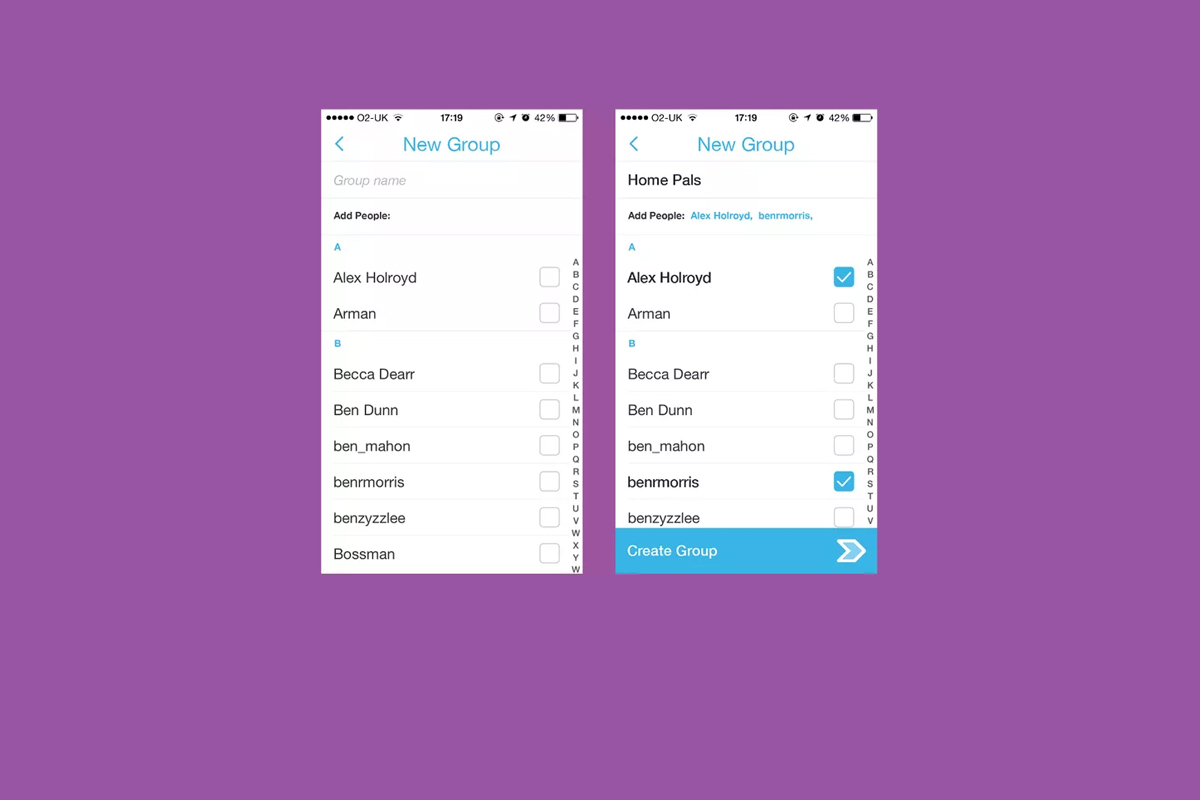
    Group Chat is self explanatory. You can chat with up to 16 people at a time and set up your chats in groups. This allows users to keep their most common friends together in one group so they can have quick access to their conversations. Your teenagers are socializing online now so this allows them to do so in a larger group.

    Every feature included in this update is another step towards Snapchat becoming the catch all app for young people. The most common users are ages 18-35 but there are many high schoolers who have already been snapping their friends for years. If they haven’t already, these updates are sure to lure them in.

    What Should Parents Know?

    As I’ve mentioned before. My main concern with Snapchat isn’t the messaging or photos, it’s the advertising. Their curated “discover” page has been and always will be a deal breaker for me. I know you may not agree so regardless of your reasons for being safe here are my tips for parents of Snapchat users.

    Don’t allow Snapchat if you’re uncomfortable.

    It’s important to remember that you have to have a say over what your kids are doing online. If what Snapchat does makes you feel uncomfortable you shouldn’t allow it on your child’s phone. Whether you’re afraid of what people may send them or what they could see on a public story. Maybe you’re just concerned about people they don’t know getting ahold of pictures of them. You also could simply be trying to keep the marketing gurus who are publishing content straight to your child’s phone from turning them into the consumer they want them to be. No matter your reason, be true to that instinct and hold firm to your position. Your teen won’t understand and will argue but you have to trust yourself on these issues.

    Use family sharing to know when apps are installed.
    I walked through family sharing and how to set it up in THIS tutorial. This is a great way to keep track of what apps are being installed on everyone’s devices. You can even set it up to ask you permission before something is installed. If you have decided to take a stand against your teen joining the Snapchat trend Family Sharing is a great way to be sure they’re sticking to those rules.

    Follow your kids’ “Story”.

    If your teen is using or wants to use Snapchat and you’re ok with it I recommend you get an account as well, even if it’s only to keep tabs on their “Story” yourself. This isn’t spying since you will communicate with them that you’re following them. Let them know it’s not that you don’t trust them, it’s that you have a responsibility to protect them from those who won’t use the social media service in the safest way.

    Talk to your kids about how they use Snapchat.

    Now comes the inevitable plea to be transparent with your children. Be open with them and honest about your concerns with Snapchat. Let them know you want to protect them from whatever it is you’re concerned about. Boundaries become stupid rules if there is no relationship. If you’re going to be following the on their account they need to know about it and know why. If you’ve decided not to allow it at all then you’ll have to be honest about why. Let them talk to you about why they want to use it. “Because it’s how my friends talk to each-other is a legitimate concern for a teenager. Social connection is the most important thing during that time of their lives. That shouldn’t cause you to back down from your rules but instead help you show empathy and compassion while you are patient enough to give them time to adjust to the rule.

    These new updates are being discussed in the tech world as another big “shot across the bow” to Facebook and Twitter and other social media giants. You can expect more and more features to roll out on all of these services. Also expect to be asked by your child if they can start an account and be ready ahead of time with your answer.
  • Pokemon GO Update: What you should know.

    Pokemon GO Update: What you should know.


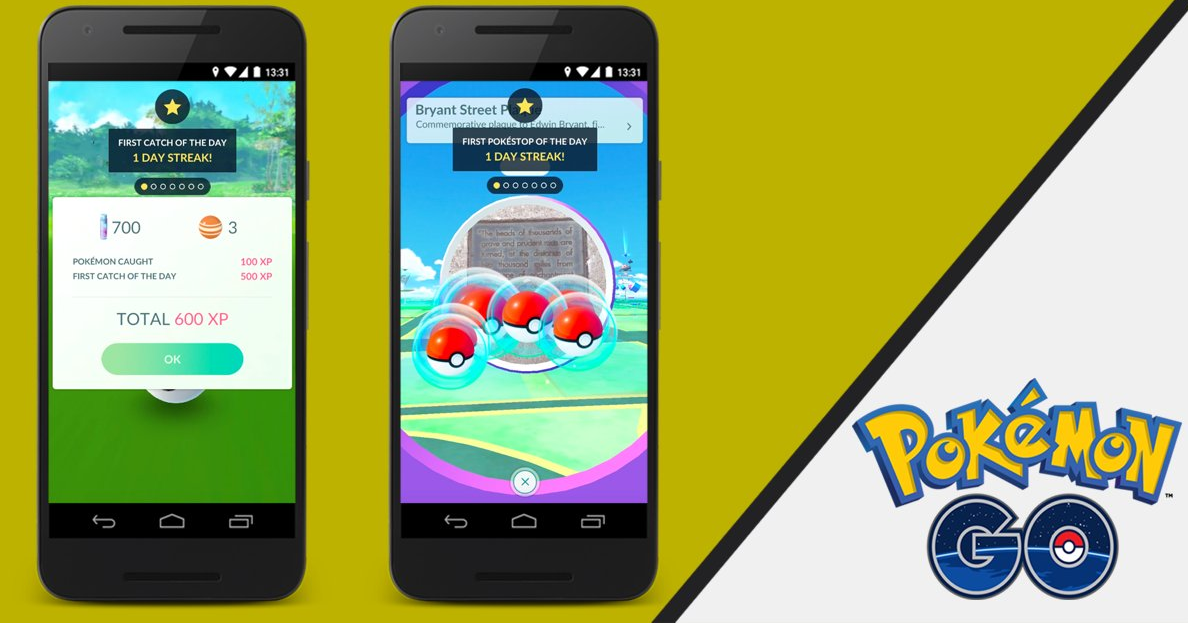
    The conversation about Pokemon GO has settled down quite a bit lately but a new update this week has caused a bit more discussion to begin again. I think parents need to hear some of what is being said. While this update adds a new 8 mph maximum speed to keep you from playing while driving and a few new Pokemon to catch, the issue most relevant to parents is the addition of Daily Bonuses to the app. (more…)