Tag: update

  • New Snapchat Feature Enables 16 Person Video Chat

    New Snapchat Feature Enables 16 Person Video Chat

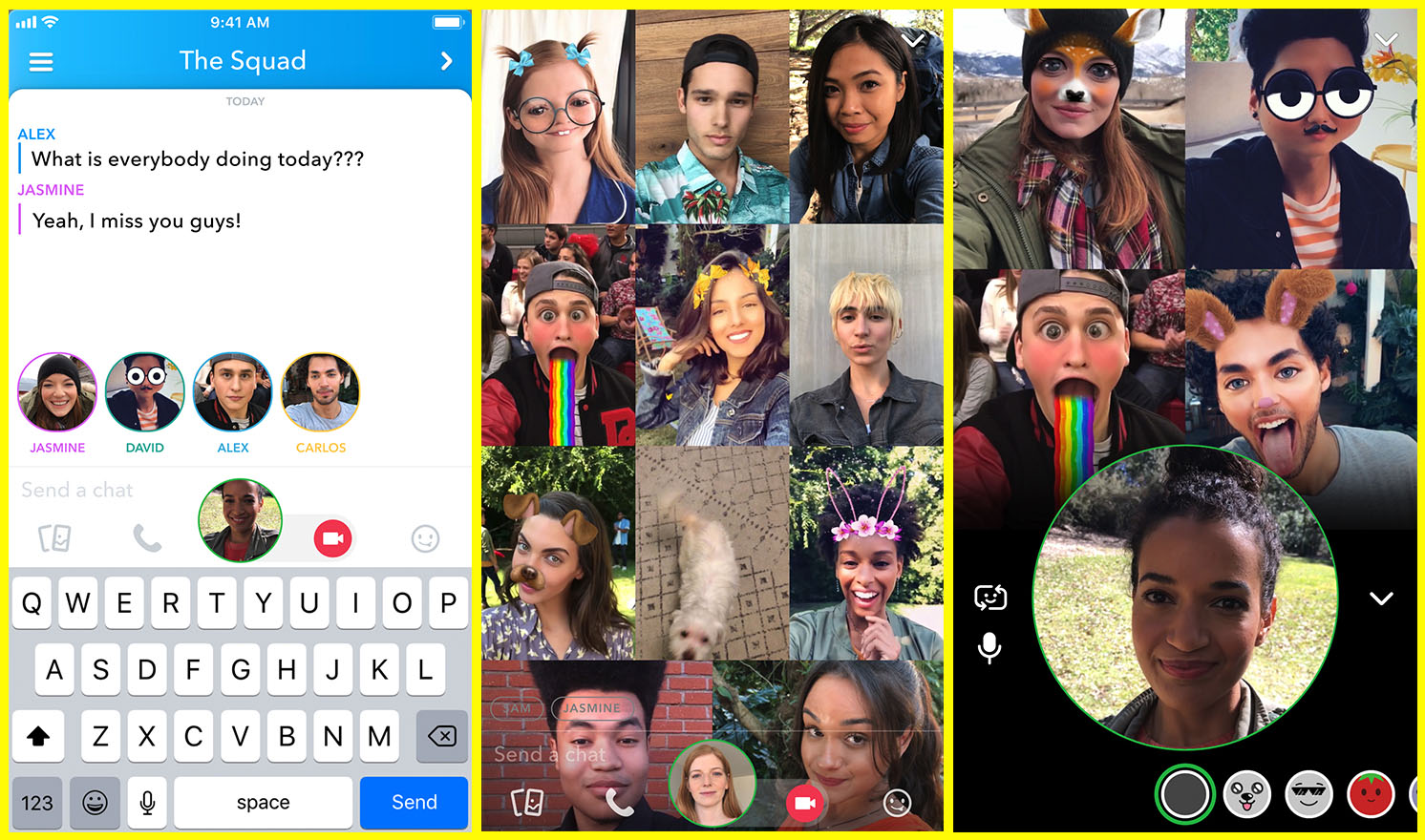
    Group chat has been available for a long while now, even in Snapchat, but now you can hang out with a large group of friends on video without ever leaving home. Snapchat’s new group video chat feature is now available and allows you to include 15 of your friends. You can sign on to a regular chat and add friends as you go or set the chat up with your large group from the beginning. Of course, Snapchat’s AR filters and masks will be available during these chats as well. Another feature that is available with this update is tagging or mentions. You can “@” tag a friend in your posts so they’ll be notified that you’re mentioning them.
    What Parents Should Know

    Parents should already know how much time their kids spend on social media. If unsupervised, they’ll chat with friends and creep their timelines all day long. In fact, many teens say they feel addicted to social media, while not doing anything to curb their own addictions. Addiction isn’t the only problem with extensive social media use. Social contact over our devices has proven to be far less beneficial than face to face interaction. There have been countless studies comparing video chat to actual conversations with someone in person and the conclusion is always the same. Spending time in the same room as someone is better for your development than only texting, calling, or video chatting. Take this excerpt summary from ScienceDirect.com’s 2014 study.

    When engaging in face-to-face communication, social information is conveyed by vocal and visual cues within the context of the situation. Nonverbal communication, defined as communication without words, includes apparent behaviors such as facial expression, eye contact, and tone of voice, as well as less obvious messages such as posture and spatial distance between two or more people (Knapp & Hall, 2010). The understanding of these kinds of nonverbal social cues is particularly important for social interaction because of the need to modify one’s own behavior in response to the reactions of others (Knapp & Hall, 2010). – ScienceDirect.com

    With apps such as Houseparty and Snapchat’s group chat out there, we have to be more intentional than ever about the time our kids spend on their screens. Hanging out with friends through our devices is becoming easier and more acceptable. Kids aren’t going out as much, the malls are closing, arcades are few and far between, and movie theaters are having to serve food like restaurants to attract the older generations because the younger ones aren’t as interested. Why go out when you can stay in and hang out with your friends online? Video chat can be an awesome way to stay in touch with long-distance family or friends but when our kids leave school and go home to do their homework while video chatting with six of their best buds all evening, something is missing from their life experience. We have to monitor their online activity and set time limits. Use unGlue or Circle to set some boundaries. Talk to your kids about the importance of face to face interaction. Don’t deny them opportunities to go spend time with friends (in families you trust). Drive them to that get-together or youth group event. Say yes when a friend wants to come over. Give them opportunities to spend face to face time with friends, outside of school, and you’ll be giving them the best chance you can to develop the skills they need to succeed.

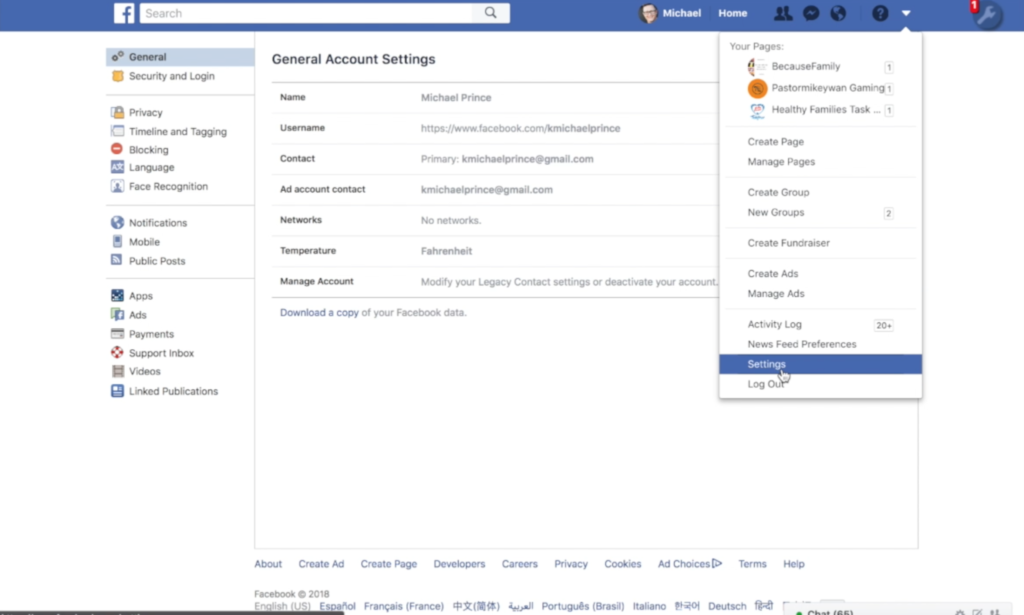
  • TUTORIAL: How to Download All of Your Photos, Videos, and Messages from Facebook at Once

    TUTORIAL: How to Download All of Your Photos, Videos, and Messages from Facebook at Once

    There could be a number of reasons you’d want to download all of your Facebook data. Maybe you’re making a fresh start but don’t want to lose photos and videos, maybe something’s going on and you need message data downloaded, or maybe you just want to back up all your data for when the giant electromagnetic pulse goes off someday and the internet comes crashing down. Whatever reason you’re interested, here are the simple steps you can take to download all of your Facebook info at once. The tutorial video is at the bottom of this post.


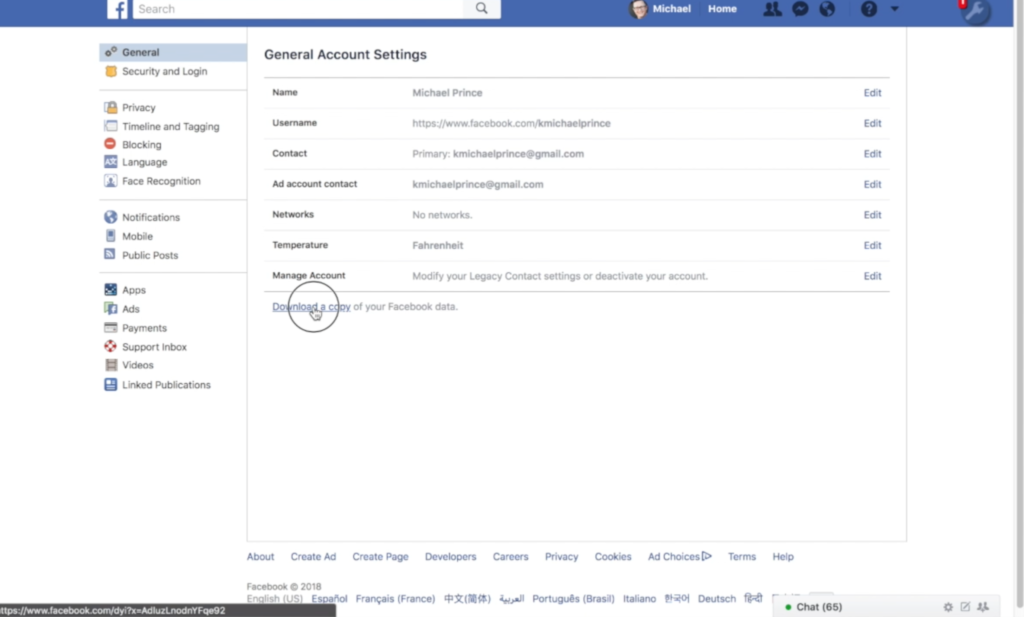
    1. Go to your settings page.


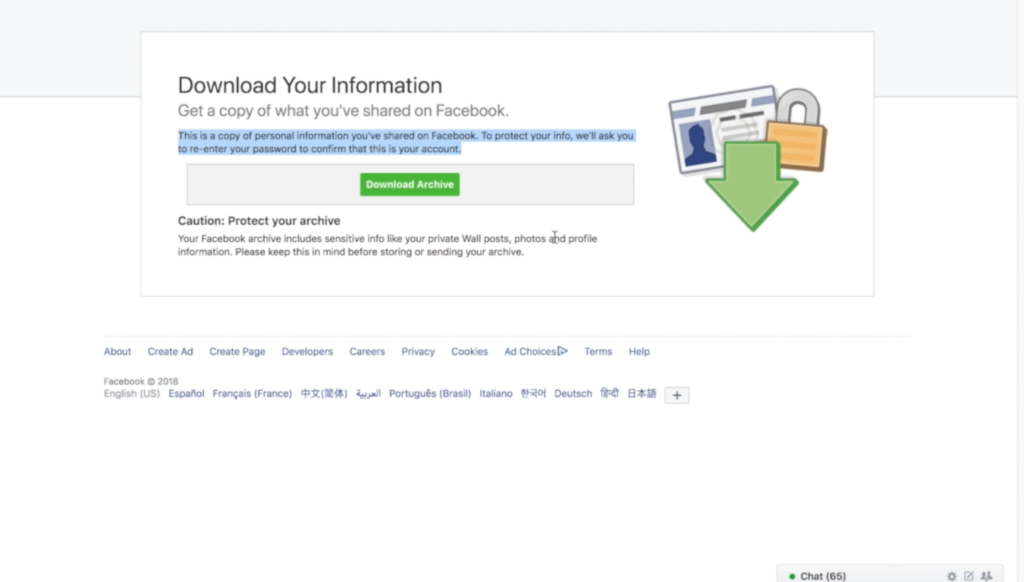
    2. Click on Download a copy Facebook Data


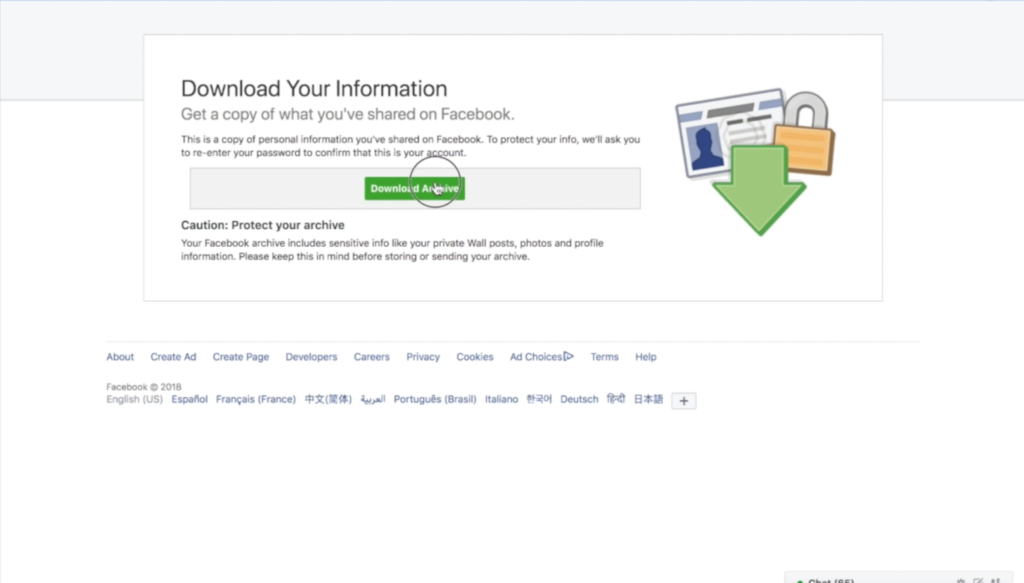
    3. Click download archive.


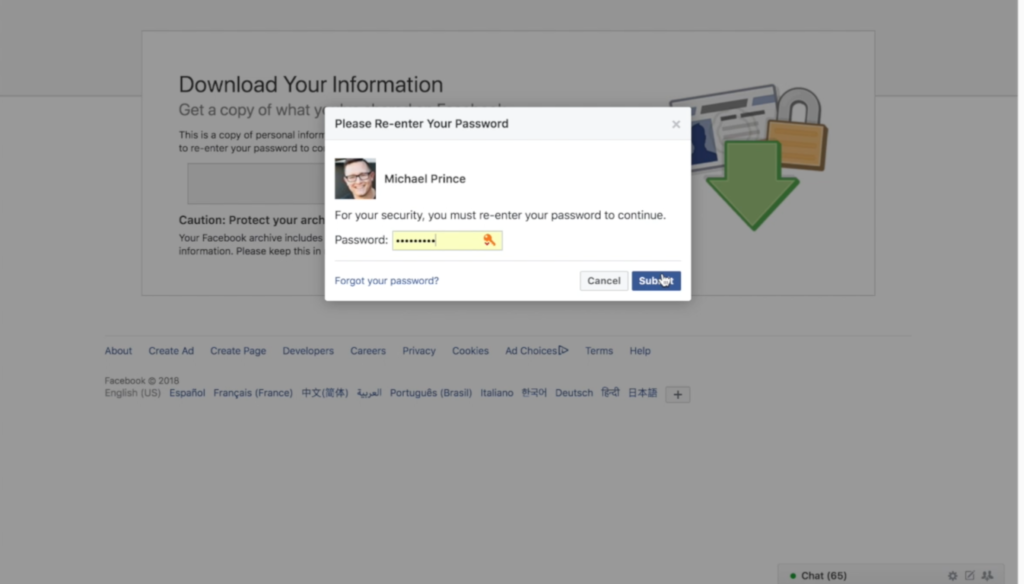
    4. Enter your password and click Submit


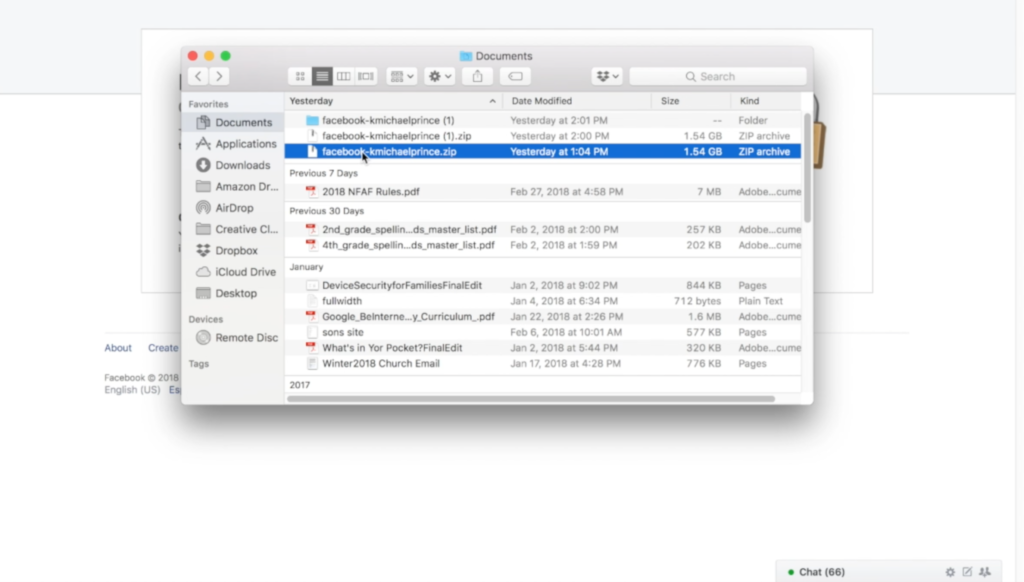
    5. Your data downloads as a zip file.


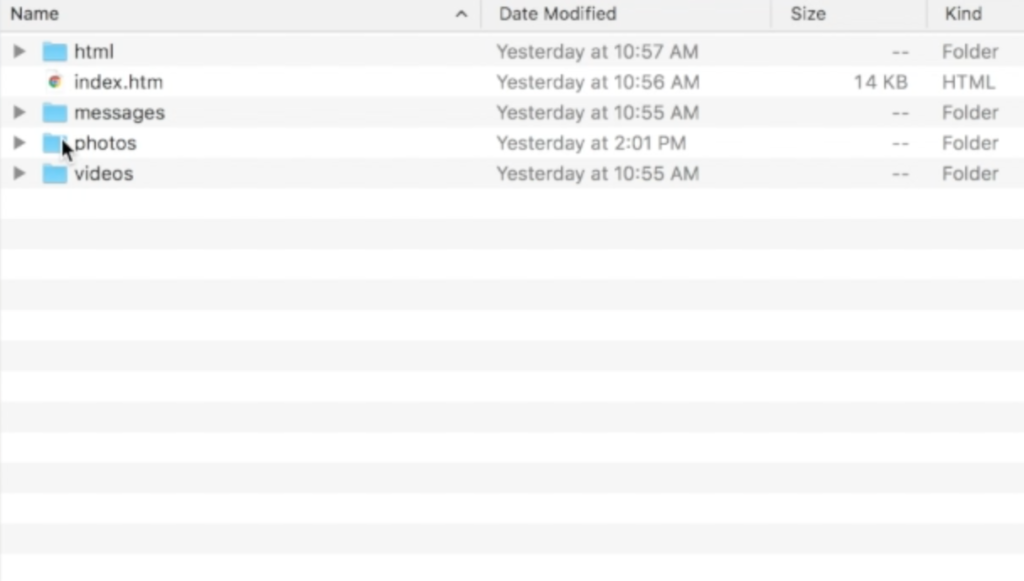
    6. Once unzipped, you’ll see your files separated into folders.


    7. Keep somewhere safe and share with caution as some of the data is personal.


    There are the instructions. Here’s a video tutorial:


  • The FamilyTechBlog Uninstall List for Spring 2018

    The FamilyTechBlog Uninstall List for Spring 2018

    Please consider keeping resources like this free to you by donating $5 to our non-profit organization.
    Visit BecauseFamily.org/partnership to give.

  • Snapmap Featured User Sourced Videos of the Florida School Shooting

    Snapmap Featured User Sourced Videos of the Florida School Shooting

    Snapchat’s “Snapmap” feature highlights news stories that are curated by their team of news editors. The team chose to feature posts from the school shooting in Parkland Florida on their map yesterday. It was comprised of Snaps from students in the school, news outlets, and passersby whom the editors thought had posted something that contributed to the viewers understanding of what was going on during the shooting. You can see that editing was done before the Snaps were put on the map because a “Warning Graphic Content” posts start the slideshow, followed by a video of what seems to be the inside of a classroom in which you can hear the gunshots from nearby. Language is bleeped out and there are no actual victims shown but you do see a couple of students who are talking about watching their friends be killed right next to them.

    Snapchat hired a former CNN exec to lead their team of news editors and they say their news team is doing their best to follow the right journalism practices. They are working to remove overly sensitive content and choosing to only feature Snaps that contribute properly to the story they are covering. Snapchat’s main audience is under 18 which likely contributed to the fact that they had so much content to use to cover the shooting in a High School. This also means though that our kids who use Snapchat, and anyone else using their map in a browser, can have access to on the scene footage of what is happening during events like this. A school shooting is a national tragedy and social media is becoming one of the most common ways that people learn about what is happening or has happened. Snapchat is attempting to provide a curated look at this news, but is that what we want our kids to see when they look at their phones?

    What Parents Should Know

    As mentioned above, posts from Snapchat are not automatically sent to the map. These posts are curated and especially selected and edited before being added. While I’m grateful for some oversite from Snapchat when it comes to sharing this news, I have to question whether or not I would want my 13 or 14-year-old to have access to some of the images seen during the shooting on Wednesday. Just seeing something so dangerous portrayed in such a real way can be damaging and cause fear in our kids. We have to look out for this and know if this is something our child can handle or not. For some of them it may be fine but for others, they aren’t mature enough to deal with that much realism.

    (Opinion warning!) I can’t tell you what’s right for your kids, I will, however, give credit to Snapchat for trying to bring some truth to the news by using information from people who are actually there. I will also keep this info from my kids for a while. There are enough things that cause fear in our lives, I wouldn’t want added influences like their social media accounts to increase that fear. Snapchat is on my uninstall list for a lot of reasons, I’m grateful they aren’t just putting every public post from one of these tragic events onto a feed that your and my kids could see but I will think long and hard before allowing my child access to this source of news.

  • Bitmoji Selfies Could Lead to Facial Recognition on Snapchat

    Bitmoji Selfies Could Lead to Facial Recognition on Snapchat

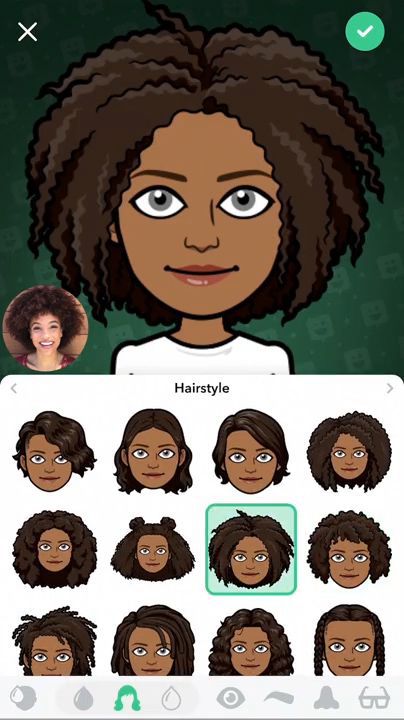
    Snapchat’s new “Bitmoji Deluxe” allows you to take a selfie and place it right next to your Avatar while you create or edit it. This lets you create your Bitmoji to look as much like you as possible. It starts with Snapchat asking if you’d like to take a selfie. Once you do, you will see an image of your actual self in the bottom corner the entire time you are editing your cartoon self. This isn’t a surprising new feature since Snapchat has teased that they may be using selfies to automatically create your Bitmoji in the near future. Facial recognition is becoming a mainstay in mobile technology so it’s only a matter of time before it works its way into social media.

    What Parents Should Know

    Snapchat is and will remain on my uninstall list. Bitmoji has never really been one of the reasons I don’t like Snapchat but I will admit I don’t “get it.” As parents, we have to keep an eye on our kids’ activity on Snapchat. One of the biggest concerns of educators, psychologists, and tech safety experts alike is the tendency for our young teens to filter their online identity. Even, sometimes, to the point of creating separate or even secret social media accounts for different followers or friends. Using a selfie to better create your Bitmoji avatar isn’t necessarily a sign of unhealthy behavior. I would, however, continue to pay attention to my teen’s conversations across all social media. Once facial recognition becomes a viable part of our social media cameras, that’s when I would consider not allowing my kids to use that service until they’ve reached an even higher level of maturity.

  • Instagram will Begin “Recommending” Posts from Accounts You Don’t Follow

    Instagram will Begin “Recommending” Posts from Accounts You Don’t Follow

    A new “recommended for you” feature will be rolling out on Instagram very soon. This feature will post pictures from users that aren’t on your friends list in an attempt to get you to increase the number of users you follow. In 2016 Instagram changed the way your feed works by changing from chronological to an algorithm based timeline. The latest change comes as Instagram is looking for ways to better market their platform to advertisers. Increasing visibility of accounts run by companies should boost those accounts followers and therefore the reach of paid advertising. The content you see you will be chosen for you based on your likes in the likes of people you follow. You won’t necessarily just see any random image, but images that the Instagram algorithm believes might be relevant to you.

    What Parents Should Know.

    Obviously, any content delivered to our children and teens by an algorithm can be suspect. This change makes it increasingly important for you to understand who your children follow on Instagram. The best way to do that is for you to log into their account on your device and check regularly. While accounts that use spam techniques or inappropriate images won’t likely be delivered to users through this method, it is still against my wishes for anyone other than myself or my child themselves to determine who or what they see on social media. My best advice for parents is that you be proactive and keep an eye on your kid’s accounts.

  • Parent Guide: StarWars Battlefront 2 (Story Mode)

    Parent Guide: StarWars Battlefront 2 (Story Mode)

    StarWars Battlefront 2 S.A.F.E. Rating

    Violence: 3 out of 5
    Language: 4 out of 5
    Sexual Content: 5 out of 5
    Positive Message: 4 out of 5

    Total: 16 out of 20 = Older Kid Friendly!

    **This review is for the story mode of StarWars Battlefront 2. Multiplayer content can vary due to downloadable, upgradable, and user-generated content. 

    The Game

    Battlefront 2 is the first in the series to have a story mode. The game contains story elements that are considered “canon” for the overall StarWars story. This makes it an even more appealing feature for this game and the good news is that the story is actually pretty interesting. You follow a couple of characters who were raised and trained in the Empire and have some second thoughts about their loyalty to the Emperor and his followers after events following the battle of Endor. The story takes you through playing as several characters including a Jedi and a Sith Lord. You also get to fly several ships and pilot a few vehicles. The game is still obviously designed for the massively multiplayer online battles and the campaign is designed to highlight all of the online features. If feels very much like a Battlefront game and seems to have a lot of replayability.

    Violence/Gore (3)

    This is ultimately a war game so you find yourself in constant combat. The violence is everpresent with shooting, lightsaber battling, electrocuting, and explosions. There is, however, very little to no gore in the game. Lazer bolts and lightsabers don’t cause you to bleed and if you use grenades, rockets, or vehicles to blow up your enemies they just fly around from the shock of the explosion. There is no loss of limbs or severe damage shown. You can’t go into a StarWars title and not expect to see some violence but this game contains combat of the PG to PG-13 variety, no more than any StarWars film.

    Language (4)

    There is no adult language in Battlefront 2. I will repeat here, however, that that fact changes greatly when you join multiplayer battles and those you’re playing with have microphones. Then, though, the language isn’t coming from the game, but from the people you are playing with.

    Sexual Content (5)

    The story mode of Battlefront 2 had no sexual innuendo or content at all. There is one kiss but it isn’t graphic or adult oriented in any way.

    Positive Message (4)

    As with any StarWars story, the message of Battlefront 2 one is hope and redemption. The rebellion is trying to bring freedom to the galaxy and the Empire is doing everything they can to keep their grip around the galaxy. The main characters are trying to be redeemed from a lifetime of fighting for an Empire they no longer believe in. The reason this game doesn’t get a 5 for Message is that, again, just as in many StarWars titles, the bad guys are super cool in BattleFront 2. It is fun to wield the red lightsabers and the dark side force powers. I obviously don’t believe playing StarWars Battlefront 2 will cause kids to want to turn to the “dark” side but I will say that there is a bit of glory given to those who are on the “bad” side of this story. Good vs Evil can get complicated, especially in real life, StarWars has always kept it pretty clear who is who. Battlefront 2 keeps that tradition alive.

    Final Thoughts

    I have played the Battlefront games for years. It is pretty cool to see them adding a story to the game since StarWars stories tend to be so interesting and inspiring. If your kid(s) has asked you for Battlefront 2 for Christmas it’s important to keep a couple things in mind. First of all, this game, while the violence isn’t brutal and gory, is still a first-person shooter. The risk of attention and anxiety problems in young men increases with more time spend playing FPS games. Secondly, this game has been marred by a bad reputation for getting players to spend money in order to excel in the game. EA, the publisher of Battlefront 2, has had to revamp a lot about how they do microtransactions and upgradable content and characters because players have been complaining and boycotting the game. No matter which side of the fence you or I sit on spending money to buy things in a game you already paid $60 to play in the first place, your children are being marketed to within this game. You, as a parent, need to be aware of that.

  • Update the YouTube Kids App, You’ll Be Glad You Did

    Update the YouTube Kids App, You’ll Be Glad You Did

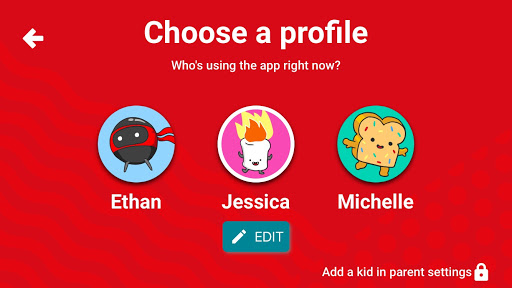
    We are big fans of YouTube Kids. While it isn’t foolproof, it is the best option available right now to let your kids enjoy their favorite videos on YouTube.The newest version makes it even more useful for parents. This update allows you to add profiles with a birthdate and a new avatar to ensure your kids are getting content appropriate for their age and interests. This will be super helpful for parents like us, who have multiple kids using one device. My recommendation is that you update your YouTube Kids apps as soon as possible and if you haven’t used it yet, what are you waiting for? Go download it.

    Stay tuned for a video review of the YouTube Kids update soon.


  • VIDEO: Three iOS 11 Features Parents Need to Know

    VIDEO: Three iOS 11 Features Parents Need to Know

    More than half of all iPhone users are now using iOS 11 and there are some major changes. The biggest change is the control center. This has become a lot more useful with the iOS 11 update and there are some features that parents should know so that they can use them to further protect their kids.

    Screen Recording

    Screen recording hasn’t been built into iPhone until this update. It’s a way to capture what’s happening on your screen and then save it as a video in your photos. This feature is cool and very useful for projects like making this video but there is a bit of a concern with kids sending messages and them being recorded without their knowledge. Keep your eye on this one.

    Quick Guided Access Button

    Guided access is an awesome way to keep you younger kids safe. The quick access button allows you to get to you GA settings quickly and use the feature to keep your kids safe. Do Not Disturb While Driving

    Do Not Disturb While Driving

    This is one that’s been needed for a while. The Do Not Disturb While Driving feature lets you just tap a simple button in your control center and not be distracted by texts until you turn it off. Pretty good idea, even if it has been a long time coming.

    There are more details and some screen capture of these features in use in the video below: