Tag: twitter

  • Tinder, Grindr, and Predators. Social Media and Suicide. Who do we blame?

    Tinder, Grindr, and Predators. Social Media and Suicide. Who do we blame?


    There were more than 30 instances of abuse of children from the Tinder and Grindr apps since 2015. That number may seem small but when you consider that fact that kids have easily skirted around the age requirements of these dating/hookup apps and made contact with people who wish to harm them, any number is too high. While these companies say they’re doing all they can to keep kids from using their software, all they really say in response to these horrible occurrences is that the predators and kids violated their terms and services. Since the terms say you shouldn’t contact minors and that minors shouldn’t be using their software, they claim the responsibility isn’t theirs because the child was put in danger by using the app in a way that it wasn’t intended to be used.

    Officials are saying that isn’t good enough with law makers in the UK trying to create legislation that will require age verification on apps like Tinder and even some social media apps like Instagram. Recent suicides have been proven to be inspired by images of self harm that were viewed on Instagram. Again, officials at the social media company say that the most violent of the images violate their terms and services. They have recently, however, banned images of self harm and suicide and removed the categories from search results.

    Here is the question: When these horrible things happen, do we blame the companies who make these online products? Is it enough to write a terms and agreements and say that those who break the rules do so at the fault of their own and no fault of the company? So far, legally, that’s all it takes. It seems that the responsibility of the company ends with the terms and conditions page. If the user doesn’t follow the terms, then how is the company supposed to protect users? Some officials are asking for age verification which means keeping more records. This is something many companies don’t want to do because of recent privacy and data breach concerns. There is only one thing I know for sure, if families will get serious about monitoring their kids’ screen time and online activity, the number of these occurrences will dramatically decrease.

    Let me describe a scenario for you. Your 12 year old child wants to meet new people online, maybe they heard some friends talking about a dating or hook up app, maybe they just don’t have a lot of friends in real life. Whatever the reason, they’re looking for a way to meet people. While they’re looking through the app store they see this in the search results:


    They tap download, create a profile and start swiping. Eventually meeting new people on the app. Conversations move to WhatsApp, Facebook Messenger, or Signal and they schedule a meetup. Your imagination can take over from there and if you’ve read some of the news stories it can get pretty awful.

    Imagine, now, that you have parental controls set so that your child has to request permission to download apps. Maybe you even have their controls set to keep them from downloading apps rated for users over 12 years of age. Either of these approaches would keep you from hearing about your child’s new friendship or worse, romantic relationship with a stranger online. Instead, you’ll see that they’re trying to download an app that is designed to connect people for romantic relationships and be able to discuss this with them. You can share the dangers of building relationships with strangers and help them understand the importance of privacy, security, and parental supervision.

    There are built in ways to protect your child on both iOS and Android devices. The key is to set them up. Use the built in protections and features and don’t rely on these companies to protect your children. They don’t exist to keep your family safe or even to help people build healthy relationships. These companies develop their products to make money. It is foolish to expect Instagram to protect your kids from suicide, should they have a responsibility for what is on their app, yes, should you blame them if your kid harms themselves because they see something on the app, not entirely. You have to take some of the blame onto yourself. There are ways to keep your kids safe from that kind of content. If you don’t know about it or don’t use it, it isn’t the fault of the company. It’s yours. Be involved, pay attention, and do the work to keep them safe.


  • How Your Teen Uses Social Media Differently Than You

    How Your Teen Uses Social Media Differently Than You

    I’ll never forget when this mother came to me and asked me why her kid is using all of these different social media sites. “I can barely keep up with Facebook. How does she do it?” The answer is simple. Your kids use social media in a much different way than you do. All of their friends are there and they all use it in the same way. While you can’t be (and shouldn’t be) expected to change how you use your social accounts in order to mimic your teen; insight into how they see the social media world can go a long way to help you keep them safe.

    They Use Each Platform Differently

    Believe it or not, there is a different way to use each social media platform. Snapchat has a purpose, as does Instagram, and even Facebook. Your teenager understands these differences and most likely uses each one accordingly. Snapchat exists to stay constantly connected with your friends. They keep up their streaks (consistent daily messages) and share the details of their lives on the private posts they send their friends. They then post the more broad and appealing snaps publicly for all to see on their story. Their Instagram is all about public posting and putting their best foot forward. (Whatever that may mean.) Facebook, if they’re there at all is for sharing the stuff they want the authority to see. It’s considered the most public of their social media connections and they use it as such. While you may take a photo on Instagram and connect it to your Facebook, Twitter, and LinkedIn, your teens don’t do that much. Each platform has its purpose and is used in a way that it’s meant to be used.

    They Use It  to Meet New People

    Social media has long been a great way for some of us to keep in contact or make contact with old friends. When we meet people in person we quickly go follow them on their social media profiles. The opposite is often true for your teenager. Young people use social media to find and begin relationships with new people. There are apps dedicated to this activity, some of which will even let you randomly connect and video chat or send private messages to these strangers. There are no such things as strangers for your teens when it comes to their online activities. People on social media are potential new friends to them. It could be a sense of anonymity or security that comes from being online instead of face to face that causes this attitude but either way your teenagers are meeting new people on social media all the time.

    They Self Edit

    I think I used the phrase “best foot forward” earlier and that’s the truth. While some of us may air our dirty laundry or share prayer requests or complaints about what’s happening in life on social media most teenagers don’t behave that way. They prefer to put forward the best version of themselves, even if it is over filtered and made up. The masks and filters available on the cameras in their favorite social media apps give them the ability to doctor up their photos in such a way that makes them seem cuter, or thinner, or smoother complected. They write their descriptions to portray the same image. They’ll do their best to come up with the most clever caption for their photo or they’ll use the emoji that is the most popular and interesting to get the reaction that they want. The most common practice is deleting or archiving posts that don’t get enough likes. Not only do they edit themselves before they post, they’ll edit their entire account by only allowing posts with the most likes and comments to continue to exist. Young people use social media to portray the version of themselves they want everyone to think is truly them. This is probably one of the main reasons they live on social media.

    They Live There

    You probably remember when you started using Facebook or Instagram. You can probably go back in your photo archives and find the first few pictures you took with a Snapchat style filter or mask. For most of us, social media is something that we’ve added to our lives and we use it to document and share much of what we do in our lives. For your teen, though, the realities can often become blurred. Many teenagers live on or through their social media accounts. Since the version of themselves they’re showcasing on social media is the filtered and edited version, teens often prefer to experience that life to the one they live offline. When I speak to teens, I always remind them that their online lives and offline lives are one in the same but they rarely put that together on their own. Any thing that happens to them MUST be shared. Many times they’ll even make decisions about real life based on what it will look like when they share it online. They aren’t like us. We’re talking about digital natives, the world they live in is a gray area between what’s done on the internet and what is done every day in real life.

    What Parents Should Know

    There are many ways that teens use social media differently than their parents. These are just a few examples but they should be eye opening ones. The only way to help our kids understand the blurred vision they can often have is to gently advise them as to what is healthier. Have conversations with them about what they could do instead of worrying so much about how they represent themselves online. Help your kids build confidence by using your own words and actions to show them how much value they have. The generation of teenagers that are growing up today have a confusing road ahead of them and moms and dads (or aunts uncles grandmas and grampas) are the only ones who can help them unravel the confusing path they have to travel.

  • Snapchat Update Adds New Effects and Sharable Links

    Snapchat Update Adds New Effects and Sharable Links

    Snapchat’s latest update will give the camera background effects and allow you to change your voice without using one of their filters. The other major feature is the ability to share links and open them within Snapchat’s very own browser. While you can’t type a url into the address bar at the top of the browser you can click around online and end up at any website you’d like. That’s right, that means your kids can now browse the internet within Snapchat. This has always been possible in other social media apps like Twitter, Instagram, and Facebook but now Snapchat will allow users to tap right on a picture and open a link without leaving the app.

    What Parents Should Know

    If the Discover Page, disappearing photos, private video chat, and SnapMap isn’t enough to put this on your uninstall list, perhaps the ability to access the entire internet without leaving the app will help you pull the trigger. Yes, this feature is available in other social media apps but when you factor in all of the other features that can be a detriment to your internet safety plan it puts Snapchat at the top of my uninstall list.

  • You Can Now See What Advertising Data Twitter Has on You

    You Can Now See What Advertising Data Twitter Has on You

    A new update today from Twitter allows users to look at the information that’s been gathered about them by Twitter and by “partner” advertisers. Not only can you view this information but you can edit it as well. If you don’t like a category you’ve been placed in, you can simply uncheck that option and opt out of the advertising for that topic. I took it for a spin and was surprised at a few of the assumptions that were made.

    First of all, I was on the list for pretty much every type of food. Packaged food, fresh food, deli meats, non-dairy milk, and the list goes on and on. Apparently I’m an eater. I was also labeled the mother of 3+ children. It’s half right. I’m the FATHER of four kids. Obviously I am being targeted for minivans and pick up trucks and family vacation packages. It was even pretty spot on with my annual income. Kind of crazy, really.

    Here’s how you can check out your Twitter ad data for yourself:

    What Parents Should Know

    It’s pretty safe to assume that if Twitter has this information about you then your other social media platforms have the same information or even more. This info can be helpful to us because it helps connect us with the products we want or need. It can be troublesome, though, to think about all of the data that’s been gathered about us and especially our kids. I recommend you use this new feature as a tool. If you have a Twitter account then use the steps above to go check out your ad data and learn about what you reveal about yourself with your online behavior. Then, talk to your kids about what you’ve found. If your kids have a Twitter account then you should have them go take a look at their information as well. Then have a conversation with them about how they represent themselves online and what this date means in real life. Here are a few talking points.

    1. Advertisers track information from all of your internet activity. Not just what you post on social media.
    2. When you click “I Accept” on any Terms and Agreements for a website or social service you’re agreeing to allow them to have this advertising information.
    3. Since this advertising info is being collected you should keep that in mind while you surf the internet. Remembering that info is being saved could help you think twice about unhealthy internet habits.

    Using a tool as vast as the internet has its tradeoffs. You’re going to have to give a little in order to get the benefits that the world wide web has to offer. In this case, twitter is allowing you to see a bit of what you’re paying. Thankfully, they’ve also given you a bit of control. Being able to turn off advertising options for different topics is a cool feature that I hope will show up on more social media services. In the mean time, remember to keep talking to your kids about how they use the internet and be sure to be a good example yourself.

  • How To Control What You See on Every Social Media Timeline

    How To Control What You See on Every Social Media Timeline

    One of the most common complaints I hear from parents is that they never see the posts they want to see on their social media timelines. They will scroll through their Facebook or Instagram feed looking for an interesting post, something from family, or even their own children and instead be bombarded with articles about politics or silly memes or chain letter type posts that want you to click like and share for some reason. If your feed is crowded with this sort of chatter it makes enjoying the purpose of social media very difficult. If you’re like me, you use your social media feeds as a way to keep up with friends and family, to promote the work that you do, and to be entertained and laugh at silly internet things. Well, the algorithms designed by those who build these social media platforms are created to give you the best experience. The problem is that it’s all based on your behavior on the site or in the app. If your behavior contributes to the clutter then you’re just going to get more clutter. Here are some tips to help you sort out the mess that may be your social media feeds.

    Remember who is on what social media service.

    There are different audiences on different social media sites. The split is based on a number of factors. Age, career, and gender are the major contributors. Twitter, for instance is more popular for young professionals looking to network and build a community of like minded business people. Instagram is a whole lot of young people and young parents who got tired of the clutter in Facebook and Twitter and just enjoy sharing photos. Facebook has a very large middle aged demographic and has seen a major decrease in young users over the past several years. Snapchat is full of youngsters but is growing rapidly in the 18-25 demographic. The reasons that people choose the platform that they choose can seem pretty obvious and it’s important to keep those reasons in mind as you use social media. You aren’t going to care too much about the photos of a ton of young parents and teens if you’re a middle aged parent who’s adult kids who have no children of their own yet so you may not open an Instagram account. As soon as your 22 year old daughter and son-in-law have a baby, though, and post photos of her online. Instagram is where you’ll want to be.

    Don’t like and join every FB page or group you’re invited to.

    Facebook Pages are created for advertising and promotion. They all link to a business, blog, or something of that nature. Because of this they’ll post nonstop and any time you react to one of their posts in any way you’re telling Facebook to show you more of what they post. So, if you’re a follow of a Facebook page, say the BecauseFamily Page, for instance, and you want to see more of the great resources and articles that they share, you’ll want to interact with their posts more. If you follow a page like Silly Kittens Playing Piano (I think I made that up but it’s probably out there somewhere) that posts fifty pictures a day that you don’t really even find that funny, you’re going to see more of those photos than you see most other things. Especially if you have ever clicked the like button on any of them.

    You see, the algorithm on Facebook gives you posts from the pages and groups you’re apart of based on how often you react to those posts. When you click the like button on every kitten picture you see, you’ll eventually see almost nothing but cat pictures on your Facebook feed. Now, if that’s what you want then awesome, but if you’re trying to keep tabs on what your kids are posting online, those cats are going to get in the way. You should probably click like a lot less. That’s my next tip.

    Leave the Like Button Alone!

    The like button on Facebook or the heart icon on Instagram and Twitter is basically a little “show me more” button. This is you telling the algorithm that you enjoy that kind of content and want to keep seeing it. The problem with this is we treat the Like button as passive aggressive head nod toward the content we’re seeing. You have to understand, it’s more than a head nod. It’s a subscription. You may be seeing tons of posts that you think are stupid or posts from people you barely even know. If you are, it’s because you’ve been clicking like as if it’s the same thing as a casual grin across the room. I’m sorry to say it but it’s your own fault.

    A couple of years ago I swore off of the the like button. I decided that if a post isn’t worth a comment, I wouldn’t react at all. After a couple months of that behavior, my Facebook feed started to become enjoyable. I see the geeky stuff that I like more than I see anything else, I don’t see much annoying click bait content anymore, and my friends and family are front and center and they don’t even have to tag me in their posts. I’ll often show my wife something hilarious that has come across my Facebook feed and she’ll ask me why my feed is so awesome. I don’t click like on ANYTHING I will tell her. Now, I will add that likes on comments within a post are an exception. I’ll often click like on a reply to one of my comments. That doesn’t add to the clutter since it’s on a post I have already commented on, thus deeming it worthy of being filed with the algorithm as something I’d like to see more of.

    Lastly on this topic, it’s important to remember that nobody gets blessed, goes to heaven, or receives better medical care because of a Facebook like. That’s called click bait and it only exists to help the page that shared it get more traffic and sell more advertising. 

    Only open posts from people you want to hear more from.

    Sometimes we see a post that peaks our interest and before we know it we’ve dived head first down a rabbit hole. When you click on a post on Facebook or Twitter, the algorithm remembers it and feeds you more posts by that poster. That means the rabbit hole doesn’t end when you’ve closed the article. It will continue on your feed from now on. The most important thing when deciding what links to click on on social media is who is posting it. If you don’t want to see more from that person or poster then you shouldn’t click the link. Also, it’s important to consider the original poster, not just the person who shared it. This info can help you populate your feed with only people who’s word you trust and respect and fewer of the random and nonsensical articles that seem to be so prevalent in our social media feeds these days.

    Use the “Follow,” “Notifications,” or “See First” options. 

    A great way to make sure you don’t miss a post by someone you care about is to tell Facebook you’d like to “See if First.” You can also tell Instagram or Twitter to notify you when someone you want to follow posts something. You can watch this video to see how to set up notifications on most of your accounts.

    Take Control

    Social Media algorithms are often treated like an enemy that we struggle to fight against. Every time Twitter or Instagram or Facebook changes the way they order your news feed petitions start showing up to put it back the way it was. The truth, though, is that these algorithms are tools. It’s a form of artificial intelligence that was designed to give you more of what it thinks you want. It decides what you want based on how you act. This means that if you don’t like what you’re seeing on your timelines, you need to change what you’re doing on your social media accounts. I’ll ignore the obvious life application here and just recommend that you apply some of the above advice to how you handle your online experience. Get back to me in six months and you can thank me for how much more “well behaved” your timeline has been recently.

  • Use Twitter’s New Tools to Protect Your Kids from Trolls

    Use Twitter’s New Tools to Protect Your Kids from Trolls

    Surprisingly, more of our teenagers are using twitter than you may think. The common attitude among young people is it’s a good place to express yourself even if you’re not sure anyone is listening. Twitter is still a place for teens to go public with their thoughts and opinions. The potential problem with such expression is that there are always those out there wanting to counter your opinion. Often this takes on the form of trolling or bullying. Twitter has released some tools that can help their users filter out some of those trolls and parents need to learn how to use them.
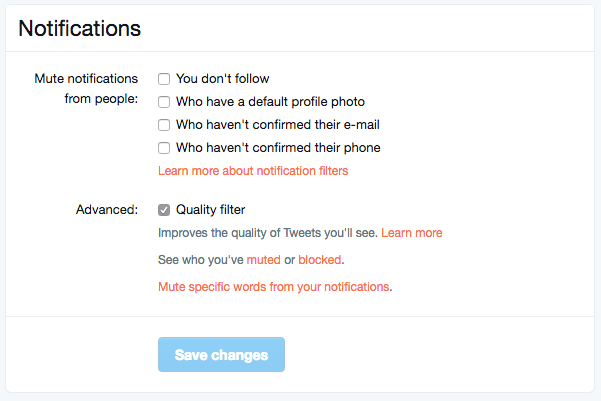
    Twitter was in the news last year because of a common theme of internet trolls bullying users, especially celebrities. This caused Twitter to begin working on some new ways to “clean up” what you see in your feed. In the last several days Android and Desktop Twitter users were given the power to block notifications of posts from certain types of accounts, including those who haven’t verified their email address and phone number. The common practice of these trolls is to create fake accounts just for the sole purpose of messing with someone. They don’t verify the account or even include a profile picture, displaying the default bird’s egg logo instead. The new tools developed by Twitter will allow these trolls to be filtered out by simply clicking a couple of checkboxes.


    What Parents Should Do

    Suicide is now the third leading cause of death among teens and a teen that is cyberbullies is ten times more likely to think about killing themselves. These statistics are a reality in this digital world and are a wake up call that parents need to take the opportunity to filter content in their kids social media feeds seriously. These notification filters can help remove some of the negative and hurtful people that just seem to want to make trouble on Twitter.


    Take note of the above picture. If you go to the notifications tab on twitter you’ll see a Settings link on the upper right. Click that link and you should see something similar to this image. It’s pretty straight forward but if you turn off notifications for anyone who hasn’t set up their profile picture, validated their email, or linked their phone number you’ll eliminate many of those troll accounts that cause so much trouble. Remember that Twitter and other social media sites contain “User Generated Content” and therefore, can’t be considered safe for anyone under 17. This means you should keep an eye on what your child or teen seeing on Twitter and have conversations with them about it. As them why they use Twitter. Find out if they’ve ever been teased or bullies on the app. If so, ask what they did about it and who they told. Kids who talk about being bullied are far less likely to take drastic measure as a result of it so open the lines of communication and be present when they need you. You should be that safe place they can come to with any problem. Bullying on social media is no exception.

    Follow all of our posts to keep in the loop on family relevant tech topics. Sign up for our weekly update newsletter. 


    Get Our Latest Posts in Your Inbox

    * indicates required


  • Should Parents Worry about the Video Messaging/Live Video Craze?

    Should Parents Worry about the Video Messaging/Live Video Craze?

    Periscope, Facebook Live, Twitter, Houseparty, Squad, Instagram, and now here comes Ping Pong. These are all ways to record or live broadcast your life or segments of your life for the entire internet to see. Our teens and young teens are eating up this new live and sometimes raw form of communication. I’ve mentioned Musical.ly a few times in the past and warned parents about some of the risks associated with the app. This week, Musical.ly has announced the release of a their newest application, Ping Pong. This app allows users to record and send video messages much like Snapchat or Instagram Stories.

    Musical.ly launched Live.ly, a live broadcasts app last fall and have seen major success in adoption of the service. In fact, there are many users who are now just live streaming almost every moment of their lives. Users can create their own channel for people to follow and be live online at any given moment. The issue here is that some of Musical.ly and Live.ly’s most popular users are young people who aren’t even old enough to have their own social media page. Apparently that doesn’t bother the CEO of Musical.ly at all.

    While Ping Pong hasn’t fully launched yet (it’s available but you can’t create an account) it is being rolled out soon and will be another app that parents must understand.

    What a Parent Should Know

    Live video and video messaging are now mainstays of the social media your teens and young teens are using every day. It’s important to remember that they are able to broadcast and watch broadcast of everything that happens in their and their friend’s daily lives. For most young people this is going to be trips to the coffee shops, dumb stunts in the gym at school, and evening’s at friend’s houses goofing off. Unfortunately it can mean other, less savory, content as well. These apps are rated for ages 17 and up because the content is provided by the users of the services. This means that parents are expected to be monitoring what their kids are doing on these applications. Allow me to second that expectation. Use monitoring software like TeenSafe and filters like NetNanny to guard your teen from unwanted content. This will protect them while giving them full use of the social media they want to have access too. They will just be using it under your boundaries.

  • Twitter Changes Settings to Combat Bullying and “Hateful Posts”

    Twitter Changes Settings to Combat Bullying and “Hateful Posts”


    Twitter is working to decrease the amount of “hate speech” that happens in their social media site. They have made it possible for victims and bystanders to report hate speech that fits the following description:

    “specific conduct that targets people on the basis of race, ethnicity, national origin, sexual orientation, gender, gender identity, religious affiliation, age, disability, or disease”

    Twitter didn’t stop there, though. They added something I’ve wanted social media to make available a long time ago. They now allow the filtering out or “Muting” of notifications that contain key words, phrases, and even emojis, that you consider offensive. While you may still see these posts in your timeline, you won’t be alerted to the post even if you are tagged in it.

    These major adjustments are seemingly more and more necessary due to the commonality of bullying on social media. Twitter has been in the news many times this year for different celebrities shutting down their Twitter accounts after being victims of racial or sexist bullying.

    Another neat thing about the new update is that hate speech reports are handled by human moderators, not algorithms. This means that each case will be handled by trained humans and not some bot that automatically shuts down an account after too many reports.

    What Parents Should Know

    This update is significant because it’s anti-hate speech and anti-cyberbullying. The way young people treat each-other online can be quite volatile. It seems that the apparent anonymity of social media gives kids a sense of invulnerability and they post whatever they think. Let’s be honest though, this isn’t just kids. These changes are happening because the problem has gotten bad enough that even some of our most loved celebrities are experiencing the backlash.

    Lets hope more and more social media sites begin to add these features. This will help us protect our kids and give them another way to protect themselves.