Tag: tracking

  • Life360 Location Tracking for Families | Lets Review Video

    Life360 Location Tracking for Families | Lets Review Video

    Here is the next installment of our Lets Review video series. In this video I look at Life 360. They advertise themselves as “Your new family circle.” The app provides location tracking, driving behavior monitoring, arrival and departure notifications, and in app family messaging. All of these features are good and important. You may be surprised, however, at why I don’t recommend the app. 

    Features that are available in other apps, hard to find price lists, and a paywall for support are just the beginning of why I’m not jumping for joy about the Life360 app. Check out the video for a lot more of my thoughts. 

  • TUTORIAL: How To Use Accountability Software

    TUTORIAL: How To Use Accountability Software

    One of the easiest ways to protect your kids online is to monitor their internet activity. Accountability software is the most effective way to do that. Accountability software does not block anything, it will report when something inappropriate has been viewed so you can talk to your child or significant other about what they spend their time doing online. 

    Our favorite Accountability Software is Accountable2You. I love it for a lot of reasons, probably the biggest reason is their support base. I have had a great experience when I have had to contact their support team to help me figure out setting up new devices. Some of the best features of Accountable2You are their GPS tracking (included,) their iOS VPN settings, and their time management tracking. 

    The video above will walk you through how to sign up and use Accountable2You. We are an affiliate of this software and you’ll get 30 days free if you use our promo code: BECAUSEFAMILY. 

  • You Can Now See What Advertising Data Twitter Has on You

    You Can Now See What Advertising Data Twitter Has on You

    A new update today from Twitter allows users to look at the information that’s been gathered about them by Twitter and by “partner” advertisers. Not only can you view this information but you can edit it as well. If you don’t like a category you’ve been placed in, you can simply uncheck that option and opt out of the advertising for that topic. I took it for a spin and was surprised at a few of the assumptions that were made.

    First of all, I was on the list for pretty much every type of food. Packaged food, fresh food, deli meats, non-dairy milk, and the list goes on and on. Apparently I’m an eater. I was also labeled the mother of 3+ children. It’s half right. I’m the FATHER of four kids. Obviously I am being targeted for minivans and pick up trucks and family vacation packages. It was even pretty spot on with my annual income. Kind of crazy, really.

    Here’s how you can check out your Twitter ad data for yourself:

    What Parents Should Know

    It’s pretty safe to assume that if Twitter has this information about you then your other social media platforms have the same information or even more. This info can be helpful to us because it helps connect us with the products we want or need. It can be troublesome, though, to think about all of the data that’s been gathered about us and especially our kids. I recommend you use this new feature as a tool. If you have a Twitter account then use the steps above to go check out your ad data and learn about what you reveal about yourself with your online behavior. Then, talk to your kids about what you’ve found. If your kids have a Twitter account then you should have them go take a look at their information as well. Then have a conversation with them about how they represent themselves online and what this date means in real life. Here are a few talking points.

    1. Advertisers track information from all of your internet activity. Not just what you post on social media.
    2. When you click “I Accept” on any Terms and Agreements for a website or social service you’re agreeing to allow them to have this advertising information.
    3. Since this advertising info is being collected you should keep that in mind while you surf the internet. Remembering that info is being saved could help you think twice about unhealthy internet habits.

    Using a tool as vast as the internet has its tradeoffs. You’re going to have to give a little in order to get the benefits that the world wide web has to offer. In this case, twitter is allowing you to see a bit of what you’re paying. Thankfully, they’ve also given you a bit of control. Being able to turn off advertising options for different topics is a cool feature that I hope will show up on more social media services. In the mean time, remember to keep talking to your kids about how they use the internet and be sure to be a good example yourself.

  • Three Apps that Can Help Any Parent

    Three Apps that Can Help Any Parent

    We spend a lot of time on this site talking about what apps you shouldn’t let your kids have. For this Friday post I would like to share a little bit about some apps you should get for yourself. I found as I dig around the internet that there are new resources for parents being released all the time. Digital resources are a new way to help you be safer, more organized, and more efficient.

    1. Mothership (by FamilyTech)

    Mothership is a great way to organize all the tasks that you need done in your home. It will pair with other apps like chore monster to distribute some of the needed duties to the members of your family. Mothership is a great idea for the family who is looking for ways to reward kids for doing chores and ways to organize the things everybody needs to get done. There’s even an app I can help mom and dad’s reward each other for accomplishing the tasks they need to do, it’s called Honeydo. We just recently wrote about the fact that Disney circle will connect with mothership to use screen time as a reward.

    2. Daniel Tiger App for Parents

    If you have young children like we do and you may find yourself constantly watching Daniel Tiger. That’s not so bad since some of the songs Daniel tiger sings can help you convince your kids to do the right thing. This app takes that into account. With songs, ideas for conversation starters, and follow up questions, The Daniel tiger for parents app gives you some cool tools to help you bring their love of the character into their learning. The Daniel tiger for parrots app is free on iTunes or android.

    3. Life 360

    As your kids get older you’ll find yourself off and wanting to keep track of where they might be. The life 360 app makes that as simple as opening a map and see for yourself. This app is created to help you stay connected to your family runs on a mobile device and let you if you found the numbers on the map communicate with them, and receive alerts when they arrived at their destination. You can even pay for more features that will allow you to get an alert if they use the phone while driving and many other cool features. These features only cost you about $2.99 a month or $25 a year. That is a small price to pay always know where your kids are and if they’re safe.

    The internet can be a dangerous place. But it also can be very useful. If we as parents learn how to leverage the benefits of digital life we can help our family be more organized, safer, and smarter. Keep informed of the latest trends in social media and other family relevant tech news by subscribing to our mailing list. You’ll also get free access to the online version of our Setting Digital Boundaries Workshops.


    Get all the latest family tech news in your inbox.

    * indicates required


  • Trusted Contacts by Google Is a Great Idea for Parents

    Trusted Contacts by Google Is a Great Idea for Parents


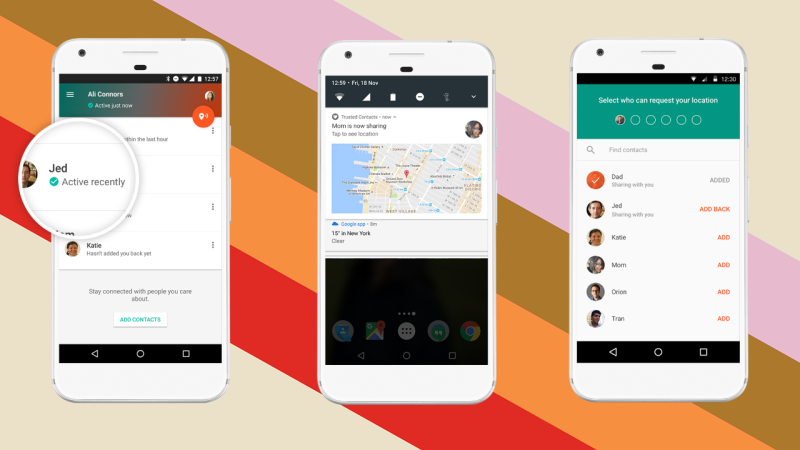
    I remember being a kid and riding my bicycle or rollerblades all over the neighborhood. We could go out and have all the fun we wanted as long as we checked in here and there. That usually meant trekking back to the house and hollering in the back door, “Mom! We’re good” and heading back out for the next adventure. Times are changing. It’s getting increasingly troublesome to allow your kids or teenagers to go out and do things without you. Our technology has been giving us ways to keep updated with our children’s activities for a while now but the newest app from Google, “Trusted Contacts” might be one of the better options.

    For years I have been helping parents set up tools they can use to protect their kids online. GPS tracking has always been available in some way as addons or with a workaround in certain apps but Trusted Contacts was built to do exactly what parents have in mind when they think of tracking their kids’ location.

    “We’re actually going to help some people, and potentially save some lives.” – David Tattersall, (Google)

    The app was built to help keep people safe. Whether checking in as ok during a natural disaster, allowing your location to be viewed while walking home from a friend’s house at night, or keeping an eye on our kids while they are out with friends, Trusted Contacts gives a simple way to remind them to check-in. Even tech writers are seeing the implications for family safety:

    I can definitely see how parents will want to install this on their kids’ [ . . . ] phones though. – Frederic Lardinois (TechCrunch)
    trustedcontacts2After installing the app you set up which contacts in your phone are “trusted.” Then whenever they want, they can ping your phone with a notification to check in with your location. You will tap the button to check in and it will update them for you. You can decline to update but if you don’t do anything for five minutes, it’s going to send them your information automatically. This will allow you to update them that you’re safe, as it will alert them that you declined, but without disclosing your location.

    Trusted Contacts is only available for Android but the iPhone version is in development. If you and your kids have Android phones I recommend downloading this app and setting it up soon. As your kids go about their increasingly busy schedule, you’ll quickly see the benefit of being able to remind them to check-in with their location. This is a pretty cool new tool for parents.

    In the meantime, there are ways to view and track location on an iPhone (mainly using messenger.) Stay tuned for a video for subscribers that will teach you how to set that up.