Tag: tips

  • Four Blue Whale Challenge FACTS

    Four Blue Whale Challenge FACTS

    There are a lot of misconceptions about the Blue Whale Challenge. Some are calling it the latest threat to our kids while others are saying it’s being blown out of proportion. The short video below unpacks some of the facts that I’ve discovered as I look deeper into this trending topic.


    The Facts:

    1. Kids ARE hurting themselves because of this the Blue Whale Challenge
    2. There have been zero (0) confirmed suicides resulting from the Blue Whale Challenge.
    3. Authorities are concerned we are going to turn this into something because of the popularity we’re giving it.
    4. There are steps you can take and you should take them now.

    What Parents Should Know

    There are always reasons to take a trend like this seriously. We, as parents should be vigilant to keep an eye on what our kids are doing online while not allowing the trendiness of a topic like the Blue Whale Challenge cause us to inflate it into even more of an issue. Be wise and take the steps you know to take to keep your kids safe online.

    My Advice:

    1. Know who they talk to online.
    2. Follow them on your social media accounts.
    3. Have their login information for EVERY social media account they have.
    4. Keep an eye out for the signs of depression or other struggles.
    5. Talk to your children openly about the dangers of buying into these trends and communicating with people you don’t know.
  • 5 Apps that are Tech Safety Expert Approved!

    5 Apps that are Tech Safety Expert Approved!

    When I do Digital Boundaries Workshops I begin by sharing all of the dangers of unsupervised internet and mobile device use. I then walk through the best practices for keeping your kids safe in the digital landscape they are navigating. I also, spend a lot of time answering questions. I received a question this week that I hadn’t been asked ever before. “What are some apps that you would recommend for my family.” Huh…I hadn’t thought of that as much. I spend so much time looking at the dangers that are so prevalent online that I often ignore some of the resources that can be fun for families. Here’s a list of five apps that I approve of.

    Social Media

    Instagram

    While I always recommend parents keep to the age restrictions recommended by the terms of agreements on a social media platform (usually 13 plus;) I also know how popular social media is and that your teen is going to want to open an account as soon as you’ll allow them. When you’re ready to give them permission, I recommend you start with Instagram. The first reason is pretty simple. Instagram is easy to monitor. You can easily put your kids’ account(s) on your installation of Instagram and keep close tabs on what they’re doing on it. You can even use that method to be notified when they get a direct message.

    Any social media opens you up for some problems. They say it isn’t great for self image and self esteem and there is always inappropriate content that can be accessed because of the fact the content is posted by users but if you’re going to give in and allow some form of Social Media then Instagram is a better starting point than Snapchat or Twitter. There a a lot of reasons and I’ve written about most of those already.

    Gaming

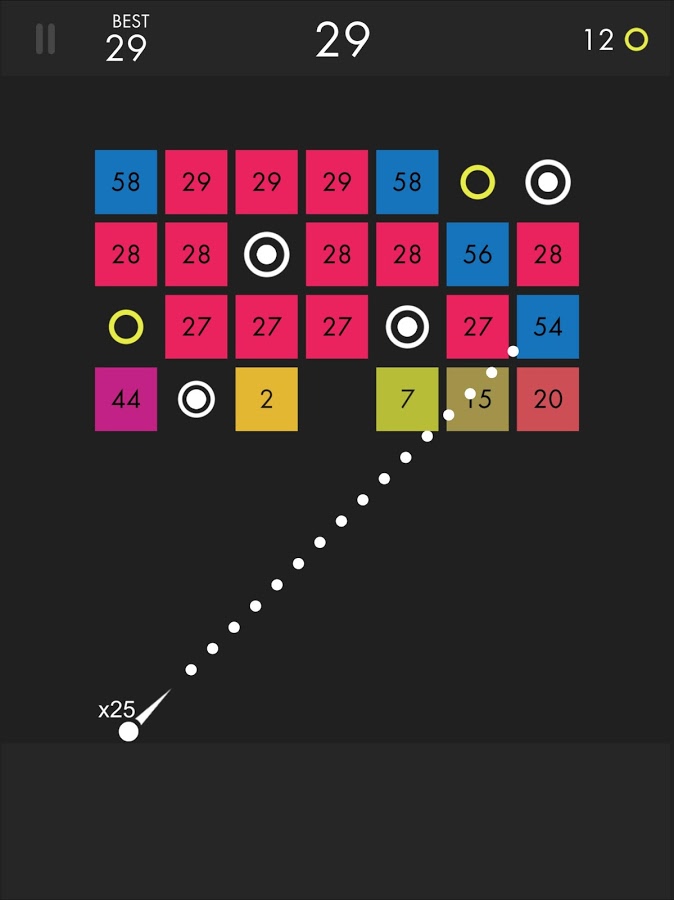
    Ballz

    This game is super fun and addictive. It’s a pretty basic concept. You swipe back and release to launch a ball to bounce around the game-board and break up blocks. The blocks have numbers on them that show how many times you need to hit the block to make it go away. You collect more “ballz” and launch them all at the same time. (I’ve launched as many as 110 at once.) This becomes extremely satisfying when you fire all of the balls towards the blocks and watch the numbers on them decrease as quickly as the block is hit by each ball. Like I said, while it’s satisfying, it’s also very very addicting.

    This game is approved because, while it has ads, the ones I’ve seen have all been for more games by the same developer. This has kept anything inappropriate from creeping up as a banner ad. I approve because it should be pretty safe and because it is just so darn fun to watch all those little balls bounce around and devastate the the game-board full of blocks.

    Research/Education

    Kiddle

    Kiddle isn’t an app. It’s a website. You can very easily save the site to be an icon on the home screen of your phone and then tell your kids to use it as their search engine. I’ve written quite a bit about Kiddle already, so go read about how the search engine works and let your kids research and learn without fear of coming up on anything nasty or scary.

    Entertaiment

    Amazon Prime and Freetime

    Amazon Prime’s kids profiles are some of the best because the shows are curated by human editors. That means that actual people have looked at the shows and determined that they are actually safe for kids. Freetime is a special way to subscribe to only kids content so that you can be sure that they’re not seeing and adult targeted shows. If you don’t have Freetime you won’t have access to kids profiles but you can still set parental controls so that content above a certain age range won’t be accessible without a pin number. Kids can’t see these shows and movies without the pin but they’ll still be able to see the thumbnail image in their “carousel.”

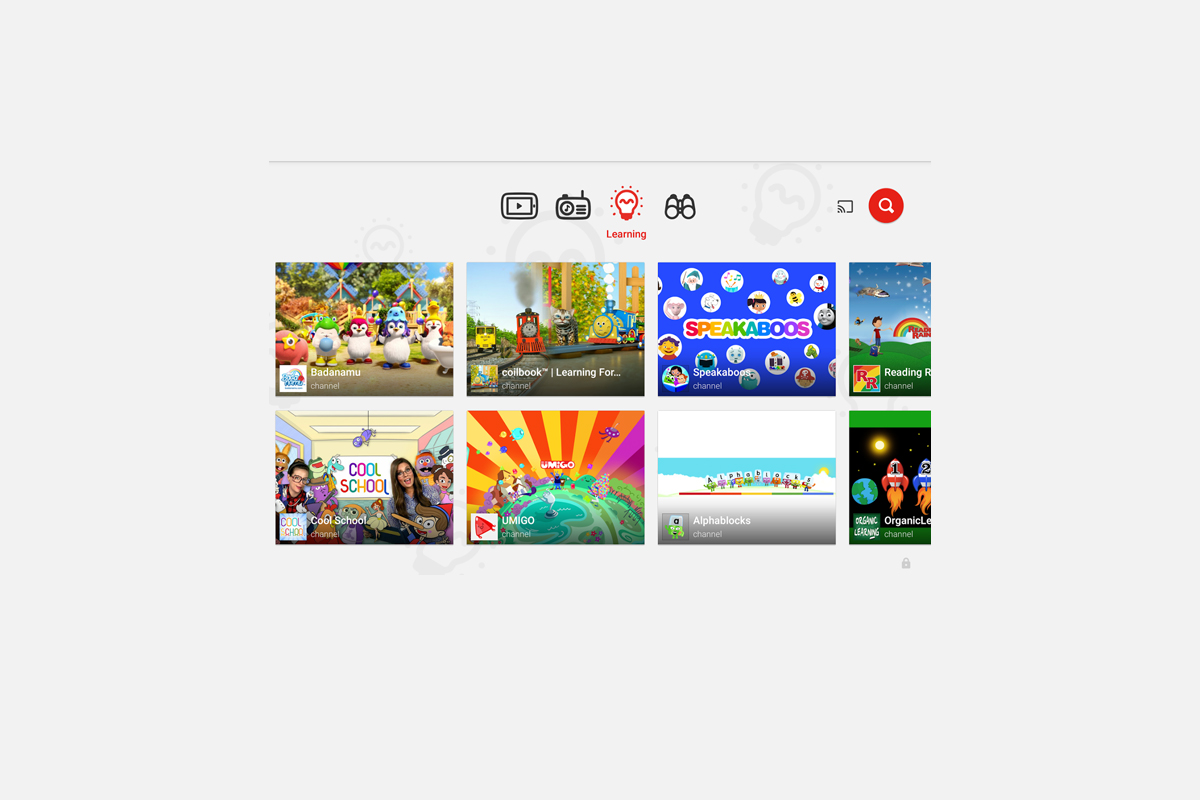
    YouTube Kids

    YouTube kids is a good option simply because of the popularity of YouTube for our children. Kids love watching all different kinds of content on YouTube and YouTube Kids makes it possible to allow them to watch their favorite channels without potentially finding videos that aren’t appropriate for their age. YouTube Kids separates their content by topics like music, education, and shows so kids can find what they want pretty easily. The only downside to YouTube Kids is that it’s monitored with an algorithm and depends on reports from parents to remove suspicious and inappropriate content. This has caused some concern for parents in the past but if you are going to allow you kids to watch YouTube then YouTube Kids is absolutely a better option.

    That Being Said

    I’m not used to thinking about what apps parents should install but I’m grateful for the question this week to give me the idea for this article. Please remember that all of these apps constantly add new content and features and sometimes that makes them less appropriate for kids. As for right now, though, I give these five apps a green light for your kids’ devices as long as you and they use the apps in the way they’re designed to be used.

  • How To Control What You See on Every Social Media Timeline

    How To Control What You See on Every Social Media Timeline

    One of the most common complaints I hear from parents is that they never see the posts they want to see on their social media timelines. They will scroll through their Facebook or Instagram feed looking for an interesting post, something from family, or even their own children and instead be bombarded with articles about politics or silly memes or chain letter type posts that want you to click like and share for some reason. If your feed is crowded with this sort of chatter it makes enjoying the purpose of social media very difficult. If you’re like me, you use your social media feeds as a way to keep up with friends and family, to promote the work that you do, and to be entertained and laugh at silly internet things. Well, the algorithms designed by those who build these social media platforms are created to give you the best experience. The problem is that it’s all based on your behavior on the site or in the app. If your behavior contributes to the clutter then you’re just going to get more clutter. Here are some tips to help you sort out the mess that may be your social media feeds.

    Remember who is on what social media service.

    There are different audiences on different social media sites. The split is based on a number of factors. Age, career, and gender are the major contributors. Twitter, for instance is more popular for young professionals looking to network and build a community of like minded business people. Instagram is a whole lot of young people and young parents who got tired of the clutter in Facebook and Twitter and just enjoy sharing photos. Facebook has a very large middle aged demographic and has seen a major decrease in young users over the past several years. Snapchat is full of youngsters but is growing rapidly in the 18-25 demographic. The reasons that people choose the platform that they choose can seem pretty obvious and it’s important to keep those reasons in mind as you use social media. You aren’t going to care too much about the photos of a ton of young parents and teens if you’re a middle aged parent who’s adult kids who have no children of their own yet so you may not open an Instagram account. As soon as your 22 year old daughter and son-in-law have a baby, though, and post photos of her online. Instagram is where you’ll want to be.

    Don’t like and join every FB page or group you’re invited to.

    Facebook Pages are created for advertising and promotion. They all link to a business, blog, or something of that nature. Because of this they’ll post nonstop and any time you react to one of their posts in any way you’re telling Facebook to show you more of what they post. So, if you’re a follow of a Facebook page, say the BecauseFamily Page, for instance, and you want to see more of the great resources and articles that they share, you’ll want to interact with their posts more. If you follow a page like Silly Kittens Playing Piano (I think I made that up but it’s probably out there somewhere) that posts fifty pictures a day that you don’t really even find that funny, you’re going to see more of those photos than you see most other things. Especially if you have ever clicked the like button on any of them.

    You see, the algorithm on Facebook gives you posts from the pages and groups you’re apart of based on how often you react to those posts. When you click the like button on every kitten picture you see, you’ll eventually see almost nothing but cat pictures on your Facebook feed. Now, if that’s what you want then awesome, but if you’re trying to keep tabs on what your kids are posting online, those cats are going to get in the way. You should probably click like a lot less. That’s my next tip.

    Leave the Like Button Alone!

    The like button on Facebook or the heart icon on Instagram and Twitter is basically a little “show me more” button. This is you telling the algorithm that you enjoy that kind of content and want to keep seeing it. The problem with this is we treat the Like button as passive aggressive head nod toward the content we’re seeing. You have to understand, it’s more than a head nod. It’s a subscription. You may be seeing tons of posts that you think are stupid or posts from people you barely even know. If you are, it’s because you’ve been clicking like as if it’s the same thing as a casual grin across the room. I’m sorry to say it but it’s your own fault.

    A couple of years ago I swore off of the the like button. I decided that if a post isn’t worth a comment, I wouldn’t react at all. After a couple months of that behavior, my Facebook feed started to become enjoyable. I see the geeky stuff that I like more than I see anything else, I don’t see much annoying click bait content anymore, and my friends and family are front and center and they don’t even have to tag me in their posts. I’ll often show my wife something hilarious that has come across my Facebook feed and she’ll ask me why my feed is so awesome. I don’t click like on ANYTHING I will tell her. Now, I will add that likes on comments within a post are an exception. I’ll often click like on a reply to one of my comments. That doesn’t add to the clutter since it’s on a post I have already commented on, thus deeming it worthy of being filed with the algorithm as something I’d like to see more of.

    Lastly on this topic, it’s important to remember that nobody gets blessed, goes to heaven, or receives better medical care because of a Facebook like. That’s called click bait and it only exists to help the page that shared it get more traffic and sell more advertising. 

    Only open posts from people you want to hear more from.

    Sometimes we see a post that peaks our interest and before we know it we’ve dived head first down a rabbit hole. When you click on a post on Facebook or Twitter, the algorithm remembers it and feeds you more posts by that poster. That means the rabbit hole doesn’t end when you’ve closed the article. It will continue on your feed from now on. The most important thing when deciding what links to click on on social media is who is posting it. If you don’t want to see more from that person or poster then you shouldn’t click the link. Also, it’s important to consider the original poster, not just the person who shared it. This info can help you populate your feed with only people who’s word you trust and respect and fewer of the random and nonsensical articles that seem to be so prevalent in our social media feeds these days.

    Use the “Follow,” “Notifications,” or “See First” options. 

    A great way to make sure you don’t miss a post by someone you care about is to tell Facebook you’d like to “See if First.” You can also tell Instagram or Twitter to notify you when someone you want to follow posts something. You can watch this video to see how to set up notifications on most of your accounts.

    Take Control

    Social Media algorithms are often treated like an enemy that we struggle to fight against. Every time Twitter or Instagram or Facebook changes the way they order your news feed petitions start showing up to put it back the way it was. The truth, though, is that these algorithms are tools. It’s a form of artificial intelligence that was designed to give you more of what it thinks you want. It decides what you want based on how you act. This means that if you don’t like what you’re seeing on your timelines, you need to change what you’re doing on your social media accounts. I’ll ignore the obvious life application here and just recommend that you apply some of the above advice to how you handle your online experience. Get back to me in six months and you can thank me for how much more “well behaved” your timeline has been recently.


  • Musical.ly Teams Up with Apple Music to Sell You More Stuff

    Musical.ly Teams Up with Apple Music to Sell You More Stuff

    Musical.ly allows users to film themselves lip-syncing and performing current pop music hits and scenes from movies or TV shows. It has become one of the most popular apps for teens and pre-teens and a connecting point for music artists and their fans. In fact, there are now Musical.ly stars who are seeing success in more mainstream markets as well. Most of them are quite young teenagers. Today, Musical.ly has announced that they’re partnering with Apple Music to provide the song clips that make up their lip sync library. They will also be promoting subscriptions to the music streaming service and allowing Apple Music subscribers to listen to full versions of songs.

    Musical.ly grew a ton in 2016 and has seen a tapering off in their young audience during the beginning of 2017. This move seems to be a way to bring more value and financial stability to Musical.ly while putting Apple’s music streaming service in front of another audience. Apple Music has been chasing Spotify for subscriptions and the aren’t gaining ground. This is an obvious attempt to target Musical.ly’s young audience with their option for streaming music. Allowing full versions of the songs kids are lip syncing to in the app is adding value that many of the app’s users will see as valuable. Possibly valuable enough to ask their parents for a subscription to Apple Music. That is if they don’t have the ability to sign up on their own.

    What Parent’s Should Know

    I have been pretty outspoken on my disdain for Musical.ly in the past. One of the major reasons is the lack of an age restriction to sign up and the CEO’s attitude about it. Now I see another potential hang up for parents who’s kids use the app. There are already songs available on the app that many parents may feel are unsuitable for the age of their kids that use the app. Now the entire songs will be available if you are one of the 20million families who have an Apple Music subscription. If you don’t have a subscription be warned that the app will be consistently asking your pre-teen if they’d like to sign up for one. Also, there are likely to be features made available that won’t be useful without an account with Apple Music. How many times will your 13 year old have to be blocked from using a song until they start asking you to subscribe for them. Advertising is still, however, the least of my worries with Musical.ly.

    Parents of young teens should pay close attention to what their kids do on Musical.ly. If your young daughter is spending a lot of time singing and dancing in front of her camera know that there is no age verification so the fourteen year old boy who watches every one of her videos could actually be anyone, anywhere, of any age. In this day and age where kids are being asked to meet up by strangers and actually saying yes, there is no reason for your kid to be unsupervised on an app like Musical.ly. I recommend and uninstall if your kid is under 17 and then to closely monitor their use of the app. 

  • YouTube Kids Coming to Your Smart TV

    YouTube Kids Coming to Your Smart TV

    The kids version of YouTube kids has been talked about a lot. Mostly because of breaches in their algorithm based filtering system. Cartoons are disguised as silly kid shows and take a turn towards the inappropriate. The way YouTube Kids governs their content has been under scrutiny for months with mere apologies as a response. Well, now this service may be coming to your Smart TV.

    Specifically, the app will come to the following TVs: all 2015-2017 LG webOS TVs (via the LG content store); all 2013-2017 Samsung Smart TVs and Blu-ray players (via the Samsung App Store); and, following a firmware update, 2016-2017 Sony TVs (with the exception of Android TV, which is coming soon). – Techcrunch

    YouTube Kids is an effort to allow children to gain access to the content that’s appropriate for them without coming in contact with more inappropriate videos. YouTube has even launched some original content, featuring some successful kid related YouTube entertainers. Millions have adopted this service and use it as a way to entertain their children. As mentioned above, there is always a concern when algorithms are used to filter adult content. I recommend parents eyes are on YouTube Kids often. In fact, I had a little rant about it the other day.

    Follow Us On Facebook

    What Parents Should Know

    As I said, Parents shouldn’t accept YouTube’s algorithm as a foolproof way to keep your kids from seeing something they don’t want them see. There are those out there who disguise their more adult oriented entertainment as kid shows for whatever reason. Moms and dads should be checking in on what their kids are watching. I think the move to smart tvs is a good thing because making the screen bigger allows parents to more easily see what is being viewed. If YouTube Kids is available on your tv, maybe you could let them watch their toy unboxing videos on there next time and peak in on what they’re watching every now and them.

  • Use Twitter’s New Tools to Protect Your Kids from Trolls

    Use Twitter’s New Tools to Protect Your Kids from Trolls

    Surprisingly, more of our teenagers are using twitter than you may think. The common attitude among young people is it’s a good place to express yourself even if you’re not sure anyone is listening. Twitter is still a place for teens to go public with their thoughts and opinions. The potential problem with such expression is that there are always those out there wanting to counter your opinion. Often this takes on the form of trolling or bullying. Twitter has released some tools that can help their users filter out some of those trolls and parents need to learn how to use them.
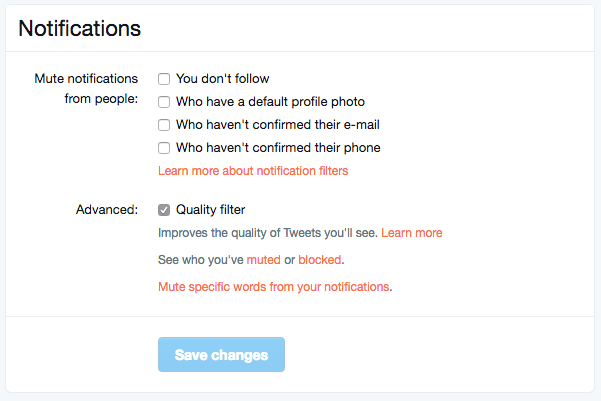
    Twitter was in the news last year because of a common theme of internet trolls bullying users, especially celebrities. This caused Twitter to begin working on some new ways to “clean up” what you see in your feed. In the last several days Android and Desktop Twitter users were given the power to block notifications of posts from certain types of accounts, including those who haven’t verified their email address and phone number. The common practice of these trolls is to create fake accounts just for the sole purpose of messing with someone. They don’t verify the account or even include a profile picture, displaying the default bird’s egg logo instead. The new tools developed by Twitter will allow these trolls to be filtered out by simply clicking a couple of checkboxes.


    What Parents Should Do

    Suicide is now the third leading cause of death among teens and a teen that is cyberbullies is ten times more likely to think about killing themselves. These statistics are a reality in this digital world and are a wake up call that parents need to take the opportunity to filter content in their kids social media feeds seriously. These notification filters can help remove some of the negative and hurtful people that just seem to want to make trouble on Twitter.


    Take note of the above picture. If you go to the notifications tab on twitter you’ll see a Settings link on the upper right. Click that link and you should see something similar to this image. It’s pretty straight forward but if you turn off notifications for anyone who hasn’t set up their profile picture, validated their email, or linked their phone number you’ll eliminate many of those troll accounts that cause so much trouble. Remember that Twitter and other social media sites contain “User Generated Content” and therefore, can’t be considered safe for anyone under 17. This means you should keep an eye on what your child or teen seeing on Twitter and have conversations with them about it. As them why they use Twitter. Find out if they’ve ever been teased or bullies on the app. If so, ask what they did about it and who they told. Kids who talk about being bullied are far less likely to take drastic measure as a result of it so open the lines of communication and be present when they need you. You should be that safe place they can come to with any problem. Bullying on social media is no exception.

    Follow all of our posts to keep in the loop on family relevant tech topics. Sign up for our weekly update newsletter. 


    Get Our Latest Posts in Your Inbox

    * indicates required


  • Snapchat isn’t Just a Messenger Anymore

    Snapchat isn’t Just a Messenger Anymore

    It may have all started with “secret” messaging but it hasn’t stopped there. Soon public sharing became the norm on Snapchat, a feature that was copied by many other Social Media networks soon after it’s release. Then, Snapchat’s “Discover” page was released, this was a way for news and media corporations to reach the users of Snapchat with their messages and advertising. Lately, Snap Inc. has been working towards becoming a serious form of entertainment for it’s users, incorporating videos and even original show content into their network. Today, VICELAND has announced they’re producing several new shows exclusively for Snapchat. They’re starting with a “reality” dating show titled “Hungry Hearts with Action Bronson.”

    VICELAND Productions is following several other studios in making original shows for Snapchat. Networks including NBC, CBS, and A&E have already announced that they’re making versions of their existing shows for viewing on Snapchat. These studios are seeing the growing adoption of Snapchat as an opportunity to reach a broader audience with their shows and content. One of the fastest growing demographics on Snapchat is the 18-35 age-group, one of the main target audiences for the late night and primetime television networks. With this trend towards entertainment content on our social media apps, it’s important that parents are aware of what these apps are becoming, we have to make good decisions on whether or not we want our kids consuming the media they’re producing.

    What Parents Should Know

    Snapchat isn’t a trend and it’s not just a messenger anymore. What was once the “Secret Message App” or the “Sexting App,” as some called it, is now a major source of media for those who use the social media platform. This means we have to treat it differently than we do many social media apps. Keeping track of who they are friends with on these networks isn’t enough anymore. We have to keep a few things in mind if we are going to allow our kids to use Snapchat, Instagram, or any of these other apps that give advertisers and media content creators a direct outlet to our kids.

    Same Media as TV, Movies, YouTube, or Games.

    The creators of the content that will be made available through social media (Facebook has been signing agreements with media companies too) aren’t producing special more family appropriate shows. They will be making content that will reflect every other media outlet they produce for. Think YouTube Red, Netflix, or Amazon Prime. In fact, some of the rules that apply to broadcast television don’t apply to shows that are streamed online. This means that you’re more likely to see content like on Game of Thrones or Orange is the New Black than something with more restrictions like Blacklist or CSI. Don’t let the fact that these programs are being produced for free public streaming online fool you. They won’t be family friendly or edited for content.

    No Parental Control

    Snapchat currently has no parental control options. Their app is geared towards teenagers so they most likely won’t feel the need to add parental restrictions any time soon. The terms and agreements on most social media services allow for accounts to be created as long as you’re 13 years old or older. The question you have to ask is whether or not you’re ok with your 14-15 year old watching online reality dating shows or politically fueled sketch comedy. If you aren’t ok with these things then you have to make a choice about whether or not snapchat is welcomed on your kid’s phones or tablets.

    All or Nothing

    Social media apps are basically creating an “all or nothing” atmosphere for content created by these media outlets. Once you have an account on Snapchat, you have access to all that is contained in the app. Every person can be a friend or follower, every feed can be found and viewed, and every original show, no matter the target audience, will be available for viewing. With no parental control options the question isn’t what Snapchat content will be allowed, it’s “all or nothing.” They can see all of it, or none of it, those are your only choices. 

    Whatever you choose, you need to be educated about what these social media apps are producing. Keep checking in to Safe.BecauseFamily.org for up to date tech news that’s relevant for your family. Also, sign up for our Safe Online Newsletter. Just fill in the short form below.


    Sign Up for the Latest Family Tech News in Your Inbox

    * indicates required


  • Parental Control Hardware “Circle” Announces Integration with “FamilyTech” Apps

    Parental Control Hardware “Circle” Announces Integration with “FamilyTech” Apps

    Circle is one of our favorite resources to recommend to families. With its simple to use app and customizable, profile based filters Circle is one of the most accessible parental control options out there. At a price tag of only $99 it’s affordable too. Today, Circle announced Circle Connections, the roll out of integrations of some new resources to make it one of the most extensive filter and time management apps available. These integrations will soon add the ability to stop notifications from social media apps while your child is driving and allow you and your kids to use Amazon Alexa to set and monitor your time limits. Launching first, however, is a partnership with FamilyTech.

    The new platform, Circle Connections, allows Circle users to connect other partner apps, devices, and services to offer rewards, automate features, and much more. These other pieces of Circle help leverage some of the biggest drivers of family life: screens, physical activity, teen driving, and social media.

    FamilyTech launched late last summer and is a chore/time management system developed by CEO Chris Bergman. The system features four apps. Mothership, the hub for setting chores and giving rewards. ChoreMonster, an app for kids that rewards them for meeting their chore goals. Honeydo, a way for couples to communicate what needs to be done and get more accomplished. And Landra, the home productivity solution for older kids and teenagers. This partnership is going to set Circle up to be one of the most extensive time management and parental control options available to parents.

    For Example

    With Circle’s time limits, the integration with FamilyTech can do a lot for parents. Imagine your child has an excellent week of chores. The choremonster app asks what reward they would like and they choose to extend their bedtime. ChoreMonster will communicate with Circle and their bedtime will be extended to whatever reward time you’ve set up. Pretty much automated rewards. That sounds awesome.

    As mentioned, some of the functionality will be released in future updates but the integration with FamilyTech is rolling out now. If you have circle, be sure to update often and take a look at what FamilyTech’s apps can do for you. If you don’t have Circle yet, maybe this will be a pretty good reason to give it a go.

  • The Risks of a Fully Connected Home Part 2

    The Risks of a Fully Connected Home Part 2

    The Internet of Things has made its way into our homes and we are becoming increasingly used to being tracked and monitored. In this, part two, of our connected home series, we’ll look at advertising and what it means to our privacy, our homes, and our families.

    Advertising

    Our society has become so accustomed to our data being used to advertising that we aren’t even creeped out by the ads on Facebook reflecting our Amazon searches last night. When we get spam email based on what we did online last week, we just hit the delete button and think nothing of it. Individualised targeted advertising is a part of everyday life now and that’s probably not ok. When everything in our home is connected to the network we are feeding data miners with so much advertising fodder that it will become impossible to ignore the onslaught of targeted ads we will recieve. Imagine when your fridge can tell that you’re out of milk, so you get an advertisement for a coupon at Walmart in your email fifteen minutes after you’ve poured the last bit into your cereal. That sounds a bit creepy to me.

    When products like Google Home are “always listening” we have to wonder what some of that innocent conversation data can be worth to advertisers. Currently the policy is to not store any of that information but will the financial bottom line ever outweigh the disapproval of consumers? Is it possible that we will get so used to this targeted advertising that we won’t be phased by it anymore? Imagine standing on your back porch talking to your spouse about wanting to enclose it someday to make a screened in sitting area. What if, the following day, you saw advertisements for builders, finish carpenters, and handymen? Would that freak you out? Right now it may but if we continue to adapt to the “internet of things” we will soon take, even that level of targeted advertising, in stride. It will just become normal, everyday life. Especially for our children.

    What Parents Should Know

    Keep in mind that your children are a multi-billion dollar industry. Every time they play a game online or watch a video, they’re being marketed to. There is no way to avoid some of that marketing but there are ways to be smart about how we allow the corporations that sell us everything we use to come in contact with our children. As mentioned in part one, experts advise that if you are concerned about potential breaches in privacy while using a smarthome or digital personal assistant you should just avoid getting one. If you’re someone who thinks that the conveniences outweigh the potential concerns then take the steps necessary to shield your kids from targeted advertising as much as possible.

    Set parental controls if your devices have them. Make sure your usernames and passwords have been changed from the default ones and that you have read and understand the privacy terms of the product you have purchased. Set any privacy settings that may be available with your children in mind, not just yourself or other adults. Always remember that your child can activate Alexa, Echo, or Google Home as easily as you can. They aren’t equipped with voice recognition (yet) so you must have the safety features set up before you allow your child to use your digital PA. More on those safety settings in part three, tomorrow.