Tag: tips

  • PODCAST: Parental Controls Showdown – Android v iPhone

    PODCAST: Parental Controls Showdown – Android v iPhone

    FAMILYTECHWEEKLY: The parental control showdown! Which OS has better built in parental controls? iOS or Android?

    Buy a book for an underprivileged family: https://www.facebook.com/donate/22627…

    Social Media Links

    Facebook: http://facebook.com/4pointfamilies
    Instagram: http://instagram.com/becausefamily
    Twitter: http://twitter.com/becausefamily

    Newsletter Signup

    Ministry Updates:: http://eepurl.com/R7Btr
    Weekly Blog Posts:: http://eepurl.com/cvnhXD

    Websites

    Ministry Site:: http://becausefamily.org
    Tech Blog:: https://safe.becausefamily.org
    Michael’s Speaking Info:: http://kmichaelprince.org

    Donate and Affiliate Links

    http://patreon.com/becausefamily
    http://BecauseFamily.org/partnership

    Music by Kevin MacLeod at http://Incompetech.com


  • Facebook Stories is Going Public

    Facebook Stories is Going Public

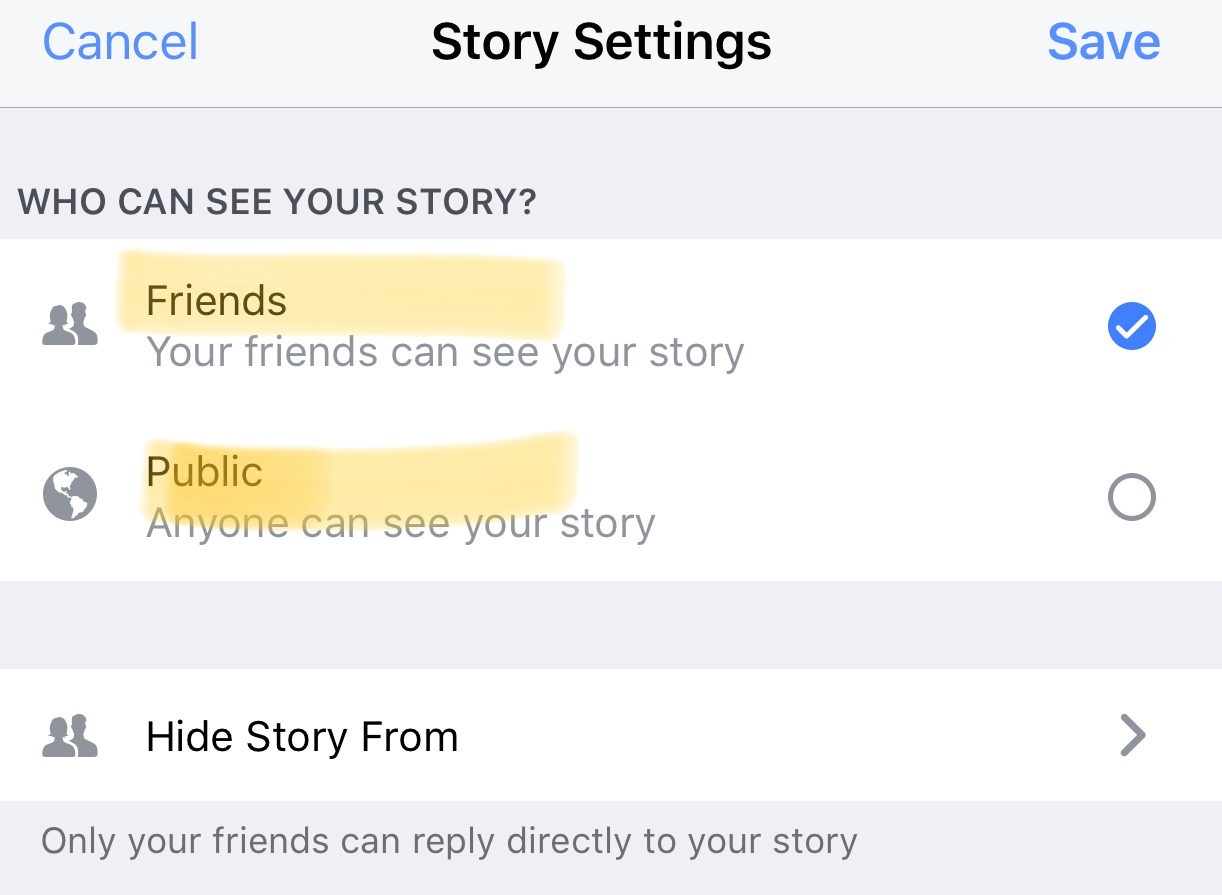
    Instagram, WhatsApp, and Snapchat have proven that 24-hour disappearing story feeds are the latest social media trend. Facebook is trying to increase user-ship of their stories feature by allowing people to post publicly. After a recent Facebook update, you can now change the privacy settings on your story posts to make them visible to anyone on Facebook. 

    Facebook Stories is really the only version of the daily posts feature that has been lagging behind in user-ship. Celebrities and brands will now be able to use Facebook stories to promote publicly just as easily as they can on Instagram and Snapchat. This may be an attempt for Facebook to increase the number of people using their stories feature but it’s likely, also, a way to entice more advertisers into using the feature.

    What Parents Should Know

    Any option to share something publicly should be known to parents. If your kids use Facebook and enjoy posting their daily activities on their Story feed you should know how to check and see if they’re posting publicly. Below is a slideshow of how to check the privacy settings on Facebook Stories.

    Be sure to check out what your kids have been sharing publicly and talk to them about the permanence of anything shared online. It’s also a good idea to talk to them about what to do if they receive contact from people they don’t know on any social media platform. As parents, we are the ones responsible for our kids’ safety and privacy online. Learn the ways these social media services have provided for you to keep them safe and private.

  • Update Your iPhone Today or Get Hacked Tomorrow

    Update Your iPhone Today or Get Hacked Tomorrow

    Most of the posts on this blog are about how to keep your kids safe from pornography, cyberbullying, predators, and other threats like that. However, protecting your and your children’s devices from hackers is equally as important. That’s why you need to know about yesterday’s iPhone update. The latest version of iOS 10 will sure up a gap in security that would allow hackers to use the wifi chip in your device to gain access to your iPhone or iPad. This means that you don’t have to do anything to allow them access, just be close enough to their wifi network with your phone’s wifi connection turned on. That’s a crazy easy hack.

    Here’s what you should do. Install the latest update TODAY. You should have been asked yesterday (Wednesday July 20th) if you’d like to update, if you ignored it then it’s time to go into your settings, tap on general, and then software update. On the update page click install now and plug your phone in to power. This will get you all secure. If you have an Android phone you received an update a couple of weeks ago that should have fixed the issue. If you’ve been ignoring that update then stop doing that and install now. I’ve written in the recent past about the importance of updating your operating system and this news is just more evidence of how urgent some of these updates can be.

  • Video Chatting Apps You Should Uninstall NOW

    Video Chatting Apps You Should Uninstall NOW

    Chat Roulette was a challenge that became its own website. The idea was that people could log on to the site and be connected with someone from around the world at random. The website isn’t as popular as it once was but there are many apps that simulate that experience and some of those apps are gaining popularity. Here are some of the ones climbing the app store charts. The ranking listed is for the Social Media category in the iOS App Store as of the publishing date of this article. I’ve only listed the live video or random connection chatting apps in the top fifty.

    Melon #14

    Melon is making the news as the latest video chatting fad. It connects you with new people based on social media friends and offers private messaging, video chat, and a people search feature. It’s gaining popularity and being featured in articles that are blasting it for the frequency of cyberbullying and the high concentration of males looking for girls that will do whatever they ask on camera.


    Live.Me #16

    Live.Me touts the ability to chat with stars and celebrities and broadcast to anyone all over the world. You can find anyone from anywhere or just look to see who is broadcasting around you. There is also the ability to search by topic or interest. Live.Me uses “gifts” and “diamonds” to allow you to share things with other users and even advertises the ability to “date” virtually through the app.


    Monkey #25

    I’ve written about Monkey before. This app was created by a couple of teens who dropped out of high-school to launch a tech startup. It quickly gained a reputation for having too much nudity and not taking some of the responsibility for the content found in the app. This app has been on the FamilyTechBlog uninstall list for a while now.


    MeetMe #35

    Formerly called “MyYearbook,” MeetMe is a app that advertises itself as a way to “meet new people.” The app uses your location to find people near you and information that you’ve entered to connect you with people who share your interests. It’s popular in the app store as it’s been around for quite a while and has the largest fan base. MeetMe offers private chat and video chatting as well as live video broadcasting.


    Climbing the Charts:

    YouNow #52

    Live stream video chat is pretty much all YouNow is about. You can broadcast yourself, find broadcasters, and even join the broadcast as a video guest. The app store listing calls for you to build your fanbase and become a YouNow celebrity. There are some complaints on in the reviews about accounts that have been reported for inappropriate content not being removed because they are popular on YouNow.


    CAM #56

    CAM is popular because it allows you to select the gender you’d like to chat with. It automatically connects you with someone and even automatically texts an invite to everyone on your contacts list without your permission. This practice has caused it to dip in the standings but some continue to use the app because they like the ability to chat or flirt with people they are attracted to.


    What Parents Should Know

    I don’t usually recommend any of these type of app for your teens or kids. Not only is it dangerous to connect with random people who could be broadcasting whatever they’d like for you to see. It’s also a problem because of the potential for predators. Any connection with strangers is dangerous. Some of these apps use your location to connect you and it’s therefore possible to meet people online that you may meet up with later. My advice is to uninstall any of these apps if you see them on your kids phones or tablets. There is no reason to use one of these apps to connect with friends since you can use Instagram or Facebook Messenger to do that now. Uninstall on sight.

  • Just Be Nice!

    Just Be Nice!

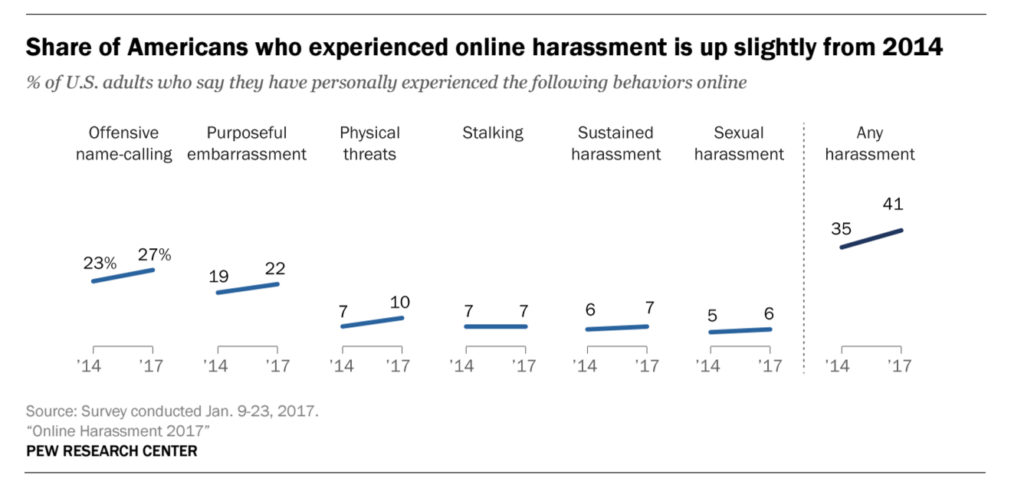
    A new study by the pew research center has highlighted that online harassment and bullying isn’t isolated to kids and teens. It seems that adults have become more comfortable with speaking their mind online even if what’s on their mind isn’t very nice. The study shows 27 percent of adults admit to being called “names” on social media and as many as 41 percent say they’ve been harassed in some way. This was up from 23% being called names and 35% being harassed in 2014.

    Obviously social media was the most popular platform that people reported seeing harassment. Men were the most harassed except for sexual harassment cases, more women admitted to being victims of unwanted sexual content including images sent over messaging. You can see more of the results in the chart below.

    What Parents Should Know

    How can we expect our kids and teens to stop or report bullying if we are participating as well? What example are we showing our kids when we profane someone because they disagree with something we said or shared online? Just because we aren’t face to face doesn’t mean the words don’t have an effect. These are things we should be teaching our kids but we obviously need to heed these warning ourselves.

    We’ve all heard the old adage, “If you can’t say anything nice, don’t say anything at all.” Apparently we have forgotten that what we say online still has consequences. This is the exact message that I have shared with teenagers and kids all over the country and I can guarantee I’ll be sharing the same message with adults now as well.

  • Turn Off Snapchat’s SnapMap NOW!

    Turn Off Snapchat’s SnapMap NOW!

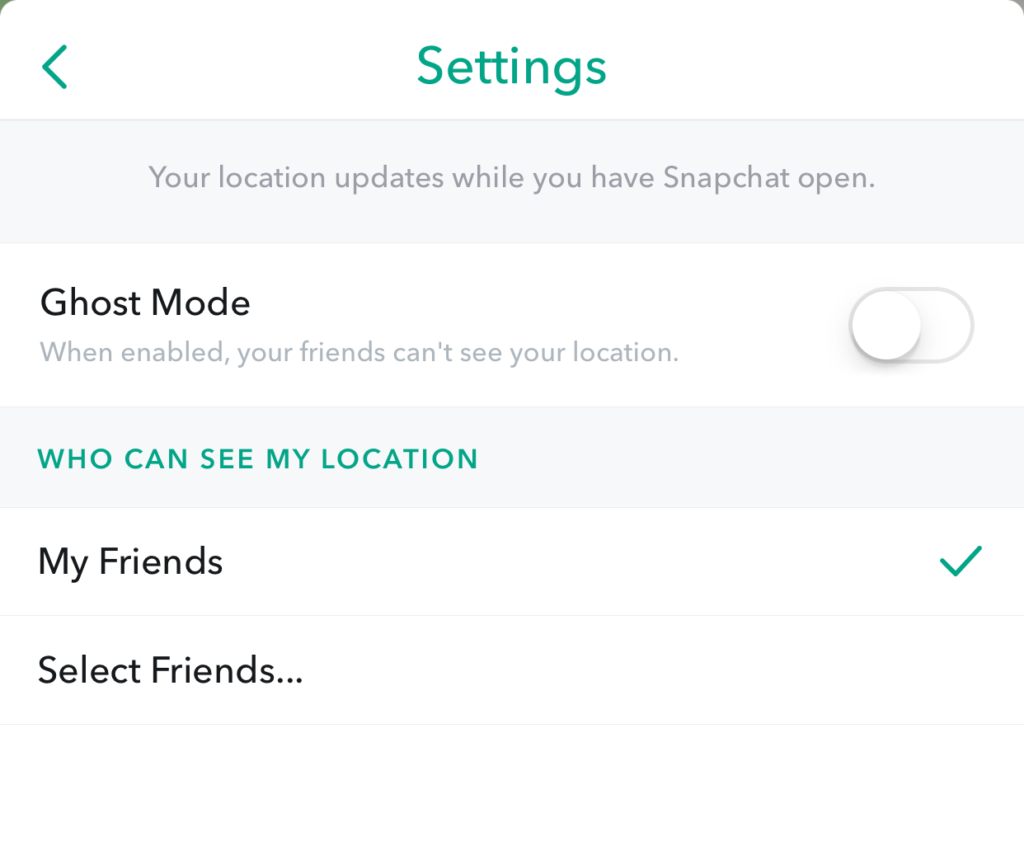
    Snapchat’s newest addition to it’s offerings is SnapMap. This feature shares your location on a map so that other’s can see snaps from similar places or events in real time. This all sounds well and good but what’s really happening is causing tech experts everywhere to warn against using SnapMap. SnapMap shares your location every time you open the app, not just when you post something. This isn’t concerning for just tech safety writers like myself but everyone who spends any time learning about the latest Tech trends is warning that users should disable this feature on their SnapChat account.

    I heard a story last week of a mother who’s daughter and her group of friends had been targeted by a sex trafficking ring using snapchat. The predator befriended a large group of related friends all at the same time and just watched their posts for a while. They all thought they were befriending someone who went to school with them since they had a bunch of friends in common. This person got very close to my friend’s daughter and started talking about a meet-up. Mom saw the posts during a check-in of her daughter’s phone and decided this “friend” was a bit shady. She contacted the police and found out that this predator was part of a larger ring of sex traffickers who use Snapchat to locate and abduct their victims. These guys had to work for months to learn more about where these teens spent their time. The SnapMap would give them that information in seconds.

    SnapMap’s initial setup is only a four step process, if you decide to turn on SnapMap you won’t be warned that your location will always be available. You’ll only be told how your friends can see where you are when you post. If you aren’t sure who all of your friends are and if you don’t know that SnapMap is pinging your location every time you open the app whether you post or not, you’re eliminating every privacy setting you’ve ever set on your phone. Your teenagers don’t know this!

    What Parents Should Know

    Teenager’s brains are developing in such a way that they’ll always fire before they aim. They’ll see the SnapMap option and opt-in just because they want to have everything set up like their friends do. You MUST talk to your kids about what SnapMap is and why it’s dangerous. You’ll want to advise (or demand) them to put their SnapMap on “GhostMode” which will hide their location on their friend’s map. If you’re allowing them to use Snapchat (which is on my uninstall list) you can’t expect them to see the SnapMap for the red flag that it is. You have to protect them by setting that boundary on their behalf.


    Don’t miss a single post. Get a list of our top posts every Friday in your email.

    Subscribe to our mailing list

    * indicates required


  • Diagnosing Your Tech Safety Needs with 3 Questions

    Diagnosing Your Tech Safety Needs with 3 Questions

    After I do a workshop and unpack the many threats and resources related to internet safety I am met with several different responses. One of the most common is the overwhelmed parent who wants to do something to help their kids be safe but doesn’t know where to start. These are the parents that I try to set up a consultation with to diagnose their internet safety needs. Here are the three questions I ask to help them make a plan and what their answers tell me.

    Question 1: How many devices are in your home?

    First of all I need to know how many phones, tablets, computers, game systems, smart TVs, and such you have floating around your house. I get all kinds of answers to this question and they all require a different approach. The main thing I need to know is who uses what devices and if everyone has their own. If everyone is using their own then something like Circle is a good idea because you can give each family member a profile and assign their devices to their account, thus, applying restrictions to each device depending on who uses it. If there are shared deices in the home it changes things. This requires you to use something like net-nanny or an accountability software like Accountable2You so that you can either have different accounts per device (on computers) or have an overall scan to catch and report any unsavory activity. This allows you to approach each situation and correct what’s allowing inappropriate content to get through. Try taking an inventory of all the electronic devices that are in your home. This will help you have a better understanding of your internet safety needs and what solutions will work best.

    Question 2: What are your devices mostly used for?

    You’ll need different options for devices that are used for research than for entertainment only. If your child likes to wander around on YouTube then you’ll want to set up the safe-search settings and install something that can keep some of the more mature content away from them. If they’re searching Google for school or other projects then you’ll have to be sure your internet filter and accountability software are strong. Smaller children can be protected by settings or apps that lock them out of other apps and browsers while your older kids can be trained by time limits, bed times, and wifi pausing features. The purpose of the device will go a long way to define the settings you’ll need to lock them down in the best, most helpful way.

    Question 3: Who are you protecting?

    The gender, age, and previous behavior of your kids are important for determining how you should protect your kids online. Older kids need to be protected from things they may seek out while younger kids usually happen upon inappropriate content on accident. Girls (often boys as well) should be monitored on social media, boys are especially prone to constant video gaming, and any child who’s been caught doing something unsavory in the past should have more strict boundaries set up for them. Knowing who you’re protecting is just as important as knowing what devices you have and what they’re used for.

    It’s Time to Evaluate!

    So now it’s up to you to start asking yourself these questions. Maybe sit down with your family and discuss the questions together. Talk with them about what healthy boundaries would look like in your home and task some of your older kids with seeking out some internet safety solutions. Work together to find the filters, accountability software, time management apps, and devices that are right for your family. Building this plan as a team will help you find keep the plan in place as you have all contributed to the strategy equally. As always, please send us an email or comment on this post if we can help you with your plan in any way.

  • PODCAST: What’s the Deal With Let’s Play Videos?

    PODCAST: What’s the Deal With Let’s Play Videos?

    Apple and Android are each getting a new OS, teaching healthy tech habits, and the eSports debate.

    FAMILY TECH WEEKLY EPISODE 8

    Social Media Links

    Facebook: http://facebook.com/4pointfamilies

    Instagram: http://instagram.com/becausefamily

    Twitter: http://twitter.com/becausefamily

    Newsletter Signup

    Ministry Updates:: http://eepurl.com/R7Btr

    Weekly Blog Posts:: http://eepurl.com/cvnhXD

    Websites

    Ministry Site:: http://becausefamily.org

    Tech Blog:: https://safe.becausefamily.org

    Michael’s Speaking Info:: http://kmichaelprince.org

    Donate and Affiliate Links

    http://BecauseFamily.org/partnership

  • New Operating Systems Coming for iPhone and Android

    New Operating Systems Coming for iPhone and Android

    The last few weeks have been loaded with updates from the two major tech brands in the industry. Google’s I/O event was May 17-19th and they had some major announcements including virtual reality, augmented reality, and a brand new operating system for Android, Android O. Apple’s Worldwide Developer’s Conference (WWDC) was this week, June 5-9th, and they’ve made similar announcements including a new version of their smartphone operating system that they’ve branded iOS 11. These two new systems will run the majority of the newer phones and tablets being released so it’s important to understand what each is offering. Here’s a rundown:

    Android O

    Android’s newest system should be made public this Fall. The most significant features are design changes in the Settings Menu and User Interface (UI.) Many of the smaller changes are things users won’t notice such as changes in how the OS will handle security and background operations, as well as channels or categories for notifications. Also, picture-in-picture support, notification badges that will appear on app icons, and better bluetooth support will definitely be features that makes Android O a step up for it’s users.

    iOS 11

    A new dock, multitasking with drag and drop, a files app, and better Apple Pencil support make iOS 11 a major upgrade for iPad. iPhone users will notice more apps in messenger, an app store that looks and works completely differently, and a new and improved Siri, including a new voice. The control center, the lock-screen, notifications screen, maps, Apple Music, and AirPlay are all getting improvements as well. iOS 11 is also slated to release this fall.


    What Parents Should Know

    There haven’t been any announcements on Parental Control improvements for either of these operating systems. When the test version of iOS 11 is released I’ll be giving it a full look-over and writing a review for you. One thing that parents will enjoy from iOS 11 is the ability to turn on an automatic Do Not Disturb while driving. The phone will sense your movement and speed and automatically silence any notifications until you’ve stopped. This will be a good way to keep your older kids safe while they are on the road. As for Android, they recently put out a new Parental Control option for their OS and it’s proving to be a pretty good setup. It’s only available on newer devices, however, and we still don’t know what changes have been made for when Android O is released.

    I always recommend keeping on top of updates when they are made available. Both of these new Operating Systems should be available this fall and you should be sure, if your devices are compatible, that you’re upgrading soon after release.  This isn’t just important to get any of the new features but also because security and privacy updates come with these new systems. The apps you use, including the ones you use for internet safety and monitoring will update to keep up with the latest software and if your devices are behind you’ll start to see holes in your security. Keep your eye on the update section of your settings menu and when it shows that a new version is available you should install immediately. You can also keep checking in to this site as I will keep you informed on the latest releases as well as how they can affect your family.

  • Teaching Your Kids Healthy Tech Habits

    Teaching Your Kids Healthy Tech Habits

    One of the most popular questions I get when I do tech safety workshops for parents is “how do I set restrictions for my older teen?” I think the most important thing to remember is that you’re not just setting restrictions, you’re teaching healthy habits. The brain of an adolescent is developing in such a way that your guidance is critical as they navigate these murky digital waters.

    I like the term healthy when it comes to internet use because right and wrong is subjective. Your sixteen year old may believe that it’s ok to watch YouTube videos for five hours on a Saturday afternoon but you can use facts to help him understand that it may not be healthy. Our conversation with our teenagers shouldn’t be about what digital habits are right and wrong but what is healthy. Here are three critical factors to keep in mind while teaching healthy tech habits.

    Relationship

    Boundaries without relationship become rules and rules were made to be broken. Because of your healthy relationship you can help your teenager understand that the rules exist to protect them. You can create a safe place for them to come to when they need guidance on their tech habits, about how they’ve been treated online, or about regrets regarding something they’ve seen or done online.

    As parents we shouldn’t close the door to conversation with instant judgement or constant nagging about the time they spend online. I recommend using digital means to keep track (with their knowledge) of what they do online and only bringing it up when it becomes a consistant problem. Relationship is the most important part of any internet safety strategy.

    Transparency

    Openness and transparency is key, not just on your teen’s part but on your part as well. It is critical that you are transparent with them about your tech habits. They need to understand that you’re trying to get it right as well and that the habits they develop now will affect them as they grow older. The best way for them to learn this is by watching you and hearing about how you’re having to deal with these same issues now. Whether you’re trying to keep them from dangerous content or help them avoid tech addiction, they should understand that you’re trying to protect yourself from those things too. The quickest way to cause your teen or young adult child to stop taking you seriously is for you to not practice what you preach.

    Time Management

    Obviously time management will be critical as your child graduates high school and enters college. Between jobs, studying, and extra activities they’ve probably already had to develop some form of time management skill. The lure and appeal of constantly available video, music, and gaming entertainment can make time management more difficult now than it’s ever been.

    You have to help your teen understand what good time management looks like. Point them towards content on the tech that they enjoy, like YouTube videos, podcasts, or productivity apps and other tools that will help them learn more about healthier time management habits. Encourage them to use these tools alongside some of the entertainment they consume.

    All three of these steps are related to each other and will greatly impact one another. If you don’t have a good relationship with your child that encourages communication, if you aren’t being a good example, and if you aren’t teaching and showing time management skills your kids are going to have a hard time navigating healthy tech habits. Online life is a real part of our world and it’s too important to ignore so utilize these steps and let me know what others you have used that have been successful.