Family Tech Blog Rating for Apex Legends:
Violence - 2
Language - 3
Sexual Content - 5
Positive Message - 2
Another Battle Royale game has been added to your kids’ wishlist this week. Apex Legends is a BR game that is set in the world of Titanfall, a first person shooter game with two previous installments. This game features fast paced, squad based combat with your typical battle royale tropes. You jump from a ship onto an island with fifteen other squads (60 players,) collect weapons and supplies, and battle to be the last squad standing.
Much like Fortnite, this game has a bent toward science fiction and less realism. It does, however, have more bloody combat and some merciless kill animations at close range. It’s a far stretch from the blue ghost fade that results from an elimination in Fortnite. You are able to respawn if your squad members survive long enough after you are eliminated, which can make your rounds longer if you’re playing with someone who is pretty good.
What Parents Should Know
There isn’t much by way of profanity in Apex Legends and characters are dressed reasonably appropriate. The only real concern for parents is the intensity and voilence of the gunplay, the pace of which has been shown to increase some behavior and attention problems in younger children. Some reasearch has also shown a temporary increase in aggression in kids who play voilent video games.Online content isn’t rated, as usual, and Apex Legends is an online battle royale game so keep that in mind. There is pretty good squad based communication built in to the game (identifying locations and directions with game controls) so you don’t have to use the microphones as much but it’s still tough to win without being able to talk to your squad. If you don’t allow in game chat on your kids’ games then you may get some pushback from them when they play Apex Legends.
To recap, Apex Legends is a bit more violent than Fortnite with bloody combat and the rag doll affect when characters are killed. The game is team or squad based and requires playing with friends. It is very easy to add people you’ve been randomly matched with to your friends list and play with them in the future. My advice is for parents to keep an eye on their kids bahavior when they play games like Fortnite, Call of Duty, or Apex Legends. More important than how much time they spend playing is what life outside of gaming looks like. Are they getting the grades they should be getting? Are they still participating in the activities they have loved? How are their relationships both in the family and with friends? Ask yourselves these questions and make adjustments to gaming time accordingly. As your kids get older, you’ll see that this works better than just an arbitrary number of hours you allow them to play.
The private messenger, WhatsApp, has updated recently to allow users to lock the app from prying eyes by using their Touch or Face ID. Private messaging is becoming more important to users these days since the spotlight has been on Facebook and Google for their data mining and sales. WhatsApp has been a mainstay of private messaging for some time now and this new update takes privacy from an algorithmic/software level to a more obvious tangible place. You can now use your FaceID or TouchID, depending on the generation of your iPhone, to lock people out of the WhatsApp software entirely. This will keep people from opening the app and looking through your messages. Currently this feature is available for iOS only but it is rumored to roll out to Android soon.
What Parents Should Know
It’s important to know that there are options that allow you to keep an eye on your kids’ messaging without having to physically take their phone from them. However, if the physical approach is your style then this update from WhatsApp could become a problem for you. Messages being locked in this way needn’t deter you from checking up on your child’s messaging activity, though. You can store your thumbprint in your child’s device so you can unlock it or just make them unlock the app for you when it comes time to inspect their messages.
I recommend allowing your children to have a feeling of privacy by using some sort of software to monitor their messaging apps instead of taking the device from them every now and then. Not only does that plan give them a feeling of privacy, it is also a far better monitor then your weekly check up. If a message monitoring algorithm like Bark is active it will look at every single message your child sends or receives in real time, notifying you if any of those messages cross the line to dangerous or inappropriate content. Taking the phone from them to monitor it yourself allows messages to be removed before you get around to looking at it.
I never advise spying on your children without their knowledge. They should know that you are keeping an eye on their messages and how the software works. They should also know what the consequences are if they send messages they shouldn’t be sending. Finally, you should have an open conversation to allow them to feel like they can come to you if they receive a message they are not comfortable with. No matter what you do to monitor your kids messaging, having a culture of transparency and openness in your home is critical.
When you think of artificial intelligence it’s natural to imagine Skynet or some similar software that is running things for us some day. While that could be the overall goal someday, right now AI is nowhere near that smart. Currently artificial intelligence isn’t intelligent at all. While it does learn from the input that is fed to it, there is currently no way for AI to decide what it needs to learn on its own. There is a very large gap between software algorithms that can learn and an intelligent software that makes its own decisions.
At CES in 2018 I watched a robot named Aeolus glide across a room cleaning up. It took it a solid three minutes to move from one side of the makeshift living room, reach down and pick up a wii remote, and roll to the table to set it down. It was nothing like we have been promised by television and movies but I guess it was still cool. What parents should understand is that while the developers of an AI can make promises of their algorithms learning and behaving as if they have intelligence, that is not the same as being actually intelligent. Humans still have to do the thinking.
While it isn’t foolproof and is definitely not sentient, artificial intelligence is a good tool. There are many ways AI is useful and much of the latest hardware and software use AI to do some of their most minor functions. Here are some of the interesting ways AI can make your parental control and accountability tools even better.
Filters
There was a day when an internet filter depended solely on the web or ip address of the site you were visiting to tell if there would be inappropriate content or not. There was a master list that had to be updated continually with new websites and key words. AI is different than that because the filter is based on images and other content that the AI was “fed” over and over again the algorithm then detects actual images, text, and videos on web pages instead of just the address of the site you are visiting. This can be helpful if a website doesn’t typically contain adult content but a certain article or comment section features material that would cross the line. A traditional filter couldn’t catch that but one that uses an AI can.
Circle (meetcircle.com) and NetNanny (netnanny.com) are examples of filters that use smart algorithm to block web content.
Accountability
Accountability software works very similarly to filters except that when it sees something inappropriate it will not block it but alert whoever is on the list to alert. AI has revolutionized this sort of software because it allows parents to receive only lists of unwanted sites instead of having to sort through everything that has been viewed by the person they are keeping accountable. The software I recommend, Accountable2You (accountable2you.com promo code BecauseFamily,) is updated constantly to allow it’s algorithm to properly and effectively scan for adult content. It works very well. You may get occasional alerts for content that shouldn’t be considered adult, but it’s not too often and it’s worth it for the peace of mind.
Privacy and Security
Finally, when we discuss AI and algorithms we must talk about privacy and security. Algorithms may have been the beginning of many of our privacy problems but it may also be providing some solutions. Tools like BitDefender can be used to protect your home network. The AI can tell the difference between forgotten passwords and malicious login attempts. Our home networks are becoming increasingly worthy of being targets of hackers and encrypting your web traffic with AI can protect your from that kind of attack.
I hear a few different reactions when I talk about artificial intelligence. Most people roll their eyes or glaze over because they aren’t even interested. It’s some tech term that they don’t think they can fully understand so they’d rather not talk about it. The other group is super interested, always wanting to learn more about it and understand it better. These are my nerd friends. I love them. Finally there’s the group that just freaks out. They immediately think of the movies and tv shows and just want to move into the woods and unplug. Which person are you? Are you willing to let AI work to your benefit in your family? Is it all too much for you? Let me know in the comments below.
A vulnerability discovered by Check Point security researchers, could have allowed hackers access to over 80 million accounts on the popular Battle Royale game Fortnite. The breach would allow hackers to see account information, use the account credit card to make in game purchases, and even listen in on player’s in game chats. The vulnerability has been fixed by Epic Games but they are making recommendations for users to secure their accounts in the future. Since the hack that was discovered didn’t need a password, changing your password on your Epic account regularly wouldn’t have saved you from this leak. Epic recommends using “two factor authentication” to keep you from being vulnerable to attacks like this. A few months ago they even provided a free avatar emote for those who opt in to two factor authentication.
What Parents Should Know
First of all, it is important to understand security and how breaches like this happen. Your children are using games, social media accounts, and web services that collect tons of data on them. Much of it is kept stored by the companies that are collecting it but the servers that this data is stored on aren’t always as secure as you would like them to be. The hack that affected Fortnite was found by accessing accounts through a website that was published by Epic Games fourteen years ago. Hackers could access player’s logins through the site and then listen in on their conversations and use their payment information. These vulnerabilities are there because the internet is so big and so open that who can blame Epic Games for forgetting about a little stats site it put up in 2004? This is why it falls to the consumer to protect our own information.
What is Two Factor Authentication?
It’s really simple. You enter your password to access a website. If you’re like me you have passwords stored on your computer and in an app on your phone so you can get to them easily and login as quickly as possible. Two factor authentication seems annoying because it adds a step. If used properly, however, it should only ask you to enter your second form of identity verification if you are logging in from a new device or location and it is really one of the safest forms of security available right now. When you get that email that asks you why you had a login from your mom’s computer across town and you roll your eyes because you know it was you checking your Facebook page because your phone died, just remember, this form of verification is one of the only ways to keep your data safe nowadays.
Passwords are infamously weak and often saved to the point that we have forgotten them. Our kids likely have learned their password creation skills from us and therefore their abilities to form a strong, memorable, but secure password or passphrase is embarrassing. Remember that you should always use multiple different forms of characters like numbers, letters. symbols, and a combination of caps and non-caps. Make your passphrase longer than you’d like and save it somewhere. Teach your kids to have different passwords on all of their accounts, not just variants of the same password either. I use a password generator and storage software to keep track of mine. I have a really really long passphrase that I have memorized to log in to my password storage software so that my other passwords can be unique and secure.
Final Advice
Finally, I recommend talking to your kids about the kind of information they post online and store on their online accounts. Remind them that what happens online is permanent. Photos will exist forever, social media posts will come back to haunt them, and that conversation they’re having while playing Fortnite may not be as private as they thought. Many adults are just now learning about how to keep our information secure online, I feel that it’s critical that we teach our kids how to do the same thing. Their data is more valuable that any of us ever imagined it would be.
I leave in just a few days for International CES in Las Vegas Nevada. It is my second year to attend this conference but many of you have just started following us since my last trip so here’s some background.
What is CES?
CES is the world’s gathering place for all who thrive on the business of consumer technologies. A high-level business event that touches all industries. A platform for innovators of all sizes to build their brands, every major technology company on the planet participates in CES in some way — by exhibiting, speaking, sponsoring, attending or holding co-located events and business meetings.
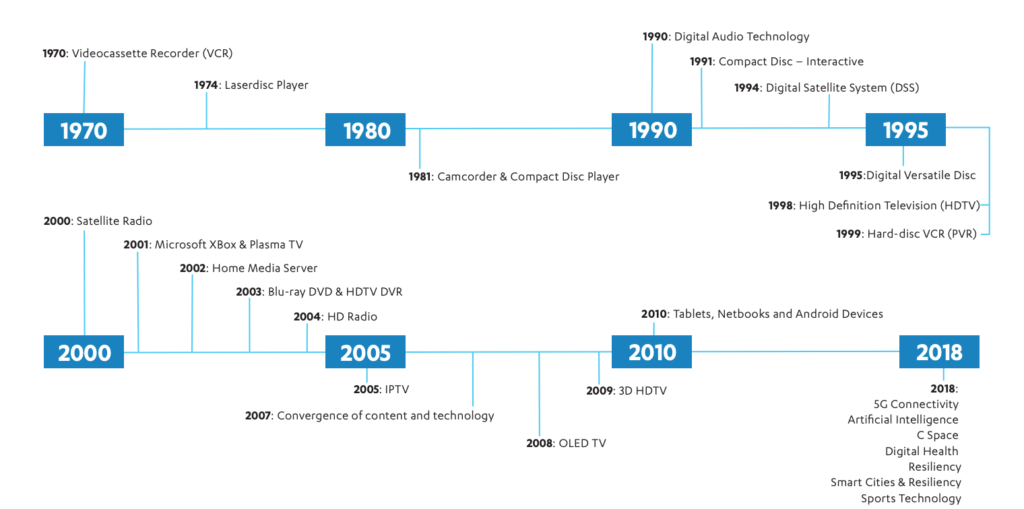
CES began in 1970 where it highlighted new, world-changing technology like the videocassette recorder and the Laserdisc Player (1974.) Products that we use every day were on display and demoed at CES over the years, including Compact Discs, Satellite and High Definition TV, Xbox, BluRay players, streaming entertainment, Tablets, and Netbooks. The show now features Virtual Reality, Smart Cities, Self Driving Vehicles, and Artificial Intelligence among a lot more!
Why do I go?
The whole purpose of BecauseFamily and the Family Tech Blog is to protect children and teenagers by bridging the technology gap between kids and their parents. In order to do this, I work to be on the cutting edge of technological advancement. Our world isn’t just digital anymore, it’s connected, marketers are struggling to find new ways to market to younger, more knowledgeable generations, and psychologists are urging app makers and toy manufacturers to cut out screen time whenever possible. These are all facts I learned at CES and use to inform my workshops, blog posts, videos, podcast episodes, and meetings with parents after. There is much more to learn this year and since I am able to attend through media credentials from the blog, I’ll be there. I’ll be learning for you. The parents.
I’m going to enjoy myself at CES. Vegas is a fun city. I enjoy being around the tech industry, I love learning about marketing, kid and teen tech, social media. and video gaming. I am excited to be an authority on these topics for parents so that I can have an answer to nearly every question I am asked when I work with families.
While it will be fun, It is work, and it is important. I am extremely grateful to all who have supported BecauseFamily and who read and share my blog posts. Please stay tuned in to the blog, our social media, and our YouTube channel for coverage from the only tech blog covering CES exclusively for the purpose of educating parents and protecting kids. You can also follow me personally on my YouTube channel for daily travel vlogs from my trip. When I go to Las Vegas, what happens there, comes home, to you!
Android Tablets are a great option for parents who want to get their kids some form of screen device without breaking the bank. The addition of Android FamilyLink has made Android and even better choice for our kids’ introductory tech device. They are affordable, fairly easy to use, and most all apps our kids want to play or use are available through the Google Play store. There is, however an issue that faces parents when they are ready to set up these devices for their kids: compatibility.
Compatibility is the ability of a device to run the software you are trying to install on the device. Android FamilyLink requires operating system 7.0 or higher in order to work on your child’s device. That means that if your device runs an older version of Android, the app that connects your parental control settings to their device won’t even be available to install from the app store.
I ran into this problem today while helping a family set up controls on the brand new tech devices they had purchased for their two girls. I initially thought it odd that on one device I could login an account as a child and on the other I could only make a basic adult Google account. Then, halfway through setup I realized that one tablet would run FamilyLink while the other would not. Both of these devices had been purchased from the same place on the same day and were brand new, not refurbished or used, but the operating system was different in each tablet. One was running Android 4.4 while the other, the one that let me set up FamilyLink, was running Android Version 7.1.
I understand that newer software will not work on older devices but these are two devices being sold at the same time as brand new. There is nothing, without further investigation, that would cause a parent to expect they couldn’t do all the same things on both tablets. The truth, though, is that not all Android Tablets are equal. We won’t get into opinions on Apple vs Android but I will make this comparison: when Apple updates their operation system ( iOS) they ping all of the devices at once and encourage installation of the newest version of the software. Android, however, is a crap shoot. You have to go see if your device will be compatible with the newer software every time a new one comes out. The main reason for this is that different companies make phones that run Android while Apple makes the device, the operating system, the app store. Basically the whole shebang.
People have different tastes and whether it’s the way the software functions, the look and feel of the phone, or just not wanting to spend as much money, Android will always be a significant part of the smart device market. My advice isn’t to just always use Apple products. I will encourage parents, instead, to always look at the specifications of any device you want to buy and see what operating system it is compatible with. If you are buying an Android product and want to instal FamilyLink, the device must run 7.0 or higher for the FamilyLink Children and Teens app to show up as downloadable in the Google Play Store. Otherwise, you’ll be looking for some third party app or combination of third party apps to add parental control functionality to your devices.
As CES 2019 approaches (my flight leaves in 17 days) I find myself more and more interested in the different topics that will be discussed at the Kids@Play Family Tech Summit. The summit features leaders in the industries of tech, toys, education, psychology, software, and entertainment. Sessions last all day long and the topics discussed are exactly the kind of information we parents need to know as we raise our kids in this digital age. The problem is, those in attendance are all industry people who are making apps, toys, and technology for our kids and families. There is very little to no representation of those who work to educate parents themselves on the connected age we live in. That’s where I come in.
To my knowledge, BecauseFamily’s FamilyTechBlog, is the only publication in attendance at CES that offers our news and stories exclusively from the viewpoint of helping parents protect their children. While I sit and take notes and record footage of the summit my mind is processing how this information can help parents make quality decisions to keep their kids safe on their tech devices. I am glad that this event exists and happy that leaders in this industry are having serious discussions about how to be responsible while developing their products for children. I am also glad that our donors and readers have made it possible for me to be there, as the only exclusive family tech safety website in attendance, and report back to you.
Here is some of what I’m looking forward to seeing, learning, and reporting on at CES 2019:
Jobs of the Future
Coding Without Screens
Gaming and Creativity
Tech Addiction
Data and Privacy for Connected Kid’s Products
Augmented and Virtual Reality to Help Kids Get More Active
There is a ton more that I’m excited to see and learn but these are going to be the highlights for sure. Parents are always asking about things like gaming and tech addiction and the jobs that are available to our children now will be completely different in ten years. Having some insight on these questions will be pivotal to making decisions as parents. Many of us have issues with keeping our kids active as they’d rather play with tech than each other at times. Can the tech increase their activity without impacting them in other negative ways? Finally, coding will soon be a skill that is not optional if you want to have your pick of the jobs of the future. How can we introduce coding logic and principles to our children without exacerbating the screen addiction problems we already see in out kids? I am looking forward to finding answers or at least more insight on these topics and questions at CES 2019.
You Can Help!
Very briefly, allow me to ask for your help for this trip to Las Vegas for CES 2019. The costs associated with this event are covered solely by donations from our non-profit partners and donors. If you would like to sponsor a meal, an Uber or Lyft ride, or something like that, please visit BecauseFamily.org/partnership to see how you can donate to BecauseFamily and send your family tech safety representative to CES on your behalf. Thank you.
The top earners from YouTube have been released in an article from Forbes and on the top of the playlist is a seven year old boy who opens and plays with toys on his channel. Ryan Toysreview features short videos that include product unpacking, play, challenges, and of course, seven year old Ryan. His videos each have view counts in the millions and that has amassed an estimated 21 million dollars to him during the past year. Ryan and his family aren’t the only content creators creating million dollar companies out of their videos. The top ten list includes vloggers, make up artists, and gamers, all who post weekly to daily videos and rack up millions of views on each one.
When I speak to parents about the kind of money gamers and other content creators can make on YouTube and Twitch I see their eyes open wide with wonder. They have no clue how doing something like gaming or unpacking toys can result in millions of views, much less millions of dollars. There are several ways that online content creators make money, some are fairly conventional and some may surprise you. Here’s a quick breakdown for those of you who can’t imagine making internet videos as a career choice.
Traditional Advertising
Pretty much all YouTubers “monetize” their videos. This means that they allow YouTube to put ads into their content and then get paid a little bitty bit every time someone sees a video or clicks on an ad banner. The rules and settings for this form of advertising is always changing and can often be frustrating to deal with. For instance, if your videos contain any content that belongs to someone else, the YouTube algorithm can sometimes flag your content as “demonetized.” That means, while your fans will see your videos, you won’t be able to make any direct ad income from it. Or, in some rare circumstances, you will have to share ad income. Below is a video that I made with my family a couple of years ago, it is a parody of a song by One Direction. Since the music is copyrighted, my video was demonetized even though the lyrics were all changed to fit our family parody.
Product Placement/Sponsorships
These regulations can be a pain for some content creators and so they choose to use other methods of advertising. Product placement and sponsorships are becoming some of the leading examples. There are many ways YouTubers and streamers can make their content fit with sponsorship deals. Channels that feature trick shots and other sports topics will be sponsored by active wear companies or stores that sell sports equipment. Our channels and blog are affiliated with sites and software that help parents with accountability monitoring and filtering.
Sometimes these sponsorships are soft or quiet which means they just have the equipment or products in their videos without much mention other than maybe in the video description. Mostly, though, you’ll see content that is made as a special sponsorship video or series and many times they’ll be labeled as “sponsored” by the creators. This is very common in unboxing or gaming videos where the creator is opening toys that were sent to them for free (maybe also with some form of financial payment) to highlight that toy or gamers are playing and doing commentary on a game that they got access to a week before release to build hype for the upcoming sales of the game. Our article and video featuring Botley was one that we were able to do because the company sent us the coding robot to play with and write about.
Direct Viewer Support
Finally, we come to direct viewer support. This method is indicative of the time we live in where people are drawn towards benevolence and away from fees and subscription pricing. People also prefer not to have products pushed on them in a non relevant way like commercials on TV or even in-line ads during a YouTube or Facebook video. This direct viewer support is a way for those who enjoy a creator’s content to literally give back to that creator and support them in their effort to make their videos full time. Gamers will stream live on Twitch.tv for six to eight hours several days a week and their viewers will reward them with small donations of a buck, five dollars, or more just to have their screen names read live on the stream. Creators will thank their supporters with mentions called “shout outs” during or at the end of their videos. There are content creators that make hundreds of thousands of dollars a year just on their viewer support alone.
There aren’t many creators who only use one method of monetization for their videos. The combination of traditional online advertising, product placement and sponsorships, and direct viewer support has allowed many gamers, vloggers, make up artists, and more to leave behind a traditional full time job and make internet videos for a living. This is the world we live in now. Entertainment looks a lot different than it did ten or even five years ago. Imagine what it will look like ten years from now.
What Parents Should Know
This article is meant to be informative and to answer a question I am asked quite often. There is a world of internet content available to our kids. Some of it is interesting and informative or educational and some of it isn’t meant to be seen by your seven year old. There has been research to show how addictive the short and fast paced videos on YouTube can lead to attention problems and issues at school so limiting screen time is important for our younger kids. As your kids get older, you’ll see their desire to consume web content increase and you will want to give them the freedom to do so more and more. This is good as long as you’ve had boundaries in the past and taught them to be aware of the time they are spending on their phone or computer.
When your son or daughter tells you they want to play video games or make internet videos for a living, don’t look at them like they are stupid. While not everyone will become a millionaire by making online content, there are many who have made it their full time job (myself included.) Just remind them that many of the things they’ll need to know to be successful they will still learn in school. Let them know that the work of an internet content creator is not easy and the expectations from viewers can be excruciatingly heavy. The most important thing they’ll have to be able to do if they are going to be online for a living is not give up. Tell them to practice that with the things they are into now. Don’t quit that sport, maintain your high grades, keep going to dance or piano classes. Whatever that thing is, learning the ability to see it through will be what can drive them to success in any venture in life. Even if it’s opening toys on videos on the internet.
*WARNING: this post uses quotes with direct language about pornography and graphic content.
While most social media sites that allow user generated content have been working to protect their users from unwanted adult images and videos, Tumblr has been happy to be known as “porn GIF central.” Last month, however, their app was pulled from the iOS app store for child pornography and that seems to have caused the developers to reconsider their policies. Earlier this week, Tumblr announced that they are changing their sensitive content guidelines and will be blocking such posts in the future.
Tumblr defines sensitive content as:
photos, videos, or GIFs that show real-life human genitals or female-presenting nipples, and any content—including photos, videos, GIFs and illustrations—that depicts sex acts. – Tumblr help center.
Their guidelines also mentions what type of posts will not cross their line to be considered “sensitive:”
Examples of exceptions that are still permitted are exposed female-presenting nipples in connection with breastfeeding, birth or after-birth moments, and health-related situations, such as post-mastectomy or gender confirmation surgery. Written content such as erotica, nudity related to political or newsworthy speech, and nudity found in art, such as sculptures and illustrations, are also stuff that can be freely posted on Tumblr. – Tumblr help center.
Their terms now state that content that is considered sensitive will not be allowed and that any sensitive posts that have been posted previously and not marked as explicit will be flagged and removed. Accounts that have been treated as explicit in the past (you can tag your own account as explicit) will maintain their explicit status and be allowed to continue posting, however, posts, both past and future, that are considered explicit under the new guidelines will be treated as such and removed.
What Parents Should Know
Very simply put, Tumblr is still going to allow some forms of sexual content and nudity in their app, as long as it can be labeled as political, newsworthy, or health and social justice related. Many other social media outlets already have these guidelines so Tumblr, while not allowing “hardcore” sexual content, there are still going to be images, videos, and GIFS, that you don’t want your children to see. My advice is, as always to keep an eye on what your children are using social media for, if they are sending messages to friends, you want to be sure they are wholesome and healthy communication and that they are only talking to people they know. If they are using it for artistic inspiration then you should know they could come across content you may consider sensitive, even if Tumblr does not.
Bark is a good way to keep an eye on what your children are sending in social media messages. It uses an artificial intelligence to watch out for dangerous conversation for you and send you an alert if something about suicide, self harm, sexting, or bullying is sent or received. As I always say, the most important thing you can do is speak to your child about what they do online and what they use their social media for. You may hear from them that Tumblr is all safe now and that they should be allowed to download it, but let this article be your warning that what Tumblr considers safe may not be the same as what you consider safe.
Instagram is rolling out another update today and this one gives users the ability to build a “Close Friends List.” This category of friend creates a list of names that will see stories that you post and designate for that group only. This allows you to post more private or personal posts and trust that it will only be seen by a pre-approved group of friends. This feature should roll out today and will be available through the settings menu on your profile page in the Instagram app.
You set up your list and then choose, in your stories posts, to designate that post only for your “Close Friends.” The update shows a green badge to notify those seeing it that it is from your Close Friends list. Those on your list will also see a green circle around your “Stories” icon.
What Parents Should Know
This update can be a really good thing. It is important to know who is seeing your posts and keeping your audience in mind. A way to separate those who you are ok with seeing certain things could be a way to eliminate the “finsta” or “Spam” instagram account. My advice, though, is to make sure your child has you on their Close Friends list. If they’ve been posting Close Friends posts and you aren’t seeing a green circle around their stories post, you aren’t on their list and you should have a conversation with them about why you don’t want them hiding posts from you.
Remember that you should be a safe place for your kids to come if they have serious issues to discuss. They shouldn’t be afraid that you won’t understand their depression or that you won’t believe them if they are having problems with people at school or work. You should be THE place that they know they’ll be heard, believed, and understood. I truly believe that if you create that culture in your family your children will automatically think to add you to their Close Friends list because you actually belong there.