Tag: teens

  • Is Apple Blocking Parental Control Apps Because they are Competitors to Screen Time?

    Is Apple Blocking Parental Control Apps Because they are Competitors to Screen Time?

    The Story So Far

    It is a long and arduous story, the tale of Apple shutting down parental control apps. Some say it was done to protect Apple’s investment in their own Screen Time app while others believe Apple truly has the wellbeing of their customers at heart. It is hard to look at this story from any one angle alone without making a blanket statement about the opposing side. This is why I have taken a look at all sides and wish to help you, parents, understand what is happening in this strange new war.

    Last fall, after announcing the release of iOS 12 which feature their new controls app “Screen Time,” Apple began to deny certain parental control apps access to the app store. Apparently, citing the fact that Apple doesn’t allow apps to use any method to block other apps (a pretty important feature in a parental control software.) Eleven of the top seventeen parental control app developers such as Mobicip, OurPact (the top Parental Control app in the app store,) and Quistudo were all in communications with Apple for months about their apps being removed and what it would take to get reinstated. Apple’s comments seem to have been centered mostly around the removal of apps and the use of something called MDM or Mobile Device Management. They stand on the fact that MDM allows access to information that should remain private. Developers of the Parental Control apps are saying that Apple said nothing about privacy in any of their communication about getting their apps reinstated. This is causing a bit of concern for developers, media, and parents alike.

    Even more information about MDM in the video and podcast.

    Recently, the New York Times released an article about Apple’s removal of the parental control apps from the app store alluding to the possibility that the move was to eliminate competition for Apple’s Screen Time or even to keep people from using apps that cause them to use the iPhones less often. We are obviously getting a lot of they said/they said back and forth with this story and there is more to come (law suits and such) but here is what I think it all means for parents. 

    What Parents Should Know

    Above all it is important for parents to understand that there is no such thing as the perfect parental control app. The free ones are likely selling your data and the paid apps are usually using some sort of loophole to even work properly. Apple uses a pretty closed approach to their app store, only allowing a very small “sandbox” for developers to work in. This causes many of the parental apps in question to fall short of complete and total control. The MDM allowed for a bit more of that control but without that access, many of these apps are simply useless. I do believe that parental control apps should be held responsible for what they do with the data that they collect. Apple takes data security and privacy very seriously. This is what they have said is at the core of their stance against some of these apps. Apple must protect the privacy of their users, it is a major part of their platform and what sets them apart from their competitors.

    Time Management Dashboard Coming to Instagram and Facebook

    What does this mean for us as parents who want to protect our kids? First of all we have to remain vigilant to keep our kids safe online. Use some sort of network level parental controls. Whether you use Circle or something else that is built in to your router, it is a lot easier to set up filters that block your entire network than to set it up on each device. Also, you can just learn and use the built in parental controls that Apple and Android have created. Screen Time isn’t perfect (as I said, none are) but it is pretty good. Use the resources you have as well as a good, healthy environment of conversation and security to keep your kids using tech properly and discussing it with you regularly.

    Until Apple makes it easier for software developers to access user behavior, any built in parental control options will be bettor for iPhone and iPad users. Screen Time is currently a bit limited but is is a lot better than nothing and will work for most families. The best part is that the stance Apple has taken for privacy will also apply to users who have set up Screen Time. Any account that you have set up for your child will be treated as a child’s account and Apple’s terms state that their data will be treated as such also. Maybe your favorite Parental Control app is a part of this whole drama. If so, hang in there and set up something you can use because this whole story isn’t over. I’ll keep you updated as more happens.

    For even more, listen to the podcast episode below:

  • Memes: A Parent’s Guide

    Memes: A Parent’s Guide

    The term Meme was coined by Richard Dawkins in his book “The Selfish Gene.” It was simply defined as any form of media that was passed from person to person until it reached a massive level of popularity. Nowadays we would call that going viral. It is difficult to put your finger on a single meme as the first one or even to identify how some of today’s most popular memes got their start. In this article we’ll look at the history of memes, how we got to where we are, and what it parents need to know about Memes. Keep in mind that you can see some Meme examples in the video above.

    History of the Meme

    It didn’t take long once the internet was available to most people for Memes to become a major part of how people spent their time online. In 1991 we saw such memes as the dancing baby, motivational posters, and the hamster dance being passed along in emails and forums. These images, videos and gifs were passed from person to person and inbox to inbox, shooting this silly content to Meme stardom.

    Then came the 2000s, some would say this was the golden age for memes due to the rise of YouTube, Social Media, and Viral Videos. This took us from sharing content within a limited access forum or the contact list in our email to sharing them on our public social media page to be re-shared over and over again to thousands or millions of people. This period is where we were blessed with the rick roll, Chuck Norris jokes, turn down for what, cat videos, and Vine videos.

    We are currently living in the age of the modern Meme. Most originating on Reddit before they become popular on other social media sites, Memes are going mainstream in television, radio, politics, and marketing. Memes are used to promote idealogical ideals. Memes like the Harambee meme are an outlet for those who are bothered by certain things in society to express their belief or concern. Politicians even capitalize on the popularity of their own Memes, sharing them on their social media accounts to gain recognition and strengthen support.

    The Dank Meme

    Dank usually means dark, damp, and gross. When it comes to Memes, dank is a positive term. A dank Meme is usually one that can be used and reused with different other Memes added. Sometimes popular sound clips or songs from a Meme will make its way through a whole bunch of different videos. Something like the “oof” of a dying Roblox character being dubbed over videos of people falling or otherwise hurting themselves. This is what a dank meme usually is.

    The Memes you see gain popularity on your social media account. That Condescending Willy Wonka image with someone’s sarcastic comment typed onto it is a dank meme, having been reimagined several times, thus gaining more popularity.

    What Parents Should Know

    Memes are an easy way to express yourself. It can be a fun way for kids to have a laugh or share what they think about certain issues. My problem with some Memes is that they tend to simplify complex concepts. Something as complicated as political beliefs are packaged as Memes and expressed in a shallow, unhelpful way. The Meme is a limited genre, only allowing so much space for sharing what you think. This can cause confusion and can ultimately be polarizing.

    Memes also have a tendency to take us in a circle of reasoning. We share more Memes that we think are funny because of the statement they are making and this tells the algorithm of the social media account we use that we want to see more Memes like this. We then are simply only fed a steady diet of the same thoughts, repackaged as dank Memes and our view is never questioned or challenged in a way that can be healthy and help shape who we are.

    Finally, we have to be careful because Memes can often be very adult oriented. Memes are an expression that has been limited to those who understand them. When we start into the Meme rabbit hole, whether it’s on Reddit or Youtube, we can tend to find ourselves getting to some strange and even dark places. I am not squeamish and there are a lot of Memes that I’m a fan of and I share regularly when I see them repackaged in a way I find humorous. I did, however, get into some content while researching this article that just made me feel stupider for seeing it. See what I go through to help you out?

    Thanks for reading. Share this article with a friend who needs to know what a Dank Meme is.

    You can listen to this post as a Podcast below:

  • Snapchat’s Social Gaming = More Time on Social Media

    Snapchat’s Social Gaming = More Time on Social Media


    It has barely been a year since Snapchat joined Facebook in a movement to help people better manage the amount of time they spend in the social networking apps they develop. Snapchat added the ability to silence notifications from certain conversation and redesigned their app to be more about time with your friends and less about time in the app. Yesterday, however, CED Evan Spiegel announced their new focus on Social Gaming and several new original video series citing a new way to keep young people in their app even longer. 

    The games featured you and your friends’ Bitmojis. In them you play silly games that include pool toy fights, field goal kicking, and keeping your Bitmoji atop a spinning record as your friend DJs for you. In the announcement Spiegel says “On Snapchat, you’re free to be you, with your real friends. As we use the internet more and more in our daily lives, we need a way to make it a bit more human.” Apparently the idea is that as social beings, we need to hang out and since we are all spending so much time on our smartphones, Snapchat wants to be the place your kids hang out in.

    Facebook and Snapchat Join the “Time Well Spent” Movement


    What Parents Should Know

    I have said it several times before, we can’t blame tech companies for wanting people to spend time on their software, that’s how they make their money. Quotes from this announcement boast of a place that people can be themselves, obviously what they truly are creating is a place where we can spend more time, see more ads, and make Snapchat and its shareholders more money. No matter what social media companies say about time well spent, privacy, or security they are protecting their bottom line. They have shareholders that they must impress with the numbers so that’s what shapes their decisions. Knowing this helps us remember that the responsibility for healthy tech use falls to users, and our kids’ tech health is the responsibility of parents.

    Talk to your kids about the amount of time they spend on social media. Don’t allow them on social media that is rated higher than their age. Teach them not to expose sensitive information like their phone number or the name of their school on these apps. Finally, use some sort of filter or time management software to help you enforce your standards. Parents are the first line of defense against the dangers of unlimited and unmonitored internet use. We have to take on that responsibility because nobody else truly will.

    You can listen to this post as a podcast episode below.

  • How Video Game Developers can Help Parents

    How Video Game Developers can Help Parents


    I think video games can be fun and good for my kids if kept in the right context. We have very strict rules about gaming in our home and do our best to limit our kid’s access, screen time, and exposure to some of the gaming content available. Unfortunately many developers build their games (even kids’ games) that make screen time and other restrictions hard for parents. If I could speak to a room full of game devs, here a few of the things I would say.

    1 Let me save the game whenever I want.

    My children have a strict 30 minutes per day rule on our xbox. They understand when they sit down to play they they have a limited amount of time. My kids know that they’ll be “kicked off” the xbox after a half hour so they save often. They save their Minecraft worlds because they can’t build the crazy epic structures they’ve planned in just 30 minutes. 

    The problem rises when we play games, like the Lego games, that don’t allow you to save your game whenever you want. You have to reach certain milestones or the end of levels to save. When the xbox kicks you out of the game, it resets the game causing you to lose your progress. This means mom or dad have to either continually add time to the limits for the day until they can save the game or we just have to deal with the kids’ frustration for wanting to see the next levels of this game but not being able to because of our time limits. We, as parents, don’t mind being the bad guy but a simple save mechanic built into the pause menu sure would make life easier.

    Parent Guide: Call of Duty Black Ops 4

    2 Password protect your content controls.

    The most popular comment on my review for last year’s Call of Duty game is “hey man, you can turn off the graphic violence.” I’ve replied to most of those comments with, “Cool, but it isn’t password protected so it may as well not be there.” Can we please put content restriction settings behind some sort of pin code? It isn’t that difficult to do. I don’t want my kids playing games that are meant for adults, but some families are ok with their fourteen year old playing a Rated M game if the gore is turned off. Unfortunately, most warm blooded 14 year old boys are into or at least interested in that sort of violent content in film and video games. That means they’ll often turn the restrictions off when mom and dad aren’t looking.

    Maybe that’s a bit too restrictive as your kids get older but isn’t that the parent’s decision to make? Game developers make their games with over the top graphic violence and pretend that their target audience is adults. The reality is that at least half of those who play your games are below the recommended age. This is why they add a content restriction in the game, however, that restriction isn’t helpful if it is only buried a couple of levels deep into your settings menu and doesn’t require any sort of passcode to change.

    3 Don’t force me to make an account to play your game.

    It is already frustrating to have to have an account for everything I do online. Then I have to create separate accounts for each of my kids to let them play games or use apps with parental control settings turned on. If I want each of my kids to have their own settings or their own way through the game I have to have an account for them on our gaming system. When I turn on a game and see that the developer of that title wants me to create yet another profile, on their site this time, it is infuriating. I don’t want to give you my email address. I paid to play your game, isn’t that enough? I get having an online account so I can play multiplayer but games that require me to have a profile with your company even to play the local offline campaign is simply data mining. I don’t need it. Especially with my kids information.

    Parents Guide: Apex Legends (Titanfall Battle Royale)

    What Can Parents Do?

    This post may be a bit ranty but I’m not the only parent I know who has complaints about these issues. It’s hard enough protecting our kids from cyberbullies, adult content, and predators. We have enough drama from our kids alone when we want to simply limit their screen time. The last thing we need is some setting or lack thereof in a video game to make it even harder. The truth, however, is that it’s unlikely a game developer will see this article or video. We have to take responsibility as parents. Either we have to take the role of gatekeeper and keep our kids from games that pose these problems or we have to just have the conflict when it arrives because it’s worth it. It’s worth it to have kids who know how to function when screens are turned off. It’s worth it to have kids that are safe from violent thoughts, nightmares, and attention problems. It’s worth it to protect our kids private information and data from collection by gaming companies and who knows who else.

    Talk to your kids about the limits you’ve set. Take a stand when they try to bypass your settings. Don’t let them play games that cause their behavior to change or keep them interested to the point of obsession. Protect their information by only creating accounts for them on sites that absolutely require it and when you do, use an alias. We live in a new world. A world where data is a form of currency and your kids gaming behavior can be used in so many ways so it is invaluable to the companies that create these games. We have to be responsible for our own family’s Internet safety and healthy tech habits. We can ask developers to make it easier and hope for the best but when it all comes down to it, it is up to you and me.


    Podcast:

  • Does Your Kid Need a Fitness Tracking Smartwatch?

    Does Your Kid Need a Fitness Tracking Smartwatch?

    We all want our kids to be healthy. Parents are always telling me they’re concerned that their kids play video games too much and just need to play outside for a bit. I agree. Couldn’t agree more! The fitness wearable (think Fitbit and Apple Watch) industry has made some huge promises about giving us motivation and inspiration to get out and get moving. The wearable trend is making its way to children now too. Garmin and Fitbit have both put out new products that are made for kids. These wearables serve as a watch, a step tracker, a sleep habit monitor, and even reward your kids for meeting goals with achievements and celebrations. My eleven year old son likes wearing a watch. He doesn’t necessarily care about tracking his steps or heart rate, but I’m sure he would love a Fitbit. Should I get him one. I have to ask a few questions first.

    Do Fitness Wearables Work?

    There have been multiple studies since the invention of the Fitbit that have tested the effectiveness of these health tracking watches. Of course the earliest studies featured products that could only track your steps. These “one trick” smart watches weren’t very smart but they promised to get you out and moving so you’d be healthier. The studies showed that those who were originally committed to fitness stayed pretty committed and were a little bit more effective at working out since they could monitor what they had done. People who were given an incentive to work out using their Fitbit tracker did exercise more but no more than those without a Fitbit who received the same incentives, also they stopped excercising as much when the incentives ended. Finally, the extra activity that was logged didn’t result in increased health outcomes. Basically, you are going to be as committed to fitness with a fitness wearable as you would be without one, the same thing is true about your kids.

    Does Your Kid Need a Fitbit or Garmin?

    These products can help those who use them keep track of the amount of activity they are getting. They can use this information to make better decisions about what they do through their day. As mentioned above, however, awareness doesn’t always equal action. Especially when it comes to fitness. Nobody will tell you you shouldn’t do something to keep your kids from being healthy. You know your child. You know if they will be inspired or intimidated by activity tracking and goal setting. You know if they will use their watch for ten days and then set it down, never to pick it up again. Finally, you are the only one who knows for sure if your child will just loose the Smartwatch within ten minutes of putting on their wrist.

    You have to take all of these factors into account when deciding if a fitness tracker is right for you child. As for which ones work best, I don’t have any data to provide you with a conclusion on that. I do, however, have a few family tech safety tips to encourage you to think about while you decide on a wearable for your kids.

    1. Data Security
      It is pretty obvious that the companies that sell fitness wearables use your data quiet liberally. They have to use it to affectively communicate your health information to you and to keep records for you to access later. Fitbit requires parents to make accounts for their children in order for their kids to use their products. By creating this account parents are giving Fitbit permission to access their children data and us it according to their Privacy Policy for Children.
    2. Smartphone Sync
      Most (basically all) of these devices require you to sync with a smartphone of some kind. While it is possible for you to sync the device up with your own phone, your child will see another opportunity to try and convince you that they need a smartphone of their own. Let’s be honest, none of us need our kids to have more points to support the argument that they need a smartphone. Maybe they already have one, great, maybe they have a device they are only allowed to use at home, that’s good too. Be sure you’re allowing them time to sync and use those apps in junction with the smartwatch or you kind of defeat the purpose.
    3. Location Sharing
      The security policies for Fitbit and Garmin both state that they do not automatically collect location data from Fitbit accounts created for children. However, they do collect IP addresses which often contain location data, and you are able to share your location manually which kids could do without realizing it. It is especially important, if you are concerned about leaked or sold location data, that you don’t allow your kids to use a fitness wearable that is connected to an adult’s account. These accounts do share location information by default.

    Be Fit, With or Without a Fitbit

    I’m not going to tell you what to do. As I said above, you know your child and their habits. You know if they are active or not. Some of these wearables can save lives, for kids with diabetes for example, but those are specific situations and, in my opinion, the absolute best and intended use of these products. Most of us have discipline and motivation problems and a fitness tracker can only bring our lack of a healthy lifestyle to our attention, we still have to do something about it. I speak as one who loves pizza and begrudgingly runs about six miles every two weeks. I am “preaching to the choir” as they say, and while I think an Apple Watch or one of the latest Fitbit Smartwatches would be cool to have, the truth is, there are data security issues to discuss, and the trade off for increased health outcomes aren’t guaranteed. Lets just get our kids to a playground more often, and maybe even get out there and play tag with them.

  • Creators of Fortnite in Court for “Predatory” Advertising

    Creators of Fortnite in Court for “Predatory” Advertising


    Imagine you go shopping and instead of clothes, toys, or other products you just see boxes. You can’t purchase items on their own, that’s not how this works. Instead, you have to buy a box and hope that what you want is in it. I don’t think that store would be popular for very long, maybe for a while but once the novelty wore off the place would likely go out of business. People want to know that when they pay for something, they are getting what they want or need. In-game “loot boxes,” work basically like the fictional store I described above. You pay a dollar amount small enough to feel meaningless and unlock access to the box. When it opens on your screen you see what you were able to purchase and you can only hope it’s something you wanted or needed for your character.

    Epic games no longer has these types of loot boxes in Fortnite but they did and that’s what this law suit is all about. The boxes advertised the best items that you could get but the family of the young player who this lawsuit is centered around say the chances of actually obtaining those items were very low. This is being interpreted as “predatory,” especially since many of the loot boxes are cute little llama pinatas. Freemium games have been around for a long time but Fortnite is the first game of its kind to have such a large and young player count. Children as young as six or seven are playing Fortnite and purchasing these items to make their characters and weapons look more interesting.

    What Parents Should Know

    If you are inclined to allow your child to play games like Fortnite you need to be aware of a few things. First of all, free is never truly free. There is a reason they don’t charge for the game, it is easier to get a ton of players and have a bunch of them pay for arbitrary avatar and weapon skins than to convince people your game is worth sixty dollars. Many of the top earners in every app store are Free to Play games. These games are popular because they are free to play and the cost of in app purchases seem very low. The trick is how easily you can rack up the amount you spend on the game just to keep yourself playing. Whether it is a game where you’re building a farm and want your crops to grow faster or one in which you are fighting and want better weapons, many of these games let you pay to progress further into the game.

    VIDEO TUTORIAL: iCloud FamilyShare Set-Up


    The question, I guess, isn’t whether or not this practice is legal. (Spoiler alert: it is completely legal.) The question is that should it be legal to create in-app purchases that appeal to especially young gamers? These games made for kids that ask you to pay to continue or educational apps that make you pay to unlock more characters have found a way to get past the parent gatekeeper by making the app free. Then the child just has to click “purchase” when the ad pops up in the app and the purchase is made. There are ways for parents to set up controls to keep that from happening but many aren’t aware of how or just don’t think to set it until their credit card has already been used for hundreds or even thousands of dollars.

    The creators of Fortnite may never be held accountable for the way they market products in their games. Whether or not they should be held accountable is up to the courts to decide. As far as parents go, you do have a responsibility to protect your kids in the digital world they live in. Talk to your children about in-app purchases. Help them understand that the money has to come from somewhere. If you are ok with them spending some money in-game then use gift cards instead of credit cards so that when they run out of money, they’re out. Set up controls so they have to ask you to approve in-app purchases. Whatever method you choose, you can keep your kids from being preyed upon by the advertising in these games. You just have to do the research and take the steps.


  • Tik-Tok Under Fire as Study Finds 25% of Kids Talk to Strangers Online

    Tik-Tok Under Fire as Study Finds 25% of Kids Talk to Strangers Online

    Tik-Tok is at the center of a controversy surrounding the exposure to predators and child pornographers through live streaming on their app. One in twenty children who use live-streaming apps have been asked to take off their clothes according to a study by the UK’s Children’s Charity NSPCC.  Originally called Musical.ly, Tok Tok claims to “empower everyone to be a creator directly from their smartphones, and is committed to building a community by encouraging users to share their passion and creative expression through their videos.” Their mission statement sounds like they are building a place for our kids to stretch their creative muscles and build a supportive audience but in reality it is exposing them to potential danger.

    Sexual exploitation is only a part of the issue, there are popular hashtags on the app that highlight self harm and eating disorders. Tags like #thinspo (thinsporation) feature videos of children as young as eight showing their rib cages through their skin and proclaiming that they are inspiring to others who desire to be thin. Suicide and self harm are also featured on the app with complete with encouragement to hurt yourself and instructions on how to do so. Tik-Tok says you have to be 13 to use the app but as we have shared multiple times on this site, that age exists to protect the company from legal action concerning the collection of children’s data, not to protect your children from content on the app.

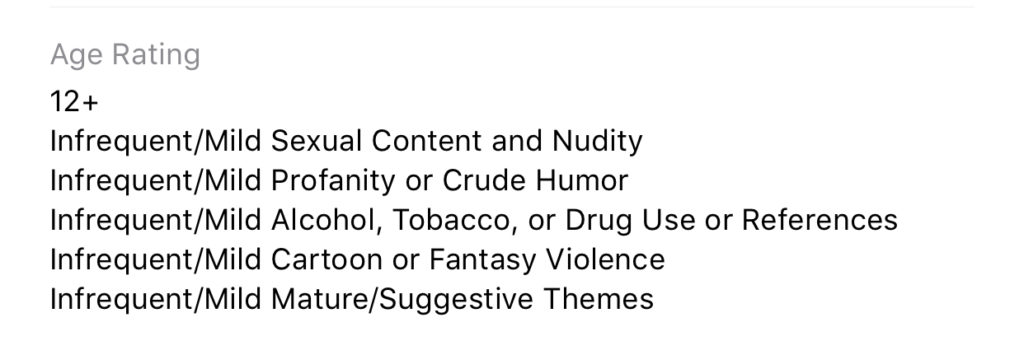
    While the app is rated 12+ in apps stores in the U.S. the reasons listed for the rating prove to be, in fact, very mature. The issue, again, as I’ve mentioned, is user generated content. Anyone with a smartphone and a wifi connection can make videos and now livestream in Tic-Tok, they can also watch you perform on the app. This makes for an open, dangerous atmosphere filled with predators, adult content, scams, and violence.

    What Parents Should Know

    Tik-Tok says they have filters and parental controls in the app that allow you to set the app to private but all of these measures have proven to be less than effective. Kids who use the app on their own can easily come across content that isn’t age appropriate. The content restriction and  time management settings in the app are password protected; they can be useful and should be set up if you allow your child to use Tik-Tok. Also be sure to turn off the ability for non-friends to comment on, share, and download (this is on by default, creepy right?) your child’s videos.

    We don’t want our kids talking to strangers online. All parents understand the dangers associated with live-streaming and posting public videos to the internet. Unfortunately many parents feel that their hands are tied when it comes to keeping their kids safe on these apps and websites. That isn’t the truth, however, there are tools (some in the app and some third party) which you can use to keep them from accessing things that are dangerous. An algorithmic filter is never going to be enough, though, so it is important that we have open communication with out kids about what they are posting and seeing on apps like Tik-Tok. Also, if your child doesn’t meet that age restriction then they shouldn’t use the app.

    Twenty five percent of kids talking to strangers online is a horrifyingly high statistic. It shows that while there are privacy settings and parental controls out there for parents to use, either parents aren’t using them or their kids are getting around them. I know that the privacy settings in Tik-Tok aren’t password protected so if your children want to talk to strangers on the app and they have time using the app by themselves there are ways for them to make that happen. It is important that parents take the responsibility to protect our kids online. Many media outlets are blasting these companies for putting our kids in danger but I have to be honest, you don’t blame the slide for your kid falling off and busting their face, you think of precautions that YOU can take to keep that from happening in the future.

  • I Can’t Help You Protect Your Kids on Apps Meant for Adults

    I Can’t Help You Protect Your Kids on Apps Meant for Adults

    I field messages and requests all week long from parents who want the latest tools for keeping their kids safe online. They ask about everything from YouTube to Instagram to Snapchat and want apps that will monitor social media use, block adult content, and limit screen time. While there are resources to help parents in each of those departments, some apps just aren’t intended for your younger child. Unfortunately many parents have a real problem giving in to that fact.

    Streaming Videos

    Let’s look at YouTube as our first example. The video app was created in 2005 as a place for anyone to upload short videos to share with their friends. Google purchased YouTube in 2006 and Social Media became popular soon after, rocketing YouTube to the successful streaming platform it has become. The site is loaded with videos from filmmakers, vloggers, video gamers, makeup artists, geeks, professionals, educators, ministers, animators, artists, basically any category you can think of. It has evolved into an immovable force on which there are 300 minutes of footage uploaded every single minute. YouTube has come under fire for some of their content being too mature or sensitive and so they’ve employed algorithms to keep tabs on inappropriate videos. They also released n app for children called YouTube Kids. This app has also seen its share of controversy after YouTube has been unable to keep sensitive material from showing up in videos on the app.

    YouTube obviously wasn’t intended for young viewers. It is a site that is populated primarily by videos uploaded by its users. Some companies that make content for kids use YouTube but this is a choice by these companies in response to the popularity of the platform. It’s an attitude that says: “Kids are there, so we should be there too.” The goal is to reach the audience already there, not necessarily to build an audience on YouTube. There are no real parental controls (safe search is mostly useless) and videos that are labeled as kid friendly are done so without any human eyes ever seeing the entire video. The only time a content reviewer sees the video is when enough users of the site have flagged it as inappropriate. Allowing your kids to watch YouTube on their own is a risk that many parents don’t even realize they are making.

    What about Social Media?

    Snapchat, Instagram, or Facebook are all the same. They, like YouTube, feature content created and posted by the users of the service. This “User Generated Content” can vary from political or religious views, to silly cat videos or memes, and random personal updates that mean nothing to anyone. People also post updates on their serious mental health issues, they share about their plans to harm themselves or others, the post images of themselves in compromising situations, and that’s just what people post publicly. Private messaging contains content that people post when they think nobody except those they trust is watching. Private messaging is how predators groom their victims. It’s how the out of control teenage boy convinces the girl to send him inappropriate pictures of herself. Social Media is intended to be a place to connect with people, some you may know, some you don’t. It is meant to be a public forum and that which is meant to be private, is meant to be completely private. This is where the problems come in when parents ask for ways to monitor their kids social media.

    Age Rating vs Terms and Agreements

    I see a lot of parents giving their kids access to social media and other online activities when they reach the age of 13. This is based on the fact that the terms and agreements that these sites have you approve before making an account list 13 as the minimum age to use their service. A common mistake parents make is thinking that this age is meant to protect their kids from content on the site when, in fact, it’s intended to protect the company from having data and information on kids under the age of 13. COPPA laws say that companies can’t collect and use information of kids under 13 without parental consent. If a company says you can’t use the site if you’re under 13 then they can do whatever they want with all of that data and if your kid is underage, it isn’t their fault. You ignored the Terms and Agreements when you allowed them to use the site.

    Age rating is the age recommendation you’ll see in the app store when you are downloading and app. This age restriction is based on the actual content in the app, not any legal requirements for the company. The usual standard is that apps populated by user generated content are rated 17+. This is because the company can’t guarantee that what is seen on their product won’t be considered adult content. When we allow our kids to use apps that contain user generated content we are allowing them to be subject to the opinions, behavior, and whims of everyone else who uses that app.

    Parental Involvement Before Parental Control

    When I am asked to help parents protect their kids in apps that are obviously not made for children I feel like I’m being asked to give parents a suit their kids can wear to protect them while they play in a burning building. I get it. It isn’t easy to tell your kids they can’t do something they want to do. “My friends are all on Snapchat.” or the one that irritates me to no end, “The teacher/coach says I have to use Facebook to get the homework/practice schedule.” Sometimes we just have to say no. It is difficult to set the boundaries and limits that keep our kids safe but if we have the right attitude about what we’re protecting them from it becomes easier. Social Media, YouTube, video games that are rated M for mature, non of these things are intended for people under the age of 17 and when we allow our kids to use these products, we open them up to a world that is meant for adults.

    It is difficult for algorithms to catch nudity or violence in uploaded videos. Social Media sites and private messaging apps go to great lengths to keep prying eyes from seeing what is being sent. This makes parental monitoring software hard to develop. Unfortunately some burning buildings are just too dangerous and there isn’t much that can be done to protect you if you’re inside. If you aren’t ok with your child seeing content that is meant for grown ups then I recommend thinking about uninstalling that app instead of trying to find software that doesn’t it allow it to do what it was intended to do.

  • Tinder, Grindr, and Predators. Social Media and Suicide. Who do we blame?

    Tinder, Grindr, and Predators. Social Media and Suicide. Who do we blame?


    There were more than 30 instances of abuse of children from the Tinder and Grindr apps since 2015. That number may seem small but when you consider that fact that kids have easily skirted around the age requirements of these dating/hookup apps and made contact with people who wish to harm them, any number is too high. While these companies say they’re doing all they can to keep kids from using their software, all they really say in response to these horrible occurrences is that the predators and kids violated their terms and services. Since the terms say you shouldn’t contact minors and that minors shouldn’t be using their software, they claim the responsibility isn’t theirs because the child was put in danger by using the app in a way that it wasn’t intended to be used.

    Officials are saying that isn’t good enough with law makers in the UK trying to create legislation that will require age verification on apps like Tinder and even some social media apps like Instagram. Recent suicides have been proven to be inspired by images of self harm that were viewed on Instagram. Again, officials at the social media company say that the most violent of the images violate their terms and services. They have recently, however, banned images of self harm and suicide and removed the categories from search results.

    Here is the question: When these horrible things happen, do we blame the companies who make these online products? Is it enough to write a terms and agreements and say that those who break the rules do so at the fault of their own and no fault of the company? So far, legally, that’s all it takes. It seems that the responsibility of the company ends with the terms and conditions page. If the user doesn’t follow the terms, then how is the company supposed to protect users? Some officials are asking for age verification which means keeping more records. This is something many companies don’t want to do because of recent privacy and data breach concerns. There is only one thing I know for sure, if families will get serious about monitoring their kids’ screen time and online activity, the number of these occurrences will dramatically decrease.

    Let me describe a scenario for you. Your 12 year old child wants to meet new people online, maybe they heard some friends talking about a dating or hook up app, maybe they just don’t have a lot of friends in real life. Whatever the reason, they’re looking for a way to meet people. While they’re looking through the app store they see this in the search results:


    They tap download, create a profile and start swiping. Eventually meeting new people on the app. Conversations move to WhatsApp, Facebook Messenger, or Signal and they schedule a meetup. Your imagination can take over from there and if you’ve read some of the news stories it can get pretty awful.

    Imagine, now, that you have parental controls set so that your child has to request permission to download apps. Maybe you even have their controls set to keep them from downloading apps rated for users over 12 years of age. Either of these approaches would keep you from hearing about your child’s new friendship or worse, romantic relationship with a stranger online. Instead, you’ll see that they’re trying to download an app that is designed to connect people for romantic relationships and be able to discuss this with them. You can share the dangers of building relationships with strangers and help them understand the importance of privacy, security, and parental supervision.

    There are built in ways to protect your child on both iOS and Android devices. The key is to set them up. Use the built in protections and features and don’t rely on these companies to protect your children. They don’t exist to keep your family safe or even to help people build healthy relationships. These companies develop their products to make money. It is foolish to expect Instagram to protect your kids from suicide, should they have a responsibility for what is on their app, yes, should you blame them if your kid harms themselves because they see something on the app, not entirely. You have to take some of the blame onto yourself. There are ways to keep your kids safe from that kind of content. If you don’t know about it or don’t use it, it isn’t the fault of the company. It’s yours. Be involved, pay attention, and do the work to keep them safe.

  • TUTORIAL: How to Keep Your Kids in a Single App on Your Android Device

    TUTORIAL: How to Keep Your Kids in a Single App on Your Android Device

    If you’ve ever given your smartphone to your kids to play a game you know that you always run the risk of them opening another app or getting access to something through an Internet browser that might be objectionable.

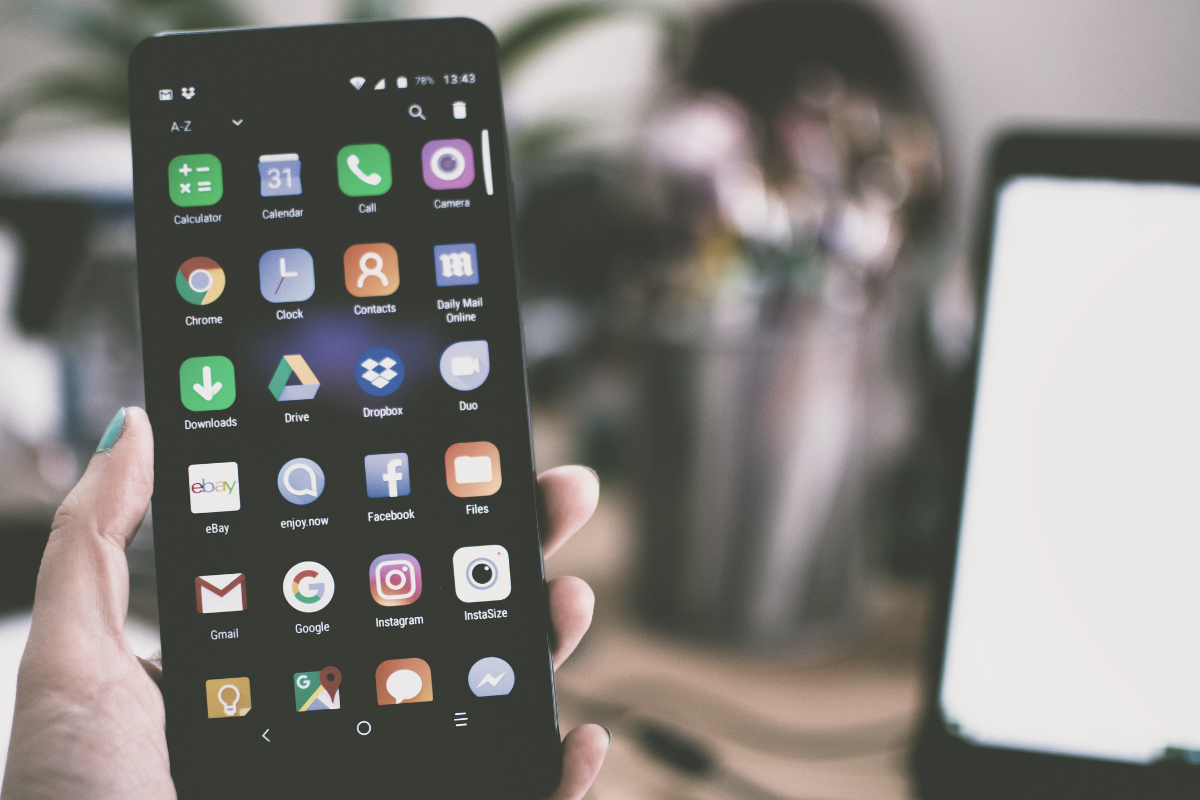
    Parents using iOS are able to use Guided Access to limit their kids to one app for a certain amount of time but what can parents with Android phones do?

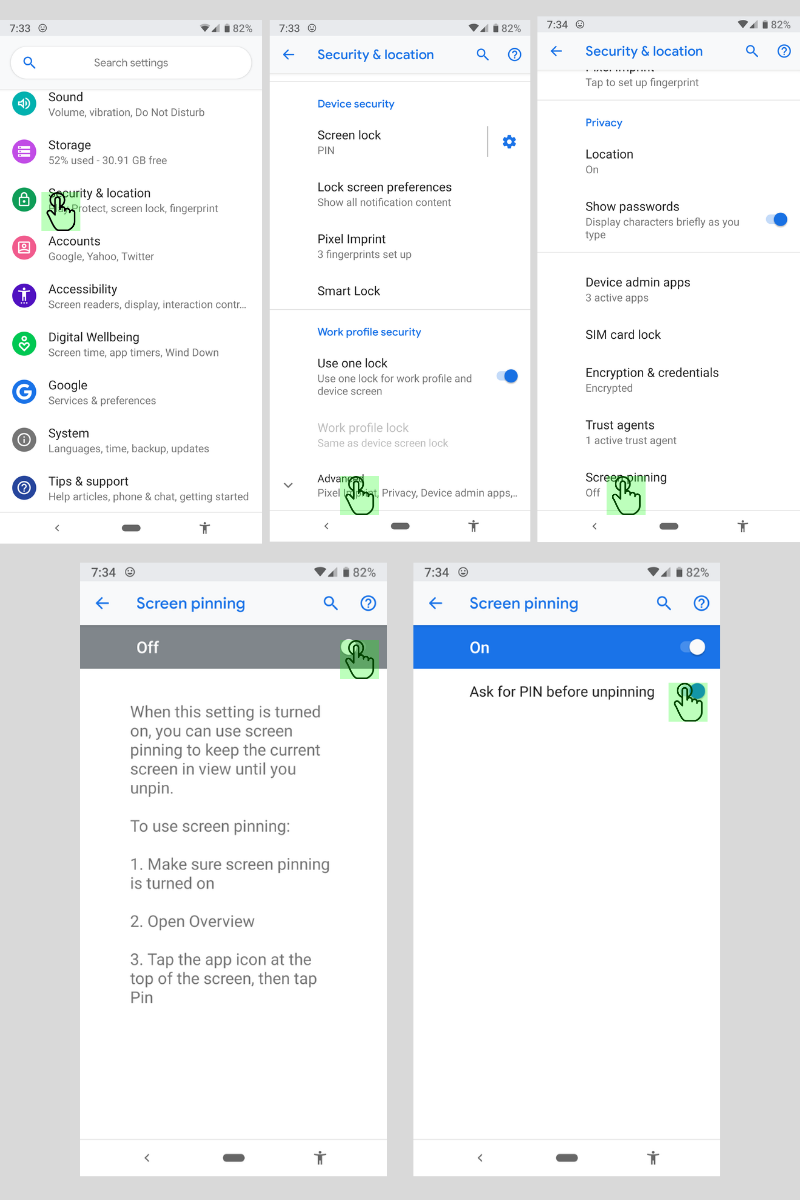
    Screen Pinning is the solution. It’s been available since Lollipop (5.0) and is advertised as a security feature but it’s a good parental control too.

    Screen Pinning only allows one app to run and someone with your phone cannot switch to another app without you PIN or fingerprint.

    There aren’t any time limits built into Screen Pinning so we’ll cover that in another article about “Digital Wellbeing”. For now, here’s how to enable this helpful feature.

    Many smartphone manufacturers implement Android a little differently. If you’re having trouble with these instructions, check with your carrier or phone manufacturer.

    These instructions are for Android 9.0 and up. If you have an older version of Android the instructions are a little bit different. You can find instructions for older versions at Google’s Help Center.

    How to Enable Screen Pinning

    1. Open your device’s settings.
    2. Tap Security & Location > Advanced > Screen Pinning.
    3. Turn on screen pinning (remember to require your PIN to disable).

    How to Pin an App to the Screen

    1. Open the app you want to pin.
    2. Swipe up to the middle of your screen.
    3. Tap the app icon.
    4. Tap the pin.

    The app is now pinned and cannot be switched without your PIN or fingerprint.

    How to Unpin an App From the Screen

    1. Touch and hold the back and home icons.
    2. After your device locks, enter your PIN or use your fingerprint to unlock.

    The app has now been unpinned and you can use other apps.

    That’s all there is to it. The next time you’re waiting in line at the DMV and your kid asks to play a game, you can give him your device without worrying that he’ll watch red band trailers on YouTube.