Tag: teens

  • Uninstall Instagram? Your Kid Can Still Use It!

    Uninstall Instagram? Your Kid Can Still Use It!

    Many of the tools parents use to protect their children depend on being notified what apps they have and are using most often. When it comes to social media, being able to monitor posts and direct messages is critical. Sometimes, finding something you didn’t want to see will result in forcing your child to uninstall the app from their device. Until recently, Instagram has been a social media platform that only allows users to post from within the app. Therefore, uninstalling was a good solution for parents who wanted to give their kids some sort of time out. Instagram has just updated their mobile site and it’s going to ruin everything.

    Instagram’s mobile browser update allows users to post photos and use the explore feature without having the app installed. This means that the most major features of the app are available. You still aren’t able to send direct messages through the mobile site, which is a good thing, but posting, viewing posts and accounts, and finding new accounts through search and explore are now accessible. This update is meant to give access to Instagram in countries and areas who have limited  access to app stores or network services. Being able to use Instagram without an app means that more and more people across the country and the world will have an opportunity to share pictures of their lunch or coffee.

    What Parents Should Know

    There is a simple way to monitor what your kids are doing on Instagram, whether it’s on the app or in the browser. I recommend installing Instagram on your own device and adding their account. Even if you have an account of your own, you can add another one and see everything they have been doing. Using the mobile browser will definitely affect your ability to “ground” your kid from social media but there are ways to avoid that to. Here are a couple of options.

    1. Remove access to browsers within the parental controls or restrictions of their device or your parental control apps.
    2. Put instagram.com on the blacklist in your filters or in the “red flag list” on your accountability software.
    3. Take the entire device from your child until the grounding is over. Make them use the family computer for any online activities they must do. This will really give an extra impact to the punish.

    Instagram isn’t inherently bad, of course. Just like any site or app with user generated content you’re going to find inappropriate content. These things can’t usually be filtered so monitoring what they are doing is critical. The most common issue is time spent on social media. Teens are spending upwards of six hours a day online and many of those hours are on some form of social media. If time is your concern, then a simple uninstall of the app won’t cut it anymore. You have to lock down some of the browser options as well. Otherwise, you’re only keeping them from a couple of the features of Instagram, not the entire platform.


  • Why Your Teen Posts Her Feelings On Social Media

    Why Your Teen Posts Her Feelings On Social Media

    I’ve seen them called “vaguebook posts.” It’s the status on social media that hints at some sort of trouble or drama but doesn’t go into detail. It can be annoying to see these things on our Instagram or Facebook feeds but sometimes they’re not just cries for attention, they’re cries for help. Teens are being taught (rightfully so) that it’s better to express their feelings than to hold them inside. Studies are showing that more and more young people are admitting to having bouts with depression, anxiety, and even suicidal thoughts. Social media has become a safe place for them to express how they feel. The problem is that it can often open them up for criticism and unwanted attention. 

    The 12-month prevalence of MDEs (major depressive episodes) increased from 8.7% in 2005 to 11.3% in 2014 in adolescents and from 8.8% to 9.6% in young adults (both P < .001). – Pediatrics Journal Study

    The reasons for these increasing numbers could be related to increased awareness of the symptoms of depression but regardless of the reason, they are statistics that parents should pay attention to. Mental Health professionals are championing more awareness and openness about depression and anxiety. They agree that being outspoken about how you feel can lead to prevention, early detection, and even increase the likelihood of sufferers getting professional help. The problem, however, may be that this transparency is happening in a public forum like Social Media. This is where parents come in.

    What Parents Should Know

    I am not a psychologist  or licensed counselor. I don’t have a professional opinion on the mental health of your teenager. I do, however, have a professional opinion of their activity on Social Media. As a family internet safety expert I see parents struggle to open the lines of communications with their teens. An emotional post on social media should be seen as an open door. There is no more important thing in the life of your young adult or teenager than the ability to be transparent with you about how they feel. If they are posting on social media about depression, anxiety, and especially suicide, it’s time to bring that conversation into a face to face meeting. Posting such transparent posts (even if they’re vague) on social media opens your child up to more bullying and harassment which could be what’s contributing to the problem in the first place. They should be advised to express those thoughts vocally to someone they trust.

    My advice is to start the conversation with your child even before you see any sign of depression. Ask them how they are doing and feeling. Ask them if they feel overwhelmed and if there is anything happening in their lives that you should know about. If you are seeing true signs of these depressive episodes then don’t hesitate to seek out a licensed counselor that can mediate your discussions with your teen. The world they are growing up in is very different than it was even twenty years ago. The standards that kids are asked to live up to are higher. Criticism is more public and the media is teaching messages that conflict with what many of feel is healthy for our kids to believe. This problem is real and it isn’t going to solve itself. We, as parents, have to step up and help our teens make quality decisions when it comes to their feelings and mental health. Take the first step today. Have a conversation.


    Sign up for our email list to get our family internet safety checklist and the Safe Blog Uninstall List.

    Get Our Latest Posts in Your Inbox

    * indicates required


  • How To Control What You See on Every Social Media Timeline

    How To Control What You See on Every Social Media Timeline

    One of the most common complaints I hear from parents is that they never see the posts they want to see on their social media timelines. They will scroll through their Facebook or Instagram feed looking for an interesting post, something from family, or even their own children and instead be bombarded with articles about politics or silly memes or chain letter type posts that want you to click like and share for some reason. If your feed is crowded with this sort of chatter it makes enjoying the purpose of social media very difficult. If you’re like me, you use your social media feeds as a way to keep up with friends and family, to promote the work that you do, and to be entertained and laugh at silly internet things. Well, the algorithms designed by those who build these social media platforms are created to give you the best experience. The problem is that it’s all based on your behavior on the site or in the app. If your behavior contributes to the clutter then you’re just going to get more clutter. Here are some tips to help you sort out the mess that may be your social media feeds.

    Remember who is on what social media service.

    There are different audiences on different social media sites. The split is based on a number of factors. Age, career, and gender are the major contributors. Twitter, for instance is more popular for young professionals looking to network and build a community of like minded business people. Instagram is a whole lot of young people and young parents who got tired of the clutter in Facebook and Twitter and just enjoy sharing photos. Facebook has a very large middle aged demographic and has seen a major decrease in young users over the past several years. Snapchat is full of youngsters but is growing rapidly in the 18-25 demographic. The reasons that people choose the platform that they choose can seem pretty obvious and it’s important to keep those reasons in mind as you use social media. You aren’t going to care too much about the photos of a ton of young parents and teens if you’re a middle aged parent who’s adult kids who have no children of their own yet so you may not open an Instagram account. As soon as your 22 year old daughter and son-in-law have a baby, though, and post photos of her online. Instagram is where you’ll want to be.

    Don’t like and join every FB page or group you’re invited to.

    Facebook Pages are created for advertising and promotion. They all link to a business, blog, or something of that nature. Because of this they’ll post nonstop and any time you react to one of their posts in any way you’re telling Facebook to show you more of what they post. So, if you’re a follow of a Facebook page, say the BecauseFamily Page, for instance, and you want to see more of the great resources and articles that they share, you’ll want to interact with their posts more. If you follow a page like Silly Kittens Playing Piano (I think I made that up but it’s probably out there somewhere) that posts fifty pictures a day that you don’t really even find that funny, you’re going to see more of those photos than you see most other things. Especially if you have ever clicked the like button on any of them.

    You see, the algorithm on Facebook gives you posts from the pages and groups you’re apart of based on how often you react to those posts. When you click the like button on every kitten picture you see, you’ll eventually see almost nothing but cat pictures on your Facebook feed. Now, if that’s what you want then awesome, but if you’re trying to keep tabs on what your kids are posting online, those cats are going to get in the way. You should probably click like a lot less. That’s my next tip.

    Leave the Like Button Alone!

    The like button on Facebook or the heart icon on Instagram and Twitter is basically a little “show me more” button. This is you telling the algorithm that you enjoy that kind of content and want to keep seeing it. The problem with this is we treat the Like button as passive aggressive head nod toward the content we’re seeing. You have to understand, it’s more than a head nod. It’s a subscription. You may be seeing tons of posts that you think are stupid or posts from people you barely even know. If you are, it’s because you’ve been clicking like as if it’s the same thing as a casual grin across the room. I’m sorry to say it but it’s your own fault.

    A couple of years ago I swore off of the the like button. I decided that if a post isn’t worth a comment, I wouldn’t react at all. After a couple months of that behavior, my Facebook feed started to become enjoyable. I see the geeky stuff that I like more than I see anything else, I don’t see much annoying click bait content anymore, and my friends and family are front and center and they don’t even have to tag me in their posts. I’ll often show my wife something hilarious that has come across my Facebook feed and she’ll ask me why my feed is so awesome. I don’t click like on ANYTHING I will tell her. Now, I will add that likes on comments within a post are an exception. I’ll often click like on a reply to one of my comments. That doesn’t add to the clutter since it’s on a post I have already commented on, thus deeming it worthy of being filed with the algorithm as something I’d like to see more of.

    Lastly on this topic, it’s important to remember that nobody gets blessed, goes to heaven, or receives better medical care because of a Facebook like. That’s called click bait and it only exists to help the page that shared it get more traffic and sell more advertising. 

    Only open posts from people you want to hear more from.

    Sometimes we see a post that peaks our interest and before we know it we’ve dived head first down a rabbit hole. When you click on a post on Facebook or Twitter, the algorithm remembers it and feeds you more posts by that poster. That means the rabbit hole doesn’t end when you’ve closed the article. It will continue on your feed from now on. The most important thing when deciding what links to click on on social media is who is posting it. If you don’t want to see more from that person or poster then you shouldn’t click the link. Also, it’s important to consider the original poster, not just the person who shared it. This info can help you populate your feed with only people who’s word you trust and respect and fewer of the random and nonsensical articles that seem to be so prevalent in our social media feeds these days.

    Use the “Follow,” “Notifications,” or “See First” options. 

    A great way to make sure you don’t miss a post by someone you care about is to tell Facebook you’d like to “See if First.” You can also tell Instagram or Twitter to notify you when someone you want to follow posts something. You can watch this video to see how to set up notifications on most of your accounts.

    Take Control

    Social Media algorithms are often treated like an enemy that we struggle to fight against. Every time Twitter or Instagram or Facebook changes the way they order your news feed petitions start showing up to put it back the way it was. The truth, though, is that these algorithms are tools. It’s a form of artificial intelligence that was designed to give you more of what it thinks you want. It decides what you want based on how you act. This means that if you don’t like what you’re seeing on your timelines, you need to change what you’re doing on your social media accounts. I’ll ignore the obvious life application here and just recommend that you apply some of the above advice to how you handle your online experience. Get back to me in six months and you can thank me for how much more “well behaved” your timeline has been recently.


  • Musical.ly Teams Up with Apple Music to Sell You More Stuff

    Musical.ly Teams Up with Apple Music to Sell You More Stuff

    Musical.ly allows users to film themselves lip-syncing and performing current pop music hits and scenes from movies or TV shows. It has become one of the most popular apps for teens and pre-teens and a connecting point for music artists and their fans. In fact, there are now Musical.ly stars who are seeing success in more mainstream markets as well. Most of them are quite young teenagers. Today, Musical.ly has announced that they’re partnering with Apple Music to provide the song clips that make up their lip sync library. They will also be promoting subscriptions to the music streaming service and allowing Apple Music subscribers to listen to full versions of songs.

    Musical.ly grew a ton in 2016 and has seen a tapering off in their young audience during the beginning of 2017. This move seems to be a way to bring more value and financial stability to Musical.ly while putting Apple’s music streaming service in front of another audience. Apple Music has been chasing Spotify for subscriptions and the aren’t gaining ground. This is an obvious attempt to target Musical.ly’s young audience with their option for streaming music. Allowing full versions of the songs kids are lip syncing to in the app is adding value that many of the app’s users will see as valuable. Possibly valuable enough to ask their parents for a subscription to Apple Music. That is if they don’t have the ability to sign up on their own.

    What Parent’s Should Know

    I have been pretty outspoken on my disdain for Musical.ly in the past. One of the major reasons is the lack of an age restriction to sign up and the CEO’s attitude about it. Now I see another potential hang up for parents who’s kids use the app. There are already songs available on the app that many parents may feel are unsuitable for the age of their kids that use the app. Now the entire songs will be available if you are one of the 20million families who have an Apple Music subscription. If you don’t have a subscription be warned that the app will be consistently asking your pre-teen if they’d like to sign up for one. Also, there are likely to be features made available that won’t be useful without an account with Apple Music. How many times will your 13 year old have to be blocked from using a song until they start asking you to subscribe for them. Advertising is still, however, the least of my worries with Musical.ly.

    Parents of young teens should pay close attention to what their kids do on Musical.ly. If your young daughter is spending a lot of time singing and dancing in front of her camera know that there is no age verification so the fourteen year old boy who watches every one of her videos could actually be anyone, anywhere, of any age. In this day and age where kids are being asked to meet up by strangers and actually saying yes, there is no reason for your kid to be unsupervised on an app like Musical.ly. I recommend and uninstall if your kid is under 17 and then to closely monitor their use of the app. 

  • The Hooked App is as Addictive as it Sounds

    The Hooked App is as Addictive as it Sounds

    We all want our kids to read more so an app that claims to have had users reading for over 500,000 hours sounds like a godsend. It is, in fact, a great idea and a pretty original way to get it’s users to read. The Hooked app isn’t new, having launched in 2014, but it’s rating number 6 in the iOS app store today. It’s popularity is growing fast.

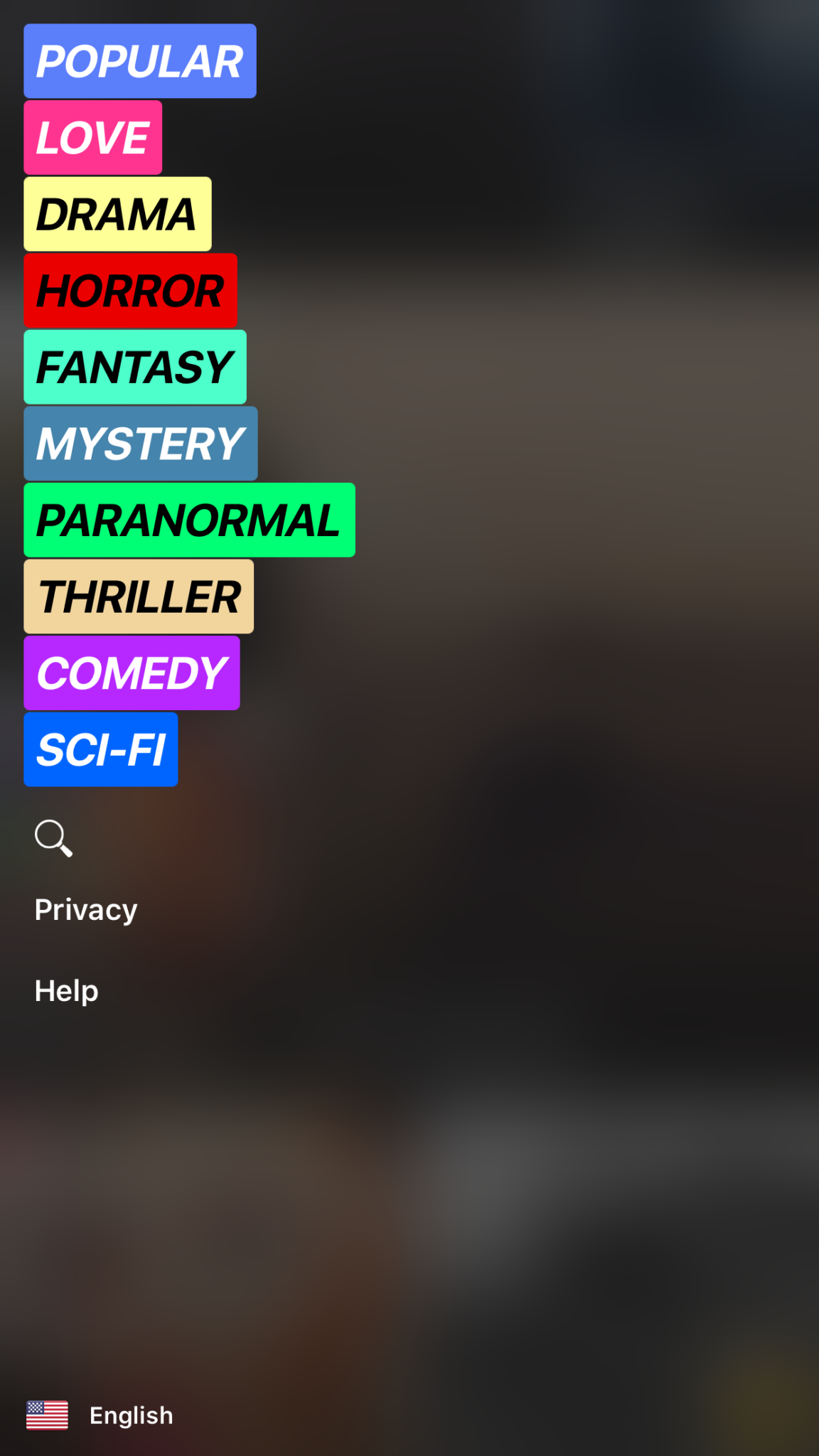
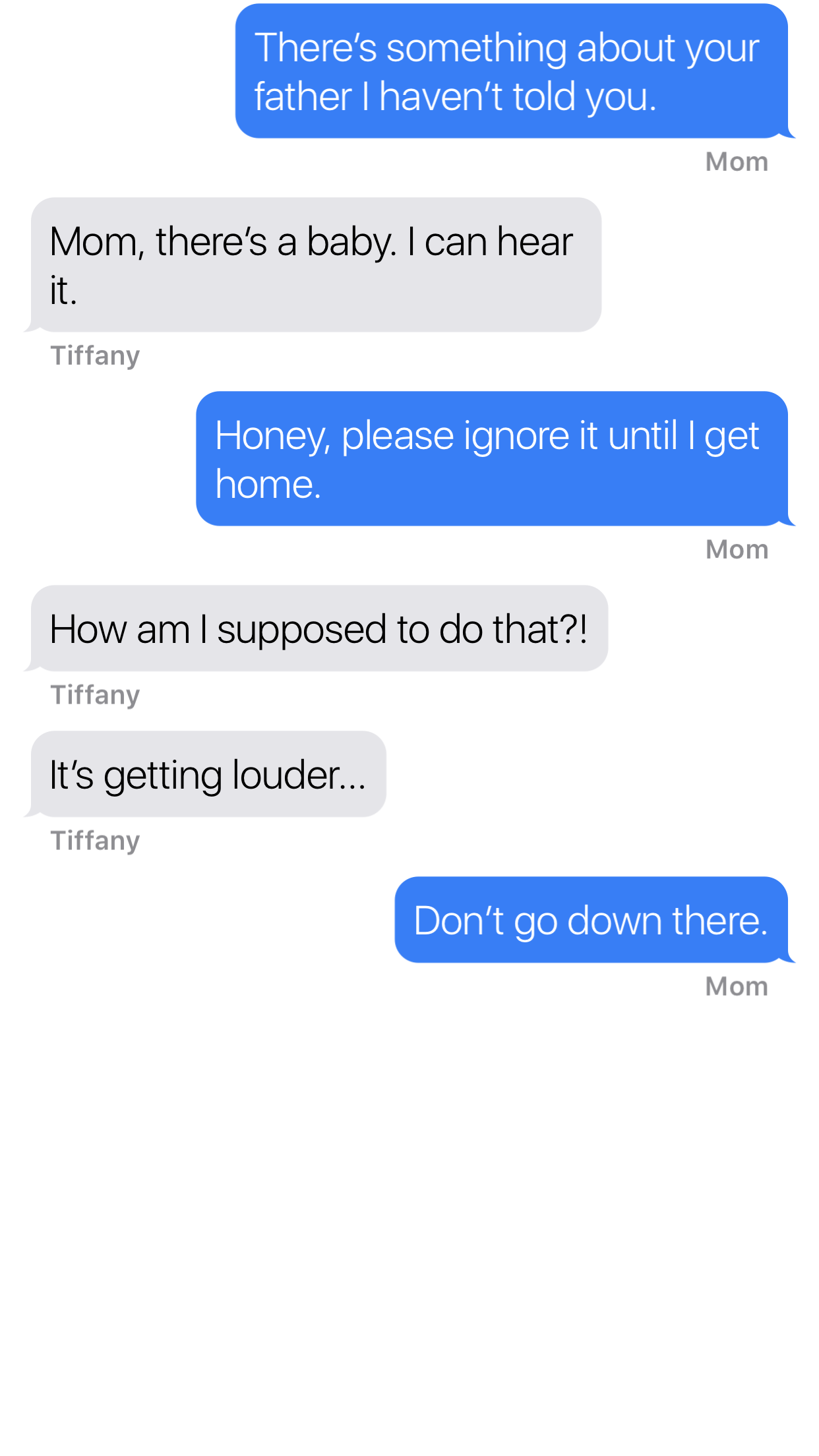
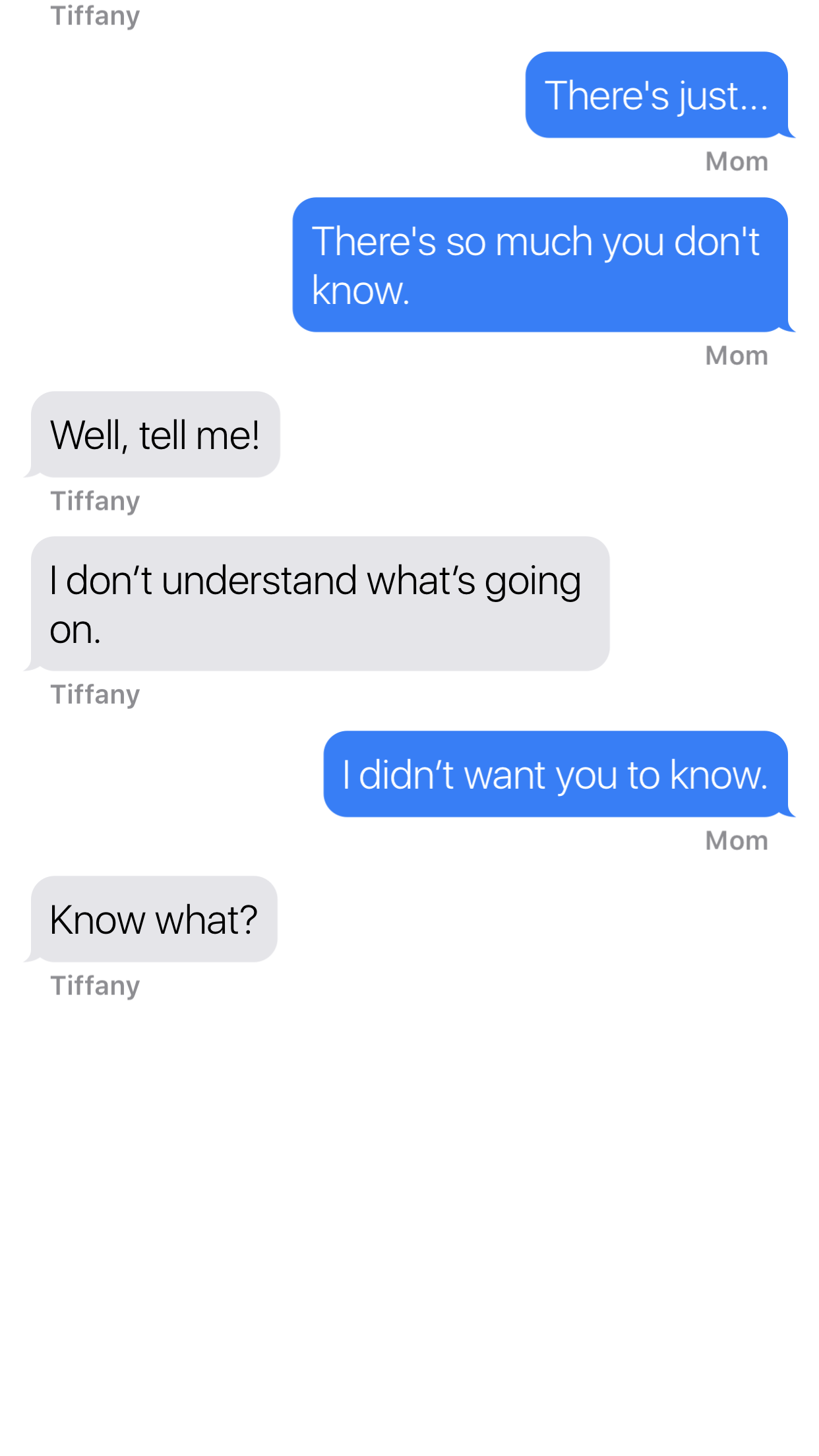
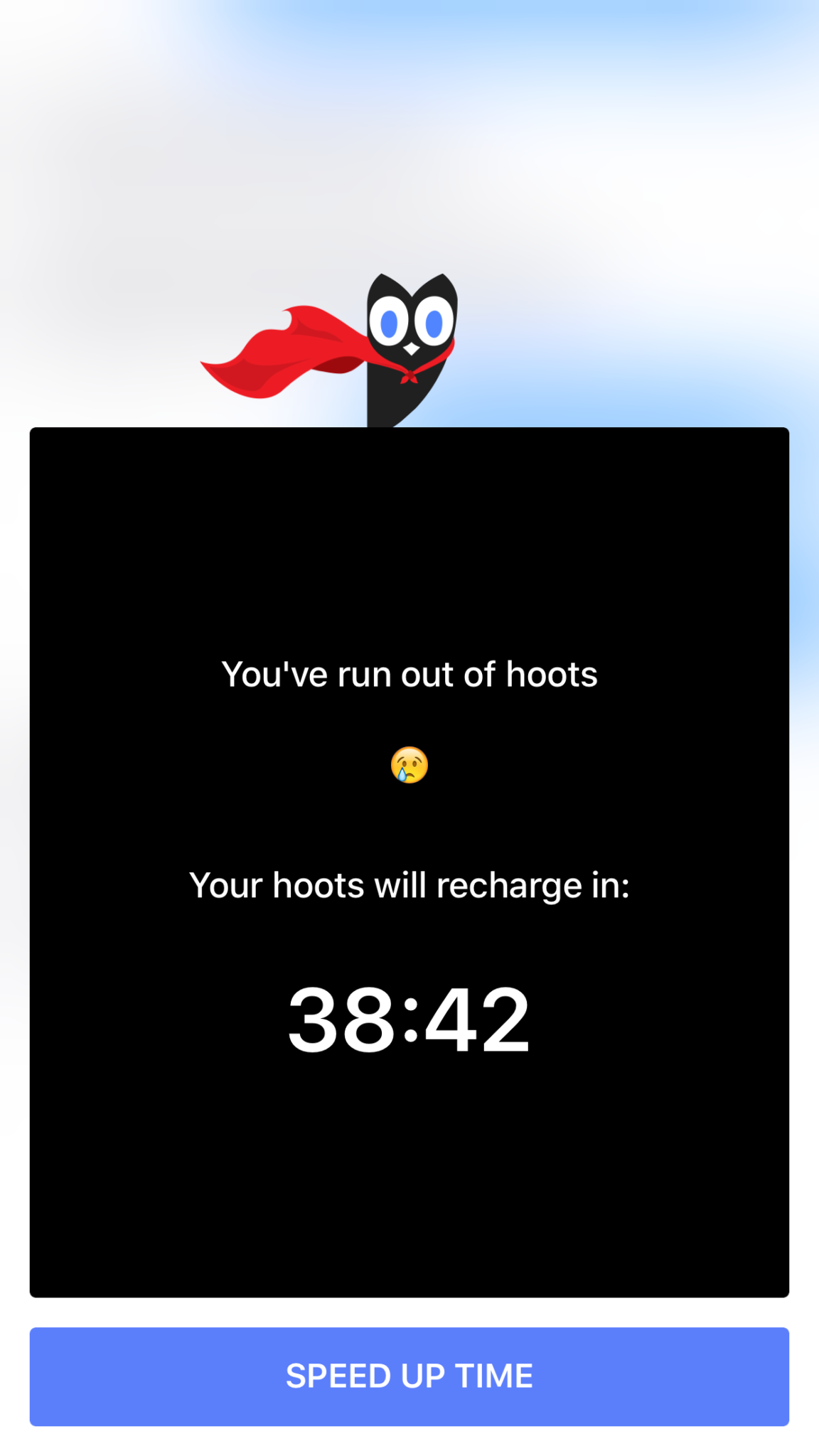
    Hooked is an app that tells stories in the form of text messaging conversations. The story topics include comedy, horror, fantasy, and sci fi. Each story has a title page photo, many of which feature a pretty girl or couple in a romantic or suggestive pose. When you’ve made your choice the story unfolds one text message at a time, usually in the form of a conversation between a couple of people. You can tap the screen to reveal the next message and you may find yourself in a tapping frenzy to reach the next plot twist. Then, however, you’ll suddenly be halted by the Hooked Owl asking you to pay for more “Hoots.” A “Hoot” is a click/tap and you only have a certain amount of them every hour. Once you’ve used them up you’ll be prompted to buy more or sign up for a weekly or monthly subscription to get unlimited “Hoots.” If you’re like me and not ready to invest fiscally in finding out the next line of the story you can just wait until the next hour begins.

    The Hooked app cashes in on the obvious popularity of texting by using it as a storytelling venue. This makes it very appealing to the younger aged adults and teenagers. The target audience for the Hooked app is ages 13-24 but I wouldn’t just look over the app if I saw it on my teen’s phone.

    What Parents Should Know

    The Hooked app consists of some very mature themed stories but is targeting younger teens.  The stories are delivered in a way that your teens and tweens will definitely find appealing. I found myself anxious to find read the next message as the story progressed. Obviously the story really started to climax right before I ran out of “Hoots” so I would have to wait a while to continue reading. While this did get me to close the app for a while, the $7.99 per month for unlimited “Hoots” is a low price tag for being able to sit all day long and click through these stories.

    My issue isn’t really with the way the stories are delivered, it’s actually a creative way to tell these tales. The “one post at a time” method lends itself to a lot of suspense and a pretty entertaining read. The problem I have is the addictive nature of this app, if you can tap an unlimited number of times and go from story to story you’d very easily find yourself reading through a hundred of these stories in just a few days. Also, these stories can be pretty mature, dramatic, and suspenseful. The categories feature love and thriller options and the stories get quite intense at times. The texting storytelling method also makes them a bit more eerie. Users can also write stories which makes for a completely new potential problem there. Any time you’re dealing with User Generated Content it’s hard to be sure what your kids may read.

    My advice is to know your child and their maturity level well before you let them use Hooked. I wouldn’t go by the 9+ rating it has in the app store, I would assume your child should be a bit older. Keep in mind that many of these stories are written by users of the app. Since the content can’t be guaranteed to be safe for any age group, you should help your teen or tween by involving yourself in their decision to use Hooked. If they do read on the app, I recommend asking them what the stories are about and what they like about them. Keep yourself in the loop and informed as much as possible.

  • Fake News and Your Family

    Fake News and Your Family

    I’ve been hesitant to write about the fake news issue. While there have been plenty of stories come out about how the tech world is battling the fake news problem I have yet to be able separate the issue from people’s political feelings and so I’ve left it alone. Today, tech news sites are talking about the latest shot fired in the fake news war and it centers around the most popular site on the internet, Google.

    Google is going to be featuring fact check links on many news stories in your search results. The need for more fact checking has become more and more obvious as the internet becomes full of user generated content. The issue with UGC is that you can say whatever you want and, until recently there weren’t a lot of ways to prove your story right or wrong. Links underneath some Google search results will now feature fact check information from sites like Politifact and Snopes. These should help those seeking true news and information to have a better understanding of the sources for the articles they’re using for their research.


    What Parents Should Know

    Fake news isn’t a kids and teens problem. Many adults share stories without finding out where the information came from. It isn’t difficult to recognize a satirical news site from a real news site. Fake news sites work to disguise themselves as real news. Satire is an obvious attempt at humor while fake news is usually just created to get clicks and sell advertising. You see, the more clicks a site gets the more money they make from advertisers on their sites. Writers on these sites will write a story based on the number of clicks it will get and not the accuracy of their information. Often these stories will be twists on something that is true while sometimes it’s just a completely made up article with a “clickbait” headline. We can’t continue to share these articles for so many reasons; the biggest reason is that it further confuses our society and divides us.

    Your children deserve a world where news is actual news. No matter your beliefs or political leanings you don’t want your kids to have to function in a society where there is no difference between factual news and an inflated false story written by some kid in a basement in Ohio (no offense to Ohio.) You should learn to fact check. Spend some time on Politifact.com or Snopes.com and dig around for the issues that are most important to you. Teach your kids what it means to site sources and look for the purest form of information or news. Yes, you can read about the latest tech news from me and I’ll related it to parenting and protecting your children online; that’s great, but if want to know more about Google’s fact checking search results you can go read their blog to get the information straight from the source.

  • PODCAST: Why is the Instagram Search Bar Recommending Porn

    PODCAST: Why is the Instagram Search Bar Recommending Porn

    The Wishbone App could be an bad idea for your tween daughter. Apple is making some changes in the app store. Amazon Prime Video now has parental controls. What can you learn from search bar auto-fill terms?


    Video Version

    – Social Media Links

    Facebook: http://facebook.com/4pointfamilies
    Instagram: http://instagram.com/becausefamily
    Twitter: http://twitter.com/becausefamily

    – Newsletter Signup

    Ministry Updates:: http://eepurl.com/R7Btr
    Weekly Blog Posts:: http://eepurl.com/cvnhXD

    – Websites

    Ministry Site:: http://becausefamily.org
    Tech Blog:: https://safe.becausefamily.org
    Michael’s Speaking Info:: http://kmichaelprince.org

    – Donate and Affiliate Links

    http://BecauseFamily.org/partnership

    Music by Kevin MacLeod at http://Incompetech.com

  • These Games Let Your Tween Play Out Their Own Soap Opera

    These Games Let Your Tween Play Out Their Own Soap Opera

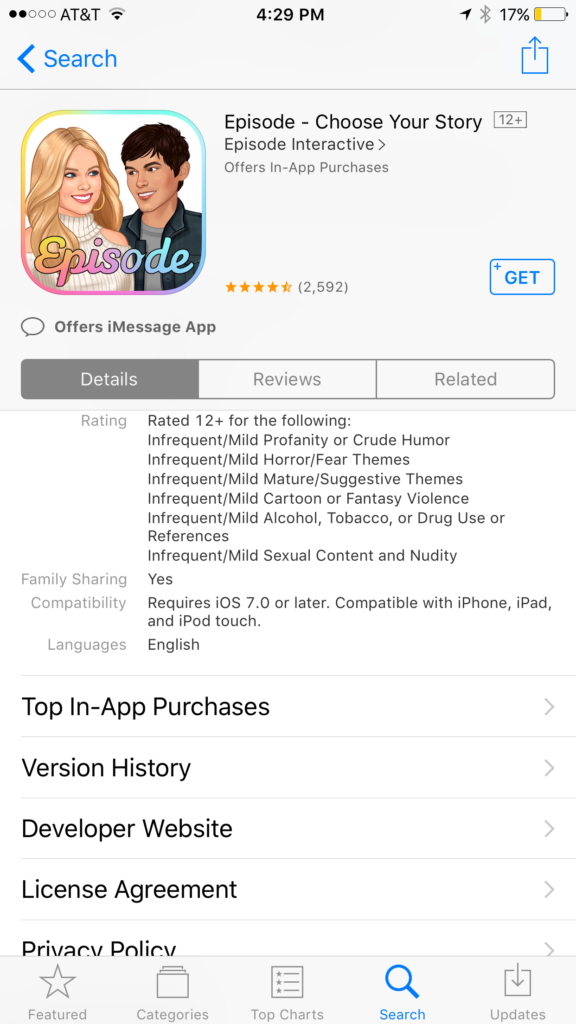
    I was doing research for an app to write about when an ad came up. The ad was for a game called Episode and it featured cartoon animated teen girls in situations that would only come from some mid-day television show. For example there was one girl deciding whether or not to perform CPR on her shirtless and handsome male companion. He winks at the “camera” and she thinks he may be faking so the player gets to chose her next move. “Perform CPR” or “Kiss him to find out.” This scenario is one of thousand available on these games that are developed by a company called Episode Interactive.

    Their apps are all interactive story games that put the player in control of the choices of the main characters. Each app features thousands of stories to play out. The scenarios feature romance, mystery, comedy, family, and a bunch more. The situations that the character is placed in during the stories can often be very adult oriented. Decisions whether or not to have sex. A choice to run away from a potential mugger or try to attack them back. There are some very dramatic and grown up themes in these games. A look at the description will tell you that the games are rated for ages twelve and over for various reasons including, sexual themes, drugs and alcohol, violence, and nudity.

    These games are a choose your own adventure of sorts for the new generations. They target young tweens with the glam of what it’s like to be a teenager or what High School life is like. It’s all obviously very fictitious but our kids buy these messages hook, line, and sinker. Think of apps like this as romance novels that are targeting your ten to twelve year old daughter. I say it’s targeting tweens because the app I was reviewing when I saw the ad for Episode was one that is obviously mostly populated with young girls. Your daughters will believe a message about who they are and what gives them value. Apps like this are speaking to a certain version of that message. We as parents must play defence against the wrong message to successfully teach the correct message.

    What Parents Can Do

    My advice is to make sure your child is far older than the recommended age for these games before you let them play. They are obviously meant to mimic the soap operas of our parent’s days and they feature exactly the same types of themes. The maturity of your child is best understood by you, their parent. It is usually not a good idea to take the age recommendation of an app, game, or other form of entertainment as the law and gospel. You have to use your own judgement. Unfortunately for some kids these themes are mild compared to things they’ve dealt with in real life. But for many of our ten, eleven, and twelve year olds, these games can introduce topics that they may not be mature enough yet to navigate. That’s why it’s so important for you as a parent to step in and see what they’re doing on their phone or tablet.

    Apps like Episode are easy to spot because they don’t hide their themes in the ads on the app store. It’s pretty obvious what they feature in your game. My advice is to use something like Google Play’s parental settings, or Apple’s Family Sharing to ensure you’re seeing every app being installed by your kids. If you see something that looks like it could be a choose your own adventure style of soap opera game then think seriously about the potential questions your child will be asked while they play it.


    Get Our Latest Posts in Your Inbox

    * indicates required


  • Use Twitter’s New Tools to Protect Your Kids from Trolls

    Use Twitter’s New Tools to Protect Your Kids from Trolls

    Surprisingly, more of our teenagers are using twitter than you may think. The common attitude among young people is it’s a good place to express yourself even if you’re not sure anyone is listening. Twitter is still a place for teens to go public with their thoughts and opinions. The potential problem with such expression is that there are always those out there wanting to counter your opinion. Often this takes on the form of trolling or bullying. Twitter has released some tools that can help their users filter out some of those trolls and parents need to learn how to use them.
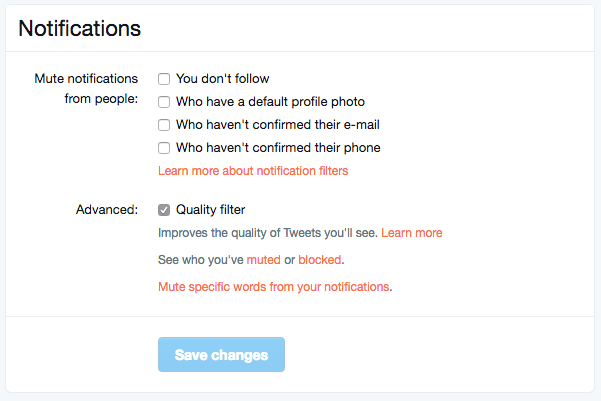
    Twitter was in the news last year because of a common theme of internet trolls bullying users, especially celebrities. This caused Twitter to begin working on some new ways to “clean up” what you see in your feed. In the last several days Android and Desktop Twitter users were given the power to block notifications of posts from certain types of accounts, including those who haven’t verified their email address and phone number. The common practice of these trolls is to create fake accounts just for the sole purpose of messing with someone. They don’t verify the account or even include a profile picture, displaying the default bird’s egg logo instead. The new tools developed by Twitter will allow these trolls to be filtered out by simply clicking a couple of checkboxes.


    What Parents Should Do

    Suicide is now the third leading cause of death among teens and a teen that is cyberbullies is ten times more likely to think about killing themselves. These statistics are a reality in this digital world and are a wake up call that parents need to take the opportunity to filter content in their kids social media feeds seriously. These notification filters can help remove some of the negative and hurtful people that just seem to want to make trouble on Twitter.


    Take note of the above picture. If you go to the notifications tab on twitter you’ll see a Settings link on the upper right. Click that link and you should see something similar to this image. It’s pretty straight forward but if you turn off notifications for anyone who hasn’t set up their profile picture, validated their email, or linked their phone number you’ll eliminate many of those troll accounts that cause so much trouble. Remember that Twitter and other social media sites contain “User Generated Content” and therefore, can’t be considered safe for anyone under 17. This means you should keep an eye on what your child or teen seeing on Twitter and have conversations with them about it. As them why they use Twitter. Find out if they’ve ever been teased or bullies on the app. If so, ask what they did about it and who they told. Kids who talk about being bullied are far less likely to take drastic measure as a result of it so open the lines of communication and be present when they need you. You should be that safe place they can come to with any problem. Bullying on social media is no exception.

    Follow all of our posts to keep in the loop on family relevant tech topics. Sign up for our weekly update newsletter. 


    Get Our Latest Posts in Your Inbox

    * indicates required