Tag: tech

  • YouTube Boasts 8 Million+ Flagged Videos Removed, is That Enough?

    YouTube Boasts 8 Million+ Flagged Videos Removed, is That Enough?

    A new report from YouTube has disclosed the removal of over 8 million videos that didn’t lineup with their content guidelines. Most of the videos were removed by their algorithms system. Videos that contained sexual content, extreme violence, hate speech, or terrorism all made the list of removed content. Some had been flagged by the system, some by viewers, and a few by YouTube employees who watch for non-compliant material on the video site.

    Many of the videos that were flagged by YouTube’s software were removed before they even received a single view. These algorithms can scan the videos through the processing system and deny them before they’re made public. Does this mean that YouTube is a lot safer for Felix?

    Check Out: Youtube Kids

    What Parents Should Know

    This is a major step in the right direction for YouTube. Unfortunately it’s never going to be full proof. The only real way to monitor inappropriate content is for human eyes to be on that content. Also, as parents it’s tough to allow another person, much less a company, to decide what is appropriate for our families and what is not.My advice, as always, is that parents have their eyes on the stuff their kids are watching whenever possible. If not possible then be sure to use tools like Guided Access or android family link or kid mode to be sure kids can’t explore YouTube unmonitored or unfiltered. YouTube does have a safe mode as well as a separate app for kids (YouTube Kids) and I recommend these tools as well.

  • Here’s How To See if Your Private Data Leaked to Cambridge Analytica

    Here’s How To See if Your Private Data Leaked to Cambridge Analytica

    There is a tool to help you find out if your data was leaked to Cambridge Analytica. There may not be much you can do about it, but it is interesting to see if your app approval habits led to the sharing of your private data. Facebook has said that they’ll be highlighting the tool on the top of everyone’s news feeds but in case you haven’t seen it or don’t see it, here’s how to find the tool on your own.


    I recommend you check this out for your own Facebook account as well as any accounts your kids may use. Just in case you don’t have a minute and a half to watch the video above, I’ve listed the steps below for you. Thanks for reading FamilyTechBlog.com and remember to be careful how much access you give apps to your social media data.

    1. Open your Facebook App
    2. Click on the “Hamburger Menu” to the bottom right. (Three stacked lines.)
    3. Scroll all the way down to the bottom of the menu.
    4. Select “Help and Support”
    5. Select Help Center
    6. Search {Cambridge}
    7. Select the first auto complete option.
    8. That’s where it tells you if you’ve shared data with Cambridge Analytica.

    Thanks again, and share this with your friends.

  • PODCAST: Three Apps Your Kids Should Uninstall

    PODCAST: Three Apps Your Kids Should Uninstall

    Family Tech Update: These apps can be seriously dangerous for your kids. Adult content, privacy issues, stranger danger, all kinds of issues here, and some of them are only rated 12+!

    Social Media Links

    Facebook: http://facebook.com/becausefamily
    Instagram: http://instagram.com/becausefamily

    Twitter: http://twitter.com/becausefamily

    Newsletter Sign up

    Ministry Updates:: http://eepurl.com/R7Btr
    Weekly Blog Posts:: http://eepurl.com/cvnhXD

    Websites

    Ministry Site:: http://becausefamily.org
    Tech Blog:: https://safe.becausefamily.org
    Michael’s Speaking Info:: http://becausefamily.org/bookings

    Donate and Affiliate Links

    http://BecauseFamily.org/partnership

    All music/audio effects are public domain.

  • Family Tech Update: “The Time Well Spent Movement” {podcast]

    Family Tech Update: “The Time Well Spent Movement” {podcast]

    There’s a movement to take back our time and curb our tech addictions. What does it mean for families and how can we take charge of tech addictions? Plus: Snaps can be embedded on any site, and coding is king, but not on a screen!

    unGlue Affiliate Link

    Facebook: http://facebook.com/becausefamily
    Instagram: http://instagram.com/becausefamily
    Twitter: http://twitter.com/becausefamily

    Newsletter Sign up

    Ministry Updates:: http://eepurl.com/R7Btr
    Weekly Blog Posts:: http://eepurl.com/cvnhXD

    Websites

    Ministry Site:: http://becausefamily.org
    Tech Blog:: https://safe.becausefamily.org
    Michael’s Speaking Info:: http://kmichaelprince.org

    Donate and Affiliate Links

    http://BecauseFamily.org/partnership


  • Google’s “Be Internet Awesome” Wants to Help Kids, Teachers, and Parents with Digital Citizenship

    Google’s “Be Internet Awesome” Wants to Help Kids, Teachers, and Parents with Digital Citizenship

    More than three-quarters of school-aged kids in the United States use the internet every week. Much of that online time, for seventy-nine percent of kids, is spent on a smartphone. Much of that time is also spent at school. Kids curriculum is increasingly web-based and school is even issuing computers to kids younger and younger. The internet has long been a place for kids and teenagers to find entertainment and now with the necessity for online activity for school work screen time and global communication among our young ones is on the rise. This has been a cause for concern among parents, teachers, and school administrators alike. Google wants to help parents, teachers, and kids understand what a healthy attitude towards internet activity looks like. While at CES I was able to hear representatives from Google explain Be Internet Awesome and how it was developed. I thought it would be a great resource for parents and teachers alike.

    INTERLAND

    “Kids can play their way to being Internet Awesome with Interland, an online adventure that puts the key lessons of digital safety into hands-on practice with four challenging games.” – beinternetawesome.withgoogle.com

    Interland is a gamified way of teaching kids internet safety and digital citizenship. You make your way through different levels that focus on different categories of your online life. You “report” cyberbullies and share kind words with online “friends.” The game is split into zones, Reality River is where you learn to recognize what’s real and what’s fake online, “Mindful Mountain” is where you learn how to think before you share online, “Tower of Treasure” will teach you how to secure your online activity with strong passwords and secure behavior, and finally “Kind Kingdom” is where you’re able to report those cyberbullies and speak kindly to friends you find online. 

    The games are fun and the characters are silly. The questions seem to be common sense but I know adults who, based on their social media behavior, probably wouldn’t score 10 out of 10. These games have good graphics and audio and they’re a simple and fun way to introduce your kids or students to proper online behavior.

    Curriculum

    The 5 part Be Internet Awesome curriculum is made for parents or educators to help kids go even deeper in their understanding of how to be secure, kind, and mindful when on the internet. By having kids analyze mock social media feeds and behavior they get a chance to think about what they learn about a person based on what they post online. Receiving fake phishing and spam messages allow kids to see what those messages look like and identify and report them easily. Recognizing bullies and how to report them is taught through group activities and clear, understandable definitions. Finally, the free 48 page PDF Curriculum, emphasizes the importance of finding an adult and talking about what they’ve experienced online.

    Pledge

    Finally, the pledge allows kids, teachers, and parents to summarize and agree to their stance on digital citizenship. This allows parents and teachers to get the whole family or class on the same page and hold each other accountable. A pledge is a good way to reemphasize what has been learned and highlight the importance of their commitment to be the best version of themselves online that they can be.

    What Parents Should Know

    I recommend you use this game and curriculum in your home if you haven’t already. Help your kids understand the dangers and concerns with the amount of time they spend online and encourage them to use their time as wisely as possible. Google has created a helpful and free tool for you as a parent or teacher to use and download as often as you need to. I say take advantage of it. If your family, like ours, has some specific rules about how you use the internet, interject them into this curriculum, using Google’s offering as a foundation for your internet safety plan and contract. Our kids will be spending more and more time on the internet as they grow. It’s important that their parents first, model proper citizenship for them, and second, take advantage of whatever resources we can to teach them how to treat themselves, their information, and others with respect on the internet.


  • CES2018: Experts Say Parents Should Play WITH Their Kids More

    CES2018: Experts Say Parents Should Play WITH Their Kids More


    There was a lot of conversation about playing at the CES2018 Kids@Play Family Tech Summit. Joining Living in Digital Times‘ founders and producers were inventors, developers, and psychologists. They were all there to discuss the importance of technology in the world we live in and the responsibility of tech developers to know how to create products that are helpful and not harmful. There were conversations about the amount of screen time that is acceptable for kids. There were many new tech gadgets that seek to teach kids about technology without requiring screen usage to do the educating. One of the main focuses of the day’s events, however, was playing. How much time should kids play and what can we learn from how they play? The day started with a panel consisting of a couple a renowned child/family psychologist, a psychologist responsible for Child Development and Learning at Mattel, the president of The Toy Association, and the Vice President of PBS Kids Digital.


    Play IS the “Secret Sauce.”

    Fred Rodgers said, “Play is the work of childhood.” Educators and toy manufacturers are taking this idea seriously. You will have noticed how more and more toys have some kind of educational element to them. This is no accident. The toy industry is taking note of the importance in play for a child’s development and education. The problem, as discussed in this panel at CES, is that many parents lack the ability to truly play and therefore, forget the benefit it has for their kids.

    “Play is how kids explore the world.” Sarah Dewitt – VP, PBS Kids Digital


    “Some parents see play as a luxury…we’re doing a lot of work to show parents the benefits of play.” – Dr. Jody Sherman Levos – Dir. Child Development and Learning at Mattel


    They say that the key is balance. In fact, I heard that word hundreds of time throughout the discussions that day. We have to work to maintain a proper balance. We should balance how busy kids are doing homework with a healthy amount of play. We also need to keep a proper attitude about how busy we, as parents, are and keep from being so busy we can’t spend time playing and exploring with our children. Parents are letting tech do more than it should do and play roles in their lives it was never meant to play. Erik Fisher, child/family psychologist said: “Tech isn’t the trouble. It’s time with your kids.” he also stated that “our kids are, in some ways, becoming guinea pigs.”

    We have used tech to teach our kids to read, entertain them, or even just keep our kids busy. The general consensus is that kids under two shouldn’t have much screen time at all and then they should be slowly introduced to toys and apps that are used mainly for educational purposes. Most importantly is that parents spend time playing with tech alongside their kids. Not only does this increase a parent’s awareness of the benefit (or lack thereof) of the device their kid is using, it also gives kids a sense of security that they can talk to you about the tech they love. This, of course, is always recommended by experts and by those of us at BecauseFamily. Imagine how easy it will be for your 13 years old to talk to you about their time on social media that day if they’ve been discussing their tech usage habits with you since they were four years old.

    The Takeaway

    Remember that kids don’t have to be inundated with technology to become the next tech giants. In fact, many west coast tech executives send their children to tech-free schools. While technology can add a layer to our kids’ play and education, it’s important that we talk to our kids about their play. Encourage them to be creative and color outside the lines. Remember what it was like to be a kid and allow them to mess up and do it wrong without negative consequences. Most of all, don’t let tech usage, even for educational purposes, outweigh the other areas of play that are so important for your kids.

  • CES 2018: Family Tech Product Rollouts and Predictions for 2018 Tech

    CES 2018: Family Tech Product Rollouts and Predictions for 2018 Tech

    My first day at CES 2018 was kind of split into two categories. I spent the first half of my time at a press conference and a market research report. This may not sound fun to you but this information is why I’m here. There’s lots of information being shared and learned here that can benefit parents as we work to raise healthy kids in this digital culture. Along with a couple of videos, I wanted to present a simple list that will show you a little bit of what I learned here at CES on media day one.

    Day One Takeaways

    • Augmented Reality and Virtual Reality are being used for diagnosis and treatment by doctors and other healthcare providers.
    • Voice Controlled speakers were the name of the tech industry game in 2017 with a 279% increase in purchases with another 60% of growth expected in 2018.
    • 715 million connected devices are expected to be sold in 2018 to the tune of $351 billion.
    • Augmented reality will be making its way into our everyday lives with uses like shopping, gaming, and health tech.
    • Companion robots are bursting onto the scene. Used as a “family companion,” photos and video, security, speaker, entertainment, and even sleep and home health management.
    • People are more aware of how artificial intelligence (how websites and connected devices collect our data) works and getting acclimated to using it.
    • Virtual reality is becoming a real tool for the fitness and home gym industry.

    Family Tech Product Releases

    • Alexa ready baby monitor. By Project Nursery (More in videos)
    • In device augmented and virtual reality toy gun with 6 depths of field. By MERGEVR (More in videos.)
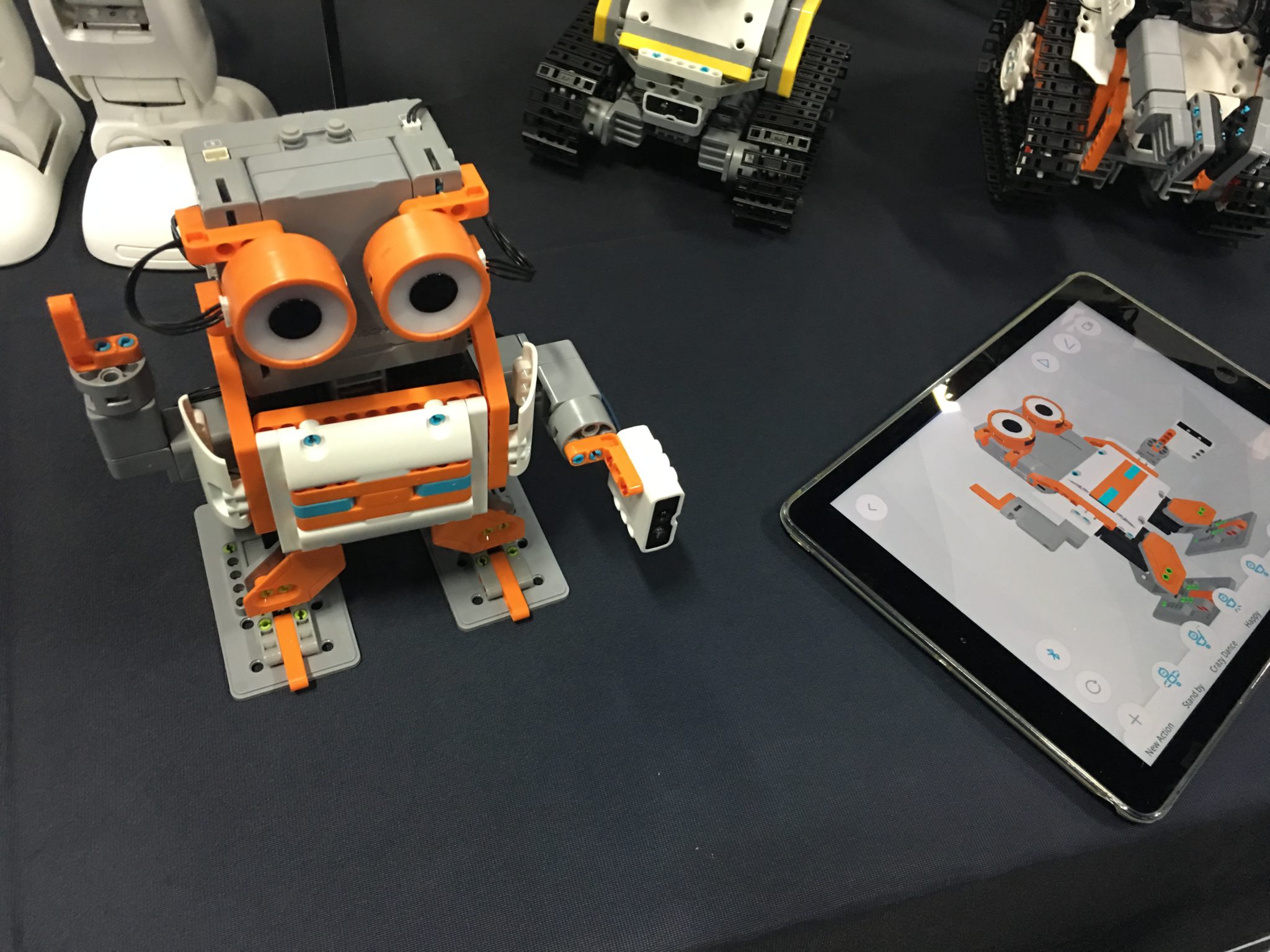
    • Jimu build and code robot. (Also in video)

    Final Thoughts

    Technology is continuing to move forward faster tthanwe can imagine. The biggest talk at this year’s CES is about voice command technology like Alexa and Google home, self-driving cars, and augmented reality content. As parents, our we should understand that our kids are going to be some of the first adopters of much of this technology and so it is important that we understand it. Kids aren’t watching content just on their televisions anymore, they aren’t having to type search terms into Google, and they are always always connected. That is what was said at day one the most, we are moving from the digital age to the connected age. You’re connected, your kids are connected, and so is everyone else so be sure to stay in the loop so that you can keep every connection safer.

    Stay tuned tomorrow for my report on day 2 of CES Media Days where I’ll talk about teen market research and more about the future of connectivity. Share this article with your friends and let them know that you’re keeping track of the latest tech trends by following FamilyTechBlog.com’s reporting on CES2018.


  • PODCAST: 2017 in Review and What’s to Come in 2018

    PODCAST: 2017 in Review and What’s to Come in 2018

    Exciting new things coming in 2018 for BecauseFamily. This episode rounds out the rest of 2017 and gives you a heads up as to what to look out for in the coming year.

    Social Media Links

    Facebook: http://facebook.com/4pointfamilies
    Instagram: http://instagram.com/becausefamily
    Twitter: http://twitter.com/becausefamily

    Newsletter Signup

    Ministry Updates:: http://eepurl.com/R7Btr
    Weekly Blog Posts:: http://eepurl.com/cvnhXD

    Websites

    Ministry Site:: http://becausefamily.org
    Tech Blog:: https://safe.becausefamily.org
    Michael’s Speaking Info:: http://kmichaelprince.org

    Donate and Affiliate Links

    http://BecauseFamily.org/partnership

  • This Week So Far: Social Media News

    This Week So Far: Social Media News

    Youtube want’s 10,000 people making sure their videos are safe.

    YouTube has been blasted recently for allowing inappropriate videos onto their kids app and allowing abusive comments on videos featuring children. They responded by shutting down some abusive channels and working harder to fix their algorithms that identify videos as safe for kids. Their latest change is going to increase the manpower involved in curating kid-safe content.

    YouTube claims that they are aiming at 10,000 new employees whose job it will be to strengthen their algorithms, enforce reviewing policies, watch and remove flagged videos, and respond to concerned users about content. This increase in manpower should be a step towards a safer YouTube but is it too late?

    Several companies have already pulled their advertising from YouTube stating that the platform needs to fix their content policies. YouTube responded fast once their bottom line was affected. This is good for parents since more people responding to problems should keep some of the worst video content off of YouTube.

    You can save your Instagram Stories posts.

    Instagram Stories is in the news again and this time they’re making it permanent. Until now your Story videos and photos lasted 24 hours and then disappeared. Instagram’s latest update now gives you the option to turn on archiving for Stories. Once turned on the archiving feature will save your Story videos and photos alongside the ones you’ve archived from your main Instagram posts.

    Archiving Stories can be a good tool for parents to use to keep their eyes on what their kids have been uploading to Instagram. Have your kid turn on this feature. If you are logged into their account on your phone you can turn the feature on yourself and see what they have shared even if you don’t check every day.

    What Parents Should Know

    With the release of the Facebook Messenger Kids app, YouTube trying to make videos safer, and Instagram making videos and photos more permanent, we are seeing some movement towards a safer social media experience. Still, the dangers exist and we have to be vigilant as parents to know was happening and what our kids are doing on social media. Hopefully, these updates keep you in the loop and help you make quality decisions for your family.

  • 5 Ways to Stay Internet Safe on Thanksgiving

    5 Ways to Stay Internet Safe on Thanksgiving


    Thanksgiving is a time of fun, family, food, and football. Everyone coming together can be super fun for the entire family. There can also be some struggles here and there, especially when it comes to what turns up on the screens in the house. Your younger kids could end up seeing too much social media on their teenage cousin’s smartphone. Uncle so and so can show Youtube videos to some family with adult language and content not noticing the children in the room. Heres a few tips to try and keep your Thanksgiving Holiday internet safe and family friendly.

    Protect Your Kids

    Encourage a host home internet filter.

    Ask the family member or friend who’s hosting your Thanksgiving festivities if they have some sort of content filter on their wifi. Many routers have a basic filter and some folks may even have another filter system in place. If there isn’t an option, recommend one like Circle. If they don’t have kids or aren’t interested in filtering their wifi long term you can recommend a free trial with something like Mobicip or NetNanny. This usually allows you to use the filter for seven days to a month at no cost. Offer to help them set it up and then you can breathe a little easier when your kids are using their wifi.

    Keep devices with screens in a common area.

    Intentional poor behavior will happen in private. If you keep the screens around everyone else you’re much less likely to have an incident. Make a rule that screens should be kept in the most common area of your Thanksgiving meeting place. The living room full of people or the dining room around a busy table is a great place to let kids spend whatever time on screens you’ve allowed while adult eyes can glance down to see what’s being viewed. This will also keep sneaky cousins from pulling up something age appropriate for their younger family members.

    Talk to your kids.

    Your kids need a safe place. They need to know that if they see something inappropriate online they can come to you and receive no judgment or criticism.  It’s critical that they are allowed to explain what they saw and how it made them feel. Discuss your screen boundaries ahead of time, your kids should know what you expect even if you aren’t able to get the whole extended family onboard with your plan. Tell them if you want them staying off screens completely. Let them know not to look at older kid’s phones or tablets while they play. Think ahead of the likelihood of your kid seeing something they shouldn’t and try to head that off at the pass. Accidents happen but if you and your kids are on guard, you should be able to have fun without too much worry.

    Protect Your Privacy

    Turn off camera location settings.

    Your camera defaults to save your location every time you take a photo. This tags those photos with where you were when you snapped that pic. Then, when you share the image on Instagram, Facebook, or Snapchat your location is uploaded with the image. This means that with the right software your location can be extracted from that photo and used for unseemly reasons. 

    • Go into your settings app and access your “location” settings.
    • Go to the camera app settings under “location” and tell your phone never to use “location” while using your camera.

    Changing these settings will keep your location data off of your pictures.

    Advise family members not to tag their location on their Thanksgiving posts.

    Finally, you’ll want to be careful not to tag your location on your photos. Yes, pictures of the pie, stuffing, turkey, and gravy boat have become as much a part of the holiday tradition as the cornucopia, but when you share it you’ll want to leave the address of the host off of your status update. Sharing your address with public social media posts is never a good idea. This can lead to all kinds of dangers. Imagine the images of all the neat and expensive stuff in the host home. Now imagine you’re a local who likes to break and enter to take things every now and then. What better way to identify a target than creep Instagram holiday posts for the people with the coolest stuff. Then, find the posts with their address tagged on the photo and off you go. Share away, but share with wisdom.

    The holidays should be a time of rejoicing and happiness. We should stuff ourselves with food and enjoy being together. Following these steps can help you stay safe and help keep your holiday party guests safe as well.