The tutorial video above will walk you through the steps necessary to set up parental controls on your Macbook Pro, Macbook Air, or iMac. These settings work with OSX High Sierra or OSX Mojave. Below is a brief summary of the steps necessary to set up these parental controls.
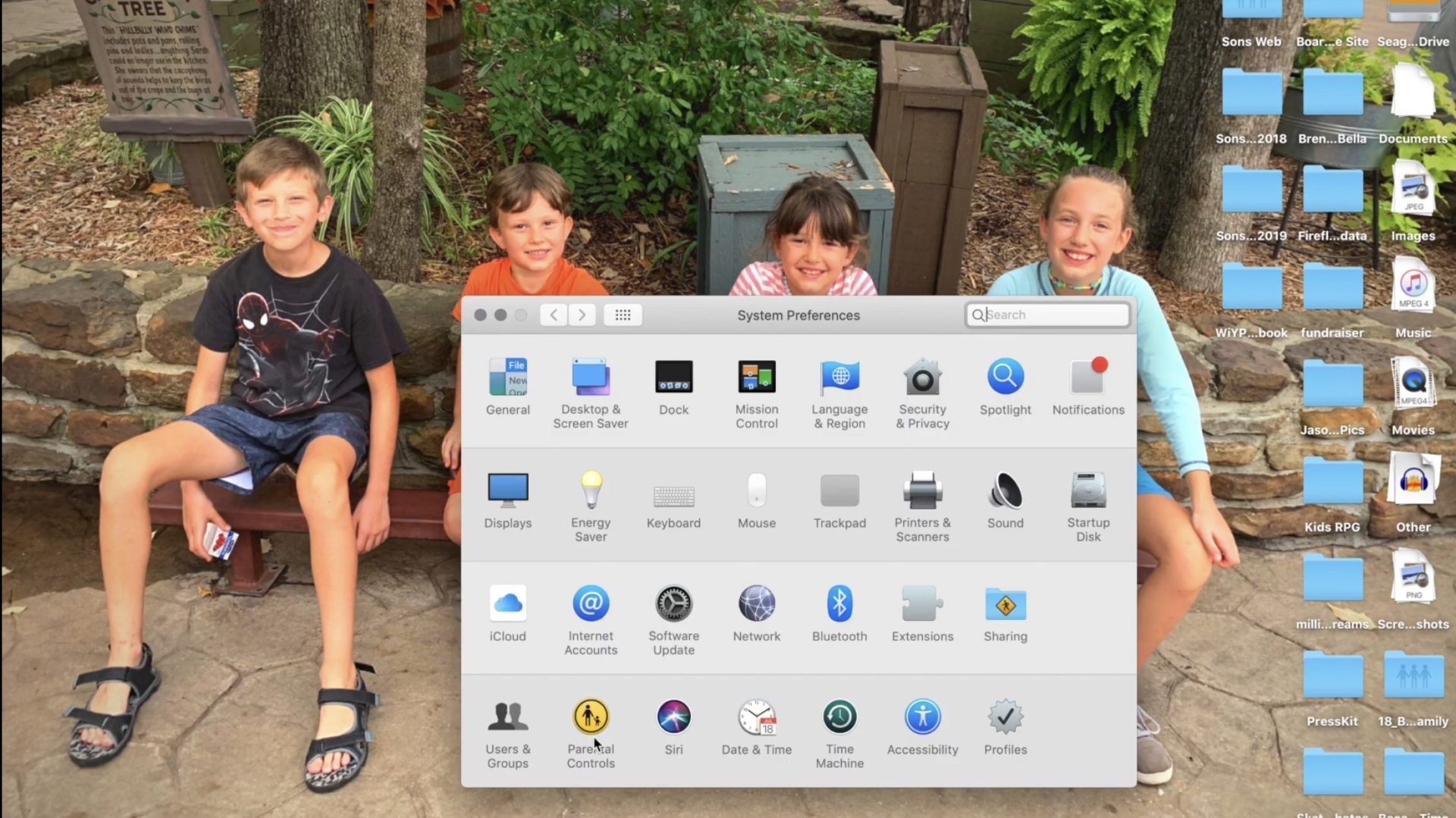
Open Preferences by clicking the apple logo in the upper left corner of your Macbook desktop and then clicking Preferences.
Click on Parental Controls on the bottom row of icons in the Preferences menu.
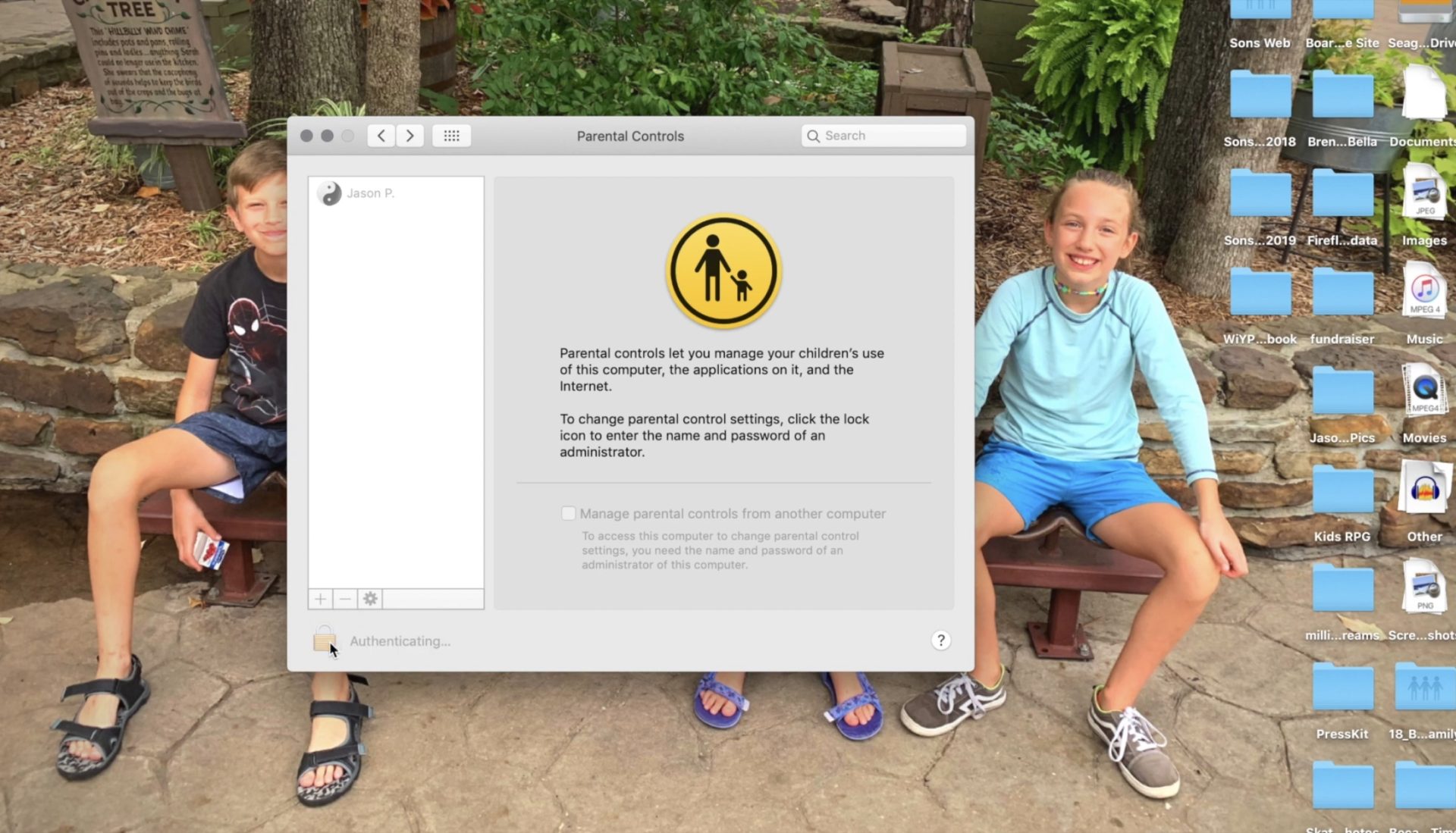
Follow the steps for creating a new account with the information of the person you are trying to set filters and restrictions for.
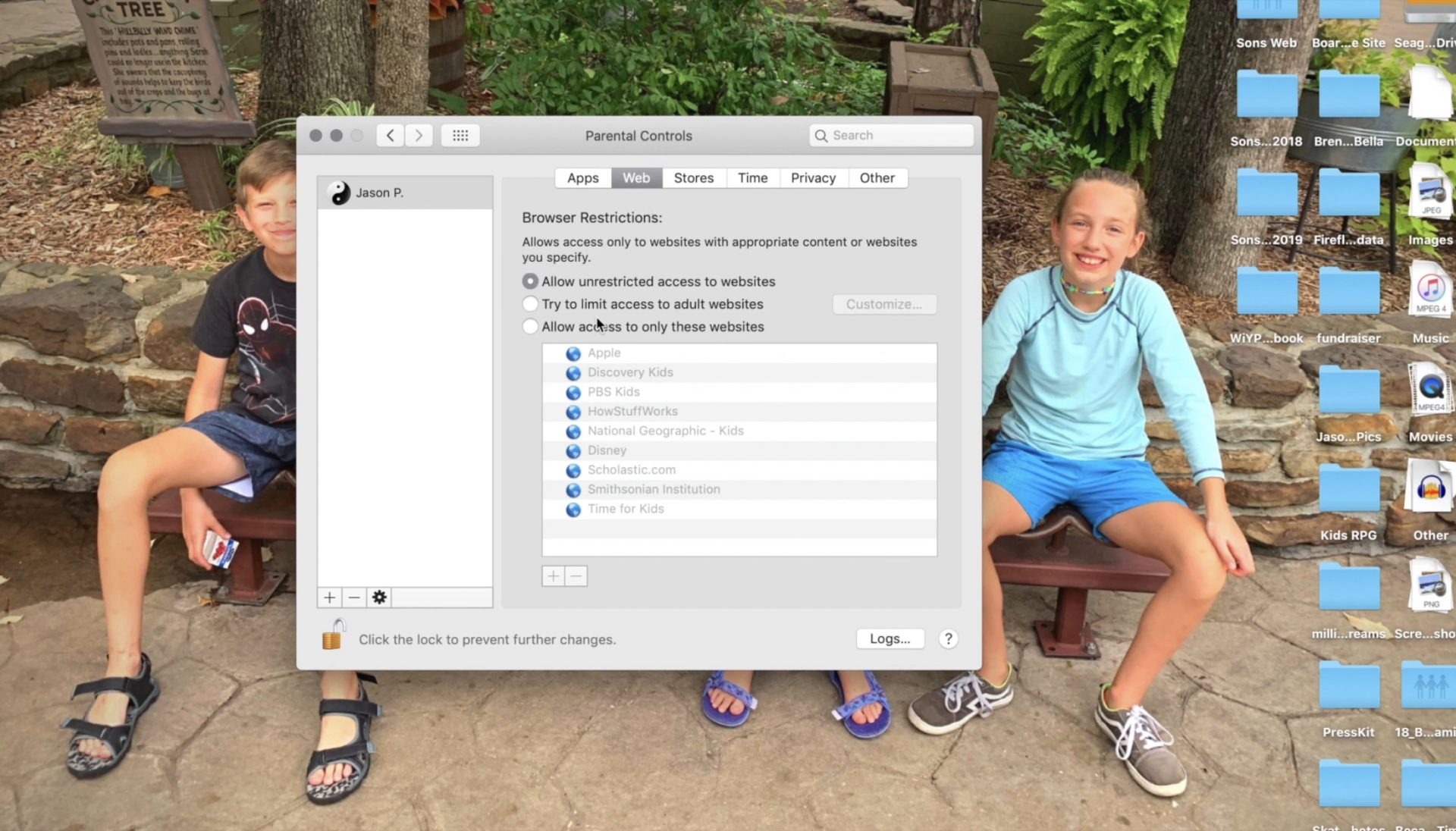
Set Restrictions for apps and web content.
Set desired time restrictions and bedtime hours.
Adjust settings for other content such as Siri and the OSX dictionary.
Clicking the lock with set the changes and password protect the settings you adjusted.
Setting these restrictions will help you have peace of mind while your child or teen uses their OSX device. If you would like further confidence that they are only seeing things that they should be seeing, look into an accountability software like Accountable2You. Also, if you come across any problems or have any questions please comment below or send us a message on Facebook.
I end every workshop and nearly every video and podcast telling parents to talk to their kids about digital citizenship, screen time balance, and internet safety. I often point them to videos or articles I have made or written that will help them with these topics. Cornell University, in partnership with Common Sense Media, have put together a resource for schools that claims to be perfect to help you, the parent, talk to your kids about these critical topics.
“Social Media Test Drive” is a curriculum created to help teachers and parents guide their kids through healthy internet use and digital citizenship. The lesson plans for younger children were good. They featured fun videos with cartoon characters singing about what to do if you see a bully and why you shouldn’t talk to strangers online. Some of the curriculum for older kids, however, gave me some red flags.
Minimizing Research
The videos that I watched that were created for older kids and teenagers did a good job of presenting research that shows how dangerous too much social media or screen time can be. Unfortunately, most of the videos then downplayed the research by comparing it to anecdotal evidence that is gained simply from the way they know kids feel about using their devices and social media. It felt as if the video was pandering to young people, encouraging them that there aren’t many dangers online as long as they know how to use the internet properly.
“Find Your Tribe”
One of the things that is increasingly dangerous about social media and internet usage is exactly the same thing that many will say is a great benefit. The ability for kids (or anyone for that matter) to go online and find a group of people who think exactly like they do and believe exactly the same things they do. This seems like it would be a good thing. In fact, one of the Common Sense Media training videos called it “Finding your tribe.” The problem comes when you surround yourself with so many like minded people that you are no longer encouraged or even able to think critically about the things you see, hear, and experience. We should be hearing voices that contradict each other sometimes so that we can grow in our understanding of the world. The internet can be good for that. We can learn about new ideas, new places, and new types of people. The problem is that when we dive into social media by clicking like or double tapping every post of every person who agrees with us on everything we think, we are telling the algorithms to feed us more and more of the same thing. This is tricking us (not just our children or teens) into thinking that everyone who is right thinks exactly like we do. This is a dangerous attitude and if “your tribe” means people who won’t challenge you when you’re wrong. I hope my kids never find theirs.
Relevance to the Point of Irrelevance
Unfortunately these videos remind me of the after school specials we all made fun of when we were kids. The young guy standing in front of motion graphics and reading a script about how to use the internet wisely. It’s been done before. It was done with cigarettes, it was done with drinking and driving, now it’s being done with the internet. It all reminds me of the end credits scene for Spiderman Homecoming where Captain America shows up give a speech on patience. As I mentioned above, it seems to be pandering and I can imagine it being laughed off by most kids in the age group it is intended for. Even with the obsolescence of the “after school special concept” these videos attempt to be cool, especially by downplaying the dangers of phone usage and encouraging kids to just “be careful.” They try so hard not to say anything that will make students shut down that they barely say anything helpful at all.
It Falls to the Parents
Ultimately these issues are the responsibility of us as the parents of our children. Only we know what it will take to get them to understand the truth about their time online. We are the only ones that can set the standards of internet use in our families. We are the ones who can set the limits we feel are best and do it in a way that helps our children feel that they are partners with us as we work towards developing healthy tech habits together as a family.
We should use the resources at our disposal, accountability software, filters, message monitoring, and built in parental control settings can all go a long way to help us keep our kids safe and teach them how to protect themselves. There are truly dangerous things on the internet. These things shouldn’t be glorified or blown out of proportion but they shouldn’t be ignored or downplayed either. We, as the gatekeepers of our homes, must decide what level of discretion we will use in protecting our children. We can rely on our schools or other companies or organizations to do it for us.
WWDC was held last week at Apple’s Headquarters in Cupertino, California. Every year, the tech giant hosts a conference for developers and media from all over the world. The company’s Project Managers and Chief Officers all take their turns on stage to discuss what they’ve been working on over the past year in order to increase the hype around Apple’s products and software. Much of what is announced at WWDC targets developers and “tech-heads” who can’t wait to find out how to make apps for Apple products or what the next big thing is going to be. Some of Apple’s new feature’s however could bring some peace of mind to parents. Here is a break down:
Apple TV+
Apple’s streaming video device has been great for viewing other services but Apple’s streaming service itself has been lackluster. One thing that has been missing for a while is the ability to make separate accounts or profiles for viewers, including children. Apple announced at WWDC that this is changing. They are making it possible to create profiles for every member of your family. Your viewing history and suggestions will be sorted according to your accounts and best of all, your recommendations won’t be overloaded with shows that your children love to watch.
Apple Music/iTunes
iTunes is officially no more as Apple will be separating iTunes offerings into multiple apps. Books, Podcasts, and Music will all be separate now on the MacOS. When you plug in your iPhone to sync with your Mac, nothing will happen. Your phone will sync in the background. It has become pretty apparent that most folks don’t need software to manage their music collection. Streaming music has taken over and iTunes wasn’t very good at that job. Apple Music is taking over the music service and Podcasts is mainly accessed through the mobile app, not on desktop.
iTunes has been around since 2001 and while there are those who have become used to the software, most have been aggravated by frequent updates and overuse of computer resources. Apple is likely accurate in thinking the software won’t be missed by very many people.
Apple Arcade
Apple is also working their way into the video game streaming world with Apple Arcade, due to release this fall. Apple Arcade will consist of a series of exclusive games made just for their system and will be playable through your phone, tablet, Mac Computer, or Apple T+. They have a controller that you can use with AppleTV but are adding support for Playstation 4 and Xbox One controllers as well. The 100 or so available games are a bit weak looking but they are sure to find some developers who are willing to put out some quality content for Apple before too long. They’re going to have to in order to compete with Google’s Sadia and the new service coming soon from Sony and Microsoft.
iOS 13
Probably the most relevant of updates from WWDC has to do the Apple’s latest smartphone operating system, iOS13. The software boasts a new dark mode, faster app launches and downloads, faster Face ID unlock, and a new (to Apple at least) “swipe” style typing system.
Dark Mode is cool and faster downloads and unlocking features are great but the iOS update doesn’t really have anything going on that is relevant to parents besides their focus on data security. More on that below.
Photos and Video
Photos in iOS13 is getting an overhaul as well. With the ability to pinch to zoom in your galleries and a new sorting method that groups photos together based on the date they were taken. Photos will also include a new smart gallery that will remove images like screen shots from your view, only showing the photos you’ve taken with your camera.
Privacy is a Key Theme
Every update at this year’s WWDC had privacy as a key theme. Directors and Developers mentioned over and over again what Apple does and doesn’t do with your data. Apple Maps uses encrypted data to help you find your way, the photos app does its date and location tracking locally, and they even mentioned a new “Sign in with Apple” that allows you to sign in with your Face ID and create accounts with individual dummy email addresses.
Data security and privacy has been in the news a lot lately and Apple has been very vocal about their desire to keep their user’s information secure. Whether it is a direct attack against other tech companies who have made most of their money by collecting and selling data or just an honest desire to maintain their user’s trust, the result should be a bit more confidence that your information is safe if you are using their products. I always advise, however, that you continue to make efforts to protect your own privacy. Be careful what you share online. Turn off location access to apps that don’t require that information to work properly and most importantly, teach this approach to privacy to your children.
You can listen to this article as a podcast on Family Tech Update.
You can subscribe on Stitcher, Spotify, or Apple Podcasts using the links below the player.
I leave in just a few days for International CES in Las Vegas Nevada. It is my second year to attend this conference but many of you have just started following us since my last trip so here’s some background.
What is CES?
CES is the world’s gathering place for all who thrive on the business of consumer technologies. A high-level business event that touches all industries. A platform for innovators of all sizes to build their brands, every major technology company on the planet participates in CES in some way — by exhibiting, speaking, sponsoring, attending or holding co-located events and business meetings.
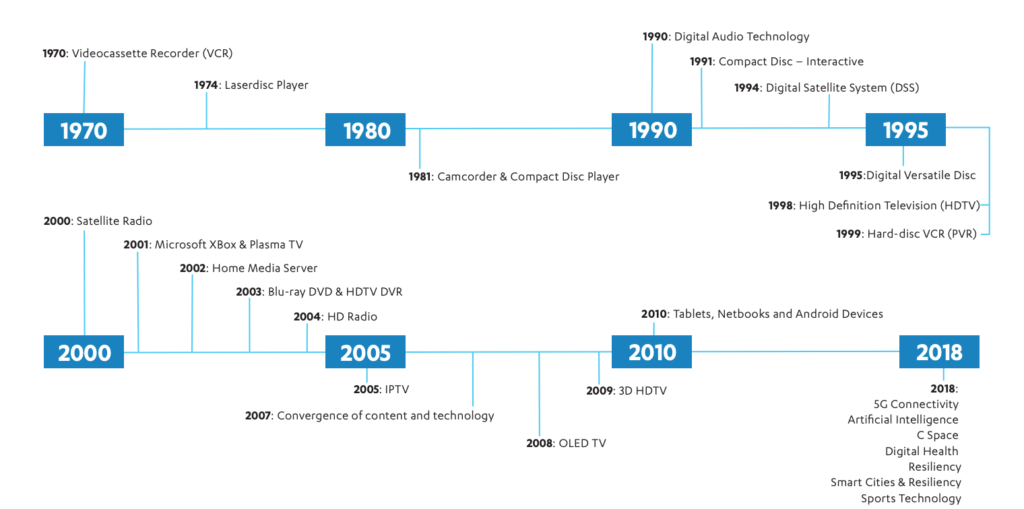
CES began in 1970 where it highlighted new, world-changing technology like the videocassette recorder and the Laserdisc Player (1974.) Products that we use every day were on display and demoed at CES over the years, including Compact Discs, Satellite and High Definition TV, Xbox, BluRay players, streaming entertainment, Tablets, and Netbooks. The show now features Virtual Reality, Smart Cities, Self Driving Vehicles, and Artificial Intelligence among a lot more!
Why do I go?
The whole purpose of BecauseFamily and the Family Tech Blog is to protect children and teenagers by bridging the technology gap between kids and their parents. In order to do this, I work to be on the cutting edge of technological advancement. Our world isn’t just digital anymore, it’s connected, marketers are struggling to find new ways to market to younger, more knowledgeable generations, and psychologists are urging app makers and toy manufacturers to cut out screen time whenever possible. These are all facts I learned at CES and use to inform my workshops, blog posts, videos, podcast episodes, and meetings with parents after. There is much more to learn this year and since I am able to attend through media credentials from the blog, I’ll be there. I’ll be learning for you. The parents.
I’m going to enjoy myself at CES. Vegas is a fun city. I enjoy being around the tech industry, I love learning about marketing, kid and teen tech, social media. and video gaming. I am excited to be an authority on these topics for parents so that I can have an answer to nearly every question I am asked when I work with families.
While it will be fun, It is work, and it is important. I am extremely grateful to all who have supported BecauseFamily and who read and share my blog posts. Please stay tuned in to the blog, our social media, and our YouTube channel for coverage from the only tech blog covering CES exclusively for the purpose of educating parents and protecting kids. You can also follow me personally on my YouTube channel for daily travel vlogs from my trip. When I go to Las Vegas, what happens there, comes home, to you!
The elements that create a healthy environment for our children are ever-changing. We want them to understand how to eat right, get exercise, get an education, stay off drugs, and so much more. A new study in Canada has isolated three critical factors for our kids’ health, and not surprisingly, the amount of time they spend on a screen is one of the major players.
Jeremy J Walsh of the Children’s Hospital of Eastern Ontario published the study that surveyed more than four thousand children ages eight to eleven. They measured cognitive abilities and the amount of time kids spent in active play, sleeping, and on screens. These three factors proved key to high cognitive health in children. The strongest results were from children who slept for 9 to 11 hours per night, spent at least 1 hour per day in active play, and spent less than two hours per day on screens. The study did not differentiate between types of screen time (entertainment/education) but researches say they are continuing their studies in that direction.
The report stated that sleep and screen time were the categories most strongly related to cognitive health and that only five percent of children surveyed met the requirements on all three categories. Sadly, nearly one third of the children in the study didn’t meet any of the requirements at all.
What Parents Should Know
You’ve probably heard the fact that many of the developers of the most popular tech products have strict screen time limits for their kids. As do family tech safety experts, myself included. Research is continuing to show that unlimited access to screens can be detrimental to our health and especially to our children’s health. Childhood obesity, mental health, and even suicide rates are rising in the United States, right alongside the number of people who would consider themselves addicted to their screens and to social media.
I am looking forward to seeing what the researchers conclude concerning the types of screen time children are having. Smaller studies have shown that young kids learn less when they learn on screens, so I wouldn’t be surprised if cognitive health is affected just as negatively by screen time used for education as it is for entertainment. We will have to wait and see.
In the meantime I recommend using Apple’s Screen time, Accountable2You, or UnGlue to monitor the amount of time your child is using their screens. Include the amount of time you know they spend in front of a screen at school as well. Remember that four rounds of Fortnite is about two hours (if you’re pretty good at it) and that game is available on every device your kid has. YouTube videos, social media scrolling, and messaging all add up to two hours of screen time rather quickly too. This is why it is so important to monitor their time spent and even limit it with software or hardware on your wifi and data connection.
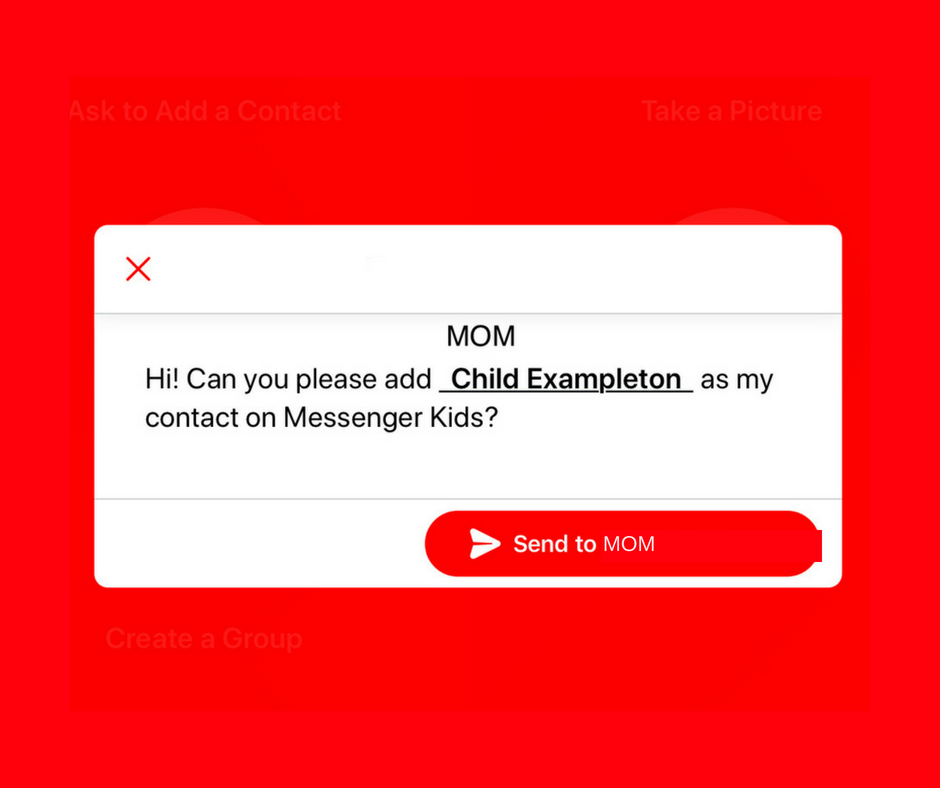
A parent controlled messenger was the dream of the FB Messenger Kids team when they created their app. They could be finding it a bit tricky to balance the security parents want with the ease of use kids need. Now a code will be available to help your kids identify themselves in the Messenger Kids app. This is a code they can use to send a friend request to other users. Parents will still receive permission requests but it will save the trouble of having to search for the potential contact’s parent’s FB account and send a request.
Obviously, this method will only work for friends who already use FB Messenger Kids. The code is also an “opt-in” feature, meaning parents will have to turn it on in their own Facebook app for their kids to receive the four-word identifier. The video above features a quick walkthrough of how to turn it on. You can also set up bedtimes in the Messenger Kids controls on your Facebook app’s settings page.
What Parents Should Know
The addition of bedtime settings is a great option for parents whose kids use FB Messenger. The jury is still out on the identifier code, though. It is intended to make adding friends easier but it remains to be seen if that will be the case. Asking your kids to remember their code so they can tell their friends is a bit reminiscent of phone numbers from our own childhoods. If they don’t know their friend’s code, they’ll still receive an option to ask parents to connect them, simply by name.
I always recommend limiting screen time for your kids, especially time on social media. The FB Messenger app is still one of the best, most secure options for your kids to keep in touch with friends and family. The stickers, challenges, video chat, and built-in AR games make it a lot of fun albeit easy to throw a lot of time into. This is why the bedtime and screen time limits are so important.
I’ve done it, you’ve done it, everyone has sent that message you immediately regret. Snapchat’s new feature will allow you to message “regret free” by adding a delete feature. You can now delete a message after you’ve hit that send button. Maybe there’s just a dumb typo, perhaps what you said could come across differently than how you meant it, no matter the reason, they’ve got you covered.
To delete a message just long press it and select the delete option. Everyone will be alerted that you deleted the message but they won’t see the message itself. Previously, Snapchat only made messages disappear when everyone in the group had seen them but this will change that up quite a bit. Obviously, screenshots can be taken of your message if someone sees it before you’ve eliminated evidence, but you’ll be notified of that as well.
This is a small change for Snapchat but it speaks volumes about the nature of a messaging app like this one. The idea has always been to remove regret, apprehension, and maybe even responsibility for the messages you send online. Our kids should understand that there are consequences for what we do on the internet, even is some of our apps try to make us feel like there aren’t.
One of my biggest concerns about Snapchat is the disappearing messages. I have heard story after story of parents reporting their kids being victimized by bullies or predators on Snapchat only to be told by police that there is nothing they can do because there is no evidence of the messages that were sent. Snapchat has always been on my uninstall list and it most likely will never be taken off that list. If your kids are under 16, think long and hard before you allow them to use a disappearing messages app like Snapchat.
Software and web developers are getting serious about the time well-spent movement. The focus on taking breaks from our screens is more and more popular and even Youtube is getting in on the trend. Their latest update includes the ability to opt-in to reminders to take a break from watching videos in the app. iOS and Android users can turn on and set the frequency of break reminders that will interrupt your viewing and remind you that you should take a break.
This feature is currently only available on the iPhone and Android app. There isn’t any information whether it is going to be rolled out to the website, smart TVs, or other streaming TV devices.
What Parents Should Know
This is a good idea and hopefully, it will trickle down to YouTube Kids soon. I always tell parents to be the example for their kids. If mom and dad are on their screens constantly then it doesn’t do much good to preach healthy screen time limits in your home. YouTube’s break reminders can be a good way to manage your own healthy screen habits so that you’re setting a better example.
Psychologists are recommending that our kids spend less time on screens and more time outside. They’ve even coined the phrase, “Green Time,” stating that kids are spending so little time outside that their development is being stunted. Use whatever tools you can find, whether it’s a built-in reminder like YouTube is offering or a separate software like unGlue to monitor and limit screen time. Build healthy habits now that will last a lifetime.
Snapchat’s newest update adds gaming to their camera. That’s right, you can now use their augmented reality camera to play silly games. Some are even multiplayer. They’re calling the games “Snappables” and they range from throwing kisses at each other to dance competitions. Users control the games with their face or touch and motion controls. Snap is planning to release new Snappables weekly featuring basketball, alien combat, and a lot of other themes.
What Parents Should Know
Right now, the multiplayer Snappable games are centered around your friend list. This means you shouldn’t be able to play games with random players you have never met. That could be an added feature and we’ll let you know if and when that is the case.
I recommend knowing what your kids are using their social media apps for. If they are connecting with their friends to play games and chat, and you’re ok with that, then that is just fine. I never recommend allowing your kids to meet new people online through Snapchat or other social media apps. Games like Snappables are pretty harmless other than more ways to waste time and the obvious opportunity for corporations to launch games featuring their brand for advertising. More than anything, just stay knowledgeable about what your kids are doing online and keep the conversation open with them. This way they won’t be concerned about you seeing what they do online and the lines of communication will stay open with them.
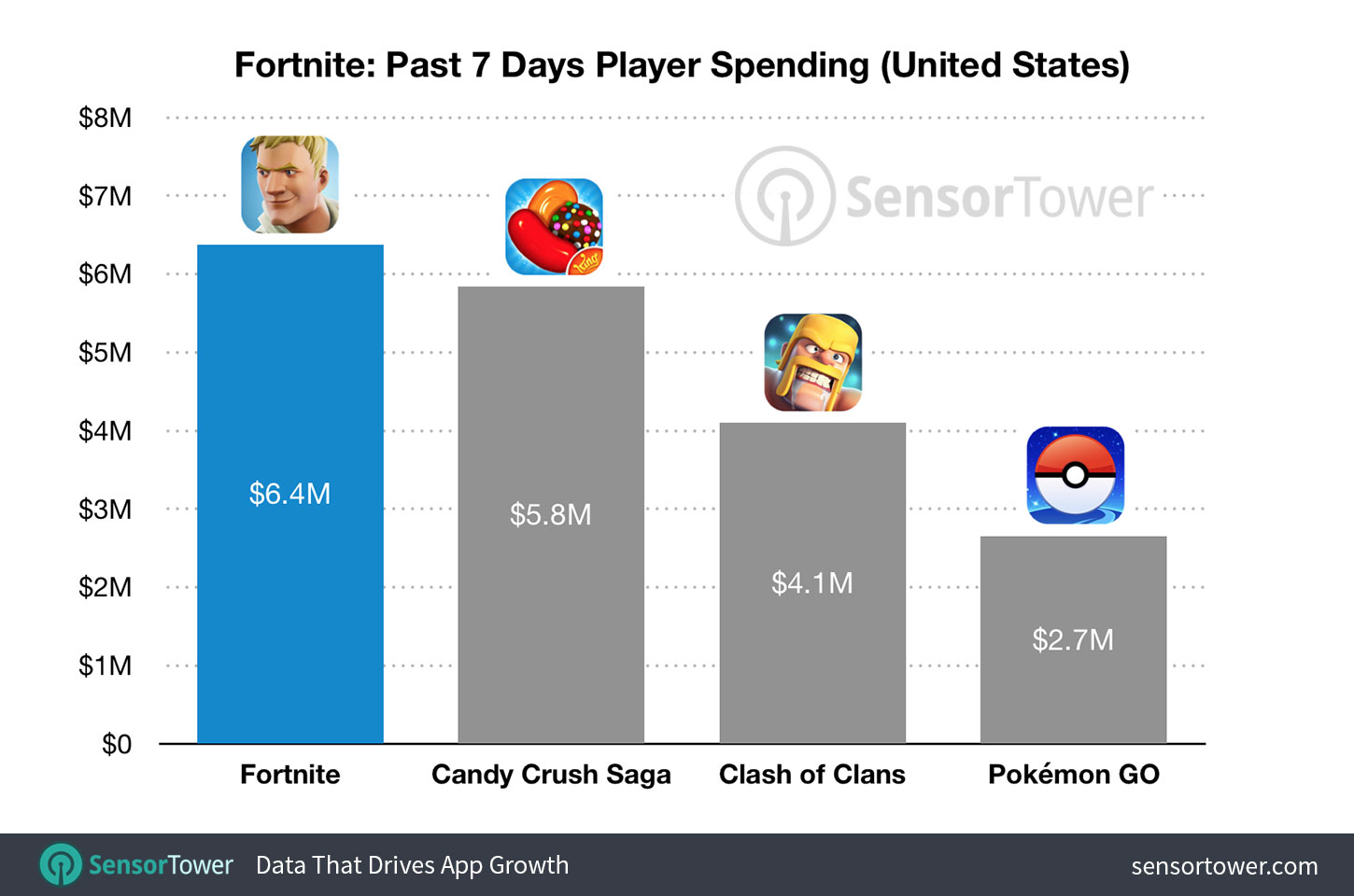
Freemium games aren’t new and there is a reason that that category has graced the top of the charts on iOS for a long time now. Fortnite: Battle Royale, however, has rushed into the Freemium Game Revenue lead, making $15 million in the first three weeks since launch. The game, in which you fight it out against 99 other players to be the last man/team standing, is free to download on iPhone. You don’t buy items to increase your skills or character’s strength, you just buy costumes and dance moves. Obviously, the lack of game-changing in-app purchases hasn’t hurt the bottom line for Epic Game’s wildly popular third-person shooter and crafting game.
SensorTower.com
What Parents Should Know
For my thoughts on shooter games and kids, you can read my game reviews and listen to this BecauseFamily Podcast episode. As far as in-app purchases go, it is up to you. You should know how to set up your kids’ devices to not allow purchases without approval. Failure to set this up will likely lead to surprise expenses as the temptation for that new dinosaur hat or “Carlton” dance moves becomes too great for your kid to withstand.
My advice is for you to talk to your kids about the time they spend playing games on their devices. Make sure you have an understanding of what a healthy amount of time on devices looks like. Also be sure that you have your credit card settings secured to keep unwanted purchases from surprising you next month. Again, talk to your kids about spending your money on the games they play. I agree that these developers deserve every dollar they make from their games. I also strongly believe that if a kid is underage, it is up to the parents to regulate whether or not their child can spend money on their favorite games. That is up to you as mom or dad.