Tag: social media

  • Movie Pass Reveals that They Collect Much More of Your Data than You Thought

    Movie Pass Reveals that They Collect Much More of Your Data than You Thought

    Several websites and apps have recently gone viral through facebook posts. These apps allow you to connect your Facebook account and see pictures of yourself be changed in some way. Maybe to look like a movie star or a politician or a model. Sure, we all want to see ourselves as celebrities or as the latest magazine cover model but there is a price to pay. If these things seem too free or cheap to be a good idea, it’s because that’s exactly what’s going on. They don’t have to charge for access to those little images or services because they make their money by selling your data.

    MoviePass made waves several months ago with their inexpensive movie theater subscription service. Their app was super successful because ten bucks per month is a super low price for up to one movie per day in the theater. I remember seeing this offer shared online numerous times over the past several months. People were amazed that it actually worked and in a world where there are mega blockbuster movies being released every month, an all-access pass is a value that seems too good to be legit. The truth is, it isn’t as legit as you may think.
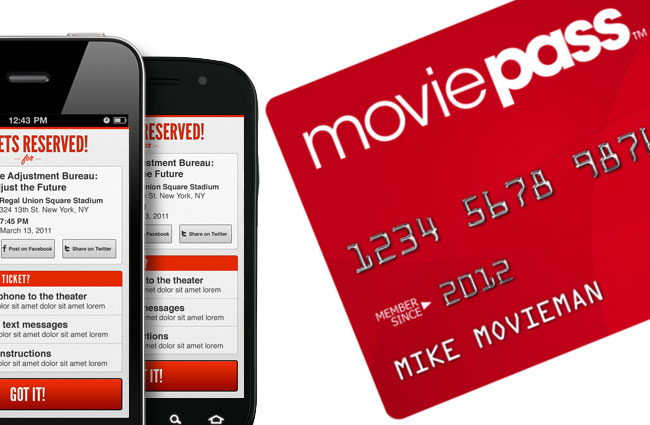
    At a recent event, Mitch Lowe, the CEO of Movie Pass gave a talk called “Data is the New Oil: How MoviePass will Monetize It.” In it he bragged about the amount of data the app received from its users:

    “We get an enormous amount of information. We watch how you drive from home to the movies. We watch where you go afterwards.” he even said, “We know all about you.”

    Data mining isn’t new, in fact, it has been happening almost since the dawn of the internet. The difference is how little information the companies are required to give users about the amount of data they’re tracking and what they do with it. Terms of Service and Privacy policies are rarely read by users and even if they were, they give the most bare-bones information about the practices of the company. MoviePass claims to ping your location data once when you search for movies in your local theater. It seems they do a bit more than that.

    We are all a bit used to our data being tracked by the sites we use. We’ve seen ads from Amazon show up on our Facebook feeds every single day for years now. Unfortunately, however, not all of the data that companies like Viralemon and MoviePass receive is about what we’re shopping for. This data can be sold to other advertisers and be used to add promotional options to their apps or websites. The biggest concern is the often less than effective security protocols these companies have. If their site is compromised for some reason, all of that data can get into the hands of hackers with less than wholesome intentions.

    My Advice

    First of all, don’t give random sites access to your social media pages. If a site, game, or activity redirects you to a link that asks you to click ALLOW in Facebook then click away immediately. If you want to upload a picture, that’s up to you but letting a sill site like that access your Friends list, timeline photos, profile photos, videos, page clicks, likes, and who knows what all else is just a bad idea. Always.

    Don’t upload pictures of your kids to these sites. Photos of kids are prime real estate. It sounds sick but you wouldn’t believe the use for random pictures of your son or daughter in the marketing, advertising, and much worse industries.

    If it sounds too cheap to be legit…IT IS NOT LEGIT! This one speaks for itself, if they aren’t making money by charging you to use their service or buy their product then they’re making money some other way. In the internet/connected age, they’re almost always making money by selling your information.

    Share and don’t Share! Cool, you are now well aware of the risks of giving these sites access to your social media accounts. Now you need to share this knowledge with your friends. Remember that if they give away their info, much of that info could include you. Let them know it isn’t safe and then stop sharing these dumb, clickbait, data mining apps and websites so that they’ll stop going viral, stop making money, and have to shut down. That would make the internet a much safer place.

  • TUTORIAL: How to Download All of Your Photos, Videos, and Messages from Facebook at Once

    TUTORIAL: How to Download All of Your Photos, Videos, and Messages from Facebook at Once

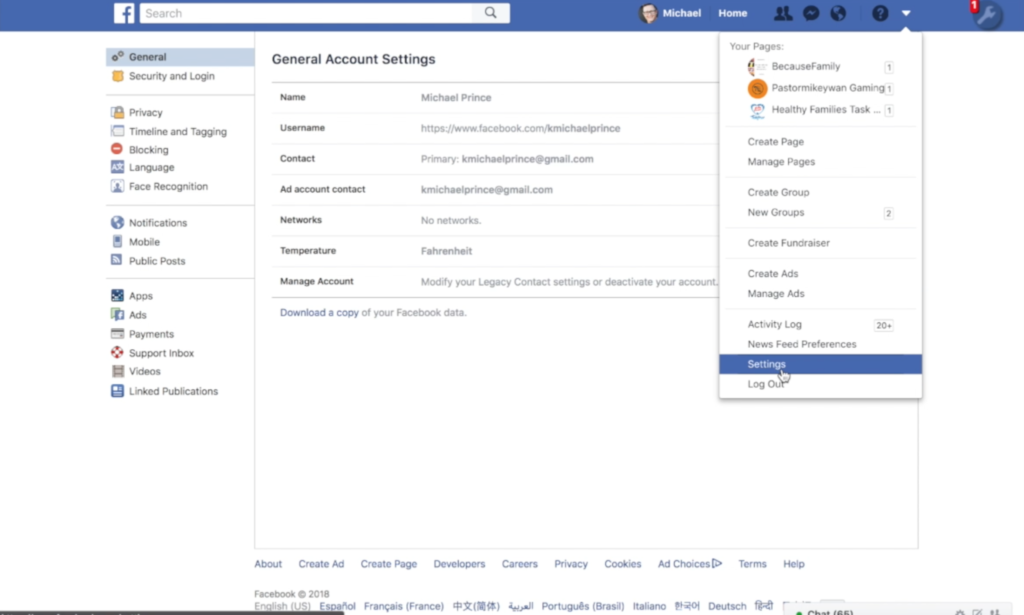
    There could be a number of reasons you’d want to download all of your Facebook data. Maybe you’re making a fresh start but don’t want to lose photos and videos, maybe something’s going on and you need message data downloaded, or maybe you just want to back up all your data for when the giant electromagnetic pulse goes off someday and the internet comes crashing down. Whatever reason you’re interested, here are the simple steps you can take to download all of your Facebook info at once. The tutorial video is at the bottom of this post.


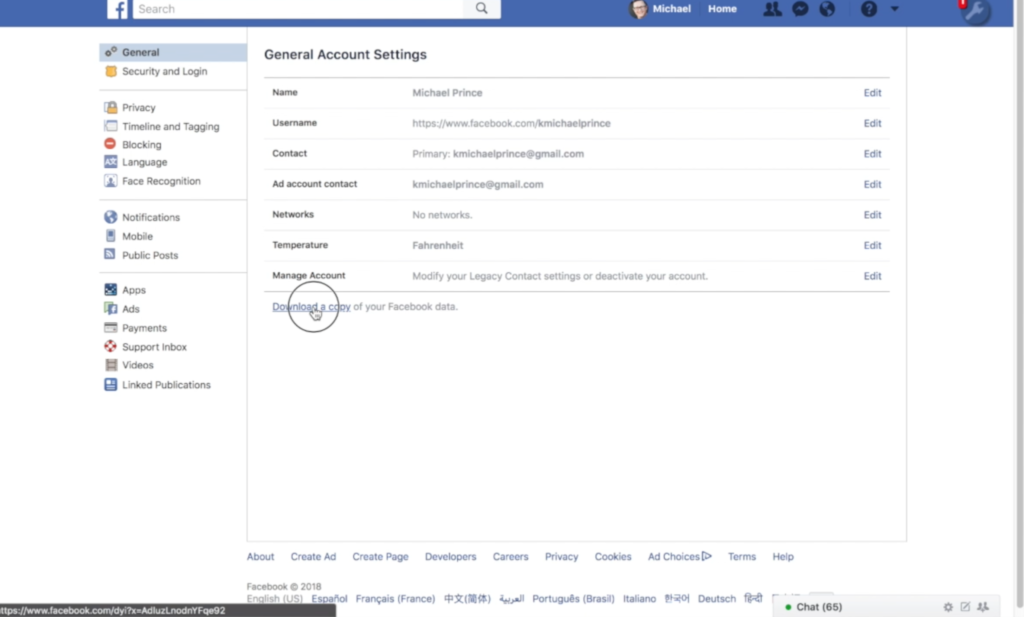
    1. Go to your settings page.


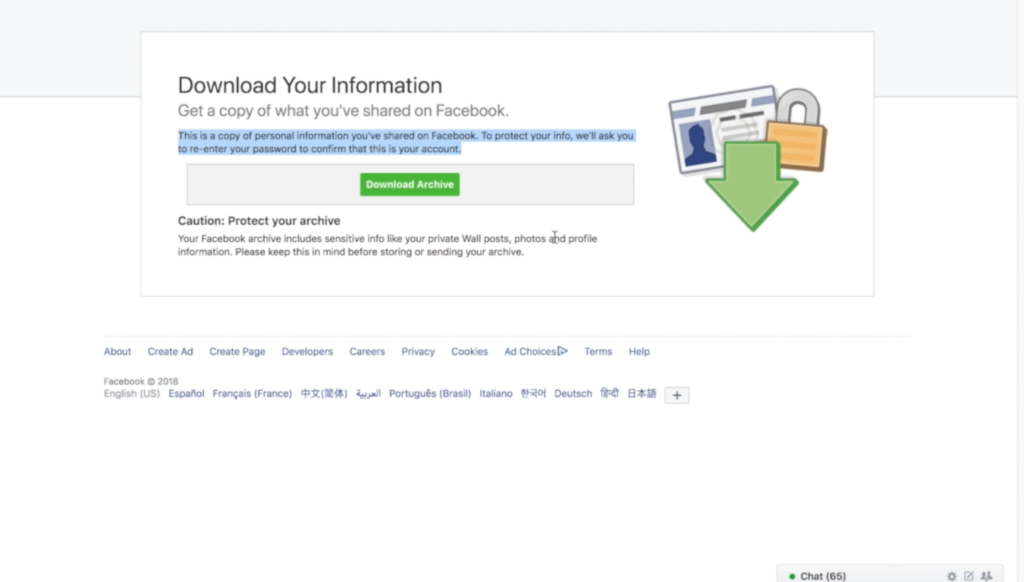
    2. Click on Download a copy Facebook Data


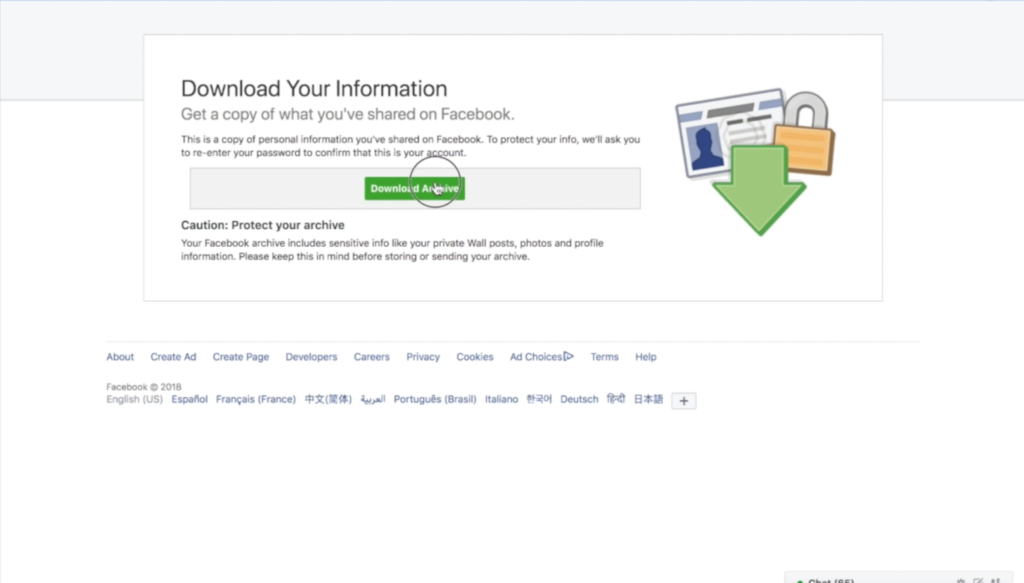
    3. Click download archive.


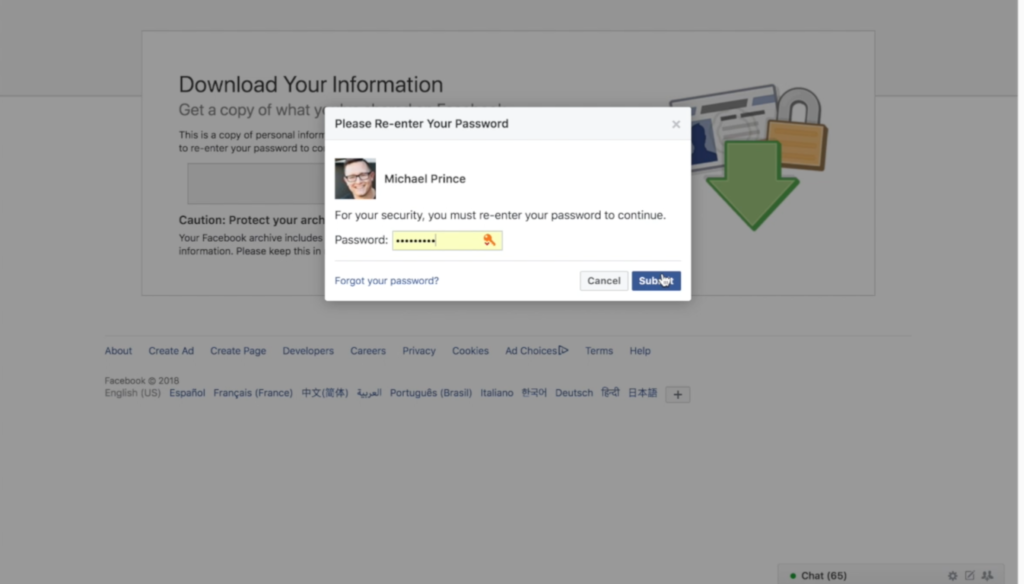
    4. Enter your password and click Submit


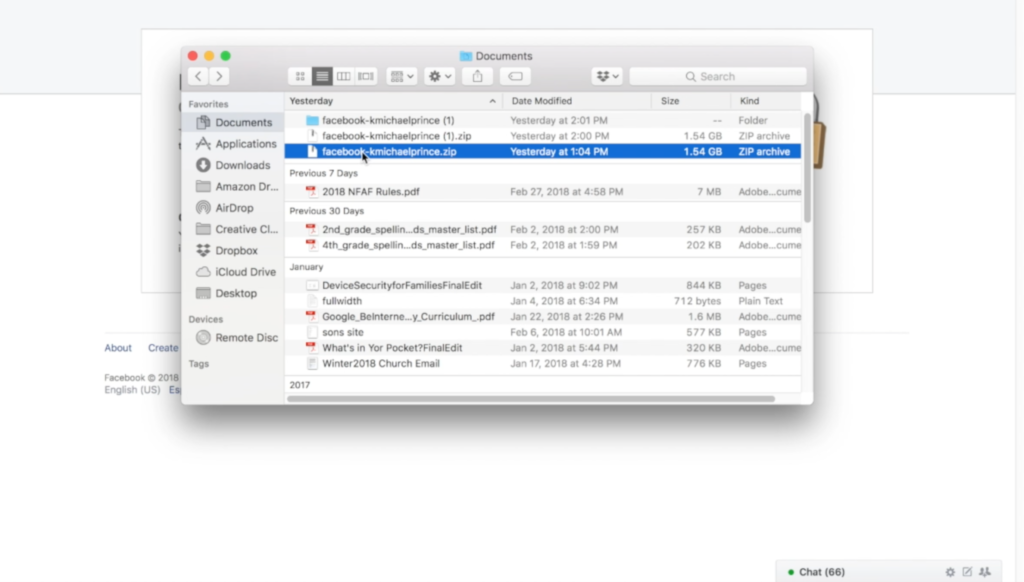
    5. Your data downloads as a zip file.


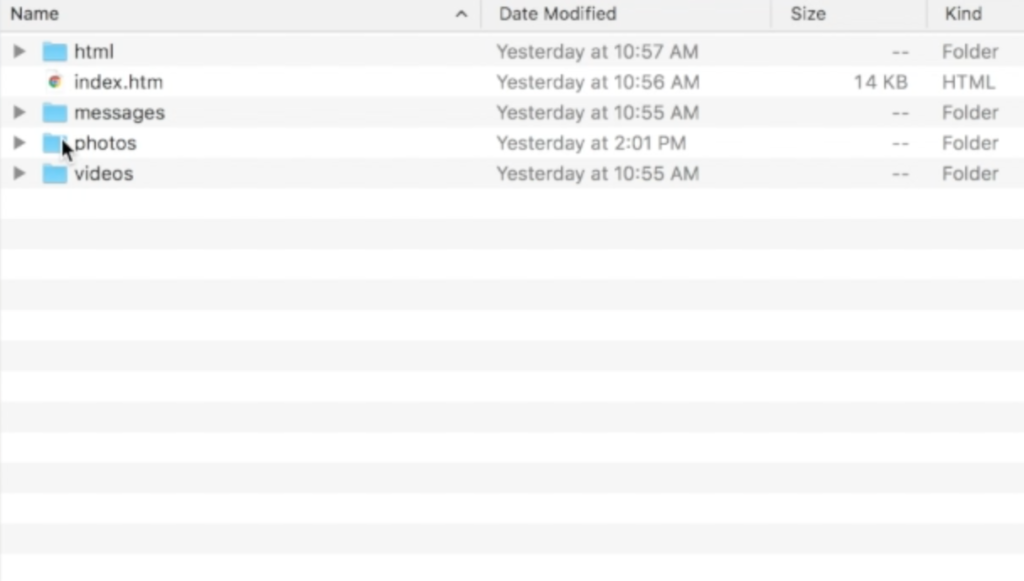
    6. Once unzipped, you’ll see your files separated into folders.


    7. Keep somewhere safe and share with caution as some of the data is personal.


    There are the instructions. Here’s a video tutorial:


  • PODCAST: Three Apps Your Kids Should Uninstall

    PODCAST: Three Apps Your Kids Should Uninstall

    Family Tech Update: These apps can be seriously dangerous for your kids. Adult content, privacy issues, stranger danger, all kinds of issues here, and some of them are only rated 12+!

    Social Media Links

    Facebook: http://facebook.com/becausefamily
    Instagram: http://instagram.com/becausefamily

    Twitter: http://twitter.com/becausefamily

    Newsletter Sign up

    Ministry Updates:: http://eepurl.com/R7Btr
    Weekly Blog Posts:: http://eepurl.com/cvnhXD

    Websites

    Ministry Site:: http://becausefamily.org
    Tech Blog:: https://safe.becausefamily.org
    Michael’s Speaking Info:: http://becausefamily.org/bookings

    Donate and Affiliate Links

    http://BecauseFamily.org/partnership

    All music/audio effects are public domain.

  • Snapmap Featured User Sourced Videos of the Florida School Shooting

    Snapmap Featured User Sourced Videos of the Florida School Shooting

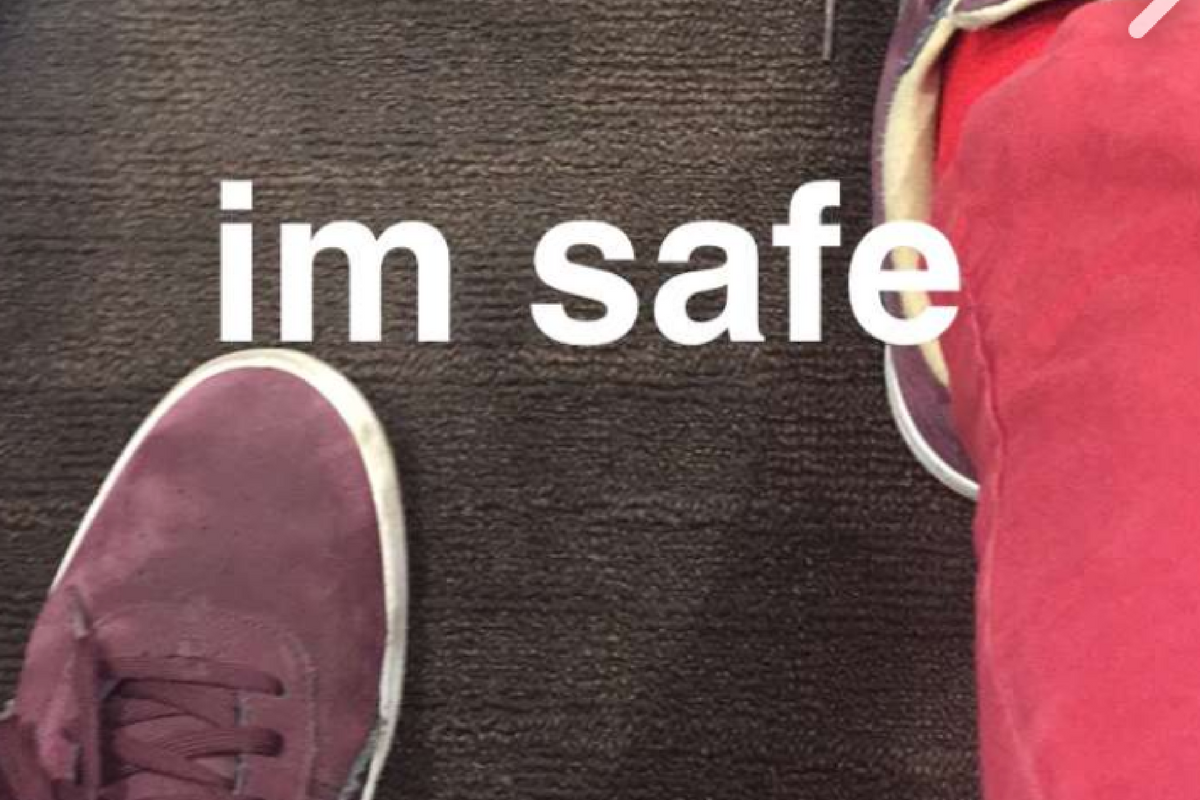
    Snapchat’s “Snapmap” feature highlights news stories that are curated by their team of news editors. The team chose to feature posts from the school shooting in Parkland Florida on their map yesterday. It was comprised of Snaps from students in the school, news outlets, and passersby whom the editors thought had posted something that contributed to the viewers understanding of what was going on during the shooting. You can see that editing was done before the Snaps were put on the map because a “Warning Graphic Content” posts start the slideshow, followed by a video of what seems to be the inside of a classroom in which you can hear the gunshots from nearby. Language is bleeped out and there are no actual victims shown but you do see a couple of students who are talking about watching their friends be killed right next to them.

    Snapchat hired a former CNN exec to lead their team of news editors and they say their news team is doing their best to follow the right journalism practices. They are working to remove overly sensitive content and choosing to only feature Snaps that contribute properly to the story they are covering. Snapchat’s main audience is under 18 which likely contributed to the fact that they had so much content to use to cover the shooting in a High School. This also means though that our kids who use Snapchat, and anyone else using their map in a browser, can have access to on the scene footage of what is happening during events like this. A school shooting is a national tragedy and social media is becoming one of the most common ways that people learn about what is happening or has happened. Snapchat is attempting to provide a curated look at this news, but is that what we want our kids to see when they look at their phones?

    What Parents Should Know

    As mentioned above, posts from Snapchat are not automatically sent to the map. These posts are curated and especially selected and edited before being added. While I’m grateful for some oversite from Snapchat when it comes to sharing this news, I have to question whether or not I would want my 13 or 14-year-old to have access to some of the images seen during the shooting on Wednesday. Just seeing something so dangerous portrayed in such a real way can be damaging and cause fear in our kids. We have to look out for this and know if this is something our child can handle or not. For some of them it may be fine but for others, they aren’t mature enough to deal with that much realism.

    (Opinion warning!) I can’t tell you what’s right for your kids, I will, however, give credit to Snapchat for trying to bring some truth to the news by using information from people who are actually there. I will also keep this info from my kids for a while. There are enough things that cause fear in our lives, I wouldn’t want added influences like their social media accounts to increase that fear. Snapchat is on my uninstall list for a lot of reasons, I’m grateful they aren’t just putting every public post from one of these tragic events onto a feed that your and my kids could see but I will think long and hard before allowing my child access to this source of news.

  • Facebook’s “Messenger Kids” App Launches on Android

    Facebook’s “Messenger Kids” App Launches on Android

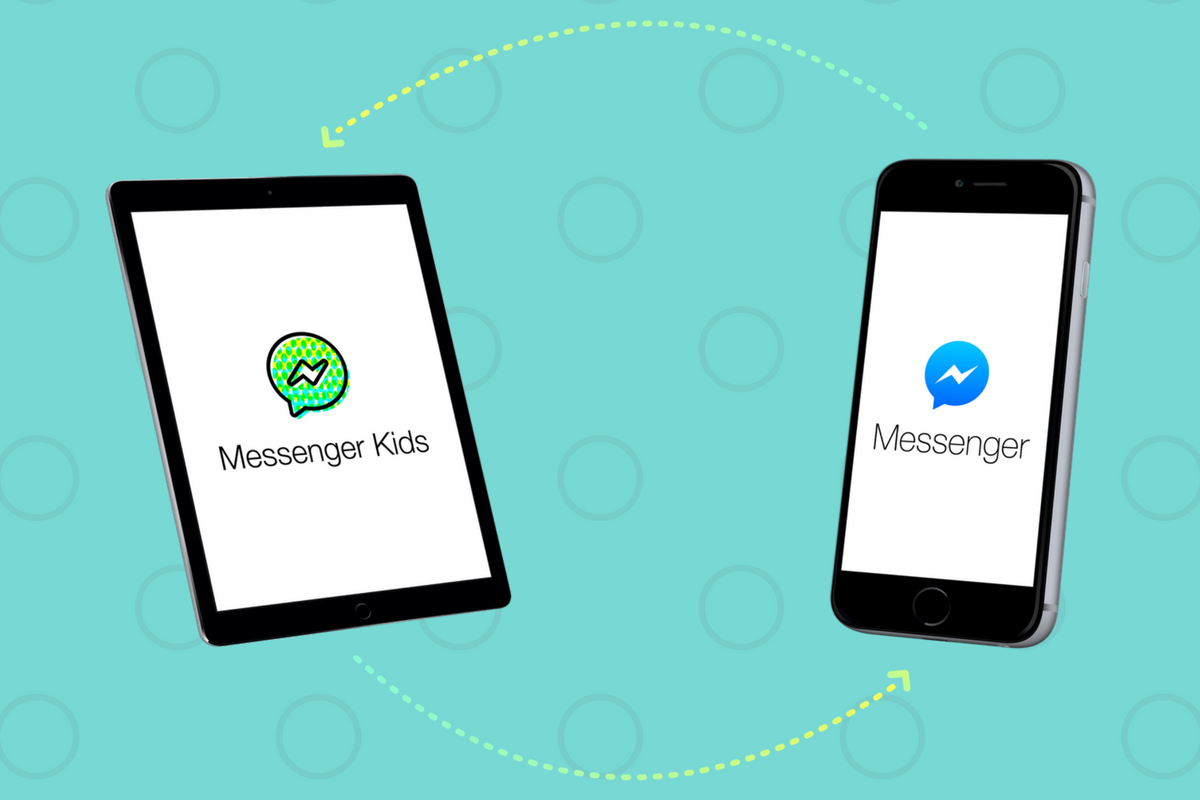
    Today, Facebook released the Android version of their Messenger Kids app. This means it’s available on iOS, Android, and Kindle now. That should pretty much cover most families. Facebook Messenger Kids puts the control in the parent’s hands, making it easy by building it into the Facebook App and Messenger App that you likely already use. You can decide who they are allowed to chat with and approve or deny friend requests.

    CHECK OUT: Facebook Messenger for Kids! for even more info about the app.

    My family uses Messenger Kids, albeit with some strict time limits (1hr per day) which we enforce through Circle (all devices) and unGlue (our older child.) It is a great way to help them get a feel for chatting through a messenger without strangers, bullies, or the constant notifications or FOM0 (Fear of Missing Out) that can accompany tech addiction. Facebook built in a lot of the controls and made the app kid-friendly by not allowing gifs that don’t originate in the Kids Messenger app and not allowing messages to be sent to unapproved friends.

    What Parents Should Know

    Since settings are controlled through your Facebook account, parents don’t have to have the same type of device as their child. You can set up your kids’ messenger app on his Android through your iPhone, for example. Keep in mind how addicting it can be to message your friends. Remember not to give them access to approve or disapprove of their friends on Messenger, this defeats the entire purpose. I know it can get tiresome to always have to sign off on everything they want to do online but Facebook makes it pretty easy with notifications on your own app.

    Use something to manage their time, like unGlue.  Talk to your kids about only messaging people they know in person and let them know what to do if someone asks them something they aren’t comfortable with. They should know that they can come to you when there is trouble. Messenger Kids is a good idea from Facebook and they did a lot of work to learn what parents would want out of a messaging app for their kids. Now the app is available on all devices so, if your kids have people they want to talk with, use this as a way to keep them in touch safely.

  • Family Tech Update: “The Time Well Spent Movement” {podcast]

    Family Tech Update: “The Time Well Spent Movement” {podcast]

    There’s a movement to take back our time and curb our tech addictions. What does it mean for families and how can we take charge of tech addictions? Plus: Snaps can be embedded on any site, and coding is king, but not on a screen!

    unGlue Affiliate Link

    Facebook: http://facebook.com/becausefamily
    Instagram: http://instagram.com/becausefamily
    Twitter: http://twitter.com/becausefamily

    Newsletter Sign up

    Ministry Updates:: http://eepurl.com/R7Btr
    Weekly Blog Posts:: http://eepurl.com/cvnhXD

    Websites

    Ministry Site:: http://becausefamily.org
    Tech Blog:: https://safe.becausefamily.org
    Michael’s Speaking Info:: http://kmichaelprince.org

    Donate and Affiliate Links

    http://BecauseFamily.org/partnership


  • Facebook and Snapchat Join the “Time Well Spent” Movement

    Facebook and Snapchat Join the “Time Well Spent” Movement

    What is “Time Well Spent?”

    The Time Well Spent movement is a project of the Center for Humane Technology who exists to “Reverse the Digital Attention Crisis and Realign Technology with Humanity’s Best Interest.” The idea is that we have been trained to focus so much on social media and technology that we are missing out on the quality time we’re meant to have in our lives. The CHT works to educate parents, teachers, and industry leaders on the dangers of our addiction to technology and what we can do to overcome that addiction.

    Taking time to enjoy nature and have real face to face conversations are things we’ve taken for granted and the Time Well Spent movement is trying to get us back to those beneficial offline activities. We have begun to see some major social networks take notice of the desire for healthier tech use. As you’ll read below, awareness of these problems has lead to some actual changes for some of the most popular social media networks.

    Snapchat Redesign

    Not long ago Snapchat redesigned their app to be more user-friendly. They’ve also quietly added features that allow you to silence conversations for a while and added new styles of text to your snaps. The silencing feature is an obvious attempt to join the “Time Well Spent” movement.

    The do not disturb feature allows you to silence groups or individuals so that you don’t get notifications from them but don’t have to leave the conversation completely this allows you to keep a streak going while taking some time off of Snapchat, it also allows you to silent someone for a bit without making them feel like you’re ignoring them. Being able to silence conversations on Snapchat can make it easier to take a break without completely silencing your phone. Sure, you want to be accessible but you may not want to be as accessible as we can be these days with social media. I say good on Snapchat for adding this new do not disturb feature.

    Facebook Timeline Changes

    Facebook has been taking strides to encourage their users to use the platform in a more healthy way. From notifying you when you’re reading fake news to lowering the frequency of viral video content in your timeline or removing reasons to just blindly scroll Facebook without purpose. These changes seem to have led to a decrease in time spent on Facebook to the tune of 50 million hours per day.

    Zuckerberg has spent quite a bit of time talking about the responsibility Facebook has as the leading social media platform to encourage users to be more responsible with their activity online. It seems that they were willing to take this belief seriously even to the point of temporarily affecting their bottom line. Facebook’s new stats show a decrease in revenue, likely based on the usage decrease. While income was down during the last quarter of 2017, Facebook predicts that their numbers will level off as ad appearances on your timeline decreases but serious/meaningful engagement increases.

    What Parents Should Know

    I’ve never fully believed that the blame for addiction or overuse of tech and social media falls on developers. Yes, they can create services that encourage healthier use, and it’s good that some of them are beginning to think in that direction. The responsibility, however, falls on users to keep a healthy attitude. If our kids are who we are worried about then the responsibility to teach and model a healthy digital lifestyle falls to parents.

    Monitor the time you’re spending on social media. Set limits for yourself using some kind of software, like unGlue. Learn about the clues to whether news articles are fake or reliable, how to report people online that are causing problems, and how to avoid spammers and phishers. You should take the role of educating your kids on “Time Well Spent” seriously enough to model it for them yourself. 


  • Google’s “Be Internet Awesome” Wants to Help Kids, Teachers, and Parents with Digital Citizenship

    Google’s “Be Internet Awesome” Wants to Help Kids, Teachers, and Parents with Digital Citizenship

    More than three-quarters of school-aged kids in the United States use the internet every week. Much of that online time, for seventy-nine percent of kids, is spent on a smartphone. Much of that time is also spent at school. Kids curriculum is increasingly web-based and school is even issuing computers to kids younger and younger. The internet has long been a place for kids and teenagers to find entertainment and now with the necessity for online activity for school work screen time and global communication among our young ones is on the rise. This has been a cause for concern among parents, teachers, and school administrators alike. Google wants to help parents, teachers, and kids understand what a healthy attitude towards internet activity looks like. While at CES I was able to hear representatives from Google explain Be Internet Awesome and how it was developed. I thought it would be a great resource for parents and teachers alike.

    INTERLAND

    “Kids can play their way to being Internet Awesome with Interland, an online adventure that puts the key lessons of digital safety into hands-on practice with four challenging games.” – beinternetawesome.withgoogle.com

    Interland is a gamified way of teaching kids internet safety and digital citizenship. You make your way through different levels that focus on different categories of your online life. You “report” cyberbullies and share kind words with online “friends.” The game is split into zones, Reality River is where you learn to recognize what’s real and what’s fake online, “Mindful Mountain” is where you learn how to think before you share online, “Tower of Treasure” will teach you how to secure your online activity with strong passwords and secure behavior, and finally “Kind Kingdom” is where you’re able to report those cyberbullies and speak kindly to friends you find online. 

    The games are fun and the characters are silly. The questions seem to be common sense but I know adults who, based on their social media behavior, probably wouldn’t score 10 out of 10. These games have good graphics and audio and they’re a simple and fun way to introduce your kids or students to proper online behavior.

    Curriculum

    The 5 part Be Internet Awesome curriculum is made for parents or educators to help kids go even deeper in their understanding of how to be secure, kind, and mindful when on the internet. By having kids analyze mock social media feeds and behavior they get a chance to think about what they learn about a person based on what they post online. Receiving fake phishing and spam messages allow kids to see what those messages look like and identify and report them easily. Recognizing bullies and how to report them is taught through group activities and clear, understandable definitions. Finally, the free 48 page PDF Curriculum, emphasizes the importance of finding an adult and talking about what they’ve experienced online.

    Pledge

    Finally, the pledge allows kids, teachers, and parents to summarize and agree to their stance on digital citizenship. This allows parents and teachers to get the whole family or class on the same page and hold each other accountable. A pledge is a good way to reemphasize what has been learned and highlight the importance of their commitment to be the best version of themselves online that they can be.

    What Parents Should Know

    I recommend you use this game and curriculum in your home if you haven’t already. Help your kids understand the dangers and concerns with the amount of time they spend online and encourage them to use their time as wisely as possible. Google has created a helpful and free tool for you as a parent or teacher to use and download as often as you need to. I say take advantage of it. If your family, like ours, has some specific rules about how you use the internet, interject them into this curriculum, using Google’s offering as a foundation for your internet safety plan and contract. Our kids will be spending more and more time on the internet as they grow. It’s important that their parents first, model proper citizenship for them, and second, take advantage of whatever resources we can to teach them how to treat themselves, their information, and others with respect on the internet.

  • CES 2018: Family Tech Product Rollouts and Predictions for 2018 Tech

    CES 2018: Family Tech Product Rollouts and Predictions for 2018 Tech

    My first day at CES 2018 was kind of split into two categories. I spent the first half of my time at a press conference and a market research report. This may not sound fun to you but this information is why I’m here. There’s lots of information being shared and learned here that can benefit parents as we work to raise healthy kids in this digital culture. Along with a couple of videos, I wanted to present a simple list that will show you a little bit of what I learned here at CES on media day one.

    Day One Takeaways

    • Augmented Reality and Virtual Reality are being used for diagnosis and treatment by doctors and other healthcare providers.
    • Voice Controlled speakers were the name of the tech industry game in 2017 with a 279% increase in purchases with another 60% of growth expected in 2018.
    • 715 million connected devices are expected to be sold in 2018 to the tune of $351 billion.
    • Augmented reality will be making its way into our everyday lives with uses like shopping, gaming, and health tech.
    • Companion robots are bursting onto the scene. Used as a “family companion,” photos and video, security, speaker, entertainment, and even sleep and home health management.
    • People are more aware of how artificial intelligence (how websites and connected devices collect our data) works and getting acclimated to using it.
    • Virtual reality is becoming a real tool for the fitness and home gym industry.

    Family Tech Product Releases

    • Alexa ready baby monitor. By Project Nursery (More in videos)
    • In device augmented and virtual reality toy gun with 6 depths of field. By MERGEVR (More in videos.)
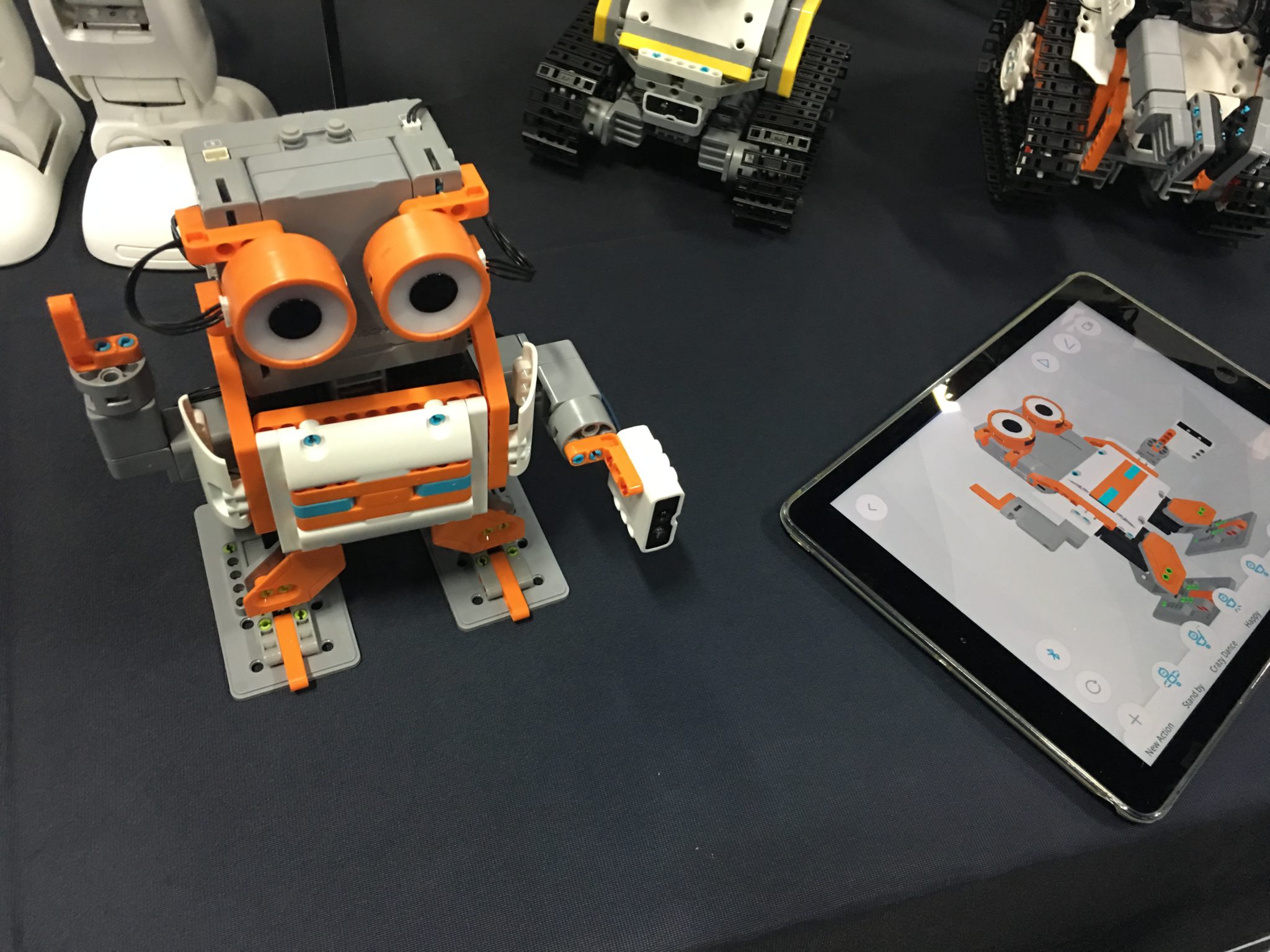
    • Jimu build and code robot. (Also in video)

    Final Thoughts

    Technology is continuing to move forward faster tthanwe can imagine. The biggest talk at this year’s CES is about voice command technology like Alexa and Google home, self-driving cars, and augmented reality content. As parents, our we should understand that our kids are going to be some of the first adopters of much of this technology and so it is important that we understand it. Kids aren’t watching content just on their televisions anymore, they aren’t having to type search terms into Google, and they are always always connected. That is what was said at day one the most, we are moving from the digital age to the connected age. You’re connected, your kids are connected, and so is everyone else so be sure to stay in the loop so that you can keep every connection safer.

    Stay tuned tomorrow for my report on day 2 of CES Media Days where I’ll talk about teen market research and more about the future of connectivity. Share this article with your friends and let them know that you’re keeping track of the latest tech trends by following FamilyTechBlog.com’s reporting on CES2018.


  • Instagram will Begin “Recommending” Posts from Accounts You Don’t Follow

    Instagram will Begin “Recommending” Posts from Accounts You Don’t Follow

    A new “recommended for you” feature will be rolling out on Instagram very soon. This feature will post pictures from users that aren’t on your friends list in an attempt to get you to increase the number of users you follow. In 2016 Instagram changed the way your feed works by changing from chronological to an algorithm based timeline. The latest change comes as Instagram is looking for ways to better market their platform to advertisers. Increasing visibility of accounts run by companies should boost those accounts followers and therefore the reach of paid advertising. The content you see you will be chosen for you based on your likes in the likes of people you follow. You won’t necessarily just see any random image, but images that the Instagram algorithm believes might be relevant to you.

    What Parents Should Know.

    Obviously, any content delivered to our children and teens by an algorithm can be suspect. This change makes it increasingly important for you to understand who your children follow on Instagram. The best way to do that is for you to log into their account on your device and check regularly. While accounts that use spam techniques or inappropriate images won’t likely be delivered to users through this method, it is still against my wishes for anyone other than myself or my child themselves to determine who or what they see on social media. My best advice for parents is that you be proactive and keep an eye on your kid’s accounts.