Tag: social media

  • Now You Can Instantly Delete Messages You’ve Sent in Snapchat

    Now You Can Instantly Delete Messages You’ve Sent in Snapchat

    I’ve done it, you’ve done it, everyone has sent that message you immediately regret. Snapchat’s new feature will allow you to message “regret free” by adding a delete feature. You can now delete a message after you’ve hit that send button. Maybe there’s just a dumb typo, perhaps what you said could come across differently than how you meant it, no matter the reason, they’ve got you covered.

    To delete a message just long press it and select the delete option. Everyone will be alerted that you deleted the message but they won’t see the message itself. Previously, Snapchat only made messages disappear when everyone in the group had seen them but this will change that up quite a bit. Obviously, screenshots can be taken of your message if someone sees it before you’ve eliminated evidence, but you’ll be notified of that as well.

    Also Read: Snapchat allows x-rated material from cosmo.

    What Parents Should Know

    This is a small change for Snapchat but it speaks volumes about the nature of a messaging app like this one. The idea has always been to remove regret, apprehension, and maybe even responsibility for the messages you send online. Our kids should understand that there are consequences for what we do on the internet, even is some of our apps try to make us feel like there aren’t.

    One of my biggest concerns about Snapchat is the disappearing messages. I have heard story after story of parents reporting their kids being victimized by bullies or predators on Snapchat only to be told by police that there is nothing they can do because there is no evidence of the messages that were sent. Snapchat has always been on my uninstall list and it most likely will never be taken off that list. If your kids are under 16, think long and hard before you allow them to use a disappearing messages app like Snapchat.


  • You No Longer Have to Be Friends with Your Kids’ Friends’ Parents on Facebook Messenger Kids

    You No Longer Have to Be Friends with Your Kids’ Friends’ Parents on Facebook Messenger Kids

    When Facebook Messenger for kids was released several months ago, I immediately installed it for my kids and began to test it out. I like that parents have to approve every single friend request. I was glad that it is encrypted, no data is collected, and that kids don’t have to open their own Facebook account. Finally, I was impressed that they built it with its own kid-friendly GIF library and camera filters. Now, Facebook has made a small change that could be helpful for many parents.

    You no longer have to be Facebook friends with the parents of the friends your kids want to contact on Messenger. The approval requirements haven’t changed. Your children aren’t allowed to make contact with anyone you haven’t pre-approved and any request will be sent to your Facebook account for easy approval or denial. This update will just free parents up to allow their kids to chat with friends regardless of being mere acquaintances with that friend’s mom and/or dad.

    What Parents Should Know

    I still think that Facebook Messenger for Kids is one of the better messaging apps for kids. It’s easy to set up and use and there is no data collection, account setup, or advertising.

    Here, however, is my warning: You should probably know your kids’ friends’ parents if they’re going to be chatting online. I’m not saying you should follow them on Facebook and be online BFFs, just that you want to be sure your children are chatting with other children. You give up a certain level of security when you aren’t looking out to see who your kids are talking to. With Facebook messenger kids the only way to find out who they’re talking to is through the account of their parents. Friend request their parent and then unfollow them if you must but you should be able to see what you can about their family to make sure your kid is only messaging other kids.

  • Instagram Updates Give You More Control Over Your Feed

    Instagram Updates Give You More Control Over Your Feed

    So many people found themselves migrating their photo sharing to Instagram several years ago because of their chronological timeline. As Facebook became more algorithm based, people felt like they had no control over what they were seeing on their timelines so they opened Instagram accounts. A few years ago Instagram went the way of the algorithm as well trying to give posts you are most interested in a higher priority in your feed. This was met with mixed reactions and now Instagram is working to give you more control.

    external link…

    The first addition, effective now, is the “Mute” feature. This allows you to hide posts from your feed without completely unfollowing them. This could be useful for hiding bullies without letting them see that you’ve unfollowed (which could encourage even more bullying) and just helping the algorithm know your preferences even better. To mute someone simply press the three dots to open the menu on a post. Select Mute in the menu and that’s it, you shouldn’t see posts from that user anymore.

    The second announcement is for updates that haven’t made their way to users yet. Soon, Instagram will include an insights feature that will allow you to see how often and how you use the social media service as well as a notification when you’ve seen all the posts from the previous 48 hours. Instagram and parent company Facebook are hoping that these features will improve the user experience by helping them develop better usage habits. There has been more of a focus recently on improving the “overall well-being” of their users. Some of the recent updates on YouTube, Facebook, Snapchat, and Instagram have been attempts to encourage more engagement within their communities without having to spend as much time using their services.

    What Parents Should Know

    Any changes made to social media sites that encourage breaks from screens are good changes. But nothing will replace a parent setting limits for their children. Remember, also, that there is no better lesson than your own example. Monitor your own screen time and make healthy choices so that you can advise your kids from a place of leadership. Instagram’s new mute feature will help moms and dads keep unwanted posts away from their kids as well as help older kids silence those they don’t longer want to hear from.

    My hope is that as parents we can guide our children into proper use of social media. Statistics are showing that the chance of depression increases the more our children use social media. More depression increases the rate of suicide among young people. In fact, suicide is now the second leading cause of death among teenagers. With these facts in place, even the social media services themselves are taking notice and making changes. Parents, do not allow yourself to be caught in the dark when it comes to your kids and safe use of their technology. While Facebook, Instagram, and Youtube have been making changes, the responsibility does not fall to these companies to protect our children. It falls to us, their parents.

  • Facebook to Release Dating Feature

    Facebook to Release Dating Feature

    Facebook is getting into the dating game. At their developers’ event in California last week, Mark Zuckerberg announced a new dating feature for Facebook. The feature will be opt-in only and will feature only the users’ first names. You can scan through people’s dating profiles (separate from their FB profile) and select whether or not you’re interested in them. If you both see each other and show interest, you’ll be connected through a built-in messenger feature.

    Tindr has had the dating app scene under control for a while, but like Snapchat, Facebook seems to be out to take some of the spotlight. This foray into online dating isn’t surprising since many (1 in 3) relationships already begin online. It is an obvious move towards Facebook becoming the one-stop app for most of your social media needs.

    What Parents Should Know

    There hasn’t been a release date announced for Facebook’s dating feature. It is, however, said to be completely separate from your Facebook account and it’s a feature that you have to opt-in to so it isn’t automatically available. If your kids or teens are on Facebook, they will likely have the option to join the dating feature since the age limit is set at 13 for the social media service.

    I recommend not allowing your younger kids to use apps like Tindr since they are meant to make contacts for face to face meetups. There are many healthy relationships that have started on dating apps but there are also many stories of young people being tricked into accepting invitations from people who have no business contacting them. I would put Facebook’s dating option on my list of dangers for your kids under 18. It is a feature that is intended for adults and should only be used by adults. I also warn against messing around with it as a married person. As crazy as it may sound, many people who aren’t interested in dating use these apps to just check what kind of people would be interested in them. Facebook is already one of the leading topics of dissent in the marriage counselor’s office. The dating app could (I submit that it definitely will) increase the frequency of marriage problems caused by social media.

  • Celebrate Screen Free Week

    Celebrate Screen Free Week

    April 30-May 6 is Screen-Free Week!

    You won’t be seeing many posts this week because we are celebrating Screen-Free Week. You can learn about our Screen-Free Week Event at BecauseFamily.org/events/screen-free-week. We are celebrating with a local roller skating night on May 6. ScreenFree.org has events listed. Go see if there are any in your area.

    From ScreenFree.org:

    “Screen-Free Week is an annual, international celebration when families, schools, and communities swap digital entertainment for the joys of life beyond the screen. Instead of watching TV, surfing the web, or playing with apps and video games, they read, play, think, create, get active, and spend more time with family and friends.

    Remember, Screen-Free Week is about taking a break from digital entertainment. You can celebrate, and still use devices for work or school. But if screens of any kind interfere with family time (including meals), you may want to rethink how and when you’re using them.”

    It is a great idea to take a break from your screens. Whether you do the whole week or just a couple of days during the week, I encourage you to take some time to get out and do something besides use screens with your family.

  • Snapchat Adds Games to Their Camera

    Snapchat Adds Games to Their Camera

    Snapchat’s newest update adds gaming to their camera. That’s right, you can now use their augmented reality camera to play silly games. Some are even multiplayer. They’re calling the games “Snappables” and they range from throwing kisses at each other to dance competitions. Users control the games with their face or touch and motion controls. Snap is planning to release new Snappables weekly featuring basketball, alien combat, and a lot of other themes.

    What Parents Should Know

    Right now, the multiplayer Snappable games are centered around your friend list. This means you shouldn’t be able to play games with random players you have never met. That could be an added feature and we’ll let you know if and when that is the case.

    I recommend knowing what your kids are using their social media apps for. If they are connecting with their friends to play games and chat, and you’re ok with that, then that is just fine. I never recommend allowing your kids to meet new people online through Snapchat or other social media apps. Games like Snappables are pretty harmless other than more ways to waste time and the obvious opportunity for corporations to launch games featuring their brand for advertising. More than anything, just stay knowledgeable about what your kids are doing online and keep the conversation open with them. This way they won’t be concerned about you seeing what they do online and the lines of communication will stay open with them.

  • Here’s How To See if Your Private Data Leaked to Cambridge Analytica

    Here’s How To See if Your Private Data Leaked to Cambridge Analytica

    There is a tool to help you find out if your data was leaked to Cambridge Analytica. There may not be much you can do about it, but it is interesting to see if your app approval habits led to the sharing of your private data. Facebook has said that they’ll be highlighting the tool on the top of everyone’s news feeds but in case you haven’t seen it or don’t see it, here’s how to find the tool on your own.


    I recommend you check this out for your own Facebook account as well as any accounts your kids may use. Just in case you don’t have a minute and a half to watch the video above, I’ve listed the steps below for you. Thanks for reading FamilyTechBlog.com and remember to be careful how much access you give apps to your social media data.

    1. Open your Facebook App
    2. Click on the “Hamburger Menu” to the bottom right. (Three stacked lines.)
    3. Scroll all the way down to the bottom of the menu.
    4. Select “Help and Support”
    5. Select Help Center
    6. Search {Cambridge}
    7. Select the first auto complete option.
    8. That’s where it tells you if you’ve shared data with Cambridge Analytica.

    Thanks again, and share this with your friends.

  • New Snapchat Feature Enables 16 Person Video Chat

    New Snapchat Feature Enables 16 Person Video Chat

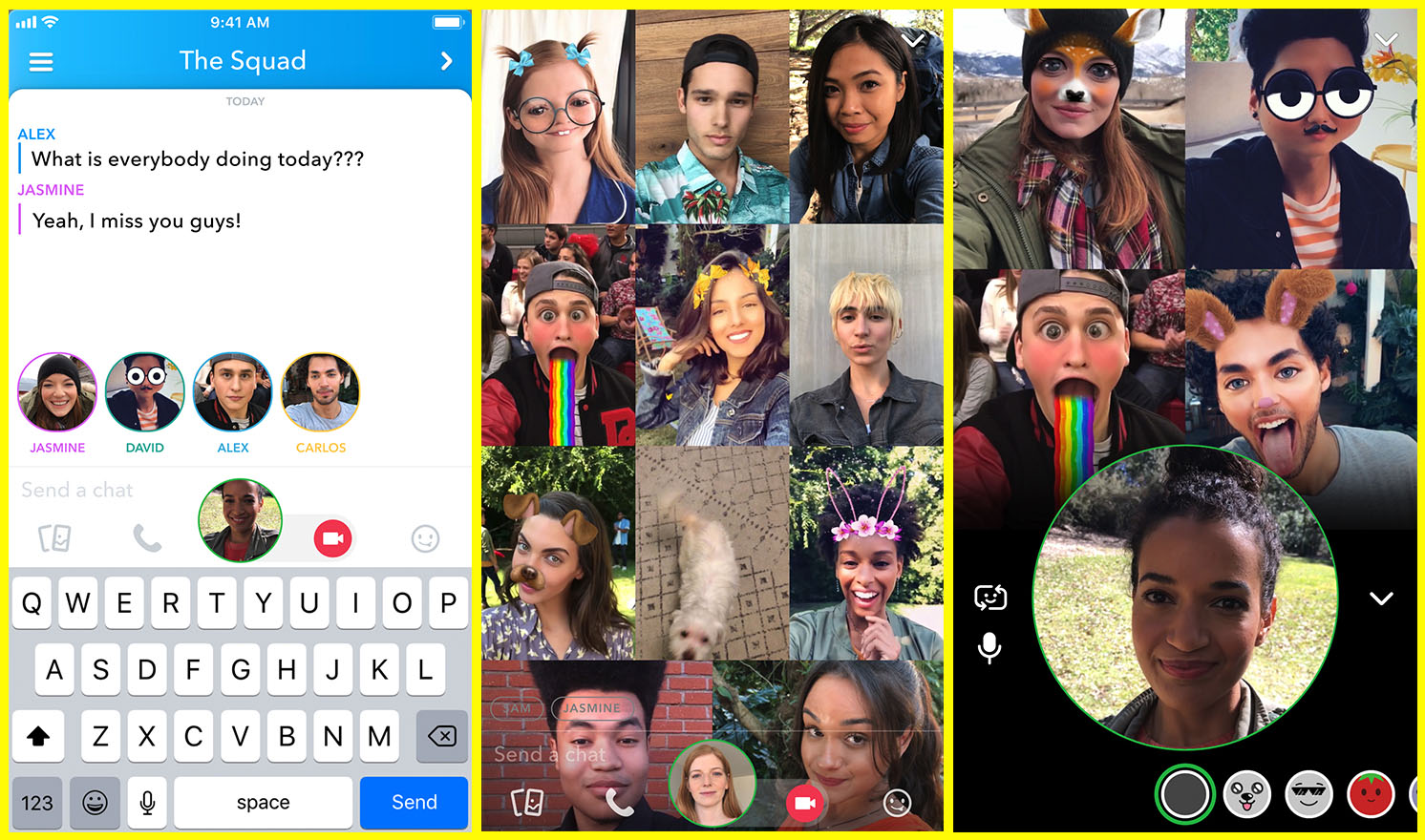
    Group chat has been available for a long while now, even in Snapchat, but now you can hang out with a large group of friends on video without ever leaving home. Snapchat’s new group video chat feature is now available and allows you to include 15 of your friends. You can sign on to a regular chat and add friends as you go or set the chat up with your large group from the beginning. Of course, Snapchat’s AR filters and masks will be available during these chats as well. Another feature that is available with this update is tagging or mentions. You can “@” tag a friend in your posts so they’ll be notified that you’re mentioning them.

    What Parents Should Know

    Parents should already know how much time their kids spend on social media. If unsupervised, they’ll chat with friends and creep their timelines all day long. In fact, many teens say they feel addicted to social media, while not doing anything to curb their own addictions. Addiction isn’t the only problem with extensive social media use. Social contact over our devices has proven to be far less beneficial than face to face interaction. There have been countless studies comparing video chat to actual conversations with someone in person and the conclusion is always the same. Spending time in the same room as someone is better for your development than only texting, calling, or video chatting. Take this excerpt summary from ScienceDirect.com’s 2014 study.

    When engaging in face-to-face communication, social information is conveyed by vocal and visual cues within the context of the situation. Nonverbal communication, defined as communication without words, includes apparent behaviors such as facial expression, eye contact, and tone of voice, as well as less obvious messages such as posture and spatial distance between two or more people (Knapp & Hall, 2010). The understanding of these kinds of nonverbal social cues is particularly important for social interaction because of the need to modify one’s own behavior in response to the reactions of others (Knapp & Hall, 2010). – ScienceDirect.com

    With apps such as Houseparty and Snapchat’s group chat out there, we have to be more intentional than ever about the time our kids spend on their screens. Hanging out with friends through our devices is becoming easier and more acceptable. Kids aren’t going out as much, the malls are closing, arcades are few and far between, and movie theaters are having to serve food like restaurants to attract the older generations because the younger ones aren’t as interested. Why go out when you can stay in and hang out with your friends online? Video chat can be an awesome way to stay in touch with long-distance family or friends but when our kids leave school and go home to do their homework while video chatting with six of their best buds all evening, something is missing from their life experience. We have to monitor their online activity and set time limits. Use unGlue or Circle to set some boundaries. Talk to your kids about the importance of face to face interaction. Don’t deny them opportunities to go spend time with friends (in families you trust). Drive them to that get-together or youth group event. Say yes when a friend wants to come over. Give them opportunities to spend face to face time with friends, outside of school, and you’ll be giving them the best chance you can to develop the skills they need to succeed.

  • PODCAST: Social Media isn’t For the Users Anymore

    PODCAST: Social Media isn’t For the Users Anymore

    Family Tech Update: Entertainment Software Rating Board will Warn Parents of In-Game Purchases in Video Games – Movie Pass Reveals that They Collect Much More of Your Data than You Thought – Netflix Testing “Patches” to Reward Kids’ Binge-Watching – and Social Media isn’t For Users Anymore!

    Show Notes:

    Facebook’s algorithm change
    Instagram never going back to chronological
    Pay for reach…
    For Parents
    there’s a system behind social media
    marketers are paid to manipulate the system
    Companies make decisions based on marketing opportunities
    Social Media isn’t made for the user anymore
    No social media until 17…

    Social Media Links

    Facebook: http://facebook.com/BecauseFamily
    Instagram: http://instagram.com/becausefamily
    Twitter: http://twitter.com/becausefamily

    Newsletter Sign up

    Ministry Updates:: http://eepurl.com/R7Btr
    Weekly Blog Posts:: http://eepurl.com/cvnhXD

    Websites

    Ministry Site:: http://becausefamily.org
    Tech Blog:: https://safe.becausefamily.org
    Michael’s Speaking Info:: http://kmichaelprince.org

    Donate and Affiliate Links

    http://BecauseFamily.org/partnership

    Music Creative Commons