Tag: snapchat

  • Snapchat Allows Cosmo to Include X-Rated Content in the App

    Snapchat Allows Cosmo to Include X-Rated Content in the App

    *This article is for parents and there is discussion of x-rated content. You have been warned.

    The Snapchat Discover page has been my main source of concern for kids and teens when it comes to the photo-sharing app. I posted a video over a year ago announcing that Snapchat was being added to my uninstall list because of the Discover page. This magazine rack style page featured articles from all kinds of magazines and other publications that highlighted sexuality, drug use, and other adult themes. As I began to understand the discover page, it became obvious to me that this app was intended for adults even though it’s used by High School and even Junior High students all over the country.

    Another Report on Cosmo After Dark

    The latest source of concern with Snapchat for parents is, as I’ve been saying, the Discover page. A new feature from Cosmo, called “Cosmo After Dark” features content that Cosmo themselves calls X-Rated. These articles are about everything from how to masturbate properly, to truth and dare ideas, and pornography site recommendations. I won’t say much more about this because the video below says it all.


    Remember, this video is from a year and a half ago, I saw this content coming from a mile away!


    Parents, PLEASE, pay attention to this news and require your child to uninstall Snapchat NOW. Use your parental control software to block data access to the app, do whatever you can to keep them away from the over-sexualization that social media is instilling in our children. Snapchat has really always been about sex, they seem to be really going for it now with this new “after-hours” content.

  • Instagram Updates Give You More Control Over Your Feed

    Instagram Updates Give You More Control Over Your Feed

    So many people found themselves migrating their photo sharing to Instagram several years ago because of their chronological timeline. As Facebook became more algorithm based, people felt like they had no control over what they were seeing on their timelines so they opened Instagram accounts. A few years ago Instagram went the way of the algorithm as well trying to give posts you are most interested in a higher priority in your feed. This was met with mixed reactions and now Instagram is working to give you more control.

    external link…

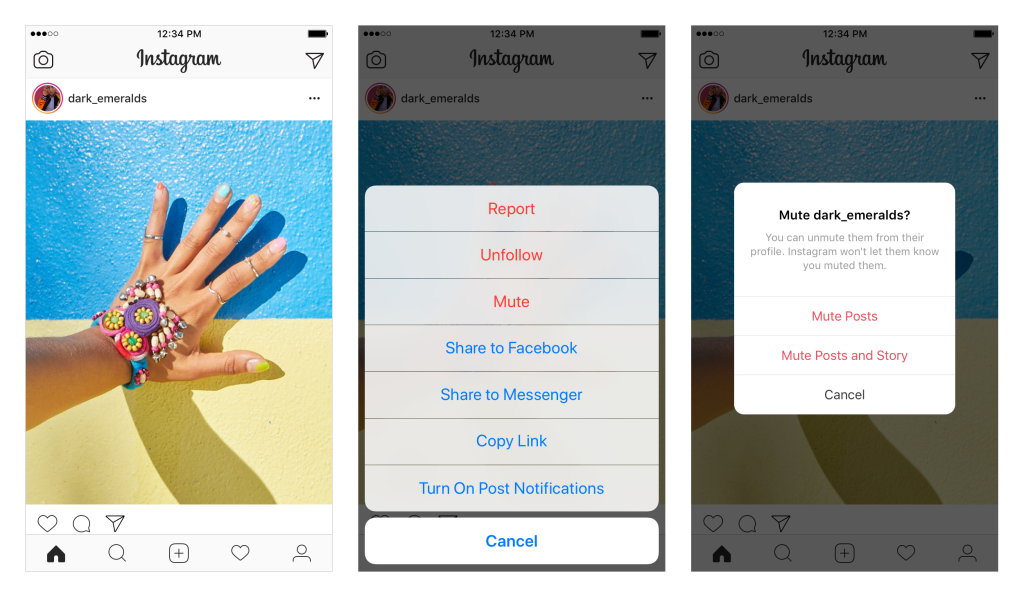
    The first addition, effective now, is the “Mute” feature. This allows you to hide posts from your feed without completely unfollowing them. This could be useful for hiding bullies without letting them see that you’ve unfollowed (which could encourage even more bullying) and just helping the algorithm know your preferences even better. To mute someone simply press the three dots to open the menu on a post. Select Mute in the menu and that’s it, you shouldn’t see posts from that user anymore.

    The second announcement is for updates that haven’t made their way to users yet. Soon, Instagram will include an insights feature that will allow you to see how often and how you use the social media service as well as a notification when you’ve seen all the posts from the previous 48 hours. Instagram and parent company Facebook are hoping that these features will improve the user experience by helping them develop better usage habits. There has been more of a focus recently on improving the “overall well-being” of their users. Some of the recent updates on YouTube, Facebook, Snapchat, and Instagram have been attempts to encourage more engagement within their communities without having to spend as much time using their services.

    What Parents Should Know

    Any changes made to social media sites that encourage breaks from screens are good changes. But nothing will replace a parent setting limits for their children. Remember, also, that there is no better lesson than your own example. Monitor your own screen time and make healthy choices so that you can advise your kids from a place of leadership. Instagram’s new mute feature will help moms and dads keep unwanted posts away from their kids as well as help older kids silence those they don’t longer want to hear from.

    My hope is that as parents we can guide our children into proper use of social media. Statistics are showing that the chance of depression increases the more our children use social media. More depression increases the rate of suicide among young people. In fact, suicide is now the second leading cause of death among teenagers. With these facts in place, even the social media services themselves are taking notice and making changes. Parents, do not allow yourself to be caught in the dark when it comes to your kids and safe use of their technology. While Facebook, Instagram, and Youtube have been making changes, the responsibility does not fall to these companies to protect our children. It falls to us, their parents.

  • Snapchat Adds Games to Their Camera

    Snapchat Adds Games to Their Camera

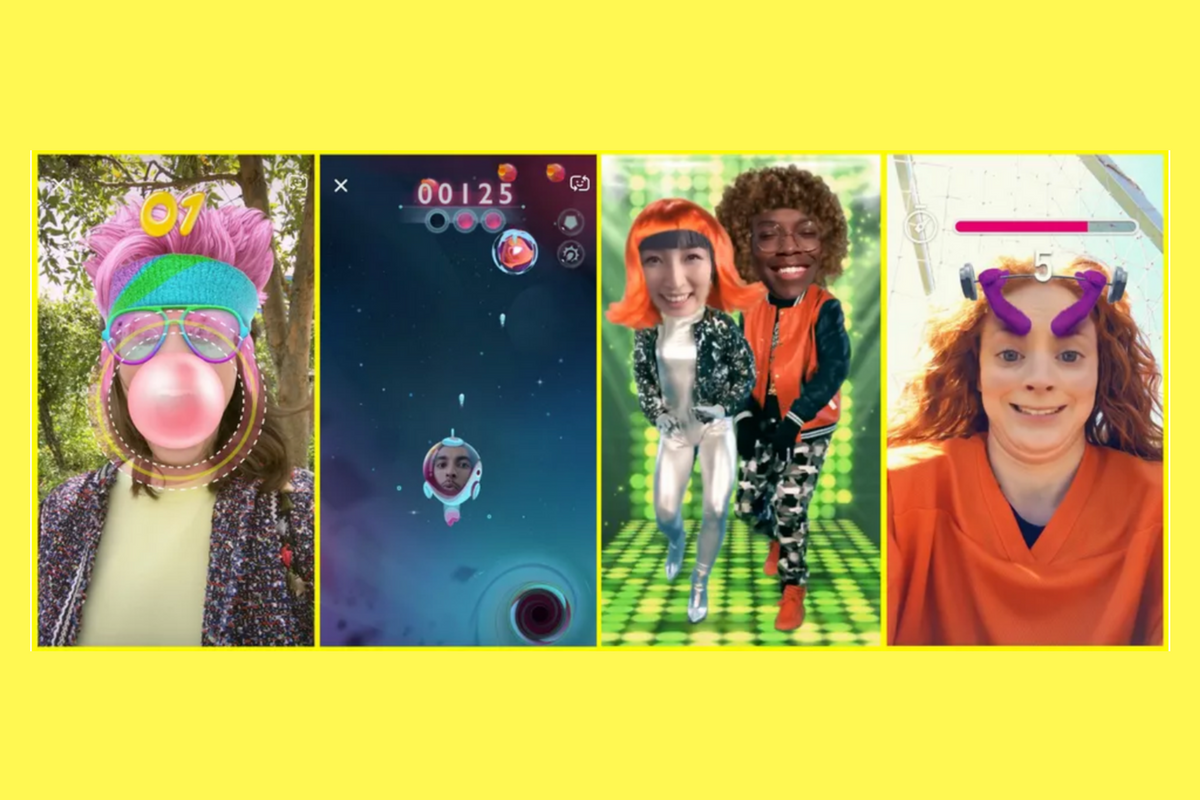
    Snapchat’s newest update adds gaming to their camera. That’s right, you can now use their augmented reality camera to play silly games. Some are even multiplayer. They’re calling the games “Snappables” and they range from throwing kisses at each other to dance competitions. Users control the games with their face or touch and motion controls. Snap is planning to release new Snappables weekly featuring basketball, alien combat, and a lot of other themes.

    What Parents Should Know

    Right now, the multiplayer Snappable games are centered around your friend list. This means you shouldn’t be able to play games with random players you have never met. That could be an added feature and we’ll let you know if and when that is the case.

    I recommend knowing what your kids are using their social media apps for. If they are connecting with their friends to play games and chat, and you’re ok with that, then that is just fine. I never recommend allowing your kids to meet new people online through Snapchat or other social media apps. Games like Snappables are pretty harmless other than more ways to waste time and the obvious opportunity for corporations to launch games featuring their brand for advertising. More than anything, just stay knowledgeable about what your kids are doing online and keep the conversation open with them. This way they won’t be concerned about you seeing what they do online and the lines of communication will stay open with them.

  • New Snapchat Feature Enables 16 Person Video Chat

    New Snapchat Feature Enables 16 Person Video Chat

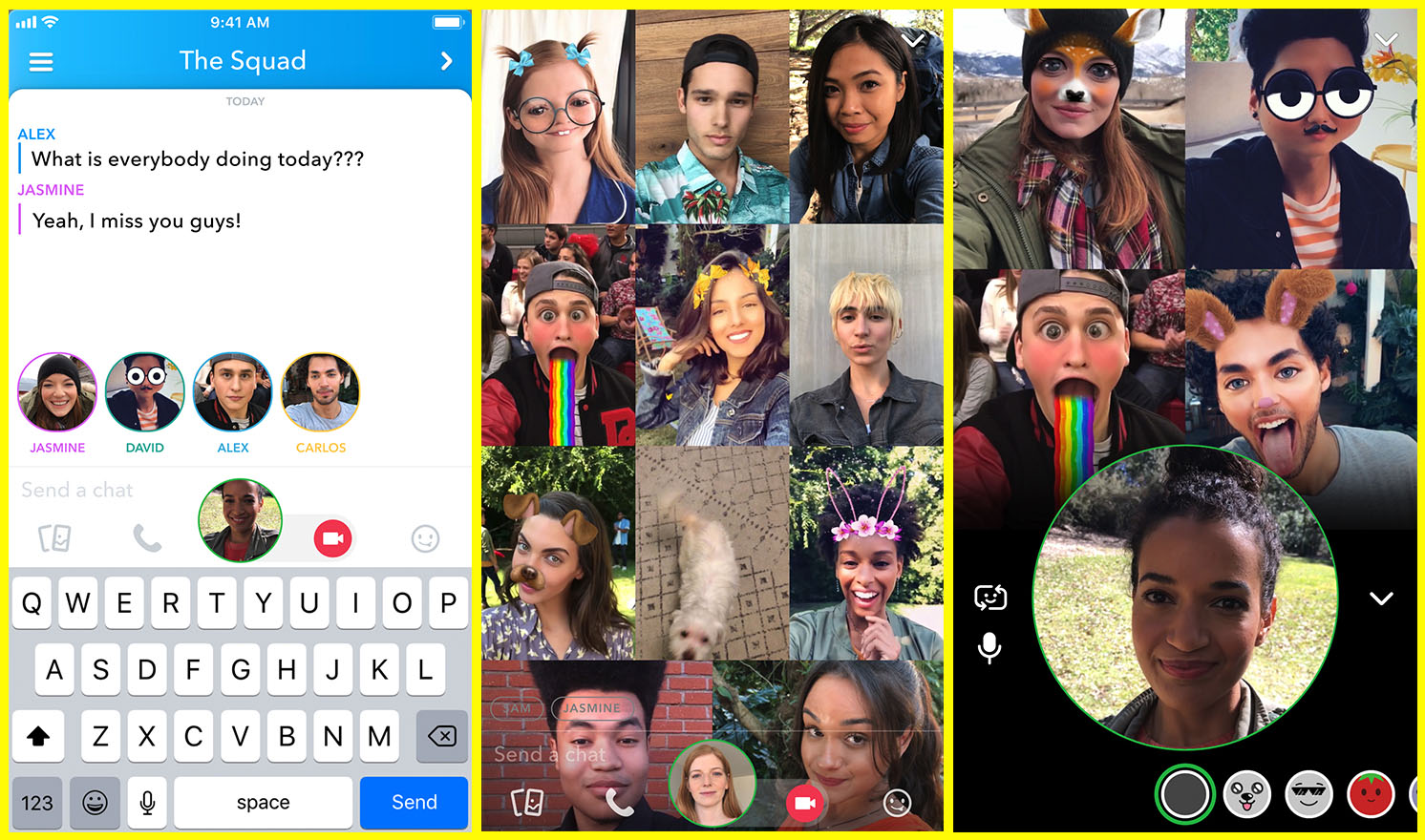
    Group chat has been available for a long while now, even in Snapchat, but now you can hang out with a large group of friends on video without ever leaving home. Snapchat’s new group video chat feature is now available and allows you to include 15 of your friends. You can sign on to a regular chat and add friends as you go or set the chat up with your large group from the beginning. Of course, Snapchat’s AR filters and masks will be available during these chats as well. Another feature that is available with this update is tagging or mentions. You can “@” tag a friend in your posts so they’ll be notified that you’re mentioning them.

    What Parents Should Know

    Parents should already know how much time their kids spend on social media. If unsupervised, they’ll chat with friends and creep their timelines all day long. In fact, many teens say they feel addicted to social media, while not doing anything to curb their own addictions. Addiction isn’t the only problem with extensive social media use. Social contact over our devices has proven to be far less beneficial than face to face interaction. There have been countless studies comparing video chat to actual conversations with someone in person and the conclusion is always the same. Spending time in the same room as someone is better for your development than only texting, calling, or video chatting. Take this excerpt summary from ScienceDirect.com’s 2014 study.

    When engaging in face-to-face communication, social information is conveyed by vocal and visual cues within the context of the situation. Nonverbal communication, defined as communication without words, includes apparent behaviors such as facial expression, eye contact, and tone of voice, as well as less obvious messages such as posture and spatial distance between two or more people (Knapp & Hall, 2010). The understanding of these kinds of nonverbal social cues is particularly important for social interaction because of the need to modify one’s own behavior in response to the reactions of others (Knapp & Hall, 2010). – ScienceDirect.com

    With apps such as Houseparty and Snapchat’s group chat out there, we have to be more intentional than ever about the time our kids spend on their screens. Hanging out with friends through our devices is becoming easier and more acceptable. Kids aren’t going out as much, the malls are closing, arcades are few and far between, and movie theaters are having to serve food like restaurants to attract the older generations because the younger ones aren’t as interested. Why go out when you can stay in and hang out with your friends online? Video chat can be an awesome way to stay in touch with long-distance family or friends but when our kids leave school and go home to do their homework while video chatting with six of their best buds all evening, something is missing from their life experience. We have to monitor their online activity and set time limits. Use unGlue or Circle to set some boundaries. Talk to your kids about the importance of face to face interaction. Don’t deny them opportunities to go spend time with friends (in families you trust). Drive them to that get-together or youth group event. Say yes when a friend wants to come over. Give them opportunities to spend face to face time with friends, outside of school, and you’ll be giving them the best chance you can to develop the skills they need to succeed.

  • PODCAST: Three Apps Your Kids Should Uninstall

    PODCAST: Three Apps Your Kids Should Uninstall

    Family Tech Update: These apps can be seriously dangerous for your kids. Adult content, privacy issues, stranger danger, all kinds of issues here, and some of them are only rated 12+!

    Social Media Links

    Facebook: http://facebook.com/becausefamily
    Instagram: http://instagram.com/becausefamily

    Twitter: http://twitter.com/becausefamily

    Newsletter Sign up

    Ministry Updates:: http://eepurl.com/R7Btr
    Weekly Blog Posts:: http://eepurl.com/cvnhXD

    Websites

    Ministry Site:: http://becausefamily.org
    Tech Blog:: https://safe.becausefamily.org
    Michael’s Speaking Info:: http://becausefamily.org/bookings

    Donate and Affiliate Links

    http://BecauseFamily.org/partnership

    All music/audio effects are public domain.

  • Snapmap Featured User Sourced Videos of the Florida School Shooting

    Snapmap Featured User Sourced Videos of the Florida School Shooting

    Snapchat’s “Snapmap” feature highlights news stories that are curated by their team of news editors. The team chose to feature posts from the school shooting in Parkland Florida on their map yesterday. It was comprised of Snaps from students in the school, news outlets, and passersby whom the editors thought had posted something that contributed to the viewers understanding of what was going on during the shooting. You can see that editing was done before the Snaps were put on the map because a “Warning Graphic Content” posts start the slideshow, followed by a video of what seems to be the inside of a classroom in which you can hear the gunshots from nearby. Language is bleeped out and there are no actual victims shown but you do see a couple of students who are talking about watching their friends be killed right next to them.

    Snapchat hired a former CNN exec to lead their team of news editors and they say their news team is doing their best to follow the right journalism practices. They are working to remove overly sensitive content and choosing to only feature Snaps that contribute properly to the story they are covering. Snapchat’s main audience is under 18 which likely contributed to the fact that they had so much content to use to cover the shooting in a High School. This also means though that our kids who use Snapchat, and anyone else using their map in a browser, can have access to on the scene footage of what is happening during events like this. A school shooting is a national tragedy and social media is becoming one of the most common ways that people learn about what is happening or has happened. Snapchat is attempting to provide a curated look at this news, but is that what we want our kids to see when they look at their phones?

    What Parents Should Know

    As mentioned above, posts from Snapchat are not automatically sent to the map. These posts are curated and especially selected and edited before being added. While I’m grateful for some oversite from Snapchat when it comes to sharing this news, I have to question whether or not I would want my 13 or 14-year-old to have access to some of the images seen during the shooting on Wednesday. Just seeing something so dangerous portrayed in such a real way can be damaging and cause fear in our kids. We have to look out for this and know if this is something our child can handle or not. For some of them it may be fine but for others, they aren’t mature enough to deal with that much realism.

    (Opinion warning!) I can’t tell you what’s right for your kids, I will, however, give credit to Snapchat for trying to bring some truth to the news by using information from people who are actually there. I will also keep this info from my kids for a while. There are enough things that cause fear in our lives, I wouldn’t want added influences like their social media accounts to increase that fear. Snapchat is on my uninstall list for a lot of reasons, I’m grateful they aren’t just putting every public post from one of these tragic events onto a feed that your and my kids could see but I will think long and hard before allowing my child access to this source of news.

  • Family Tech Update: “The Time Well Spent Movement” {podcast]

    Family Tech Update: “The Time Well Spent Movement” {podcast]

    There’s a movement to take back our time and curb our tech addictions. What does it mean for families and how can we take charge of tech addictions? Plus: Snaps can be embedded on any site, and coding is king, but not on a screen!

    unGlue Affiliate Link

    Facebook: http://facebook.com/becausefamily
    Instagram: http://instagram.com/becausefamily
    Twitter: http://twitter.com/becausefamily

    Newsletter Sign up

    Ministry Updates:: http://eepurl.com/R7Btr
    Weekly Blog Posts:: http://eepurl.com/cvnhXD

    Websites

    Ministry Site:: http://becausefamily.org
    Tech Blog:: https://safe.becausefamily.org
    Michael’s Speaking Info:: http://kmichaelprince.org

    Donate and Affiliate Links

    http://BecauseFamily.org/partnership


  • Two Ways Your Snaps Can End Up Anywhere On the Web

    Two Ways Your Snaps Can End Up Anywhere On the Web

    One of my initial internet safety tips for parents is to turn off location data for their camera. Many of them do this immediately upon hearing my advice. The problem, however, is that they then jump over to Facebook and Snapchat to use that camera and their location settings are as public as can be. Today’s news gives us even more information about how your location data is used by Snapchat and Snapmap.

    Embedding

    Snap has opened up the ability to “embed” a snap into a website. This means that if your snap is public, a code can be copied and pasted so that your post shows up on the site that contains the embed code. It’s easy to do and really isn’t a new concept since public Facebook videos and photos can be embedded by default as well. I’ve embedded a snap from Disney on Ice in Des Plaines, Illinois:

    SnapMap

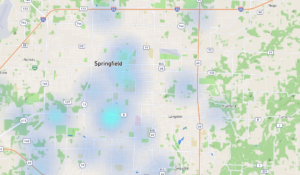
    Snapmap went into browsers today. This means that you don’t have to have the Snapchat app to see public posts overlayed onto a map of anywhere in the world. Concentrations of Snaps show up as colored dots that range from light blue (few Snaps) to bright red (high concentration of Snaps.) When you click on these colors you see the Snaps in a slideshow style format. They appear as most recent first and move to the past as you click or watch until the end of each post.

    Most of the Snap-map posts highlight breaking news (i.e. the recent ice storm in my area or a basketball game or concert) but it will sometimes feature posts from the general user if their posts are relevant and set to public. Posts are curated by a team of news editors. The idea is that Snapchat wants news organizations and sites to use their map to highlight current events and breaking news in real time. This offers a real opportunity to see real news, as it happens. It could also be dangerous if your kids aren’t setting their Snapchat settings to private or friends only.

    What Parents Should Know

    Location privacy is a major concern for parents. We post more of our private lives online than ever before and a map that highlights where we are and what we are up to can be considered a privacy disaster. Especially when it comes to our kids. Users of Snapchat are meant to be 13 years old or older. Some kids under than 13 spend a lot of time on the app, though, and their snaps are, therefore, available to be used as news coverage on this public map. I consider this a real problem for parents.

    I would recommend that if your kids use Snapchat, you ensure that they have their profiles set to private or friends only. Disable the Snapmap (put it in Ghost Mode) so that what they are posting won’t show up. Not taking these precautions could lead to your home address being featured on Snapchat’s map and even someone else’s website. Take location privacy serious. Talk to your kids about staying private, encourage them to never post anything they wouldn’t be comfortable being seen by anyone in the world. The internet isn’t private and social media is growing increasingly more public. Your kids need to understand that.

  • Facebook and Snapchat Join the “Time Well Spent” Movement

    Facebook and Snapchat Join the “Time Well Spent” Movement

    What is “Time Well Spent?”

    The Time Well Spent movement is a project of the Center for Humane Technology who exists to “Reverse the Digital Attention Crisis and Realign Technology with Humanity’s Best Interest.” The idea is that we have been trained to focus so much on social media and technology that we are missing out on the quality time we’re meant to have in our lives. The CHT works to educate parents, teachers, and industry leaders on the dangers of our addiction to technology and what we can do to overcome that addiction.

    Taking time to enjoy nature and have real face to face conversations are things we’ve taken for granted and the Time Well Spent movement is trying to get us back to those beneficial offline activities. We have begun to see some major social networks take notice of the desire for healthier tech use. As you’ll read below, awareness of these problems has lead to some actual changes for some of the most popular social media networks.

    Snapchat Redesign

    Not long ago Snapchat redesigned their app to be more user-friendly. They’ve also quietly added features that allow you to silence conversations for a while and added new styles of text to your snaps. The silencing feature is an obvious attempt to join the “Time Well Spent” movement.

    The do not disturb feature allows you to silence groups or individuals so that you don’t get notifications from them but don’t have to leave the conversation completely this allows you to keep a streak going while taking some time off of Snapchat, it also allows you to silent someone for a bit without making them feel like you’re ignoring them. Being able to silence conversations on Snapchat can make it easier to take a break without completely silencing your phone. Sure, you want to be accessible but you may not want to be as accessible as we can be these days with social media. I say good on Snapchat for adding this new do not disturb feature.

    Facebook Timeline Changes

    Facebook has been taking strides to encourage their users to use the platform in a more healthy way. From notifying you when you’re reading fake news to lowering the frequency of viral video content in your timeline or removing reasons to just blindly scroll Facebook without purpose. These changes seem to have led to a decrease in time spent on Facebook to the tune of 50 million hours per day.

    Zuckerberg has spent quite a bit of time talking about the responsibility Facebook has as the leading social media platform to encourage users to be more responsible with their activity online. It seems that they were willing to take this belief seriously even to the point of temporarily affecting their bottom line. Facebook’s new stats show a decrease in revenue, likely based on the usage decrease. While income was down during the last quarter of 2017, Facebook predicts that their numbers will level off as ad appearances on your timeline decreases but serious/meaningful engagement increases.

    What Parents Should Know

    I’ve never fully believed that the blame for addiction or overuse of tech and social media falls on developers. Yes, they can create services that encourage healthier use, and it’s good that some of them are beginning to think in that direction. The responsibility, however, falls on users to keep a healthy attitude. If our kids are who we are worried about then the responsibility to teach and model a healthy digital lifestyle falls to parents.

    Monitor the time you’re spending on social media. Set limits for yourself using some kind of software, like unGlue. Learn about the clues to whether news articles are fake or reliable, how to report people online that are causing problems, and how to avoid spammers and phishers. You should take the role of educating your kids on “Time Well Spent” seriously enough to model it for them yourself. 

     

  • Bitmoji Selfies Could Lead to Facial Recognition on Snapchat

    Bitmoji Selfies Could Lead to Facial Recognition on Snapchat

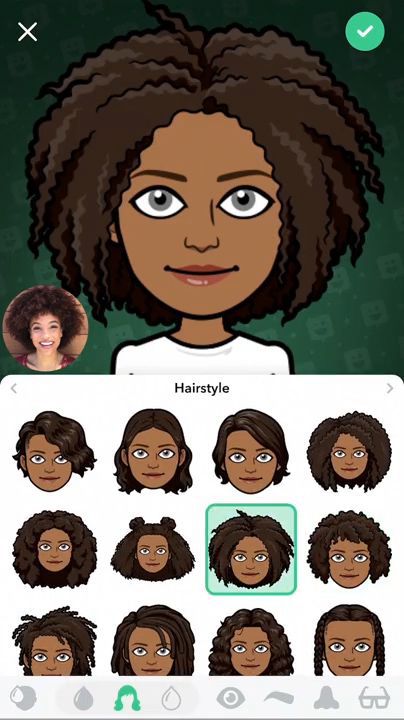
    Snapchat’s new “Bitmoji Deluxe” allows you to take a selfie and place it right next to your Avatar while you create or edit it. This lets you create your Bitmoji to look as much like you as possible. It starts with Snapchat asking if you’d like to take a selfie. Once you do, you will see an image of your actual self in the bottom corner the entire time you are editing your cartoon self. This isn’t a surprising new feature since Snapchat has teased that they may be using selfies to automatically create your Bitmoji in the near future. Facial recognition is becoming a mainstay in mobile technology so it’s only a matter of time before it works its way into social media.

    What Parents Should Know

    Snapchat is and will remain on my uninstall list. Bitmoji has never really been one of the reasons I don’t like Snapchat but I will admit I don’t “get it.” As parents, we have to keep an eye on our kids’ activity on Snapchat. One of the biggest concerns of educators, psychologists, and tech safety experts alike is the tendency for our young teens to filter their online identity. Even, sometimes, to the point of creating separate or even secret social media accounts for different followers or friends. Using a selfie to better create your Bitmoji avatar isn’t necessarily a sign of unhealthy behavior. I would, however, continue to pay attention to my teen’s conversations across all social media. Once facial recognition becomes a viable part of our social media cameras, that’s when I would consider not allowing my kids to use that service until they’ve reached an even higher level of maturity.