Tag: sharing

  • Is FaceApp Sending all of Your Private Data to Russia?

    Is FaceApp Sending all of Your Private Data to Russia?


    Last week everyone was posting pictures of themselves looking older or younger. They were all using FaceApp, an Android and iPhone app that uses AI to change your face to make you look older or younger, change your gender, and all kinds of different things. Then, suddenly everyone who had been posting pictures of themselves began sharing articles about the privacy dangers of FaceApp. What is true? What does FaceApp do with your pictures? Should we use apps like this? Here are the answers I found.

    Your Pictures Aren’t in Russia

    One of the major concerns due to political news lately is that all of these pictures have been stored by the Russians since the company that makes FaceApp is in Russia. The truth is that these pictures are stored on servers owned by Google and Amazon. Many of the photo apps you use including some of the social media apps you frequent use the same server companies to store your pictures and posts. There is no evidence to suggest that your images are being collected by the Russian government or even companies in Russia.

    Your Photos are Deleted after 48 Hours

    The face app privacy policies state that photos uploaded to their servers are usually deleted after 48 hours. They do state that some photos may be kept for analytical purposes but that they are not sent to the FaceApp companies. These photos are used by the artificial intelligence to make it smarter and help it do a better job of editing photos for people.

    FaceApp Terms Mention Affiliate Companies and Governments

    The policies of FaceApp do allow for them to give your photos to other companies “in their network.” Again, they say that this is for analysis purposes and not data tracking. They also say that they’ll give your photos to law enforcement if requested through legal means. 

    You Can Use FaceApp Without Giving Personal Information

    The company that makes FaceApp says that 99% of their users don’t login to the app. That means there are no ways for them to have your personal or identifying information. The only thing that they collect in those cases are your photos. If you have location settings turned off for your camera then there isn’t much personal data that can be gained from the images. All they actually have is a picture of a non-identified person’s face. Also, FaceApp only uses the photos you tell it to upload. Not your whole camera roll. 

    “…please note that we may transfer information, including personal information, to a country and jurisdiction that does not have the same data protection laws as your jurisdiction.” FaceApp Privacy Terms

    FaceApp Doesn’t Handle Data Differently than any Other Social Media Service

    The only major difference between FaceApp’s privacy policies and those of Facebook and Instagram are how much terminology they use to describe them. Personal data and photos are basically handled the same way by all these companies. You may consider it more of a fair trade off for Facebook and Instagram to collect your data in exchange for the services they provide. You also may be less inclined to be worried because of Facebook and Instagram being from the United States. Either way, your data is being used in the same way by all of these companies.

    Musical.ly is now Tik Tok


    Just Share Smart

    These instances of public outcry about the privacy policies of an app or a company are a great time to be reminded of the importance of thinking before you share. The truth is that everything, once shared on the internet, is public domain. It belongs to every citizen of the web and not to you any more. This should govern every choice you make on every site you visit and every app you use. If you wouldn’t want the whole world seeing that photo of you, your child, or your spouse, then you shouldn’t share it. If what you are about to post as a status would put your security in jeopardy then you shouldn’t post it. If you aren’t sure about a company or an app that is asking for your personal information then you shouldn’t give them your personal info. It is very simple. Just think before you fill out an online form. Think before you share a photo. Think before you past your thoughts about anything and everything.

    The issue isn’t where your information is stored. It is the fact that you share photos, phone numbers, credit card numbers, and even your social security number like it is no big deal. You don’t have to be an internet security expert, you just have to pause and think.

     

  • 5 Ways to Stay Internet Safe on Thanksgiving

    5 Ways to Stay Internet Safe on Thanksgiving


    Thanksgiving is a time of fun, family, food, and football. Everyone coming together can be super fun for the entire family. There can also be some struggles here and there, especially when it comes to what turns up on the screens in the house. Your younger kids could end up seeing too much social media on their teenage cousin’s smartphone. Uncle so and so can show Youtube videos to some family with adult language and content not noticing the children in the room. Heres a few tips to try and keep your Thanksgiving Holiday internet safe and family friendly.

    Protect Your Kids

    Encourage a host home internet filter.

    Ask the family member or friend who’s hosting your Thanksgiving festivities if they have some sort of content filter on their wifi. Many routers have a basic filter and some folks may even have another filter system in place. If there isn’t an option, recommend one like Circle. If they don’t have kids or aren’t interested in filtering their wifi long term you can recommend a free trial with something like Mobicip or NetNanny. This usually allows you to use the filter for seven days to a month at no cost. Offer to help them set it up and then you can breathe a little easier when your kids are using their wifi.

    Keep devices with screens in a common area.

    Intentional poor behavior will happen in private. If you keep the screens around everyone else you’re much less likely to have an incident. Make a rule that screens should be kept in the most common area of your Thanksgiving meeting place. The living room full of people or the dining room around a busy table is a great place to let kids spend whatever time on screens you’ve allowed while adult eyes can glance down to see what’s being viewed. This will also keep sneaky cousins from pulling up something age appropriate for their younger family members.

    Talk to your kids.

    Your kids need a safe place. They need to know that if they see something inappropriate online they can come to you and receive no judgment or criticism.  It’s critical that they are allowed to explain what they saw and how it made them feel. Discuss your screen boundaries ahead of time, your kids should know what you expect even if you aren’t able to get the whole extended family onboard with your plan. Tell them if you want them staying off screens completely. Let them know not to look at older kid’s phones or tablets while they play. Think ahead of the likelihood of your kid seeing something they shouldn’t and try to head that off at the pass. Accidents happen but if you and your kids are on guard, you should be able to have fun without too much worry.

    Protect Your Privacy

    Turn off camera location settings.

    Your camera defaults to save your location every time you take a photo. This tags those photos with where you were when you snapped that pic. Then, when you share the image on Instagram, Facebook, or Snapchat your location is uploaded with the image. This means that with the right software your location can be extracted from that photo and used for unseemly reasons. 

    • Go into your settings app and access your “location” settings.
    • Go to the camera app settings under “location” and tell your phone never to use “location” while using your camera.

    Changing these settings will keep your location data off of your pictures.

    Advise family members not to tag their location on their Thanksgiving posts.

    Finally, you’ll want to be careful not to tag your location on your photos. Yes, pictures of the pie, stuffing, turkey, and gravy boat have become as much a part of the holiday tradition as the cornucopia, but when you share it you’ll want to leave the address of the host off of your status update. Sharing your address with public social media posts is never a good idea. This can lead to all kinds of dangers. Imagine the images of all the neat and expensive stuff in the host home. Now imagine you’re a local who likes to break and enter to take things every now and then. What better way to identify a target than creep Instagram holiday posts for the people with the coolest stuff. Then, find the posts with their address tagged on the photo and off you go. Share away, but share with wisdom.

    The holidays should be a time of rejoicing and happiness. We should stuff ourselves with food and enjoy being together. Following these steps can help you stay safe and help keep your holiday party guests safe as well. 


  • Facebook Stories is Going Public

    Facebook Stories is Going Public

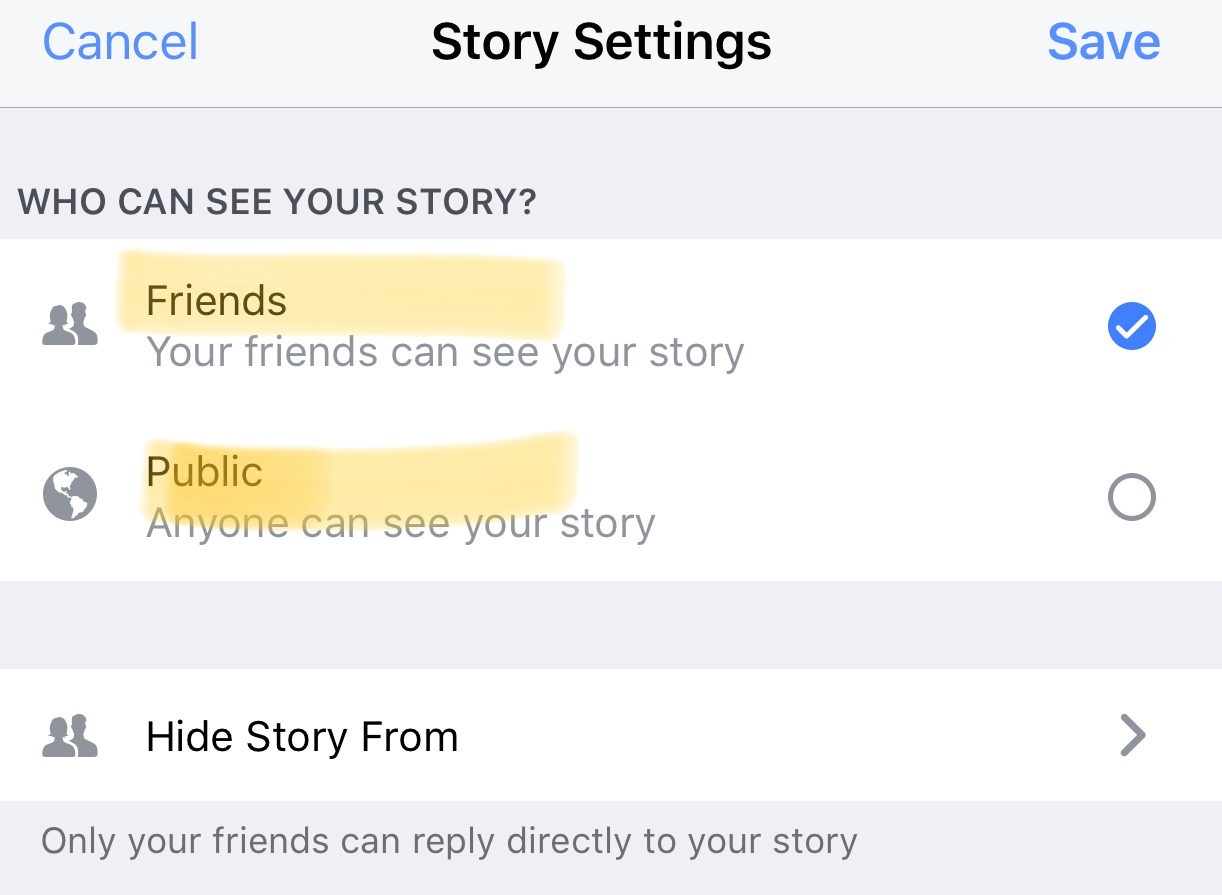
    Instagram, WhatsApp, and Snapchat have proven that 24-hour disappearing story feeds are the latest social media trend. Facebook is trying to increase user-ship of their stories feature by allowing people to post publicly. After a recent Facebook update, you can now change the privacy settings on your story posts to make them visible to anyone on Facebook. 

    Facebook Stories is really the only version of the daily posts feature that has been lagging behind in user-ship. Celebrities and brands will now be able to use Facebook stories to promote publicly just as easily as they can on Instagram and Snapchat. This may be an attempt for Facebook to increase the number of people using their stories feature but it’s likely, also, a way to entice more advertisers into using the feature.

    What Parents Should Know

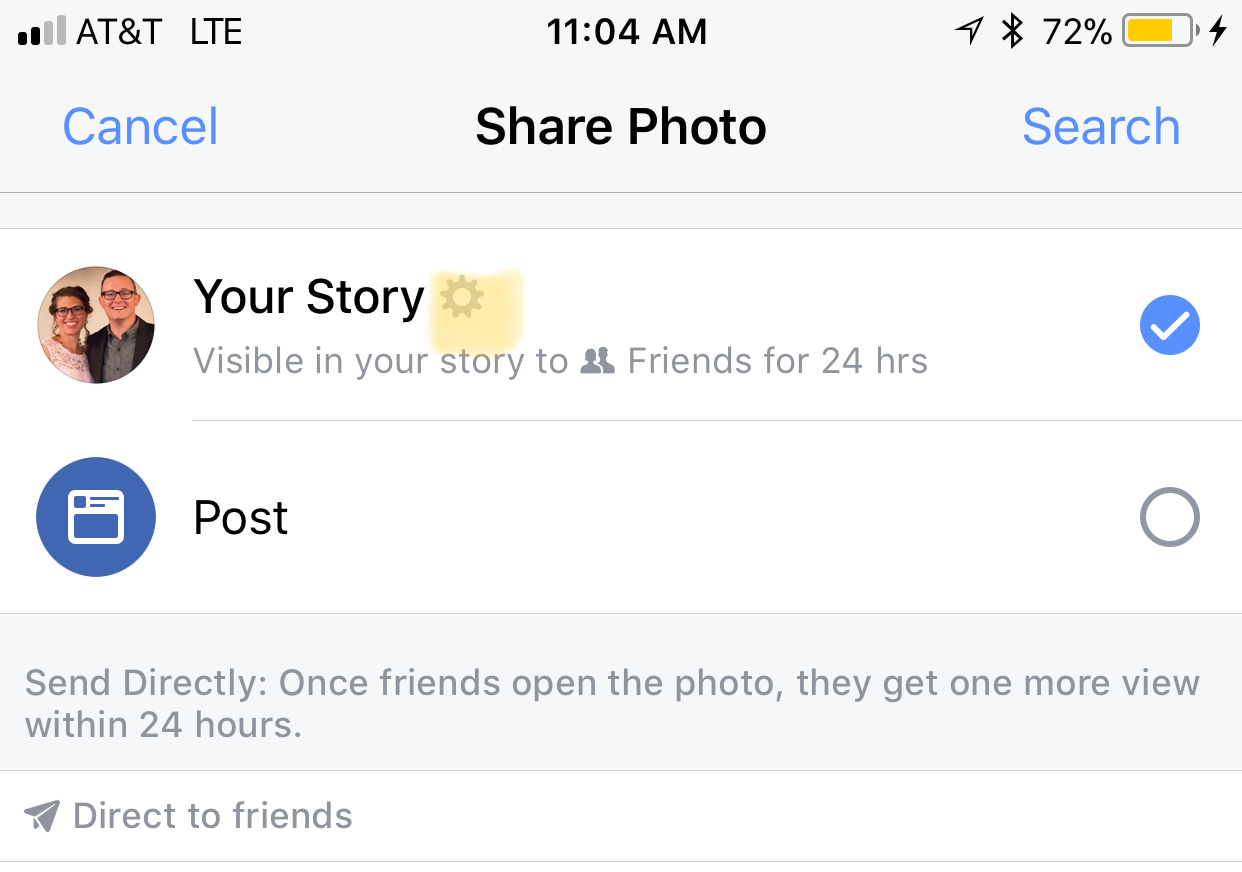
    Any option to share something publicly should be known to parents. If your kids use Facebook and enjoy posting their daily activities on their Story feed you should know how to check and see if they’re posting publicly. Below is a slideshow of how to check the privacy settings on Facebook Stories.

    Be sure to check out what your kids have been sharing publicly and talk to them about the permanence of anything shared online. It’s also a good idea to talk to them about what to do if they receive contact from people they don’t know on any social media platform. As parents, we are the ones responsible for our kids’ safety and privacy online. Learn the ways these social media services have provided for you to keep them safe and private.