Tag: sexting

  • These Apps Aren’t as Harmless as they Seem

    These Apps Aren’t as Harmless as they Seem

    Our kids use all kinds of different apps for many different reasons. Some for socializing, some for fun, and some for school and productivity. We don’t think twice about letting our kids use Google Documents or even the Bible app. Yet many of these apps aren’t as harmless as they seem. I receive messages from parents a lot asking if I have seen the latest awful thing people have done online. The answer is usually yes, and I am not surprised. For the last five years I’ve been learning about the digital/connected world our kids are growing up in and how it impacts our children and our families.

    Something I’ve learned is that if there is a system or an app that can be exploited to do harm, those who wish to cause harm will use it to do so. You see it yourself in your Facebook comments as some friends think it is the perfect forum for their disruptive thoughts. Worse still is the story from Bark’s project that put a 37 year old mom on instagram posing as a 13 year old girl. The response was shocking with inappropriate pictures and requests filling her direct messages just minutes after posting her first picture. The social function in the YouVersion Bible App being used to groom potential predatory victims. Google docs being used by young people for bullying, secret messaging, and sexting.

    It is shocking but I’m not surprised.

    What is our response to this tendency for people to use something meant for good and using it for the worst intentions. We can’t hide our head in the sand and keep our kids from using technology at all. This just isn’t realistic. We won’t be writing paper letters and saying no to laptops for school projects. The only reasonable response is to take responsibility for our children’s safety ourselves. We can no longer trust the apps that they use blindly, imagining that no harm can come to them simply because the app wasn’t meant for harm.

    We have to help our kids remember that the same stranger danger that is true when you’re six and at the playground is just as real when you’re fifteen and connected in direct messages by people you don’t know. I am not surprised by the nonsense that is happening on these apps. I just know that we, parents, are the only answer. People always find a way to ruin things that were meant for productivity or good. My advice is to talk to your kids. Help them know that. Tell them that if they are contacted by a stranger, even in an app like the Bible App they take caution. Remind them that they should say something if they see bullying online, even in a class Google Document.

    Our children are surrounded by voices telling them all kinds of truths. If you aren’t creating a safe place for them to come and be open with you about their concerns then you’re making it hard for them to live in this connected world. Do your best to be who they need you to be. I’m here to help.

  • Facebook is Making a Dating Feature while Instagram Works to Curb Bullying

    Facebook is Making a Dating Feature while Instagram Works to Curb Bullying

    Social Media News from Facebook’s F8 Conference

    The F8 Developers Conference is Facebook’s annual event to showcase what they are working on in their numerous social media and messaging platforms. Tuesday’s announcements featured Facebook’s new features to connect people for romance and new friendships. Instagram is looking to stop bullying before it happens.

    Facebook Dating

    The dating feature for Facebook has been tested in several countries including Mexico, Thailand, and Canada. It will be rolled out soon to more countries and finally released in the United States “by the end of this year.The latest update to Facebook Dating allows you to build a secret crush list. This list of eight people will be saved and compared to the lists of your friends who also use Facebook Dating. If any of your crushes add you to their crush list you will both be notified so you can make a connection.

    I guess, if you’re going to try to make romantic connections on social media it is better to start with people you’re already friends with. Facebook says it will help you with connections based on your groups, likes, and comments on their app. Their goal is to help connect you to people with whom you share interested, thus, increasing the chance of you having a match. They actually said they are not trying to make connections for a one time hook up but to actually help you find someone you’d be interested in having a real relationship with.

    Facebook is also testing features that will recommend new friends based on your interests, location, work, and even what college you went to. Again, being tested in just a few countries, the Meet New Friends feature will allow users to opt-in and then customize their profile to tell the system what interests to prioritize while connecting them with new friends. You can even list what activities you’d like to do with new friends and then be prompted to send a private message to someone and make plans to do that activity.

    What Parents Should Know

    Fewer of our kids use Facebook now but there are those that still spend time on there. Dating and Friend Finding features can be problematic for parents who are concerned about their kids making unwanted connections on social media. My advice is to not allow your child on social media until around the age of 16 (based on their maturity) and even then keep open conversation with them about the kind of people they make friends with online. My rule will be to only allow my friends to communicate online with people they already know really well in real life.

    Instagram Fights Bullying

    While Facebook is trying to connect you with more people, Instagram is working to protect you from the people you’re already connected to. Developers have announced a tool that will nudge users to think twice before posting a negative comment on an Instagram photo. They can choose to ignore the advice and post it anyway, but Instagram is hoping that causing them to give pause will curb some of the negativity that Instagram is becoming known for. There are also tools in development that will allow users to block comments from certain users without blocking their accounts altogether.

    Just in case blocking comments isn’t enough of a break from the negativity, another Instagram feature will let you take a break by going into “away mode.” This is a way to sign off of Instagram for a while, no longer get messages, comments, and notifications or be prompted to post, but still not have to delete your account. Also, in an attempt to make Instagram “less pressurized” they are testing the ability to hide like counts.

    What Parents Should Know

    We have all heard stories of young people deleting or archiving photos because they didn’t get enough likes. We’ve read the horrible news stories about kids who harmed themselves, or worse, as a result of being bullied on Instagram or Snapchat. These efforts by Instagram to curb some of the negativity are a great idea. In my opinion, however, there is no better line of defense that parents. Our job is to create that safe space for our kids to come to when they have a question or concern about social media. We should be the ones determining how old they should be before they sign up for that Instagram profile. We should be who they come to when some stranger reaches out to them on Snapchat. That can’t happen if we aren’t aware or if we are too timid about the time they spend on social media. If we will take our role seriously we can raise kids who are healthy and whole.

    Listen to this post as a podcast below:

  • The FamilyTechBlog Uninstall List for Spring 2018

    The FamilyTechBlog Uninstall List for Spring 2018

    Please consider keeping resources like this free to you by donating $5 to our non-profit organization.
    Visit BecauseFamily.org/partnership to give.

  • Instagram Letting Users Change Privacy Settings on More Sensitive Messages

    Instagram Letting Users Change Privacy Settings on More Sensitive Messages

    Instagram has made an update that will let users set privacy settings on their private messages. With the options to “See once, Replay Once, or Show in Chat,” these settings provide a sense of safety when sending that “sensitive” message to someone. Until now, users could replay any message they got on Instagram, but the new Direct Camera settings will allow the sender to make the rules.

    Many are seeing this change as an obvious attempt to combat Snapchat in the disappearing-message department. There is still no way to change settings on your Snapchat private messages. Instagram and Snapchat have been competing back and forth for more than a year now and it seems Instagram is looking to take on the secret message market.

    What Parents Should Know

    As sexting becomes more common, the last thing parents need is another one of our kids’ favorite social media services featuring disappearing messages. The problem with sexting is that kids think there aren’t consequences for the messages they send. Something like a “See Once” feature is exactly what would cause your 14-year-old to give in to that pressure to send an inappropriate picture. Since they can’t see it more than once, nothing can go wrong, right?

    I’m not the only one saying that these features are meant for naughty images. It’s pretty much a given that when you don’t think these messages can be screen captured or saved, you’ll send whatever pops into your mind at the time. I’m adding Instagram to my uninstall list because of the addition of the see once and replay once feature. You’ll do whatever you think is best for your own kids but I’m going to call Instagram an 18+ social media app.

  • How Your Kids Can Hide Texts

    How Your Kids Can Hide Texts

    One of the major issues facing our teens these days is sexting. Statistics say that one of every ten teenagers admits to having sent naked pictures of themselves to someone. Sometimes our kids use social media to do this. They’ll send photos and inappropriate messages in the private messaging features of these social media platforms. Sometimes, though, your kids just use text messaging to do it. There are several tools out there to allow you to monitor what texts your kids are sending but there are a few ways they can hide their texts, even from the security you’ve set up. Here’s what they’re doing.

    Deleting text history.

    This seems pretty obvious but you’d be surprised how oblivious some parents can be. If there aren’t any text messages in your kids’ messaging app, or if it looks like they’ve only chatted with you, they’ve probably deleted their messages. This doesn’t always mean they’re up to something naughty but it does mean you should be having a conversation with them. Deleting their messages is a bad habit to allow them to get into for a number of reasons. First, it looks like they’re hiding something. They don’t want you to be suspicious of them any more than you want to creep around and spy on them. Secondly, they could be deleting conversations that can come back in the future. It’s not a bad thing to have written (or typed) evidence of these conversations, especially if they’re ever contacted by someone they don’t know. I advise you to encourage your kids not to delete texts. If you’re using a monitoring software that uses the iCloud backup (TeenSafe, mSPY) to monitor their texts then you could be missing what they’ve texted if they deleted them while outside of wifi and before a backup to the cloud. If you have a suspicion that text messages are being deleted then you should disallow the use of texting on their phone. If you can’t disable texting then don’t be afraid to take the phone away for a while. Most of all talk to your kids about the risks associated with keeping their conversations hidden. You should be here to help them and they need to understand that.

    Using Dummy Phone Numbers and Private Texting Apps

    Apps like TextBurner, Anonymous Texting, Buffalo Private Texting, and Smiley Private Texting can easily be used by kids and teens to hide the conversations they’ve been having. Not only do these apps require a pin number to access the text messages but many of them also allow you to set up a new phone number so that you can send and receive texts of calls anonymously. The apps descriptions mention job searches, Craigs List, and dating as some of the main uses for these private texting and dummy phone numbers. They do, however, advise against certain usese of the app and even warn of some of their policies for dealing with those who don’t follow guidelines:


    Screenshot from the Anonymous Texting App


    Check out this list of private texting apps for iOS.     —      Here’s a list of private texting apps for Android.

    Notice the warning about the age requirement? It says you must be 13 years old. If that’s so then why is the app rated for ages 4+? If you do a scan of all of the apps like this in iOS you’ll find that they’re all rated 4+. If you have your app store settings allowing your kid to download apps rated 9+ or lower or even 4+, they’d be able to download one of these apps, create a private and secret phone number that you don’t even know about and begin texting whoever they’d like. This is why I recommend using Family Link (for android phones OS 7 or higher) and iTunes Family Share to require your child to ask permission to download new apps. If you see any kind of app that says secret or private, or anonymous in the description I’d think twice about allowing them to download it. We have a major issue on our hands of kids sending images and texts that are very adult oriented. You, honestly, can’t keep an eye on every message they send on every app. This is why it’s important to limit which apps they’re allowed to use. It may cause that knockdown, drag out fight you’ve been trying to avoid but it’s better than filing a police report about some stranger who has been sending nasty pictures to your child.


  • Group Video Chat is Everywhere! Now, even in iMessage.

    Group Video Chat is Everywhere! Now, even in iMessage.

    Kik has been popular with kids and pre-teens for some time. It’s a messenger that allows them to chat over wifi using a made up profile or “display name.”  The app recently joined the likes of Snapchat, Instagram, WhatsApp, and FB Messenger by adding group video to the mix.

    Then, a few days ago, a new app called Fam came onto the scene. Fam allows group video chats within iPhone’s iMessage. When iOS 10 released for iPhones it came with the ability to add and utilize apps, stickers, and games within the app itself. This has opened up the ability to put in GIFs, use emojis that aren’t available on your keyboard, and even share music or money with just a few taps in the iMessage app. Now, Fam is capitalizing on those abilities.

    How Does it Work?

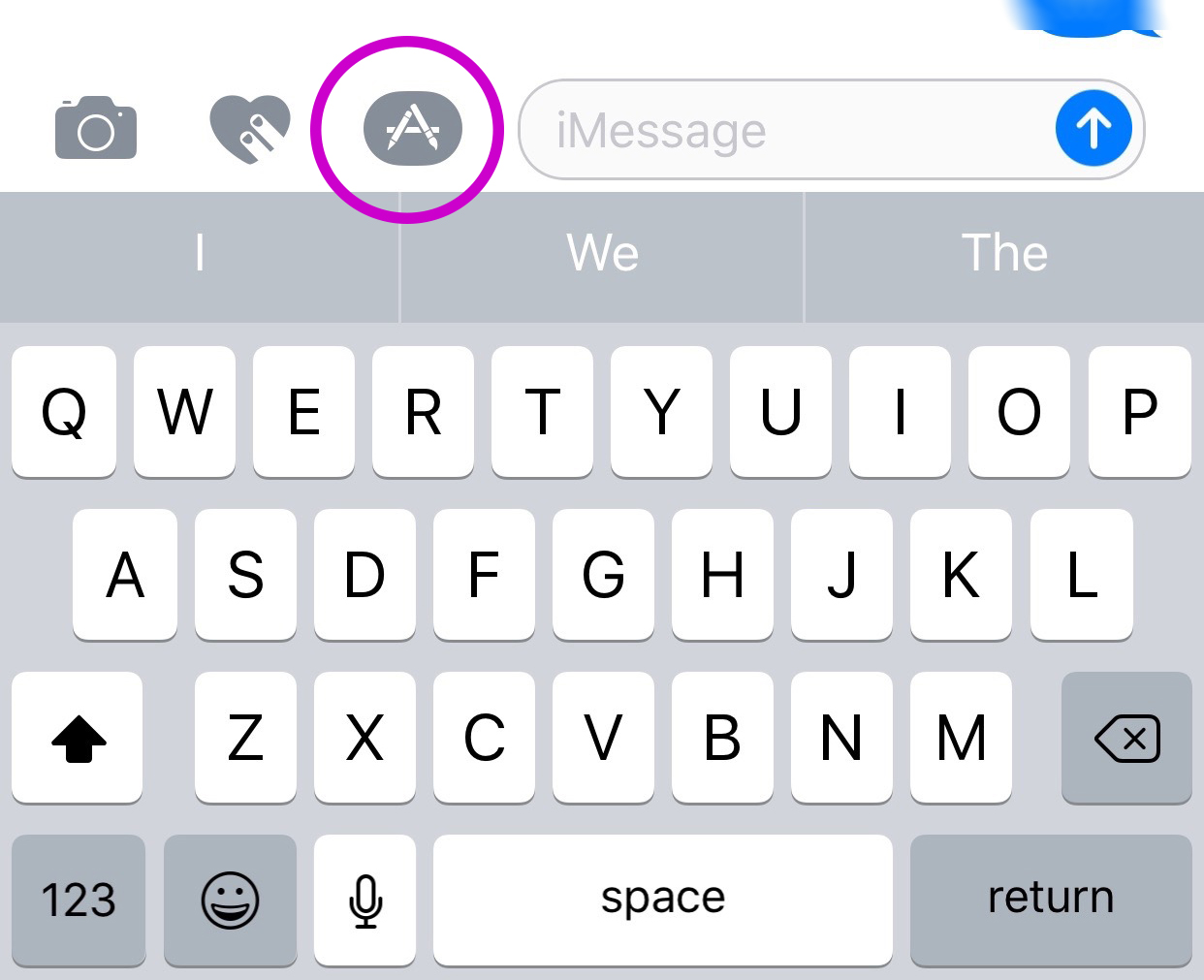
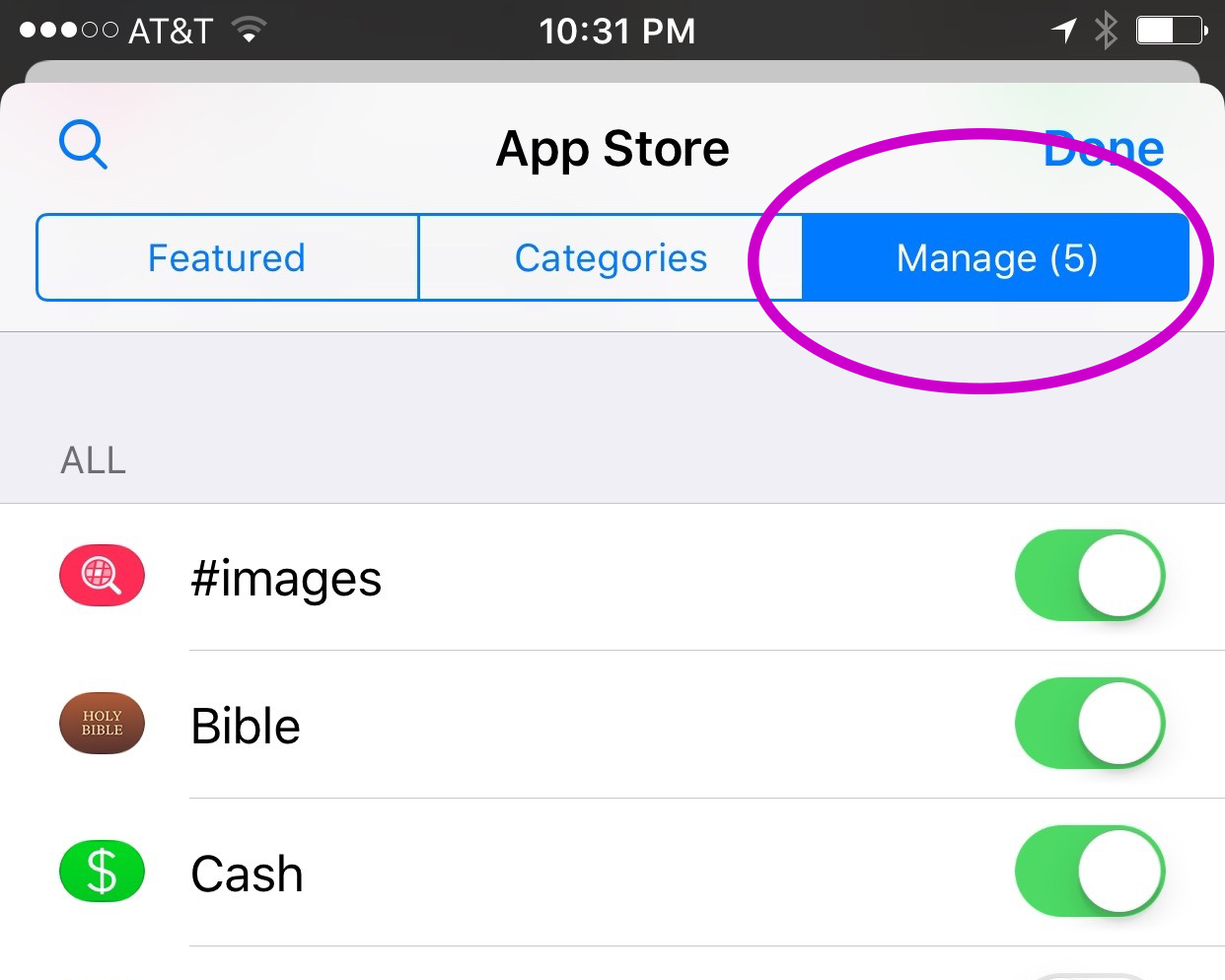
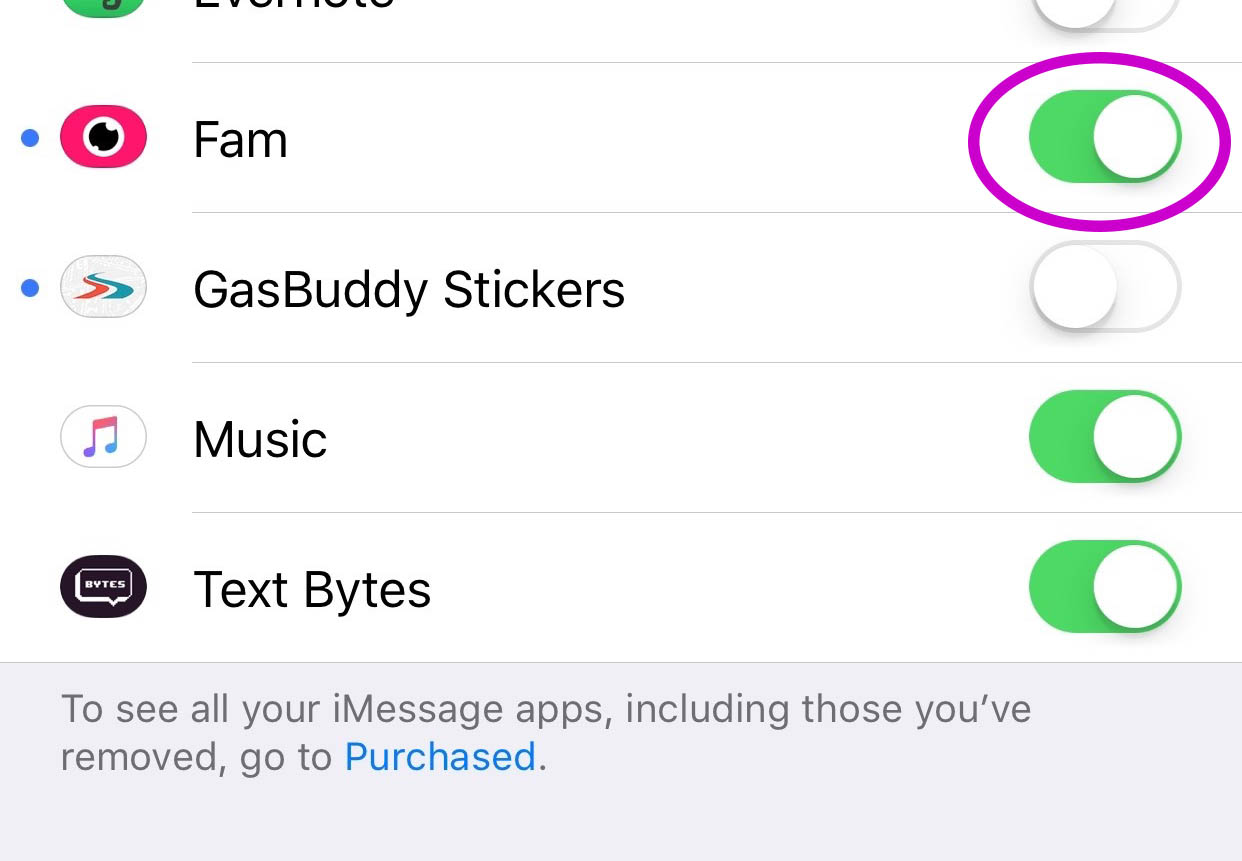
    You’ll have to find the Fam app in the app store and install it. Once it’s on your phone you can activate it by selecting the apps icon next to your text box and then the small icon that looks like a group of app buttons on the bottom left.  Next you’ll tap store, and then the manage tab on the upper right. Once you toggle Fam to be active it will show up within iMessage (your text messaging app) alongside your other apps. Once you have it you just have to tap the “Create Video Chat” button and it will send an invite to up to 8 people in your iMessage thread. (See the gallery below for those instructions with some photos.) If your friends have the app installed then they’ll be able to join right away, otherwise they’ll have to go install and activate the app too.


    What Should Parents Know?

    The dangers with video messaging are pretty obvious. If your teen is wanting to have an inappropriate video conversation with someone there are plenty of options to do that. The truth is that group video has become a mainstay. The conversation in social media and tech circles is that having group video chat available is now expected on any and every social media platform. As a parent we have to understand what apps can do what and know how to disable certain features if you decide it’s best for your family.

    That said, Fam is a pretty neat addition to iMessage. I was excited when they added the ability to put apps in iMessage and apps like Fam are precisely why. This is a way to communicate over video with the folks you contact the most. I will most likely use it, that is, if the people I talk to would be willing to install it.

    I recently spoke to a father who was trying to make the best decision to let his daughter get her cell phone back after losing it due to some behavior her parents didn’t approve of. My recommendation was that they take baby steps and I advised him to not let her have any messaging apps, to only allow her to use the basic text messaging on her phone. There was a time when that would keep you away from a lot of the danger. The dangers of some of those messaging apps is the creation of often anonymous accounts. Your kids may not always know who they’re talking to. A video messaging app in iMessage (which uses only their contacts) can help keep that from being as much of a fear.With apps like Fam stepping into the light, though, I have to emphasise the importance of checking out your child/teen’s phone every now and then. Look at the apps they use and even the apps they use in their messenger. Read through some of their conversations and make sure you know everyone on their contacts lists. If you don’t you should be finding out who they are immediately. Especially since they can now have a video conversation with your kid.

  • Don’t Let Your Kids Download a New Calculator

    Don’t Let Your Kids Download a New Calculator


    Looking today at a list of free apps in the Apple App store I noticed that a secret calculator app has been discounted. Be aware that there are secret photo apps disguised as calculators available for your kids phones. The one below is pretty simple to spot since the icon shows photos behind the peeled back calculator but they’re not all that simple to identify.
    screenshot-2016-12-01-12-26-21 You would normally look at a calculator app and not think anything of it but these apps will allow you to hide files behind a code that unlocks access when it’s entered into the calculator. In most of these apps, the calculator actually works as well. The best way to identify if your kids are trying to hide things from you with one of these apps is to look at it’s page in the app store. The description will mention the abilitscreenshot-2016-12-01-12-35-20y to hide files. If you find that your kids have one of these apps on their smartphone or tablet I recommend you uninstall immediately.


    An important tool to help you with this is iTunes FamilyShare. Be sure this feature is set up so you can pre-view any app your kids want to download and they can even be required to ask your permission. Check out this tutorial on setting up FamilyShare for to subscribers.

  • Mobile Device Vocabulary Lesson 3: Messaging

    Mobile Device Vocabulary Lesson 3: Messaging


    Our kids and teenagers are communicating more differently than ever before. The note being passed from desk to desk has been replaced with words typed on a screen. Long phone conversations with friends every evening have given way to short, emoji laced text messages with pictures, videos, animated images, and links to other online content. Communication has evolved, or at least changed and it’s more common than you may have ever imagined. Just look at these statistics from April of 2015.

    73% of teenagers have a smartphone and 91% of those teens text. Teenagers send and recieve and average of 30 text per day. (PEW Research Center)

    More than nine out of ten teens who own a smartphone give and receive an average of 30 text messages every single day. That means, your child texts. The following abbreviations/phrases will give you greater insight to what messenger apps are capable of.  (more…)