Tag: setup

  • We Bought Four Amazon Echo Dots!

    We Bought Four Amazon Echo Dots!

    Well, it is Prime Day and as usual, there are some deeply discounted items available on Amazon. My family usually looks but doesn’t buy on Prime Day, hoping to be able to predict the discounts we may see on Cyber Monday or Black Friday in a few weeks. We especially avoid any smart speaker or digital assistant hardware since we have always had (well informed) privacy issues and concerns. This year it has been different. We caved and bought Amazon Echo Dots for the whole family. Here’s why.

    They’ll Be Perfect for Our New Home

    Our forever family home is being built and we are planning a move-in just a few months from now. We are going to have more space for the six of us than we have ever had, especially in the kids’ rooms, the master suite, and the kitchen/dining great room. We’ll be a bit more spread out than we’ve ever been and the Echo has some great options for communicating throughout your home without having to scream up the stairs or down the hallway. The intercom feature was a deal sealer for both my wife and myself. The kids are pretty excited too.

    Digital Homeschool Help

    More of us are homeschooling than ever now and with four kids, all doing school work nearly every day, we need help sometimes. YouTube can be great to present some complicated concepts in helpful ways (7th-grade math, anyone) but my kids looking at screens and using a Google Search for spelling or calculator solutions isn’t the safest proposition. Alexa (the Virtual Assistant on Amazon Echo) will answer your spelling, language arts, science, and math questions with no risky search results or screen use at all. It is more important for my kids to know how to get information than it is that they know the info when they pass a grade. Alexa and other Virtual Assistants are the new waves of information access and they aren’t going away. They’re only getting smarter and faster.

    Less Screen Time

    My kids, like all kids, love to sit around and look at a phone or tablet. We are constantly having to get on to them about their obsessive behavior. We try to set better examples, we don’t always succeed, but giving them alternatives is very helpful. The Echo Dot is a smart speaker without a screen. At night, when the kids want to listen to a podcast or music for bedtime they can ask Alexa to play it for them instead of having their screens in their faces right up to when they fall asleep. Studies have shown this isn’t good for their sleep and can actually very detrimental to their development. With parental controls on the subscription services we use and on Alexa itself, we can ensure that our kids aren’t looking at their screens and are only listening to music and podcasts we’ve approved of.

    Safety and Security Upgrades

    All of this is great but digital safety and data security are always an issue. Especially with artificial intelligence that is designed to learn about you in order to be more useful to you. There is an obvious trade-off. You’re giving it information in exchange for convenience. I believe most of us consider that an acceptable exchange, considering Alexa and Google Home have been some of the fastest tech product to be integrated into people’s homes. The truth is that we have been making this exchange for a long time without really thinking about it. Every post on Facebook, Twitter, or Instagram, every search on Google, and every purchase or browsing session on Amazon has been used to build a database of advertising information about you. This can be scary to many but in all honesty, that ship has sailed and you raised the sails for it to do so.

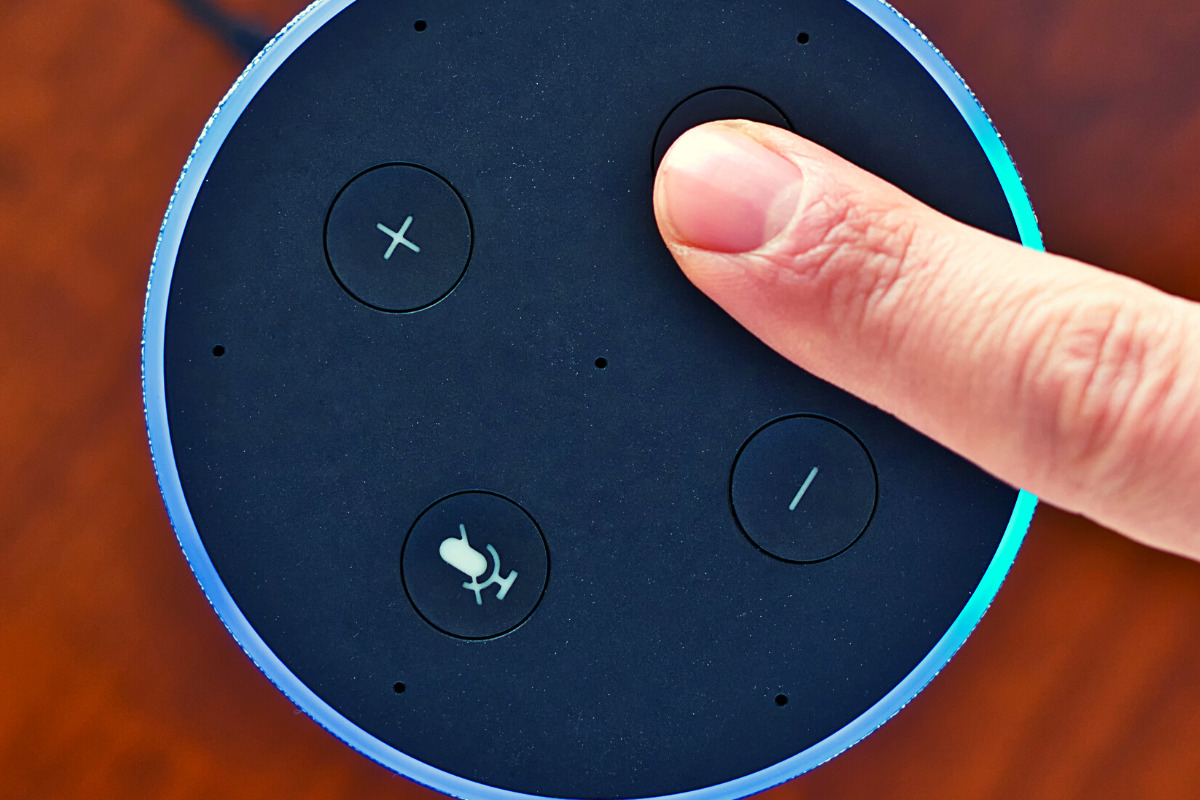
    When you use these sites, you allow them access to your information. Alexa is no different and my family has considered the risks and decided it’s worth it. First of all, we already get targeted ads because we do so much of our shopping on Amazon and searching on Google. Secondly, the latest models of Amazon Echo Dot have added features like a hardware button to turn off the microphone that makes us feel like we can avoid being listened to when we don’t want to be listened to.

    Risk/Reward

    When you narrow it down it is a consideration of opportunity cost. You have an opportunity for convenience but it will cost some of your info. At a $19.99 price point, the Echo Dot is a great deal right now on Prime Day so we bought four of them. They’ll be here in a couple of days and I’ll set one up and let you know how it all goes. Stay tuned for my (late but in-depth) review of the Amazon Echo Dot as a tool for controlling kids’ screen time.

    If you shop the Amazon Prime Day today, consider using http://smile.amazon.com and signing up to support our non-profit, Four Point Families. You’ll have to search for Four Point Families and select it as the organization you’d like to partner with. Then Amazon will send .5% of your purchase our way to help us continue to protect families. Thanks.

     

  • Snapchat to Offer Mental Health Support to Users

    Snapchat to Offer Mental Health Support to Users

    The post on Snapchat’s blog says they are trying to “create a safer internet.” Snapchat will offer mental health support to their users through a feature called “Here for You.” This feature will provide mental health resources and other information as a result of searches within the app that involve mental health topics. 

    “Here For You, which will roll out in the coming months, will show safety resources from local experts when Snapchatters search for certain topics, including those related to anxiety, depression, stress, grief, suicidal thoughts, and bullying.” Snapchat Blog

    They are also adding features that promote a healthy mental state, with lenses, creative tools, filters, and a quiz. Snap claims to have always had their users privacy and security at the forefront of the design of their platform. The addition of “Here for You” is another step to promote safety and security for their users.

    What Parents Should Know

    What would cause Snapchat to offer mental health support to their users? Could it possibly be the outcry about social media being terrible for your mental health? Comparing yourselves to others, being called out for your own faults, bullying, and many other issues have caused our young people to be more susceptible to depression and negative self image. Snapchat, Instagram, and Facebook, with their story features have allowed people to post with a false sense of ephemerality. This is the belief that what you post is temporary and therefore you’re safe to post what you want. Ephemerality is a myth on the internet and social media. When you post something online, it is forever. Snap Inc. is touting themselves as a pioneer of privacy and safety in Social Media but truthfully, they’ve created an ecosystem that allows more bullying, sexting, and bad advice than ever before.

    Pointing users in the direction of professional mental health advice is a very good step in the right direction. In my opinion, however, it is just an attempt to cover themselves for a problem they’ve caused. It’s like a mechanic taking a part out of your car accidentally and then telling you they decided to replace it for you for free. You didn’t have as much of a problem until they caused it in the first place. Shouldn’t we expect that they would do whatever they can to make it right?

    It’s Up to Us!

    We, as parents, are the only ones truly looking out for the safety of our children. Every one of these tech companies has a fiscal reason to provide “solutions” to mental health problems. They all have shareholders screaming at them to keep their company out of the news except for the right reasons. Hearing that depressive symptoms is linked to social media is the kind of thing that will cause stock prices to drop. It makes sense that they would scramble to provide some kind of “band aid” for that issue. Be smarter than the average consumer and protect your own and your children’s mental health by keeping them from overuse of social media. Make your plan, set your limits and don’t be afraid to have the hard conversations with your kids.

  • How to Turn Off Hidden Location Access in iOS

    How to Turn Off Hidden Location Access in iOS

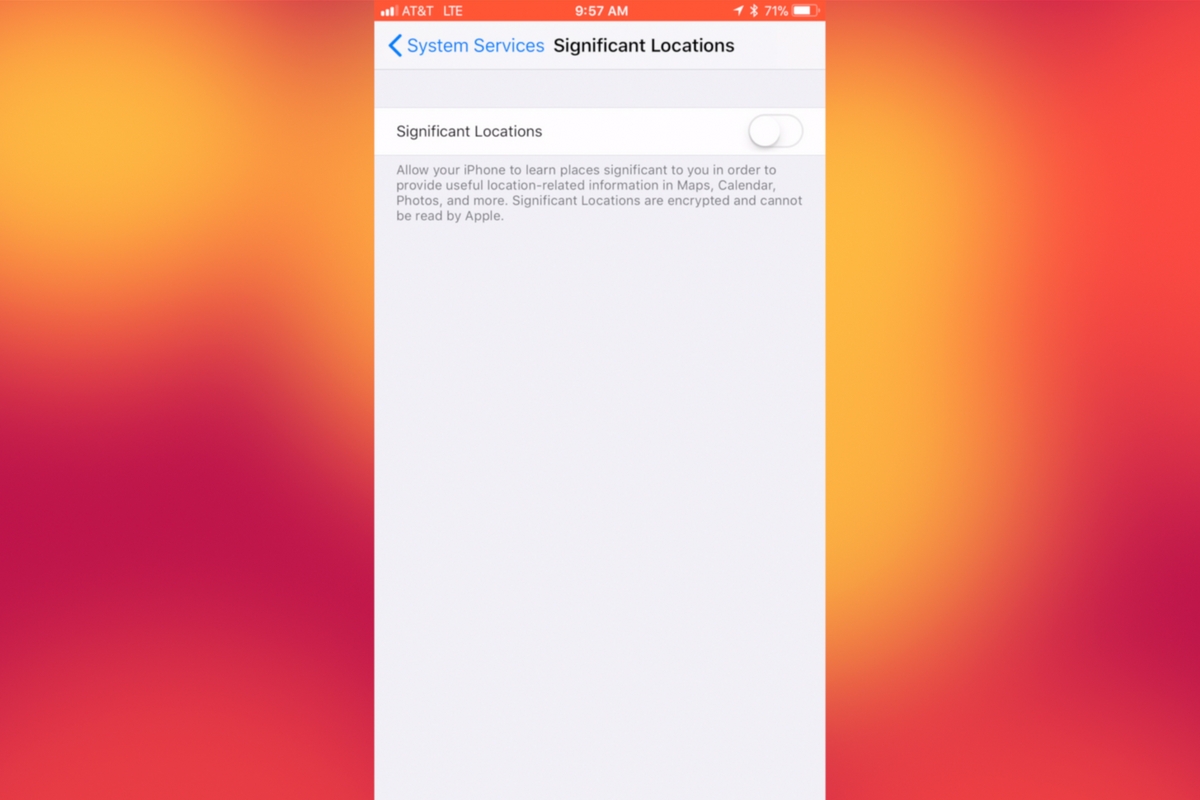
    I recently noticed that some of my photos and videos were still being tagged with a location. One of the most common pieces of advice I give to parents is to turn location access off to their cameras. I was a bit annoyed because I never saw location information in my Photos app before, but now I was. Well, I did a bit of digging and found the culprit. It’s about five taps deep into your privacy settings and, therefore, easy to miss. Below is a short video tutorial to help you be sure location info on your phone stays as private as possible.

    Why Turn This Off

    Your location information is easy to track and very easy to gather from the data in the videos and pictures that you upload to social media. There have been instances of kids being harassed by predators who learned where they were through images their parents had shared online. Common sense tells us never to post pictures or videos that show an address number, school name, or sign of a place you frequently go with your family. The problem is that some of the apps on our phones tag our locations by default. I recommend you look at every app’s location request and ask yourself, “Does this app HAVE TO know where I am to function properly?” If it does not, then turn off access to your location.

    Hopefully, this short video helps you make the changes you need to feel like your privacy is even more secure. I know I feel better.

  • PODCAST: Three Apps Your Kids Should Uninstall

    PODCAST: Three Apps Your Kids Should Uninstall

    Family Tech Update: These apps can be seriously dangerous for your kids. Adult content, privacy issues, stranger danger, all kinds of issues here, and some of them are only rated 12+!

    Social Media Links

    Facebook: http://facebook.com/becausefamily
    Instagram: http://instagram.com/becausefamily

    Twitter: http://twitter.com/becausefamily

    Newsletter Sign up

    Ministry Updates:: http://eepurl.com/R7Btr
    Weekly Blog Posts:: http://eepurl.com/cvnhXD

    Websites

    Ministry Site:: http://becausefamily.org
    Tech Blog:: https://safe.becausefamily.org
    Michael’s Speaking Info:: http://becausefamily.org/bookings

    Donate and Affiliate Links

    http://BecauseFamily.org/partnership

    All music/audio effects are public domain.

  • Bitmoji Selfies Could Lead to Facial Recognition on Snapchat

    Bitmoji Selfies Could Lead to Facial Recognition on Snapchat

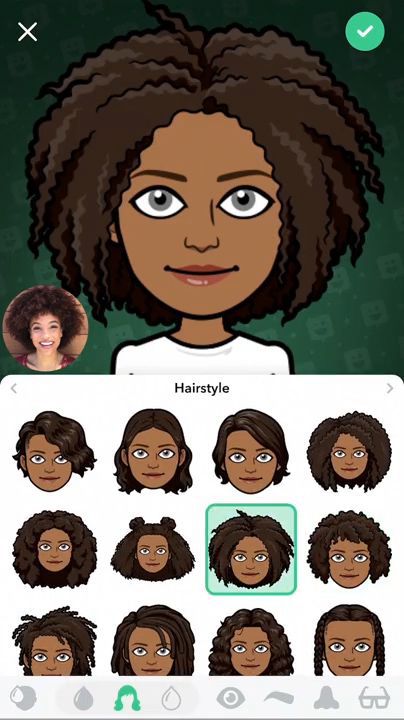
    Snapchat’s new “Bitmoji Deluxe” allows you to take a selfie and place it right next to your Avatar while you create or edit it. This lets you create your Bitmoji to look as much like you as possible. It starts with Snapchat asking if you’d like to take a selfie. Once you do, you will see an image of your actual self in the bottom corner the entire time you are editing your cartoon self. This isn’t a surprising new feature since Snapchat has teased that they may be using selfies to automatically create your Bitmoji in the near future. Facial recognition is becoming a mainstay in mobile technology so it’s only a matter of time before it works its way into social media.

    What Parents Should Know

    Snapchat is and will remain on my uninstall list. Bitmoji has never really been one of the reasons I don’t like Snapchat but I will admit I don’t “get it.” As parents, we have to keep an eye on our kids’ activity on Snapchat. One of the biggest concerns of educators, psychologists, and tech safety experts alike is the tendency for our young teens to filter their online identity. Even, sometimes, to the point of creating separate or even secret social media accounts for different followers or friends. Using a selfie to better create your Bitmoji avatar isn’t necessarily a sign of unhealthy behavior. I would, however, continue to pay attention to my teen’s conversations across all social media. Once facial recognition becomes a viable part of our social media cameras, that’s when I would consider not allowing my kids to use that service until they’ve reached an even higher level of maturity.

  • Android FamilyLink is A Great Parental Control Solution, Albeit with One Major Flaw.

    Android FamilyLink is A Great Parental Control Solution, Albeit with One Major Flaw.

    I had the privilege to hear Saurabh Sharma – Sr. Product Manager with Google, speak on the abilities and development of Android’s parental control solution, FamilyLink. He covered many of the trends they were seeing in kids and families and how those stats encouraged their team to implement some full device control features on the monitoring system. As you can see in the video above, there are some pretty neat features in FamilyLink, including the ability to lock an entire device, not just the data connection. Also, time management and scheduling is a major part of the FamilyLink features. One of the coolest features spoken about at CES was the ability to use Google Home to control FamilyLink. Voice command was all the rage at CES2018 and Google’s parental control apps were no exception.

    The app on kids’ devices allows them to see exactly what their parents are seeing. App usage stats, app blocking, bedtime and offtime, and setting the Google’s content filter, “SafeSearch.” While the SafeSearch filter isn’t the most extensive and customizable content management tool, it is a good start, especially for your younger children.

    One Major Flaw

    When FamilyLink was announced ten months ago my first question was, “Can our kids use this on the older phones we’ve handed down to them?”  The answer is listed in the fine print on the Google FamilyLink homepage: “*Children can run Family Link on Android devices running Nougat (7.0) and higher, along with certain Marshmallow (6.1) devices listed in our FAQ.” This was immediately a problem for me since I know many families who use their older Android phones as the solution for their kids. It’s always been pretty easy to just hand down your phone to your kids when you get a new one. While there are many internet safety options available for Android, nothing works as well as an app developed by the same people who made your operating system.

    After hearing Saurabh Sharma talk about FamilyLink, I followed him out of the room as he headed towards his next meeting and I asked him about the possibility of making FamilyLink backward compatible with older phones. He replied: Making FamilyLink backward compatible is a “difficult problem but one we are committed to trying to solve.” So there you have it. While it’s understandably not an easy thing to fix, we are assured that it is on the team’s radar and something they’re working towards.

    Apple’s iOS has had native parental controls for a long time now. They’re pretty effective but haven’t been updated over the last several operating system upgrades. Hopefully, some time management and monitoring options can be added soon. Thankfully there are apps like Accountable2You and UnGlue to help with some of those needs. 


  • PODCAST: 2017 in Review and What’s to Come in 2018

    PODCAST: 2017 in Review and What’s to Come in 2018

    Exciting new things coming in 2018 for BecauseFamily. This episode rounds out the rest of 2017 and gives you a heads up as to what to look out for in the coming year.

    Social Media Links

    Facebook: http://facebook.com/4pointfamilies
    Instagram: http://instagram.com/becausefamily
    Twitter: http://twitter.com/becausefamily

    Newsletter Signup

    Ministry Updates:: http://eepurl.com/R7Btr
    Weekly Blog Posts:: http://eepurl.com/cvnhXD

    Websites

    Ministry Site:: http://becausefamily.org
    Tech Blog:: https://safe.becausefamily.org
    Michael’s Speaking Info:: http://kmichaelprince.org

    Donate and Affiliate Links

    http://BecauseFamily.org/partnership

  • Amazon is Changing the Parental Controls Game

    Amazon is Changing the Parental Controls Game

    Many parents purchase their children a tablet without taking built in parental controls into consideration. Amazon’s addition of the Parent Dashboard should cause most parents to lead towards a Kindle Fire tablet. Amazon FreeTime has been available for a little while and allows parents to set child profiles, manage content, set time limits and bedtimes, and feature’s curated content. The Parent Dashboard, launching today, takes FreeTime to the next level by giving parents a breakdown of their kids digital habits. The app will allow parents who have set up FreeTime to see the time your kids have spent on certain apps. You can see what they’ve been reading and watching and it even suggests discussion starters for the content your children have been consuming.

    FreeTime features tens of thousands of apps, books, websites, and videos. The built in web browser only allows pre-approved content and features age appropriate Amazon prime videos. All of this content is curated by an actual editorial team. They watch videos through to the end and read every page of every book to be sure it’s suitable for the age group it’s listed under. This is not filtering based on algorithms, it’s work done by live people to help you protect your kids. They’re keeping in mind that you don’t want your kids to run in to something online that they’re not ready to see. In factKurt Beidler, director and general manager of Amazon FreeTime, told Digital Trends: “We take a conservative approach.” 

    What Parents Should Know

    It seems like the internet safety market is always trying to play catch-up with the latest online and social media trends. The stuff we don’t want our kids to see always seems to creep its way onto every platform. The only true way to keep inappropriate content away from our kids is for human eyes to make the distinction between what is suitable and what is not. The human editorial team for Amazon FreeTime is one of the first of its kind, surveying content with a conservative, kid’s health comes first mindset that we can hopefully take comfort in.

    I don’t usually recommend getting devices for our young children but I understand that many parents or grandparents will insist. If that is you or someone you love, may I suggest the Kindle Fire Kid Edition. This thing comes pre-loaded with the kid friendly content and a 12 month subscription to FreeTime. Yes, FreeTime is a pay subscription based service. It’s $2.99 per child or $6.99 per family. That’s not a lot to pay for your own team of content curators working to help your children be safer online. No, I don’t have an affiliate link to promote. I just think this is a great option for families.

    I do recommend, as always, talking to your children about what is appropriate online and what is not. I recommend they know that you are the safe place to come to if they see something that they shouldn’t see. Obviously the goal is to keep this from happening and using Amazon FreeTime with the Parent Dashboard is a great step in that direction.

  • Snapchat isn’t Just a Messenger Anymore

    Snapchat isn’t Just a Messenger Anymore

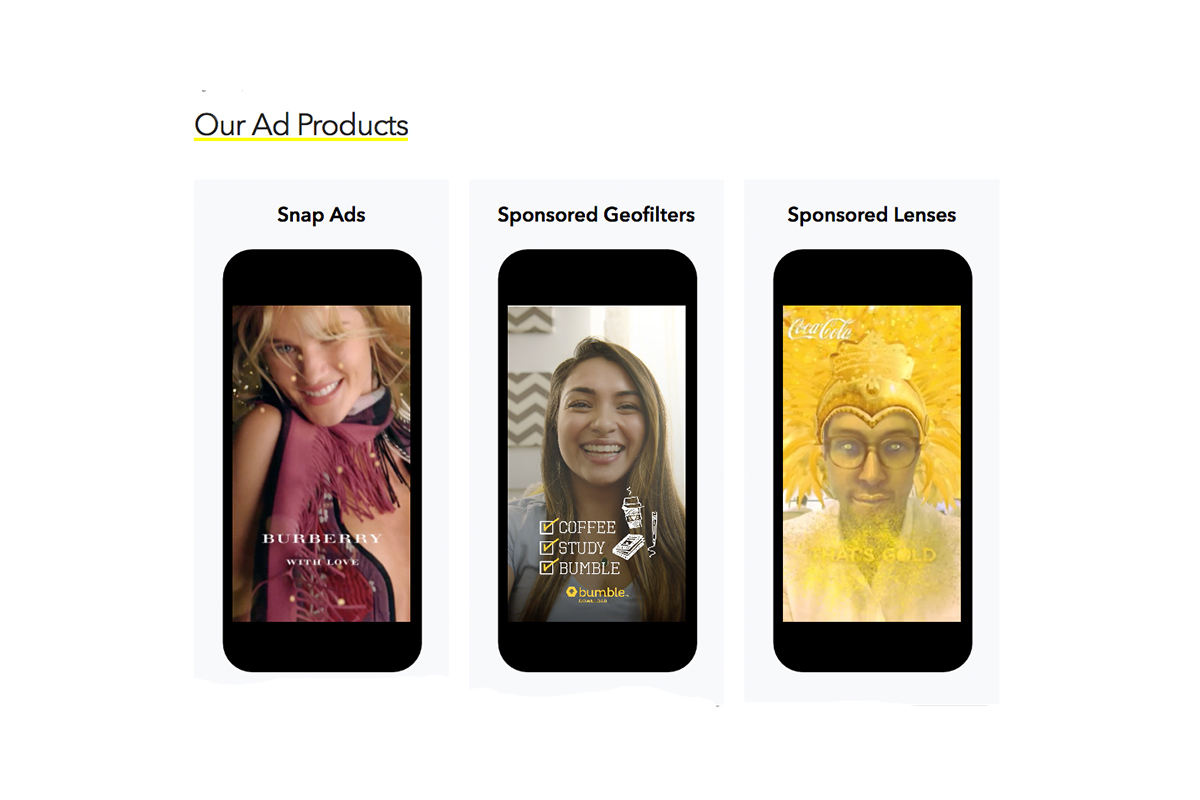
    It may have all started with “secret” messaging but it hasn’t stopped there. Soon public sharing became the norm on Snapchat, a feature that was copied by many other Social Media networks soon after it’s release. Then, Snapchat’s “Discover” page was released, this was a way for news and media corporations to reach the users of Snapchat with their messages and advertising. Lately, Snap Inc. has been working towards becoming a serious form of entertainment for it’s users, incorporating videos and even original show content into their network. Today, VICELAND has announced they’re producing several new shows exclusively for Snapchat. They’re starting with a “reality” dating show titled “Hungry Hearts with Action Bronson.”

    VICELAND Productions is following several other studios in making original shows for Snapchat. Networks including NBC, CBS, and A&E have already announced that they’re making versions of their existing shows for viewing on Snapchat. These studios are seeing the growing adoption of Snapchat as an opportunity to reach a broader audience with their shows and content. One of the fastest growing demographics on Snapchat is the 18-35 age-group, one of the main target audiences for the late night and primetime television networks. With this trend towards entertainment content on our social media apps, it’s important that parents are aware of what these apps are becoming, we have to make good decisions on whether or not we want our kids consuming the media they’re producing.

    What Parents Should Know

    Snapchat isn’t a trend and it’s not just a messenger anymore. What was once the “Secret Message App” or the “Sexting App,” as some called it, is now a major source of media for those who use the social media platform. This means we have to treat it differently than we do many social media apps. Keeping track of who they are friends with on these networks isn’t enough anymore. We have to keep a few things in mind if we are going to allow our kids to use Snapchat, Instagram, or any of these other apps that give advertisers and media content creators a direct outlet to our kids.

    Same Media as TV, Movies, YouTube, or Games.

    The creators of the content that will be made available through social media (Facebook has been signing agreements with media companies too) aren’t producing special more family appropriate shows. They will be making content that will reflect every other media outlet they produce for. Think YouTube Red, Netflix, or Amazon Prime. In fact, some of the rules that apply to broadcast television don’t apply to shows that are streamed online. This means that you’re more likely to see content like on Game of Thrones or Orange is the New Black than something with more restrictions like Blacklist or CSI. Don’t let the fact that these programs are being produced for free public streaming online fool you. They won’t be family friendly or edited for content.

    No Parental Control

    Snapchat currently has no parental control options. Their app is geared towards teenagers so they most likely won’t feel the need to add parental restrictions any time soon. The terms and agreements on most social media services allow for accounts to be created as long as you’re 13 years old or older. The question you have to ask is whether or not you’re ok with your 14-15 year old watching online reality dating shows or politically fueled sketch comedy. If you aren’t ok with these things then you have to make a choice about whether or not snapchat is welcomed on your kid’s phones or tablets.

    All or Nothing

    Social media apps are basically creating an “all or nothing” atmosphere for content created by these media outlets. Once you have an account on Snapchat, you have access to all that is contained in the app. Every person can be a friend or follower, every feed can be found and viewed, and every original show, no matter the target audience, will be available for viewing. With no parental control options the question isn’t what Snapchat content will be allowed, it’s “all or nothing.” They can see all of it, or none of it, those are your only choices. 

    Whatever you choose, you need to be educated about what these social media apps are producing. Keep checking in to Safe.BecauseFamily.org for up to date tech news that’s relevant for your family. Also, sign up for our Safe Online Newsletter. Just fill in the short form below.


    Sign Up for the Latest Family Tech News in Your Inbox

    * indicates required