
Tag: screen time

  • 2020 Back To School Tech Safety Checklist

    2020 Back To School Tech Safety Checklist

    This school year is sure to be unlike any other. We are facing a global pandemic causing many schools to shut down and send students online. Parents shaming others for their decisions to send or not to send kids to the classroom. Political upheaval in an election year, and racial outrage all over the country are causing stress levels to increase too. There has never been a time when protecting our kids’ minds and hearts has been so critical for their education. This Back to School Tech Safety Checklist can help you enjoy the 2020 school year with your kids instead of losing your mind.

    Back to School Tech Safety Checklist

    Accountability Software

    I hardly ever write an article about protecting your children on the internet without mentioning accountability software. This software will securely monitor the sites being visited on a computer or mobile device and report anything inappropriate. Most of the time this software allows you to customize the sensitivity of the system so that you aren’t being alerted for things that aren’t actual threats. Our favorite software, Accountable2You, allows you to adjust settings on multiple devices and will send you an email or text when something you don’t approve of has been visited. If the site wasn’t what the algorithm thought it was, simply login to the Accountable2You site and adjust the settings for that site so you won’t be alerted for it anymore.

    Your child will likely be doing more and more work for school on their computer. (As if they weren’t already doing a ton of schoolwork online.) This means that they’ll be searching the web and using web based cirriculum. Accountability software allows you to give them the freedom to use their Chromebook or PC knowing you’ll be alerted if they happen upon something not intended for kids or education. You can even set up certain sites on “blacklists” that will alert you. This means their favorite gaming site or YouTube can be put on the list so you’re notified if they’re wasting more time than they should be.

    Home Network Filter

    Monitoring what your kids see online is a good start. It is definitly step one, in my opinion. Step two, or maybe step 1.5, is a content filter for your home network. A lot of newer internet routers and modems come with content filters that can easily be set up from an app on your phone. These filters will block most adult content from showing up on your child’s device. We’ve all had that experience where a seemingly innocent Google search resulted in an assault on our eyeballs with some crazy adult site that seems to have been intentionally named to show up if you had a typo in the search bar. Filters can keep those nafarious sites from showing up. Even if they are sought out intentionally.

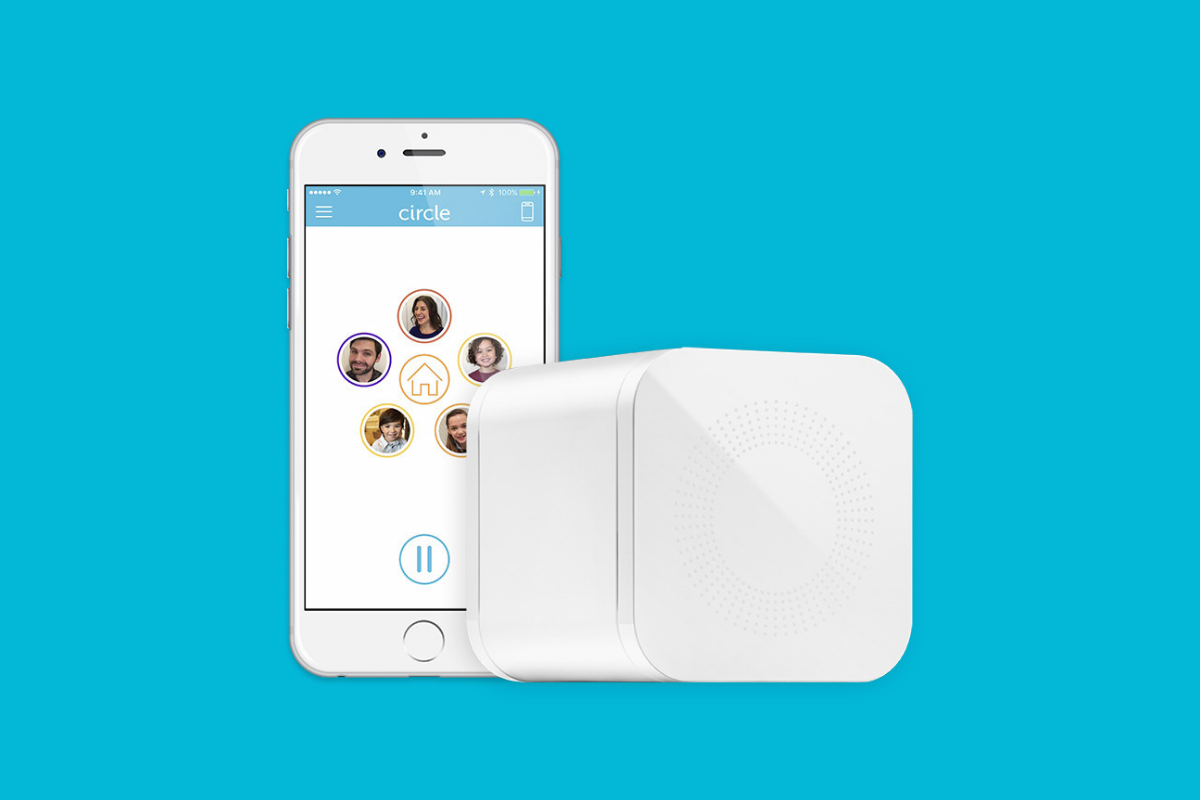
    Remember that a home network filter will protect your child on your home wifi connection. When they disconnect from it and use cellualar data, the protection will be gone. There are filter options for that, though. Circle is one of my favorite options. Bark is also a good resource since they have added time limits and content filters recently.

    Screen Time Limits

    Speaking of time limits, that is also something you need to consider while your kids are spending so much time using technology for school. The good news is that not all screen time is created equal. Experts are saying that creative or educational screen time for our elementary aged and older kids can be beneficial compared to time spent playing games or consuming video content. This means you can probably still give your son a bit of time on Minecraft or Fortnite after they’ve already been doing school work on the computer for four hours.

    Gaming can relieve stress, playing games online with friends can provide some social interaction that they aren’t getting if they’re not going to school every day. These things are benefits of recreational screen time. Also, creativity can be stimulated by use of their screens. Minecraft is a great example, if your child is building a world in the game they’re doing a lot of important critical thinking and creative reasoning which is good for them. I encourage you to be aware of how much time your kids are spending on a screen and use features like Screen Time or Family Link to limit social media, entertainment, and gaming but don’t freak out about the extra time spent learning online.

    Plenty of “Green Time”

    Green Time is simply defined as time spent outside. Our kids need to run around, play, and enjoy the outdoors. Your younger kids can enjoy time on a playground or just running around playing kid games at the park while your older kids enjoy a sport, hike, or some other recreational activity. There has been research to show that green time improves attention span, relieves stress, and we have known for years that it helps kids’ physical health as well. Build in “Green Time” breaks for your kids during their online school day. If the school schedules their day for them, make sure you allow for time outside when the school schedule has ended. You’ll see them have better health, get better grades, and even have a better attitude. If you’re spending all day at home with them this year, you’ll be super grateful for that last benefit.

    Communication

    I emphasise the importance of communication in nearly every post I write, podcast episode I record, and in person presentation that I do. You have to talk to your children about their digital wellbeing. Kids are smarter about these things than you think. You may be surprised at how much they want to do the right thing. Encourage them to come to you when they see something inaproppriate, tell them you’re on their team and want them to have the best school year possible despite the crazy circumstances. Help them know you are a safe place to come about their digital lives and they’ll be grateful to know you are there to support them.

    Adapt and Enjoy!

    If I have learned anything during this crazy year its that you have to adapt and be abe to enjoy life right where you are. Hopefully these tips can help you enjoy this extra time with your kids. After all, when you count how long you have with them by school years rather than days, you may be happy that you got this time with them during this crazy phase of life.


  • The Worst Thing About CES2020!

    The Worst Thing About CES2020!

    I spent five days walking around the show room floor and attending conference sessions at CES2020. It is the largest trade show in the world. I saw all kinds of technology from smart cars, smart homes, and toys and ed products for kids. These people are why I am at CES. I’m there to learn how their products can benefit our kids in the future. Tech is super helpful and useful as a tool for education, entertainment, and development. Many kids are learning in ways they couldn’t before, children are getting opportunities they didn’t have before because of vr and ar classrooms. Technology is and always will be a part of our lives. The world is getting more and more tech-centric. The worst thing about CES2020 seems to be that parent’s concerns about the amount of tech in their kids’ lives are being ignored.

    The Worst Thing about CES2020

    I heard a lot of mixed messages at CES this year. Especially at the Living at Digital Times “Family Tech Summit.” It has become increasingly frustrating to listen to software developers and hardware engineers talk about how their new technology is going to change the world. While much of this technology is very neat, and as mentioned, can be helpful. There are also a small percentage of people on the stages at CES warning us that our kids are becoming too dependent on this technology. Parents and teachers are getting concerned because they feel like technology is moving far faster than they can keep up. The experts at CES don’t seem to understand the anxiety caused by new, “world changing,” technology being announced every single year.

    Most technology being announced at CES is a new take on the same thing we’ve had for the past ten years. I am walking in to the Family Tech Summit expecting to hear about what new products will be best for our kids. Instead I am hearing what will be best for these developers and companies. How to market and close sales with their new products. I did hear from a few people about ways to protect our kids on the technology we allow them to use.

    Unfortunately they were given a small amount of time. They were followed by someone who just got on stage to celebrate the latest voice control tech. This “expert” explained how great it is for our kids. He marginalized parents’ concerns by calling them misguided. then he touted the fact that parents seem to be concerned but don’t take action to protect their kids. He ignored the fact that companies make their products and advertise them as safe. They build in parental controls that are weak and hard to set up. Then they wonder why they show up in the news when a kid comes across adult content on a smart speaker or is visited by a stranger on their in-room nanny cam.

    It wasn’t all bad.

    There were highlights at CES2020, though. Dr Amanda Gummer with the Good Toy Guide, spoke of using tech to encourage kids to play and learn. Sean Herman, author of “Screen Captured,” shared about his own kids and how their attention to screens caused him to start Kinzoo. Kinzoo is a messenger app that “turns screen time into family time.” I met Carrol Titus, founder of GoldenPoppy Inc. who is making augmented reality games to teach physics, programming, and positive self awareness. I enjoyed speaking with Ahren Hoffman and Sue Warfield from the American Specialty Toy Retailing Association, “ASTRA.” We talked about the lack of attention to giving parents tools to learn and use tech wisely and the benefits of kids playing off of screens. Especially young children.

    Everyone can say what they want about screen time and the benefits or risks. The truth I see is ‘that technology should enhance our play and education. It shouldn’t replace it. Parents aren’t freaking out because their kids are spending too much time watching educational videos. They’re not concerned about them playing apps that teach them to read or do math. The concern is the unstoppable flow of entertainment that comes flying at our children at toy stores and app stores. Entertainment that has no intention of teaching anything, just using up your child’s time and attention to show them ads or sell them access to more entertainment. I understand that many want to see tech become the new norm for education, recreation, entertainment, and everything else.

    The issue is that we currently aren’t promoting balance. Surely not at CES2020, definitely not in our app stores or on the shelves of our retailers. Once again, it falls to us as parents to take the step towards a healthy attitude toward s tech. Digital wellness is our responsibility and the more I hear from app developers and toy makers, the more I am sure they won’t be taking it seriously, not really, so we have to.


    If you’re concerned about what your kids are doing online, be sure to check out Accountable2You.com. This software is my favorite accountability software and will help you keep a close eye on the websites your kids view.

  • Get Parental Control Tools for Cheap on Amazon’s Prime Day

    Get Parental Control Tools for Cheap on Amazon’s Prime Day


    Meet Circle, Our Favorite Home WiFi Parental Control Solution

    We love Circle. It monitors our kids online activity and protects them from happening upon websites they should be avoiding. I recommend Circle everywhere I go and to everyone I talk to. They have released a NEW VERSION of Circle that includes a year of premium features when you buy the device. If you are ok with having the older version (which is still supported, at least for now) you can get it for a third of the original price on Amazon right now.

    A Kid Friendly Watch with Messaging

    You may not want your child to have their own phone but need them to be able to contact you when necessary. This watch uses the Android operating system and allows GPS tracking, WiFi, Calls and Messaging. It also has a camera. The watch is kid sized, made for children ages 4-12. If you want the phone call option you will need to get a sim card from your cell service provider (Verizon and Sprint not supported.)

    Have Some Screen Free Fun!

    Parental Control doesn’t always mean keeping them safe while on technology. Sometimes it means keeping them off of tech completely. Board games are a great way to achieve the goal of entertaining your kids without screen time.

    Whatever age your kids are, there are some awesome off screen games available on Amazon’s Prime Day today. Whether you want to build a Unicorn Army, expand civilization through villages and farms, or collect jewels to earn more points than your opponents, these games are a ton of fun! Check out the deals on these tabletop games and sit down with your family, with no screens, and have a good time. Board games encourage eye contact, communication, healthy competition, and creative/critical thinking. They are good for learning as well as fun.


    Enjoy Each-other Outdoors

    Sometimes you just have to get outside. These activities will give you a chance to leave the technology indoors and head out for some “green time.”  Use your aim and dexterity to score as many points as possible in the classic Ladder Toss game which is on sale at a special Prime Day price for then next couple of days. If you’d rather toss Horse Shoes, this kid safe version of the outdoor favorite is also priced for Prime Day. If you want a new twist on an old classic, check out this Cornhole/Golf Chipping Target combo. It’s only $40 today.

    Thanks for partnering with BecauseFamily (Four Point Families 501c3)

    BecauseFamily exists to protect children and teenagers by bridging the technology gap between them and their parents. As we work to provide resources to parents and kids alike, you partnership helps us continue our mission to keep kids safe. Your options for supporting BecauseFamily are available at BecauseFamily.org/partnership and include direct donation through PayPal, ongoing support of our media content through Patreon, using our affiliate links, and signing up to support us on smile.amazon.com. The links above all direct you to the smile.amazon.com page for those products. You may be asked to sign up for who to support, search Four Point Families to elect us as the benefactor of your Amazon Smile donations. We are eternally grateful for your support!

  • The Three Worst Tech Parents

    The Three Worst Tech Parents

    I had the opportunity to speak at a conference last week that was full of educators and school administration. They were extremely excited about the things I had to share, they loved learning about ways to protect their students online, and they were generally interested in the statistics and facts about online dangers. They all, however, had one major complaint. “Parents just don’t seem to care.“

    That’s right! Teachers, administration, afterschool program leaders, and even librarians want to help kids learn the best way to use their tech devices. Everyone is concerned about overuse and too much screen time. Nobody wants kids to end up on the wrong websites or being communicated to by the wrong people. They all want kids to be protected while they’re on school property but they know that that is only a very small amount of time compared to the time they spend online at home.

    This all falls on parents. There is no one who has as much influence over their children as the parents who raise them. Teachers, coaches, pastors, and mentors all do what they can and have a real heart to protect your kids but if mom and dad aren’t taking part then it is an uphill battle.

    Here are three kinds of technology parents and where they mess up.

    1. The ”Do as I say, not as I do.” parent.

    I’ll never forget my neighbor’s grandfather when I was a child. He smoked like a chimney, several packs of cigarettes every day. When we would be outside playing with our friends, it never failed, he would come out light up a cigarette and immediately tell us all, “Never start smoking, it’s really bad for you.”

    I get addiction. I understand that there are things people can’t just give up. But this “do as I say not as I do” attitude can be very harmful to our kids. When it comes to technology most of us lift our phones about every 10 seconds on average. We spend 4 to 6 hours per day creeping Facebook, watching YouTube, and posting to Instagram.

    Even as a 10-year-old kid I realized how weird it was that this man was standing there, chain-smoking cigarettes, and telling us not to do the same thing. Our kids get confused when we tell them they can’t have any more screen time while we are looking at our phone just like we have all day long. Put it down, look up, and set a good example for your children.

    1. The “I’m super busy.” parent.

    I remember being told to play outside because my mom needed a few minutes to her self. We would go play at friends’ houses and every now and then a friend would say that his mom wouldn’t let us play there today because she needed the house to her self. Parents have always needed time without kids running around asking for things and getting on their nerves. The difference is that when I was a child I was going to the homes of people my parents knew. Now we set our kids down in front of devices on which they can communicate with the entire world.

    Using Netflix or YouTube as a babysitter is just simply a bad idea. It can be useful if you know how to set it up properly but most of the time parents know less about these sites and apps than their kids do. I get that you’re busy. I understand you have things you have to get done. It’s just very easy to allow your kid to be on the screen for 4 to 6 hours before you realize how long it has been. Use some sort of app that sets a time limit for your kids’ Screen time. That way it doesn’t fall to you to remember when they their time is up. It automatically kicks them off and you can tell them to get outside and have some fun in the sun.

    1. The “I have great kids.” parent

    Of course you have great kids. I know they don’t want to do anything wrong online. They will not bully people, they won’t send inappropriate photos, and they are definitely not visiting adult websites. The problem with this logic is that they don’t have to seek out these things, they come to them. Two out of every three kids who see adult content for the first time saw it by accident and the average age a young man sees pornography for the first time is age 8! These are, most likely, children whose parents would consider “Good Kids.”

    I sat and watched a young lady of seven years old create videos of herself and post them publicly on an app called Likee. I went to look at this app in the App Store and saw that it is rated 17+ because of the ability to post your videos publicly online. I guarantee mom didn’t know that app was posting videos that strangers can see online. Moms and dads trust their kids because they believe they’re going to do the right thing. The issue isn’t usually what your kid does online. Most of the time the problem is the strangers on the other side of that screen.

    Your kids need you to care!

    The worst thing we do, as parents, is decide that we can’t learn any more about the tech our kids are using. We cannot be fooled into thinking that the digital world is moving too fast for us to keep up. It does move fast, I understand, but there are resources that we can and should use to help us better wrap our minds around our children’s time on tech. Use FamilyTechBlog.com, our YouTube Channel, and Podcast to help you stay informed. Knowledge is definitely power. You need that power to keep your kids safe and help them develop healthy habits.

    Secondly, we often get too focused on ourselves and what we need. While our homes shouldn’t be fully centered around our children, we have to set some boundaries and standards to protect our kids from the nonsense that the online world can provide. We should pay attention to what they do on social media and not let them use those apps until they are old enough to use them responsibly. We need to be knowledgable about the video games they play, the sites they visit, and who they communicate with online. We should learn all we can, every chance we get, to continue to keep our kids safe.

    It is easy to get discouraged. We hear of the worst case scenario on the news almost daily. kids going missing, kids hurting themselves because of something they’ve seen online, and studies showing how damaging excessive screen time can be for our childrens’ brains. I advise that you don’t get discouraged but get inspired. Let this information drive you to learn more to protect your kids. Learn all you can and share what you learn with all of the parents you know. That’s the best way to protect our kids and help them build healthy habits.


    Listen to the podcast here:


  • Is Apple Blocking Parental Control Apps Because they are Competitors to Screen Time?

    Is Apple Blocking Parental Control Apps Because they are Competitors to Screen Time?

    The Story So Far

    It is a long and arduous story, the tale of Apple shutting down parental control apps. Some say it was done to protect Apple’s investment in their own Screen Time app while others believe Apple truly has the wellbeing of their customers at heart. It is hard to look at this story from any one angle alone without making a blanket statement about the opposing side. This is why I have taken a look at all sides and wish to help you, parents, understand what is happening in this strange new war.

    Last fall, after announcing the release of iOS 12 which feature their new controls app “Screen Time,” Apple began to deny certain parental control apps access to the app store. Apparently, citing the fact that Apple doesn’t allow apps to use any method to block other apps (a pretty important feature in a parental control software.) Eleven of the top seventeen parental control app developers such as Mobicip, OurPact (the top Parental Control app in the app store,) and Quistudo were all in communications with Apple for months about their apps being removed and what it would take to get reinstated. Apple’s comments seem to have been centered mostly around the removal of apps and the use of something called MDM or Mobile Device Management. They stand on the fact that MDM allows access to information that should remain private. Developers of the Parental Control apps are saying that Apple said nothing about privacy in any of their communication about getting their apps reinstated. This is causing a bit of concern for developers, media, and parents alike.

    Even more information about MDM in the video and podcast.

    Recently, the New York Times released an article about Apple’s removal of the parental control apps from the app store alluding to the possibility that the move was to eliminate competition for Apple’s Screen Time or even to keep people from using apps that cause them to use the iPhones less often. We are obviously getting a lot of they said/they said back and forth with this story and there is more to come (law suits and such) but here is what I think it all means for parents. 

    What Parents Should Know

    Above all it is important for parents to understand that there is no such thing as the perfect parental control app. The free ones are likely selling your data and the paid apps are usually using some sort of loophole to even work properly. Apple uses a pretty closed approach to their app store, only allowing a very small “sandbox” for developers to work in. This causes many of the parental apps in question to fall short of complete and total control. The MDM allowed for a bit more of that control but without that access, many of these apps are simply useless. I do believe that parental control apps should be held responsible for what they do with the data that they collect. Apple takes data security and privacy very seriously. This is what they have said is at the core of their stance against some of these apps. Apple must protect the privacy of their users, it is a major part of their platform and what sets them apart from their competitors.

    Time Management Dashboard Coming to Instagram and Facebook

    What does this mean for us as parents who want to protect our kids? First of all we have to remain vigilant to keep our kids safe online. Use some sort of network level parental controls. Whether you use Circle or something else that is built in to your router, it is a lot easier to set up filters that block your entire network than to set it up on each device. Also, you can just learn and use the built in parental controls that Apple and Android have created. Screen Time isn’t perfect (as I said, none are) but it is pretty good. Use the resources you have as well as a good, healthy environment of conversation and security to keep your kids using tech properly and discussing it with you regularly.

    Until Apple makes it easier for software developers to access user behavior, any built in parental control options will be bettor for iPhone and iPad users. Screen Time is currently a bit limited but is is a lot better than nothing and will work for most families. The best part is that the stance Apple has taken for privacy will also apply to users who have set up Screen Time. Any account that you have set up for your child will be treated as a child’s account and Apple’s terms state that their data will be treated as such also. Maybe your favorite Parental Control app is a part of this whole drama. If so, hang in there and set up something you can use because this whole story isn’t over. I’ll keep you updated as more happens.

    For even more, listen to the podcast episode below:

  • Ten Screen Free Things to Do This Week!

    Ten Screen Free Things to Do This Week!

    Today marks the first day of Screen Free Week 2019. We have become so used to doing everything on our phones, TVs, tablets, and computers that it can be difficult to think of things to do when we unplug. It can especially be difficult for our kids who spend so much time on screens every day. Here are some ideas to help you start thinking of how you’ll spend your time this Screen Free Week. I’m sure that whichever activity you chose to do you’ll be blown away at how good it was for you to be screen free, even if only for a little while.

    1. Read Books

    No, I mean a physical book. With paper and glue and pages and everything. Many of us are spoiled to our audio books and ebooks. We carry around a library of hundreds of volumes and read whichever we want, whenever we want. This Screen Free Week, why not forget about the books in your digital library and take a look at some of the adventures you have on your actual bookshelf. You’ll be amazed at how cathartic it can be to just turn a real page instead of swiping to the next set of pixels that make up the story.

    2. Share a Screen Free Meal

    Having a meal with friends and family can be a great way to reconnect and charge up that need for social interaction. Food brings people together. Unfortunately, our phones can often get in the way of this beneficial time. Celebrate Screen Free Week by choosing to keep your phones away from the table during meals together. Look each other in the eye, have conversations, and share the time with your friends and family.

    3. Play Board Games

    You can pull out the old classics like Monopoly and Life or maybe sit down to a newer hit like Settlers of Cataan, Forbidden Island, or Dice Forge. Whatever board games you choose, you and your family and friends can enjoy screen free entertainment. Personally, I look forward to Dungeons and Dragons every week when I sit down with some guy friends, eat snacks, roll dice, and tell a story together. A story filled with imagination, humor, and adventure. Don’t underestimate the power of time around a table playing a game.

    4. Play Outside

    Trade in Screen Time for some Green Time! Get outside and get moving. Play a sport, run a race, skip, hop, jump, run, anything you can think of outside will be so good for you. Your body will thank you for the exercise and your brain will thank you for the release.

    5. Go for a Hike

    Screen Free Week is a wonderful time to get out and experience the beauty nature has to offer. You’re bound to have a hiking trail just a short drive from your home. Maybe it is just through a park in the city but it will be great to slow down, walk through nature, and stop and look at what the beauty all around you. Bend down and look at those leaves or that insect working away. Feed some ducks or squirrels. You’ll be amazed at how wonderful life is beyond the six inch space in front of your eyes that your phone often tends to occupy.

    6. Act Out Your Own Play

    We love to be entertained. Netflix, Youtube, Hulu, and Amazon Prime make their money off of our desire to escape reality by enjoying a movie or series. Take this week without screens to create your own entertainment. Play an improve game or charades to get your imagination moving. Get some friends together and act out some of your favorite scenes from the movies and shows that you love. How fun will it be to play the characters you love and laugh with your friends as you channel that inner child.

    7. Play a Musical Instrument

    How long has it been since you’ve picked up that guitar in the corner of your room? How long has that violin been sitting in its case, untouched? Without the distractions of y0ur screens this week you can take some time to play that instrument you’ve been neglecting. Maybe you aren’t a musician. Why not try something new? Borrow an instrument from a friend or just bang out a beat on your knees with some pencils. Make some music this Screen Free Week!

    8. Write in a Journal

    Social Media is often the place where we share our deepest feelings. Many of us look for validation by posting what we think about this thing or that. Since you’re avoiding screens more this week, start practicing a new train of thought. When you have an opinion you think would make a good Tweet or status update, write it down in a journal instead. Write down your deepest thoughts on all of the topics you usually post about publicly. You may find that journaling gives you the same cathartic feeling without the drama of other people’s comments and debate.

    9. Do an Art Project

    Our screens train us to consume consume consume. Why not take this break from consuming so much media as a chance to do some creating. I have a weekly goal to create more than I consume. I ask myself every day what I’ve created that I can be proud of. Often my creations are videos, blog posts, and podcasts but I can look back and say I created something instead of just consuming all day long. Give yourself a chance this week to be more creative. Make something awesome. Do some art. Maybe sidewalk chalk, or a craft project, perhaps you can knit or crochet. Do something creative that you can look back on at the end of the week and actually see the product of your time. It is so very rewarding.

    10. Plant a Garden

    Again, Screen Free Week is a great time to get outside. The spring weather is just waiting to be enjoyed. This early in the spring, it is also a great time to plant a garden. Go get some flowers and plants and set yourself up a nice patch of nature. Your kids will love helping and digging around in the dirt and your whole family will love seeing the plants come to life as the spring and summer progress.

    Beyond Screen Free Week

    There are lots of things you can do without your screen. If you are like me, Screen Free Week is a great reminder to adjust my priorities. Hopefully this Screen Free Week, you can remember the importance of time in which you intentionally unplug and spend time with those you love. Use tools like Screen Time to monitor that amount of time you spend using your devices. It is amazing what good just being aware of your screen time can do for you. Have a happy happy Screen Free Week.

    For 101 more Screen Free Week ideas visit ScreenFree.org!

    Listen to this post as a podcast below:

  • How Video Game Developers can Help Parents

    How Video Game Developers can Help Parents


    I think video games can be fun and good for my kids if kept in the right context. We have very strict rules about gaming in our home and do our best to limit our kid’s access, screen time, and exposure to some of the gaming content available. Unfortunately many developers build their games (even kids’ games) that make screen time and other restrictions hard for parents. If I could speak to a room full of game devs, here a few of the things I would say.

    1 Let me save the game whenever I want.

    My children have a strict 30 minutes per day rule on our xbox. They understand when they sit down to play they they have a limited amount of time. My kids know that they’ll be “kicked off” the xbox after a half hour so they save often. They save their Minecraft worlds because they can’t build the crazy epic structures they’ve planned in just 30 minutes. 

    The problem rises when we play games, like the Lego games, that don’t allow you to save your game whenever you want. You have to reach certain milestones or the end of levels to save. When the xbox kicks you out of the game, it resets the game causing you to lose your progress. This means mom or dad have to either continually add time to the limits for the day until they can save the game or we just have to deal with the kids’ frustration for wanting to see the next levels of this game but not being able to because of our time limits. We, as parents, don’t mind being the bad guy but a simple save mechanic built into the pause menu sure would make life easier.

    Parent Guide: Call of Duty Black Ops 4

    2 Password protect your content controls.

    The most popular comment on my review for last year’s Call of Duty game is “hey man, you can turn off the graphic violence.” I’ve replied to most of those comments with, “Cool, but it isn’t password protected so it may as well not be there.” Can we please put content restriction settings behind some sort of pin code? It isn’t that difficult to do. I don’t want my kids playing games that are meant for adults, but some families are ok with their fourteen year old playing a Rated M game if the gore is turned off. Unfortunately, most warm blooded 14 year old boys are into or at least interested in that sort of violent content in film and video games. That means they’ll often turn the restrictions off when mom and dad aren’t looking.

    Maybe that’s a bit too restrictive as your kids get older but isn’t that the parent’s decision to make? Game developers make their games with over the top graphic violence and pretend that their target audience is adults. The reality is that at least half of those who play your games are below the recommended age. This is why they add a content restriction in the game, however, that restriction isn’t helpful if it is only buried a couple of levels deep into your settings menu and doesn’t require any sort of passcode to change.

    3 Don’t force me to make an account to play your game.

    It is already frustrating to have to have an account for everything I do online. Then I have to create separate accounts for each of my kids to let them play games or use apps with parental control settings turned on. If I want each of my kids to have their own settings or their own way through the game I have to have an account for them on our gaming system. When I turn on a game and see that the developer of that title wants me to create yet another profile, on their site this time, it is infuriating. I don’t want to give you my email address. I paid to play your game, isn’t that enough? I get having an online account so I can play multiplayer but games that require me to have a profile with your company even to play the local offline campaign is simply data mining. I don’t need it. Especially with my kids information.

    Parents Guide: Apex Legends (Titanfall Battle Royale)

    What Can Parents Do?

    This post may be a bit ranty but I’m not the only parent I know who has complaints about these issues. It’s hard enough protecting our kids from cyberbullies, adult content, and predators. We have enough drama from our kids alone when we want to simply limit their screen time. The last thing we need is some setting or lack thereof in a video game to make it even harder. The truth, however, is that it’s unlikely a game developer will see this article or video. We have to take responsibility as parents. Either we have to take the role of gatekeeper and keep our kids from games that pose these problems or we have to just have the conflict when it arrives because it’s worth it. It’s worth it to have kids who know how to function when screens are turned off. It’s worth it to have kids that are safe from violent thoughts, nightmares, and attention problems. It’s worth it to protect our kids private information and data from collection by gaming companies and who knows who else.

    Talk to your kids about the limits you’ve set. Take a stand when they try to bypass your settings. Don’t let them play games that cause their behavior to change or keep them interested to the point of obsession. Protect their information by only creating accounts for them on sites that absolutely require it and when you do, use an alias. We live in a new world. A world where data is a form of currency and your kids gaming behavior can be used in so many ways so it is invaluable to the companies that create these games. We have to be responsible for our own family’s Internet safety and healthy tech habits. We can ask developers to make it easier and hope for the best but when it all comes down to it, it is up to you and me.


    Podcast:

  • What Happens in Vegas WILL NOT Stay in Vegas

    What Happens in Vegas WILL NOT Stay in Vegas

    I leave in just a few days for International CES in Las Vegas Nevada. It is my second year to attend this conference but many of you have just started following us since my last trip so here’s some background.

    What is CES?

    CES is the world’s gathering place for all who thrive on the business of consumer technologies. A high-level business event that touches all industries. A platform for innovators of all sizes to build their brands, every major technology company on the planet participates in CES in some way — by exhibiting, speaking, sponsoring, attending or holding co-located events and business meetings.

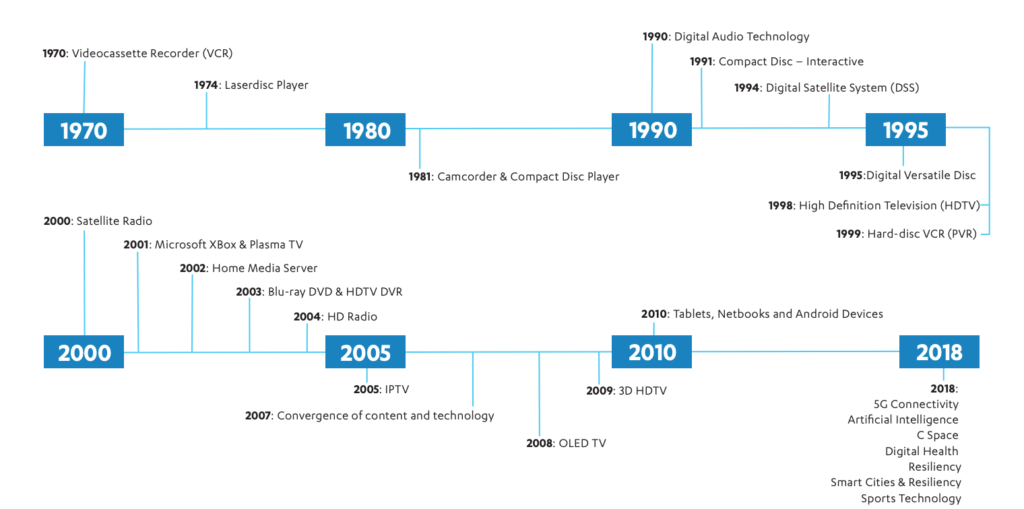
    CES began in 1970 where it highlighted new, world-changing technology like the videocassette recorder and the Laserdisc Player (1974.) Products that we use every day were on display and demoed at CES over the years, including Compact Discs, Satellite and High Definition TV, Xbox, BluRay players, streaming entertainment, Tablets, and Netbooks. The show now features Virtual Reality, Smart Cities, Self Driving Vehicles, and Artificial Intelligence among a lot more!

    Why do I go?

    The whole purpose of BecauseFamily and the Family Tech Blog is to protect children and teenagers by bridging the technology gap between kids and their parents. In order to do this, I work to be on the cutting edge of technological advancement. Our world isn’t just digital anymore, it’s connected, marketers are struggling to find new ways to market to younger, more knowledgeable generations, and psychologists are urging app makers and toy manufacturers to cut out screen time whenever possible. These are all facts I learned at CES and use to inform my workshops, blog posts, videos, podcast episodes, and meetings with parents after. There is much more to learn this year and since I am able to attend through media credentials from the blog, I’ll be there. I’ll be learning for you. The parents.

    CES 2018 Stats – ces.tech

    So Here I Go, Please Join Me

    I’m going to enjoy myself at CES. Vegas is a fun city. I enjoy being around the tech industry, I love learning about marketing, kid and teen tech, social media. and video gaming. I am excited to be an authority on these topics for parents so that I can have an answer to nearly every question I am asked when I work with families.

    While it will be fun, It is work, and it is important. I am extremely grateful to all who have supported BecauseFamily and who read and share my blog posts. Please stay tuned in to the blog, our social media, and our YouTube channel for coverage from the only tech blog covering CES exclusively for the purpose of educating parents and protecting kids. You can also follow me personally on my YouTube channel for daily travel vlogs from my trip. When I go to Las Vegas, what happens there, comes home, to you!

  • Family Tech Blog’s Top Five Posts of 2018

    Family Tech Blog’s Top Five Posts of 2018

    Thank You for Everything!

    I can’t believe the year is over. During 2018 the Family Tech Blog has more than doubled in monthly reach and many articles have been read thousands of times each. I am so grateful for all of you who read and share our content and especially to those who have chosen to support BecauseFamily financially so that this blog can exist. Looking back on this past year it is crazy to think of what all has happened in the tech and family tech safety world. I wanted to write one last post for 2018 that highlights some of the most read articles from this past year. Here are the most read posts from a busy and fascinating 2018.

    Number Five

    Three Ways to Identify a Dangerous YouTube Video Before Your Kids See It

    YouTube is a popular topic for parents and educators. The video streaming site provides some of the most helpful and easy to access free resources on the internet. Unfortunately, however, when anything is as easy to use and popular as YouTube, you will have content on there that isn’t appropriate. I think this article was so popular because in it, I lay out some steps parents can take to identify dangerous or misleading videos on YouTube just by looking for a few signs. I’ve had parents, youth workers, and teachers tell me this article helped them make better choices in what their child was able to watch. Remember that YouTube is the wild wild west. Nearly anything goes. Parental supervision is HIGHLY recommended.

    Number Four

    unGlue is a Great Way to Teach Your Older Kids Screen Time Management

    There comes a time as parents that we should transition from control to guidance. unGlue (a BecauseFamily affiliate) is a great software option for parents who want to add guidance to their internet safety plan without giving up all control at once. This article came out before Apple rolled out Screen Time so it was one of the first software options to provide the kind of limits parents were looking for. It you are trying to protect Android devices or even some older hand me down iPhones, unGlue is still a great option.

    Number Three

    Do Violent Video Games Create Killers?

    Tragedy at a gaming competition in Florida spurred this article that explored some of the opinions that float around about gaming and violence every time a young man commits a violent crime. This article unpacks actual research that has been done to try and answer the question: Do violent video games create killers?

    Number Two

    Tools to Monitor Your Own Screen Time in 2018

    As parents, it is critical that we live out the lessons we try to teach our kids. They retain more of what they see you do than what hear you teach. Monitoring your own screen time, even if just to increase your awareness, can be a very helpful practice in trying to set a healthy example for our kids and teens. This article was released right at the beginning of 2018 and continued to grow in popularity all year long. It is obvious that people realize they spend a lot of time on their phones, here’s hoping they used some of these resources to keep track and make some healthy choices.

    Number One

    Parent Guide: Call of Duty Black Ops 4

    Finally, we are back to gaming. Call of Duty Black Ops 4 released on the back of a ton of hype based around their Battle Royale mode titled “Blackout.” The game released to positive reviews but had a lot of kids asking their parents if they could play it. This Parent Guide is a great way for moms and dads to see if this game would be appropriate for their child.

    Final Thoughts and Trends

    There are the top five posts from 2018. Obviously video games and screen time was a major trend with YouTube maintaining  a presence as one of the most common apps used by parents. I was surprised that there were no articles about Fortnite on the list as that game has taken the world by storm. You can’t look anywhere without seeing the dances, costumes, and merchandise. Voice control is another major trend in 2018 that I am surprised didn’t get as many readers as some other topics. I imagine 2019 will be all about gaming, internet privacy, voice control, and of course…YouTube.

    Thank you for reading the Family Tech Blog this year. We appreciate your support and sharing. Keep checking in through the next year as we have even more awesome plans including adding more tutorial content, including Xbox and Android tutorials, and a lot of news from CES2019, starting next week. Thank you again, Happy New Year, and we will see you in 2019!

  • A Warning About Fortnite’s New NFL Themed Avatars

    A Warning About Fortnite’s New NFL Themed Avatars

    Coming November 9th, NFL fans will be able to represent their favorite teams with their Fortnite avatar. The uniform packs will be available for purchase ($12-$15) and will allow you to customize your uniform to select any of the NFL’s 32 teams and any jersey number you’d like. You will not see any names on the back of the jersey’s, though. Emotes (dances,) goal posts, and referees will also show up during your Battle Royale matches.

    The partnership between the NFL and Epic Games (developer of Fortnite) is no surprise as the video game phenomenon has taken the world by storm. We’ve already seen many of the NFL’s end zone celebrations feature some of the dance moves showcased in Fortnite’s emotes and heard many players discussing their love of the game. Blending the video game world with the NFL team culture is great marketing for both Epic Games and the NFL. The NFL will especially benefit since gaming is such a major market for younger generations whom the league is wanting to attract for obvious future-proofing reasons.

    Check this out: Ok, Fine. Here’s What I Think About Fortnite

    What Parents Should Know

    A major frustration for many parents is the constant nagging from their children to allow them to buy skins for their avatars on Fortnite. It’s possible it will get a lot worse. The biggest difference, though, is that some parents may actually see the benefit of allowing their kid to get an NFL Themed skin. If parents are major supporters of an NFL team, it’s possible they would approve of such a purchase because of their desire to see their child express their fanaticism as well.

    All of this is well and good. Just know, if you are the type of parent who doesn’t want your kid spending actual money in a game like Fortnite, this could be one of the first major areas of conflict between you and your child. If you’re ok with Fortnite and even making purchases in the game, remember to keep track of the amount of time your child is spending playing the Battle Royale game.  Be aware that advertising your favorite NFL team in a massively online game could broadcast a little bit (obviously not always) about where you live. i.e. Chiefs fans are in Kansas or Missouri, and Broncos fans are likely in, or at least from, Colorado.

    There have been instances of predators grooming kids in Fortnite and any detailed interest about your child that is proclaimed through their profile or avatar can give a predator more information to use for grooming purposes. Talk to your child about who they are playing with in-game and remind them to avoid lengthy conversations or “squadding up” with strangers. I don’t say any of this to scare you, only to remind you to be vigilant in monitoring the amount of time your child spends on the game, and to maintain an ongoing conversation with them about their time in the game, who they play with, who they talk to, and what their experience is like.