I have written nearly 400 articles since 2016. Most of them are still relevant in today’s social media and internet safety climate. While we are all being asked to limit our social contact and kids are staying home from school I thought it would be helpful to put together some Family Tech Safety Tips. Here is a list of articles that can help in this time of social distancing. These articles speak for themselves as to how they can help your family during this time. Feel free to contact me on our Facebook Page if you have questions about keeping your family safe online during the next few weeks. Please use these links to help you keep your kids healthy and safe during this time. Our prayers are with you and your family as we all work together to make the right decisions to protect each other.
I field messages and requests all week long from parents who want the latest tools for keeping their kids safe online. They ask about everything from YouTube to Instagram to Snapchat and want apps that will monitor social media use, block adult content, and limit screen time. While there are resources to help parents in each of those departments, some apps just aren’t intended for your younger child. Unfortunately many parents have a real problem giving in to that fact.
Streaming Videos
Let’s look at YouTube as our first example. The video app was created in 2005 as a place for anyone to upload short videos to share with their friends. Google purchased YouTube in 2006 and Social Media became popular soon after, rocketing YouTube to the successful streaming platform it has become. The site is loaded with videos from filmmakers, vloggers, video gamers, makeup artists, geeks, professionals, educators, ministers, animators, artists, basically any category you can think of. It has evolved into an immovable force on which there are 300 minutes of footage uploaded every single minute. YouTube has come under fire for some of their content being too mature or sensitive and so they’ve employed algorithms to keep tabs on inappropriate videos. They also released n app for children called YouTube Kids. This app has also seen its share of controversy after YouTube has been unable to keep sensitive material from showing up in videos on the app.
YouTube obviously wasn’t intended for young viewers. It is a site that is populated primarily by videos uploaded by its users. Some companies that make content for kids use YouTube but this is a choice by these companies in response to the popularity of the platform. It’s an attitude that says: “Kids are there, so we should be there too.” The goal is to reach the audience already there, not necessarily to build an audience on YouTube. There are no real parental controls (safe search is mostly useless) and videos that are labeled as kid friendly are done so without any human eyes ever seeing the entire video. The only time a content reviewer sees the video is when enough users of the site have flagged it as inappropriate. Allowing your kids to watch YouTube on their own is a risk that many parents don’t even realize they are making.
What about Social Media?
Snapchat, Instagram, or Facebook are all the same. They, like YouTube, feature content created and posted by the users of the service. This “User Generated Content” can vary from political or religious views, to silly cat videos or memes, and random personal updates that mean nothing to anyone. People also post updates on their serious mental health issues, they share about their plans to harm themselves or others, the post images of themselves in compromising situations, and that’s just what people post publicly. Private messaging contains content that people post when they think nobody except those they trust is watching. Private messaging is how predators groom their victims. It’s how the out of control teenage boy convinces the girl to send him inappropriate pictures of herself. Social Media is intended to be a place to connect with people, some you may know, some you don’t. It is meant to be a public forum and that which is meant to be private, is meant to be completely private. This is where the problems come in when parents ask for ways to monitor their kids social media.
Age Rating vs Terms and Agreements
I see a lot of parents giving their kids access to social media and other online activities when they reach the age of 13. This is based on the fact that the terms and agreements that these sites have you approve before making an account list 13 as the minimum age to use their service. A common mistake parents make is thinking that this age is meant to protect their kids from content on the site when, in fact, it’s intended to protect the company from having data and information on kids under the age of 13.COPPA laws say that companies can’t collect and use information of kids under 13 without parental consent. If a company says you can’t use the site if you’re under 13 then they can do whatever they want with all of that data and if your kid is underage, it isn’t their fault. You ignored the Terms and Agreements when you allowed them to use the site.
Age rating is the age recommendation you’ll see in the app store when you are downloading and app. This age restriction is based on the actual content in the app, not any legal requirements for the company. The usual standard is that apps populated by user generated content are rated 17+. This is because the company can’t guarantee that what is seen on their product won’t be considered adult content. When we allow our kids to use apps that contain user generated content we are allowing them to be subject to the opinions, behavior, and whims of everyone else who uses that app.
Parental Involvement Before Parental Control
When I am asked to help parents protect their kids in apps that are obviously not made for children I feel like I’m being asked to give parents a suit their kids can wear to protect them while they play in a burning building. I get it. It isn’t easy to tell your kids they can’t do something they want to do. “My friends are all on Snapchat.” or the one that irritates me to no end, “The teacher/coach says I have to use Facebook to get the homework/practice schedule.” Sometimes we just have to say no. It is difficult to set the boundaries and limits that keep our kids safe but if we have the right attitude about what we’re protecting them from it becomes easier. Social Media, YouTube, video games that are rated M for mature, non of these things are intended for people under the age of 17 and when we allow our kids to use these products, we open them up to a world that is meant for adults.
It is difficult for algorithms to catch nudity or violence in uploaded videos. Social Media sites and private messaging apps go to great lengths to keep prying eyes from seeing what is being sent. This makes parental monitoring software hard to develop. Unfortunately some burning buildings are just too dangerous and there isn’t much that can be done to protect you if you’re inside. If you aren’t ok with your child seeing content that is meant for grown ups then I recommend thinking about uninstalling that app instead of trying to find software that doesn’t it allow it to do what it was intended to do.
There were more than 30 instances of abuse of children from the Tinder and Grindr apps since 2015. That number may seem small but when you consider that fact that kids have easily skirted around the age requirements of these dating/hookup apps and made contact with people who wish to harm them, any number is too high. While these companies say they’re doing all they can to keep kids from using their software, all they really say in response to these horrible occurrences is that the predators and kids violated their terms and services. Since the terms say you shouldn’t contact minors and that minors shouldn’t be using their software, they claim the responsibility isn’t theirs because the child was put in danger by using the app in a way that it wasn’t intended to be used.
Officials are saying that isn’t good enough with law makers in the UK trying to create legislation that will require age verification on apps like Tinder and even some social media apps like Instagram. Recent suicides have been proven to be inspired by images of self harm that were viewed on Instagram. Again, officials at the social media company say that the most violent of the images violate their terms and services. They have recently, however, banned images of self harm and suicide and removed the categories from search results.
Here is the question: When these horrible things happen, do we blame the companies who make these online products? Is it enough to write a terms and agreements and say that those who break the rules do so at the fault of their own and no fault of the company? So far, legally, that’s all it takes. It seems that the responsibility of the company ends with the terms and conditions page. If the user doesn’t follow the terms, then how is the company supposed to protect users? Some officials are asking for age verification which means keeping more records. This is something many companies don’t want to do because of recent privacy and data breach concerns. There is only one thing I know for sure, if families will get serious about monitoring their kids’ screen time and online activity, the number of these occurrences will dramatically decrease.
Let me describe a scenario for you. Your 12 year old child wants to meet new people online, maybe they heard some friends talking about a dating or hook up app, maybe they just don’t have a lot of friends in real life. Whatever the reason, they’re looking for a way to meet people. While they’re looking through the app store they see this in the search results:
They tap download, create a profile and start swiping. Eventually meeting new people on the app. Conversations move to WhatsApp, Facebook Messenger, or Signal and they schedule a meetup. Your imagination can take over from there and if you’ve read some of the news stories it can get pretty awful.
Imagine, now, that you have parental controls set so that your child has to request permission to download apps. Maybe you even have their controls set to keep them from downloading apps rated for users over 12 years of age. Either of these approaches would keep you from hearing about your child’s new friendship or worse, romantic relationship with a stranger online. Instead, you’ll see that they’re trying to download an app that is designed to connect people for romantic relationships and be able to discuss this with them. You can share the dangers of building relationships with strangers and help them understand the importance of privacy, security, and parental supervision.
There are built in ways to protect your child on both iOS and Android devices. The key is to set them up. Use the built in protections and features and don’t rely on these companies to protect your children. They don’t exist to keep your family safe or even to help people build healthy relationships. These companies develop their products to make money. It is foolish to expect Instagram to protect your kids from suicide, should they have a responsibility for what is on their app, yes, should you blame them if your kid harms themselves because they see something on the app, not entirely. You have to take some of the blame onto yourself. There are ways to keep your kids safe from that kind of content. If you don’t know about it or don’t use it, it isn’t the fault of the company. It’s yours. Be involved, pay attention, and do the work to keep them safe.
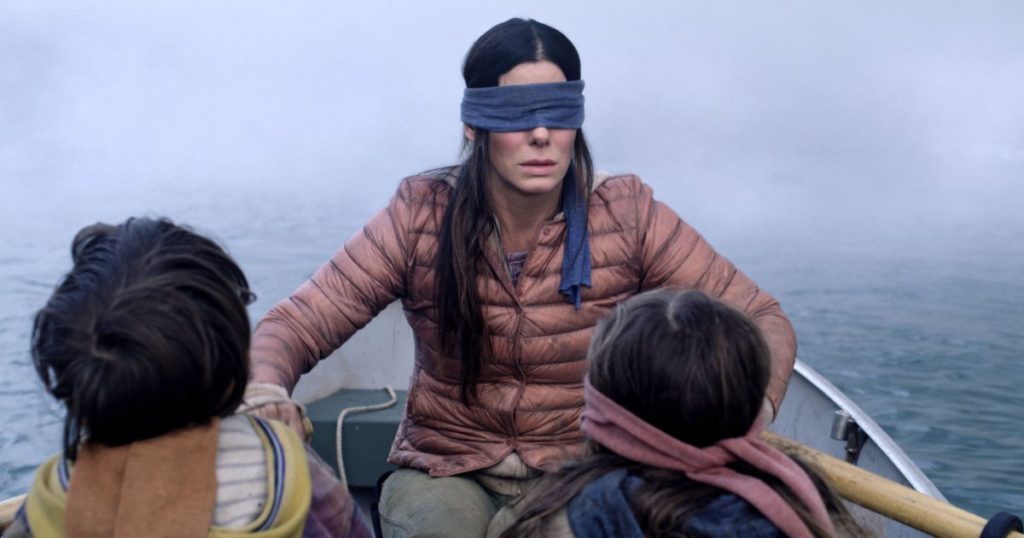
It seems that every time something gets popular, someone finds a way to turn it into a dangerous internet meme. The movie Birdbox on Netflix stars Sandra Bullock and features her adventure with two children through a dystopian wasteland five years after a mysterious force caused mass suicide all over the world. Because this force causes you to kill yourself when you look at it most of the main characters spend the entire movie wearing blindfolds. Enter said internet meme.
Bird Box
The Birdbox Challenge is a video meme that asks its participants to do mundane, regular tasks while blindfolded. People have done things like cooking, walking through their home, spend 24 hours blindfolded, and even driving while blindfolded. Some of the earliest challenge videos received millions of views in a matter of days. Obviously content creators felt the need to outdo themselves and others. This led to some dumb and even dangerous stunts that eventually led to a warning from Netflix and the banning of all BirdBox challenge videos from YouTube.
People have filmed themselves walking through traffic and driving while blindfolded leading to a couple of car crashes including one by a teen in Layton, Utah. These challenges can be dangerous and unfortunately the popularity travels so fast that our kids are the first ones to learn of them and try them themselves. Always looking for something of theirs to go viral, our kids will try to copy and even outdo the other videos they’ve seen online. The TidePod challenge is another example of escalation causing a silly meme to get out of hand and even hurt people. The Tide Pod challenge was also banned by YouTube and Tide even did a series of commercials to discourage people from participating.
Whenever anyone, especially our kids, gets harmed by something as ridiculous as a challenge on the internet there is an outcry for someone to take responsibility. We may speak out against law enforcement for not cracking down or the production company for making the show the memes are based on. Maybe we’ll want the streaming platform or social media service that these memes are being shared on to take responsibility. Wherever we place the blame, we are understandably longing for someone to answer for these stupid and dangerous occurrences.
Gaming, social media, entertainment, and education have all come under fire from time to time for the influence they have over our kids. Learning about dangerous challenges can happen naturally from friends but the ability for information to spread over the internet is unprecedented until now. The inspiration for some of these challenges come from the media our kids consume. There are so many factors, though, that cause the spread of all this craziness but the one factor that is constant is the lack of moderation and responsibility.
As parents, we should see these occurrences as warnings that it is time for us to be more involved in what our kids are doing, whether online or offline. We have no excuse since there is so much hardware and software available to help us monitor what is happening on our kids’ screens. We are hearing all of the time that we need to be involved and that we should take responsibility for the things our children are seeing. It also falls to us to teach our kids to take personal responsibility for their actions.
Teaching Responsibility
When our kids see Netflix putting out warnings or YouTube banning content, they see a major corporation taking responsibility for their user-base’s stupid choices. In reality, though, these companies aren’t taking responsibility, they are covering their own back sides before something truly horrible and reputation ruining happens on their service or platform. We live in a world that wants to skirt around responsibility and find someone else to blame. Our kids aren’t going to learn how to take the fall for their own actions unless we teach them to do so. Here are some ways my wife and I teach that to our children:
1. They must ask forgiveness and they must give forgiveness.
We don’t just let our kids say they’re sorry. When they hurt each other’s feelings they must ask to be forgiven and then we expect the other child to say more than “It’s ok.” we want them to say “I forgive you.” This causes the offender to understand that their actions caused someone harm and the offended to realize that they have a responsibility to honor the request for forgiveness.
2. They have chores.
Our children have responsibility for things they do around the house and they don’t get paid for it. We consider keeping your room clean and your laundry in the hamper a basic requirement for living in our home. They have other chores that they cycle through and they don’t get to bargain or trade, no matter which ones they dislike or like they have to do what the chart says for that day. This way they’re learning to do junk they don’t enjoy just because they are required to do it. They don’t get paid for this either unless you consider that fact that they have to have it done to even ask to get screen time.
3. They buy their own stuff.
Our oldest two children have made some money through performing and sometimes they all get a chance to do odd jobs for friends and family to earn some cash. When they have money, they like to spend it and when it’s gone, it’s gone. We don’t usually agree to fit the bill on stuff they want. They can wait for birthdays or Christmas or they can buy it themselves. That’s how life works.
4. They are told no a lot.
We have learned the power of saying no to your children. As our oldest two have grown up they’ve heard no so much that they know when to not even ask. Sometimes I’ll have what I call a “Yes day!” this is a day when I say yes to pretty much anything they ask me (within reason.) I don’t tell them it’s a yes day but they tend to figure it out pretty quick and we all really enjoy doing things together that I would normally say no to without thinking. (Think playing four hours of Risk with your 11 and 9 year old.)
These things aren’t world changing but they can be life changing and can go a long way to help you instill a sense of responsibility in your kids. Making them take responsibility for how they feel and how they make others feel is something that I believe is truly lacking in our society and our kids have a head start at becoming excellent human beings from that step alone. Learning how to work for and spend money wisely teaches them that they are responsible for how they spend their time as well as what they earn and what they have. Finally, hearing no is critical for kids from a very young age. Life isn’t fair. There are things in life that just happen when you don’t want them to or things that you wish would happen to you that happen for others instead. This. Is. Life. Get used to it.
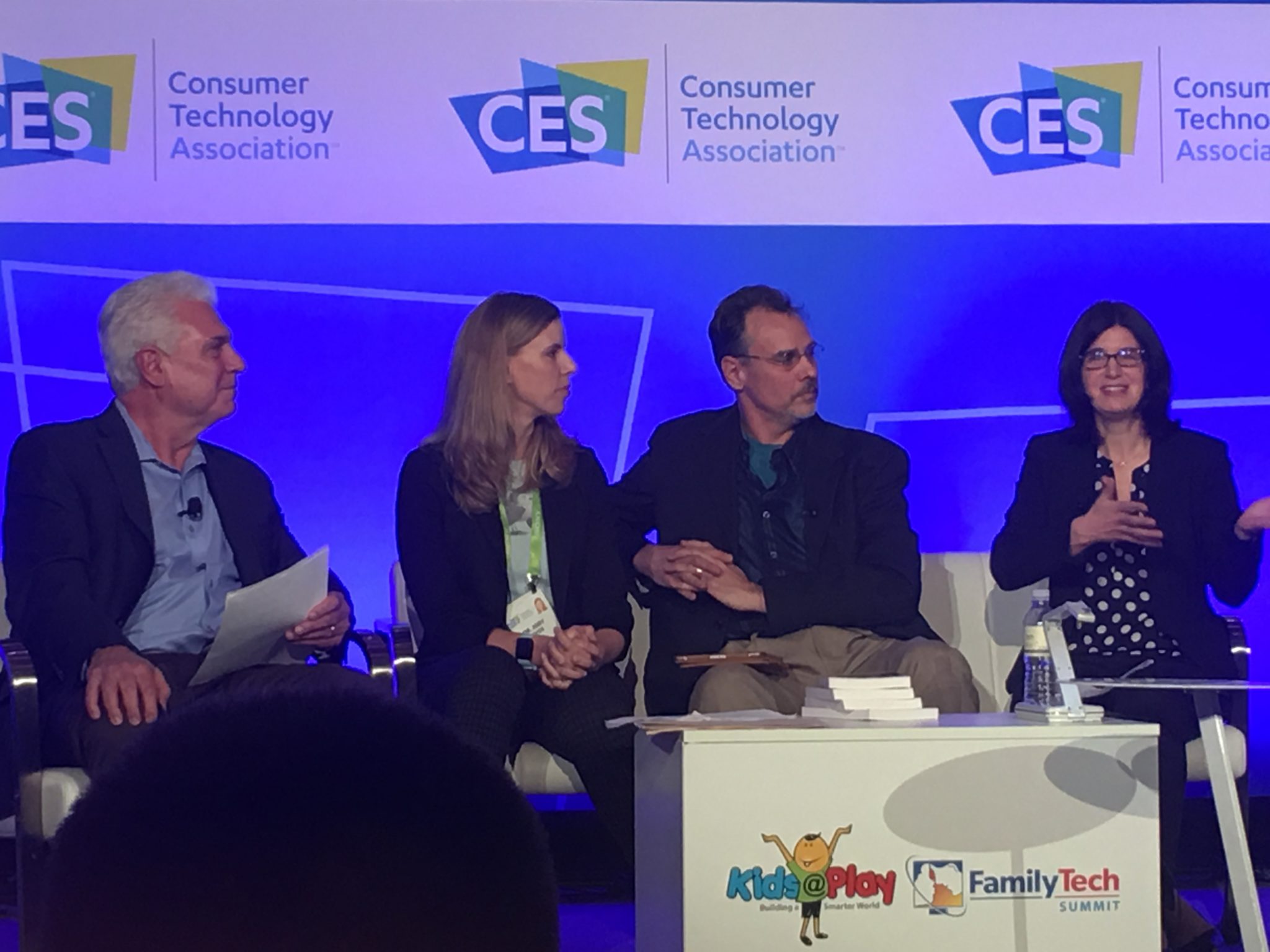
There was a lot of conversation about playing at the CES2018 Kids@Play Family Tech Summit. Joining Living in Digital Times‘ founders and producers were inventors, developers, and psychologists. They were all there to discuss the importance of technology in the world we live in and the responsibility of tech developers to know how to create products that are helpful and not harmful. There were conversations about the amount of screen time that is acceptable for kids. There were many new tech gadgets that seek to teach kids about technology without requiring screen usage to do the educating. One of the main focuses of the day’s events, however, was playing. How much time should kids play and what can we learn from how they play? The day started with a panel consisting of a couple a renowned child/family psychologist, a psychologist responsible for Child Development and Learning at Mattel, the president of The Toy Association, and the Vice President of PBS Kids Digital.
Play IS the “Secret Sauce.”
Fred Rodgers said, “Play is the work of childhood.” Educators and toy manufacturers are taking this idea seriously. You will have noticed how more and more toys have some kind of educational element to them. This is no accident. The toy industry is taking note of the importance in play for a child’s development and education. The problem, as discussed in this panel at CES, is that many parents lack the ability to truly play and therefore, forget the benefit it has for their kids.
“Play is how kids explore the world.” Sarah Dewitt – VP, PBS Kids Digital
“Some parents see play as a luxury…we’re doing a lot of work to show parents the benefits of play.” – Dr. Jody Sherman Levos – Dir. Child Development and Learning at Mattel
They say that the key is balance. In fact, I heard that word hundreds of time throughout the discussions that day. We have to work to maintain a proper balance. We should balance how busy kids are doing homework with a healthy amount of play. We also need to keep a proper attitude about how busy we, as parents, are and keep from being so busy we can’t spend time playing and exploring with our children. Parents are letting tech do more than it should do and play roles in their lives it was never meant to play. Erik Fisher, child/family psychologist said: “Tech isn’t the trouble. It’s time with your kids.” he also stated that “our kids are, in some ways, becoming guinea pigs.”
We have used tech to teach our kids to read, entertain them, or even just keep our kids busy. The general consensus is that kids under two shouldn’t have much screen time at all and then they should be slowly introduced to toys and apps that are used mainly for educational purposes. Most importantly is that parents spend time playing with tech alongside their kids. Not only does this increase a parent’s awareness of the benefit (or lack thereof) of the device their kid is using, it also gives kids a sense of security that they can talk to you about the tech they love. This, of course, is always recommended by experts and by those of us at BecauseFamily. Imagine how easy it will be for your 13 years old to talk to you about their time on social media that day if they’ve been discussing their tech usage habits with you since they were four years old.
The Takeaway
Remember that kids don’t have to be inundated with technology to become the next tech giants. In fact, many west coast tech executives send their children to tech-free schools. While technology can add a layer to our kids’ play and education, it’s important that we talk to our kids about their play. Encourage them to be creative and color outside the lines. Remember what it was like to be a kid and allow them to mess up and do it wrong without negative consequences. Most of all, don’t let tech usage, even for educational purposes, outweigh the other areas of play that are so important for your kids.
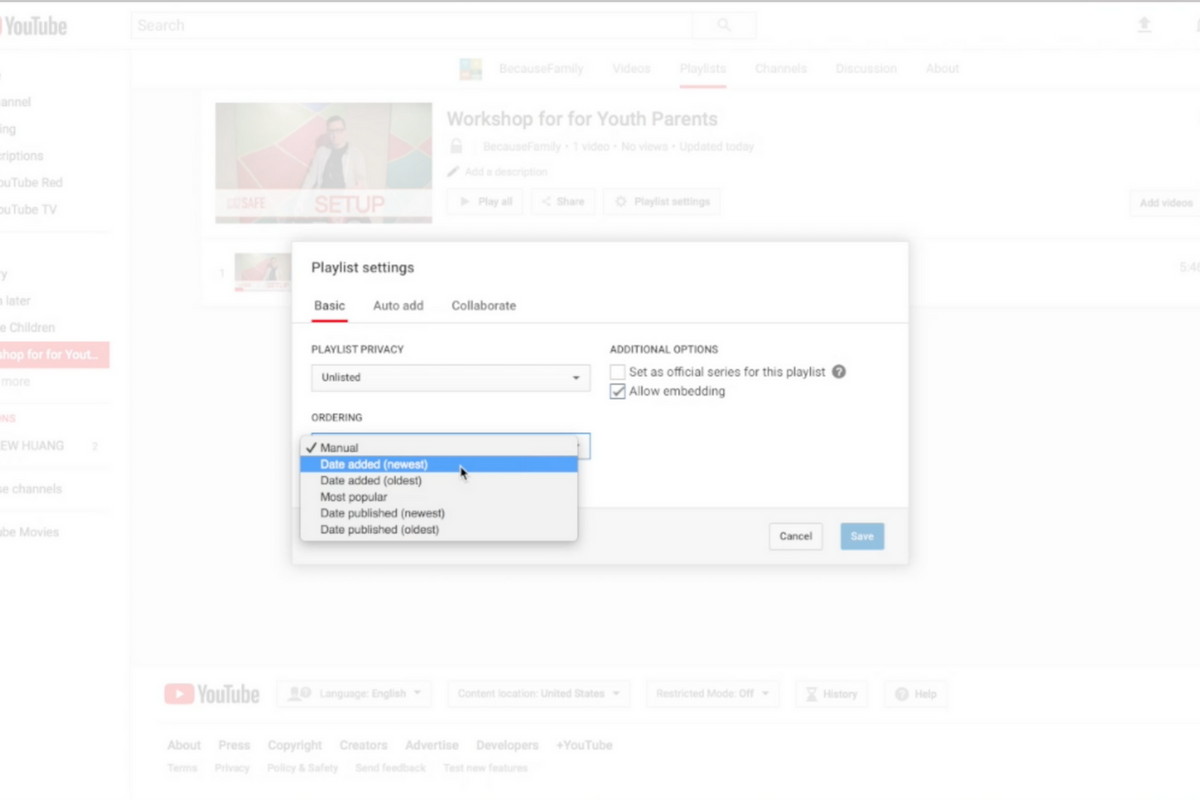
Parents are always asking me for advice on keeping their kids safe on YouTube. Especially parents of older kids who may feel like YouTube Kids is a bit too young for their liking. I recommend building approved playlists. Find videos on YouTube that you are ok with them watching and put them in a playlist. This will allow them the freedom to watch videos without you pulling up each one while still keeping them safe from happening upon something inappropriate. You can also add playlists to your library that have been created by another channel. Then, you just have to discuss with your kids that they should only watch videos from the playlists you’ve put in the library. This keeps things safe. Watch the video below to learn how to build these playlists and hear more about why it’s a good idea.
This is also a great idea for teachers and ministers who may want to show videos but don’t want something showing up unintentionally. If you’re playing videos from your playlist, you won’t accidentally show some video you haven’t pre-screened. YouTube can be an awesome tool but there is a lot of content on there that may not be classroom friendly. Use this tutorial to help you set up playlists and keep that stuff off your screen.
UPDATE: Here’s a video tutorial to help you set up a playlist on the mobile app.
More than half of all iPhone users are now using iOS 11 and there are some major changes. The biggest change is the control center. This has become a lot more useful with the iOS 11 update and there are some features that parents should know so that they can use them to further protect their kids.
Screen Recording
Screen recording hasn’t been built into iPhone until this update. It’s a way to capture what’s happening on your screen and then save it as a video in your photos. This feature is cool and very useful for projects like making this video but there is a bit of a concern with kids sending messages and them being recorded without their knowledge. Keep your eye on this one.
Quick Guided Access Button
Guided access is an awesome way to keep you younger kids safe. The quick access button allows you to get to you GA settings quickly and use the feature to keep your kids safe. Do Not Disturb While Driving
Do Not Disturb While Driving
This is one that’s been needed for a while. The Do Not Disturb While Driving feature lets you just tap a simple button in your control center and not be distracted by texts until you turn it off. Pretty good idea, even if it has been a long time coming.
There are more details and some screen capture of these features in use in the video below:
Musical.ly announced earlier this summer that they are going to be featuring original shows from networks like NBC, Seventeen Magazine, and Viacom. We’ve written before about how we don’t like their lack of age verification even though the CEO seems to think it’s no big deal. The lip-syncing video app’s newest update will put more previously unseen and original content in front of your kids. The updates include a “Watch Next” feature that will use what’s called “computer vision” to see what they are watching and make a decision about what other videos (original content or user generated) to recommend they view next.
The No. 1 goal of the new app design is to make “a wide range of content more accessible,” Hofmann said. – Variety.com
This update also includes a new look and feel to the app and some new ways to personalize your profile page. The most interesting addition, from a parental control standpoint, is the idea that an algorithm is going to be recommending more videos for your kids to watch.
What Parents Should Know
This feature isn’t entirely new to streaming apps. You’ve seen Netflix, Amazon, Hulu, and YouTube feature videos or shows that they think you might enjoy. Their recommendations are based on what you’ve been watching, just like those in the Musical.ly app. The concern, here, is some of what may be available on Musical.ly and the fact that most parents don’t keep an eye on what their kids do on the app.
I still don’t recommend parents allow this app on their kids’ and young teenager’s phones because of the lack of age verification. It’s still on our uninstall list and will remain there until they take the risk of predators contacting kids on this app more seriously.
I approached the mother of a family we have been friends with for a while and asked if she would be willing to host one of our first Digital Boundaries Workshops. She immediately began to tear up and say absolutely yes. I was thrilled but concerned and confused by her tears. She confessed that, while we had discussed setting up internet safety solutions in her home nearly a year earlier, we had never made the scheduling work and she felt horrible. Especially because her son, who was in third grade, had just been caught searching for information on some very adult topics online. A younger child on the school bus had told him what he should search for and curiosity immediately took over. “We need to do something as soon as possible.” she said, “I wish we hadn’t waited, I hope it’s not too late.” We did a workshop for her just a couple weeks later.
This response is all too common. Our work for families gets far more attention from parents who’ve been through some kind of related struggle than those who want to set up preventative measures to keep their family from such a story becoming their reality. Our children are being called digital natives by psychologists. This is a label that identifies them as a generation that’s so used to technology, it’s like it’s their native tongue. If you’ve spent any time with a young child or teen you’ve probably been impressed with their ability to maneuver digital devices. It’s hard for parents to keep up. It’s even harder if you’re an older parent or a grandparent who feels left behind by the online world. My “Setting Digital Boundaries” living room workshop is an easy way to get some training that will set you on the path towards understanding the digital world your kids are growing up in. Starting next month (August 2017) these workshops will be available both live and through skype.
What Happens at a Workshop?
I jokingly tell people that our Setting Digital Boundaries Workshop is like a Mary Kay party. You invite your friends over and serve up some snacks. After everyone has had some time to arrive and say hello we begin the presentation. Instead of selling you make up I’ll be teaching you and your friends how to protect your children online. After updating you on some of the latest dangers and threats available to your kids online I teach you our internet safety plan that I call S.A.F.E. (Setup Accountability Filtering and Education)
Each section of this presentation will be spent unpacking the four keys of our S.A.F.E. plan all the while highlighting some of the best resources you can use to protect your family. Each section ends with a time for questions. The sessions last anywhere from 40 to 60 minutes and afterward, I always stay available to answer more questions and give feedback on some of yours and your friends’ tech safety needs.
These workshops are so valuable because of how quickly the internet safety atmosphere changes. Our book is helpful for getting you started and teaching you some of the terms that you need to understand to protect your kids online. A book, however, can’t give you step by step help with your internet safety goals. A blog post or YouTube video can’t listen to your specific internet safety needs and diagnose the best plan for protecting your family. That’s what makes Setting Digital Boundaries Workshops so critical.
I had some deep thoughts during Father’s Day yesterday. As always they concerned my work with families and internet safety and so I posted the following status on Facebook. I want to make it available to our blog readers here too. Moms, please share this with the fathers of your children; dads, please be challenged and let me know what steps you’ve taken to protect your kids online.
From Facebook on Father’s Day, Sunday, June 18, 2017.
It’s Father’s Day and I’m thinking about some of the greatest opposition I face in our work to help parents protect their children online. You would think that kids would hate me. I’m the guy that comes in and sets up restrictions on their phones and computers. They’re not the ones giving me the stank eye, though, it’s the dads.
Too often, the worst critic of my attempt to block pornography from the family computer or phones is the father. “Well, is this going to block dumb stuff?” “Is YouTube going to be useless now?” I am constantly hearing concern that in my attempt to protect their children from cyber bullying, adult content, porn, or sexting I’ll inconvenience dad in some way.
Please understand that there have been many dads who were totally onboard and even some who have admitted to wanting better accountability for themselves but those dads aren’t the norm. I hear moms who are exasperated, sometimes to tears, because they want to keep their kids safe while dad is calling it “no big deal.” Again, the father too often seems to be more concerned about facing limitations of his own than the digital health and boundaries he’s setting for his family.
Step up dads. If your kids need accountability then so do you. You should have it installed on your devices first. You should set the filters more strict than necessary and tell your kids that it’s annoying sometimes but it’s worth it because the alternative is something you don’t want to face. I wish I got more emails or calls from dads (I’ve had some) that are desperate to set boundaries for their kids’ internet use. I pray that it will change. Dads, we MUST be the example of the change we want to see. Call me. Let’s get your family a gift this father’s day. The gift of your commitment to higher standards while online.
If you need help. Let me know EMAIL ME or contact me on Facebook or Instagram. I’d love to give you a hand.