Tag: preschool

  • TUTORIAL: How to Keep Your Kids in a Single App on Your Android Device

    TUTORIAL: How to Keep Your Kids in a Single App on Your Android Device

    If you’ve ever given your smartphone to your kids to play a game you know that you always run the risk of them opening another app or getting access to something through an Internet browser that might be objectionable.

    Parents using iOS are able to use Guided Access to limit their kids to one app for a certain amount of time but what can parents with Android phones do?

    Screen Pinning is the solution. It’s been available since Lollipop (5.0) and is advertised as a security feature but it’s a good parental control too.

    Screen Pinning only allows one app to run and someone with your phone cannot switch to another app without you PIN or fingerprint.

    There aren’t any time limits built into Screen Pinning so we’ll cover that in another article about “Digital Wellbeing”. For now, here’s how to enable this helpful feature.

    Many smartphone manufacturers implement Android a little differently. If you’re having trouble with these instructions, check with your carrier or phone manufacturer.

    These instructions are for Android 9.0 and up. If you have an older version of Android the instructions are a little bit different. You can find instructions for older versions at Google’s Help Center.

    How to Enable Screen Pinning

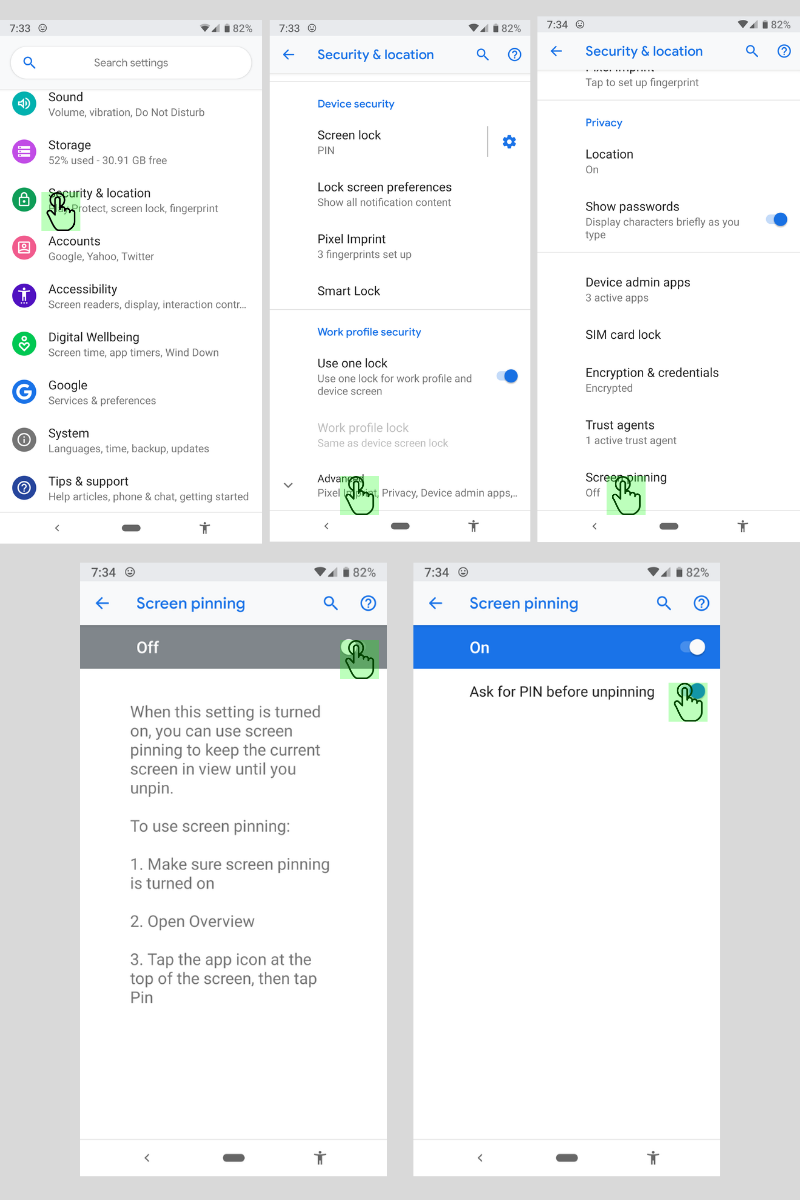
    1. Open your device’s settings.
    2. Tap Security & Location > Advanced > Screen Pinning.
    3. Turn on screen pinning (remember to require your PIN to disable).
    How to Pin an App to the Screen

    1. Open the app you want to pin.
    2. Swipe up to the middle of your screen.
    3. Tap the app icon.
    4. Tap the pin.

    The app is now pinned and cannot be switched without your PIN or fingerprint.

    How to Unpin an App From the Screen

    1. Touch and hold the back and home icons.
    2. After your device locks, enter your PIN or use your fingerprint to unlock.

    The app has now been unpinned and you can use other apps.

    That’s all there is to it. The next time you’re waiting in line at the DMV and your kid asks to play a game, you can give him your device without worrying that he’ll watch red band trailers on YouTube.
  • LETS RESEARCH | Predatory Advertising in Preschooler Apps

    LETS RESEARCH | Predatory Advertising in Preschooler Apps

    The Study

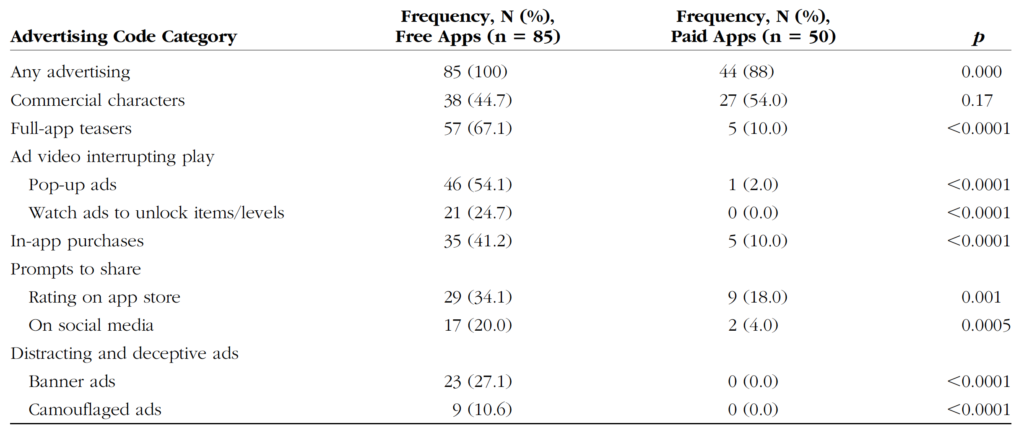
    This review by Wolters Kluwer Health looked at 39 apps that target kids ages 5 and under. They reviewed the different kinds of advertising and manipulation used in the apps to encourage engagement by the young users. Researchers used Android devices and tested the most popular apps in the age category at the time.

    Types of Advertising:

    Commercial Characters – These are apps that are designed around marketing certain characters that your kids may already love. i.e. Daniel Tiger, Mickey Mouse, Bob the Builder, or Hello Kitty.

    App Teasers – Encouragement for kids to unlock the “full version” of the app.

    Ad Videos Interrupting Play – Videos that feature other apps in the marketplace by interrupting your child’s use of the current app and showing videos of gameplay.

    In-App Purchases – Items, levels, or other content that your child can’t use in the app without purchasing them. These may be items that can be used in game, costumes or costume pieces or even in-game currency that can be used to purchase other things in the app.

    Prompts to Share – Encouragement to share the app on social media sites or even just to rate it on the app store.

    Deceptive or Distracting Ads – These ads often trick your child into thinking they are playing another level of the game. Sometimes they look like they are a part of the app your child is using and then open up an app store link when tapped.

    What Parents Should Know

    To get my full thoughts on this research watch the video above. Liking it and sharing with your friends would be super helpful as well. I will say here, though, that it is critical that we as parents understand how these apps are marketing to our children and help our kids understand the difference between something they are playing or learning from and an advertisement. This study also looked at the difference between ads in paid apps vs free apps and educational apps vs entertainment. None of the results are shocking but hopefully, they are a bit eye-opening for parents who allow their kids unsupervised time on screens.