Tag: post

  • Instagram Update Could Open the Door for Porn and Predators

    Instagram Update Could Open the Door for Porn and Predators

    Instagram has just released an update that adds the ability to follow hashtags. This feature allows you to keep tabs on interests or events that you’re interested in without having to search for the tag every few minutes. It’s easy to follow a hashtag. Just search for the tag and then a follow button appears with the results. Or you can click on a hashtag in a post or story and then click follow when that result appears. From then on the hashtag will show up in your instagram timeline just like the people you follow. When you are done seeing everything posted under that tag appear in your Instagram feed, you can just go back to the hashtag search result and tap “Unfollow.”


    What Parents Should Know

    Being able to follow hashtags has been a “thing” for a while now on Twitter. It has long been a way for events or products to feature themselves and allow attendees or fans to keep up with what’s going on. The problem with our kids blindly following hashtags is the potential for other users to abuse the tag and use it to get attention on their content. Some of that content may not be very wholesome. Pornography is fairly easy to access on Instagram if your kids know where to look. The potential for these adult-oriented posts to add a non-related hashtag so that followers will see their content is cause for concern.

    Imagine your teen follows #pokemon on Instagram. All someone would have to do is put the #pokemon tag on their innapropriate photo and it would, likely, show up on your his Instagram feed.

    Also, sharing the hashtag for an event you’re currently attending is, in essence, the same as sharing your location information. If you kids are sharing a Prom Night hashtag, then whoever wants to can follow that hashtag and see all the activity and who knows what plans could come from that. Unfortunately, with every great new feature, there seems to be a new danger that accompanies it. My advice is to encourage your kids to post with hashtags after an event has ended. Kind of like posting the memories of the event instead of live-photo-blogging every little thing they’re currently doing. Including where they’re headed next. You don’t have to have too big of an imagination to think of some ways that could be dangerous.

  • You May Soon Share Your Instagram Stories on Facebook

    You May Soon Share Your Instagram Stories on Facebook

    Facebook Stories still hasn’t taken off. Despite putting them on the desktop site and constantly encouraging you to use the feature in the app, Facebook hasn’t been able to increase usership of their stories feature. In fact, if you look at the top of your Facebook timeline you will probably notice that only one or two of your six hundred Facebook friends have actually posted a story for you to look at. In their latest attempt to lure users onto stories, Facebook may soon allow you to share your Instagram story to Facebook. 

    Instagram is testing a “share to facebook” feature in the story camera. Once you’ve taken your video or photo for Instagram stories, you’ll then be able to share it to Facebook or share screenshots to Twitter. This is one of the first times we’ve seen Instagram test a feature that will integrate directly into Facebook, even though both networks are run by the same company. We haven’t seen them cross over much since Facebook bought Instagram in 2012.

    What Parents Should Know

    Instagram stories is still the most popular feature of its kind in social media. Hundreds and millions of teens and adults alike use stories every day to share what’s been going on and what they’re into. Facebook, while they are obviously reaping the benefits of Instagram’s success, they’re also wanting to block Snapchat out of the picture completely. Pulling the 2 billion Facebook users into the story feature could go a long way to make Facebook’s social media selections stand far above those of Snapchat. Most likely, however, your kids are still going to be using the service that their friends are on and the fact that parents don’t really “get” Snapchat makes it more appealing to them. Be sure you spend some time using Snapchat, Instagram, and Facebook so you’re familiar with all of the social media options available to your kids and teens. Set notifications so you’ll know when your kids are posting, and you can even log in as their accounts on some of the social media services. Whatever method you use, don’t be outside of the loop when it comes to your kids’ social media preferences. Talk to them about it, follow them on their favorite social media accounts, and use their login information to stay informed as they post and receive private messages.

  • How Social Media Sites Use Your Photos to Learn About You

    How Social Media Sites Use Your Photos to Learn About You

    A new extension (plugin or addon for a web browser) has just highlighted an issue we all probably won’t be surprised by but have never thought about. Our social media sites are scanning our photos to learn more about us. The extension is called, get ready it’s a mouthful, “Show Facebook Computer Vision Tags Extension” and it displays the detailed tags that Facebook has used to label your photos when you post them to the site. The tag information is built by automatically scanning every image you post and using the information to create trackable details about that image. So, for instance, if you post an image of you and your kids at the zoo it may show tags that say: “3 people, smiling people, animals, nature.”
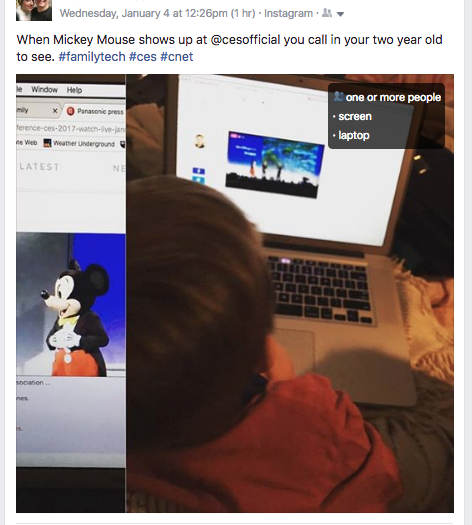


    This may seem like no big deal but when you think about just how much information can be obtained from a simple thoughtless upload of a family photo, it can get a bit creepy. Most likely this info is used to help Facebook target you better with those advertisers who pay for the privilege to use the data to identify potential customers. It also is used to help with search results when someone is looking for photos of you or somewhere you’ve been.

    Use this as a tool!

    Oversharing online is more than just annoying. When you post a picture of your food that nobody cares about you are identifying yourself as a consumer who wants to be advertised to about that type of food. When you post that bad blurry picture of your kids in their princess dress, you’re highlighting that you should be targeted with more Disney advertising. Use this extension as a tool to help you learn that lesson, and teach it to your kids.

    This extension can be a pretty cool way to help you and your kids see how much information about you is available when you post online. I always advocate for parents to teach their kids that the internet is a public place. Whatever you post can and will be used against you IRL (in real life) and so you should think about that before you post. This extension may be a great way to drive that advice home with your kids.

    If you want to see for yourself, you can download the chrome extension HERE.