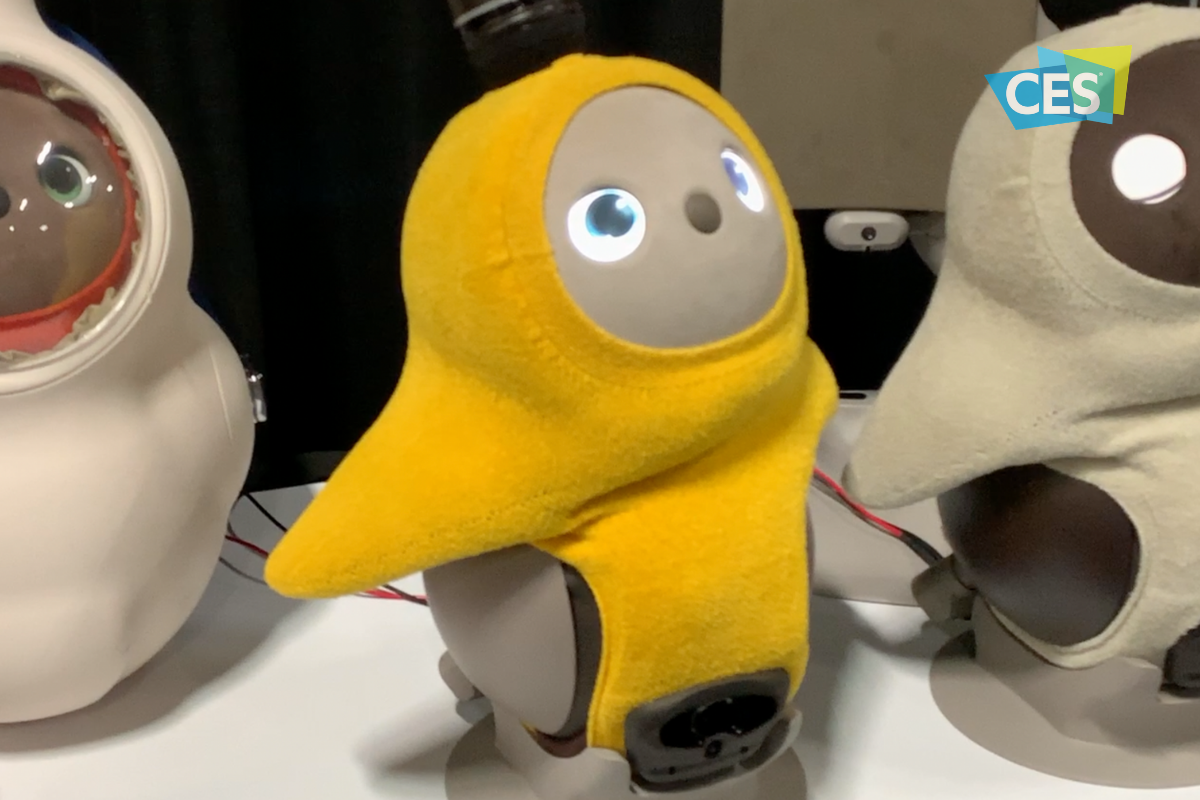
Above are the highlights from my first day at CES. This day is a media-only event and features press conferences from major brands, a “trends to watch” presentation, and a pre-show floor event called “Unveiled.” In this video, we will hear some of the tech trends that are being discussed at CES this year and show you some of the kid/family tech that I’m excited to learn more about when the show floor opens. Keep tuning in to the blog, our YouTube channel, and our social media for more of the only tech blog covering CES exclusively to protect children and teenagers online.
I leave in just a few days for International CES in Las Vegas Nevada. It is my second year to attend this conference but many of you have just started following us since my last trip so here’s some background.
What is CES?
CES is the world’s gathering place for all who thrive on the business of consumer technologies. A high-level business event that touches all industries. A platform for innovators of all sizes to build their brands, every major technology company on the planet participates in CES in some way — by exhibiting, speaking, sponsoring, attending or holding co-located events and business meetings.
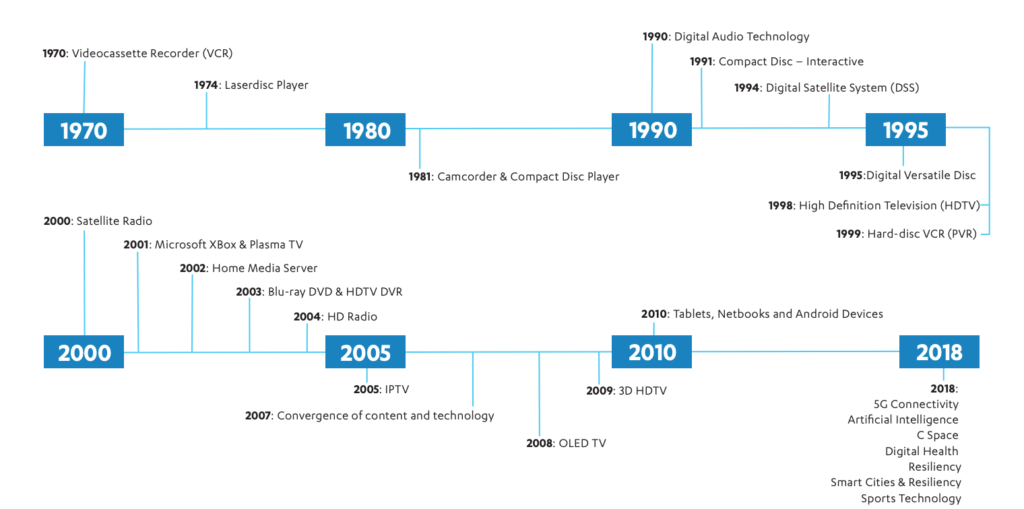
CES began in 1970 where it highlighted new, world-changing technology like the videocassette recorder and the Laserdisc Player (1974.) Products that we use every day were on display and demoed at CES over the years, including Compact Discs, Satellite and High Definition TV, Xbox, BluRay players, streaming entertainment, Tablets, and Netbooks. The show now features Virtual Reality, Smart Cities, Self Driving Vehicles, and Artificial Intelligence among a lot more!
Why do I go?
The whole purpose of BecauseFamily and the Family Tech Blog is to protect children and teenagers by bridging the technology gap between kids and their parents. In order to do this, I work to be on the cutting edge of technological advancement. Our world isn’t just digital anymore, it’s connected, marketers are struggling to find new ways to market to younger, more knowledgeable generations, and psychologists are urging app makers and toy manufacturers to cut out screen time whenever possible. These are all facts I learned at CES and use to inform my workshops, blog posts, videos, podcast episodes, and meetings with parents after. There is much more to learn this year and since I am able to attend through media credentials from the blog, I’ll be there. I’ll be learning for you. The parents.
I’m going to enjoy myself at CES. Vegas is a fun city. I enjoy being around the tech industry, I love learning about marketing, kid and teen tech, social media. and video gaming. I am excited to be an authority on these topics for parents so that I can have an answer to nearly every question I am asked when I work with families.
While it will be fun, It is work, and it is important. I am extremely grateful to all who have supported BecauseFamily and who read and share my blog posts. Please stay tuned in to the blog, our social media, and our YouTube channel for coverage from the only tech blog covering CES exclusively for the purpose of educating parents and protecting kids. You can also follow me personally on my YouTube channel for daily travel vlogs from my trip. When I go to Las Vegas, what happens there, comes home, to you!
Android Tablets are a great option for parents who want to get their kids some form of screen device without breaking the bank. The addition of Android FamilyLink has made Android and even better choice for our kids’ introductory tech device. They are affordable, fairly easy to use, and most all apps our kids want to play or use are available through the Google Play store. There is, however an issue that faces parents when they are ready to set up these devices for their kids: compatibility.
Compatibility is the ability of a device to run the software you are trying to install on the device. Android FamilyLink requires operating system 7.0 or higher in order to work on your child’s device. That means that if your device runs an older version of Android, the app that connects your parental control settings to their device won’t even be available to install from the app store.
I ran into this problem today while helping a family set up controls on the brand new tech devices they had purchased for their two girls. I initially thought it odd that on one device I could login an account as a child and on the other I could only make a basic adult Google account. Then, halfway through setup I realized that one tablet would run FamilyLink while the other would not. Both of these devices had been purchased from the same place on the same day and were brand new, not refurbished or used, but the operating system was different in each tablet. One was running Android 4.4 while the other, the one that let me set up FamilyLink, was running Android Version 7.1.
I understand that newer software will not work on older devices but these are two devices being sold at the same time as brand new. There is nothing, without further investigation, that would cause a parent to expect they couldn’t do all the same things on both tablets. The truth, though, is that not all Android Tablets are equal. We won’t get into opinions on Apple vs Android but I will make this comparison: when Apple updates their operation system ( iOS) they ping all of the devices at once and encourage installation of the newest version of the software. Android, however, is a crap shoot. You have to go see if your device will be compatible with the newer software every time a new one comes out. The main reason for this is that different companies make phones that run Android while Apple makes the device, the operating system, the app store. Basically the whole shebang.
People have different tastes and whether it’s the way the software functions, the look and feel of the phone, or just not wanting to spend as much money, Android will always be a significant part of the smart device market. My advice isn’t to just always use Apple products. I will encourage parents, instead, to always look at the specifications of any device you want to buy and see what operating system it is compatible with. If you are buying an Android product and want to instal FamilyLink, the device must run 7.0 or higher for the FamilyLink Children and Teens app to show up as downloadable in the Google Play Store. Otherwise, you’ll be looking for some third party app or combination of third party apps to add parental control functionality to your devices.
As CES 2019 approaches (my flight leaves in 17 days) I find myself more and more interested in the different topics that will be discussed at the Kids@Play Family Tech Summit. The summit features leaders in the industries of tech, toys, education, psychology, software, and entertainment. Sessions last all day long and the topics discussed are exactly the kind of information we parents need to know as we raise our kids in this digital age. The problem is, those in attendance are all industry people who are making apps, toys, and technology for our kids and families. There is very little to no representation of those who work to educate parents themselves on the connected age we live in. That’s where I come in.
To my knowledge, BecauseFamily’s FamilyTechBlog, is the only publication in attendance at CES that offers our news and stories exclusively from the viewpoint of helping parents protect their children. While I sit and take notes and record footage of the summit my mind is processing how this information can help parents make quality decisions to keep their kids safe on their tech devices. I am glad that this event exists and happy that leaders in this industry are having serious discussions about how to be responsible while developing their products for children. I am also glad that our donors and readers have made it possible for me to be there, as the only exclusive family tech safety website in attendance, and report back to you.
Here is some of what I’m looking forward to seeing, learning, and reporting on at CES 2019:
Jobs of the Future
Coding Without Screens
Gaming and Creativity
Tech Addiction
Data and Privacy for Connected Kid’s Products
Augmented and Virtual Reality to Help Kids Get More Active
There is a ton more that I’m excited to see and learn but these are going to be the highlights for sure. Parents are always asking about things like gaming and tech addiction and the jobs that are available to our children now will be completely different in ten years. Having some insight on these questions will be pivotal to making decisions as parents. Many of us have issues with keeping our kids active as they’d rather play with tech than each other at times. Can the tech increase their activity without impacting them in other negative ways? Finally, coding will soon be a skill that is not optional if you want to have your pick of the jobs of the future. How can we introduce coding logic and principles to our children without exacerbating the screen addiction problems we already see in out kids? I am looking forward to finding answers or at least more insight on these topics and questions at CES 2019.
You Can Help!
Very briefly, allow me to ask for your help for this trip to Las Vegas for CES 2019. The costs associated with this event are covered solely by donations from our non-profit partners and donors. If you would like to sponsor a meal, an Uber or Lyft ride, or something like that, please visit BecauseFamily.org/partnership to see how you can donate to BecauseFamily and send your family tech safety representative to CES on your behalf. Thank you.
The top earners from YouTube have been released in an article from Forbes and on the top of the playlist is a seven year old boy who opens and plays with toys on his channel. Ryan Toysreview features short videos that include product unpacking, play, challenges, and of course, seven year old Ryan. His videos each have view counts in the millions and that has amassed an estimated 21 million dollars to him during the past year. Ryan and his family aren’t the only content creators creating million dollar companies out of their videos. The top ten list includes vloggers, make up artists, and gamers, all who post weekly to daily videos and rack up millions of views on each one.
When I speak to parents about the kind of money gamers and other content creators can make on YouTube and Twitch I see their eyes open wide with wonder. They have no clue how doing something like gaming or unpacking toys can result in millions of views, much less millions of dollars. There are several ways that online content creators make money, some are fairly conventional and some may surprise you. Here’s a quick breakdown for those of you who can’t imagine making internet videos as a career choice.
Traditional Advertising
Pretty much all YouTubers “monetize” their videos. This means that they allow YouTube to put ads into their content and then get paid a little bitty bit every time someone sees a video or clicks on an ad banner. The rules and settings for this form of advertising is always changing and can often be frustrating to deal with. For instance, if your videos contain any content that belongs to someone else, the YouTube algorithm can sometimes flag your content as “demonetized.” That means, while your fans will see your videos, you won’t be able to make any direct ad income from it. Or, in some rare circumstances, you will have to share ad income. Below is a video that I made with my family a couple of years ago, it is a parody of a song by One Direction. Since the music is copyrighted, my video was demonetized even though the lyrics were all changed to fit our family parody.
Product Placement/Sponsorships
These regulations can be a pain for some content creators and so they choose to use other methods of advertising. Product placement and sponsorships are becoming some of the leading examples. There are many ways YouTubers and streamers can make their content fit with sponsorship deals. Channels that feature trick shots and other sports topics will be sponsored by active wear companies or stores that sell sports equipment. Our channels and blog are affiliated with sites and software that help parents with accountability monitoring and filtering.
Sometimes these sponsorships are soft or quiet which means they just have the equipment or products in their videos without much mention other than maybe in the video description. Mostly, though, you’ll see content that is made as a special sponsorship video or series and many times they’ll be labeled as “sponsored” by the creators. This is very common in unboxing or gaming videos where the creator is opening toys that were sent to them for free (maybe also with some form of financial payment) to highlight that toy or gamers are playing and doing commentary on a game that they got access to a week before release to build hype for the upcoming sales of the game. Our article and video featuring Botley was one that we were able to do because the company sent us the coding robot to play with and write about.
Direct Viewer Support
Finally, we come to direct viewer support. This method is indicative of the time we live in where people are drawn towards benevolence and away from fees and subscription pricing. People also prefer not to have products pushed on them in a non relevant way like commercials on TV or even in-line ads during a YouTube or Facebook video. This direct viewer support is a way for those who enjoy a creator’s content to literally give back to that creator and support them in their effort to make their videos full time. Gamers will stream live on Twitch.tv for six to eight hours several days a week and their viewers will reward them with small donations of a buck, five dollars, or more just to have their screen names read live on the stream. Creators will thank their supporters with mentions called “shout outs” during or at the end of their videos. There are content creators that make hundreds of thousands of dollars a year just on their viewer support alone.
There aren’t many creators who only use one method of monetization for their videos. The combination of traditional online advertising, product placement and sponsorships, and direct viewer support has allowed many gamers, vloggers, make up artists, and more to leave behind a traditional full time job and make internet videos for a living. This is the world we live in now. Entertainment looks a lot different than it did ten or even five years ago. Imagine what it will look like ten years from now.
What Parents Should Know
This article is meant to be informative and to answer a question I am asked quite often. There is a world of internet content available to our kids. Some of it is interesting and informative or educational and some of it isn’t meant to be seen by your seven year old. There has been research to show how addictive the short and fast paced videos on YouTube can lead to attention problems and issues at school so limiting screen time is important for our younger kids. As your kids get older, you’ll see their desire to consume web content increase and you will want to give them the freedom to do so more and more. This is good as long as you’ve had boundaries in the past and taught them to be aware of the time they are spending on their phone or computer.
When your son or daughter tells you they want to play video games or make internet videos for a living, don’t look at them like they are stupid. While not everyone will become a millionaire by making online content, there are many who have made it their full time job (myself included.) Just remind them that many of the things they’ll need to know to be successful they will still learn in school. Let them know that the work of an internet content creator is not easy and the expectations from viewers can be excruciatingly heavy. The most important thing they’ll have to be able to do if they are going to be online for a living is not give up. Tell them to practice that with the things they are into now. Don’t quit that sport, maintain your high grades, keep going to dance or piano classes. Whatever that thing is, learning the ability to see it through will be what can drive them to success in any venture in life. Even if it’s opening toys on videos on the internet.
Instagram is rolling out another update today and this one gives users the ability to build a “Close Friends List.” This category of friend creates a list of names that will see stories that you post and designate for that group only. This allows you to post more private or personal posts and trust that it will only be seen by a pre-approved group of friends. This feature should roll out today and will be available through the settings menu on your profile page in the Instagram app.
You set up your list and then choose, in your stories posts, to designate that post only for your “Close Friends.” The update shows a green badge to notify those seeing it that it is from your Close Friends list. Those on your list will also see a green circle around your “Stories” icon.
What Parents Should Know
This update can be a really good thing. It is important to know who is seeing your posts and keeping your audience in mind. A way to separate those who you are ok with seeing certain things could be a way to eliminate the “finsta” or “Spam” instagram account. My advice, though, is to make sure your child has you on their Close Friends list. If they’ve been posting Close Friends posts and you aren’t seeing a green circle around their stories post, you aren’t on their list and you should have a conversation with them about why you don’t want them hiding posts from you.
Remember that you should be a safe place for your kids to come if they have serious issues to discuss. They shouldn’t be afraid that you won’t understand their depression or that you won’t believe them if they are having problems with people at school or work. You should be THE place that they know they’ll be heard, believed, and understood. I truly believe that if you create that culture in your family your children will automatically think to add you to their Close Friends list because you actually belong there.
As you make your #givingtuesday plans please consider BecauseFamily. As a small startup non-profit I can guarantee that your donation goes to help us protect kids and teens by bridging the technology gap between them and their parents.
No VP or CEO pockets to line with cash, no big fancy expensive parties or fundraisers to finance. Just a guy doing his best to spread the word about the importance of screen safety for our families. Please donate and share.
Facebook is testing a new feature that will allow you to unsend messages after you’ve sent them. As long as you decide to take the message back within 10 minutes you can undo your typos, unintentional rants, or inappropriate messages. This feature currently isn’t available in all markets but will be very soon.
What Parents Should Know
Anytime a Messenger has the ability to delete messages you’ve already sent, I see red flags. One of the problems with our young people using messenger apps is the false idea that they are anonymous or that they can hide what they said. Being able to send disappearing messages on Instagram and Snapchat has put them on my uninstall list. This new feature for Facebook Messenger might be a dealbreaker as well.
Always discuss with your kids the idea that anything posted online should be considered there forever. Even though a message says it could be deleted doesn’t mean it wasn’t saved by the recipient before you removed it. Also, the increase in cyber bullying and sexting can sometimes be attributed to the ability to take back messages you’ve already sent. Young people could be more inclined to send a sensitive message if they think they can just delete it later. Predators also use disappearing messages to allow them to groom there pray without any evidence being compiled.
Keep communication about social media open with your kids. Use something like Bark to manage what they are sending and receiving. And model good examples on how to use a Messenger app in a healthy way.
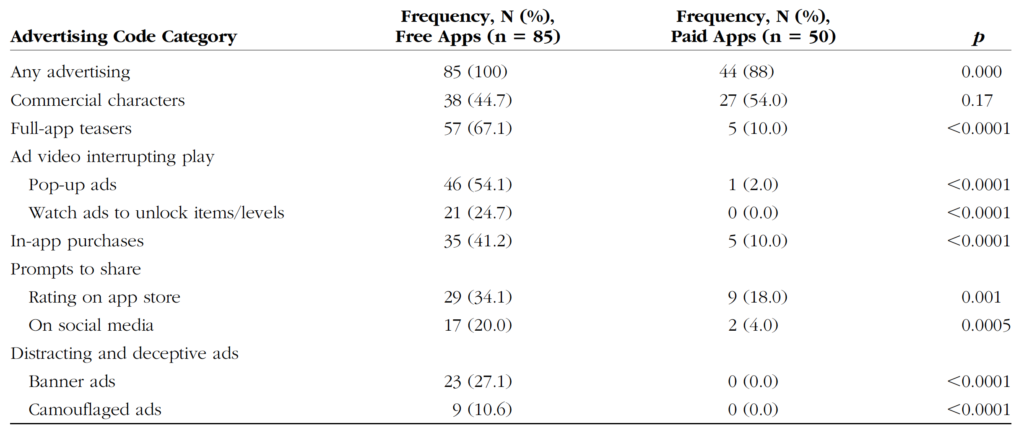
This review by Wolters Kluwer Health looked at 39 apps that target kids ages 5 and under. They reviewed the different kinds of advertising and manipulation used in the apps to encourage engagement by the young users. Researchers used Android devices and tested the most popular apps in the age category at the time.
Types of Advertising:
Commercial Characters – These are apps that are designed around marketing certain characters that your kids may already love. i.e. Daniel Tiger, Mickey Mouse, Bob the Builder, or Hello Kitty.
App Teasers – Encouragement for kids to unlock the “full version” of the app.
Ad Videos Interrupting Play – Videos that feature other apps in the marketplace by interrupting your child’s use of the current app and showing videos of gameplay.
In-App Purchases – Items, levels, or other content that your child can’t use in the app without purchasing them. These may be items that can be used in game, costumes or costume pieces or even in-game currency that can be used to purchase other things in the app.
Prompts to Share – Encouragement to share the app on social media sites or even just to rate it on the app store.
Deceptive or Distracting Ads – These ads often trick your child into thinking they are playing another level of the game. Sometimes they look like they are a part of the app your child is using and then open up an app store link when tapped.
What Parents Should Know
To get my full thoughts on this research watch the video above. Liking it and sharing with your friends would be super helpful as well. I will say here, though, that it is critical that we as parents understand how these apps are marketing to our children and help our kids understand the difference between something they are playing or learning from and an advertisement. This study also looked at the difference between ads in paid apps vs free apps and educational apps vs entertainment. None of the results are shocking but hopefully, they are a bit eye-opening for parents who allow their kids unsupervised time on screens.
This is just a brief notice to let parents know that PUBG, a battle royale game similar to Fortnite but more realistic and graphic, is free today and for a limited time on Xbox. The game usually costs $29.99 but has been marked down for the rest of the week and likely the weekend. The version for iOS and Android has been free since release.
Player Unknown’s Battleground is similar to Fortnite in that you parachute onto an island and try to be the last player standing. That is about where the similarities end, though. The graphics, while not nearly as polished, are more realistic and the death animations are geared a bit more towards adults. This news is important for parents who keep their credit card number or csv from their kids as a way to force them to ask permission to download a game. Since PUBG is free right now, this method of monitoring may not be effective since a payment won’t be necessary.
I always advise that parents know what their kids are playing on their game consoles and that you discuss with them that there is a healthy and safe way to play and that they should make those good choices. Avoiding strangers and keeping from sharing too much personal information is the best start for your multiplayer gaming safety conversation. Just remember that like Call of Duty’s Blackout, PUBG may seem like its “basically Fortnite,” but it is very different.