Tag: parents

  • You Can Finally Get a Refund for those Old Amazon Purchases Your Kids Made

    You Can Finally Get a Refund for those Old Amazon Purchases Your Kids Made

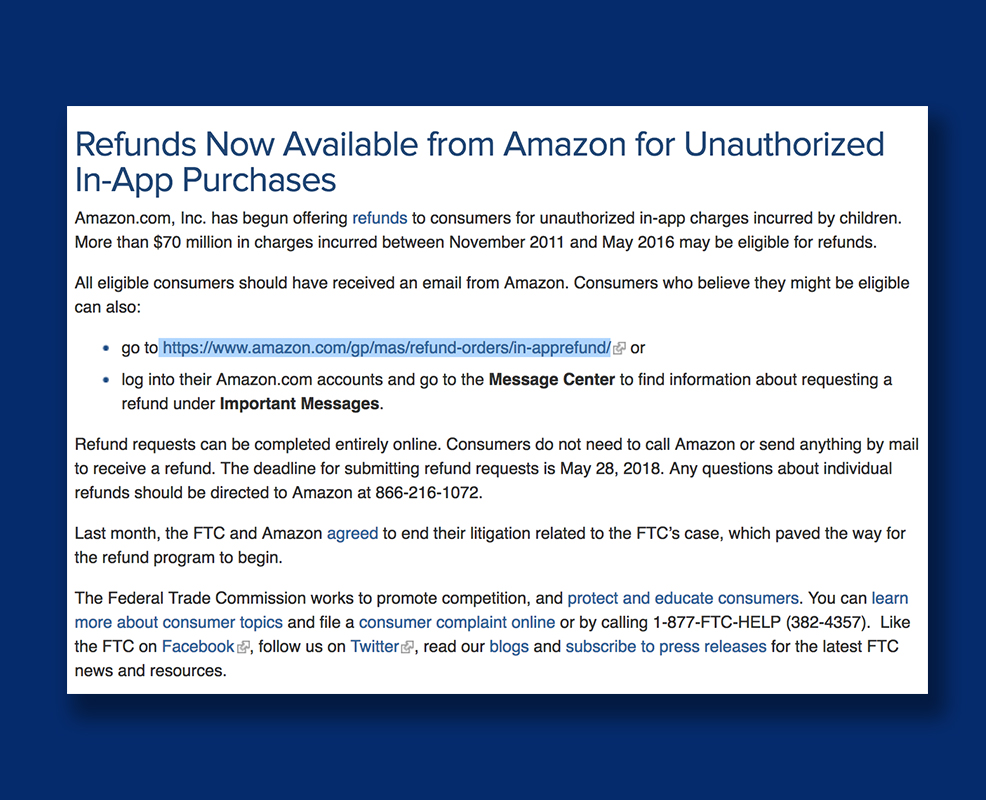
    Remember those unintended charges your kid racked up on your Amazon account? You can finally get a refund for that. Amazon announced this week, after teasing in April, that they’re opening up their refund system for those old charges. You may recall that Amazon got in to some trouble with the Federal Trade Commission for being too lax on in app purchases. This caused thousands of parents to see charges show up on their accounts that they weren’t responsible for. Their kids could buy gems, gold pieces, upgrades, or whatever else in the games they were playing with no secret pin or passcode required. At the time Amazon added the parental restrictions but were still working on a way to give out all of the refunds.

    They will be emailing users who are eligible for a refund and you can follow the steps from there. There is a one year deadline to submit for your refund and them the time is up. These refunds will cost Amazon up to $70 million dollars and are available to users who had this problem from 2011 through 2016. If you think you’re eligible but didn’t get an email you can visit https://www.amazon.com/gp/mas/refund-orders/in-apprefund/ to find out if you qualify.

    The Federal Trade Commission’s Official Statement

    What Parents Should Know

    Obviously you should get your refund if you qualify but these charges can still happen if you don’t have your settings right. You can set up purchase permissions on iTunes, Amazon, or Android’s Google Play store. You also have to set individual permissions on most of your devices. This will allow you to require passwords and pins in order to make a purchase, thus keeping you from seeing strange charges on your credit card or bank statements. I’ve made a video to help you with your Apple devices. Hopefully you can use these steps to keep from having to apply for any refunds for purchases you didn’t make yourself.

  • Instagram Rolls Out Major Updates to Direct Messaging

    Instagram Rolls Out Major Updates to Direct Messaging

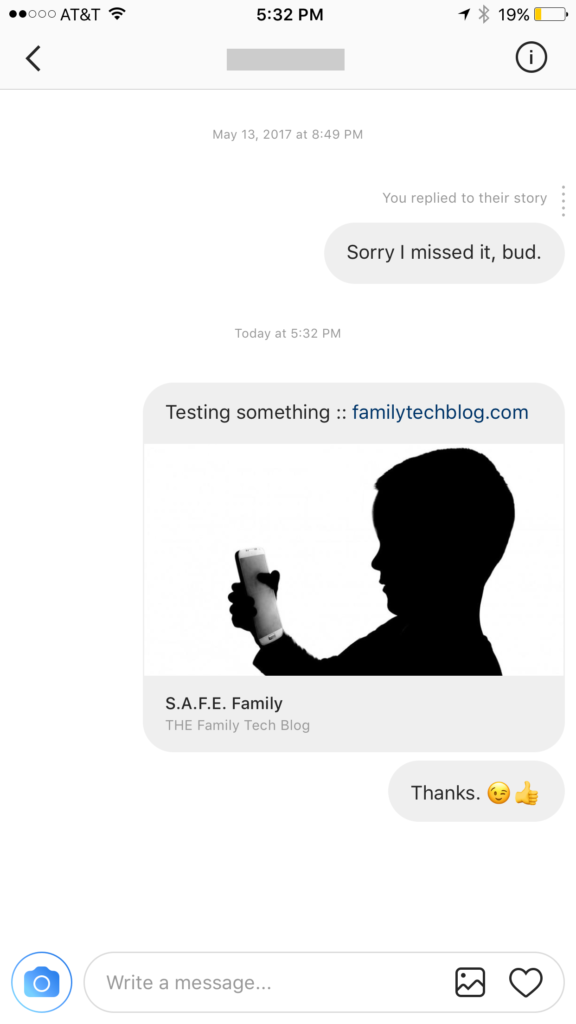
    Instagram has launched their seemingly weekly major update today with a focus on their direct messaging feature. Now it’s possible to see previews of links and to send full size images. (Not just squares.) While most of Instagram’s updates have focused on it’s Stories feature, the DM gets quite a bit of attention every now and then too. There seems to be a race between Instagram and Snapchat to develop the best private messaging option out there. Features like link previews and removing the image dimension limits will go a long way to make Instagram a serious contender for direct messages.


    Link previews look a lot like in FB Messenger.

    What Parents Should Know

    Obviously it’s important to know who your kids are talking to online. Private messages open up the possibility for kids to contact people they don’t really know very well. This can lead to full, private conversations with videos and images that are difficult for parents to monitor. There is no way to disable direct messaging in the Instagram app so if your kids are using the service they have the ability to contact people in private. These messages won’t show up on their image timeline and images won’t be stored on their phones unless they manually save them. This can result in private messaging that may cross your line of what’s appropriate.

    Links that show up in Instagram will open in the Instagram browser when clicked. This means some accountability software and filters won’t take affect. You should keep that in mind when deciding whether or not to allow them to use Instagram.

    My advice, as always, is to take whatever measures you’re most comfortable with to monitor your kids Instagram activity. The only way to monitor their private messaging is to have their login information. I show you how to log in as them on your own device in a video here. Prevention, monitoring, and conversation are the most important things you can do to keep your kids from unwanted material online.

  • Here is Everything Snapchat Added in it’s Big Huge Update

    Here is Everything Snapchat Added in it’s Big Huge Update

    Snapchat’s fastest growing demographic is young adults but it still built it’s success on the short lived selfies of High School kids. Your High School kids. Today Snapchat released a major updates that adds some very new, never before seen features. While I don’t expect these new additions to make Snapchat more of a problem. I do think its smart for parents to understand what the apps their kids use are capable of. Here’s what’s new:


    No Time Limit

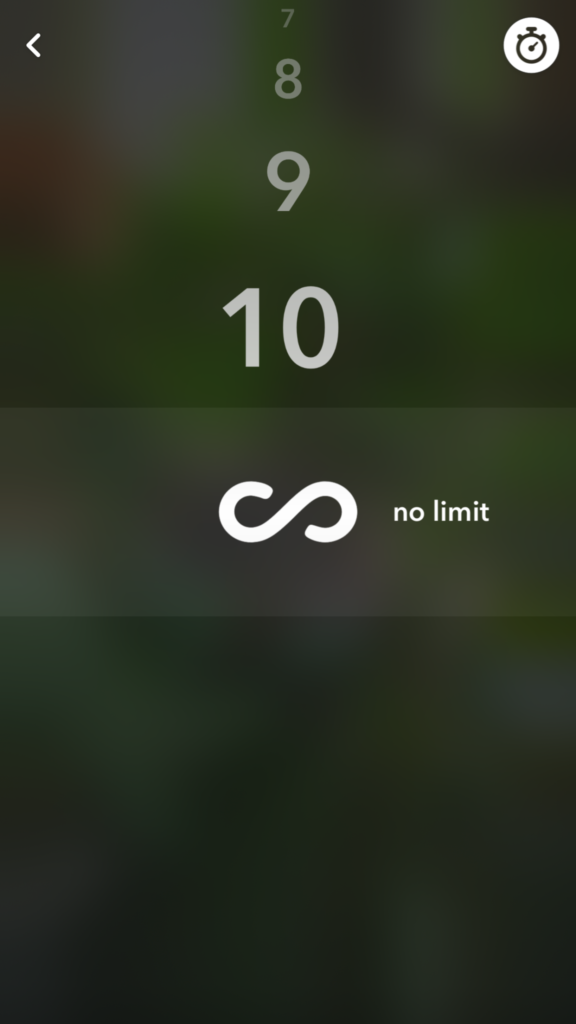
    You can now post you images without a time limit counting down until transitioning to the next photo. Videos also have a “play forever” option that will loop your videos. The “disappearing” images is what made Snapchat such a novelty at the beginning. This is a major step away from that.


    Emoji Brushes

    This is pretty much just a way to draw with emojis. Dumb? Maybe. Annoying? Definitely. Will it be used like crazy? Absolutely. You’ll be seeing emojis plastered all over snapchat images now. Enjoy!


    Magic Eraser

    This is just what it sounds like. It’s probably the coolest new feature in this update. It allows you to cut out sections of your photo and replaces the background automatically. This makes whatever you erased disappear like it was never in the photo in the first place. Features like this have been available in photo editing software but it’s the first time we’ve seen it in a social media camera.

    What Parents Should Know

    As I already mentioned these features don’t necessarily make Snapchat a more dangerous app. (It’s already on our uninstall list, mostly because of the potentially adult themed articles in the Discover section.) If you’ve been telling your teen they can’t install Snapchat this update might make it a bit more difficult. You are sure to hear “but mom, so and so has it” or “all of my friends..” just remember that while these updates are cool, there are other reasons you may not think this app is smart for your teen to have. This update doesn’t change any of that.


  • How To Control What You See on Every Social Media Timeline

    How To Control What You See on Every Social Media Timeline

    One of the most common complaints I hear from parents is that they never see the posts they want to see on their social media timelines. They will scroll through their Facebook or Instagram feed looking for an interesting post, something from family, or even their own children and instead be bombarded with articles about politics or silly memes or chain letter type posts that want you to click like and share for some reason. If your feed is crowded with this sort of chatter it makes enjoying the purpose of social media very difficult. If you’re like me, you use your social media feeds as a way to keep up with friends and family, to promote the work that you do, and to be entertained and laugh at silly internet things. Well, the algorithms designed by those who build these social media platforms are created to give you the best experience. The problem is that it’s all based on your behavior on the site or in the app. If your behavior contributes to the clutter then you’re just going to get more clutter. Here are some tips to help you sort out the mess that may be your social media feeds.

    Remember who is on what social media service.

    There are different audiences on different social media sites. The split is based on a number of factors. Age, career, and gender are the major contributors. Twitter, for instance is more popular for young professionals looking to network and build a community of like minded business people. Instagram is a whole lot of young people and young parents who got tired of the clutter in Facebook and Twitter and just enjoy sharing photos. Facebook has a very large middle aged demographic and has seen a major decrease in young users over the past several years. Snapchat is full of youngsters but is growing rapidly in the 18-25 demographic. The reasons that people choose the platform that they choose can seem pretty obvious and it’s important to keep those reasons in mind as you use social media. You aren’t going to care too much about the photos of a ton of young parents and teens if you’re a middle aged parent who’s adult kids who have no children of their own yet so you may not open an Instagram account. As soon as your 22 year old daughter and son-in-law have a baby, though, and post photos of her online. Instagram is where you’ll want to be.

    Don’t like and join every FB page or group you’re invited to.

    Facebook Pages are created for advertising and promotion. They all link to a business, blog, or something of that nature. Because of this they’ll post nonstop and any time you react to one of their posts in any way you’re telling Facebook to show you more of what they post. So, if you’re a follow of a Facebook page, say the BecauseFamily Page, for instance, and you want to see more of the great resources and articles that they share, you’ll want to interact with their posts more. If you follow a page like Silly Kittens Playing Piano (I think I made that up but it’s probably out there somewhere) that posts fifty pictures a day that you don’t really even find that funny, you’re going to see more of those photos than you see most other things. Especially if you have ever clicked the like button on any of them.

    You see, the algorithm on Facebook gives you posts from the pages and groups you’re apart of based on how often you react to those posts. When you click the like button on every kitten picture you see, you’ll eventually see almost nothing but cat pictures on your Facebook feed. Now, if that’s what you want then awesome, but if you’re trying to keep tabs on what your kids are posting online, those cats are going to get in the way. You should probably click like a lot less. That’s my next tip.

    Leave the Like Button Alone!

    The like button on Facebook or the heart icon on Instagram and Twitter is basically a little “show me more” button. This is you telling the algorithm that you enjoy that kind of content and want to keep seeing it. The problem with this is we treat the Like button as passive aggressive head nod toward the content we’re seeing. You have to understand, it’s more than a head nod. It’s a subscription. You may be seeing tons of posts that you think are stupid or posts from people you barely even know. If you are, it’s because you’ve been clicking like as if it’s the same thing as a casual grin across the room. I’m sorry to say it but it’s your own fault.

    A couple of years ago I swore off of the the like button. I decided that if a post isn’t worth a comment, I wouldn’t react at all. After a couple months of that behavior, my Facebook feed started to become enjoyable. I see the geeky stuff that I like more than I see anything else, I don’t see much annoying click bait content anymore, and my friends and family are front and center and they don’t even have to tag me in their posts. I’ll often show my wife something hilarious that has come across my Facebook feed and she’ll ask me why my feed is so awesome. I don’t click like on ANYTHING I will tell her. Now, I will add that likes on comments within a post are an exception. I’ll often click like on a reply to one of my comments. That doesn’t add to the clutter since it’s on a post I have already commented on, thus deeming it worthy of being filed with the algorithm as something I’d like to see more of.

    Lastly on this topic, it’s important to remember that nobody gets blessed, goes to heaven, or receives better medical care because of a Facebook like. That’s called click bait and it only exists to help the page that shared it get more traffic and sell more advertising. 

    Only open posts from people you want to hear more from.

    Sometimes we see a post that peaks our interest and before we know it we’ve dived head first down a rabbit hole. When you click on a post on Facebook or Twitter, the algorithm remembers it and feeds you more posts by that poster. That means the rabbit hole doesn’t end when you’ve closed the article. It will continue on your feed from now on. The most important thing when deciding what links to click on on social media is who is posting it. If you don’t want to see more from that person or poster then you shouldn’t click the link. Also, it’s important to consider the original poster, not just the person who shared it. This info can help you populate your feed with only people who’s word you trust and respect and fewer of the random and nonsensical articles that seem to be so prevalent in our social media feeds these days.

    Use the “Follow,” “Notifications,” or “See First” options. 

    A great way to make sure you don’t miss a post by someone you care about is to tell Facebook you’d like to “See if First.” You can also tell Instagram or Twitter to notify you when someone you want to follow posts something. You can watch this video to see how to set up notifications on most of your accounts.

    Take Control

    Social Media algorithms are often treated like an enemy that we struggle to fight against. Every time Twitter or Instagram or Facebook changes the way they order your news feed petitions start showing up to put it back the way it was. The truth, though, is that these algorithms are tools. It’s a form of artificial intelligence that was designed to give you more of what it thinks you want. It decides what you want based on how you act. This means that if you don’t like what you’re seeing on your timelines, you need to change what you’re doing on your social media accounts. I’ll ignore the obvious life application here and just recommend that you apply some of the above advice to how you handle your online experience. Get back to me in six months and you can thank me for how much more “well behaved” your timeline has been recently.

  • Android’s New Instant Apps Can Undermine Your Monitoring Software

    Android’s New Instant Apps Can Undermine Your Monitoring Software

    If you follow my recommendations on this site you’ve got some sort of monitoring software installed to allow you to see what your kids are doing on their devices. This is important because you can’t help you children navigate the digital world they’re growing up in if you don’t know what they’re doing online. Every now and then, though, a super cool new update comes out for our phones, computers, or tablets that will undermine the goals you have for monitoring your kid’s devices. Android’s “Instant Apps” is one such update.

    Instant apps is a great idea. It’s a really cool way to share new apps and a great way for app developers to give brief access for someone who wants to see something that’s been shared but doesn’t want to download an app to see it. Usually when you see a cool post on social media or someone sends you a link in a direct message you have to use a browser to see the mobile website version of what they’re sharing, Instant Apps makes it easier to see the what’s being shared. For example if I’m creeping Amazon and see the Blu Ray for that super cool movie we saw together and want to share it with you. I can text you a link and when you open it the product will open in the “instant” version of the Amazon app. This will provide you with a much easier and smoother transition to possibly purchasing that product. The instant app permissions won’t allow it to run in the background and will disable some features that would be available if you downloaded the full app but it’s a cool intro to software you haven’t installed yet. Cool idea, yes, but maybe not for our kids.

    What Parents Should Know

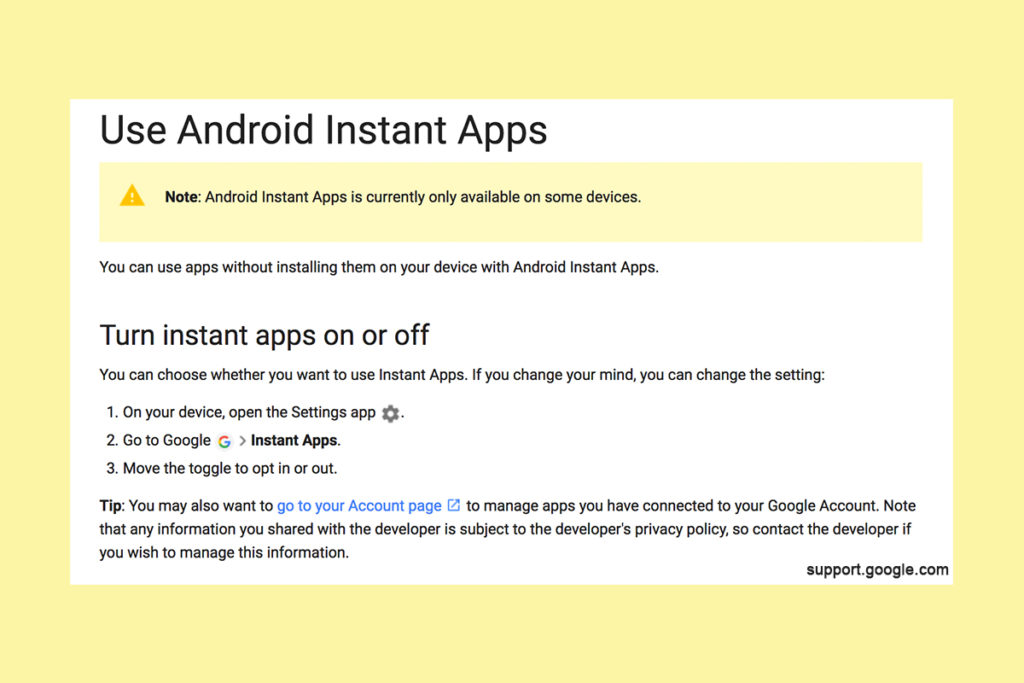
    Being able to see content from an app that isn’t even installed could be troublesome for parents who are trying to monitor their kids online activity. If you have uninstalled apps from your kids’ devices to keep them from seeing what is shared in that app you aren’t going to want them to be able to see the content in instant apps. I recommend disabling Instant Apps in on your kids’ devices if they have it. If you can’t find anything about Instant Apps in the settings of their phone or tablet then it isn’t available for their device and you don’t have to worry about it. If you do see it, follow the steps below to turn it off.


    Whether you’re using an accountability software like Accountable2You, a filter like NetNanny, or monitoring the entire device with something like Mobicip, the Instant App feature could give your child access to the very content you are trying to keep away from them. Be sure to give yourself opportunity to look over their phone or tablet whenever possible and check for the Instant App option. There aren’t very many apps developed with the feature yet but it has been opened up to most developers. More and more apps will be using Instant Apps to allow folks to share content in the near future. Turn it off now and get ahead of the game.


  • Parental Control Options for Your Kids’ Chromebook

    Parental Control Options for Your Kids’ Chromebook

    The Chromebook is unique because it isn’t really a full fledge computer. They are designed to just run a browser so you can access the internet. This makes them affordable and easy to use. Because of this the Chromebook is often the chosen computer for schools. So your child may have been assigned a Chromebook when they were enrolled in school. While they must have content controls set while they are on school property there aren’t any regulations requiring schools to keep them protected while off campus. Here are some options for how you can protect your kids while they use their Chromebooks.

    Supervised User

    UPDATE: Google has discontinued Supervised User in favor of FamilyLink.

    This is an account based system that’s built into the Chrome browser. It allows you to set filters, monitor sites visited, prevent installation of apps, turn on safesearch, and change settings. You do have to use blacklists or whitelists to block websites, there is not an automatic filter built in. I recommend using THIS LIST of blacklist sites provided by a University in France. It’s a pretty extensive set of blacklists and will take some effort to set up but if you don’t want to just set the Chromebook to only access a few domains then copy pasting sites from these lists is your best option. You can access the supervised accounts by going to chrome.google.com/manage.

    Click THIS LINK to see Google’s set up instructions for a supervised user account.

    MobiCip

    One of the only full service filter and monitoring apps for Chromebook, Mobicip offers a plugin that you can download from the Chrome app store. Mobicip will give you customizable filters, time limit controls, and usage reports and its pretty easy to set up. You just download the extension from the Chrome app store and then login. It takes you through the setup steps and lets you set your desired filter levels. Once it’s all set up you can make changes from anywhere using their web based controls dashboard. Their SUPPORT page has good How-To resources to walk you through the process.

    If you want more controls than the Supervised User option gives you then Mobicip is a pretty good choice. It’s $39.99 per year for all of the features mentioned above for up to five devices. If you are going to need to protect more than twenty devices (I’ve met families with upwards of 30) then you’ll have to get a quote for their “Enterprise” option. Mobicip is a good option and will give you quite a bit of control.

    Accountable2You

    The final option is an accountability software. This, combined, with the Supervised User Account may be all you need.  Accountability software doesn’t block content. This software will keep an eye on what’s being viewed and then red flag and report anything that it deems inappropriate. This allows you to more easily see when something questionable has been viewed. Otherwise you’ll spend time sifting through link after unrecognizable link to find something that may be naughty. You can even set up Accountable2You to send you a text message when an inappropriate site was accessed. The software works across all of your devices including Chromebook and is $6.99 per month for six devices and $9.99 per month for twenty devices. They have easy setup instructions on their SUPPORT page and have excellent customer service.

    Whether your kids got Chromebooks from you to help with schoolwork or they were school issued, it’s critical that you have some sort of parental control solution set up. I recommend using one or more of these to set up a plan to help your kids be safer online. The statistics say that only one out of every three kids who saw something inappropriate online was looking for it. The fact that you have well behaved children doesn’t apply here. The internet isn’t well behaved and we have to make the effort to keep them safe.

    This article contains affiliate links…

  • PODCAST: Should I Follow My Teen on Social Media?

    PODCAST: Should I Follow My Teen on Social Media?

    Facebook wouldn’t stop talking about augmented reality, the Hooked app is super addictive, and should you follow your kids on social media?

    HUSHATHON :: http://becausefamily.org/hush

    Social Media Links

    Facebook: http://facebook.com/4pointfamilies
    Instagram: http://instagram.com/becausefamily
    Twitter: http://twitter.com/becausefamily

    Newsletter Signup

    Ministry Updates:: http://eepurl.com/R7Btr
    Weekly Blog Posts:: http://eepurl.com/cvnhXD

    Websites

    Ministry Site:: http://becausefamily.org
    Tech Blog:: https://safe.becausefamily.org
    Michael’s Speaking Info:: http://kmichaelprince.org

    Donate and Affiliate Links

    http://BecauseFamily.org/partnership

    Music by Kevin MacLeod at http://Incompetech.com

  • Facebook Conference Gives Us a Sneak Peak at the Future of AR

    Facebook Conference Gives Us a Sneak Peak at the Future of AR

    Facebook is in the middle of their F8 developer conference in Santa Rosa, California. The leaders of the Facebook company are announcing and unpacking their newest features and offerings on the social media platforms they develop. The most major announcement from day 1 yesterday was the opening of a public development platform for the Facebook augmented reality camera. Here’s what that means.

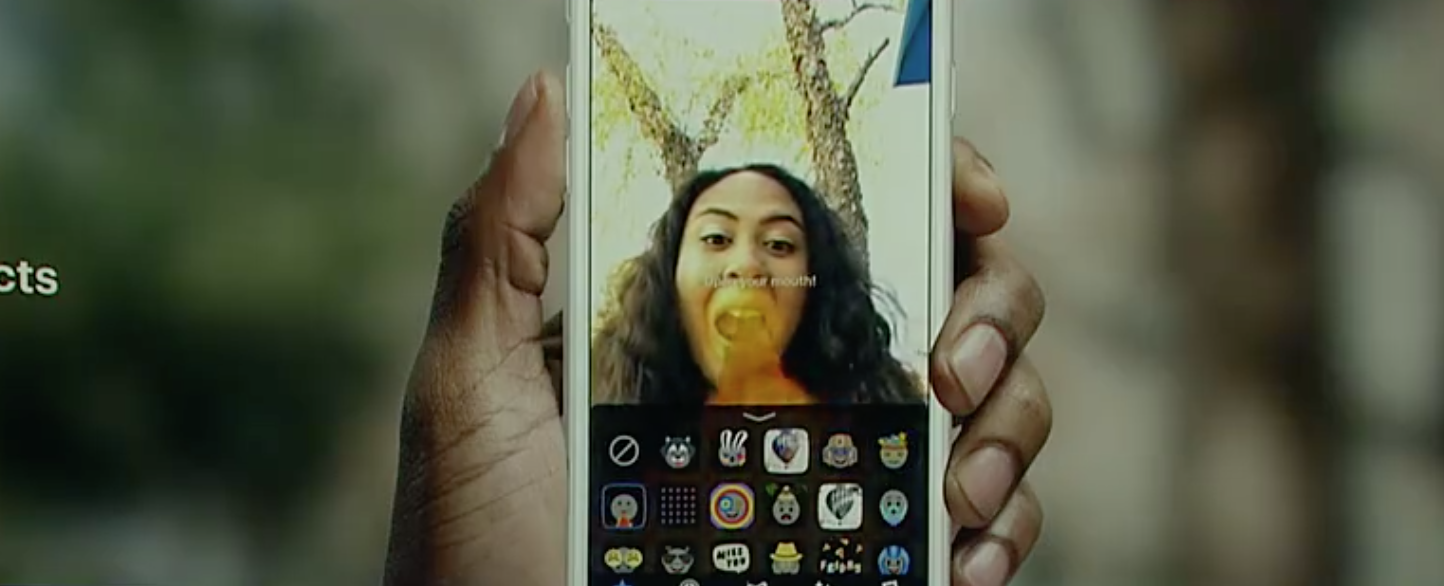
    The Facebook Camera will be the first open augmented reality platform. This means that developers will be able to make animations and images that will show up on your screen. So far, these overlays have been developed only by the company that makes the social media app itself. This means that any ideas or filter concepts must come from Facebook or Snapchat only. Any advertising has to go through the process that Facebook sends advertisers through. That will no longer be the case.

    The open platform launched in closed beta yesterday, April 18. It will still be a while before we see thousands of filter options showing up on our cameras but it is absolutely coming. You can imagine companies and programmers are chomping at the proverbial bit to start putting their projects on the Facebook camera so once it is public we will see it grow very quickly. It’s going to be a good idea for parents to keep an eye on what’s available in Facebook and Instagram’s stories camera.

    What Parents Should Know

    An open platform means developers will have the tools necessary to create their own camera overlays and animations. This will, most likely, begin with licensed developers only but it probably won’t end there. Imagine anyone in the world being able to create an overlay that you can access in your Facebook or Instagram camera. This could result in  content being available that we don’t want our children to see. Please understand that these changes aren’t happening tomorrow. This is an early warning and a reminder to always keep your eyes on what’s developing on the apps your kids use.

    Conversation with your kids is important. It’s also important to keep an eye on what your kids are installing and using. I recommend following your child or teen on social media and keeping an eye on what they are posting and sharing. With their knowledge, this will allow you to be on top of any inappropriate posts that they may share. It’s also a good idea to have their passwords so that you can see what they’ve been receiving on direct message. Eventually, you’ll want to see what their most recent AR filters have been, this will only be possible by logging in to their account. Start developing the trust now so that when there is even more reason to keep an eye on things you’ll already have a habit of doing so.


  • PODCAST: Date Night Monkey Business

    PODCAST: Date Night Monkey Business

    Amazon is changing the parental controls game, Instagram has 200 mil users, and MONKEY is a hotbed for predators.

    FAMILY TECH WEEKLY EPISODE 3

    Social Media Links

    Facebook: http://facebook.com/4pointfamilies

    Instagram: http://instagram.com/becausefamily

    Twitter: http://twitter.com/becausefamily

    Newsletter Signup

    Ministry Updates:: http://eepurl.com/R7Btr

    Weekly Blog Posts:: http://eepurl.com/cvnhXD

    Websites

    Ministry Site:: http://becausefamily.org

    Tech Blog:: https://safe.becausefamily.org

    Michael’s Speaking Info:: http://kmichaelprince.org

    Donate and Affiliate Links

    http://BecauseFamily.org/partnership

    Music by incompetech.com

  • Everyone You Know Uses Instagram Stories

    Everyone You Know Uses Instagram Stories

    There are those who made fun of Instagram for copying the Snapchat stories feature. Some of us saw it as a step towards saving Instagram from going the way of MySpace. Today, they’ve announced that the stories feature has 200 million daily users. That’s 40 million more than Snapchat announced this winter when they took their company public. To celebrate this momentous occasion they’ve added a few more features that Snapchat has had for a while. You can now add more stickers to your stories and even pin them to something in your video so they’ll move with you. They’ve also included Geostickers for several new cities.

    These stickers, no matter what social media platform they’re on, are causing a term to enter the conversation that may have some parents scratching their heads. AR. AR stands for augmented reality which is exactly what it sounds like. Using your camera, these apps view the real world and then change it in whatever way you choose. Whether it’s a dog mask that pants when you open your mouth or stickers of bunny ears to celebrate easter, AR allows you to apply animation or illustrations to your images and videos. This is a popular feature that folks have been using for a while and it’s now been spotted by advertisers as a major opportunity for promotions. That’s why you’ll see masks featuring the latest movie release or a filter that has the logo of a make up product or beverage in the corner. AR is the new Television commercial but people are actually paying attention to it. Instagram’s celebration of these numbers with more AR features is guaranteed to bring in more users and more advertisers.


    What Parents Should Know

    Your kids and teens love nothing more than making silly faces in their selfies and sharing them with their friends. It’s good fun and usually not a big deal. Obviously advertising is everywhere and it was only a matter of time (it’s already been happening for a while) until marketing companies caught on that this was the best way to gain access to young people. I would expect more and more advertisers to jump on this bandwagon in the near future. The thing for parents to keep in mind is that these social media options allow marketers to identify their niche audience more easily and reach them more frequently. They can target age groups, locations, and even specific likes and dislikes to cater their marketing for that audience. 

    AR is just where entertainment is right now for our young people. Advertisers have always looked to target them in the cheapest and most direct way possible. My advice is simply to be aware of the amount of time your kid is spending on social media. There are always dangers that we want to keep them from but, while I wouldn’t call it dangerous, the constant barrage of advertising can become worrisome for some kids. My strongest advice is for you to get an account on the social media services your children use and get to know them a little bit. At worst you’ll have to see some dumb ads and lots of dog faces, at best you could have something in common to talk with your teenager about.