Tag: parents

  • Update the YouTube Kids App, You’ll Be Glad You Did

    Update the YouTube Kids App, You’ll Be Glad You Did

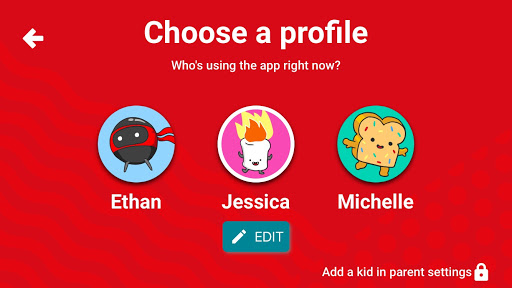
    We are big fans of YouTube Kids. While it isn’t foolproof, it is the best option available right now to let your kids enjoy their favorite videos on YouTube.The newest version makes it even more useful for parents. This update allows you to add profiles with a birthdate and a new avatar to ensure your kids are getting content appropriate for their age and interests. This will be super helpful for parents like us, who have multiple kids using one device. My recommendation is that you update your YouTube Kids apps as soon as possible and if you haven’t used it yet, what are you waiting for? Go download it.

    Stay tuned for a video review of the YouTube Kids update soon.


  • Snap INC and NBC are Working on Snapchat Scripted Shows

    Snap INC and NBC are Working on Snapchat Scripted Shows

    While our TVs are getting more and more similar to our computers and our Computers are being used to watch TV, Snapchat is taking steps to make their Social Media platform another major purveyor of original video content. Snap INC announced today that they’re joining with NBC to turn your phone into another TV. Since everyone’s eyes are always on their phones, NBC sees an opportunity to put their content on what people are already viewing.

    Snap Inc, the company that owns Snapchat is launching its first scripted series with NBCUniversal and the Duplass Brothers’ Production company, Donut. Not only are they working on scripted shows, they’re also building a studio to be ready to film content made to fit the vertical format of a Snapchat story. 

    What Parents Should Know

    There was a time when we were super careful what we allowed our kids to watch. If the shows are on the Social Media apps they are already using for hours every day, it’s going to get more difficult to keep tabs on what content they’re watching. Moms and dads should be aware of what shows are being produced for Snapchat, Musical.ly, Facebook, YouTube, and any other video streaming service.

    The Duplass’ brothers are known for producing more mature content so the fact that their company is working on this shows provides evidence that Snap INC is trying to appeal to a more adult audience. This could pose a problem for those with younger teens who use Snapchat. My advice is to keep your eyes on the shows that are being released and talk to your kids about what they’re watching on their phones. Screen or WiFi/Data bedtimes are a good idea, as are time limits. Whether you use something like Circle or GoogleWiFi to set your bedtimes or use the more manual, “phones in the basket” approach, you should be aware of how much time is spent watching shows, and what shows are being watched.

  • Amazon for Teens will Teach Your Kids to Shop with Them

    Amazon for Teens will Teach Your Kids to Shop with Them

    Amazon has launched a new service that will allow you to set up a dedicated login for your teenager so that they can shop on the Amazon app. The goal is, first of all, to give parents a way to allow their kids more freedom to shop for things they’d like online while providing some realistic boundaries. It’s most likely, also, a great way to get your kid used to just buying whatever they need on the Amazon app.

    Amazon for Teens will allow your children to shop on the Amazon app and make purchases for themselves. You have the option to allow them to shop for whatever they’d like with a budget that you set or ask permission for every item they select to buy. If you choose the budget option you will have access to their purchase history and be able to cancel a purchase or request a return. So far there is no way to have teens use their own money within your family account. Currently, all shopping is done with a shared credit/bank card.

    The service is available to set up for your kids’ ages 13-17. They’ll be able to select whatever items they’d like to purchase and attach a note for you. You will be notified when they’ve made a purchase and you have 30 minutes to cancel the order if you don’t approve. Of course, if you’ve set it up to ask permission you’ll be able to approve or deny the order before it’s completed. Also, the default privacy settings will hide parent’s purchase history and credit card information.

    What Parents Should Know

    Amazon.com/teen is a way for Amazon to introduce your teen to their shopping app. For some, this may seem like a great way to teach your kids about finances and shopping. For others, there’s an obvious stench of commercialism and consumerism. If you’re so inclined, Amazon Prime for Teens seems to have a pretty good handle on what parents need to feel confident that their teens can shop on their own. In fact, they claim they used focus groups of parents in order to help them create the service.

    I say that if you’re going to use this service, be sure to keep the default settings to not allow your credit card and purchase info to be shared. I also think it will be even better when you’re able to set an Amazon Prime exclusive allowance for them to use with this service. Boundaries are the key to allowing your teenager to have independence while keeping them safe from their inability to make quality and safe decisions. Amazon for Teens could provide the exact boundaries you’re looking for to keep from having to order those new boots for the coming fall weather while making sure she orders the ones that are on sale.

  • Snapchat Brings the “Real World” to Your Story with Context Cards

    Snapchat Brings the “Real World” to Your Story with Context Cards

    Snapchat is hoping to make your Snaps and public story even more beneficial to advertisers. This is becoming more and more possible as they continue to update. The recent addition of “Context Cards” may be the feature that sets Snapchat apart as a social media advertising. Context Cards is an informational feed that highlights content from Snapchat’s partners. This content will include information like phone numbers, menus, maps, and ratings.

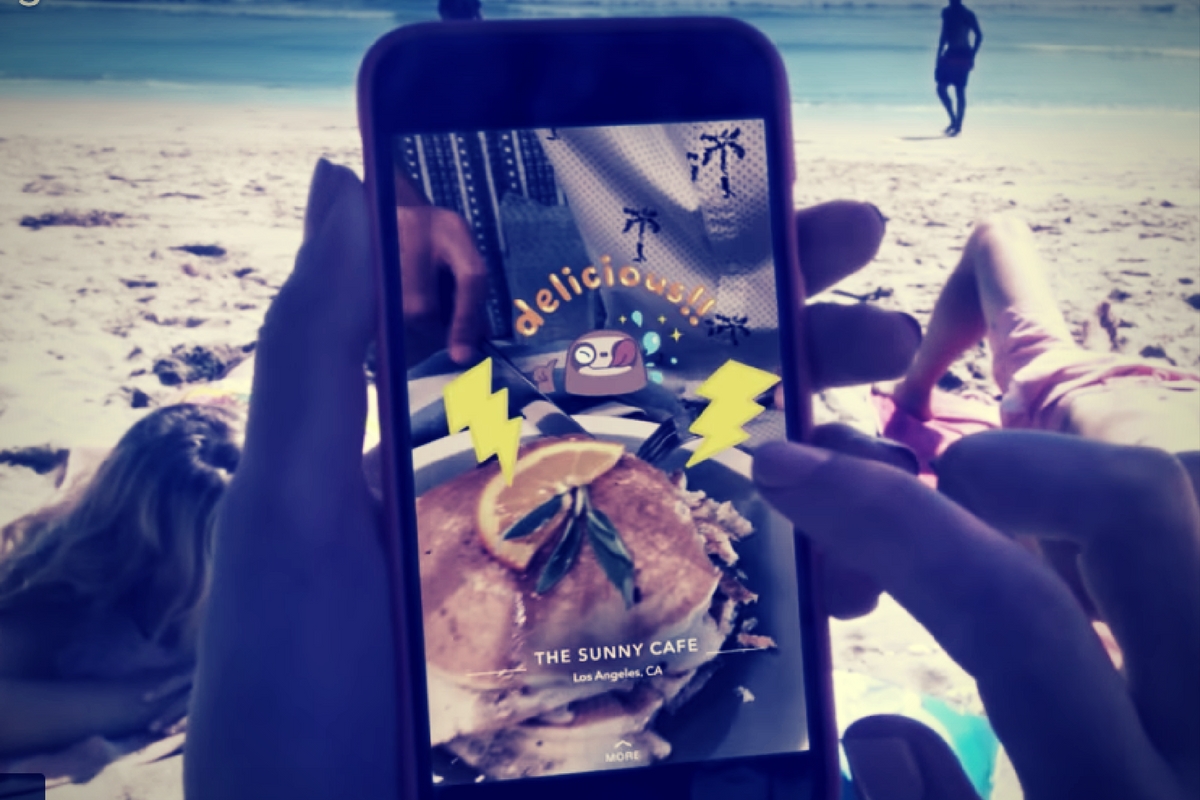
    Context Cards display information about the Snap you’re viewing – powered by amazing content from our partners like TripAdvisor, Foursquare, Michelin, and goop. – SnapInc.com

    Here’s how it will work. You will see a Snap shared to a public story and it will say “More” at the bottom. When you swipe up you’ll see the timeline style list of different information cards. Continue swiping up to see more or tap on the information to learn more or perform an action. You can hail an Uber or Lyft ride, make a call, view a menu, or see reviews or a website. The goal is to take you to the information you need without leaving Snapchat, as well as to encourage advertisers to build more ads for Snapchat Stories.

    What Parents Should Know

    These new features in Snapchat are meant to encourage more real-world engagement. You probably noticed the video featured college kids going all over town joining their friends at their current party location. They use Context Cards to know exactly where their friends are and what they’re doing there and even how to get there themselves. The problem for parents is that your kids aren’t members of the age group that is featured in this video. Decisions made to strengthen a company’s advertising abilities can often introduce more safety or privacy concerns for our younger users.

    I recommend encouraging your kids’ to have location information turned off for Snapchat. The especially should turn their SnapMap to ghost mode. Young users should always set location and sharing settings to as private as possible. Leaning towards privacy is going to render Context Cards basically useless on Snapchat. This may annoy your kids. (It may not because it may just look like annoying advertising.) If it does annoy your kids I recommend you stand your ground and still encourage them to keep their online presence as private as possible.

  • Families Receive Threatening Messages after Iowa School Network Hacked

    Families Receive Threatening Messages after Iowa School Network Hacked

    A school district in Iowa canceled a day of classes after a network breach allowed hackers to send hateful messages to families from the public school. The messages contained personal details about students and threatened to do harm to them and their families. Apparently, the threats weren’t credible except to stir up fear and make a show of their ability to access the information. There is a theory that this could be an attempt to threaten people as to warn the FBI to stop investigating them.

    The group is called “thedarkoverlord” and they’ve been responsible for recent info leaks and hacks of organizations like Netflix and Larson Studios. They have been under investigation for these hacks and could have performed this recent “attack” as a warning. They even tweeted out links to the contact information of the students from the school district, stating that predators can now use that information to plan their targets.

    With the student directory from JCSD we released, any child predator can now easily acquire new targets and even plan based on grade level.

    — thedarkoverlord (@tdo_hackers) October 5, 2017

    What Parents Should Know

    Network security is becoming a more and more serious issue. We live in a world where all of your personal information is available in multiple locations online. If you, as a digital citizen, aren’t thinking about important tools like passwords and usernames your information can end up in dangerous hands. The best advice I can give you is to ask your school district if they have someone responsible for the security of their network and if so if they can keep something like what happened in Iowa from happening at your school. Then make sure you follow some simple network security rules yourself. Use different passwords for different sites. Use passwords or passphrases that, while easy for you to remember, aren’t easy to guess, and don’t ever use default passwords on websites, routers, modems, or computers. 

  • Snapchat News: Are You Being Recorded?

    Snapchat News: Are You Being Recorded?

    Snapchat has been busy with updates lately. The latest numbers show their user numbers barely rising when compared to Social Media giants like Facebook and Instagram. Some of these features are just to lure more users and some are to increase revenue. Either way, you should know what they’ve added.

    Sky and AR Filters

    Snap Inc. is working very hard to highlight the creative possibilities with their Snapchat camera. The sky filter allows you to change what the sky looks like. This feature shows off the ability for the Snapchat camera to detect what’s being photographed and then apply effects. You can turn a clear sky cloudy, a day sky to night, or just add a rainbow. Augmented reality filters were updated last week and you can now place your bitmoji (an animated character that you make look like you) onto different spaces in your photo or video and record different animations.

    iOS Update Allows Capturing of Your “Private” Snaps

    iOS 11 was released last week and it includes the ability to record your screen by simply tapping a button in your control panel. This has been cause for concern for Snapchat users. Especially for those who use Snapchat for very private or personal conversations. As of the publishing of this article, Snapchat currently has no way to alert you that what you’re sending or even your live chat is being recorded. This means that as our kids are chatting with their friends, those friends can record their messages and then post them later. This could be a pretty big problem. It is likely that Snap Inc. will eventually add the ability to be notified when someone is screen recording your Snaps. You’ll see an article about it here, for sure, when that happens.

    Ads will Open New Games, Videos, and Interactive Ads

    Snapchat also announced a partnership with content creators who will be providing new ways for Snapchat users to experience ads. The new format for ads will include videos, interactive ads, and built-in games. Their goal is to cause users to interact more with advertising in Snapchat and lure more marketers to the platform. 

    What Parents Should Know

    Snapchat continues to be a popular social media platform for teens and preteens. Internet Safety experts show concern about Snapchat because of its Discover page, private messaging and video messaging, and disappearing photos and videos. It is important to stay informed as to what the app is capable of when they release updates. Hopefully, this information can help you make a quality decision on what to do with your teen’s Snapchat account.

  • “Anonymous” Polling Apps Your Kids ARE Using

    “Anonymous” Polling Apps Your Kids ARE Using

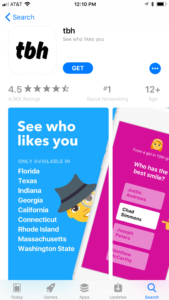
    I wrote about Sarahah and even discussed it on our podcast a while back but there are competitors for the anonymous messaging app now and they’re climbing the App Store charts. Polly and TBH (To Be Honest) are taking the social media category by storm. These apps are made to allow people to communicate with each other anonymously and share their deepest secrets. They encourage downloads with phrases like “Learn who likes you.” or “What do your friends really think?” Are these apps harmless or is this a disaster waiting to happen?

    Polly

    Polly is a polling app that allows you to create a link to questions you want your friends to answer and share a link in Snapchat. Polls are recommended at random and range from “What’s my spirit animal?” to “What is something I’m really good at?” Or you can create your own. One of the samples on the app store images is the question “What am I to you?” with answers like “Friend, Enemy, and Crush.” Polly boasts the following features:

    • Create a Polly lightning fast
    • Add your Bitmoji to be more stylish
    • Customize your Polly’s look & feel to reflect your vibe
    • Just 1-tap to add it to your Snapchat Story
    • Get notified when your friends vote
    • Track the results to all of your Pollys in one place
    • Share a screenshot of the results with your friends

    Polly is rated for ages 4 plus. 


    TBH

    TBH, which stands for To Be Honest, calls the app a combination of ask.fm and Sarahah. TBH allows you to ask people questions about you and allow them to answer anonymously. You can add yourself and your friends as answers to the questions so you can be voted on by your friends. The testimonials in the app highlight the fact that users feel good about themselves because they’ve been picked in the polls they’ve set up.

    From the app store description: “That tbh app makes me feel so good about myself”
    “tbh is really having a positive impact on people”

    TBH is only available in ten states because you have to choose your school from a list when you sign up for the app. This means you’re polling the people who attend school with you. The app basically sets up a network of high school and college kids who attend the same school and allows them to secretly say what they really feel about each other.

    What Parents Should Know

    The question stands, what do we, as parents, think about our teens posting anonymous messages about each other. Is it a good idea for our kids to be revealing their deepest thoughts about their friends. Sometimes, yes, it could lead to kids starting or strengthening their friendships, but how likely is that to be the norm? Remember what it was like when you were a teenager. Remember the jealousy and shallowness of your feelings toward the other kids around you? In a world ruled by hormones and feelings, it’s tough for me to see anonymous messages, question and answer sessions, and polls as a good way for our kids to communicate. Maybe we should be encouraging them to make eye contact and speak to their friends and potential romantic interests in a way that puts everything on the line.

    Your kids need to understand two things. First of all, nothing is ever truly anonymous online. The sense of secrecy in these apps is really a facade and someone knows who they are. Secondly, the words they say and the votes they cast may seem fun and silly but they can have very real consequences. The teenage psyche can be fragile. Putting someone’s emotions out there waiting to be crushed with too many negative votes in an anonymous poll seems, at least to me, to be a very dangerous proposition. I’m going to recommend uninstalling these apps if you see them. Disagree? Leave me a comment. I’d love to hear why.

  • How Your Teen Uses Social Media Differently Than You

    How Your Teen Uses Social Media Differently Than You

    I’ll never forget when this mother came to me and asked me why her kid is using all of these different social media sites. “I can barely keep up with Facebook. How does she do it?” The answer is simple. Your kids use social media in a much different way than you do. All of their friends are there and they all use it in the same way. While you can’t be (and shouldn’t be) expected to change how you use your social accounts in order to mimic your teen; insight into how they see the social media world can go a long way to help you keep them safe.

    They Use Each Platform Differently

    Believe it or not, there is a different way to use each social media platform. Snapchat has a purpose, as does Instagram, and even Facebook. Your teenager understands these differences and most likely uses each one accordingly. Snapchat exists to stay constantly connected with your friends. They keep up their streaks (consistent daily messages) and share the details of their lives on the private posts they send their friends. They then post the more broad and appealing snaps publicly for all to see on their story. Their Instagram is all about public posting and putting their best foot forward. (Whatever that may mean.) Facebook, if they’re there at all is for sharing the stuff they want the authority to see. It’s considered the most public of their social media connections and they use it as such. While you may take a photo on Instagram and connect it to your Facebook, Twitter, and LinkedIn, your teens don’t do that much. Each platform has its purpose and is used in a way that it’s meant to be used.

    They Use It  to Meet New People

    Social media has long been a great way for some of us to keep in contact or make contact with old friends. When we meet people in person we quickly go follow them on their social media profiles. The opposite is often true for your teenager. Young people use social media to find and begin relationships with new people. There are apps dedicated to this activity, some of which will even let you randomly connect and video chat or send private messages to these strangers. There are no such things as strangers for your teens when it comes to their online activities. People on social media are potential new friends to them. It could be a sense of anonymity or security that comes from being online instead of face to face that causes this attitude but either way your teenagers are meeting new people on social media all the time.

    They Self Edit

    I think I used the phrase “best foot forward” earlier and that’s the truth. While some of us may air our dirty laundry or share prayer requests or complaints about what’s happening in life on social media most teenagers don’t behave that way. They prefer to put forward the best version of themselves, even if it is over filtered and made up. The masks and filters available on the cameras in their favorite social media apps give them the ability to doctor up their photos in such a way that makes them seem cuter, or thinner, or smoother complected. They write their descriptions to portray the same image. They’ll do their best to come up with the most clever caption for their photo or they’ll use the emoji that is the most popular and interesting to get the reaction that they want. The most common practice is deleting or archiving posts that don’t get enough likes. Not only do they edit themselves before they post, they’ll edit their entire account by only allowing posts with the most likes and comments to continue to exist. Young people use social media to portray the version of themselves they want everyone to think is truly them. This is probably one of the main reasons they live on social media.

    They Live There

    You probably remember when you started using Facebook or Instagram. You can probably go back in your photo archives and find the first few pictures you took with a Snapchat style filter or mask. For most of us, social media is something that we’ve added to our lives and we use it to document and share much of what we do in our lives. For your teen, though, the realities can often become blurred. Many teenagers live on or through their social media accounts. Since the version of themselves they’re showcasing on social media is the filtered and edited version, teens often prefer to experience that life to the one they live offline. When I speak to teens, I always remind them that their online lives and offline lives are one in the same but they rarely put that together on their own. Any thing that happens to them MUST be shared. Many times they’ll even make decisions about real life based on what it will look like when they share it online. They aren’t like us. We’re talking about digital natives, the world they live in is a gray area between what’s done on the internet and what is done every day in real life.

    What Parents Should Know

    There are many ways that teens use social media differently than their parents. These are just a few examples but they should be eye opening ones. The only way to help our kids understand the blurred vision they can often have is to gently advise them as to what is healthier. Have conversations with them about what they could do instead of worrying so much about how they represent themselves online. Help your kids build confidence by using your own words and actions to show them how much value they have. The generation of teenagers that are growing up today have a confusing road ahead of them and moms and dads (or aunts uncles grandmas and grampas) are the only ones who can help them unravel the confusing path they have to travel.

  • Family Safe Eclipse Coverage

    Family Safe Eclipse Coverage

    Everyone has an idea of how you should safely view today’s eclipse. Use the glasses, don’t use the glasses, use a pinhole projector (we’ve made ours) watch live coverage. However you want to view the eclipse in person, you need to know a few things before choosing which live stream coverage you’re wanting to use. For some reason, those who cover events like the eclipse aren’t always scientists or educators and they may give dumb, or even dangerous advice. They might even have non-age appropriate language or other content in their videos, coverage, or advertising. Here are a few of the channels and videos that we recommend so that you can learn about and enjoy live coverage of today’s total eclipse.

    Live Feed

    NASA: 

    I’m only listing this one option. They have a pre-show with more science facts than you can handle and then live coverage from multiple parts of the country. You know the information and advice will be good because these are some of our country’s absolute best scientists. Enjoy!

    Education:

    National Geographic: https://youtu.be/cxrLRbkOwKs

    Some great educational videos about the eclipse and other science facts. National Geographic is a trusted source for nature and science information and education.

    Sci Show Kids: https://www.youtube.com/channel/UCRFIPG2u1DxKLNuE3y2SjHA

    Sci Show Kids is a great way to teach your kids any scientific information. They have some very good videos about today’s eclipse.

    Sci Show Space: https://www.youtube.com/user/scishowspace/search?query=eclipse

    Sci Show Space has great scientific learning videos as well and is perfect for those who are a bit older. The link above is to a search for the eclipse videos on their channel.


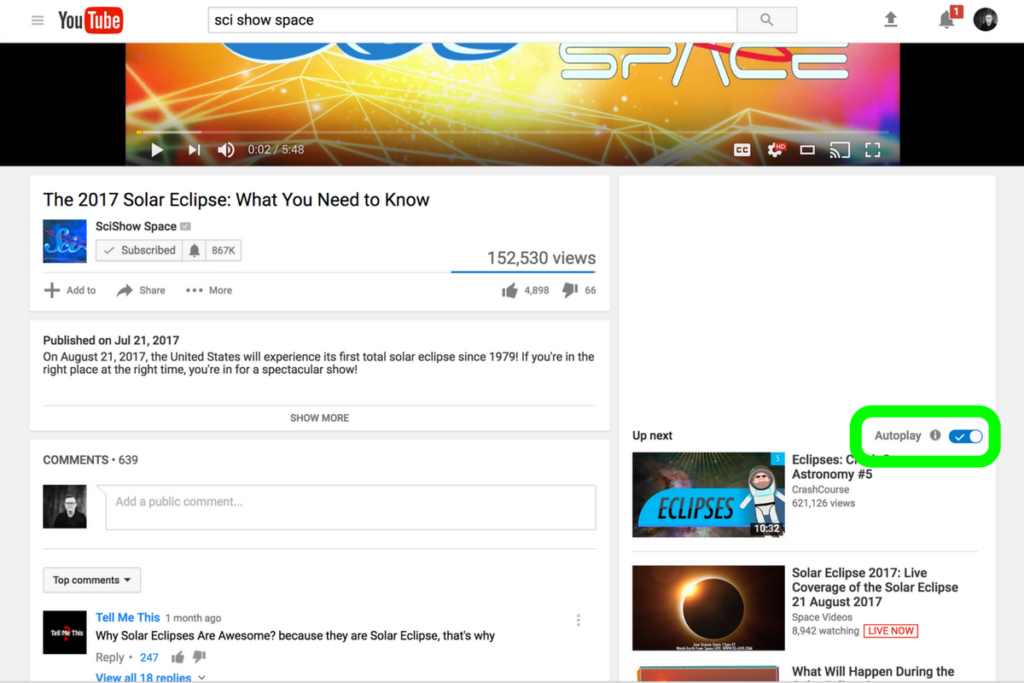
    Be smart about what videos you show your kids and whether or not you allow follow-up videos to autoplay. Turn autoplay off to avoid accidentally exposing them to content you didn’t expect and aren’t ready for them to see. The eclipse is a great opportunity to teach your children some science facts but you have to be wise with what tools you use. Hopefully, the resources listed in this article will give you an idea of where to start. Be safe, and have fun.

  • The S.A.F.E. Approach to Raising Digital Natives

    The S.A.F.E. Approach to Raising Digital Natives

    The globalization of our world has led to so many benefits for our children. Endless information at their fingertips, education can be more exciting and entertaining, and distant family and friends are only a few screen taps away. With every benefit, however, comes a new challenge. Adult content, cyberbullying, sexting, and access to strangers and predators are changing statistics in our world and not for the better. Physiologists are calling our kids digital natives. They will never know a world that isn’t ruled by the screen, the like button, the selfie, and the Google search. It can seem like such a scary world but there are ways to keep our kids safe. We, as parents, just have to take the initiative to learn and apply a strategy. We at BecauseFamily.org call that strategy S.A.F.E.

    S.A.F.E. stands for Setup, Accountability, Filtering, and Education. It should be an easy way to remember the steps you must take to give your kids access to the technology that can enhance their lives while still setting boundaries that will keep them from the dangers of being always connected to the entire world. Let’s unpack the S.A.F.E. strategy.

    Setup

    The developers of your computer, tablet, and smartphone know that you need some sort of way to keep your kids safe while they use their device. Because of this, almost every device on the market now has some sort of Parental Controls built into the operating system. This means that parents should be able to implement some sort of safety strategy on their devices without spending any money or downloading any extra software.

    There are some exceptions, for instance, Android phones didn’t get built in parental controls until the 7.1 version of the operating system and Windows didn’t get it right until Windows 8. My advice is to find out what operating system your device is running and do a google search for parental controls on that OS. Once you’ve found what’s available, set them up immediately. This will give you, while basic, some protections on the tech that your children use.

    Accountability

    The easiest way to explain the benefit of accountability software is by describing a high-security building. The alarm is set, the doors and windows are closed, locked and break proof. There is even a super high tech laser grid that will set off the alarm if you cross its path. There are still, however, cameras installed. The cameras show you what went on when the rest of the security breaks down. Accountability software is the security camera of your internet safety plan. Accountability software doesn’t block content, it reports inappropriate websites to a pre-determined accountability “partner” through a text or email. This allows you to see what has gone on if something unsavory has been accessed on a computer or other device under your care. When you’ve seen what was found you will be able to have conversations with those you’re holding accountable and take the necessary actions to keep that kind of “breach in security” from happening again.

    Filtering

    Web filters DO block content. The idea is to let the good things in the internet pass through while filtering out the bad. There are three levels of filtering available on most devices. The first is the built in filters, these are usually pretty basic with an on off switch and not much customizability.

    Secondly is the option to purchase and download third party software that will block content. These options usually give you a bit more control and let you set filter levels by age, ratings, or content type and keywords.

    Third, you have your whitelist and blacklist settings. Most built in filters have this option but it takes your filter to the next level. Putting a website link in your black list will make it inaccessible on the device that the filter is set up on. This is useful if a site doesn’t necessarily have adult or dangerous content on it but you don’t want your kid or teen visiting the site. For instance, they watch too much YouTube and got bad grades. You can just blacklist the YouTube website on their devices and watch the studying commence.

    Whitelisting is the opposite. This allows you to either give a free pass to sites that have been blocked previously by your filter or some filters let you set up a browser to only view websites on the whitelist. I use this for my older kids to use my laptop. They only use three or four websites so that’s all that’s on the whitelist. The rest of the internet is completely closed to them. Filters are the initial protection phase of internet safety. It’s your first line of defense and should be the second step you take…the first is education.

    Education

    This phase really has two parts to it: research and conversation. Parents should give time every day to researching some of the latest information pertaining to internet safety. One good way to do this is the tech blog that I write found at safe.BecauseFamily.org. This site has daily tech news, up to date tutorials, and even a podcast recapping the week’s family relevant technology stories. I also recommend doing a regular Google search for a “dangerous app list.” You’ll often find some of the accountability and filtering resources have put together lists to help parents identify misleading or dangerous apps.

    Conversation is the key to this entire plan. If you aren’t transparent with your kids or teens about your plan for internet safety it will not work. I never recommend sneaking around to monitor your kids’ internet activity. In my experience, you’re much better off having them on your team. Discuss healthy tech habits with your kids and let them help you work through your plan and consequences for breaking the boundaries you’ve set up.

    Finally, remember that this plan is fluid. It’s going to work if you put effort into it but things do change. It’s critical that you stay informed on what’s going on in the technology world. When I do workshops to help families with these tech topics the questions are the most relevant and interesting part of the meetings. I recommend looking up our website and shooting us an email if you have any questions. Definitely, keep an eye on our blog at safe.BecauseFamily.org and learn all you can about the digital world your kids are growing up in. It can be hard work and seem overwhelming but there is no task that will bring more positive change.

    Bio

    K. Michael Prince is a husband, father of 4, blogger, speaker, author, and podcaster. He wrote “What’s in Your Pocket? A parents guide to protecting your children online.” and is the lead editor for a family tech blog (safe.BecauseFamily.org.) He is the director of BecauseFamily, a non-profit that works to empower and equip parents to be the first influence in their kids lives and train parents on raising digital natives.

    To learn more about how to host a workshop (in person or skype) at your home, church, or organization, contact us using the info below.

    Email: BecauseFamily@gmail.com

    Or go online to BecauseFamily.org