Tag: parents

  • This Week So Far: Social Media News

    This Week So Far: Social Media News

    Youtube want’s 10,000 people making sure their videos are safe.

    YouTube has been blasted recently for allowing inappropriate videos onto their kids app and allowing abusive comments on videos featuring children. They responded by shutting down some abusive channels and working harder to fix their algorithms that identify videos as safe for kids. Their latest change is going to increase the manpower involved in curating kid-safe content.

    YouTube claims that they are aiming at 10,000 new employees whose job it will be to strengthen their algorithms, enforce reviewing policies, watch and remove flagged videos, and respond to concerned users about content. This increase in manpower should be a step towards a safer YouTube but is it too late?

    Several companies have already pulled their advertising from YouTube stating that the platform needs to fix their content policies. YouTube responded fast once their bottom line was affected. This is good for parents since more people responding to problems should keep some of the worst video content off of YouTube.

    You can save your Instagram Stories posts.

    Instagram Stories is in the news again and this time they’re making it permanent. Until now your Story videos and photos lasted 24 hours and then disappeared. Instagram’s latest update now gives you the option to turn on archiving for Stories. Once turned on the archiving feature will save your Story videos and photos alongside the ones you’ve archived from your main Instagram posts.

    Archiving Stories can be a good tool for parents to use to keep their eyes on what their kids have been uploading to Instagram. Have your kid turn on this feature. If you are logged into their account on your phone you can turn the feature on yourself and see what they have shared even if you don’t check every day.

    What Parents Should Know

    With the release of the Facebook Messenger Kids app, YouTube trying to make videos safer, and Instagram making videos and photos more permanent, we are seeing some movement towards a safer social media experience. Still, the dangers exist and we have to be vigilant as parents to know was happening and what our kids are doing on social media. Hopefully, these updates keep you in the loop and help you make quality decisions for your family.

  • Parent Guide: StarWars Battlefront 2 (Story Mode)

    Parent Guide: StarWars Battlefront 2 (Story Mode)

    StarWars Battlefront 2 S.A.F.E. Rating

    Violence: 3 out of 5
    Language: 4 out of 5
    Sexual Content: 5 out of 5
    Positive Message: 4 out of 5

    Total: 16 out of 20 = Older Kid Friendly!

    **This review is for the story mode of StarWars Battlefront 2. Multiplayer content can vary due to downloadable, upgradable, and user-generated content. 

    The Game

    Battlefront 2 is the first in the series to have a story mode. The game contains story elements that are considered “canon” for the overall StarWars story. This makes it an even more appealing feature for this game and the good news is that the story is actually pretty interesting. You follow a couple of characters who were raised and trained in the Empire and have some second thoughts about their loyalty to the Emperor and his followers after events following the battle of Endor. The story takes you through playing as several characters including a Jedi and a Sith Lord. You also get to fly several ships and pilot a few vehicles. The game is still obviously designed for the massively multiplayer online battles and the campaign is designed to highlight all of the online features. If feels very much like a Battlefront game and seems to have a lot of replayability.

    Violence/Gore (3)

    This is ultimately a war game so you find yourself in constant combat. The violence is everpresent with shooting, lightsaber battling, electrocuting, and explosions. There is, however, very little to no gore in the game. Lazer bolts and lightsabers don’t cause you to bleed and if you use grenades, rockets, or vehicles to blow up your enemies they just fly around from the shock of the explosion. There is no loss of limbs or severe damage shown. You can’t go into a StarWars title and not expect to see some violence but this game contains combat of the PG to PG-13 variety, no more than any StarWars film.

    Language (4)

    There is no adult language in Battlefront 2. I will repeat here, however, that that fact changes greatly when you join multiplayer battles and those you’re playing with have microphones. Then, though, the language isn’t coming from the game, but from the people you are playing with.

    Sexual Content (5)

    The story mode of Battlefront 2 had no sexual innuendo or content at all. There is one kiss but it isn’t graphic or adult oriented in any way.

    Positive Message (4)

    As with any StarWars story, the message of Battlefront 2 one is hope and redemption. The rebellion is trying to bring freedom to the galaxy and the Empire is doing everything they can to keep their grip around the galaxy. The main characters are trying to be redeemed from a lifetime of fighting for an Empire they no longer believe in. The reason this game doesn’t get a 5 for Message is that, again, just as in many StarWars titles, the bad guys are super cool in BattleFront 2. It is fun to wield the red lightsabers and the dark side force powers. I obviously don’t believe playing StarWars Battlefront 2 will cause kids to want to turn to the “dark” side but I will say that there is a bit of glory given to those who are on the “bad” side of this story. Good vs Evil can get complicated, especially in real life, StarWars has always kept it pretty clear who is who. Battlefront 2 keeps that tradition alive.

    Final Thoughts

    I have played the Battlefront games for years. It is pretty cool to see them adding a story to the game since StarWars stories tend to be so interesting and inspiring. If your kid(s) has asked you for Battlefront 2 for Christmas it’s important to keep a couple things in mind. First of all, this game, while the violence isn’t brutal and gory, is still a first-person shooter. The risk of attention and anxiety problems in young men increases with more time spend playing FPS games. Secondly, this game has been marred by a bad reputation for getting players to spend money in order to excel in the game. EA, the publisher of Battlefront 2, has had to revamp a lot about how they do microtransactions and upgradable content and characters because players have been complaining and boycotting the game. No matter which side of the fence you or I sit on spending money to buy things in a game you already paid $60 to play in the first place, your children are being marketed to within this game. You, as a parent, need to be aware of that.

  • Social Media News: Youtube, Snapchat, and Instagram Update Information

    Social Media News: Youtube, Snapchat, and Instagram Update Information

    Here’s a rundown of the social media news for this week thus far.

    Snapchat is changing “everything.”

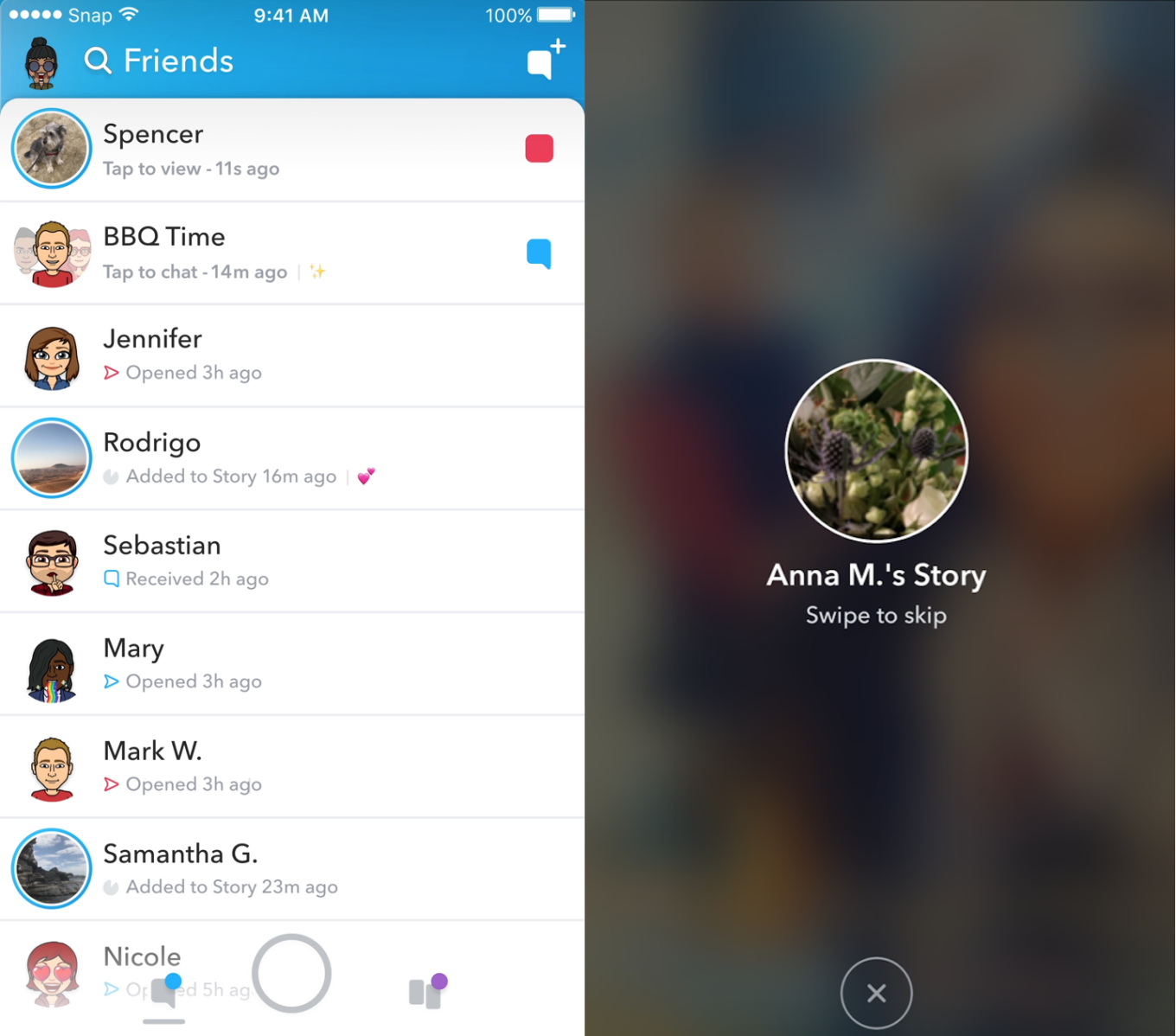
    In an attempt to increase both user numbers and ad revenue, Snapchat is making some major UI (User Interface [the buttons, controls, and setting options on an app or software that allow you to use the app or software.]) changes. In a video by CEO Evan Speigel, he claims that the new Snapchat will separate your social from the media. He says that “your friends aren’t content, they’re relationships” and should be kept separate from the paid advertising and influencer content on the Discover page.

    The app will still feature the “swipe right/swipe left” control style with the left being your friends and right being the Discover page. The Discover page seems to be going through a bit of an upgrade too with animated thumbnails (title images) and including more content from influencers along with the paid media articles. Snap Inc. is hoping this change will make the Snapchat app more appealing to more users and increase buy-in from those who have installed it but don’t use it much. Only time will tell.

    Instagram now lets you ask to join live stories.

    Instagram released the ability to join a friend’s live story just a few weeks ago. The feature has gained some popularity but they’re hoping that the latest addition will make the Live story an even more integral part of the Instagram experience. The latest update allows audience members to request to join a live video on their friend’s Instagram. It isn’t as much an added feature as it is a streamlining of one they released previously.

    Being able to ask to join a live story will increase the visibility of many Instagram accounts and could cause users to spend more time on Instagram. That, at least is what the company is counting on.

    Youtube is soon adding a “stories” type feature of their own.

    The Story feed was started by Snapchat, perfected by Instagram, and flopped on Facebook. Now Youtube wants in on the action. Reels is Youtube’s answer to the latest social trend. This addition lets content creators create quick 30 second vertical videos to keep their followers updated on what’s happening. It lets vloggers and video creators make more content with less commitment.

    The biggest difference from the other Story features is that Youtube’s Reel videos will not disappear and they can make multiple Reel videos. Youtube has been trying to make their app more social and it’s obvious that Reels are a huge step in that direction. They haven’t announced when Reels will be released but you can count on the S.A.F.E. Family Tech Blog to let you know when they do.

    What Parents Should Know

    It’s always important for parents to understand what their kids’ favorite apps are capable of. For many of our children, Social Media apps are the most commonly used. These recent updates should help you be informed about what your children can do with these apps. My advice is always to download these apps for yourself so you can play with all the features. Talk to your kids about what the apps are best used for and what behavior you believe to be healthy or not healthy on social media. Use examples and share about difficult social experiences you’ve had that would have been even worse if they had been online. Strengthen your child’s sense of self-awareness and confidence to ensure they represent themselves in a healthy way online. Most of all, keep an eye on what your kids are posting on their social media accounts and continue to stay informed so that you can be ahead of the social media curve.

  • Partner with BecauseFamily on #GivingTuesday

    Partner with BecauseFamily on #GivingTuesday


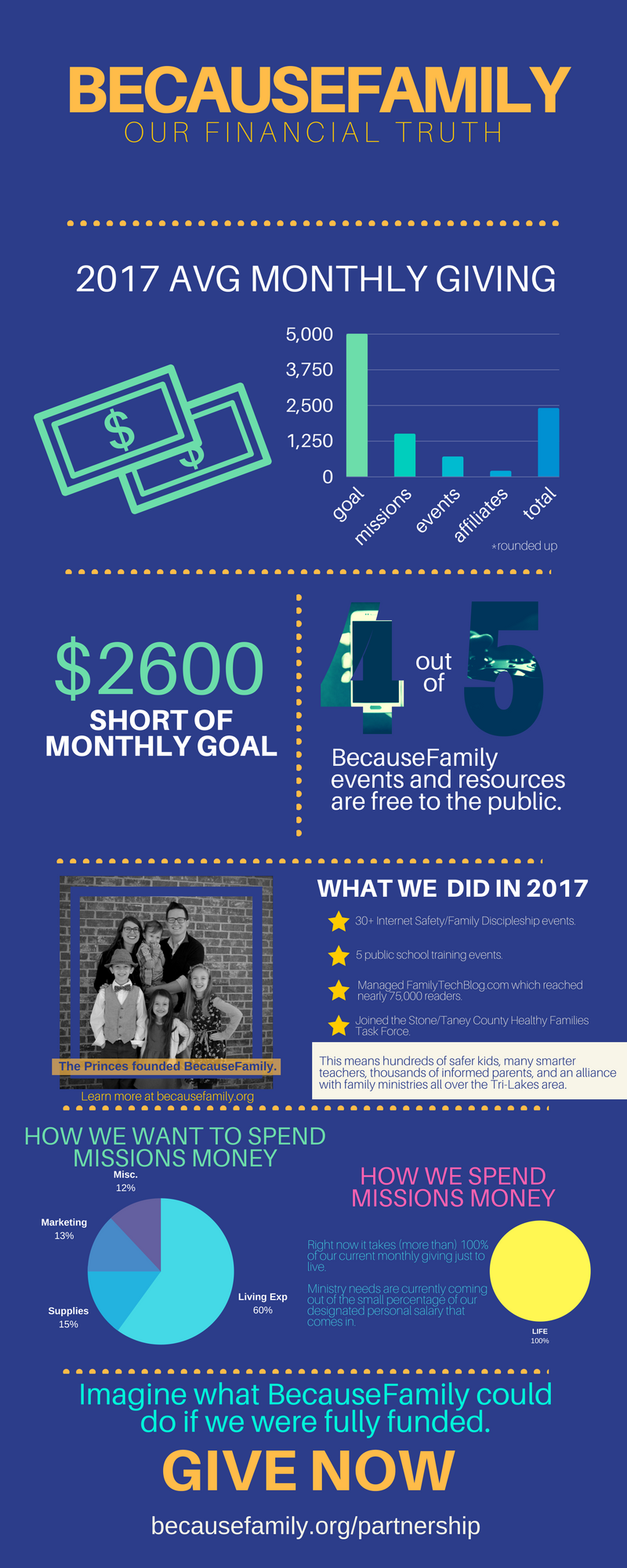
    BecauseFamily exists to inspire and equip parents to be the first influence in the lives of their children. We do that by hosting workshops, seminars, and events. We also do that with this blog. The goal of Family Tech Blog is to help parents be informed about the digital world their kids are growing up in. The blog is free, Living Room Workshops are free, the podcast is free, our YouTube videos are free! All free! We keep them free with the goal of removing any barrier to parents learning the things they need to know to raise digital natives. We can’t keep producing your free content without financial partnership.

    BecauseFamily is a non-profit ministry and can only do what we do because of the generosity of those who give monthly and those who donate at our fundraiser events. Offline, BecauseFamily does even more than what you see on this blog. We are in area schools, educating teachers on how to keep their classroom internet safe. We work with families to set up restrictions and parental controls on their devices. We speak in our area churches and organizations and share the tools and resources we’ve found that can help keep kids S.A.F.E. online. BecauseFamily is working every single day to keep parents informed, teens secure, and kids safe. Your gift to BecauseFamily can help us keep our work going.

    Visit BecauseFamily.org/partnership to sign up to give. Thank you for reading the Family Tech Blog and for sharing this post. We have big plans for our work for families and we can only accomplish these plans with your help.


  • 5 Ways to Stay Internet Safe on Thanksgiving

    5 Ways to Stay Internet Safe on Thanksgiving


    Thanksgiving is a time of fun, family, food, and football. Everyone coming together can be super fun for the entire family. There can also be some struggles here and there, especially when it comes to what turns up on the screens in the house. Your younger kids could end up seeing too much social media on their teenage cousin’s smartphone. Uncle so and so can show Youtube videos to some family with adult language and content not noticing the children in the room. Heres a few tips to try and keep your Thanksgiving Holiday internet safe and family friendly.

    Protect Your Kids

    Encourage a host home internet filter.

    Ask the family member or friend who’s hosting your Thanksgiving festivities if they have some sort of content filter on their wifi. Many routers have a basic filter and some folks may even have another filter system in place. If there isn’t an option, recommend one like Circle. If they don’t have kids or aren’t interested in filtering their wifi long term you can recommend a free trial with something like Mobicip or NetNanny. This usually allows you to use the filter for seven days to a month at no cost. Offer to help them set it up and then you can breathe a little easier when your kids are using their wifi.

    Keep devices with screens in a common area.

    Intentional poor behavior will happen in private. If you keep the screens around everyone else you’re much less likely to have an incident. Make a rule that screens should be kept in the most common area of your Thanksgiving meeting place. The living room full of people or the dining room around a busy table is a great place to let kids spend whatever time on screens you’ve allowed while adult eyes can glance down to see what’s being viewed. This will also keep sneaky cousins from pulling up something age appropriate for their younger family members.

    Talk to your kids.

    Your kids need a safe place. They need to know that if they see something inappropriate online they can come to you and receive no judgment or criticism.  It’s critical that they are allowed to explain what they saw and how it made them feel. Discuss your screen boundaries ahead of time, your kids should know what you expect even if you aren’t able to get the whole extended family onboard with your plan. Tell them if you want them staying off screens completely. Let them know not to look at older kid’s phones or tablets while they play. Think ahead of the likelihood of your kid seeing something they shouldn’t and try to head that off at the pass. Accidents happen but if you and your kids are on guard, you should be able to have fun without too much worry.

    Protect Your Privacy

    Turn off camera location settings.

    Your camera defaults to save your location every time you take a photo. This tags those photos with where you were when you snapped that pic. Then, when you share the image on Instagram, Facebook, or Snapchat your location is uploaded with the image. This means that with the right software your location can be extracted from that photo and used for unseemly reasons. 

    • Go into your settings app and access your “location” settings.
    • Go to the camera app settings under “location” and tell your phone never to use “location” while using your camera.

    Changing these settings will keep your location data off of your pictures.

    Advise family members not to tag their location on their Thanksgiving posts.

    Finally, you’ll want to be careful not to tag your location on your photos. Yes, pictures of the pie, stuffing, turkey, and gravy boat have become as much a part of the holiday tradition as the cornucopia, but when you share it you’ll want to leave the address of the host off of your status update. Sharing your address with public social media posts is never a good idea. This can lead to all kinds of dangers. Imagine the images of all the neat and expensive stuff in the host home. Now imagine you’re a local who likes to break and enter to take things every now and then. What better way to identify a target than creep Instagram holiday posts for the people with the coolest stuff. Then, find the posts with their address tagged on the photo and off you go. Share away, but share with wisdom.

    The holidays should be a time of rejoicing and happiness. We should stuff ourselves with food and enjoy being together. Following these steps can help you stay safe and help keep your holiday party guests safe as well. 


  • App Review: Noah’s Elephant in the Room

    App Review: Noah’s Elephant in the Room


    App Review: Ride the elephant around the Ark collecting peanuts. Just try not to get caught by your sons. They’ll put the elephant back in its cage and ruin your fun. This game features fun gameplay, easy controls, awesome animation, and a great scripture memory element. Check out Noah’s Elephant in the Room here.

    Tell them BecauseFamily sent you.

    Social Media Links

    Facebook: http://facebook.com/becausefamily
    Instagram: http://instagram.com/becausefamily
    Twitter: http://twitter.com/becausefamily

    Newsletter Sign-up

    Ministry Updates:: http://eepurl.com/R7Btr
    Weekly Blog Posts:: http://eepurl.com/cvnhXD

    Websites

    Ministry Site:: http://becausefamily.org
    Tech Blog:: https://safe.becausefamily.org
    Michael’s Speaking Info:: http://kmichaelprince.org

    Donate and Affiliate Links

    http://BecauseFamily.org/partnership

    Music by Kevin MacLeod at http://Incompetech.com

    Download the game here.

  • Parent Guide: Call of Duty World War 2

    Parent Guide: Call of Duty World War 2


    Call of Duty World War 2 S.A.F.E. Rating
    
    Violence: 1 out of 5
    Language: 2 out of 5
    Sexual Content: 4 out of 5
    Positive Message: 5 out of 5

    The Game

    Call of Duty has been the “Belle” of the FPS (first person shooter) ball since day Halo. COD games are created with extremely high budgets and make intense amounts of money for the developers. These games are released on nearly every gaming platforms and each version seems to outsell the previous. Needless to say, many parents are being asked by their young teen or even pre-teen kids if they can go out and get the game for Christmas. Be sure to read this post before you decide to stuff their stocking with this Rated-M game. Here’s my breakdown.

    Violence/Gore (1)

    Call of Duty is a war game. You’d expect a fair amount of pew pew pew gun action and bloody gore and that’s exactly what you will get. In the first few minutes you see someones face blown off, arms and legs missing, and a explosions blowing people and pieces of people into the air. When you have a chance to fire back you see the brute force of your weapon as people’s faces and bodies become covered in blood when you shoot them. The level of gore is dependent on the weapon you are using but it never truly lets up. There is continuous shooting, explosions, stabbing (bayonets and knives), and hand to hand combat. Some of the violence isn’t just to soldiers, there’s discussion about how prisoners are handled, as well as civilians being killed.


    Zombies

    The gore does pick up, however, when you play the Zombie portions of the game. So does the language. Imagine half decomposed, limbless bodies coming after you over and over again in increasing numbers. Then imagine you have nothing but a shovel to defend yourself. The gore STARTS there and just gets more brutal as the game continues. In the Zombie levels you have to get past puzzle like obstacles while fighting off these waves of the undead. You get stronger weapons and unlock traps and boosts to kill the onslaught in more affective, yet, gruesome ways. The Zombie section isn’t a separate purchase or something you can lock or unlock, it’s a part of the game.

    Language (2)

    The language is rated R from the very beginning. You’ll hear F—, Sh–, D—, H—, G–D—, and D— throughout the game. It’s your basic FPS, war game vocabulary. While I can’t guarantee I’d be saying gosh and golly gee during hardcore WWII combat, that doesn’t change the fact that we have to look out for our younger kids and young teens and decide if the language in games like Call of Duty World War 2 is something we want them to take in.

    Sexual Content (4)

    No sexual content besides a bit of “locker room” talk between a few of the soldiers. There is discussion of girlfriends and fiancé as well as some chatter about meeting women when they get to Paris. Any sexual content or conversation pretty much ends at jokes and innuendo.

    Positive Message (5)

    This was the most surprising part of Call of Duty World War 2 for me. I wasn’t expecting such positive vibes from the game. The focus on the heroism, the discussion on PTSD, commitment, sacrifice, and what you must withstand to face combat. It was all very very interesting and quite emotional at times. If you play the story mode you will get a sense of belonging to the unit you fight with during the game. You play as a soldier named Red Daniels, and live a bit of his history, future, and present day life in combat. This story takes you from D-Day until you secure the bridge across the Reign, the river that you must cross to get into Germany and eventually Berlin. The epilogue takes you a bit beyond that even. (Don’t want to spoil it.)

    The generation of men and women who fought in WW2 are looked upon with honor in this game. There are speeches given by some characters in the game that really emphasize the sacrifice the young (and old) people of that day had to face as they fought the evil that was the Nazi regime. I was impressed by the attention given to the human sacrifice during the time of WWII and feel like, if a teenager or adult is old enough to handle the content, the message will be a good one for many of us to hear.

    MULTIPLAYER

    I didn’t test multiplayer in this game but I will say simply that there are no ratings listed for multiplayer on any video game. The reason for that is that the conversations had while you play online with other people can and will turn ADULT very and very quickly. My recommendation is that online, multiplayer, gaming be something is only approved for your older teenage kids that you trust can handle the onslaught of adult language and innuendo.

    Final Thoughts
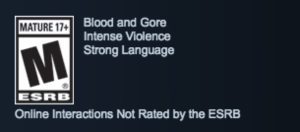
    This game is rated M for Mature. That means it was CREATED for people aged 17 and older. No doubt, your younger teen will be asking permission to play this game. Hopefully you will take all the information in this article into account before blindly allowing them to play a game with content that’s intended for users up to five years older than they are. There’s a big difference in the mental maturity of at 12 year old and an 18 year old.

    I absolutely wouldn’t recommend games like this for kids with any kind of attention problems or anxiety. The game is very stressful and barely lets up for cut scenes and story elements. Shortly after any kind of break in the action, though, you’re right back into it and the fighting is very intense. This action includes explosives going on all around you, being shot at, meeting objectives before you lose members of your squad. It’s all very high impact and the “fight or flight” response would be very very extreme during this game. The drama during some of the cut scenes could even be a bit much for some kids and teens because it deals with heavy and dark topics like PTSD, losing friends in combat, and the mistreatment of civilians and prisoners.

    Be wise with games that have an M rating. Know what your kids are getting into and don’t buy them the game just because they wear you down and you give in. Be smart enough to protect them from content they may not be ready to see. It will definitely be worth it.


  • iPhone X Face ID Won’t Keep Your Kids Out of Your Phone

    iPhone X Face ID Won’t Keep Your Kids Out of Your Phone

    One of the best ways to keep your phone safe is to make sure it’s locked so your kids can’t get into it without you knowing. This allows us, as parents, to have apps or games we wouldn’t let them use without worrying that they’re going to get into them. Maybe you keep your kids off your phone because your filters aren’t as strict, maybe you don’t want them reading all of your messages, maybe you just don’t want them resetting your Mario Run scores. Whatever your reasons for locking down your phone, the new iPhone X’s facial ID feature isn’t your best option. Here’s why.


    The statistical probability is different for twins and siblings that look like you and among children under the age of 13, because their distinct facial features may not have fully developed. If you’re concerned about this, we recommend using a passcode to authenticate. – support.apple.com

    What Parents Should Know

    Apparently, young undeveloped faces can trick the facial recognition software on the iPhone X and let a child get access to your phone. If your phone isn’t locked down then your kids will have access to those in-app purchases, unfiltered searches, and accessing unapproved entertainment or social media you’ve blocked on their devices. Apple recommends you use a passcode if you have small children. This recommendation seems to hint that they’ve just accepted that this will be a limitation of their Face ID feature. My tip is to take Apple’s advice. Use a passcode if you have an iPhone X. If you want an iPhone X mostly because of Face ID then you may reconsider.


  • Snapchat Outage Reveals Some Serious Priority Concerns

    Snapchat Outage Reveals Some Serious Priority Concerns

    A Snapchat outage on Monday left millions unable to send disappearing filtered messages to their friends. This was a bad enough problem for users of Snapchat but the problem intensified when service resumed and they realized their “Streaks” had ended. Snapchat has used a system they call “Snap Streaks” to encourage users to send messages to each other more consistently. Every day you send a message adds a number to your streak. When the app was down for nearly an entire day, some people were unable to send messages within the 24hr deadline. This caused their streaks to end.

    People took to Twitter to address their concerns with Snapchat. They complained that their streaks of 25, 100, and some even 500 days had been lost and they were not happy about it. Snap Inc’s support division stated that they were working on restoring streaks that were lost during the outage and asked folks to be patient and report if they had lost their records.

    What Parents Should Know

    The focus on streaks is simply another symptom of a culture that is telling our kids that the highest form of acceptance is being accepted socially by your peers. My full thoughts on this topic are on a video on our Facebook page but I’ll summarize here. Many of our kids are very very serious about their social media accounts. They are highly concerned with the number of followers they have and how many likes their pictures and videos get. Some of them have separate accounts, on one of which they post the version of themselves they want everyone to see, and the other is used for their silly, nerdy, or even sexy side. This social media self-image focus can be cause for serious concerns. It’s important for us as parents to help our kids understand who they are, what they should be focusing on, and what healthy use of social media looks like. Their friends are “all doing it.” But you may have to be the first parent to decide to put your guard up.


    (External Link) You can watch my video here:

  • The Best Way to Keep Your Kids Safe On Youtube

    The Best Way to Keep Your Kids Safe On Youtube

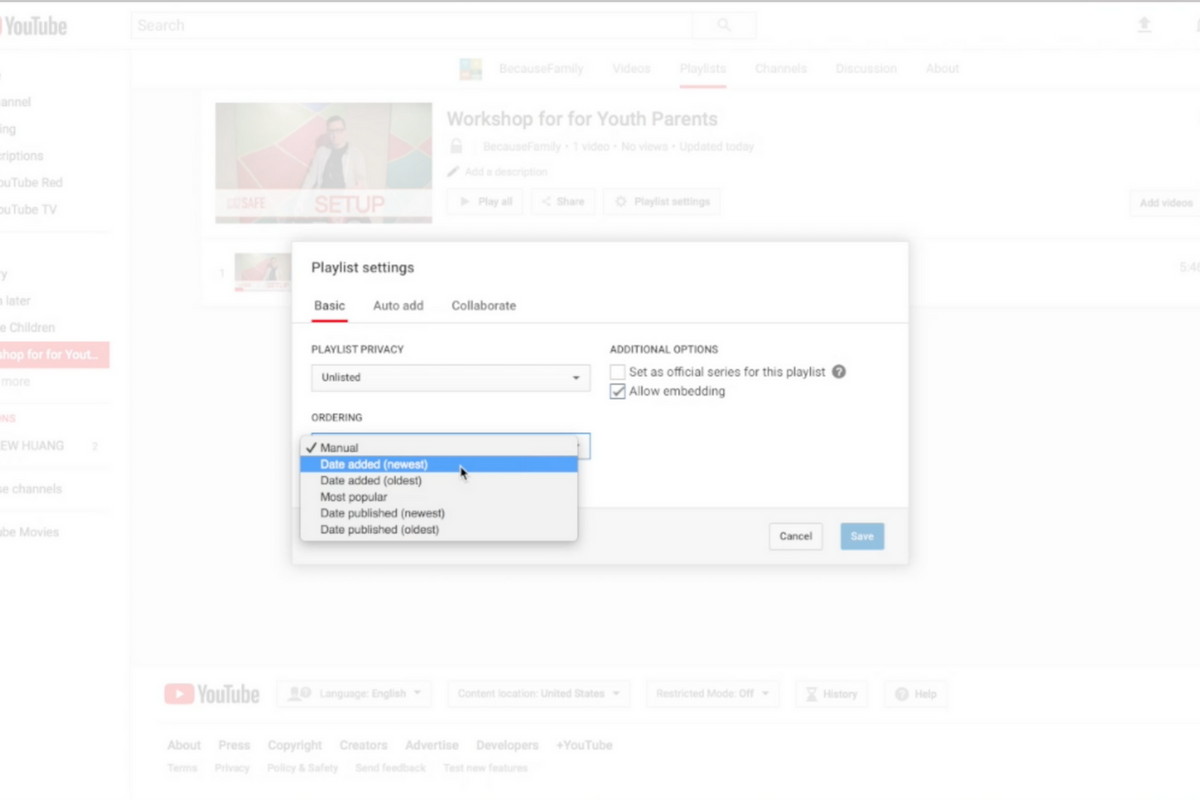
    Parents are always asking me for advice on keeping their kids safe on YouTube. Especially parents of older kids who may feel like YouTube Kids is a bit too young for their liking. I recommend building approved playlists. Find videos on YouTube that you are ok with them watching and put them in a playlist. This will allow them the freedom to watch videos without you pulling up each one while still keeping them safe from happening upon something inappropriate. You can also add playlists to your library that have been created by another channel. Then, you just have to discuss with your kids that they should only watch videos from the playlists you’ve put in the library. This keeps things safe. Watch the video below to learn how to build these playlists and hear more about why it’s a good idea.


    This is also a great idea for teachers and ministers who may want to show videos but don’t want something showing up unintentionally. If you’re playing videos from your playlist, you won’t accidentally show some video you haven’t pre-screened. YouTube can be an awesome tool but there is a lot of content on there that may not be classroom friendly. Use this tutorial to help you set up playlists and keep that stuff off your screen.

    UPDATE: Here’s a video tutorial to help you set up a playlist on the mobile app.