Tag: parents

  • Botley the Screen Free Coding Ed Robot

    Botley the Screen Free Coding Ed Robot

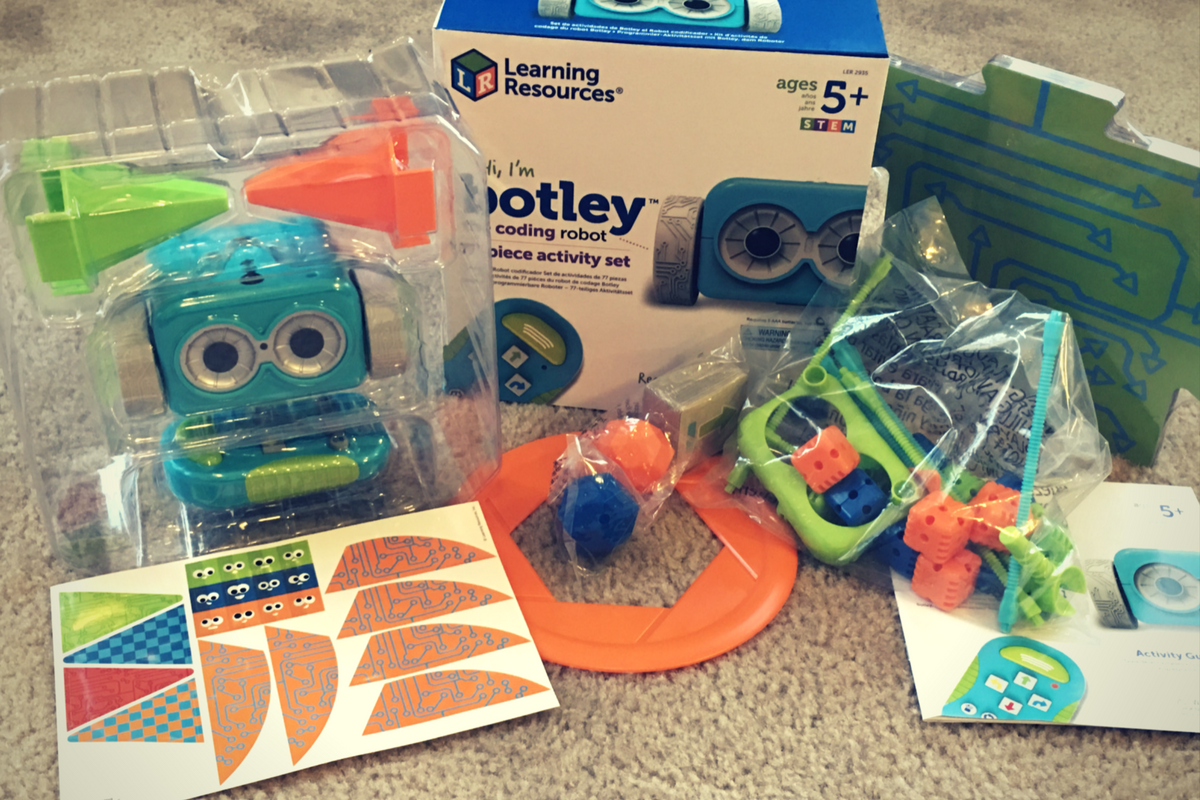
    Coding education was one of the hottest topics at CES2018. The conversation was led by toy makers, psychologists, media producers, and educators alike. They all agree that if your children aren’t learning the basics of programming logic, they’re not laying the foundation that they need to function in the future they will be living in. The other major highlight of CES was the problem with too much screen time. Kids are spending too many hours every day looking at their screens and it isn’t good for their development. These two conversations pose a serious problem. How can our kids learn to program computers if they don’t use any screens? Well, there were some pretty creative answers to that question at CES and BOTLEY was probably my favorite one.

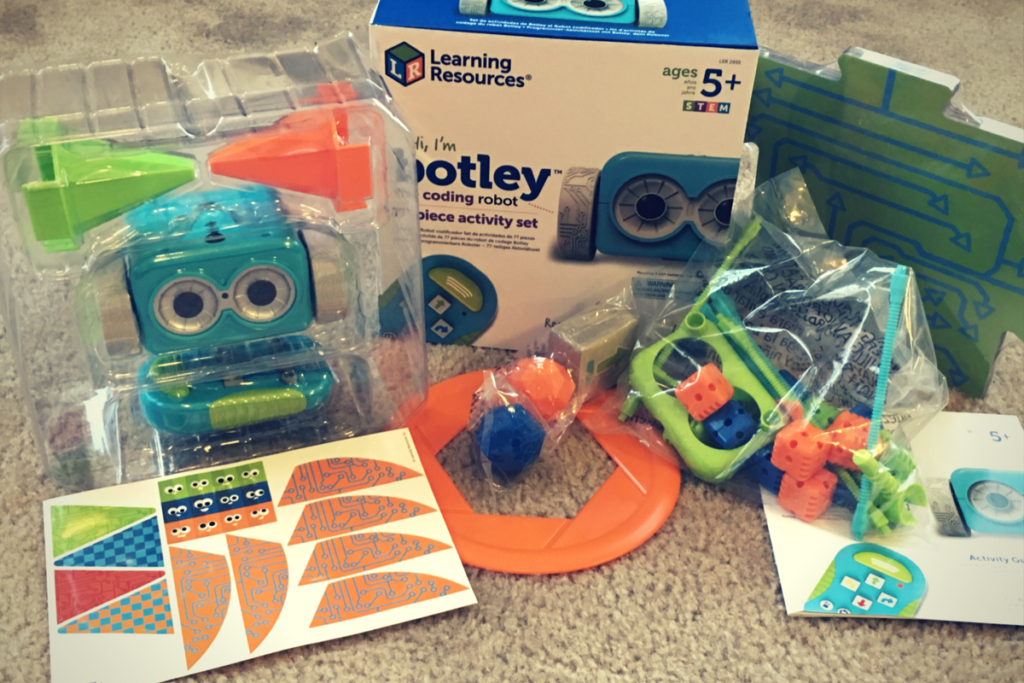
    Botley is a screen-free coding education robot. He can do up to 80 commands issued to him from a single remote control device. He has object recognition and awareness and can trace lines with the sensor on his “belly.” His basic 77 piece set comes with an instruction manual full of tips, tricks, and even a curriculum style guide to help parents set their kids up to learn from the beginnings of coding to more advanced sequences. Best of all, there is no app or software to program him. No screen needed at all.

    His kit contains toys for Botley to play with so that you can create games for him. Have Botley drive over a maze you create with the included puzzle tiles, have him bust through the wall you make from the blocks, or have him push a ball into the goal. All the games advance children through different techniques they can use to program Botley to complete different tasks. These techniques are the basis for the same programming tools used by professionals to create games, websites, and software.

    You can see more about my family’s experience with Botley in the video below. You can get Botley at learningresources.com and tell them FamilyTechBlog.com sent you.


  • unGlue is a Great Way to Teach Your Older Kids Screen Time Management

    unGlue is a Great Way to Teach Your Older Kids Screen Time Management

    *unGlue is FamilyTechBlog.com’s latest affiliate

    UPDATE: You can use the promo code “SAFE10Off” to save 10% when you subscribe to unGlue!

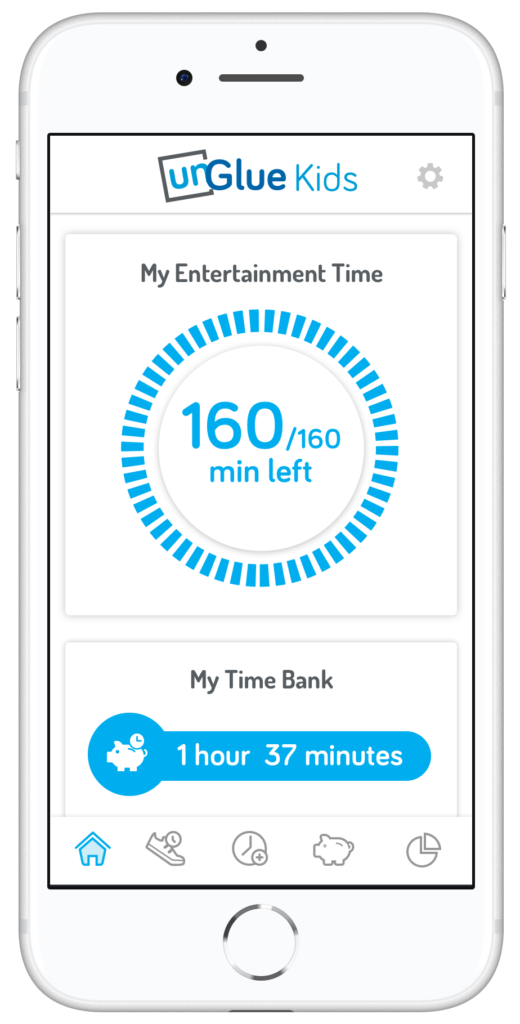
    The most common concern among parents when it comes to tech use is that their kids spend too much time on their screens. There are plenty of options out there to help you monitor and limit the amount of time spent using tech, but unGlue is one of the first ones that allows you to put the control in your kids’ hands. The advice of the FamilyTechBlog has always been to help your kids know that you are on their team when it comes to internet safety and digital health. What better way to partner up than to give them choices as to how they spend their internet time? UnGlue lets you do just that.


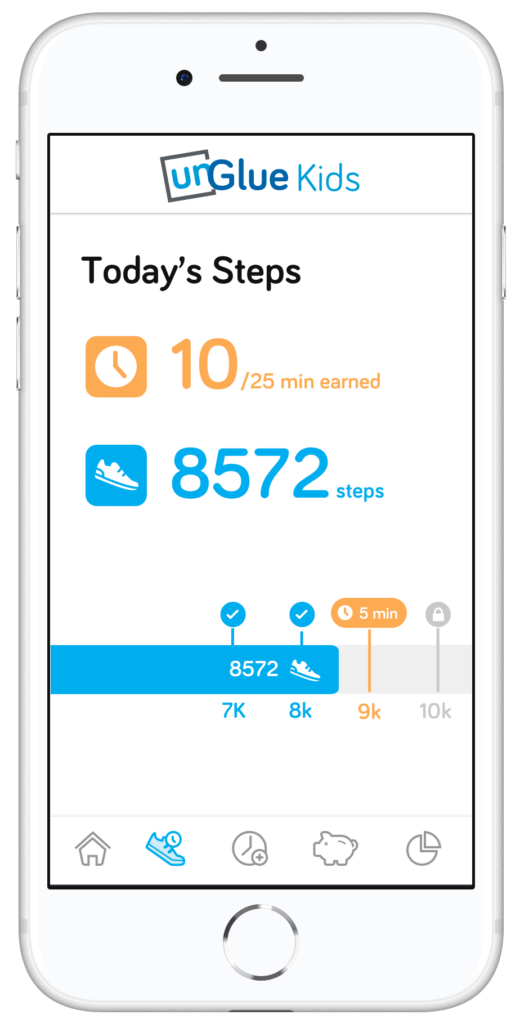
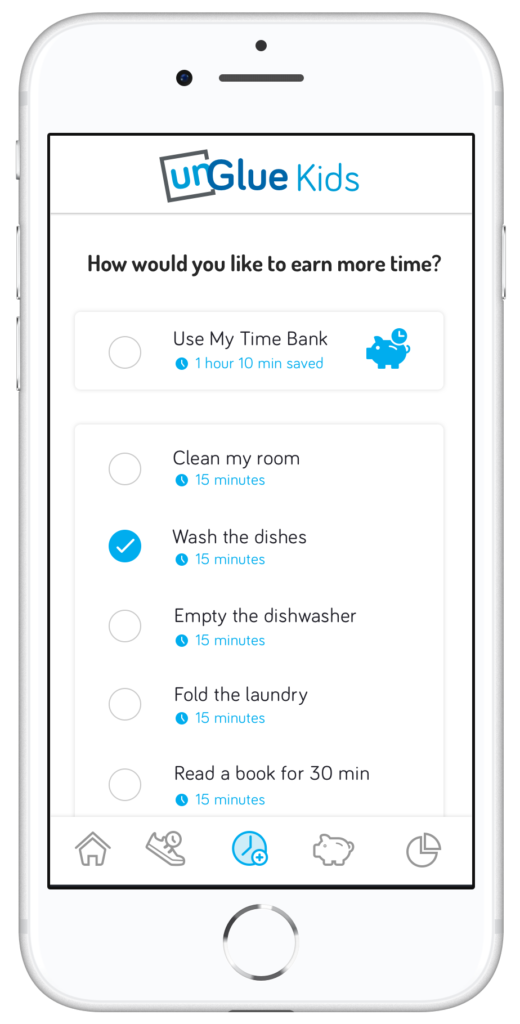
    unGlue’s features include an adult content filter, monitoring online time, trading steps or chores for more time, entertainment time rollover, and screen time scheduling. The best part is that most of this activity can be done in the kid’s version of the app. The parents set the limits but then the kids get to decide how they use their time and even how they can earn even more time. Rollover allows them to save up some of today’s time to use tomorrow if they’d like.

    How it Works

    At home, unGlue works through your wifi. You install software on your main home computer (only works while turned on) and it mirrors your router traffic to see the web activities on the devices you have set up. While on the go, unGlue uses a VPN to keep track of what is being done online. These methods mean your time is managed everywhere you go. You can even set up guest access in your home. If you don’t have a home computer to set up unGlue on, they have a device called the unGlue Puck that will only cost you $30.

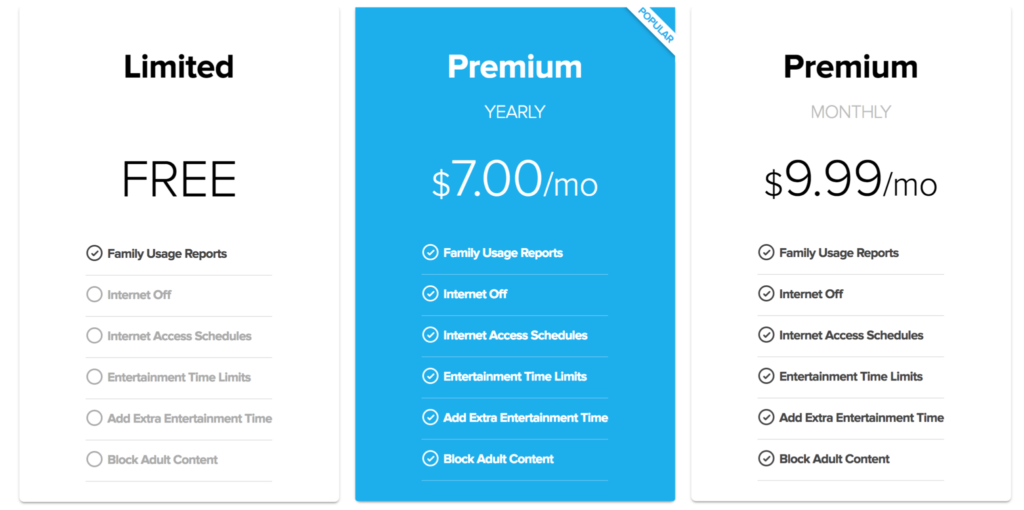
    Speaking of cost, you can download the unGlue app for free and start monitoring online time right away. If you want to set up and use the other features you can subscribe for $9.99 per month or $84 per year. Both subscription options include full-featured access to unGlue.

    What Parents Should Know

    Managing screen time can be a challenge for people of all ages. The best way to ensure your kids have a good attitude about the time they spend online is to start teaching them young and to lead by example. Track your own screen time and set some limits for yourself. This will help your kids see that you are as committed to a healthy digital attitude as you are asking them to be. Using unGlue is simple and is an especially good option for those of us with older kids. Other options just monitor our kids and give us the option to turn the internet on and off at will and on a schedule. That’s a good way to manage screen time for your younger kids but studies show that our older kids need guidance and boundaries but not overbearing rules and regulations.

    Our hope is that the resources we partner with for parents can each bring a unique approach to your digital boundaries strategy. In my opinion, unGlue is the choice for parents of older kids who are ready to start managing their own time online. The option to earn more time through activity and chores adds another element that teaches your kids lessons they’ll have to continue to learn as they grow older. Download unGlue now and start monitoring. I think you’ll find it useful enough that you decide to subscribe in no time.

  • Google’s “Be Internet Awesome” Wants to Help Kids, Teachers, and Parents with Digital Citizenship

    Google’s “Be Internet Awesome” Wants to Help Kids, Teachers, and Parents with Digital Citizenship

    More than three-quarters of school-aged kids in the United States use the internet every week. Much of that online time, for seventy-nine percent of kids, is spent on a smartphone. Much of that time is also spent at school. Kids curriculum is increasingly web-based and school is even issuing computers to kids younger and younger. The internet has long been a place for kids and teenagers to find entertainment and now with the necessity for online activity for school work screen time and global communication among our young ones is on the rise. This has been a cause for concern among parents, teachers, and school administrators alike. Google wants to help parents, teachers, and kids understand what a healthy attitude towards internet activity looks like. While at CES I was able to hear representatives from Google explain Be Internet Awesome and how it was developed. I thought it would be a great resource for parents and teachers alike.

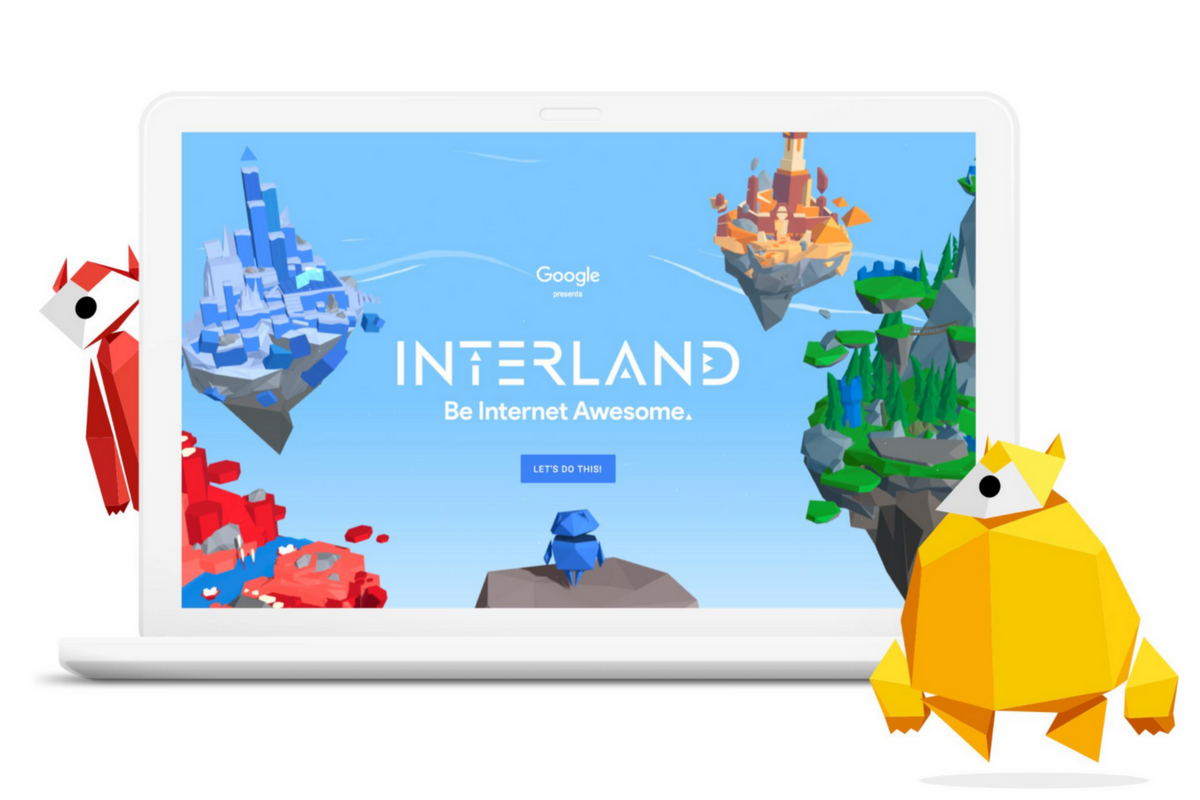
    INTERLAND

    “Kids can play their way to being Internet Awesome with Interland, an online adventure that puts the key lessons of digital safety into hands-on practice with four challenging games.” – beinternetawesome.withgoogle.com

    Interland is a gamified way of teaching kids internet safety and digital citizenship. You make your way through different levels that focus on different categories of your online life. You “report” cyberbullies and share kind words with online “friends.” The game is split into zones, Reality River is where you learn to recognize what’s real and what’s fake online, “Mindful Mountain” is where you learn how to think before you share online, “Tower of Treasure” will teach you how to secure your online activity with strong passwords and secure behavior, and finally “Kind Kingdom” is where you’re able to report those cyberbullies and speak kindly to friends you find online. 

    The games are fun and the characters are silly. The questions seem to be common sense but I know adults who, based on their social media behavior, probably wouldn’t score 10 out of 10. These games have good graphics and audio and they’re a simple and fun way to introduce your kids or students to proper online behavior.

    Curriculum

    The 5 part Be Internet Awesome curriculum is made for parents or educators to help kids go even deeper in their understanding of how to be secure, kind, and mindful when on the internet. By having kids analyze mock social media feeds and behavior they get a chance to think about what they learn about a person based on what they post online. Receiving fake phishing and spam messages allow kids to see what those messages look like and identify and report them easily. Recognizing bullies and how to report them is taught through group activities and clear, understandable definitions. Finally, the free 48 page PDF Curriculum, emphasizes the importance of finding an adult and talking about what they’ve experienced online.

    Pledge

    Finally, the pledge allows kids, teachers, and parents to summarize and agree to their stance on digital citizenship. This allows parents and teachers to get the whole family or class on the same page and hold each other accountable. A pledge is a good way to reemphasize what has been learned and highlight the importance of their commitment to be the best version of themselves online that they can be.

    What Parents Should Know

    I recommend you use this game and curriculum in your home if you haven’t already. Help your kids understand the dangers and concerns with the amount of time they spend online and encourage them to use their time as wisely as possible. Google has created a helpful and free tool for you as a parent or teacher to use and download as often as you need to. I say take advantage of it. If your family, like ours, has some specific rules about how you use the internet, interject them into this curriculum, using Google’s offering as a foundation for your internet safety plan and contract. Our kids will be spending more and more time on the internet as they grow. It’s important that their parents first, model proper citizenship for them, and second, take advantage of whatever resources we can to teach them how to treat themselves, their information, and others with respect on the internet.

  • Google Has Taken Away Chromebook’s Native Parental Control Solution

    Google Has Taken Away Chromebook’s Native Parental Control Solution

    What is “Supervised User?”

    I wrote all about your parental control choices for your kids’ Chromebooks a few months ago:

    “Supervised User is an account based system that’s built into the Chrome browser. It allows you to set filters, monitor sites visited, prevent installation of apps, turn on safesearch, and change settings. You do have to use blacklists or whitelists to block websites, there is not an automatic filter built in…”

    This wasn’t a foolproof solution but it was something that could give parents a head start on protecting their kids while they use the computers their schools have given them. Supervised User, however, has been discontinued so that they can focus their attention on another “parental control option to be released later this year.” Having received several calls from parents and principles this past year asking me to help them teach parents about the controls available, I know the need for Chromebooks to be safe while kids are online. Unfortunately, the simplest, most obvious solution is no longer available. At least for a while.

    From “Google Chrome Help”

    But There Are Solutions!

    Mobicip

    For a full-featured filter option, consider Mobicip. One of the only full-service filter and monitoring apps for Chromebook, Mobicip offers a plugin that you can download from the Chrome app store. Mobicip will give you customizable filters, time limit controls, and usage reports and its pretty easy to set up. You just download the extension from the Chrome app store and then log in. It takes you through the setup steps and lets you set your desired filter levels. Once it’s all set up you can make changes from anywhere using their web-based controls dashboard. Their SUPPORT page has good How-To resources to walk you through the process.

    If you want more controls than the Supervised User option gives you then Mobicip is a pretty good choice. It’s $39.99 per year for all of the features mentioned above for up to five devices. If you are going to need to protect more than twenty devices (I’ve met families with upwards of 30) then you’ll have to get a quote for their “Enterprise” option. Mobicip is a good option and will give you quite a bit of control.

    Accountable2You

     This accountability software doesn’t block content. This software will keep an eye on what’s being viewed and then red flag and report anything that it deems inappropriate. This allows you to more easily see when something questionable has been viewed. Otherwise, you’ll spend time sifting through link after unrecognizable link to find something that may be naughty. You can even set up Accountable2You to send you a text message when an inappropriate site was accessed. The software works across all of your devices including Chromebook and is $6.99 per month for six devices and $9.99 per month for twenty devices. They have easy setup instructions on their SUPPORT page and have excellent customer service. (NOTE: Accountable2You just released their lates iOS app that will cover every browser used on an iPhone or iPad. One of the first accountability solutions of it’s kind.)

    Use SOMETHING!

    I advise against waiting for Google to release a different option. Please set something up and do it soon. Kids are using their computers for much more than school work and there is more content showing up every day that would prey on your children’s innocence and even their safety. A Chromebook is basically a machine built only to run the internet. It has little to no other use. Pretending that it’s safe just because the school issued it is foolish. Use one of the affiliate links above and set up a solution. I wouldn’t recommend something I don’t or wouldn’t use myself.

  • Taking Too Many Selfies is Officially the Latest Mental Disorder

    Taking Too Many Selfies is Officially the Latest Mental Disorder

    “Selfitis” is the new term for obsessively taking selfies and it’s being called a symptom of other, more serious, mental disorders. The study by Nottingham Trent University was held in India because of their high population and social media user numbers. Also, because of the high number of deaths caused by taking selfies in a dangerous situation. Researchers studied a focus group of 200 people and asked them questions about their selfie-taking behavior. The results had some surprises and some expected outcomes. The most likely candidates to have selfitis were men, which was unexpected, but as you may have guessed, the youngest group also scored the highest probability to suffer from the disorder.

    The idea for this study came from news stories in 2014 about selfitis becoming a recognized mental disorder. At the time these stories were false but now the term is beginning to get scientific research to back it up. The researchers’ findings are, probably, only the beginning of the information we will get about what our increasingly online lives are doing to our habits and mental condition.

    “Typically, those with the condition suffer from a lack of self-confidence and are seeking to ‘fit in’ with those around them and may display symptoms similar to other potentially addictive behaviors,” – Dr. Janarthanan Balakrishnan

    What Parents Should Know

    It’s obvious how the appeal of Instagram likes and Twitter followers can lead to obsessive behavior. This condition falls under the same category as internet, video game, and media addictions and its actual diagnosability is debatable in some psychological circles. My unprofessional but educated opinion is that anything that becomes obsessive and compulsive should be considered dangerous by parents. It can take conscious effort for many of us to avoid taking a photo or selfie to share during an event. I have often made the distinct decision to not take a photo and just enjoy a moment for myself. The study of selfitis shows that there are increasingly more people out there who cannot make that decision for themselves. The first thing they think about is what a good social media post this moment would make and then they can’t deny themselves the opportunity to share it online and see how many likes it gets.

    Selfitis and other social media related conditions will always be ridiculed because it seems like just making a decision to stop something would solve the problem. Serious professionals, however, are giving these behaviors real attention and I think we, especially parents, should too. Find out what your child’s attitude is about social media. Why do they post? How important is it to them to get likes and followers? Do they take down photos if they don’t get the amount of attention they want them to? Knowing your child’s online and social media habits can go a long way to help them have a healthy attitude towards how they represent themselves online. Mom and dad are the first line of defense and diagnosis. You should be having conversations with your kids.

    You can see the entire study HERE. Including the questions asked to those tested in the study. Maybe you can use these questions (also listed below) to see what your kids think about their selfie habits…or your own.


    Selfitis Behavior Scale

    1. Taking selfies gives me a good feeling to better enjoy my environment
    2. Sharing my selfies creates healthy competition with my friends and colleagues
    3. I gain enormous attention by sharing my selfies on social media
    4. I am able to reduce my stress level by taking selfies
    5. I feel confident when I take a selfie
    6. I gain more acceptance among my peer group when I take selfie and share it on social media
    7. I am able to express myself more in my environment through selfies
    8. Taking different selfie poses helps increase my social status
    9. I feel more popular when I post my selfies on social media
    10. Taking more selfies improves my mood and makes me feel happy
    11. I become more positive about myself when I take selfies
    12. I become a strong member of my peer group through selfie postings
    13. Taking selfies provides better memories about the occasion and the experience
    14. I post frequent selfies to get more ‘likes’ and comments on social media
    15. By posting selfies, I expect my friends to appraise me
    16. Taking selfies instantly modifies my mood
    17. I take more selfies and look at them privately to increase my confidence
    18. When I don’t take selfies, I feel detached from my peer group
    19. I take selfies as trophies for future memories
    20. I use photo editing tools to enhance my selfie to look better than others

    Scoring: Responses are rated on a 5-point Likert scale: (5 = strongly agree; 4 = Agree; 3 = Neither Agree or Disagree; 2 = Disagree; 1 = Strongly Disagree). Scores are summed. The higher the score, the greater the likelihood of selfitis

    Items 1, 7, 13, and 19 relate to environmental enhancement – Items 2, 8, 14 and 20 relate to social competition – Items 3, 9, and 15 relate to attention seeking – Items 4, 10, and 16 relate to mood modification – Items 5, 11, and 17 relate to self-confidence Items 6, 12, and 18 relate to subjective conformity
     

  • Soon, All Tech Will Know Your Face…Get Used to It!

    Soon, All Tech Will Know Your Face…Get Used to It!

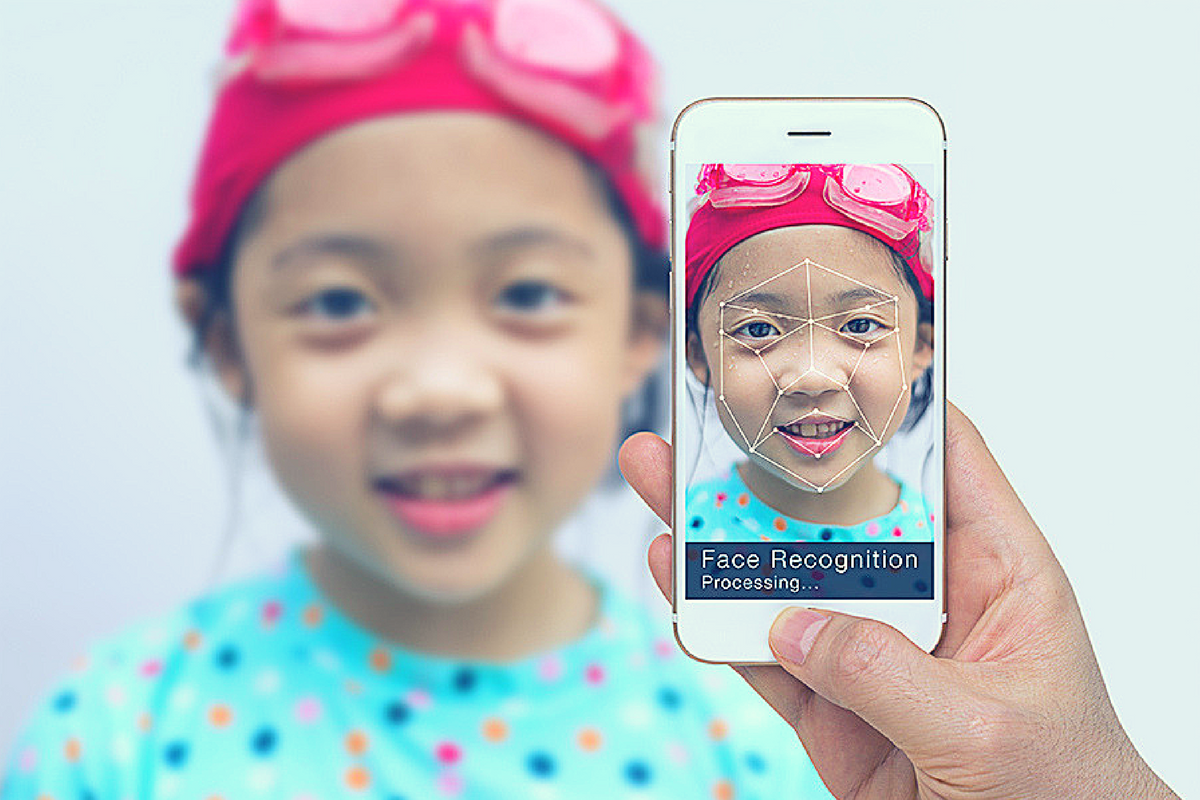
    Facial recognition is one of the hot-button topics of 2017. iPhone is featuring it now, several social media platforms have been using it for a while to help you tag your friends in photos. In fact, Facebook has just announced how they’re using facial recognition to help the blind learn more about photos on their timeline. Artificial intelligence in our social media timeline tells us what images and posts we want to see first, it identifies who is in our photos, it even decides what ads we will be most likely to click on. Social media isn’t the end of facial recognition AI, though. As I prepare to head to Las Vegas for the Consumer Electronics Show (thank you, by the way, your readership of this blog made that possible) I see more and more smart-home and gaming tech using facial recognition for their main functionality.

    Security

    The application of facial recognition in security tech should be pretty obvious. Amazon has a camera that you mount outside your door that will only allow approved delivery people into your home to drop off your packages. Smart security tech will use motion sensors and facial recognition to identify who enters a room and determine if they belong or not. If you aren’t approved, an alert goes to the homeowner and they can decide to alert the authorities or not based on seeing the picture that the security device took of you.

    Smart Home Tech

    Smart home technology isn’t early market anymore, it’s actually becoming more of a mainstay in the American household. People are calling out to Alexa, Google, and even Cortana more an more every day. The latest technology will be featuring the ability to recognize you and adjust the “settings” of your home accordingly. Think lights dimmed, music on to your playlists, coffee part started, and your tv turned on to your favorite channel. Most of the latest smart home tools are putting cameras on their devices and making facial recognition standard in their algorithms. That means that more and more “affordable” or “budget” devices will be scanning your face. When you pay less for similar tech, what you usually save money on is the privacy and security side of things. You have to be careful to understand the security settings and privacy policies of any “smart” device you purchase.

    What Parents Should Know

    Every single new tech development has the challenge of balancing convenience and progressiveness with security and privacy. Having your lights come on because a device saw your face walk into a room sounds like a really convenient thing. Being alerted by Facebook when someone uploads a picture of you is a great idea. It can help you keep photos you don’t like of yourself off of the internet or just help you make sure you are tagged in the photo you’re in. If all of these new technologies can ensure that your identity is secure then it’s a great way to use the latest developments to add convenience to your life. 

    My advice with the newest releases is always to wait a while. Let the lawsuits and hackers do what they will before you own one of the devices and your personal data is in jeopardy. Once it’s been out for a while then maybe integrate it into your life, but only if you know how to set it up and secure it properly.

  • Why the Repeal of Net Neutrality Matters to Every Parent

    Why the Repeal of Net Neutrality Matters to Every Parent

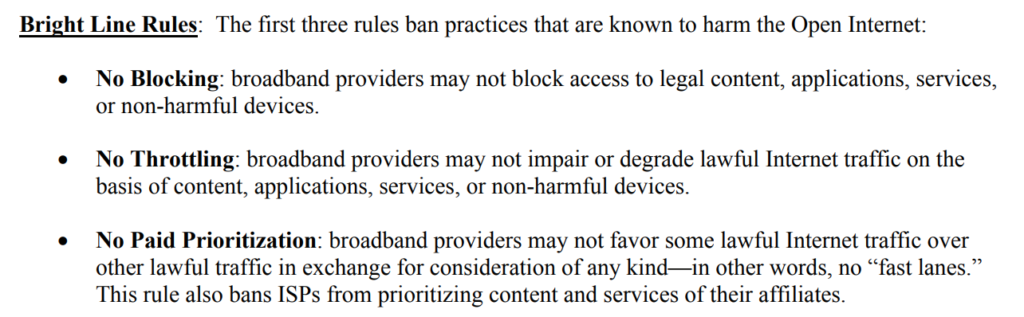
    Today, the FCC voted to repeal the net-neutrality rules that made access to the internet a Title 2 utility for consumers. This categorization, among other things, allowed the government to keep companies from denying, slowing, or charging extra for access to the internet and the content on the internet because it was considered a public right. The repeal removes those regulations and may allow companies to prioritize the content you can access based on their profit margin. The fears outlined by many non-profits, senators, online content creators, and companies that have taken action against this repeal include speed throttling, site blocking, loss of innovation, and a general prioritization of access by internet service providers.

    Supporters of the repeal have said that government oversight isn’t necessary to maintain a free and open internet and that the free market will keep companies from resorting to these feared measures in order to increase profits and popularity. They state that the internet was free and open before the 2015 Net Neutrality measures were passed and that it will continue to stay open after it’s repealed. 


    Screenshot from the 2015 FCC Net Neutrality Press Release

    What does (could) it mean?

    It may not mean a lot right away but it could eventually mean higher prices for internet use and a sort of “cable tv style” bundling of internet access. It could also mean a more difficult (or maybe even impossible) road to success for creative internet and software startups.

    Imagine, for example, that Spotify is getting started and it’s catching on with music fans. Then, imagine that Comast (everyone’s favorite ISP to hate) starts their own music streaming service because they see the opportunity to increase revenue. Since Comcast wants to be more successful they will have to come up with anything they can to attract more customers than Spotify. This may include slowing down data access to you while you’re streaming music through Spotify. Eventually, you may get annoyed enough to switch to Comcast’s own music streaming service simply because there are fewer interruptions in streaming. Spotify eventually fails because their users can’t get the access necessary to help the company succeed. Next Comcast makes their music service only available if you are a Comcast customer. What do you do then? Switch ISPs because the services you feel are most important to you are only available if you use them to provide you with your internet service? Finally, their prices can rise and rise because more people are using Comcast based on the fact that their favorite internet content has now become inaccessible on any other ISP. There is no more competition.

    I’ll give you that this is a worse case, distant future scenario, but if you look at Cable and Sattelite TV it doesn’t seem that far-fetched. Under Net Neutrality, Comcast, Time Warner, or anyone else for that matter aren’t allowed to throttle down internet speeds to certain sites and services. They definitely can’t block access to the sites you want to visit. They aren’t allowed to bundle websites into different cost packages either. This means you can use whatever streaming service and websites you like best and not have to worry about access being slowed or blocked. You can imagine why a small, non-profit, tech safety website startup might be a little concerned about ISPs getting full control of an audiences internet access. Net Neutrality puts access to the internet in a category similar to electricity and water. Access to these necessities is considered a basic right and the companies that profit from these resources are only allowed to operate in a way that allows equal and fair access to all users. 

    Why does it matter to parents?

    It matters to you as a parent because you want more people innovation online. You want services like Mobicip, Accountable2You, and Unglue to be able to create their products to help your family be smarter and safer online. If the only way to be successful online is to become affiliated with a major corporation or to pay that corporation to be included in their access package, many of the newest most helpful resources for parents wouldn’t exist. Again, I’m against fear tactics and panicking but I encourage you, as a parent who is concerned for their child’s safety online, to speak out. Contact your congresspeople and tell them you support Net Neutrality. The vote is over but the battle is not. Lawsuits and petitions are already beginning to be filed and you’ll be hearing about this issue for a while.

    I don’t like to spend much time talking about political issues but this could, eventually, affect this blog and our work for families in a serious way so I had to say something. Thank you, now back to your regularly scheduled internet safety blog posts.

  • Now ANYONE Can Make a Facebook Camera Filter!

    Now ANYONE Can Make a Facebook Camera Filter!

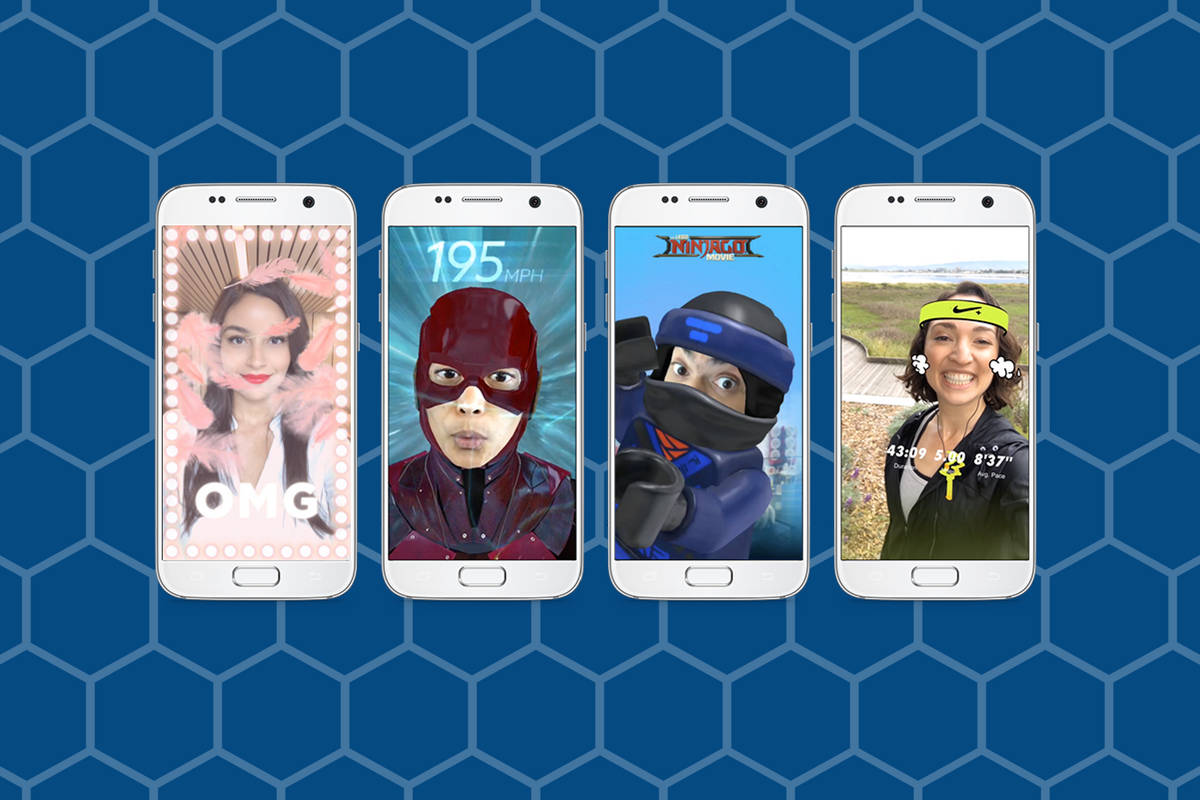
    Augmented Reality (AR) and Location Filters have become a mainstay of the social media camera. Snapchat started and Instagram, Facebook quickly followed suit, and before you know it, we’re all posting images and videos of ourselves with animated beards, mustaches, and hats. Your favorite fancy additions to your photos have always been created by select developers or advertisers so that those who run our favorite social media outlets can keep tabs on what’s being allowed on their platform. That has now, officially, changed. Facebook has opened up their public Filter and AR creator tools.

    “Starting today, we’re expanding availability of the platform and the AR Studio creative tool to everyone.” – https://www.facebook.com/FacebookforDevelopers/

    It’s truly as simple as going to the facebook developers site and downloading the AR software. Making non-AR overlays is even easier. The tool is built into the website. You simply upload your images and move them around wherever you’d like on the screen. You can use the tools to resize and edit your image as well as to remove the background so you get a transparent effect. While making a 3D mask takes some coding and design experience, making an overlay is a pretty simple process that just about anyone should be able to do.


    What Parents Should Know

    Obviously, there is no stopping the “AR train.” We all love taking photos with those crazy filters and it’s so neat to put some strange creature on your countertop and film it playing the guitar. Until now, we could trust that content being posted as filters on the Facebook camera had been created by legitimate developers and didn’t contain anything that wasn’t allowed by Facebook’s guidelines. Allowing public access to these tools basically makes filters and AR User Generated Content. I made one for FamilyTechBlog in about six minutes. There was no approval process (as far as I could tell) which leads me to believe that inappropriate content will only be identified by a “user flag and review” system. This could lead to who knows what kind of violent or adult-oriented filters showing up on our Facebook (and most likely eventually Instagram) camera.

    My advice for parents is to continue to talk to your kids about what content they use and see on their social media accounts. User Generated Content means that most of what has been posted hasn’t been edited or reviewed by anyone who can pull down non-approved posts. Algorithms and a flag system can only get so far in protecting our families from dangerous content. Parents should always be seeing what is posted by their kids and what their kids are seeing in the apps they use.


  • PODCAST: 2017 in Review and What’s to Come in 2018

    PODCAST: 2017 in Review and What’s to Come in 2018

    Exciting new things coming in 2018 for BecauseFamily. This episode rounds out the rest of 2017 and gives you a heads up as to what to look out for in the coming year.

    Social Media Links

    Facebook: http://facebook.com/4pointfamilies
    Instagram: http://instagram.com/becausefamily
    Twitter: http://twitter.com/becausefamily

    Newsletter Signup

    Ministry Updates:: http://eepurl.com/R7Btr
    Weekly Blog Posts:: http://eepurl.com/cvnhXD

    Websites

    Ministry Site:: http://becausefamily.org
    Tech Blog:: https://safe.becausefamily.org
    Michael’s Speaking Info:: http://kmichaelprince.org

    Donate and Affiliate Links

    http://BecauseFamily.org/partnership