Tag: parenting

  • Amazon is Changing the Parental Controls Game

    Amazon is Changing the Parental Controls Game

    Many parents purchase their children a tablet without taking built in parental controls into consideration. Amazon’s addition of the Parent Dashboard should cause most parents to lead towards a Kindle Fire tablet. Amazon FreeTime has been available for a little while and allows parents to set child profiles, manage content, set time limits and bedtimes, and feature’s curated content. The Parent Dashboard, launching today, takes FreeTime to the next level by giving parents a breakdown of their kids digital habits. The app will allow parents who have set up FreeTime to see the time your kids have spent on certain apps. You can see what they’ve been reading and watching and it even suggests discussion starters for the content your children have been consuming.

    FreeTime features tens of thousands of apps, books, websites, and videos. The built in web browser only allows pre-approved content and features age appropriate Amazon prime videos. All of this content is curated by an actual editorial team. They watch videos through to the end and read every page of every book to be sure it’s suitable for the age group it’s listed under. This is not filtering based on algorithms, it’s work done by live people to help you protect your kids. They’re keeping in mind that you don’t want your kids to run in to something online that they’re not ready to see. In factKurt Beidler, director and general manager of Amazon FreeTime, told Digital Trends: “We take a conservative approach.” 

    What Parents Should Know

    It seems like the internet safety market is always trying to play catch-up with the latest online and social media trends. The stuff we don’t want our kids to see always seems to creep its way onto every platform. The only true way to keep inappropriate content away from our kids is for human eyes to make the distinction between what is suitable and what is not. The human editorial team for Amazon FreeTime is one of the first of its kind, surveying content with a conservative, kid’s health comes first mindset that we can hopefully take comfort in.

    I don’t usually recommend getting devices for our young children but I understand that many parents or grandparents will insist. If that is you or someone you love, may I suggest the Kindle Fire Kid Edition. This thing comes pre-loaded with the kid friendly content and a 12 month subscription to FreeTime. Yes, FreeTime is a pay subscription based service. It’s $2.99 per child or $6.99 per family. That’s not a lot to pay for your own team of content curators working to help your children be safer online. No, I don’t have an affiliate link to promote. I just think this is a great option for families.

    I do recommend, as always, talking to your children about what is appropriate online and what is not. I recommend they know that you are the safe place to come to if they see something that they shouldn’t see. Obviously the goal is to keep this from happening and using Amazon FreeTime with the Parent Dashboard is a great step in that direction.

  • The Monkey App will be a Hotbed for Predators

    The Monkey App will be a Hotbed for Predators

    You can often tell a lot about an app or product by their logo. (See Instagram or YouTube) They often use the small icon to entice you into using their app based on the style or the creative way the image can explain what the app is used for. Sometimes, though, you can be lured into a false sense of security by the playfulness of an app’s logo or icon. Monkey is a perfect example of this. When I saw Monkey listed as number 51 on the app store’s top downloads I was expecting to see some kid’s social media platform that would allow you to chat privately or play games or something. That’s not at all what I found.

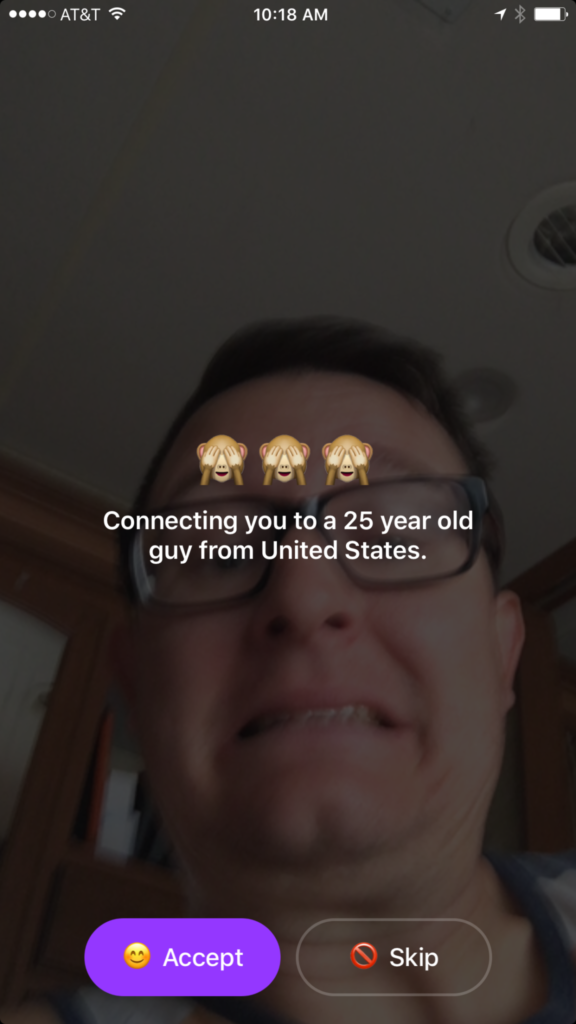
    In reality Monkey is a chat roulette type of video chatting app. Once you’ve downloaded the app it will ask you your age. You set your age to whatever you’d like it to be, provide your phone number and your snapchat username and you’re in. It immediately begins connecting you with someone to video chat with. While it’s connecting it shows your face dimly in the background and says who it’s connecting you to. You have the option to skip the connection or accept. If you accept you’ll be shown their video feed and they’ll see yours. In the short time I tested the app I was connected with all males ranging from ages 22-45.

    Once you have connected with someone a countdown clock begins. You can tap the clock to add time and keep talking but if they don’t tap their clock you’ll be disconnected. This is another “swipe right” concept that gives each user the option to continue the connection with a simple gesture on their smartphone. To be honest I never accepted a connection. I still just don’t get a good feeling about the gamble of finding random video chatting partners. I don’t know what I”ll see when I connect. You also don’t know what your kids might see.


    What Parents Should Know

    The dangers of a roulette style video chat app should be pretty obvious. The potential for unwanted material and contact with dangerous people is real. While there is a report button to flag any inappropriate content, that method takes the “after the damage is done” approach to keeping their app free from pornography and bullying. The app is rated for users aged twelve and over and the terms and agreements explain how the company takes no responsibility for the content that may be displayed on the app.

    YOU FURTHER UNDERSTAND AND ACKNOWLEDGE THAT, WHILE THE SERVICES ARE NOT PROVIDED FOR PORNOGRAPHIC PURPOSES OR FOR MAKING SEXUALLY EXPLICIT CONTENT AVAILABLE, YOU MAY BE EXPOSED TO CONTENT THAT YOU DEEM TO BE OFFENSIVE, INDECENT, OBJECTIONABLE, OR SEXUALLY EXPLICIT, AND YOU AGREE TO WAIVE, AND HEREBY DO WAIVE, ANY LEGAL OR EQUITABLE RIGHTS OR REMEDIES YOU HAVE OR MAY HAVE AGAINST MONKEYSQUAD WITH RESPECT THERETO. – Monkey Terms of Use (All caps theirs.)

    This app was developed by two sixteen year old kids from Australia. They said that they designed the app to allow teens to build more random online relationships. Ben Pasternak and Isaiah Turner told Mashable “…Snapchat is for your real life friends and Monkey is for your internet friends.” These teenagers saw a line between their real world relationships and the ones they could make with people all over the world through the internet. This is exactly what parents need to consider. While living in a more globalized world has many positives there are also very real risks to exposing our young teens and kids to the entire globe. 

    My advice is to put this app on your uninstall list. Never trust an app based on their branding or icon. Have a real conversation with your teen about the potential of seeing body parts or other unsightly things on this app. Remind them of the problem of connecting with random people online. There are always people who will lie about their age or their gender in order to connect with someone they’d like to prey on. Even if they know they’re only going to be connected for a few seconds. Sometimes a few seconds is enough to cause major problems for our young kids. Don’t let the cute monkey emoji logo fool you. Uninstall on sight!


    Does your family have an internet safety plan? Sign up for our email list to get a free checklist that will guide you to family internet security.  

    Get Our Latest Posts in Your Inbox

    * indicates required


  • Minecraft Update will Add a Marketplace and Virtual Currency

    Minecraft Update will Add a Marketplace and Virtual Currency

    Minecraft is still one of the most popular video games on any platform. What started as a small building game has become a National phenomenon with billions of dollars (2.5 billion in 2016) made every year on downloads and merchandise. Microsoft is soon launching another avenue for profit and an opportunity for Minecraft content creators to split that profit. Later this month they will be launching the Minecraft Marketplace.

    The Minecraft Marketplace will feature user made products such as maps, skins, and textures. The items in the store will be curated so it won’t be filled with tons of useless products made by just anybody. In fact, they aren’t allowing random users to upload content, just creators with an established and registered business. Products in the store will be purchased with a virtual currency called Minecraft Coins that can be bought with real money. This currency will be purchased through your XBox Live account. There is no way to earn these coins in the game. Microsoft is launching the store on Android public beta (a test version) this month with several content packs already available. These packs include pirate, fairy tale, and stone age map packs and some pastel textures among other items. The full public release is coming later this spring to pc and mobile platforms. It isn’t clear if and when the Marketplace will be available on console platforms.

    What Parents Should Know

    Obviously it’s important to know any time the apps your children use have an in-game way to spend money. Minecraft adding a Marketplace will undoubtedly lead to more of kids asking parents if they can buy something on their computer or mobile device. Since true money will only be spent on purchasing coins it is likely that a message will pop up when you tap an item to purchase that will lead you to a way to buy coins. If in app purchases are disabled on your device it shouldn’t be much of a problem. If they are not disabled then you’ll want to be sure that a password is required to make purchases.

    The fact that the content on the marketplace will be curated is a good thing. This means that your child won’t be spending money on something that isn’t guaranteed to work in-game. It also means that they should keep any adult themed or inappropriate content from making it’s way into the store. While I’m sure that’s a goal, it’s still important for parents to look at the store every now and then to see what kind of content is available. If there’s something you wouldn’t want your kid to see then you should consider disabling the marketplace if and when that feature is available.

    The Minecraft Marketplace won’t be available to everyone right away but a public beta means that it’s coming soon. Be sure to be talking to your children about the time they spend on Minecraft, explain to them what virtual currency is and that purchasing those coins costs real actual money. Also, be sure that if your kid wants to download a new skin or texture pack that they know how to implement it so they won’t be buying something they don’t even know how to use. Start the conversation now so you’ll have a head start when the Marketplace launches to everyone.

  • Fake News and Selfie Smiles

    Fake News and Selfie Smiles

    Your kids’ brains are developing, you MUST learn to tell fake news from real news, your pictures need more sprinkles, and SURPRISE!! Instagram is full of narcissists.

    FAMILY TECH WEEKLY EPISODE 2

    Social Media Links

    Facebook: http://facebook.com/4pointfamilies
    Instagram: http://instagram.com/becausefamily
    Twitter: http://twitter.com/becausefamily

    Newsletter Signup

    Ministry Updates:: http://eepurl.com/R7Btr
    Weekly Blog Posts:: http://eepurl.com/cvnhXD

    Websites

    Ministry Site:: http://becausefamily.org
    Tech Blog:: https://safe.becausefamily.org
    Michael’s Speaking Info:: http://kmichaelprince.org

    Donate and Affiliate Links

    http://BecauseFamily.org/partnership
    Music by Kevin MacLeod at http://Incompetech.com

  • Fake News and Your Family

    Fake News and Your Family

    I’ve been hesitant to write about the fake news issue. While there have been plenty of stories come out about how the tech world is battling the fake news problem I have yet to be able separate the issue from people’s political feelings and so I’ve left it alone. Today, tech news sites are talking about the latest shot fired in the fake news war and it centers around the most popular site on the internet, Google.

    Google is going to be featuring fact check links on many news stories in your search results. The need for more fact checking has become more and more obvious as the internet becomes full of user generated content. The issue with UGC is that you can say whatever you want and, until recently there weren’t a lot of ways to prove your story right or wrong. Links underneath some Google search results will now feature fact check information from sites like Politifact and Snopes. These should help those seeking true news and information to have a better understanding of the sources for the articles they’re using for their research.


    What Parents Should Know

    Fake news isn’t a kids and teens problem. Many adults share stories without finding out where the information came from. It isn’t difficult to recognize a satirical news site from a real news site. Fake news sites work to disguise themselves as real news. Satire is an obvious attempt at humor while fake news is usually just created to get clicks and sell advertising. You see, the more clicks a site gets the more money they make from advertisers on their sites. Writers on these sites will write a story based on the number of clicks it will get and not the accuracy of their information. Often these stories will be twists on something that is true while sometimes it’s just a completely made up article with a “clickbait” headline. We can’t continue to share these articles for so many reasons; the biggest reason is that it further confuses our society and divides us.

    Your children deserve a world where news is actual news. No matter your beliefs or political leanings you don’t want your kids to have to function in a society where there is no difference between factual news and an inflated false story written by some kid in a basement in Ohio (no offense to Ohio.) You should learn to fact check. Spend some time on Politifact.com or Snopes.com and dig around for the issues that are most important to you. Teach your kids what it means to site sources and look for the purest form of information or news. Yes, you can read about the latest tech news from me and I’ll related it to parenting and protecting your children online; that’s great, but if want to know more about Google’s fact checking search results you can go read their blog to get the information straight from the source.

  • Adolescent Neuroscience and Online Safety

    Adolescent Neuroscience and Online Safety

    You hear it all the time. “Kid’s these days.” or “I just don’t get teenagers.” There’s a myth that our teenagers are becoming more and more selfish and entitled. In reality, however, adolescence is nothing new. William Shakespeare wrote of the craziness of the teen years in The Winters Tale,

    I would there were no age between ten and three-and-twenty, or that youth would sleep out the rest; for there is nothing in the between but getting wenches with child, wronging the ancientry, stealing, fighting.

    Teenagers of “the good ol’ days,” while they may have had jobs earlier in life or were thrown into battle before they could legally buy a beer, were still teenagers and dealt with the same issues as our kids do these days. The issues may be highlighted these days by the availability of technology and the hyper-connectedness of our culture. Young people have the entire world at their fingertips and can have face to face type interactions with anyone from anywhere. This is what is new and some recent studies in neuroscience have shed light on some of the biological reasons for a teen’s selfishness, risk taking, and lack of self control. Watch this Ted Talk from neuroscientist Sarah Jayne Blackmore.


    What Parents Should Know

    You, most of all, should be encouraged that your teen is just like every other teen. Their outbursts and seeming lack of responsibility is largely based on biological reasons. They aren’t stupid or handicapped, they are developing and this affects their behavior, especially online. A book by David Walsh called Why Do They Act That Way? reminds parents of the “use it of lose it” factor of brain development.

    During development your brain synapses are growing and they literally have to connect to each other in order for you to learn something. During the development of adolescence if you are not guided into proper choices the synapses in your brain will never connect. This means you could struggle with those types of decisions for the rest of your life. With the advent of social media and our dependency on screens for entertainment this necessity for guidance in healthy behaviour is even more evident.

    When your son or daughter tells you that they want a smart phone because all the other kids have one, this is an opportunity to help their brain develop a proper attitude. When your 13-year-old son has been watching YouTube videos for six hours a day setting time limits on your Wi-Fi is helping him practice self-control. When your daughter received a message from somebody she doesn’t know and you see it on your monitoring app and immediately tell her to block that person you’re teaching her how to make good decisions.

    Let this post encourage you. You are the mom or dad, and it’s up to you to help your young adult grow to be a contributing member of society. Their biology can get in the way but your guidance can show them how to make the right decisions. Hang in there, keep doing the hard stuff, we’ll keep giving you the info you need.

  • PODCAST: Why is the Instagram Search Bar Recommending Porn

    PODCAST: Why is the Instagram Search Bar Recommending Porn

    The Wishbone App could be an bad idea for your tween daughter. Apple is making some changes in the app store. Amazon Prime Video now has parental controls. What can you learn from search bar auto-fill terms?


    Video Version

    – Social Media Links

    Facebook: http://facebook.com/4pointfamilies
    Instagram: http://instagram.com/becausefamily
    Twitter: http://twitter.com/becausefamily

    – Newsletter Signup

    Ministry Updates:: http://eepurl.com/R7Btr
    Weekly Blog Posts:: http://eepurl.com/cvnhXD

    – Websites

    Ministry Site:: http://becausefamily.org
    Tech Blog:: https://safe.becausefamily.org
    Michael’s Speaking Info:: http://kmichaelprince.org

    – Donate and Affiliate Links

    http://BecauseFamily.org/partnership

    Music by Kevin MacLeod at http://Incompetech.com

  • What Can You Learn from Search Bar Auto-Complete

    What Can You Learn from Search Bar Auto-Complete

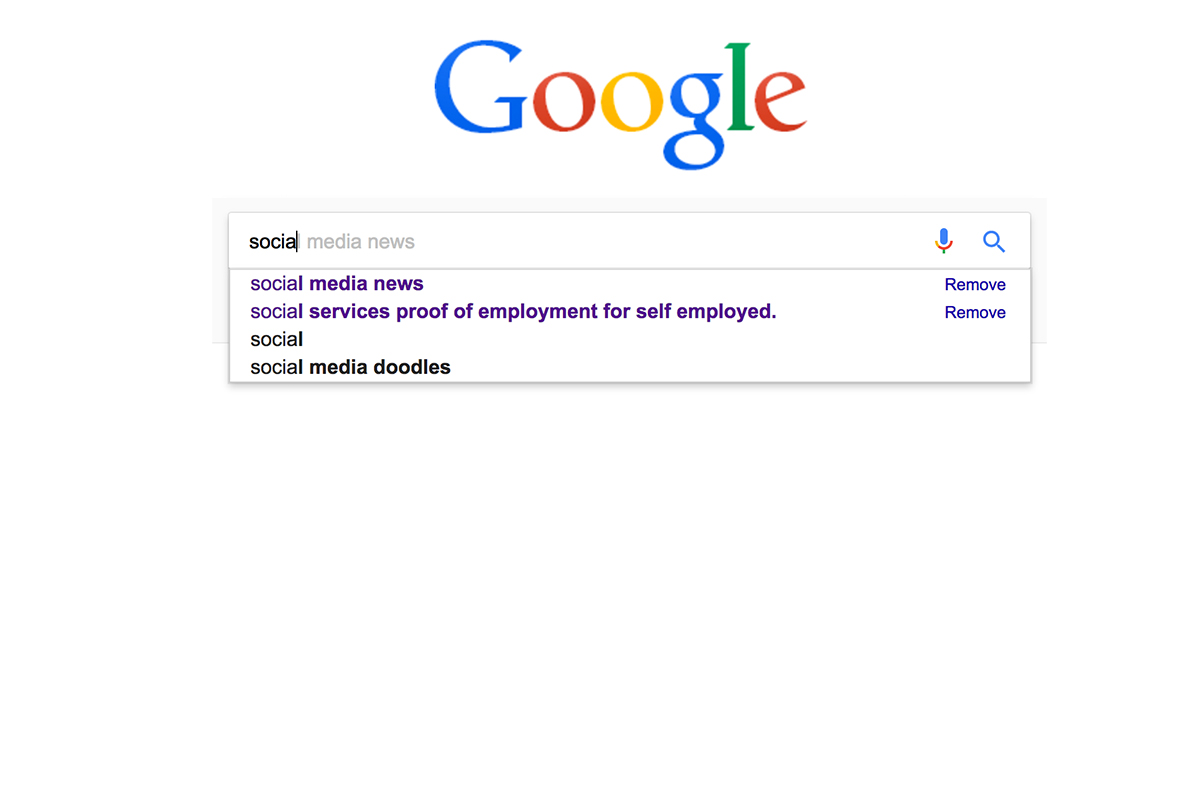
    I have no better advice for parents than putting your eyes on the devices your kids use as often as possible. As long as you’re communicating with your child it isn’t spying to take a peek at what their friends are posting on social media or what they’ve been searching for in their web browser. I do not, however, advise that you let yourself get too worked up over the recommended search results or auto-complete results in the social media apps your kid/teen uses. It can be frightening to type in a couple of letters and get a dropdown full of accounts you’re unsure of or search terms you wouldn’t want them to be searching for. The initial reaction of parents is usually to be concerned that this means their child has been looking for something inappropriate in the past. That isn’s always the case and I’ll try to explain why.

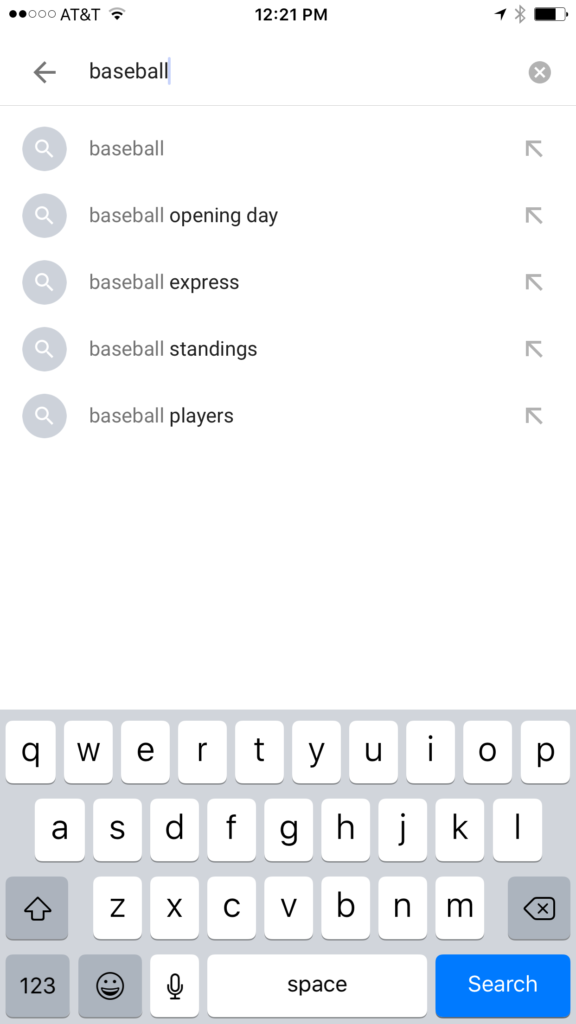
    Instagram, Facebook, Pinterest, and other photo or video sharing sites use algorithms that combine your past searches, popular items on their site, and your location to recommend the search results that may interest you. I don’t recommend parents take suggestions from these apps as evidence that their child was doing something inappropriate. You can, however, on many of those sites go find a search history and actually see what they have typed in the search bar in the past. This information is also deletable though. Regardless, looking at the search history is a much better way to monitor what your child is doing on these sites than assuming something from the first two letters you type in to the search bar.


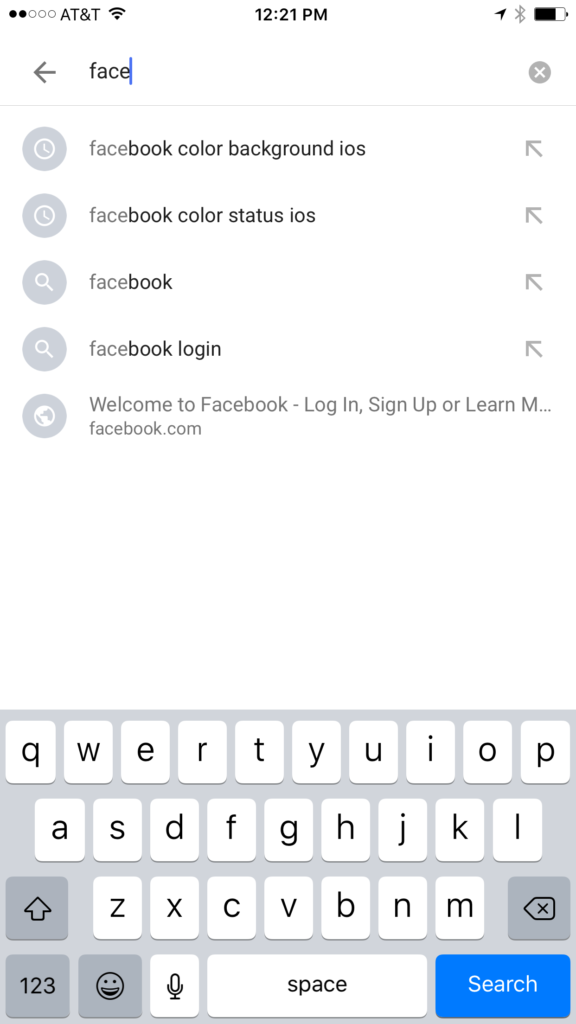
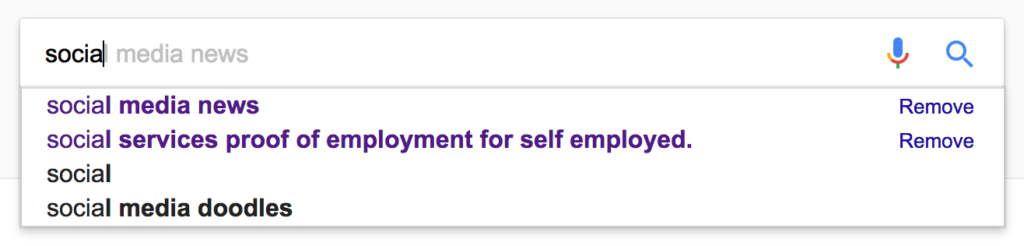
    Google and YouTube are the two most popular search engines on the internet. Thankfully, they’re a bit easier to monitor. The Google app has identifiers to help you know why it’s recommending certain things. You’ll see a clock icon if the recommendation is from search history and a magnifying glass icon if it is just recommended based on other data. On your browser the auto-complete results are a different color and you receive an option to remove them if they’re from history. YouTube, being a part of Google, uses the same methods to identify auto-complete search items.


    What Parents Should Know

    There is a lot to consider when you’re trying to monitor your child or teen’s online activity. Because so much of the internet is now consumed with photo and video sharing it goes without saying that some of the content you wouldn’t want your child accessing makes it’s way to those platforms almost immediately. This being said, there are better ways to monitor than trying to creep through search histories. I recommend using a good accountability software like Accountable2You or a filter like NetNanny. Another option is to install the social media apps they’re using and get to know how the search bars work for yourself. Find out if it’s using your history to establish the items it recommends for you or not. As you get used to it you’ll be able to get a better feel for what’s happening in your child’s account when you check their device.

    Remember that communication is key. Your kids should know you’re looking at their devices and social media accounts. Rules are good but without conversation and relationship they create conflict. Your goal is to set boundaries that will help your children develop healthy habits. A healthy approach to monitoring and regulating their internet usage will speak volumes to them about your family’s online safety standards.


  • These Games Let Your Tween Play Out Their Own Soap Opera

    These Games Let Your Tween Play Out Their Own Soap Opera

    I was doing research for an app to write about when an ad came up. The ad was for a game called Episode and it featured cartoon animated teen girls in situations that would only come from some mid-day television show. For example there was one girl deciding whether or not to perform CPR on her shirtless and handsome male companion. He winks at the “camera” and she thinks he may be faking so the player gets to chose her next move. “Perform CPR” or “Kiss him to find out.” This scenario is one of thousand available on these games that are developed by a company called Episode Interactive.

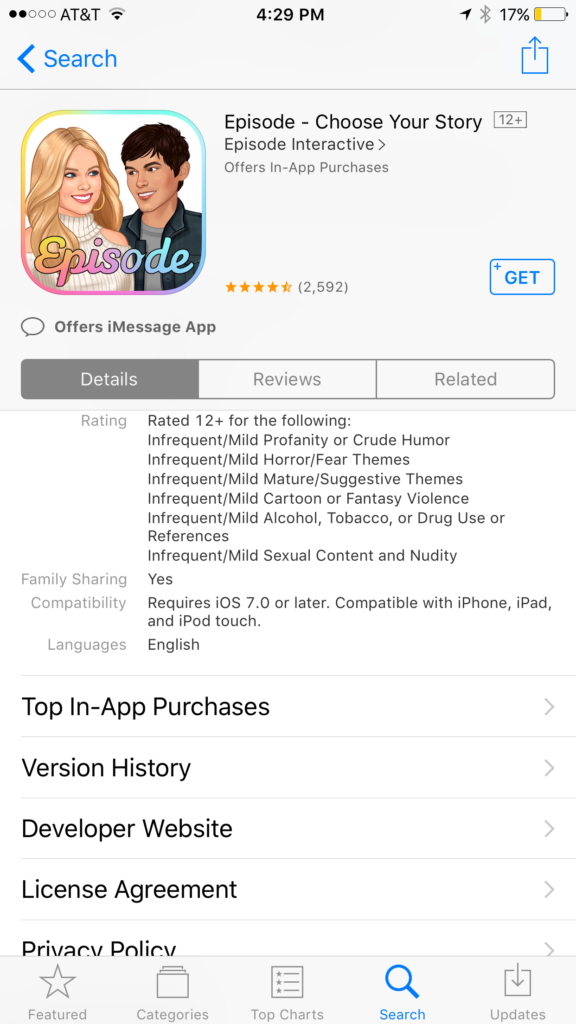
    Their apps are all interactive story games that put the player in control of the choices of the main characters. Each app features thousands of stories to play out. The scenarios feature romance, mystery, comedy, family, and a bunch more. The situations that the character is placed in during the stories can often be very adult oriented. Decisions whether or not to have sex. A choice to run away from a potential mugger or try to attack them back. There are some very dramatic and grown up themes in these games. A look at the description will tell you that the games are rated for ages twelve and over for various reasons including, sexual themes, drugs and alcohol, violence, and nudity.

    These games are a choose your own adventure of sorts for the new generations. They target young tweens with the glam of what it’s like to be a teenager or what High School life is like. It’s all obviously very fictitious but our kids buy these messages hook, line, and sinker. Think of apps like this as romance novels that are targeting your ten to twelve year old daughter. I say it’s targeting tweens because the app I was reviewing when I saw the ad for Episode was one that is obviously mostly populated with young girls. Your daughters will believe a message about who they are and what gives them value. Apps like this are speaking to a certain version of that message. We as parents must play defence against the wrong message to successfully teach the correct message.

    What Parents Can Do

    My advice is to make sure your child is far older than the recommended age for these games before you let them play. They are obviously meant to mimic the soap operas of our parent’s days and they feature exactly the same types of themes. The maturity of your child is best understood by you, their parent. It is usually not a good idea to take the age recommendation of an app, game, or other form of entertainment as the law and gospel. You have to use your own judgement. Unfortunately for some kids these themes are mild compared to things they’ve dealt with in real life. But for many of our ten, eleven, and twelve year olds, these games can introduce topics that they may not be mature enough yet to navigate. That’s why it’s so important for you as a parent to step in and see what they’re doing on their phone or tablet.

    Apps like Episode are easy to spot because they don’t hide their themes in the ads on the app store. It’s pretty obvious what they feature in your game. My advice is to use something like Google Play’s parental settings, or Apple’s Family Sharing to ensure you’re seeing every app being installed by your kids. If you see something that looks like it could be a choose your own adventure style of soap opera game then think seriously about the potential questions your child will be asked while they play it.


    Get Our Latest Posts in Your Inbox

    * indicates required


  • Use Twitter’s New Tools to Protect Your Kids from Trolls

    Use Twitter’s New Tools to Protect Your Kids from Trolls

    Surprisingly, more of our teenagers are using twitter than you may think. The common attitude among young people is it’s a good place to express yourself even if you’re not sure anyone is listening. Twitter is still a place for teens to go public with their thoughts and opinions. The potential problem with such expression is that there are always those out there wanting to counter your opinion. Often this takes on the form of trolling or bullying. Twitter has released some tools that can help their users filter out some of those trolls and parents need to learn how to use them.
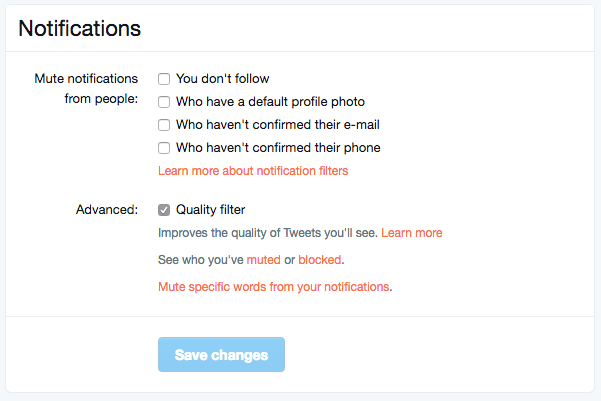
    Twitter was in the news last year because of a common theme of internet trolls bullying users, especially celebrities. This caused Twitter to begin working on some new ways to “clean up” what you see in your feed. In the last several days Android and Desktop Twitter users were given the power to block notifications of posts from certain types of accounts, including those who haven’t verified their email address and phone number. The common practice of these trolls is to create fake accounts just for the sole purpose of messing with someone. They don’t verify the account or even include a profile picture, displaying the default bird’s egg logo instead. The new tools developed by Twitter will allow these trolls to be filtered out by simply clicking a couple of checkboxes.


    What Parents Should Do

    Suicide is now the third leading cause of death among teens and a teen that is cyberbullies is ten times more likely to think about killing themselves. These statistics are a reality in this digital world and are a wake up call that parents need to take the opportunity to filter content in their kids social media feeds seriously. These notification filters can help remove some of the negative and hurtful people that just seem to want to make trouble on Twitter.


    Take note of the above picture. If you go to the notifications tab on twitter you’ll see a Settings link on the upper right. Click that link and you should see something similar to this image. It’s pretty straight forward but if you turn off notifications for anyone who hasn’t set up their profile picture, validated their email, or linked their phone number you’ll eliminate many of those troll accounts that cause so much trouble. Remember that Twitter and other social media sites contain “User Generated Content” and therefore, can’t be considered safe for anyone under 17. This means you should keep an eye on what your child or teen seeing on Twitter and have conversations with them about it. As them why they use Twitter. Find out if they’ve ever been teased or bullies on the app. If so, ask what they did about it and who they told. Kids who talk about being bullied are far less likely to take drastic measure as a result of it so open the lines of communication and be present when they need you. You should be that safe place they can come to with any problem. Bullying on social media is no exception.

    Follow all of our posts to keep in the loop on family relevant tech topics. Sign up for our weekly update newsletter. 


    Get Our Latest Posts in Your Inbox

    * indicates required