Tag: parenting

  • New Operating Systems Coming for iPhone and Android

    New Operating Systems Coming for iPhone and Android

    The last few weeks have been loaded with updates from the two major tech brands in the industry. Google’s I/O event was May 17-19th and they had some major announcements including virtual reality, augmented reality, and a brand new operating system for Android, Android O. Apple’s Worldwide Developer’s Conference (WWDC) was this week, June 5-9th, and they’ve made similar announcements including a new version of their smartphone operating system that they’ve branded iOS 11. These two new systems will run the majority of the newer phones and tablets being released so it’s important to understand what each is offering. Here’s a rundown:

    Android O

    Android’s newest system should be made public this Fall. The most significant features are design changes in the Settings Menu and User Interface (UI.) Many of the smaller changes are things users won’t notice such as changes in how the OS will handle security and background operations, as well as channels or categories for notifications. Also, picture-in-picture support, notification badges that will appear on app icons, and better bluetooth support will definitely be features that makes Android O a step up for it’s users.

    iOS 11

    A new dock, multitasking with drag and drop, a files app, and better Apple Pencil support make iOS 11 a major upgrade for iPad. iPhone users will notice more apps in messenger, an app store that looks and works completely differently, and a new and improved Siri, including a new voice. The control center, the lock-screen, notifications screen, maps, Apple Music, and AirPlay are all getting improvements as well. iOS 11 is also slated to release this fall.


    What Parents Should Know

    There haven’t been any announcements on Parental Control improvements for either of these operating systems. When the test version of iOS 11 is released I’ll be giving it a full look-over and writing a review for you. One thing that parents will enjoy from iOS 11 is the ability to turn on an automatic Do Not Disturb while driving. The phone will sense your movement and speed and automatically silence any notifications until you’ve stopped. This will be a good way to keep your older kids safe while they are on the road. As for Android, they recently put out a new Parental Control option for their OS and it’s proving to be a pretty good setup. It’s only available on newer devices, however, and we still don’t know what changes have been made for when Android O is released.

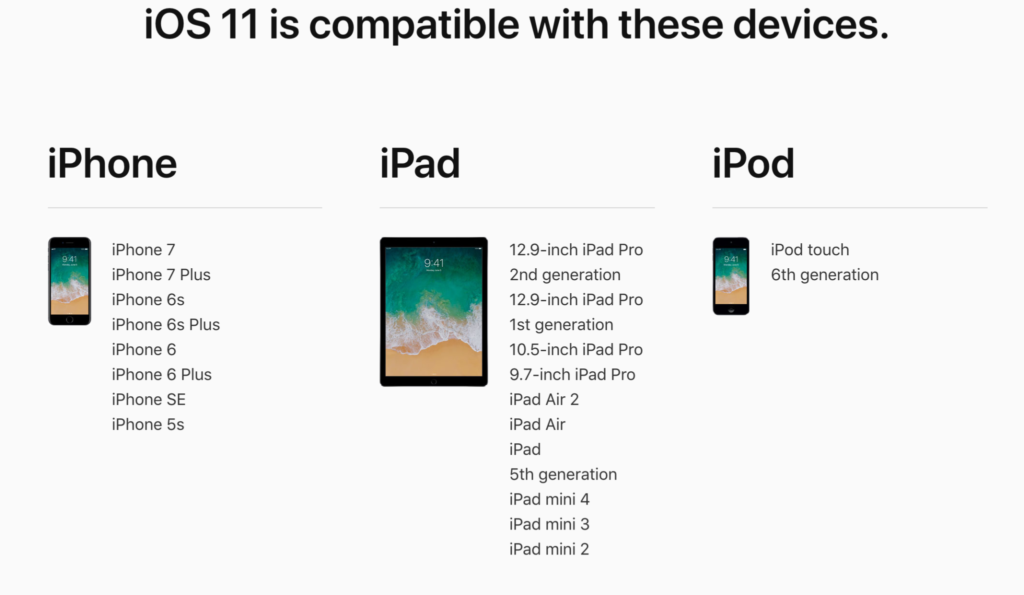
    I always recommend keeping on top of updates when they are made available. Both of these new Operating Systems should be available this fall and you should be sure, if your devices are compatible, that you’re upgrading soon after release.  This isn’t just important to get any of the new features but also because security and privacy updates come with these new systems. The apps you use, including the ones you use for internet safety and monitoring will update to keep up with the latest software and if your devices are behind you’ll start to see holes in your security. Keep your eye on the update section of your settings menu and when it shows that a new version is available you should install immediately. You can also keep checking in to this site as I will keep you informed on the latest releases as well as how they can affect your family.

  • Social Media, Globalization, and Our Kids’ Convictions

    Social Media, Globalization, and Our Kids’ Convictions

    We’ve got “covfeve”, Hillary Clinton speaking about politics at a programming conference, Kathy Griffin vs Donald Trump on Twitter, Mark Zuckerberg and Elon Musk talking about the President’s climate change beliefs, and all other kinds of tech notables using their platform to promote their political and ethical beliefs. There’s no doubt that our kids are growing up being more aware of the polarized political landscape we live in than ever before.

    I remember knowing there was a President when I was a kid. I remember hearing a thing or two about impeachment and adultery but I didn’t care or pay too much attention. I was a preteen and I had more important things to deal with. Mainly video games, girls, and baseball. I don’t remember hearing anything about politics while I was in middle school or high school. I registered to vote when I was 18 and voted for who my family said would be a good choice. Now, the people who run our favorite entertainment companies openly state their disdain or support for our government officials. Protests have hashtags and political videos and memes go viral equally because of people agreeing and disagreeing with them. It’s obvious to our kids now that we are living in a volatile political situation.

    Political opinion is formed by who you grow up listening to. It used to be formed by parents, grandparents, and the culture in your local community. Globalization now allows our kids access to every opinion from any voice they want to hear from. Many times these voices are people mom and dad may not be comfortable with. Declaring whether or not that is a good thing is not the intent of this article. My goal with this article is to give understanding to parents who are confused about why their kids grow up to think differently than they do.

    Your children live in a globally influential world instead of the small section of the country that we grew up in. I grew up in Texas, New Mexico, and Missouri and believed the better part of what I was raised to believe. The global landscape of social media (which is just the state of the internet in our culture) has caused many of those beliefs to shift or even outright be changed. Not just for me but for most in my generation and younger.

    Parents should be aware, whatever your thoughts are on today’s hot political topics, that your voice is most likely not the loudest voice in your children’s lives. The Snapchat Discover page, that YouTube vlogger, Instagram influencers, and even Twitter are telling them whatever message they’re more interested in soaking in. The algorithm’s on these platforms provide them with a steady stream of reinforcement for whatever it is they’ve been tapping or clicking on up to this point. Opinion isn’t being formed by their church, their school, or their family like it used to. It’s formed by anyone and everyone in the entire world. Whatever your thoughts on what your kids should believe or where they should form these beliefs, I just wanted you to know where it’s actually coming from. 

  • You Can Finally Get a Refund for those Old Amazon Purchases Your Kids Made

    You Can Finally Get a Refund for those Old Amazon Purchases Your Kids Made

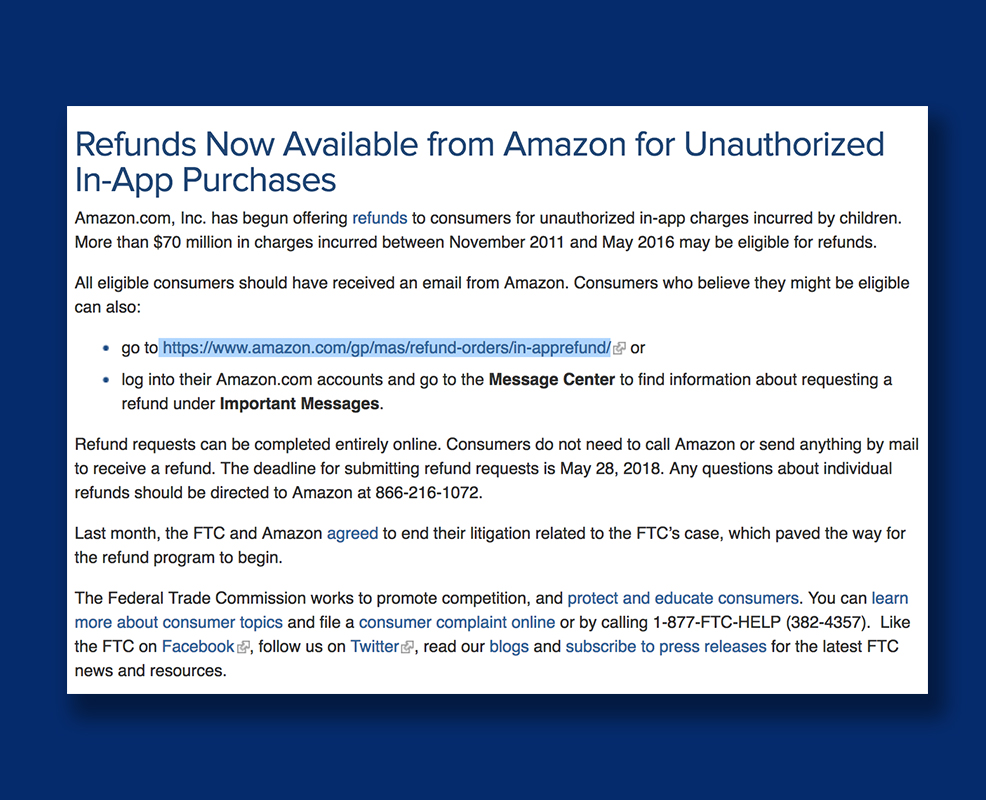
    Remember those unintended charges your kid racked up on your Amazon account? You can finally get a refund for that. Amazon announced this week, after teasing in April, that they’re opening up their refund system for those old charges. You may recall that Amazon got in to some trouble with the Federal Trade Commission for being too lax on in app purchases. This caused thousands of parents to see charges show up on their accounts that they weren’t responsible for. Their kids could buy gems, gold pieces, upgrades, or whatever else in the games they were playing with no secret pin or passcode required. At the time Amazon added the parental restrictions but were still working on a way to give out all of the refunds.

    They will be emailing users who are eligible for a refund and you can follow the steps from there. There is a one year deadline to submit for your refund and them the time is up. These refunds will cost Amazon up to $70 million dollars and are available to users who had this problem from 2011 through 2016. If you think you’re eligible but didn’t get an email you can visit https://www.amazon.com/gp/mas/refund-orders/in-apprefund/ to find out if you qualify.

    The Federal Trade Commission’s Official Statement

    What Parents Should Know

    Obviously you should get your refund if you qualify but these charges can still happen if you don’t have your settings right. You can set up purchase permissions on iTunes, Amazon, or Android’s Google Play store. You also have to set individual permissions on most of your devices. This will allow you to require passwords and pins in order to make a purchase, thus keeping you from seeing strange charges on your credit card or bank statements. I’ve made a video to help you with your Apple devices. Hopefully you can use these steps to keep from having to apply for any refunds for purchases you didn’t make yourself.

  • Teaching Your Kids Healthy Tech Habits

    Teaching Your Kids Healthy Tech Habits

    One of the most popular questions I get when I do tech safety workshops for parents is “how do I set restrictions for my older teen?” I think the most important thing to remember is that you’re not just setting restrictions, you’re teaching healthy habits. The brain of an adolescent is developing in such a way that your guidance is critical as they navigate these murky digital waters.

    I like the term healthy when it comes to internet use because right and wrong is subjective. Your sixteen year old may believe that it’s ok to watch YouTube videos for five hours on a Saturday afternoon but you can use facts to help him understand that it may not be healthy. Our conversation with our teenagers shouldn’t be about what digital habits are right and wrong but what is healthy. Here are three critical factors to keep in mind while teaching healthy tech habits.

    Relationship

    Boundaries without relationship become rules and rules were made to be broken. Because of your healthy relationship you can help your teenager understand that the rules exist to protect them. You can create a safe place for them to come to when they need guidance on their tech habits, about how they’ve been treated online, or about regrets regarding something they’ve seen or done online.

    As parents we shouldn’t close the door to conversation with instant judgement or constant nagging about the time they spend online. I recommend using digital means to keep track (with their knowledge) of what they do online and only bringing it up when it becomes a consistant problem. Relationship is the most important part of any internet safety strategy.

    Transparency

    Openness and transparency is key, not just on your teen’s part but on your part as well. It is critical that you are transparent with them about your tech habits. They need to understand that you’re trying to get it right as well and that the habits they develop now will affect them as they grow older. The best way for them to learn this is by watching you and hearing about how you’re having to deal with these same issues now. Whether you’re trying to keep them from dangerous content or help them avoid tech addiction, they should understand that you’re trying to protect yourself from those things too. The quickest way to cause your teen or young adult child to stop taking you seriously is for you to not practice what you preach.

    Time Management

    Obviously time management will be critical as your child graduates high school and enters college. Between jobs, studying, and extra activities they’ve probably already had to develop some form of time management skill. The lure and appeal of constantly available video, music, and gaming entertainment can make time management more difficult now than it’s ever been.

    You have to help your teen understand what good time management looks like. Point them towards content on the tech that they enjoy, like YouTube videos, podcasts, or productivity apps and other tools that will help them learn more about healthier time management habits. Encourage them to use these tools alongside some of the entertainment they consume.

    All three of these steps are related to each other and will greatly impact one another. If you don’t have a good relationship with your child that encourages communication, if you aren’t being a good example, and if you aren’t teaching and showing time management skills your kids are going to have a hard time navigating healthy tech habits. Online life is a real part of our world and it’s too important to ignore so utilize these steps and let me know what others you have used that have been successful.

  • Instagram Rolls Out Major Updates to Direct Messaging

    Instagram Rolls Out Major Updates to Direct Messaging

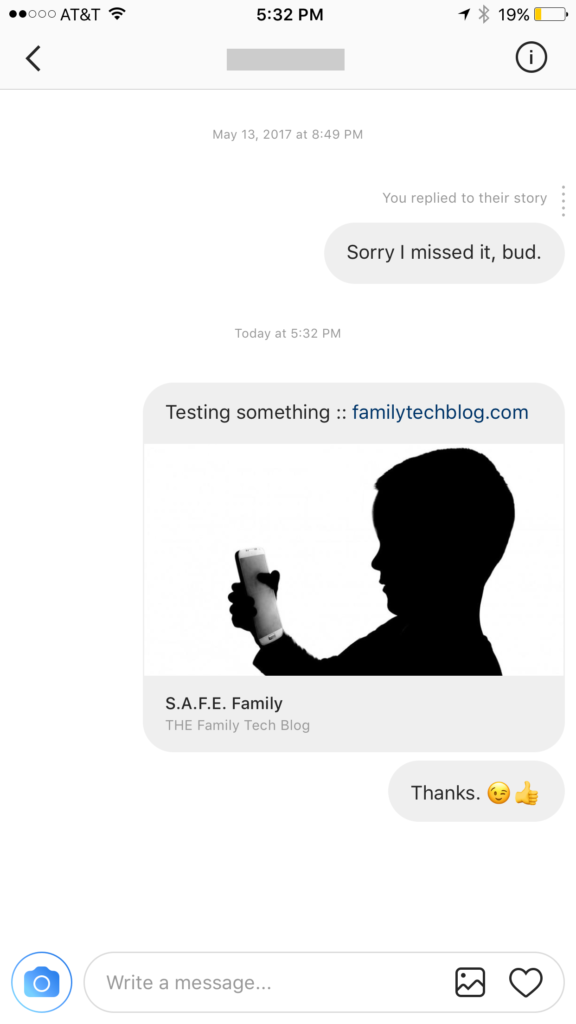
    Instagram has launched their seemingly weekly major update today with a focus on their direct messaging feature. Now it’s possible to see previews of links and to send full size images. (Not just squares.) While most of Instagram’s updates have focused on it’s Stories feature, the DM gets quite a bit of attention every now and then too. There seems to be a race between Instagram and Snapchat to develop the best private messaging option out there. Features like link previews and removing the image dimension limits will go a long way to make Instagram a serious contender for direct messages.


    Link previews look a lot like in FB Messenger.

    What Parents Should Know

    Obviously it’s important to know who your kids are talking to online. Private messages open up the possibility for kids to contact people they don’t really know very well. This can lead to full, private conversations with videos and images that are difficult for parents to monitor. There is no way to disable direct messaging in the Instagram app so if your kids are using the service they have the ability to contact people in private. These messages won’t show up on their image timeline and images won’t be stored on their phones unless they manually save them. This can result in private messaging that may cross your line of what’s appropriate.

    Links that show up in Instagram will open in the Instagram browser when clicked. This means some accountability software and filters won’t take affect. You should keep that in mind when deciding whether or not to allow them to use Instagram.

    My advice, as always, is to take whatever measures you’re most comfortable with to monitor your kids Instagram activity. The only way to monitor their private messaging is to have their login information. I show you how to log in as them on your own device in a video here. Prevention, monitoring, and conversation are the most important things you can do to keep your kids from unwanted material online.

  • Is Pinterest Safe for Your Kids and Teens?

    Is Pinterest Safe for Your Kids and Teens?

    Is there porn on Pinterest? Does Pinterest allow porn? I’ve heard both of these questions many times and the answers are very very different. Today, as Pinterest announced their new approach to advertising videos on their site and app, I’m reminded of the many parents who have discussed the potential dangers of Pinterest with me at workshops and other events. Lets unpack a few of those dangers, what Pinterest’s approach is, and what parents can do about it.

    There IS porn on Pinterest.

    I can confirm that there is pornography on Pinterest in two ways. First of all, I started some searches for inappropriate topics and (without having to click through to results) could see that there was porn available. Just typing the first few letters of these search terms produced recommended searches that told the entire story. 

    These results pretty much let you know what is available on the site and in the app. Searching more specific terms would, obviously, produce more specific results.

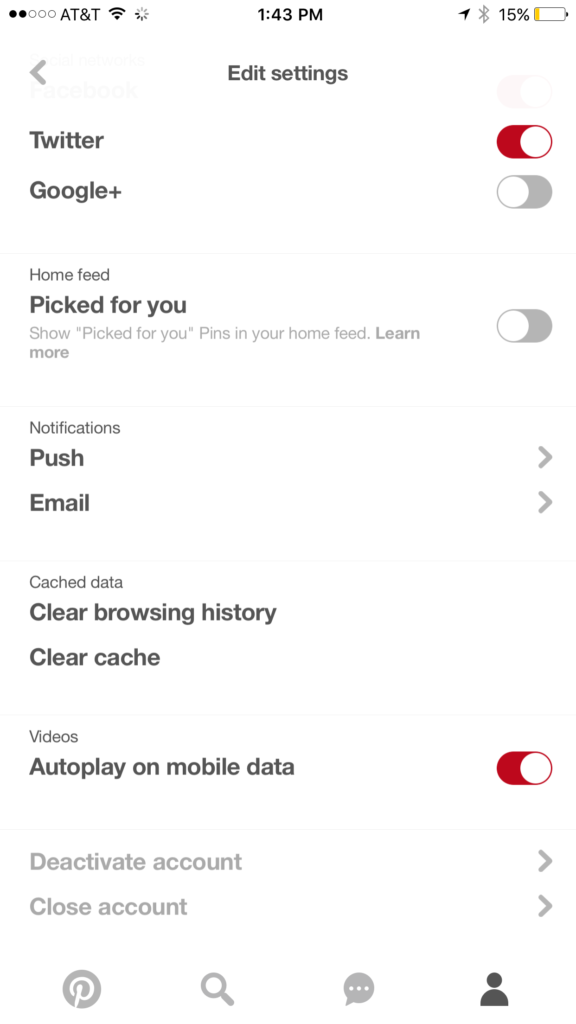
    While this covers intentionally searching for content, your kids may not be the type to have been in to that before so you don’t expect them to go searching for it. This is where it gets a bit tricky. Pinterest feeds you new content in two different ways. They show you pins from people you’ve decided to follow and they show you pins that have been “picked for you.” Pinterest uses what you do in their app and site as well as what you do on other websites to recommend different things to you. If you’ve liked art before then you’ll start to get more art posts. If you’re into geeky quotes, you’ll see pins from people you don’t follow based on what you’ve pinned or viewed in the past. This can lead to being shown pinners who’s pins may not line up with what you’d consider “safe” for your kids. There is, however, a way to turn off the “picked for you” option. See the image below:

    Go into your profile, then settings, and you can turn off personalization AND picked for you.

    Pinterest Doesn’t Allow “Explicit Content.”

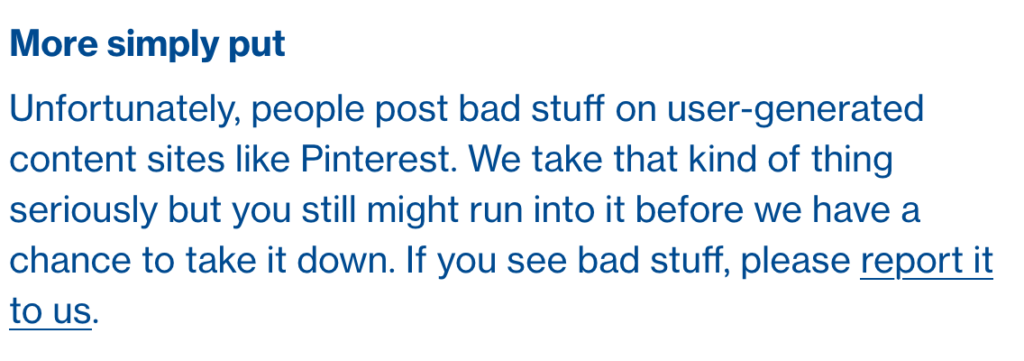
    From Pinterest’s terms of service.

    Pinterest’s rules don’t allow explicit pornography to be posted but it relies on reporting from users to identify and remove the offending pins. This means that the post can be up for days or weeks before it gets enough reports to have it taken down. Another thing to keep in mind is that Pinterest will still use their own definition of “explicit.” You may think something is not good for your 14 year old son to view while they view it as art or expression. This means you have to truly stay on top of what they’re seeing.

    What Parents Should Know

    Again, much is left to interpretation. Some parents may say a photo of a nude statue is artistic and cultural and some might say it’s inappropriate. While some folks think any nudity should be considered explicit, there are parents who would disagree unless it’s in a sexual situation or atmosphere. There are many factors that keep photo sharing sites like Pinterest from making a blanket NO NUDITY rule.

    I would prefer if there were some way to turn off nudity as an option for users but as of right now that isn’t possible. It also isn’t easy to monitor what content is being viewed in the Pinterest apps. Yes, the service is built to work best on the mobile apps, my recommendation is that you limit your younger teen (over 13 to comply with the service agreement) to using Pinterest on a browser. Use something like Accountable2You to monitor their activity so you can be alerted if they’ve come across something inappropriate. This could help keep you from difficult situations stemming from your kids happening upon something adult oriented on Pinterest.

    So, to answer the question, is Pinterest safe for your kid or teen? The answer is no and yes. No it isn’t recommended for your child. The age restriction to get an account is 13. I would, however, begin to ease up on a strict anti-Pinterest rule as my kids enter their teen years but I would monitor their usage in the most effective way possible. Just because you’ve never seen anything when you creep Pinterest doesn’t mean it isn’t there. Know that this risk is real and that your kids are as susceptible as any. Take precautions BEFORE anything regretful happens.

  • Location and Hashtag Search Makes Instagram Stories Unending

    Location and Hashtag Search Makes Instagram Stories Unending

    Instagram has added the ability to search Stories by hashtag and location. This means that your explore tab will now give you access to basically unlimited Instagram story content. Instagram is going to feature location tagged stories by people you follow and also from people you don’t. If you search for your town, or any town for that matter, you’ll see a small map, the posts featured from that town, and if it’s been tagged in a story you’ll see that above the map as well. This will give more access to more stories and may lead to following more people on Instagram. Hashtag results will work in much the same way. You’ll be able to search stories by topic with the hashtag. It will also highlight the posts you and your friend’s made by featuring them first in the results.

    What Parents Should Know

    There’s always a bit of a red flag for me when there’s more potential to be connected with strangers on Social Media. Location and Hashtag filters allow you to find people you’ve never met and see what they’ve posted. Granted, the explore feature already makes that pretty easy. Instagram’s algorithm will gather these people and posts and present them to you from a simple search. These explore and search results aren’t going to be monitored by any accountability software since they’re not technically in a browser. You should take steps to monitor what your kids do in Instagram yourself. You should also lead the conversation with them about Instagram as these new updates come out.

  • Fidget Spinners are Coming to Your App Store

    Fidget Spinners are Coming to Your App Store

    When something becomes trendy in the offline world you can almost guarantee it’ll show up in some digital form. The theory rings true with the latest elementary school kid craze, the Fidget Spinner. While doing my daily scroll through the most popular apps on the Apple App store I noticed a couple of Fidget Spinner games. “Of course!” I said to myself, “it was only a matter of time before the app store tried to cash in on the popularity of the toy trend. Fidget Spinners have caused a lot of conversation among psychologists, sociologists, parents, and educators recently. Everyone seems to be talking about them. My goal was to avoid them on the blog because, “Hey, they aren’t on a smartphone or tablet.” Well, that’s no longer the case.

    Fidget Toys have gained popularity recently as a way to help kids with ADD, ADHD, and anxiety focus during class and other times when they need a longer attention span. Blocks, dice, balls, and other items have served teachers and psychologists well as they help these children excel in their every day tasks. Spinners toys gave another option and even boast in their advertising that they can increase focus and productivity. The problem with that according to some teachers and psychologists is that a good fidget tool will allow you to keep your eyes focused somewhere else while playing with it. This will increase your attention on the speaker or teacher or video simply because your hands are busy. A Spinner’s main benefit is the spinning itself. This spinning must be viewed to be fully enjoyed. This is why many teachers are banning the toys from their classrooms. They are saying the Fidget Spinner is simply a distraction. In a recent CNN story a teacher said:

    We have kids using them in class and the kids nearby are distracted by them. There are kids playing with them (during class) and showing other kids. – CNN

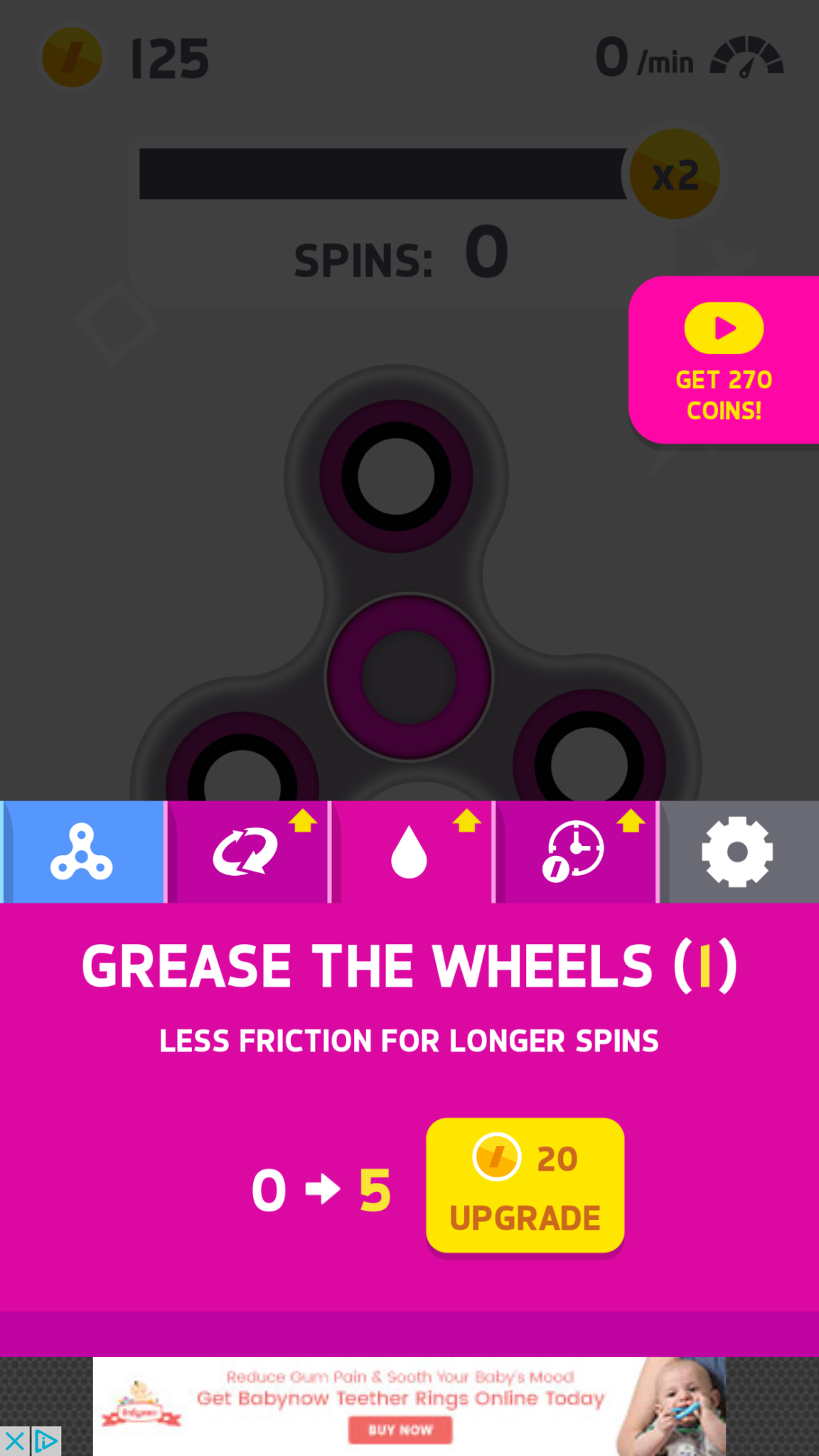
    Many kids have a Fidget Spinner simply because its the latest craze. They don’t need it for focus, its just a toy for them and that’s completely fine. The benefit I’ve heard many parents mention from using the Fidget Spinner as a toy is that it keeps the off of their screens for a longer time. Well, app developers have an answer to that too. Currently, the fasting rising apps on the Apple AND Android app charts are Fidget Spinner games. I downloaded a couple of the iOS games and played for a bit. Here’s how it works.


    What Parents Should Know

    Obviously these apps aren’t dangerous on their own. There is advertising involved, however, and it will most likely not always be geared toward young users. You can also watch ad videos to get coins, the ads were mostly for other free, casual style games. You can pay to get rid of the ads if you’d like. If screen time is a problem then these games could cause some issues. The one I spent the most time on, Spinner, had me trying harder and harder to get more spins out of my spinner. I wanted those coins so I could see what the next spinner design looked like or upgrade my speed. Kids who find themselves hooked on games like this would definitely have the same problem with one of these fidget spinner apps.

    My advice is, as always, to know your child. You have to know if your kid is the type to get hooked on something like this. If they use fidget toys because it helps their attention span then apps like Spinner may not be a good idea since its well known that screen time can cause kids to have more trouble focusing. Let me just finish by saying that these apps are not designed to help your kids with focus or attention. They are simply created to capitalize on the Fidget Spinner craze. In fact, playing the game could take the place of the real spinner altogether for some kids. That just means more screen time, more advertising, and more distraction. We, as parents, have to have the right information and make quality decisions about how our kids spend their time. Hopefully the info in this article can help you take the right steps.


  • Here is Everything Snapchat Added in it’s Big Huge Update

    Here is Everything Snapchat Added in it’s Big Huge Update

    Snapchat’s fastest growing demographic is young adults but it still built it’s success on the short lived selfies of High School kids. Your High School kids. Today Snapchat released a major updates that adds some very new, never before seen features. While I don’t expect these new additions to make Snapchat more of a problem. I do think its smart for parents to understand what the apps their kids use are capable of. Here’s what’s new:


    No Time Limit

    You can now post you images without a time limit counting down until transitioning to the next photo. Videos also have a “play forever” option that will loop your videos. The “disappearing” images is what made Snapchat such a novelty at the beginning. This is a major step away from that.


    Emoji Brushes

    This is pretty much just a way to draw with emojis. Dumb? Maybe. Annoying? Definitely. Will it be used like crazy? Absolutely. You’ll be seeing emojis plastered all over snapchat images now. Enjoy!


    Magic Eraser

    This is just what it sounds like. It’s probably the coolest new feature in this update. It allows you to cut out sections of your photo and replaces the background automatically. This makes whatever you erased disappear like it was never in the photo in the first place. Features like this have been available in photo editing software but it’s the first time we’ve seen it in a social media camera.

    What Parents Should Know

    As I already mentioned these features don’t necessarily make Snapchat a more dangerous app. (It’s already on our uninstall list, mostly because of the potentially adult themed articles in the Discover section.) If you’ve been telling your teen they can’t install Snapchat this update might make it a bit more difficult. You are sure to hear “but mom, so and so has it” or “all of my friends..” just remember that while these updates are cool, there are other reasons you may not think this app is smart for your teen to have. This update doesn’t change any of that.


  • Uninstall Instagram? Your Kid Can Still Use It!

    Uninstall Instagram? Your Kid Can Still Use It!

    Many of the tools parents use to protect their children depend on being notified what apps they have and are using most often. When it comes to social media, being able to monitor posts and direct messages is critical. Sometimes, finding something you didn’t want to see will result in forcing your child to uninstall the app from their device. Until recently, Instagram has been a social media platform that only allows users to post from within the app. Therefore, uninstalling was a good solution for parents who wanted to give their kids some sort of time out. Instagram has just updated their mobile site and it’s going to ruin everything.

    Instagram’s mobile browser update allows users to post photos and use the explore feature without having the app installed. This means that the most major features of the app are available. You still aren’t able to send direct messages through the mobile site, which is a good thing, but posting, viewing posts and accounts, and finding new accounts through search and explore are now accessible. This update is meant to give access to Instagram in countries and areas who have limited  access to app stores or network services. Being able to use Instagram without an app means that more and more people across the country and the world will have an opportunity to share pictures of their lunch or coffee.

    What Parents Should Know

    There is a simple way to monitor what your kids are doing on Instagram, whether it’s on the app or in the browser. I recommend installing Instagram on your own device and adding their account. Even if you have an account of your own, you can add another one and see everything they have been doing. Using the mobile browser will definitely affect your ability to “ground” your kid from social media but there are ways to avoid that to. Here are a couple of options.

    1. Remove access to browsers within the parental controls or restrictions of their device or your parental control apps.
    2. Put instagram.com on the blacklist in your filters or in the “red flag list” on your accountability software.
    3. Take the entire device from your child until the grounding is over. Make them use the family computer for any online activities they must do. This will really give an extra impact to the punish.

    Instagram isn’t inherently bad, of course. Just like any site or app with user generated content you’re going to find inappropriate content. These things can’t usually be filtered so monitoring what they are doing is critical. The most common issue is time spent on social media. Teens are spending upwards of six hours a day online and many of those hours are on some form of social media. If time is your concern, then a simple uninstall of the app won’t cut it anymore. You have to lock down some of the browser options as well. Otherwise, you’re only keeping them from a couple of the features of Instagram, not the entire platform.