
Tag: online

  • 2020 Back To School Tech Safety Checklist

    2020 Back To School Tech Safety Checklist

    This school year is sure to be unlike any other. We are facing a global pandemic causing many schools to shut down and send students online. Parents shaming others for their decisions to send or not to send kids to the classroom. Political upheaval in an election year, and racial outrage all over the country are causing stress levels to increase too. There has never been a time when protecting our kids’ minds and hearts has been so critical for their education. This Back to School Tech Safety Checklist can help you enjoy the 2020 school year with your kids instead of losing your mind.

    Back to School Tech Safety Checklist

    Accountability Software

    I hardly ever write an article about protecting your children on the internet without mentioning accountability software. This software will securely monitor the sites being visited on a computer or mobile device and report anything inappropriate. Most of the time this software allows you to customize the sensitivity of the system so that you aren’t being alerted for things that aren’t actual threats. Our favorite software, Accountable2You, allows you to adjust settings on multiple devices and will send you an email or text when something you don’t approve of has been visited. If the site wasn’t what the algorithm thought it was, simply login to the Accountable2You site and adjust the settings for that site so you won’t be alerted for it anymore.

    Your child will likely be doing more and more work for school on their computer. (As if they weren’t already doing a ton of schoolwork online.) This means that they’ll be searching the web and using web based cirriculum. Accountability software allows you to give them the freedom to use their Chromebook or PC knowing you’ll be alerted if they happen upon something not intended for kids or education. You can even set up certain sites on “blacklists” that will alert you. This means their favorite gaming site or YouTube can be put on the list so you’re notified if they’re wasting more time than they should be.

    Home Network Filter

    Monitoring what your kids see online is a good start. It is definitly step one, in my opinion. Step two, or maybe step 1.5, is a content filter for your home network. A lot of newer internet routers and modems come with content filters that can easily be set up from an app on your phone. These filters will block most adult content from showing up on your child’s device. We’ve all had that experience where a seemingly innocent Google search resulted in an assault on our eyeballs with some crazy adult site that seems to have been intentionally named to show up if you had a typo in the search bar. Filters can keep those nafarious sites from showing up. Even if they are sought out intentionally.

    Remember that a home network filter will protect your child on your home wifi connection. When they disconnect from it and use cellualar data, the protection will be gone. There are filter options for that, though. Circle is one of my favorite options. Bark is also a good resource since they have added time limits and content filters recently.

    Screen Time Limits

    Speaking of time limits, that is also something you need to consider while your kids are spending so much time using technology for school. The good news is that not all screen time is created equal. Experts are saying that creative or educational screen time for our elementary aged and older kids can be beneficial compared to time spent playing games or consuming video content. This means you can probably still give your son a bit of time on Minecraft or Fortnite after they’ve already been doing school work on the computer for four hours.

    Gaming can relieve stress, playing games online with friends can provide some social interaction that they aren’t getting if they’re not going to school every day. These things are benefits of recreational screen time. Also, creativity can be stimulated by use of their screens. Minecraft is a great example, if your child is building a world in the game they’re doing a lot of important critical thinking and creative reasoning which is good for them. I encourage you to be aware of how much time your kids are spending on a screen and use features like Screen Time or Family Link to limit social media, entertainment, and gaming but don’t freak out about the extra time spent learning online.

    Plenty of “Green Time”

    Green Time is simply defined as time spent outside. Our kids need to run around, play, and enjoy the outdoors. Your younger kids can enjoy time on a playground or just running around playing kid games at the park while your older kids enjoy a sport, hike, or some other recreational activity. There has been research to show that green time improves attention span, relieves stress, and we have known for years that it helps kids’ physical health as well. Build in “Green Time” breaks for your kids during their online school day. If the school schedules their day for them, make sure you allow for time outside when the school schedule has ended. You’ll see them have better health, get better grades, and even have a better attitude. If you’re spending all day at home with them this year, you’ll be super grateful for that last benefit.

    Communication

    I emphasise the importance of communication in nearly every post I write, podcast episode I record, and in person presentation that I do. You have to talk to your children about their digital wellbeing. Kids are smarter about these things than you think. You may be surprised at how much they want to do the right thing. Encourage them to come to you when they see something inaproppriate, tell them you’re on their team and want them to have the best school year possible despite the crazy circumstances. Help them know you are a safe place to come about their digital lives and they’ll be grateful to know you are there to support them.

    Adapt and Enjoy!

    If I have learned anything during this crazy year its that you have to adapt and be abe to enjoy life right where you are. Hopefully these tips can help you enjoy this extra time with your kids. After all, when you count how long you have with them by school years rather than days, you may be happy that you got this time with them during this crazy phase of life.


  • Helpful Family Resources Concerning Race in America

    Helpful Family Resources Concerning Race in America

    This blog has been silent for a while. To be honest, I have been very busy learning and listening. I am not an authority on any of the most important topics of today. I am trying to see the world beyond my small town in Southwest Missouri and discover a world of people who are trying to find change. I haven’t felt that there is a need for education on protecting our kids online during this time of upheaval and division. I have quieted my voice, to try and amplify some others. There are a few voices that I have found very helpful during this time and I wanted to share them with the readers of the Family Tech Blog. I am including a video and links for three of these voices. Please check out the videos below and don’t stop there. Continue listening by clicking the links to their articles, channels, and podcasts.


    Phil Vischer | The Holy Post – Race in America


    • Phil and his cohorts Skye and Christian cover so many timely topics on The Holy Post Podcast. I highly recommend you subscribe.


    The Bible Project – Justice


    • Their entire podcast is loaded with great insight on what scripture says about our world and our role as God’s Image in the world.


    Uncomfortable Conversations with a Black Man


    • This series has several videos that you will find helpful in starting conversations with your children about race, racism, and justice.


    These resources have been helpful to me and my family. We’ve been able to learn and have conversations that need to be had during this time. While, as one video series is aptly titled, these conversations can be uncomfortable, they are necessary. As a tech blog that is founded in faith in God and His way of living, justice is a priority. We shouldn’t protect our children from difficult topics, only dangerous ones. Open up to your kids about your experiences with race and racism and allow them to learn, grow, and listen with you.


  • 2020 Kid and Family Tech Trends

    2020 Kid and Family Tech Trends


    This is an audio article from BecauseFamily and Family Tech Blog. Listen to the full article below.


    Highlights and Links:

    Kid Online Media Trends

    • Roblox has 120mil users and is worth 4bil dollars
    • Games are shifting to social 
    • Kids are a new audience online, companies are discovering ways to attract them.
    • Kids see no difference in life online vs offline

    Tech Crunch Interview: https://techcrunch.com/2020/04/07/techcrunch-live-childrens-media/

  • BecauseFamily 2019 Year in Review

    BecauseFamily 2019 Year in Review

    2019 was an incredible year! Thank you, our readers, for supporting our organization by reading, watching, listening to, and sharing our posts. We have been able to help thousands of families be internet safe in 2019. The infographic below is a celebration of the advancements our organization has made this year. Be sure to watch the video above to hear about all of the exciting new things in the works for 2020.


  • Dauntless: A Parent’s Guide

    Dauntless: A Parent’s Guide

    Dauntless Parent’s Guide

    The rating below is based on the game content. Online interactions will always increase the risk of unwanted content.

    Violence – 3
    Language – 4
    Sexual Content – 5
    Positive Message – 2

    Total Score – 14  out of 20
    (The higher the rating, the safer the game is for kids.)

    ESRB Rating – T for Teen [for blood and violence]


    The Game

    Dauntless is made by Epic Games, the same developers who made Fortnite. The world is called “The Shattered Isles,” floating islands make up the landscape and the Behemoth are too close to civilization. You are a Slayer, one of the defenders of the cities, you must hunt and kill these beasts, using their parts and armor to create new weapons and armor of your own, thus making you more effective at slaying the monsters of the Shattered Isles.

    Violence

    The violence in Dauntless is player vs monster or monster vs player. You go out on missions to destroy these monsters and swing your sword, hammer, axe, or pike or shoot your blaster at it. There are some sprays of blood sometimes but mostly it is just to add flavor, there is no gore to speak of in this game. Even when you slice off a part of the behemoth, the appendage looks more like a T-bone steak than any kind of disgusting severed body part. The intensity of the violence can be high but it always (at least early on) feels like you’re going to succeed at defeating the monster. You just want to score as highly as possible while you do it.

    Language

    There is some minor (Rated PG) language during the intro cinematic of the game. Beyond that, you aren’t going to hear any language at all, except for other players while playing online. Most of the communication with non-player characters in the game is through text and it is usually just lore and mission details. Not a lot of flavor text, therefore, not much by way of adult language. Language doesn’t make the list of reasons Dauntless received a T for Teen rating.

    Sexual Content

    There is no sexual content to speak of in Dauntless. Unless you come across another player being inappropriate in the chat or on voice chat, you won’t see or hear anything sexual. I was even impressed at the design of the costumes and armor. All of the female characters are tastefully dressed. There is some “mid-drift” here and there but nothing over the top, sexually.

    Positive Message

    Besides fun, the message of this game could be teamwork. Hunts are measurably easier with friends. It is also easier if you learn how to strategize your weapons and armor so that your team can work together in the best way to defeat the monsters. The “freemium” model for this game is par for the course for Epic Games since they’ve made so much money off of their “free” title, Fortnite. You will be asked by your kids if they can buy something within the game.

    What Parents Should Know

    Remember that this game is online. It is easier and more fun to fight monsters and level up when playing with other people. You can hunt alone or create a hunting party full of your friends but random matchmaking is the default mode for going out on a hunt. Kids should be a bit older or at least know how to handle themselves properly on the internet before playing games with strangers online. Talk to them about their behavior and that of others online before allowing them to play a game like Dauntless.

    You should also be careful if your credit card number is accessible on your child’s game system or computer. The items that you can purchase for Dauntless give you a really fun edge in the game and look super cool so kids will want to buy them. Like in Fortnite, they sell a pass that gives you a bunch of content and bonus loot for defeating monsters. These are all appealing and will cause your kids to ask you over and over again if they can spend some money in the game.

    Finally, keep an eye on screen time. I found myself wanting to play “just one more hunt” over and over again late into the night. It is easy to pour hours and hours into a game like Dauntless and not realize how long you’ve been playing. You can use built-in parental controls to set time limits or limit internet access to the game system or computer. Since the game is fully online, disconnection from the internet will make it impossible to play Dauntless.

    I think Dauntless is a pretty good alternative to the battle royale shooter games that are so popular today. I even think some of us parents can get involved, play with our children, and flex those video game muscles we built playing so much Zelda when we were young. 

    Listen to this story on the Family Tech Update Podcast below:


  • Player Unknown’s Battleground is Temporarily Free on Xbox

    Player Unknown’s Battleground is Temporarily Free on Xbox

    This is just a brief notice to let parents know that PUBG, a battle royale game similar to Fortnite but more realistic and graphic, is free today and for a limited time on Xbox. The game usually costs $29.99 but has been marked down for the rest of the week and likely the weekend. The version for iOS and Android has been free since release.

    Check Out: 5 Kinds of Apps Parents Should Look Out For

    What Parents Should Know

    Player Unknown’s Battleground is similar to Fortnite in that you parachute onto an island and try to be the last player standing. That is about where the similarities end, though. The graphics, while not nearly as polished, are more realistic and the death animations are geared a bit more towards adults. This news is important for parents who keep their credit card number or csv from their kids as a way to force them to ask permission to download a game. Since PUBG is free right now, this method of monitoring may not be effective since a payment won’t be necessary.

    I always advise that parents know what their kids are playing on their game consoles and that you discuss with them that there is a healthy and safe way to play and that they should make those good choices. Avoiding strangers and keeping from sharing too much personal information is the best start for your multiplayer gaming safety conversation. Just remember that like Call of Duty’s Blackout, PUBG may seem like its “basically Fortnite,” but it is very different.


  • Snapchat’s New Filters Can Recognize Items in your Photos

    Snapchat’s New Filters Can Recognize Items in your Photos


    Snapchat’s new camera filters can now identify items in your photo and recommend AR graphics, borders, or stickers for you to add. The action is automatic and will insert recommendations into the filter carousel. To my knowledge you cannot turn off this feature, it is now a stock part of the Snapchat camera. The camera can recognize pets, sports equipment or events, food, and even specific locations.

    These are powerful tools for Snapchat users, especially paired with their geofilters which is strictly based on your location data. Besides just making your recommended filters more relevant, these new filters will make it easier for advertisers to target their ads more specifically. Turning off your location information won’t be enough anymore, your camera can now give advertisers clues (automatically based on software and algorithms) as to where you spend your time. This is big news for advertisers and even bigger news for tech safety and security specialists. 

    What Parents Should Know

    My advice is to always turn off the location data on your kid and young teen’s phone. I recommend only sharing location information when you’ve left somewhere, never while you’re there. There are many reasons for that advice, including not alerting people that you aren’t home and not making it easier for predators to figure out where you spend your time. If your camera is using the things in your photos to tag your location then you have lost control over your location data. That, to me, is a problem. Snapchat has been on my uninstall list for a while and this news just strengthens my case against it. Snapchat’s goal is to service financially and they are now making decisions to make their product the best advertising tool available to brands all over the world. This means forsaking the privacy and security of their users and most of their users are your teens. Uninstall Snapchat now. There…I said it.

  • Snap INC and NBC are Working on Snapchat Scripted Shows

    Snap INC and NBC are Working on Snapchat Scripted Shows

    While our TVs are getting more and more similar to our computers and our Computers are being used to watch TV, Snapchat is taking steps to make their Social Media platform another major purveyor of original video content. Snap INC announced today that they’re joining with NBC to turn your phone into another TV. Since everyone’s eyes are always on their phones, NBC sees an opportunity to put their content on what people are already viewing.

    Snap Inc, the company that owns Snapchat is launching its first scripted series with NBCUniversal and the Duplass Brothers’ Production company, Donut. Not only are they working on scripted shows, they’re also building a studio to be ready to film content made to fit the vertical format of a Snapchat story. 

    What Parents Should Know

    There was a time when we were super careful what we allowed our kids to watch. If the shows are on the Social Media apps they are already using for hours every day, it’s going to get more difficult to keep tabs on what content they’re watching. Moms and dads should be aware of what shows are being produced for Snapchat, Musical.ly, Facebook, YouTube, and any other video streaming service.

    The Duplass’ brothers are known for producing more mature content so the fact that their company is working on this shows provides evidence that Snap INC is trying to appeal to a more adult audience. This could pose a problem for those with younger teens who use Snapchat. My advice is to keep your eyes on the shows that are being released and talk to your kids about what they’re watching on their phones. Screen or WiFi/Data bedtimes are a good idea, as are time limits. Whether you use something like Circle or GoogleWiFi to set your bedtimes or use the more manual, “phones in the basket” approach, you should be aware of how much time is spent watching shows, and what shows are being watched.

  • Should Your Kids Use Sarahah?

    Should Your Kids Use Sarahah?

    Sarahah is an app that snuck up the charts over the past weeks. It was originally put on the app store in June but is already sitting at number one on the free app charts in iOS. This app allows you to leave anonymous comments about people. The idea is that, since it’s completely anonymous, you can be honest and say what you really think. This can obviously lead to some really encouraging and uplifting posts, maybe it could cause a crush to reveal themselves, but definitely, it will cause mean people to do what mean people do. The risk of bullying on this app is very very high.

    This isn’t the first app of its kind but none have risen in popularity so quickly. “Sarahah” is the Arabic word for honesty, the app’s website describes the goal of the app simply:

    “Sarahah helps you in discovering your strengths and areas for improvement by receiving honest feedback from your employees and your friends in a private manner.”

    Again, the app is very new but development is happening fast (five updates since its June 13th release) and the app promises more features to come. Something like a planet icon on the bottom of the screen seems to hint at a future explore or discover page and they mention on their site that they’re studying an option to allow users to reply to the comments that come through Sarahah. The appeal of the app is obvious, most of us wish we could say whatever we are thinking to someone and there are also those of us that wish we could hear exactly what people think of us all the time. This may be fun or even cathartic for grown adults, but when teens and tweens are in the throes of development, hormones, and emotion, is this app a good idea?

    What Parents Should Know

    My Facebook feed has begun to blow up with Sarahah messages that have been screenshotted and shared. Most of the ones I see are people celebrating a super nice comment they got from someone but I’ve seen a few that were laughing at the commenter who was being a jerk. Those I’ve seen on Sarahah were adults, mostly because I don’t follow many young people on Facebook but there is no doubt, seeing this app climb the charts like it did, that there are younger users too. Parents should be cautioned that this app is rated 17+ for unrestricted web access, profanity, and adult humor. The issue is that since anyone who wants can post whatever they want (it’s called user generated content) it’s next to impossible to ensure there will be no adult content on the app. Secondly, I warn parents, as I did above, about the dangers of bullying through this app. The bully follows our kids around in their pocket and this app gives them the ability to say whatever they want without any way to identify who they are.

    There is already an epidemic of kids feeling like they can say whatever they want online without consequence. Unfortunately, that isn’t the case because the one reading what is written feels real emotions based on what’s been said. The ability to be completely anonymous could cause kids to be even crueler and could even lead to kids who wouldn’t say anything mean to some one actually doing it because they don’t see how they can be identified as the culprit. You can block users who you don’t want to message you anymore but once you’ve done that the damage could already be done.

    My advice is to disallow this app on your kids’ phones. You can do it the old fashion way by looking at their phone yourself and uninstalling that app if you see it. You can also set age restrictions in the app store or parental control/restrictions options on your kids’ devices. This should block Sarahah since it’s rated 17+. As an adult, maybe you enjoy this app, I would advise caution to you too. Not only are you putting yourself out there to be spoken to anonymously by anyone who could say whatever they want but you’re also setting an example for your kids.

  • Bullying in 2017

    Bullying in 2017

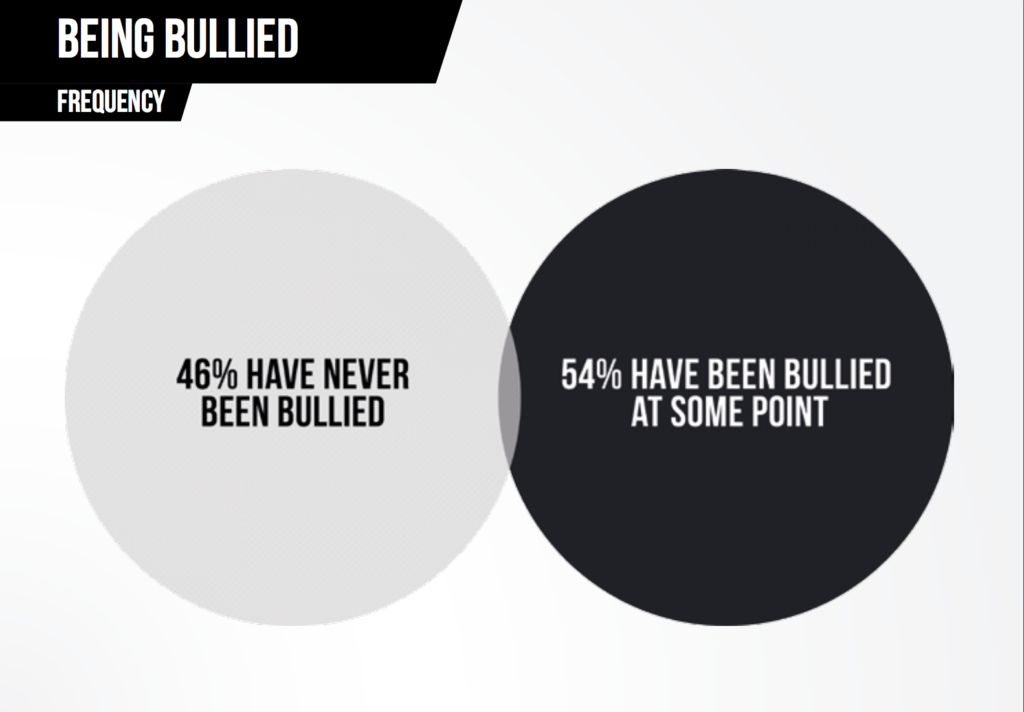
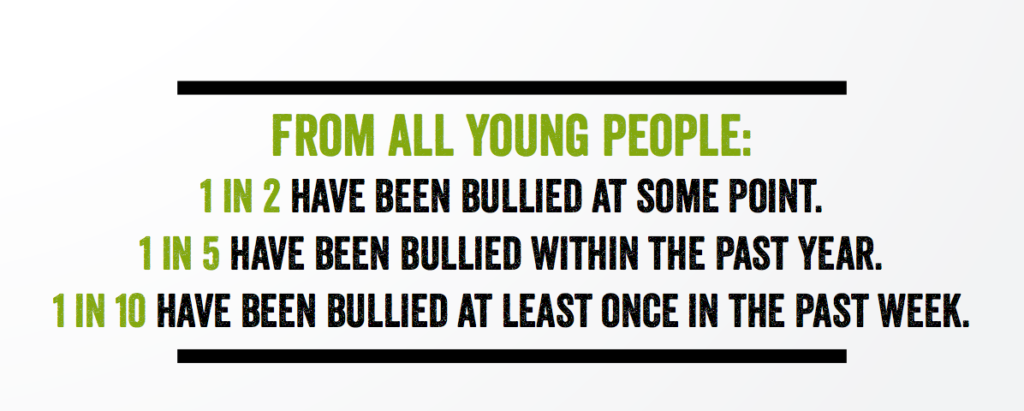
    Ditch the Label has released their annual bullying survey and the results aren’t surprising at all.  It seems that bullying is increasing and people feel more comfortable bullying online than offline. They surveyed over 10,000 people between the ages of 12 and 20. The people they surveyed all lived in the UK and could answer gender identity, race, religion, and other questions to help get information about the reasons behind bullying. You can see some screenshots of the results I found interesting below.


    Another interesting fact pulled from this study was that young people considered Instagram the most common social media site for bullying. Facebook came in a close second. The reasons for bullying varied greatly in the study with appearance and interests/hobbies being the most common and gender identity, sexuality, and religion all coming in near the bottom of the list. This is the largest study of its kind with some of the most extensive and well rounded results we’ve ever seen. This should be a great resource to parents, teachers, and school officials.

    What Parents Should Know

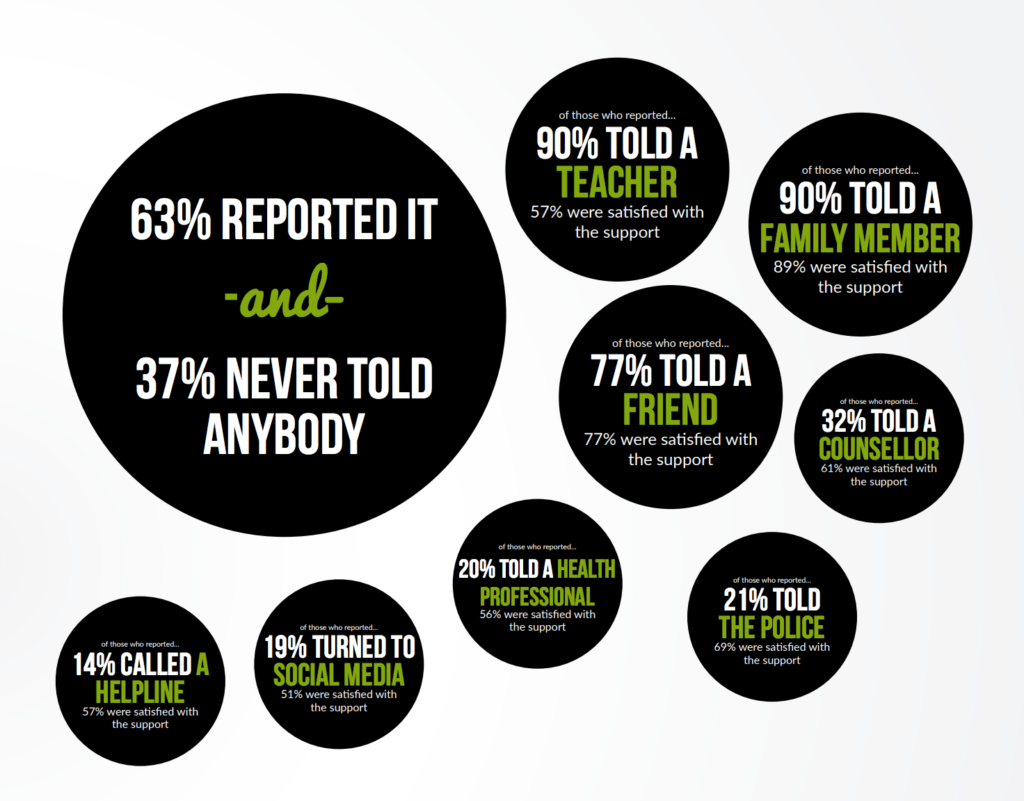
    I preach research and education for parents every single day. This is the kind of information parents need to be aware of. Notice that in the final screenshot about who kids went to when they were bullied, those who say they reported to a family member said they had the highest satisfaction in the support they received. Parents, aunts, uncles, grandparens, and everyone else with a family relationship to a young person need to be ready to have these conversations about bullying and how to handle it. It’s important to understand the issues facing your teens and to know how technology has escalated these issues.

    Go read up and learn all you can. You can see the entire report from Delete the Label on this PDF here.