Tag: news

  • Fortnite is Available to Play Now on Nintendo Switch

    Fortnite is Available to Play Now on Nintendo Switch

    At E3, today, Nintendo announced that the extremely popular battle royale game, Fortnite, is available to play on their latest console, the Switch. Fortnite is an online multiplayer battle royale game that rushed onto the scene several months ago and broke all kinds of records. The game is free to play on PS4, XBox, Android, iOS, Windows, Mac, and now on Nintendo Switch as well. There are some limitations, however, as PS4 won’t allow you to play online with players who use other consoles or computers to play. Also, Nintendo says they will be using a pay model for their online gaming platform beginning in September, whether or not Fortnite will fall into the pay to play category at that time remains to be seen.

    What Parents Should Know

    I wrote an extensive article about my thoughts on Fortnite. If your kids enjoy playing the game and have a Nintendo switch then they will likely ask to download it for their console very soon. Nintendo announced that it’s available now so be sure to keep an eye on what your kids are playing and installing and who they are playing with. Fortnite keeps pretty well with Nintendo’s seemingly family-friendly nature since the game is rating T for Teen and not M for Mature. While some Mature games are available on the Switch, most of the games produced for the console are rated T or below. Just keep in mind that multiplayer gaming is officially unrated and that Fortnite is famous because of the ability to play online with other players.

  • Instagram Updates Give You More Control Over Your Feed

    Instagram Updates Give You More Control Over Your Feed

    So many people found themselves migrating their photo sharing to Instagram several years ago because of their chronological timeline. As Facebook became more algorithm based, people felt like they had no control over what they were seeing on their timelines so they opened Instagram accounts. A few years ago Instagram went the way of the algorithm as well trying to give posts you are most interested in a higher priority in your feed. This was met with mixed reactions and now Instagram is working to give you more control.

    external link…

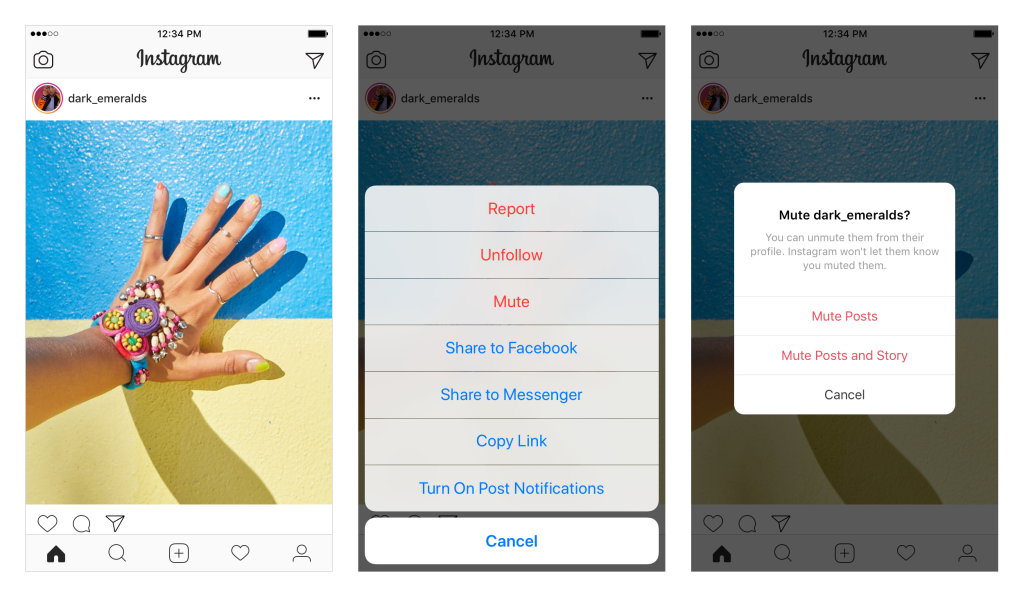
    The first addition, effective now, is the “Mute” feature. This allows you to hide posts from your feed without completely unfollowing them. This could be useful for hiding bullies without letting them see that you’ve unfollowed (which could encourage even more bullying) and just helping the algorithm know your preferences even better. To mute someone simply press the three dots to open the menu on a post. Select Mute in the menu and that’s it, you shouldn’t see posts from that user anymore.

    The second announcement is for updates that haven’t made their way to users yet. Soon, Instagram will include an insights feature that will allow you to see how often and how you use the social media service as well as a notification when you’ve seen all the posts from the previous 48 hours. Instagram and parent company Facebook are hoping that these features will improve the user experience by helping them develop better usage habits. There has been more of a focus recently on improving the “overall well-being” of their users. Some of the recent updates on YouTube, Facebook, Snapchat, and Instagram have been attempts to encourage more engagement within their communities without having to spend as much time using their services.

    What Parents Should Know

    Any changes made to social media sites that encourage breaks from screens are good changes. But nothing will replace a parent setting limits for their children. Remember, also, that there is no better lesson than your own example. Monitor your own screen time and make healthy choices so that you can advise your kids from a place of leadership. Instagram’s new mute feature will help moms and dads keep unwanted posts away from their kids as well as help older kids silence those they don’t longer want to hear from.

    My hope is that as parents we can guide our children into proper use of social media. Statistics are showing that the chance of depression increases the more our children use social media. More depression increases the rate of suicide among young people. In fact, suicide is now the second leading cause of death among teenagers. With these facts in place, even the social media services themselves are taking notice and making changes. Parents, do not allow yourself to be caught in the dark when it comes to your kids and safe use of their technology. While Facebook, Instagram, and Youtube have been making changes, the responsibility does not fall to these companies to protect our children. It falls to us, their parents.

  • Snapchat Adds Games to Their Camera

    Snapchat Adds Games to Their Camera

    Snapchat’s newest update adds gaming to their camera. That’s right, you can now use their augmented reality camera to play silly games. Some are even multiplayer. They’re calling the games “Snappables” and they range from throwing kisses at each other to dance competitions. Users control the games with their face or touch and motion controls. Snap is planning to release new Snappables weekly featuring basketball, alien combat, and a lot of other themes.

    What Parents Should Know

    Right now, the multiplayer Snappable games are centered around your friend list. This means you shouldn’t be able to play games with random players you have never met. That could be an added feature and we’ll let you know if and when that is the case.

    I recommend knowing what your kids are using their social media apps for. If they are connecting with their friends to play games and chat, and you’re ok with that, then that is just fine. I never recommend allowing your kids to meet new people online through Snapchat or other social media apps. Games like Snappables are pretty harmless other than more ways to waste time and the obvious opportunity for corporations to launch games featuring their brand for advertising. More than anything, just stay knowledgeable about what your kids are doing online and keep the conversation open with them. This way they won’t be concerned about you seeing what they do online and the lines of communication will stay open with them.

  • Amazon Echo Dot For Kids Released on the Same Day an Alexa Security Flaw Was Announced

    Amazon Echo Dot For Kids Released on the Same Day an Alexa Security Flaw Was Announced

    Voice is the new screen. That’s what all the tech gurus are saying these days. We’re moving beyond tapping to simply speaking. “OK, Google,” “Alexa,” even “Cortana” have become standard parts of our vocabulary. Even our kids know how to play music, stories, or get help with their math or spelling from a voice-activated assistant of some kind. Voice command started with Siri and quickly became a standard feature in all smartphones and even in some of our vehicles. What seemed like science fiction only 15 years ago is now a common tool for most of our culture.

    We are all hyper-aware, now, of the amount of information tech companies are gathering from our internet use. Since we carry fully connected devices around with us everywhere we go and use them to broadcast our daily routine on social media, there isn’t much that is hidden. Recently, though, we’ve become a bit cautious of how much of our data we share with these companies. It’s one thing to let Google know we like seeing ads on YouTube for our favorite movie genre, but tracking our location and schedule is a bit far.

    A test by security group, Checkmarx, found a security flaw that allowed them to design an app that would leave the Alexa microphone on long after you’ve finished using Alexa. Then, the app would send the hacker a transcript of what the mic picked up while you didn’t know it was turned on. Checkmarx found this flaw earlier this month and reported it to Amazon. It was corrected immediately.

    “Customer trust is important to us and we take security and privacy seriously,” the company said in a statement. “We have put mitigations in place for detecting this type of skill behavior and reject or suppress those skills when we do.” – Amit Ashbel, director of product marketing for Checkmarx

    This obvious flaw is the first of its kind that has been made public. There is no way to know how long it has been around or if it has been used by anyone to collect user data. Amazon was fast to fix the issue but only after a third party research group found the problem in the first place. There are always security risks with any smart-home or virtual device and having a microphone that is always on compounds that risks. The popularity of Alexa and Google home is ever increasing, though, despite these risks. With the outcry against Facebook for their data collection and usage, it seems interesting to me that these fully connected, in-home virtual assistants are becoming so common. So common, in fact, that they’re being designed for our kids.


    Enter, the Echo Dot for Kids


    The news of this breach was released today, and interestingly, so was Amazon’s new Echo Dot for Kids. The Alexa enabled personal assistant speaker comes with a protective case, a replacement warranty (for the inevitable drop on the hardwood floor), a year’s worth of Amazon Freetime, built-in parental controls, and a bunch of skills (apps) that are geared towards kids. The Dot will read to your kids, help them with homework, play kid-friendly Audible audiobooks and more. The Echo Dot for Kids is $79.99 on Amazon.com.

    What Parents Should Know

    Being able to lock your kids out of explicit music and audiobooks, disabling entertainment features in favor of educational skills, turning off voice purchasing, and other parental control options make the Dot for Kids a pretty appealing piece of technology. I am, however, very skeptical of putting a marketing company’s microphone in my kids’ rooms. I know that doesn’t sound like the opinion of a tech nerd but my distaste for targeted marketing to minors and collection of the data of children will always outweigh the desire to be in with what’s trendy in technology.

    Though the Alexa security flaw has been resolved, I wonder how long it will be until another workaround is discovered? I bet it’ll be pretty soon. Here’s why: Amazon is trying to strike a balance between a way to gather the most information about your family as possible and still make you feel that your information is secure. There will always be functionalities in their systems that allow them to gather just that little bit more than you know they’re collecting. When a security company (at best) or hackers (at worst) find these functionalities, they exploit them to meet their own needs. Sometimes the need is to sell the workaround info to the company to keep it all quiet and sometimes it’s worse, the collection of data for sale or use. We all seem to be ok with Amazon or Facebook or Google having a bunch of our private data. After all, it is often used to make our lives easier and more convenient. The problem comes when something like the Cambridge Analytica fiasco takes place and we have our information being sold to the highest bidder or used to target us with fake news and advertising.

    Unfortunately, as long as we have devices that take in our likes, dislikes, conversations, and habits, we will have companies using that information to further strengthen their bottom line. All I am saying is that, as families, we have to draw our own line. My line is drawn pretty strictly against voice-activated assistants in our home, especially ones designed to be used by my kids. Your line will be somewhere different than mine but I advise you to be knowledgeable about any tech you bring into your home. If you aren’t sure what something does or how it really works, I wouldn’t buy it or use it in the first place. I know that sounds a bit counter-cultural, but the culture seems pretty ok with giving away all of their personal information and then panicking when they find out it’s being misused. I don’t blame companies for that, I blame people. Facebook fooled us once, perhaps shame on them, if you’re fooled again, shame on you.



  • Top “Family” Android Apps Found to Collect Kids’ Data Without Parental Permission

    Top “Family” Android Apps Found to Collect Kids’ Data Without Parental Permission

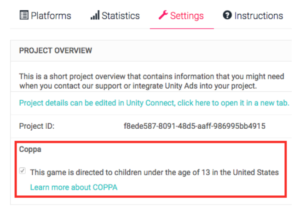
    It’s so nice to just head to the Google Play store and grab a couple of free apps to keep your child busy for a few minutes. There are a lot of free options and Google Play has a “Designated for Families” section to help you know if the app will be safe. Unfortunately, many app developers haven’t been following the rules. Android’s compliance rules are very specific about requiring apps to stay true to the Children’s Online Privacy Protection Act (COPPA.) That means there are certain types of data they aren’t allowed to collect without parental permission and other types they can’t gather at all. A recent research project has found that the majority of these apps ignore the rules of COPPA entirely.

    Overall, roughly 57% of the 5,855 child-directed apps that we analyzed are potentially violating COPPA. – Proceedings on Privacy Enhancing Technologies

    The study found that most apps collect the data of their users, even though the apps are geared towards an audience under 12 years of age. The research group formed from North American and European universities developed an automatic system to study nearly 6,000 apps. They looked at data such as ad tracking, location tracking, ID sharing, and wifi address tracking. Many of the transmissions were unsecured which put data at a greater risk.


    What Parents Should Know

    When an app is free there are some things you need to consider. There’s a reason it is free, not because they want to give you free access but because developers make their money in other ways. Obviously, advertising is one of the ways, the other way is your personal information. Things like your location, device type, web search habits, and internet history are very valuable resources to advertisers. App developers are able to gather this information and sell it for marketing purposes. The common phrase is data is the new currency.

    There are certain laws concerning the collection and use data of people under the age of 13. This study shows that many android app developers are ignoring the rules. This proves that the method of self-regulation may not be viable when it comes to protecting our information and privacy.

    My recommendation is that parents pay very close attention to the privacy practices of the apps they use for their kids. Read the terms and agreements. Read their privacy policies. Most importantly, understand that a free app is free because they are selling something else. Namely, your and your family’s personal information.

  • How To: Encrypt Your Facebook Messenger Conversations

    How To: Encrypt Your Facebook Messenger Conversations

    Facebook’s data mining habits have been in the news for the past few weeks and today they’ve admitted that they’re reading your private messages in FB Messenger. They use some of this information to better your experience, they scan images and text to be sure you’re not breaking any of their policies and to check in on reported users. They also, however, scan your messages to receive more data about you. Advertising has been in messenger for a while and your private conversations are being used to customize that info for marketers.

    Check Out: How to download your Facebook Data…

    Facebook messenger has had a way for you to encrypt (or hide info in) your messages for a while, the above video is a walkthrough on how to turn those settings on. Unfortunately, you have to opt-in per conversation but once it’s on your messages are encrypted “end to end” meaning they can’t be read by Facebook’s AI and should they be intercepted by a third party, they would come through as gibberish-like code instead of the messages you’ve sent. 

    Here is a step by step guide for turning on “secret conversations” in messenger.

    1. Select the conversation you’d like to make secret.
    2. Tap the name of the group or contact above your conversation thread.
    3. Scroll down and select “Secret Conversation.”
    4. That’s it…you’re encrypted.


  • New Snapchat Feature Enables 16 Person Video Chat

    New Snapchat Feature Enables 16 Person Video Chat

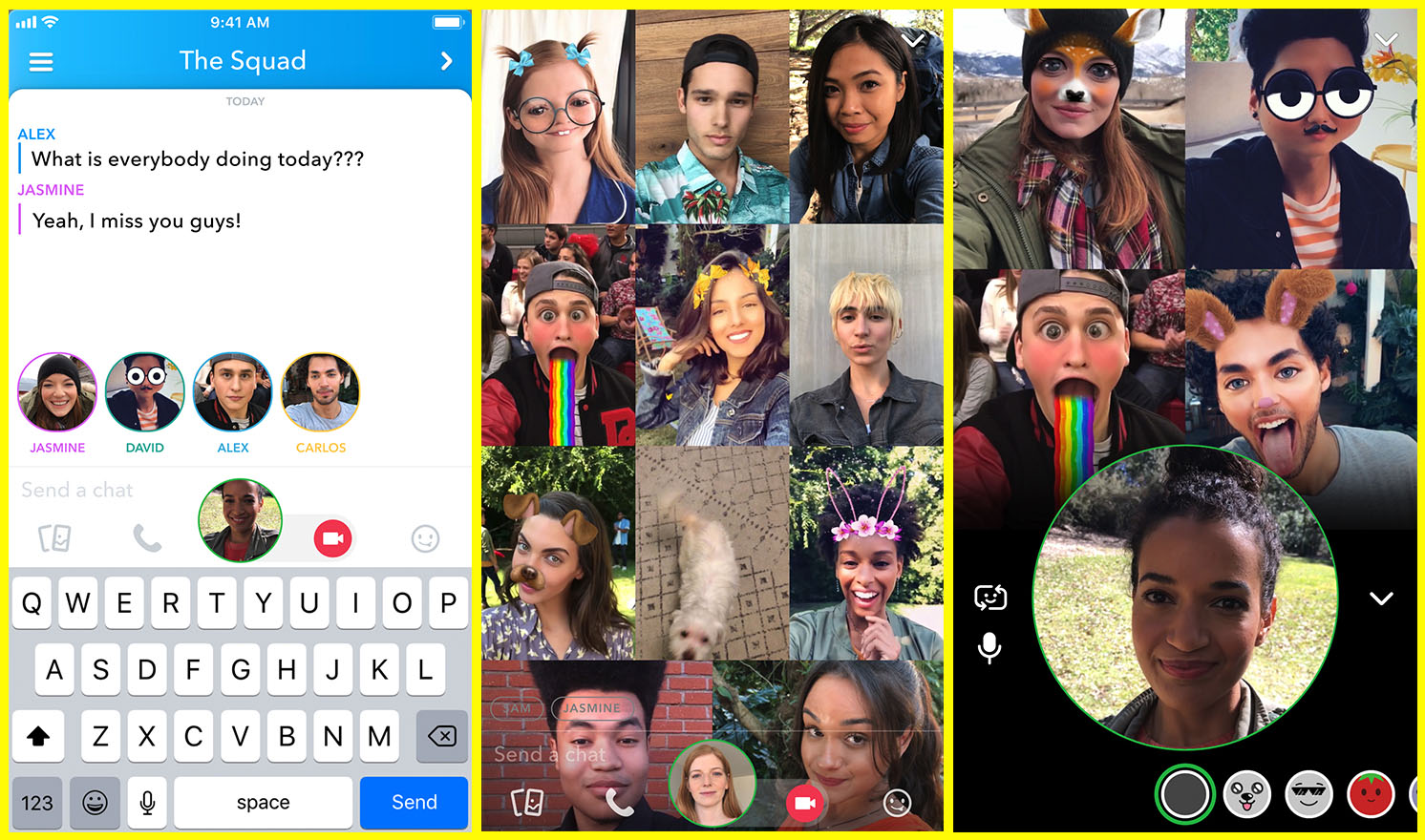
    Group chat has been available for a long while now, even in Snapchat, but now you can hang out with a large group of friends on video without ever leaving home. Snapchat’s new group video chat feature is now available and allows you to include 15 of your friends. You can sign on to a regular chat and add friends as you go or set the chat up with your large group from the beginning. Of course, Snapchat’s AR filters and masks will be available during these chats as well. Another feature that is available with this update is tagging or mentions. You can “@” tag a friend in your posts so they’ll be notified that you’re mentioning them.

    What Parents Should Know

    Parents should already know how much time their kids spend on social media. If unsupervised, they’ll chat with friends and creep their timelines all day long. In fact, many teens say they feel addicted to social media, while not doing anything to curb their own addictions. Addiction isn’t the only problem with extensive social media use. Social contact over our devices has proven to be far less beneficial than face to face interaction. There have been countless studies comparing video chat to actual conversations with someone in person and the conclusion is always the same. Spending time in the same room as someone is better for your development than only texting, calling, or video chatting. Take this excerpt summary from ScienceDirect.com’s 2014 study.

    When engaging in face-to-face communication, social information is conveyed by vocal and visual cues within the context of the situation. Nonverbal communication, defined as communication without words, includes apparent behaviors such as facial expression, eye contact, and tone of voice, as well as less obvious messages such as posture and spatial distance between two or more people (Knapp & Hall, 2010). The understanding of these kinds of nonverbal social cues is particularly important for social interaction because of the need to modify one’s own behavior in response to the reactions of others (Knapp & Hall, 2010). – ScienceDirect.com

    With apps such as Houseparty and Snapchat’s group chat out there, we have to be more intentional than ever about the time our kids spend on their screens. Hanging out with friends through our devices is becoming easier and more acceptable. Kids aren’t going out as much, the malls are closing, arcades are few and far between, and movie theaters are having to serve food like restaurants to attract the older generations because the younger ones aren’t as interested. Why go out when you can stay in and hang out with your friends online? Video chat can be an awesome way to stay in touch with long-distance family or friends but when our kids leave school and go home to do their homework while video chatting with six of their best buds all evening, something is missing from their life experience. We have to monitor their online activity and set time limits. Use unGlue or Circle to set some boundaries. Talk to your kids about the importance of face to face interaction. Don’t deny them opportunities to go spend time with friends (in families you trust). Drive them to that get-together or youth group event. Say yes when a friend wants to come over. Give them opportunities to spend face to face time with friends, outside of school, and you’ll be giving them the best chance you can to develop the skills they need to succeed.

  • TUTORIAL: How to Download All of Your Photos, Videos, and Messages from Facebook at Once

    TUTORIAL: How to Download All of Your Photos, Videos, and Messages from Facebook at Once

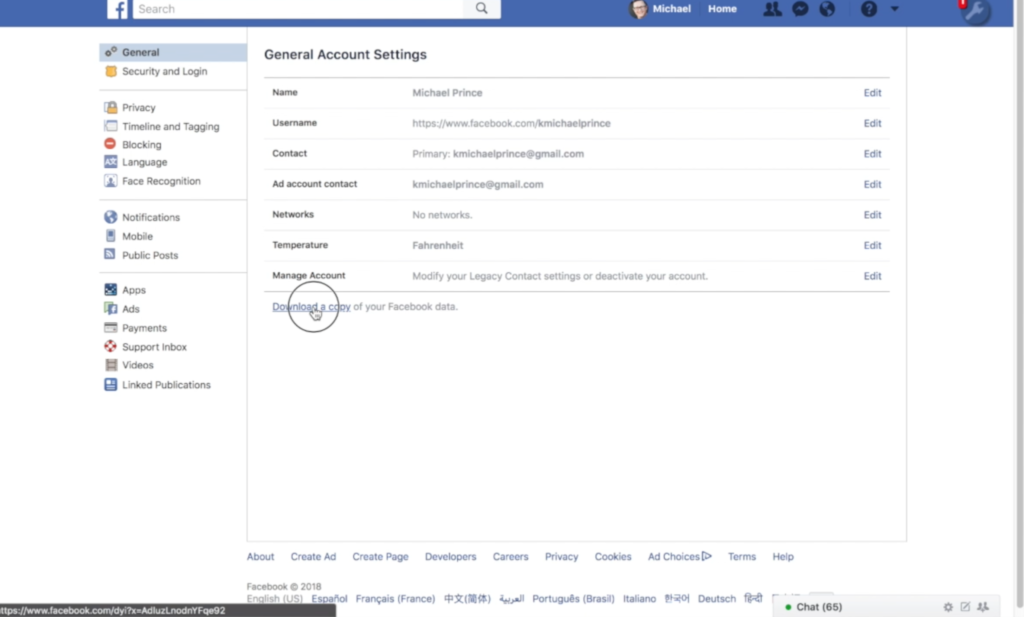
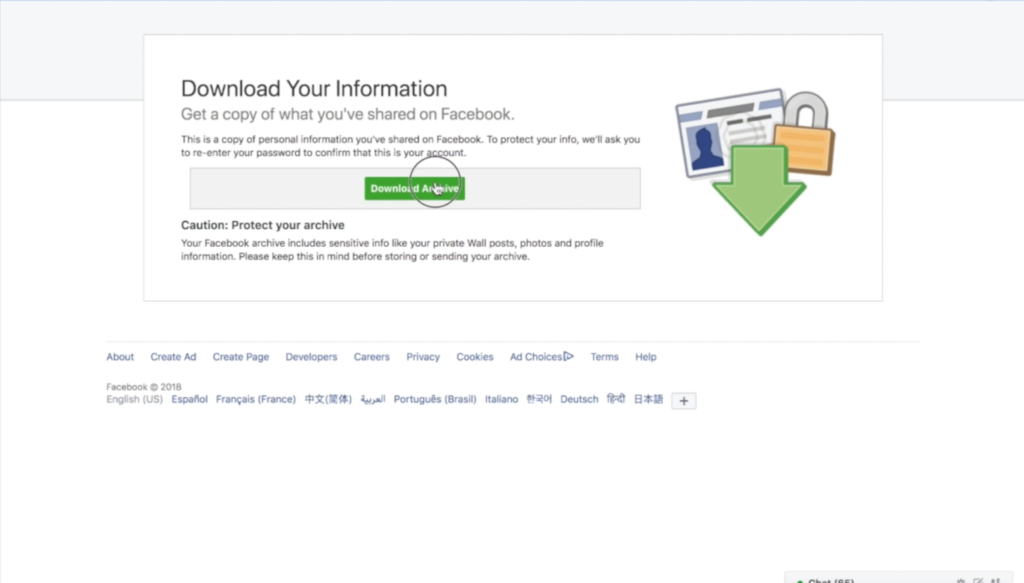
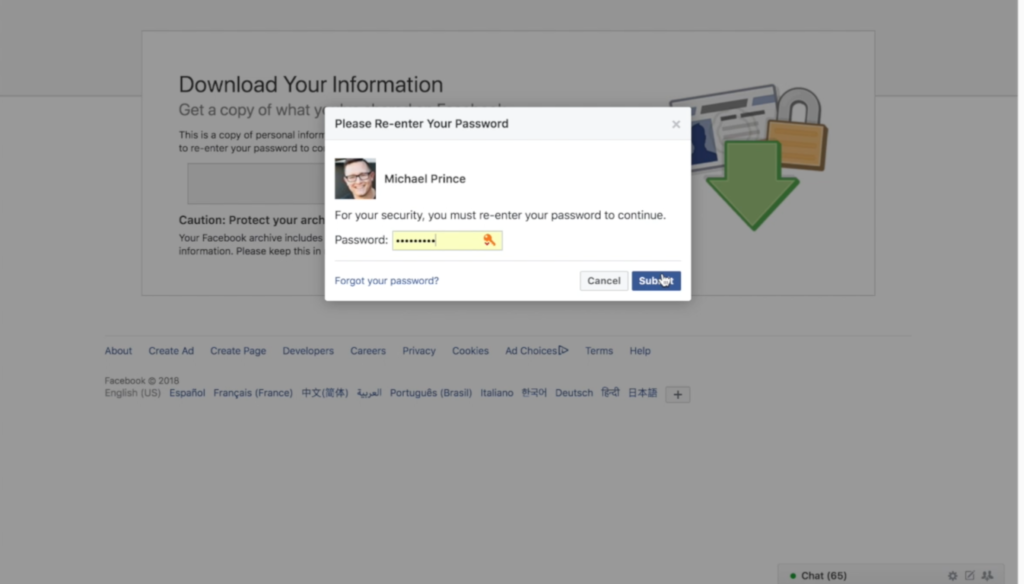
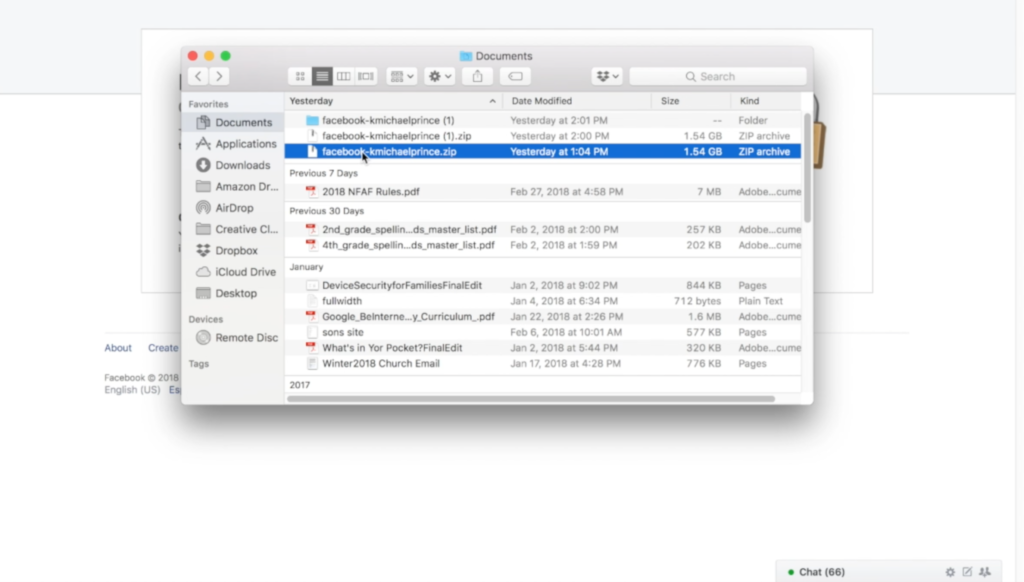
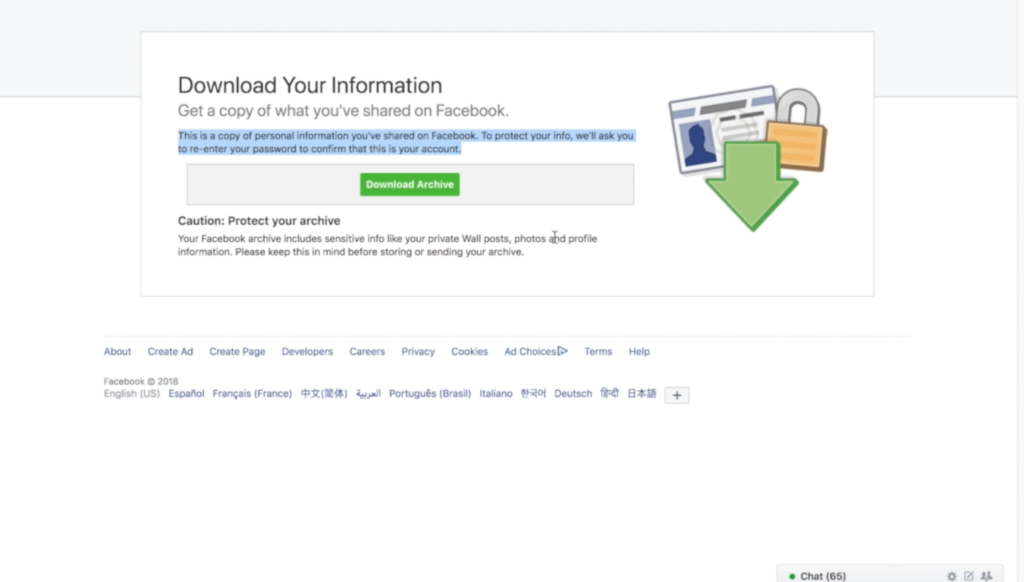
    There could be a number of reasons you’d want to download all of your Facebook data. Maybe you’re making a fresh start but don’t want to lose photos and videos, maybe something’s going on and you need message data downloaded, or maybe you just want to back up all your data for when the giant electromagnetic pulse goes off someday and the internet comes crashing down. Whatever reason you’re interested, here are the simple steps you can take to download all of your Facebook info at once. The tutorial video is at the bottom of this post.


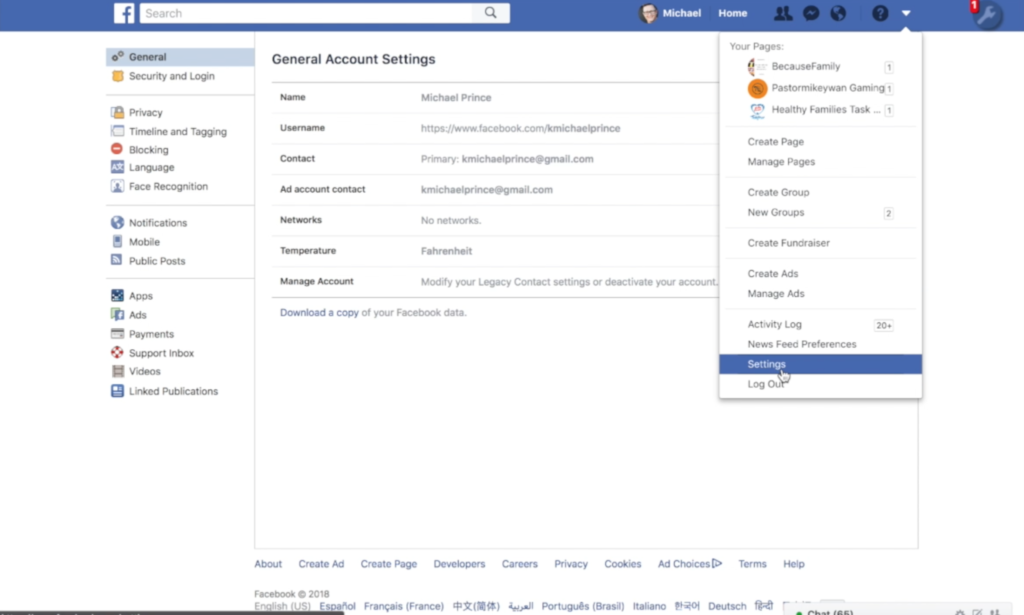
    1. Go to your settings page.


    2. Click on Download a copy Facebook Data


    3. Click download archive.


    4. Enter your password and click Submit


    5. Your data downloads as a zip file.


    6. Once unzipped, you’ll see your files separated into folders.


    7. Keep somewhere safe and share with caution as some of the data is personal.


    There are the instructions. Here’s a video tutorial:


  • PODCAST: Three Apps Your Kids Should Uninstall

    PODCAST: Three Apps Your Kids Should Uninstall

    Family Tech Update: These apps can be seriously dangerous for your kids. Adult content, privacy issues, stranger danger, all kinds of issues here, and some of them are only rated 12+!

    Social Media Links

    Facebook: http://facebook.com/becausefamily
    Instagram: http://instagram.com/becausefamily

    Twitter: http://twitter.com/becausefamily

    Newsletter Sign up

    Ministry Updates:: http://eepurl.com/R7Btr
    Weekly Blog Posts:: http://eepurl.com/cvnhXD

    Websites

    Ministry Site:: http://becausefamily.org
    Tech Blog:: https://safe.becausefamily.org
    Michael’s Speaking Info:: http://becausefamily.org/bookings

    Donate and Affiliate Links

    http://BecauseFamily.org/partnership

    All music/audio effects are public domain.

  • Here is our Uninstall List for This Spring

    Here is our Uninstall List for This Spring

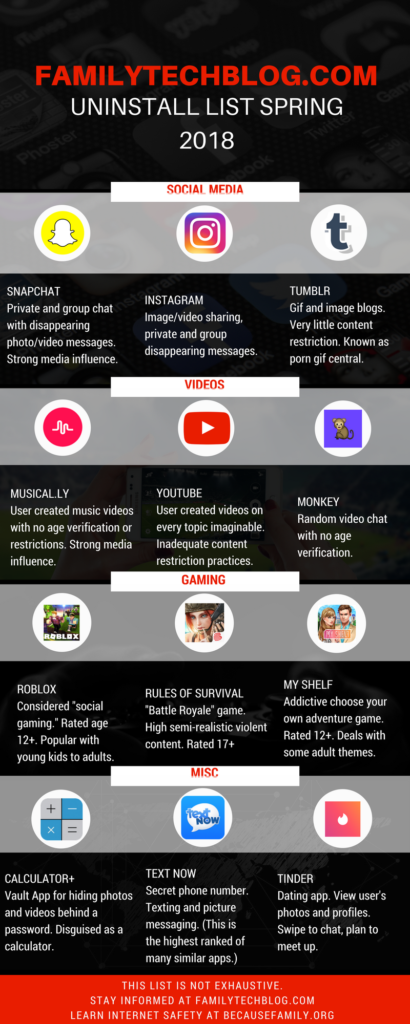
    Some apps are just annoying, some are a bit risky, others should just be uninstalled. This is the list of apps that FamilyTechBlog thinks should be removed from your kids’ phones on sight. No, this isn’t an exhaustive list. There are plenty more apps that can be dangerous. Our list features some of the most popular apps in each category and apps that highlight a certain genre that may need to be avoided altogether.

    Feel free to click on the image below to see the large version of the infographic. If you want some help with internet safety resources and strategies, contact us here. Also, share this post with everyone you know. Let’s make a difference and spread something helpful on our social media timelines for a change.

    FAMILYTECHBLOG.COM UNINSTALL LIST
    SPRING 2018

    CLICK FOR LARGER VERSION

    Please consider keeping resources like this free to you by donating $5 to our non-profit organization.
    Visit BecauseFamily.org/partnership to give.