Tag: monitoring

  • Google Has Proof they’re Finally Taking App Store Security Seriously

    Google Has Proof they’re Finally Taking App Store Security Seriously

    The Google Play app store has been known to be a bit of the wild wild west. There were copycat apps, apps with adult content, and apps with malware or spyware. Google now has some proof that they’ve been hard at work putting an end to all of the nonsense. In a recent report, Google said they removed more than 700,000 malicious apps last year. That’s 70% more than they removed in 2016. They say that most of the removed apps were copycats and many contained pornography or extreme violence, both of which are against the Play store policies. Most importantly of all, of the apps that were removed, 90% were rejected before they even made it to the store. This means they were never able to deceive users.

    This is very good news for Android users. It means that Google’s algorithms, AI, and “machine learning, techniques are working well and keeping apps that could put your security at risk from ever being installed on your phone. The openness of Google’s play store was always a major reason I wouldn’t own an Android phone. This update, as I said, is proof of how serious Google is taking security. There is still, however, a major risk associated with the use of an Android phone. It is a popular reason some folks prefer Android even though it is against their recommended usage policies. No matter how secure the Google Play store becomes, you aren’t protected if you are downloading apps and other files from other sites and apps. “Sideloading” apps is not recommended by Google and can put your security at risk.

    What Parents Should Know

    I spoke with a mom of a young teenager a few months ago about some strange stats on her monitoring software on his Android phone. It turns out, while she had turned off app downloads to keep him from installing adult apps or time wasters, he had been finding other ways to install apps on his phone. The Google Play Store removing unsecured and malicious apps can keep your kids safe from some of the dangers out there but if they are installing apps in other ways, you’ve lost all confidence that they’re protected. You should have some sort of monitoring software installed. Use something like unGlue, Accountable2You, or Circle to monitor what your kids are doing on their phones and keep an eye out for apps that don’t seem legit.

    A good way to know if they are sideloading apps is by looking for the term “APK Installer” in their recent activity. If you have the phone set to ask for permission or to disallow app installation and you see the “APK Installer” running, they may be sideloading. My advice is to keep an eye out for this and if you see it, ask them about what apps they are using. Maybe even have a look at what is installed on their phone. If you don’t recognize the app, do some research and uninstall it if you don’t approve. Most importantly, talk to your child about the importance of only downloading approved apps from the Google Play store. Let them know is as much about internet privacy and security as it is keeping them away from inappropriate content. Google is doing their part by monitoring and managing their app store, you can do yours as a parent by keeping an eye on what your kids are using on their Android device. 
     

  • PODCAST: 2017 in Review and What’s to Come in 2018

    PODCAST: 2017 in Review and What’s to Come in 2018

    Exciting new things coming in 2018 for BecauseFamily. This episode rounds out the rest of 2017 and gives you a heads up as to what to look out for in the coming year.

    Social Media Links

    Facebook: http://facebook.com/4pointfamilies
    Instagram: http://instagram.com/becausefamily
    Twitter: http://twitter.com/becausefamily

    Newsletter Signup

    Ministry Updates:: http://eepurl.com/R7Btr
    Weekly Blog Posts:: http://eepurl.com/cvnhXD

    Websites

    Ministry Site:: http://becausefamily.org
    Tech Blog:: https://safe.becausefamily.org
    Michael’s Speaking Info:: http://kmichaelprince.org

    Donate and Affiliate Links

    http://BecauseFamily.org/partnership

  • Is Pinterest Safe for Your Kids and Teens?

    Is Pinterest Safe for Your Kids and Teens?

    Is there porn on Pinterest? Does Pinterest allow porn? I’ve heard both of these questions many times and the answers are very very different. Today, as Pinterest announced their new approach to advertising videos on their site and app, I’m reminded of the many parents who have discussed the potential dangers of Pinterest with me at workshops and other events. Lets unpack a few of those dangers, what Pinterest’s approach is, and what parents can do about it.

    There IS porn on Pinterest.

    I can confirm that there is pornography on Pinterest in two ways. First of all, I started some searches for inappropriate topics and (without having to click through to results) could see that there was porn available. Just typing the first few letters of these search terms produced recommended searches that told the entire story. 

    These results pretty much let you know what is available on the site and in the app. Searching more specific terms would, obviously, produce more specific results.

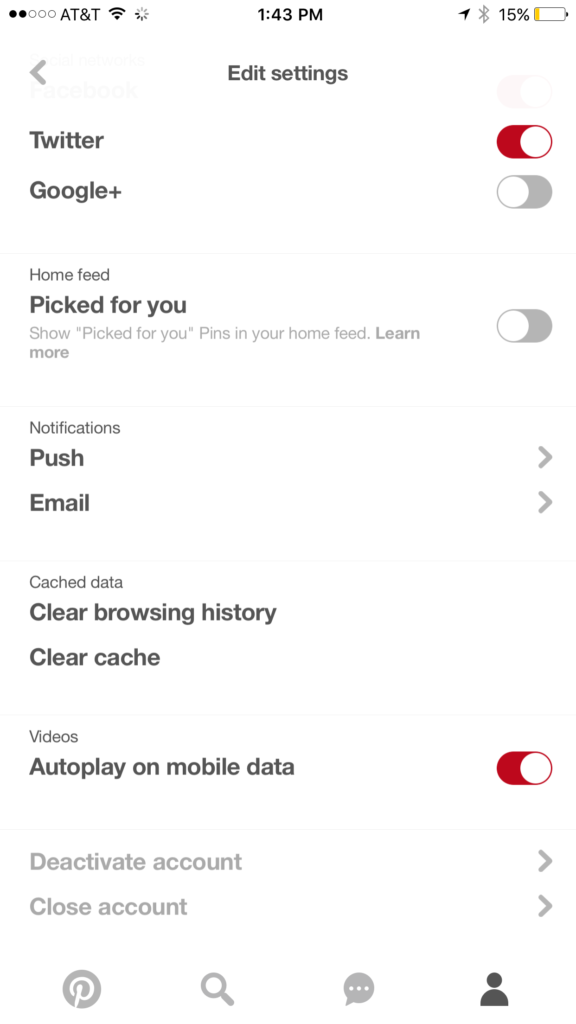
    While this covers intentionally searching for content, your kids may not be the type to have been in to that before so you don’t expect them to go searching for it. This is where it gets a bit tricky. Pinterest feeds you new content in two different ways. They show you pins from people you’ve decided to follow and they show you pins that have been “picked for you.” Pinterest uses what you do in their app and site as well as what you do on other websites to recommend different things to you. If you’ve liked art before then you’ll start to get more art posts. If you’re into geeky quotes, you’ll see pins from people you don’t follow based on what you’ve pinned or viewed in the past. This can lead to being shown pinners who’s pins may not line up with what you’d consider “safe” for your kids. There is, however, a way to turn off the “picked for you” option. See the image below:

    Go into your profile, then settings, and you can turn off personalization AND picked for you.

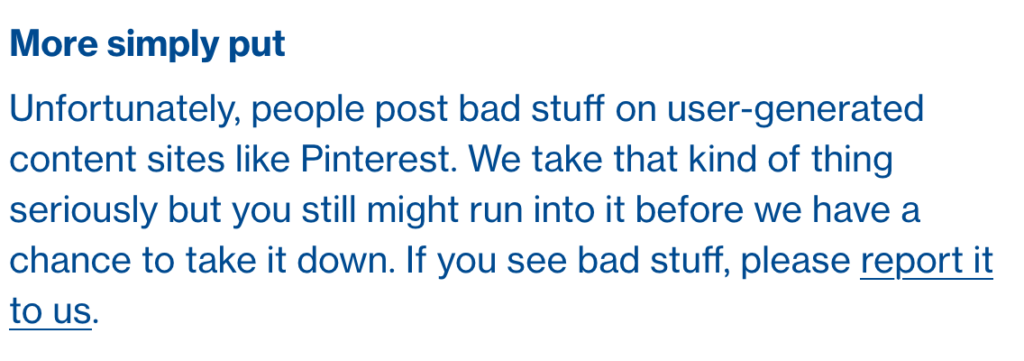
    Pinterest Doesn’t Allow “Explicit Content.”

    From Pinterest’s terms of service.

    Pinterest’s rules don’t allow explicit pornography to be posted but it relies on reporting from users to identify and remove the offending pins. This means that the post can be up for days or weeks before it gets enough reports to have it taken down. Another thing to keep in mind is that Pinterest will still use their own definition of “explicit.” You may think something is not good for your 14 year old son to view while they view it as art or expression. This means you have to truly stay on top of what they’re seeing.

    What Parents Should Know

    Again, much is left to interpretation. Some parents may say a photo of a nude statue is artistic and cultural and some might say it’s inappropriate. While some folks think any nudity should be considered explicit, there are parents who would disagree unless it’s in a sexual situation or atmosphere. There are many factors that keep photo sharing sites like Pinterest from making a blanket NO NUDITY rule.

    I would prefer if there were some way to turn off nudity as an option for users but as of right now that isn’t possible. It also isn’t easy to monitor what content is being viewed in the Pinterest apps. Yes, the service is built to work best on the mobile apps, my recommendation is that you limit your younger teen (over 13 to comply with the service agreement) to using Pinterest on a browser. Use something like Accountable2You to monitor their activity so you can be alerted if they’ve come across something inappropriate. This could help keep you from difficult situations stemming from your kids happening upon something adult oriented on Pinterest.

    So, to answer the question, is Pinterest safe for your kid or teen? The answer is no and yes. No it isn’t recommended for your child. The age restriction to get an account is 13. I would, however, begin to ease up on a strict anti-Pinterest rule as my kids enter their teen years but I would monitor their usage in the most effective way possible. Just because you’ve never seen anything when you creep Pinterest doesn’t mean it isn’t there. Know that this risk is real and that your kids are as susceptible as any. Take precautions BEFORE anything regretful happens.

  • Android’s New Instant Apps Can Undermine Your Monitoring Software

    Android’s New Instant Apps Can Undermine Your Monitoring Software

    If you follow my recommendations on this site you’ve got some sort of monitoring software installed to allow you to see what your kids are doing on their devices. This is important because you can’t help you children navigate the digital world they’re growing up in if you don’t know what they’re doing online. Every now and then, though, a super cool new update comes out for our phones, computers, or tablets that will undermine the goals you have for monitoring your kid’s devices. Android’s “Instant Apps” is one such update.

    Instant apps is a great idea. It’s a really cool way to share new apps and a great way for app developers to give brief access for someone who wants to see something that’s been shared but doesn’t want to download an app to see it. Usually when you see a cool post on social media or someone sends you a link in a direct message you have to use a browser to see the mobile website version of what they’re sharing, Instant Apps makes it easier to see the what’s being shared. For example if I’m creeping Amazon and see the Blu Ray for that super cool movie we saw together and want to share it with you. I can text you a link and when you open it the product will open in the “instant” version of the Amazon app. This will provide you with a much easier and smoother transition to possibly purchasing that product. The instant app permissions won’t allow it to run in the background and will disable some features that would be available if you downloaded the full app but it’s a cool intro to software you haven’t installed yet. Cool idea, yes, but maybe not for our kids.

    What Parents Should Know

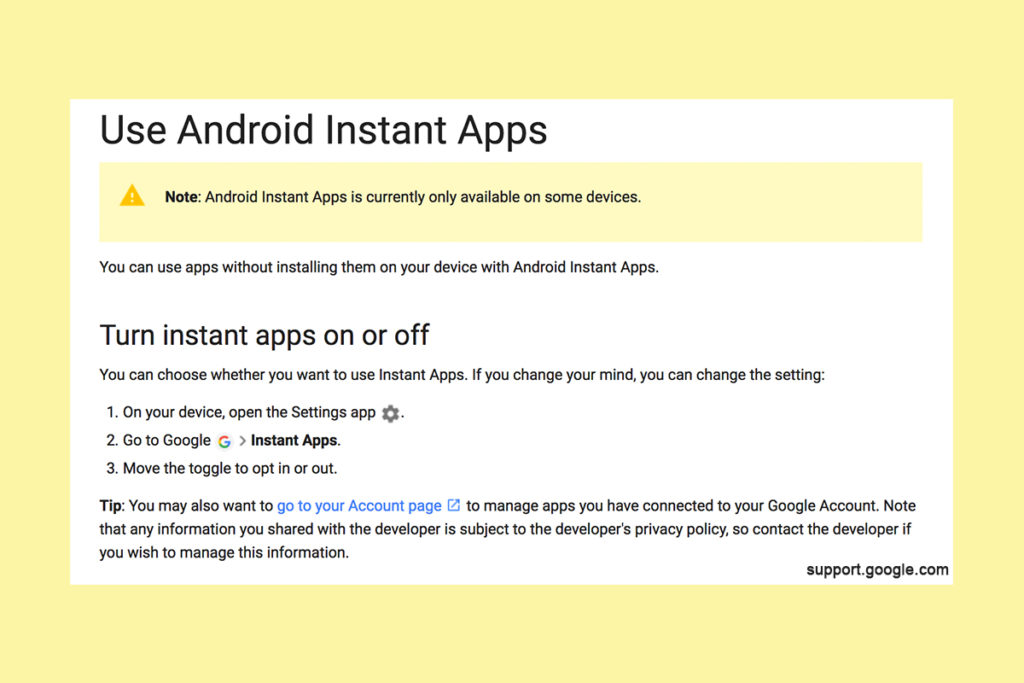
    Being able to see content from an app that isn’t even installed could be troublesome for parents who are trying to monitor their kids online activity. If you have uninstalled apps from your kids’ devices to keep them from seeing what is shared in that app you aren’t going to want them to be able to see the content in instant apps. I recommend disabling Instant Apps in on your kids’ devices if they have it. If you can’t find anything about Instant Apps in the settings of their phone or tablet then it isn’t available for their device and you don’t have to worry about it. If you do see it, follow the steps below to turn it off.


    Whether you’re using an accountability software like Accountable2You, a filter like NetNanny, or monitoring the entire device with something like Mobicip, the Instant App feature could give your child access to the very content you are trying to keep away from them. Be sure to give yourself opportunity to look over their phone or tablet whenever possible and check for the Instant App option. There aren’t very many apps developed with the feature yet but it has been opened up to most developers. More and more apps will be using Instant Apps to allow folks to share content in the near future. Turn it off now and get ahead of the game.


  • Snapchat isn’t Just a Messenger Anymore

    Snapchat isn’t Just a Messenger Anymore

    It may have all started with “secret” messaging but it hasn’t stopped there. Soon public sharing became the norm on Snapchat, a feature that was copied by many other Social Media networks soon after it’s release. Then, Snapchat’s “Discover” page was released, this was a way for news and media corporations to reach the users of Snapchat with their messages and advertising. Lately, Snap Inc. has been working towards becoming a serious form of entertainment for it’s users, incorporating videos and even original show content into their network. Today, VICELAND has announced they’re producing several new shows exclusively for Snapchat. They’re starting with a “reality” dating show titled “Hungry Hearts with Action Bronson.”

    VICELAND Productions is following several other studios in making original shows for Snapchat. Networks including NBC, CBS, and A&E have already announced that they’re making versions of their existing shows for viewing on Snapchat. These studios are seeing the growing adoption of Snapchat as an opportunity to reach a broader audience with their shows and content. One of the fastest growing demographics on Snapchat is the 18-35 age-group, one of the main target audiences for the late night and primetime television networks. With this trend towards entertainment content on our social media apps, it’s important that parents are aware of what these apps are becoming, we have to make good decisions on whether or not we want our kids consuming the media they’re producing.

    What Parents Should Know

    Snapchat isn’t a trend and it’s not just a messenger anymore. What was once the “Secret Message App” or the “Sexting App,” as some called it, is now a major source of media for those who use the social media platform. This means we have to treat it differently than we do many social media apps. Keeping track of who they are friends with on these networks isn’t enough anymore. We have to keep a few things in mind if we are going to allow our kids to use Snapchat, Instagram, or any of these other apps that give advertisers and media content creators a direct outlet to our kids.

    Same Media as TV, Movies, YouTube, or Games.

    The creators of the content that will be made available through social media (Facebook has been signing agreements with media companies too) aren’t producing special more family appropriate shows. They will be making content that will reflect every other media outlet they produce for. Think YouTube Red, Netflix, or Amazon Prime. In fact, some of the rules that apply to broadcast television don’t apply to shows that are streamed online. This means that you’re more likely to see content like on Game of Thrones or Orange is the New Black than something with more restrictions like Blacklist or CSI. Don’t let the fact that these programs are being produced for free public streaming online fool you. They won’t be family friendly or edited for content.

    No Parental Control

    Snapchat currently has no parental control options. Their app is geared towards teenagers so they most likely won’t feel the need to add parental restrictions any time soon. The terms and agreements on most social media services allow for accounts to be created as long as you’re 13 years old or older. The question you have to ask is whether or not you’re ok with your 14-15 year old watching online reality dating shows or politically fueled sketch comedy. If you aren’t ok with these things then you have to make a choice about whether or not snapchat is welcomed on your kid’s phones or tablets.

    All or Nothing

    Social media apps are basically creating an “all or nothing” atmosphere for content created by these media outlets. Once you have an account on Snapchat, you have access to all that is contained in the app. Every person can be a friend or follower, every feed can be found and viewed, and every original show, no matter the target audience, will be available for viewing. With no parental control options the question isn’t what Snapchat content will be allowed, it’s “all or nothing.” They can see all of it, or none of it, those are your only choices. 

    Whatever you choose, you need to be educated about what these social media apps are producing. Keep checking in to Safe.BecauseFamily.org for up to date tech news that’s relevant for your family. Also, sign up for our Safe Online Newsletter. Just fill in the short form below.


    Sign Up for the Latest Family Tech News in Your Inbox

    * indicates required


  • The Risks of a Fully Connected Home Part 1

    The Risks of a Fully Connected Home Part 1

    If there’s one thing that CES 2017 showed us last month, it’s that the “internet of things” is our future. Our world is becoming increasingly more connected and so are our homes. Everything from your television or thermostat to your mirror or even your toaster can be intertwined in a web of wireless connectivity. These advances in technology offer new and exciting levels of convenience but what are the risks involved in being so connected all the time? This three part series of posts will help you weigh the potential risks of home connectivity and make a knowledgeable decision for your family.

    Internet Privacy

    There have been news reports about hackers playing with people’s wifi enabled thermostats, unlocking their smartphone controlled door locks, turning on closed circuit security cameras and even baby monitors. Many of these connected home appliances come with basic, easy to guess passwords and usernames and can be messed with very easily. The best advice for these types of products is to always change the username and password from the one that comes pre-designated. Now, however, more families are inviting a new digital personal assistant product into their home.

    Many experts are looking at smart home and “PA” devices such as Amazon Alexa/Echo and Google Home with some caution due to their microphone “always listening.” There has been much conversation among internet privacy and security experts about the risks involved with a device in your home that can hear every conversation you’re having. Amazon and Google both say that their products were designed with privacy in mind and that they don’t store any information you say that wasn’t preceded by the command words. (i.e. Ok Google or Hey Alexa) What you say after you activate the devices is stored on an encrypted server but spokespersons for the companies are silent on what happens to the data after that. They only admit that your voice patterns and speech is being monitored to help the devices become better at recognizing you.

    What Parents Should Know

    “These devices are microphones already installed in people’s homes, transmitting data to third parties,” Joel Reidenberg, director of the Center on Law and Information Policy at Fordham Law School in New York City, told USA Today. “So reasonable privacy doesn’t exist. Under the Fourth Amendment, if you have installed a device that’s listening and is transmitting to a third party, then you’ve waived your privacy rights under the Electronic Communications Privacy Act.” – Tec.Mic

    Using a device like Alexa or Google Home effectively waives your right to privacy in your home. While you can mute the device to turn off the microphone, that decreases the convenience and usefulness of the product. When you use the product, however, you are accepting the terms and agreements and are allowing a microphone to be “always listening” (Google’s words) during all of your conversations. Be sure, if you think you need to be this connected, to read all of the legal documentation and make sure you feel confident that the risks you may be taking are outweighed by the benefits of having a “smarter,” more connected home.

  • DirecTV NOW is Not Family Friendly Yet

    DirecTV NOW is Not Family Friendly Yet


    It’s the future! I have been saying for years that paying for cable tv service is ridiculous. What if I could just stream the channels I want and not have to buy a whole package of useless Home Improvement and Movie Channels? Well, they aren’t exactly there yet but DirecTV is getting closer with DirecTV NOW.  AT&T announced yesterday that they’re offering a television streaming service called DirecTV NOW; it’s available for purchase in bundles starting today, November 30th.

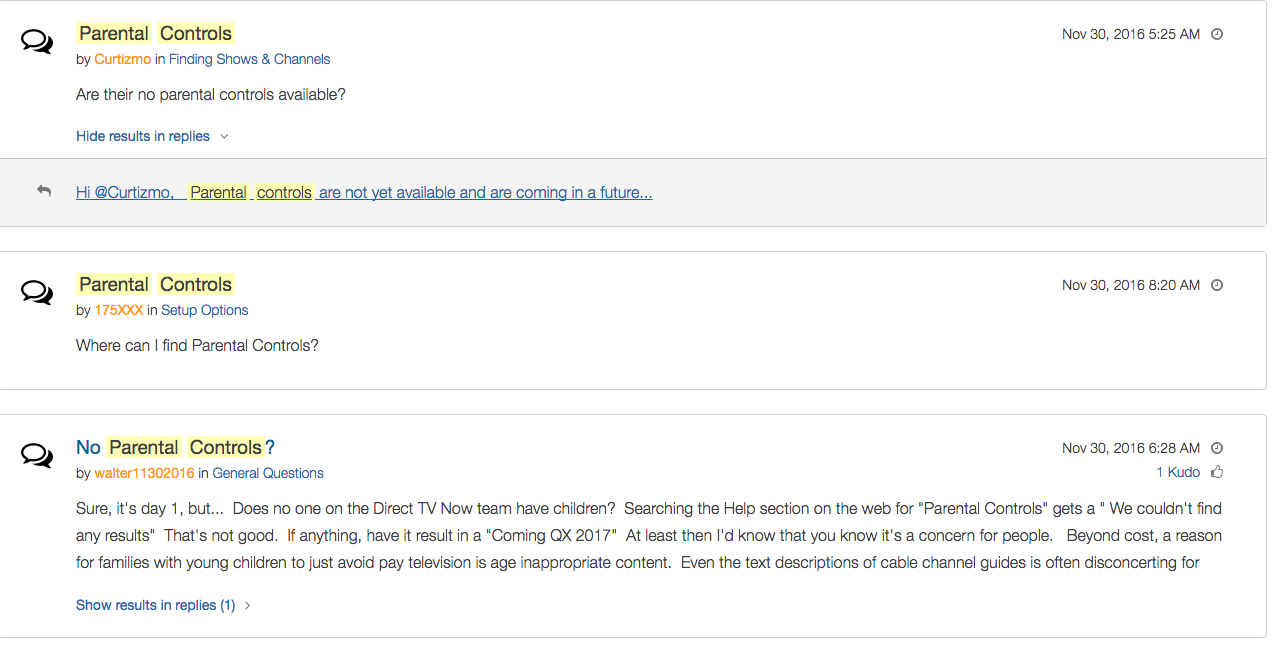
    Yes! It’s exciting to see that our TV options are expanding and even keeping up with the times a bit more. With ChromeCast, Apple TV, RoKu, and mobile access available we are finally being offered a version the tv service we wanted. Unfortunately, however, after some time with my free trial I have noticed that there is absolutely no parental control options built in for DirecTV NOW. I looked at the menus and in my account settings (there’s no option to create separate profiles, i.e. a kid profile, either.) I also tried to find a “block” option per channel to no avail. Then, a search for “parental controls” on the support and FAQ page led to no results and that was pretty much my final clue. There is currently no way to protect your kids from unwanted content on DirecTV NOW.

    That’s a deal breaker for me, especially with so much of what has become acceptable on cable television lately. Sexual activity, language, and increasing violence are mainstays in both broadcast and cable television shows. Even the commercials seem to highlight all of the features we would like to protect our young children from. I guess “keeping up with the times” comes with its costs as well.

    What’s a Parent to Do?

    screenshot-2016-11-30-12-15-35I would say wait. Just wait for a while and I’m betting we will see parental controls rolled out on DirecTV NOW before too long. In fact, a quick search on the AT&T Community Forums showed several concerned parents had already begun asking about this feature and it’s in development.

    DirecTV NOW looks to be a great way to save some money while still getting the entertainment content we want. Thankfully parental controls and content restrictions are becoming commonplace these days and this will be no exception. It is literally “day one” for this service so we’ll give them some time and the benefit of the doubt. You can join the future too if you’d like, I would just recommend keeping your kids off of it until you can set up some restrictions. 

  • VIDEO: FACEBOOK LIVE Q&A

    VIDEO: FACEBOOK LIVE Q&A


    Circle, Accountable2You, YouTube Kids, Young Kids and Internet Safety. All this and more in this Facebook Live video. This #givingtuesday live video was a great way to meet parent’s needs right where they are. Be sure to visit BecauseFamily.org/partnership to learn more about donating.


  • VIDEO TUTORIAL: Turning off Safari in iOS

    VIDEO TUTORIAL: Turning off Safari in iOS


    If you have an accountability software and/or a filter installed on your kids’ iPhone, iPad, or iPod you’re wasting your time unless Safari is also disabled. You will want to disable the ability to download new apps as well. In this video tutorial I explain why you’ll want to take these critical steps and walk you through the steps themselves.  (more…)