Tag: kindle

  • Three Tech Rules in My House

    Three Tech Rules in My House

    I get asked a lot about how I handle my kids’ technology in my house. It is easy to answer this question because I am pretty active in my kids’ tech lives and also because my kids are pretty young. Below are three of our most important rules for keeping our own four kids safe online.

    Rule #1 | It isn’t YOUR device.

    My kids don’t have their own tech devices. We have a shared iPad 2 and iPad Mini and a couple of old iPhone 4s that our kids use. They often try to claim one of the devices or another as their own but we quickly remind them that they don’t own any of them. We tested it with our ten year old for a few weeks and it caused too many problems. Him thinking he could do whatever he wanted because it was just his device led to a lot of frustration when we tried to enforce our boundaries. The solution was simple. All of these devices are shared, you can’t tell your sister not to use it and you can’t take it to bed with you at night. Done.

    Rule #2 | No tech in bed with you.

    This one is a bit tricky since my kids use their devices to listen to noises or music as they go to sleep. The rule, however, is no browsing once it’s lights out. We often just set it for them and forget it so the device stays across the room. There are studies to show that viewing the glowing screen at night can hinder your ability to rest. Lack of rest can cause serious health concerns in our children. Once I explained all of this to my kids, they have done pretty well to respect the “No tech in bed” rule. They want to be healthy just as badly as we want them to be.

    Why I Told My 10 Year Old EVERYTHING About Pornography

    Rule #3 | You gotta ask first.

    My children aren’t allowed to just grab a device and do as they wish. They don’t have passcodes (because built-in restrictions and a wifi content filter are set up) but if they are caught hiding in another room doing something on a device they lose the privilege for at least a week. We make them ask and when they are playing or watching something we nearly always require that it is in a common area. That part of the rule is flexible when they are doing schoolwork on an app and don’t want to be disturbed or but most of the time they have to be somewhere where everyone’s eyes can see their screen. They always, have to ask though. Mom and Dad must know you are using that device. If we find out they were hiding (and we have our ways) there is a major cost.

    We have more rules but these are the simplest and most easily implemented of our plan. They require no software installation or tech knowledge. It’s really just parenting, plain and simple. Your kids need you to set some boundaries. Maybe you can start with these three rules. Do you have some different rules or different ways to implement these same rules? Tell me about them in the comments below.
  • PODCAST: Kindle Fire/Amazon FreeTime App Review

    PODCAST: Kindle Fire/Amazon FreeTime App Review

    FAMILYTECHWEEKLY: Is the kindle fire the answer to all of your parental control questions? We don’t think so…here’s why.

    Sponsor this podcast! http://patreon.com/becausefamily

    Social Media Links

    Facebook: http://facebook.com/becausefamily
    Instagram: http://instagram.com/becausefamily
    Twitter: http://twitter.com/becausefamily

    Newsletter Signup

    Ministry Updates:: http://eepurl.com/R7Btr
    Weekly Blog Posts:: http://eepurl.com/cvnhXD

    Websites

    Ministry Site:: http://becausefamily.org
    Tech Blog:: https://safe.becausefamily.org
    Michael’s Speaking Info:: http://kmichaelprince.org

    Donate and Affiliate Links

    http://BecauseFamily.org/partnership

    Music by Kevin MacLeod at http://Incompetech.com

  • PODCAST: Date Night Monkey Business

    PODCAST: Date Night Monkey Business

    Amazon is changing the parental controls game, Instagram has 200 mil users, and MONKEY is a hotbed for predators.

    FAMILY TECH WEEKLY EPISODE 3

    Social Media Links

    Facebook: http://facebook.com/4pointfamilies

    Instagram: http://instagram.com/becausefamily

    Twitter: http://twitter.com/becausefamily

    Newsletter Signup

    Ministry Updates:: http://eepurl.com/R7Btr

    Weekly Blog Posts:: http://eepurl.com/cvnhXD

    Websites

    Ministry Site:: http://becausefamily.org

    Tech Blog:: https://safe.becausefamily.org

    Michael’s Speaking Info:: http://kmichaelprince.org

    Donate and Affiliate Links

    http://BecauseFamily.org/partnership

    Music by incompetech.com

  • Amazon is Changing the Parental Controls Game

    Amazon is Changing the Parental Controls Game

    Many parents purchase their children a tablet without taking built in parental controls into consideration. Amazon’s addition of the Parent Dashboard should cause most parents to lead towards a Kindle Fire tablet. Amazon FreeTime has been available for a little while and allows parents to set child profiles, manage content, set time limits and bedtimes, and feature’s curated content. The Parent Dashboard, launching today, takes FreeTime to the next level by giving parents a breakdown of their kids digital habits. The app will allow parents who have set up FreeTime to see the time your kids have spent on certain apps. You can see what they’ve been reading and watching and it even suggests discussion starters for the content your children have been consuming.

    FreeTime features tens of thousands of apps, books, websites, and videos. The built in web browser only allows pre-approved content and features age appropriate Amazon prime videos. All of this content is curated by an actual editorial team. They watch videos through to the end and read every page of every book to be sure it’s suitable for the age group it’s listed under. This is not filtering based on algorithms, it’s work done by live people to help you protect your kids. They’re keeping in mind that you don’t want your kids to run in to something online that they’re not ready to see. In factKurt Beidler, director and general manager of Amazon FreeTime, told Digital Trends: “We take a conservative approach.” 

    What Parents Should Know

    It seems like the internet safety market is always trying to play catch-up with the latest online and social media trends. The stuff we don’t want our kids to see always seems to creep its way onto every platform. The only true way to keep inappropriate content away from our kids is for human eyes to make the distinction between what is suitable and what is not. The human editorial team for Amazon FreeTime is one of the first of its kind, surveying content with a conservative, kid’s health comes first mindset that we can hopefully take comfort in.

    I don’t usually recommend getting devices for our young children but I understand that many parents or grandparents will insist. If that is you or someone you love, may I suggest the Kindle Fire Kid Edition. This thing comes pre-loaded with the kid friendly content and a 12 month subscription to FreeTime. Yes, FreeTime is a pay subscription based service. It’s $2.99 per child or $6.99 per family. That’s not a lot to pay for your own team of content curators working to help your children be safer online. No, I don’t have an affiliate link to promote. I just think this is a great option for families.

    I do recommend, as always, talking to your children about what is appropriate online and what is not. I recommend they know that you are the safe place to come to if they see something that they shouldn’t see. Obviously the goal is to keep this from happening and using Amazon FreeTime with the Parent Dashboard is a great step in that direction.

  • Amazon is Paying the Piper, or at Least His Parents

    Amazon is Paying the Piper, or at Least His Parents


    We have to protect our children from inappropriate content online but we also have to protect ourselves. Thankfully most developers give us tools to keep us from unexpected content and unwanted charges. We learned today what happens if a developer neglects those protections. They pay.

    Amazon is in the news today for a case that began in 2011. Thousand of parents were shocked to find that their kids had racked up in-app purchases that they hadn’t known about. Amazon made $86 million dollars on in-app purchases but it’s estimated that 42 percent of that was from unapproved purchases made by kids in the app store. The Federal Trade Commission said that Amazon’s system allowed for unlimited charges on apps and the courts sided with them in April of 2016, saying their methods of informing parents of purchases was “not sufficient.”

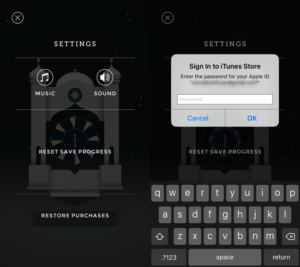
    enter-passwordThe software store on Kindle simply didn’t have a password protection setting for their in-app purchases. This is what got them in to trouble. Children could log in to make purchases on these apps and there was nothing built in to stop them. Shortly after complaints started coming in, Amazon updated software to include a password and had already refunded money but the FTC said that wasn’t enough.

    The courts decided today that Amazon had to pay back the money to parents directly. In order to receive re-payments parents must submit individual claims. They did say that Amazon must notify parents affected of the availability of the refunds.

    My Advice

    I always recommend setting your in-app purchase password and keeping that password a secret. You can’t ever tell when some freemium game is going to convince your child that they need that cool hat for their character or that if they buy that ten thousand pack of rubies they can build their village faster. We have to use our common sense because sometimes our children don’t.