Tag: kids

  • Snapchat News: Are You Being Recorded?

    Snapchat News: Are You Being Recorded?

    Snapchat has been busy with updates lately. The latest numbers show their user numbers barely rising when compared to Social Media giants like Facebook and Instagram. Some of these features are just to lure more users and some are to increase revenue. Either way, you should know what they’ve added.

    Sky and AR Filters

    Snap Inc. is working very hard to highlight the creative possibilities with their Snapchat camera. The sky filter allows you to change what the sky looks like. This feature shows off the ability for the Snapchat camera to detect what’s being photographed and then apply effects. You can turn a clear sky cloudy, a day sky to night, or just add a rainbow. Augmented reality filters were updated last week and you can now place your bitmoji (an animated character that you make look like you) onto different spaces in your photo or video and record different animations.

    iOS Update Allows Capturing of Your “Private” Snaps

    iOS 11 was released last week and it includes the ability to record your screen by simply tapping a button in your control panel. This has been cause for concern for Snapchat users. Especially for those who use Snapchat for very private or personal conversations. As of the publishing of this article, Snapchat currently has no way to alert you that what you’re sending or even your live chat is being recorded. This means that as our kids are chatting with their friends, those friends can record their messages and then post them later. This could be a pretty big problem. It is likely that Snap Inc. will eventually add the ability to be notified when someone is screen recording your Snaps. You’ll see an article about it here, for sure, when that happens.

    Ads will Open New Games, Videos, and Interactive Ads

    Snapchat also announced a partnership with content creators who will be providing new ways for Snapchat users to experience ads. The new format for ads will include videos, interactive ads, and built-in games. Their goal is to cause users to interact more with advertising in Snapchat and lure more marketers to the platform. 

    What Parents Should Know

    Snapchat continues to be a popular social media platform for teens and preteens. Internet Safety experts show concern about Snapchat because of its Discover page, private messaging and video messaging, and disappearing photos and videos. It is important to stay informed as to what the app is capable of when they release updates. Hopefully, this information can help you make a quality decision on what to do with your teen’s Snapchat account.


  • You May Soon Share Your Instagram Stories on Facebook

    You May Soon Share Your Instagram Stories on Facebook

    Facebook Stories still hasn’t taken off. Despite putting them on the desktop site and constantly encouraging you to use the feature in the app, Facebook hasn’t been able to increase usership of their stories feature. In fact, if you look at the top of your Facebook timeline you will probably notice that only one or two of your six hundred Facebook friends have actually posted a story for you to look at. In their latest attempt to lure users onto stories, Facebook may soon allow you to share your Instagram story to Facebook. 

    Instagram is testing a “share to facebook” feature in the story camera. Once you’ve taken your video or photo for Instagram stories, you’ll then be able to share it to Facebook or share screenshots to Twitter. This is one of the first times we’ve seen Instagram test a feature that will integrate directly into Facebook, even though both networks are run by the same company. We haven’t seen them cross over much since Facebook bought Instagram in 2012.

    What Parents Should Know

    Instagram stories is still the most popular feature of its kind in social media. Hundreds and millions of teens and adults alike use stories every day to share what’s been going on and what they’re into. Facebook, while they are obviously reaping the benefits of Instagram’s success, they’re also wanting to block Snapchat out of the picture completely. Pulling the 2 billion Facebook users into the story feature could go a long way to make Facebook’s social media selections stand far above those of Snapchat. Most likely, however, your kids are still going to be using the service that their friends are on and the fact that parents don’t really “get” Snapchat makes it more appealing to them. Be sure you spend some time using Snapchat, Instagram, and Facebook so you’re familiar with all of the social media options available to your kids and teens. Set notifications so you’ll know when your kids are posting, and you can even log in as their accounts on some of the social media services. Whatever method you use, don’t be outside of the loop when it comes to your kids’ social media preferences. Talk to them about it, follow them on their favorite social media accounts, and use their login information to stay informed as they post and receive private messages.

  • Family Safe Eclipse Coverage

    Family Safe Eclipse Coverage

    Everyone has an idea of how you should safely view today’s eclipse. Use the glasses, don’t use the glasses, use a pinhole projector (we’ve made ours) watch live coverage. However you want to view the eclipse in person, you need to know a few things before choosing which live stream coverage you’re wanting to use. For some reason, those who cover events like the eclipse aren’t always scientists or educators and they may give dumb, or even dangerous advice. They might even have non-age appropriate language or other content in their videos, coverage, or advertising. Here are a few of the channels and videos that we recommend so that you can learn about and enjoy live coverage of today’s total eclipse.

    Live Feed

    NASA: 

    I’m only listing this one option. They have a pre-show with more science facts than you can handle and then live coverage from multiple parts of the country. You know the information and advice will be good because these are some of our country’s absolute best scientists. Enjoy!

    Education:

    National Geographic: https://youtu.be/cxrLRbkOwKs

    Some great educational videos about the eclipse and other science facts. National Geographic is a trusted source for nature and science information and education.

    Sci Show Kids: https://www.youtube.com/channel/UCRFIPG2u1DxKLNuE3y2SjHA

    Sci Show Kids is a great way to teach your kids any scientific information. They have some very good videos about today’s eclipse.

    Sci Show Space: https://www.youtube.com/user/scishowspace/search?query=eclipse

    Sci Show Space has great scientific learning videos as well and is perfect for those who are a bit older. The link above is to a search for the eclipse videos on their channel.


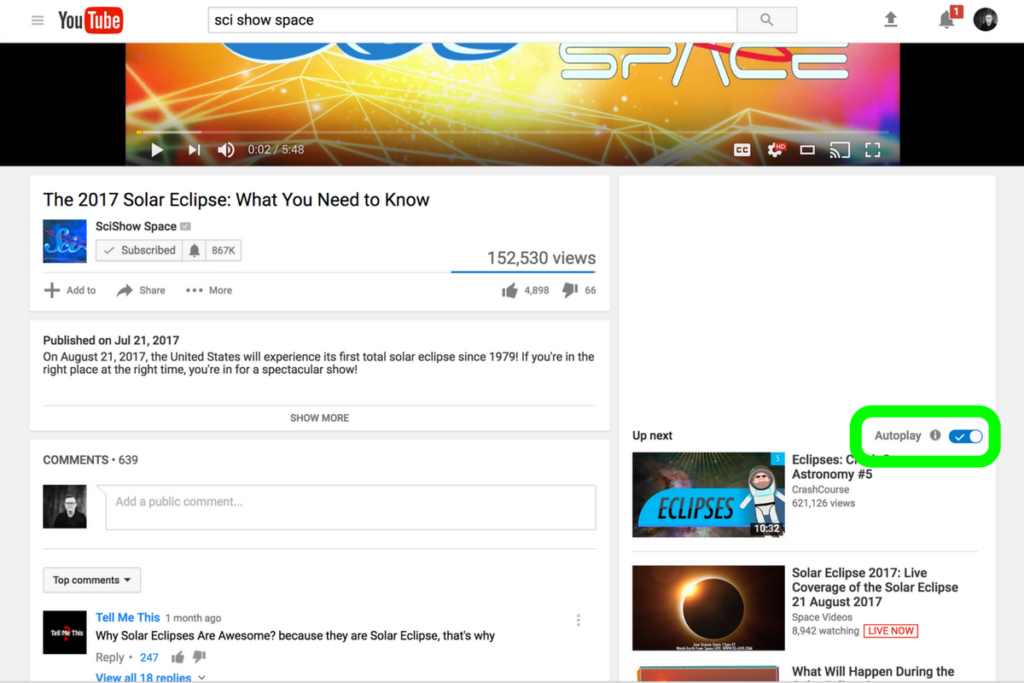
    Be smart about what videos you show your kids and whether or not you allow follow-up videos to autoplay. Turn autoplay off to avoid accidentally exposing them to content you didn’t expect and aren’t ready for them to see. The eclipse is a great opportunity to teach your children some science facts but you have to be wise with what tools you use. Hopefully, the resources listed in this article will give you an idea of where to start. Be safe, and have fun.

  • PODCAST: Parental Controls Showdown – Android v iPhone

    PODCAST: Parental Controls Showdown – Android v iPhone

    FAMILYTECHWEEKLY: The parental control showdown! Which OS has better built in parental controls? iOS or Android?

    Buy a book for an underprivileged family: https://www.facebook.com/donate/22627…

    Social Media Links

    Facebook: http://facebook.com/4pointfamilies
    Instagram: http://instagram.com/becausefamily
    Twitter: http://twitter.com/becausefamily

    Newsletter Signup

    Ministry Updates:: http://eepurl.com/R7Btr
    Weekly Blog Posts:: http://eepurl.com/cvnhXD

    Websites

    Ministry Site:: http://becausefamily.org
    Tech Blog:: https://safe.becausefamily.org
    Michael’s Speaking Info:: http://kmichaelprince.org

    Donate and Affiliate Links

    http://patreon.com/becausefamily
    http://BecauseFamily.org/partnership

    Music by Kevin MacLeod at http://Incompetech.com


  • Disney Being Sued for “Spying on Children”

    Disney Being Sued for “Spying on Children”

    Disney is in the news again and this time it’s for spying. Apparently, over 40 of the smartphone/tablet games released by Disney have ad tracking built in. That is usually not a surprise when you’re using an app but when the apps are intended for children it changes the game completely. The Children’s Online Privacy and Protection Act puts certain limits on what a website or app are allowed to do with information collected from individuals under 13 years of age. Using their information for ad tracking isn’t allowed under COPPA guidelines and a resident of California is taking the company to court because of this policy.

    AvengersNet, Beauty and the Beast, Cars Lightning League, Club Penguin Island, Disney Gif, Frozen Free Fall, and many more apps have all been discovered to be collecting data entered by the children using the apps so that Disney can sell it to advertisers. This information is then used to easily target children with these advertiser’s marketing campaigns. Information such as geolocation, age, web history, email address, and full name are collected in many of these games and are quite valuable to marketing companies. Disney can also use this information to better target the advertising built into their own apps.

    Disney has paid fines for misuse of information before. In 2011, Playcom, a Disney subsidiary paid 3 million in fines for collecting email addresses, full names, and other information from minors.  There’s obviously money to be made from collecting personal information. The question is how can we keep this from happening to our kids?

    What Parents Should Know

    This is why so many apps are free. You’re not paying with money but you’re paying with information. When you or your kids use an app, you should always assume your information is being collected. Sites and apps save passwords, email addresses, and usernames to use on their site but they don’t have to just store that information. They can use that info to make more money as well. There is no way to avoid having the information you enter into apps, software, and websites collected for purposes outside of your control. The key is to control what information you put into those apps.

    There are browsers and plugins that will help you avoid ad tracking. You can search with DuckDuckGo instead of Google, for instance. You can install the AdBlocker extension for Google Chrome to keep some sites from taking your information. The problem is that many of these sites know that blockers are in effect and won’t release all of the features of their site until you disable them. Apps come with tracking built in so there isn’t really any way to avoid letting them take your information. My advice is to only enter information that you would be willing to make public. If you wouldn’t put it on an advertising survey for some company then you shouldn’t enter it into their site or app either.

    As for your children, you have to take the same precautions as you would yourself. In fact, consider being even more strict with the information you enter into the apps your children use. Don’t let them use their real full name or their social media account usernames. Don’t allow them to enter their email address or any contact information. You should enter whatever info you would for yourself and then allow them to use the app. I have a “family” email address that I use for apps or software that want an email address from my kids. My children don’t even know the address or login information, it’s strictly to use for logging in to a couple of the educational or silly game apps they like to use. These are a few of the things you can do to protect your kids from being tracked for advertising. It’s important that they understand that whatever information they enter online will immediately be outside of their control. Teach them to keep private things private. This will protect them from so much more than just advertising.


  • How Your Kids Can Hide Texts

    How Your Kids Can Hide Texts

    One of the major issues facing our teens these days is sexting. Statistics say that one of every ten teenagers admits to having sent naked pictures of themselves to someone. Sometimes our kids use social media to do this. They’ll send photos and inappropriate messages in the private messaging features of these social media platforms. Sometimes, though, your kids just use text messaging to do it. There are several tools out there to allow you to monitor what texts your kids are sending but there are a few ways they can hide their texts, even from the security you’ve set up. Here’s what they’re doing.

    Deleting text history.

    This seems pretty obvious but you’d be surprised how oblivious some parents can be. If there aren’t any text messages in your kids’ messaging app, or if it looks like they’ve only chatted with you, they’ve probably deleted their messages. This doesn’t always mean they’re up to something naughty but it does mean you should be having a conversation with them. Deleting their messages is a bad habit to allow them to get into for a number of reasons. First, it looks like they’re hiding something. They don’t want you to be suspicious of them any more than you want to creep around and spy on them. Secondly, they could be deleting conversations that can come back in the future. It’s not a bad thing to have written (or typed) evidence of these conversations, especially if they’re ever contacted by someone they don’t know. I advise you to encourage your kids not to delete texts. If you’re using a monitoring software that uses the iCloud backup (TeenSafe, mSPY) to monitor their texts then you could be missing what they’ve texted if they deleted them while outside of wifi and before a backup to the cloud. If you have a suspicion that text messages are being deleted then you should disallow the use of texting on their phone. If you can’t disable texting then don’t be afraid to take the phone away for a while. Most of all talk to your kids about the risks associated with keeping their conversations hidden. You should be here to help them and they need to understand that.

    Using Dummy Phone Numbers and Private Texting Apps

    Apps like TextBurner, Anonymous Texting, Buffalo Private Texting, and Smiley Private Texting can easily be used by kids and teens to hide the conversations they’ve been having. Not only do these apps require a pin number to access the text messages but many of them also allow you to set up a new phone number so that you can send and receive texts of calls anonymously. The apps descriptions mention job searches, Craigs List, and dating as some of the main uses for these private texting and dummy phone numbers. They do, however, advise against certain usese of the app and even warn of some of their policies for dealing with those who don’t follow guidelines:


    Screenshot from the Anonymous Texting App


    Check out this list of private texting apps for iOS.     —      Here’s a list of private texting apps for Android.

    Notice the warning about the age requirement? It says you must be 13 years old. If that’s so then why is the app rated for ages 4+? If you do a scan of all of the apps like this in iOS you’ll find that they’re all rated 4+. If you have your app store settings allowing your kid to download apps rated 9+ or lower or even 4+, they’d be able to download one of these apps, create a private and secret phone number that you don’t even know about and begin texting whoever they’d like. This is why I recommend using Family Link (for android phones OS 7 or higher) and iTunes Family Share to require your child to ask permission to download new apps. If you see any kind of app that says secret or private, or anonymous in the description I’d think twice about allowing them to download it. We have a major issue on our hands of kids sending images and texts that are very adult oriented. You, honestly, can’t keep an eye on every message they send on every app. This is why it’s important to limit which apps they’re allowed to use. It may cause that knockdown, drag out fight you’ve been trying to avoid but it’s better than filing a police report about some stranger who has been sending nasty pictures to your child.


  • PODCAST: Is Sarahah Meant for Your Teens?

    PODCAST: Is Sarahah Meant for Your Teens?

    Subscribe on iTunes: https://itunes.apple.com/us/podcast/family-tech-weekly/id1231177225?mt=2 

    Sarahaha is an interesting app and it’s still gaining in popularity. In this episode, Michael and Melinda discuss the appeal of Sarahaha, the meaning of the word, and what we think parents should do about it.


    Social Media Links

    Facebook: http://facebook.com/4pointfamilies

    Instagram: http://instagram.com/becausefamily

    Twitter: http://twitter.com/becausefamily

    Newsletter Signup

    Ministry Updates:: http://eepurl.com/R7Btr

    Weekly Blog Posts:: http://eepurl.com/cvnhXD

    Websites

    Ministry Site:: http://becausefamily.org

    Tech Blog:: https://safe.becausefamily.org

    Michael’s Speaking Info:: http://kmichaelprince.org

    Donate and Affiliate Links

    http://patreon.com/becausefamily

    http://BecauseFamily.org/partnership

  • Should Your Kids Use Sarahah?

    Should Your Kids Use Sarahah?

    Sarahah is an app that snuck up the charts over the past weeks. It was originally put on the app store in June but is already sitting at number one on the free app charts in iOS. This app allows you to leave anonymous comments about people. The idea is that, since it’s completely anonymous, you can be honest and say what you really think. This can obviously lead to some really encouraging and uplifting posts, maybe it could cause a crush to reveal themselves, but definitely, it will cause mean people to do what mean people do. The risk of bullying on this app is very very high.

    This isn’t the first app of its kind but none have risen in popularity so quickly. “Sarahah” is the Arabic word for honesty, the app’s website describes the goal of the app simply:

    “Sarahah helps you in discovering your strengths and areas for improvement by receiving honest feedback from your employees and your friends in a private manner.”

    Again, the app is very new but development is happening fast (five updates since its June 13th release) and the app promises more features to come. Something like a planet icon on the bottom of the screen seems to hint at a future explore or discover page and they mention on their site that they’re studying an option to allow users to reply to the comments that come through Sarahah. The appeal of the app is obvious, most of us wish we could say whatever we are thinking to someone and there are also those of us that wish we could hear exactly what people think of us all the time. This may be fun or even cathartic for grown adults, but when teens and tweens are in the throes of development, hormones, and emotion, is this app a good idea?

    What Parents Should Know

    My Facebook feed has begun to blow up with Sarahah messages that have been screenshotted and shared. Most of the ones I see are people celebrating a super nice comment they got from someone but I’ve seen a few that were laughing at the commenter who was being a jerk. Those I’ve seen on Sarahah were adults, mostly because I don’t follow many young people on Facebook but there is no doubt, seeing this app climb the charts like it did, that there are younger users too. Parents should be cautioned that this app is rated 17+ for unrestricted web access, profanity, and adult humor. The issue is that since anyone who wants can post whatever they want (it’s called user generated content) it’s next to impossible to ensure there will be no adult content on the app. Secondly, I warn parents, as I did above, about the dangers of bullying through this app. The bully follows our kids around in their pocket and this app gives them the ability to say whatever they want without any way to identify who they are.

    There is already an epidemic of kids feeling like they can say whatever they want online without consequence. Unfortunately, that isn’t the case because the one reading what is written feels real emotions based on what’s been said. The ability to be completely anonymous could cause kids to be even crueler and could even lead to kids who wouldn’t say anything mean to some one actually doing it because they don’t see how they can be identified as the culprit. You can block users who you don’t want to message you anymore but once you’ve done that the damage could already be done.

    My advice is to disallow this app on your kids’ phones. You can do it the old fashion way by looking at their phone yourself and uninstalling that app if you see it. You can also set age restrictions in the app store or parental control/restrictions options on your kids’ devices. This should block Sarahah since it’s rated 17+. As an adult, maybe you enjoy this app, I would advise caution to you too. Not only are you putting yourself out there to be spoken to anonymously by anyone who could say whatever they want but you’re also setting an example for your kids.

  • Internet Safety Training in Your Home

    Internet Safety Training in Your Home

    I approached the mother of a family we have been friends with for a while and asked if she would be willing to host one of our first Digital Boundaries Workshops. She immediately began to tear up and say absolutely yes. I was thrilled but concerned and confused by her tears. She confessed that, while we had discussed setting up internet safety solutions in her home nearly a year earlier, we had never made the scheduling work and she felt horrible. Especially because her son, who was in third grade, had just been caught searching for information on some very adult topics online. A younger child on the school bus had told him what he should search for and curiosity immediately took over. “We need to do something as soon as possible.” she said, “I wish we hadn’t waited, I hope it’s not too late.” We did a workshop for her just a couple weeks later.

    This response is all too common. Our work for families gets far more attention from parents who’ve been through some kind of related struggle than those who want to set up preventative measures to keep their family from such a story becoming their reality. Our children are being called digital natives by psychologists. This is a label that identifies them as a generation that’s so used to technology, it’s like it’s their native tongue. If you’ve spent any time with a young child or teen you’ve probably been impressed with their ability to maneuver digital devices. It’s hard for parents to keep up. It’s even harder if you’re an older parent or a grandparent who feels left behind by the online world. My “Setting Digital Boundaries” living room workshop is an easy way to get some training that will set you on the path towards understanding the digital world your kids are growing up in. Starting next month (August 2017) these workshops will be available both live and through skype.

    What Happens at a Workshop?

    I jokingly tell people that our Setting Digital Boundaries Workshop is like a Mary Kay party. You invite your friends over and serve up some snacks. After everyone has had some time to arrive and say hello we begin the presentation. Instead of selling you make up I’ll be teaching you and your friends how to protect your children online. After updating you on some of the latest dangers and threats available to your kids online I teach you our internet safety plan that I call S.A.F.E. (Setup Accountability Filtering and Education)


    Each section of this presentation will be spent unpacking the four keys of our S.A.F.E. plan all the while highlighting some of the best resources you can use to protect your family. Each section ends with a time for questions. The sessions last anywhere from 40 to 60 minutes and afterward, I always stay available to answer more questions and give feedback on some of yours and your friends’ tech safety needs.

    These workshops are so valuable because of how quickly the internet safety atmosphere changes. Our book is helpful for getting you started and teaching you some of the terms that you need to understand to protect your kids online. A book, however, can’t give you step by step help with your internet safety goals. A blog post or YouTube video can’t listen to your specific internet safety needs and diagnose the best plan for protecting your family. That’s what makes Setting Digital Boundaries Workshops so critical.

    Email Us to book a workshop and go to BecauseFamily.org to learn more about what we teach and how you can partner with us financially to help us keep these workshops free.

  • Video Chatting Apps You Should Uninstall NOW

    Video Chatting Apps You Should Uninstall NOW

    Chat Roulette was a challenge that became its own website. The idea was that people could log on to the site and be connected with someone from around the world at random. The website isn’t as popular as it once was but there are many apps that simulate that experience and some of those apps are gaining popularity. Here are some of the ones climbing the app store charts. The ranking listed is for the Social Media category in the iOS App Store as of the publishing date of this article. I’ve only listed the live video or random connection chatting apps in the top fifty.

    Melon #14

    Melon is making the news as the latest video chatting fad. It connects you with new people based on social media friends and offers private messaging, video chat, and a people search feature. It’s gaining popularity and being featured in articles that are blasting it for the frequency of cyberbullying and the high concentration of males looking for girls that will do whatever they ask on camera.


    Live.Me #16

    Live.Me touts the ability to chat with stars and celebrities and broadcast to anyone all over the world. You can find anyone from anywhere or just look to see who is broadcasting around you. There is also the ability to search by topic or interest. Live.Me uses “gifts” and “diamonds” to allow you to share things with other users and even advertises the ability to “date” virtually through the app.


    Monkey #25

    I’ve written about Monkey before. This app was created by a couple of teens who dropped out of high-school to launch a tech startup. It quickly gained a reputation for having too much nudity and not taking some of the responsibility for the content found in the app. This app has been on the FamilyTechBlog uninstall list for a while now.


    MeetMe #35

    Formerly called “MyYearbook,” MeetMe is a app that advertises itself as a way to “meet new people.” The app uses your location to find people near you and information that you’ve entered to connect you with people who share your interests. It’s popular in the app store as it’s been around for quite a while and has the largest fan base. MeetMe offers private chat and video chatting as well as live video broadcasting.


    Climbing the Charts:

    YouNow #52

    Live stream video chat is pretty much all YouNow is about. You can broadcast yourself, find broadcasters, and even join the broadcast as a video guest. The app store listing calls for you to build your fanbase and become a YouNow celebrity. There are some complaints on in the reviews about accounts that have been reported for inappropriate content not being removed because they are popular on YouNow.


    CAM #56

    CAM is popular because it allows you to select the gender you’d like to chat with. It automatically connects you with someone and even automatically texts an invite to everyone on your contacts list without your permission. This practice has caused it to dip in the standings but some continue to use the app because they like the ability to chat or flirt with people they are attracted to.


    What Parents Should Know

    I don’t usually recommend any of these type of app for your teens or kids. Not only is it dangerous to connect with random people who could be broadcasting whatever they’d like for you to see. It’s also a problem because of the potential for predators. Any connection with strangers is dangerous. Some of these apps use your location to connect you and it’s therefore possible to meet people online that you may meet up with later. My advice is to uninstall any of these apps if you see them on your kids phones or tablets. There is no reason to use one of these apps to connect with friends since you can use Instagram or Facebook Messenger to do that now. Uninstall on sight.