Tag: kids

  • Here’s How To See if Your Private Data Leaked to Cambridge Analytica

    Here’s How To See if Your Private Data Leaked to Cambridge Analytica

    There is a tool to help you find out if your data was leaked to Cambridge Analytica. There may not be much you can do about it, but it is interesting to see if your app approval habits led to the sharing of your private data. Facebook has said that they’ll be highlighting the tool on the top of everyone’s news feeds but in case you haven’t seen it or don’t see it, here’s how to find the tool on your own.


    I recommend you check this out for your own Facebook account as well as any accounts your kids may use. Just in case you don’t have a minute and a half to watch the video above, I’ve listed the steps below for you. Thanks for reading FamilyTechBlog.com and remember to be careful how much access you give apps to your social media data.

    1. Open your Facebook App
    2. Click on the “Hamburger Menu” to the bottom right. (Three stacked lines.)
    3. Scroll all the way down to the bottom of the menu.
    4. Select “Help and Support”
    5. Select Help Center
    6. Search {Cambridge}
    7. Select the first auto complete option.
    8. That’s where it tells you if you’ve shared data with Cambridge Analytica.

    Thanks again, and share this with your friends.

  • Fortnite is Free; and also the Highest Grossing Game on iOS

    Fortnite is Free; and also the Highest Grossing Game on iOS

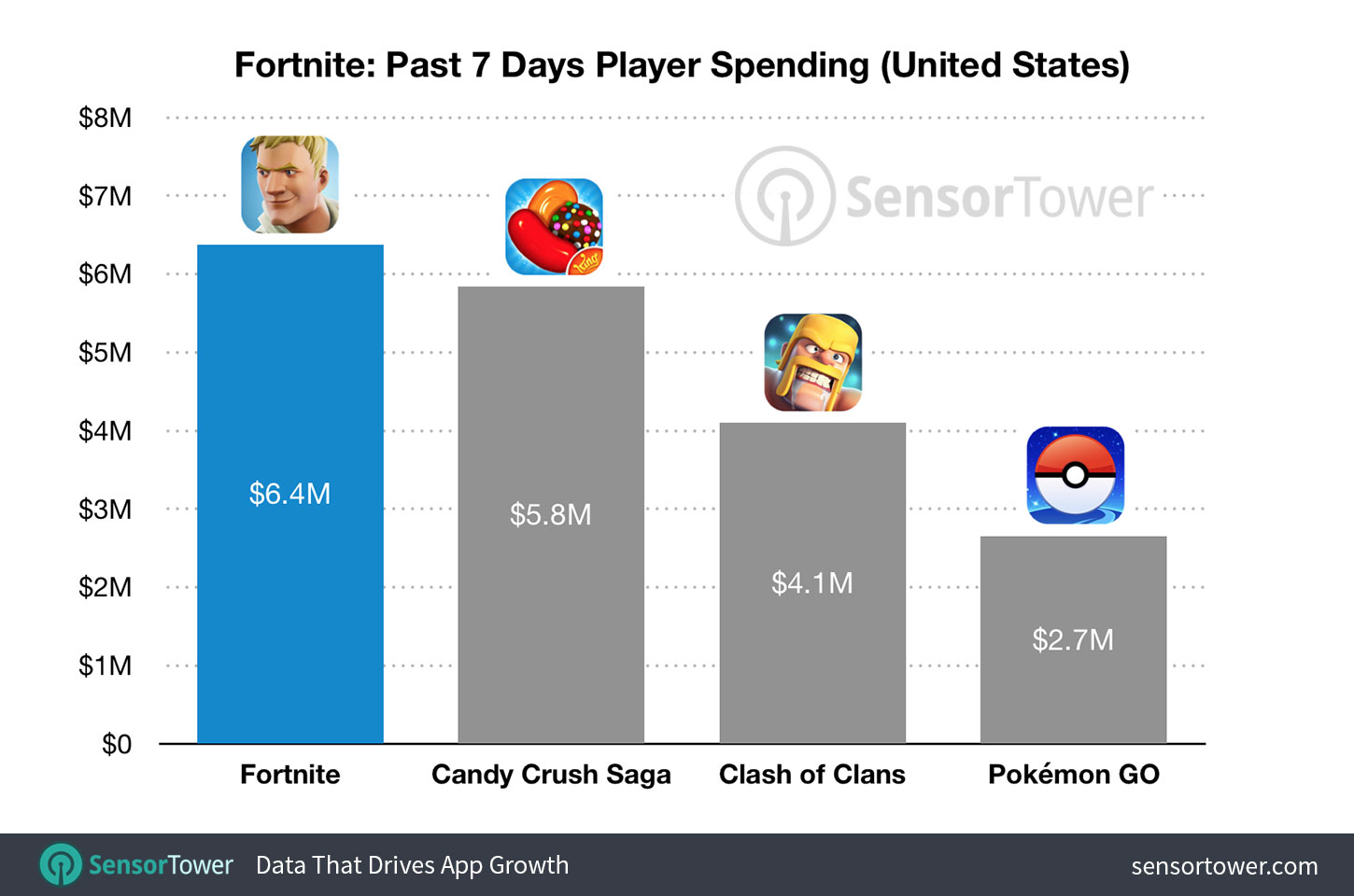
    Freemium games aren’t new and there is a reason that that category has graced the top of the charts on iOS for a long time now. Fortnite: Battle Royale, however, has rushed into the Freemium Game Revenue lead, making $15 million in the first three weeks since launch. The game, in which you fight it out against 99 other players to be the last man/team standing, is free to download on iPhone. You don’t buy items to increase your skills or character’s strength, you just buy costumes and dance moves. Obviously, the lack of game-changing in-app purchases hasn’t hurt the bottom line for Epic Game’s wildly popular third-person shooter and crafting game.

    SensorTower.com

    What Parents Should Know

    For my thoughts on shooter games and kids, you can read my game reviews and listen to this BecauseFamily Podcast episode. As far as in-app purchases go, it is up to you. You should know how to set up your kids’ devices to not allow purchases without approval. Failure to set this up will likely lead to surprise expenses as the temptation for that new dinosaur hat or “Carlton” dance moves becomes too great for your kid to withstand. 

    My advice is for you to talk to your kids about the time they spend playing games on their devices. Make sure you have an understanding of what a healthy amount of time on devices looks like. Also be sure that you have your credit card settings secured to keep unwanted purchases from surprising you next month. Again, talk to your kids about spending your money on the games they play. I agree that these developers deserve every dollar they make from their games. I also strongly believe that if a kid is underage, it is up to the parents to regulate whether or not their child can spend money on their favorite games. That is up to you as mom or dad.

  • How To: Encrypt Your Facebook Messenger Conversations

    How To: Encrypt Your Facebook Messenger Conversations

    Facebook’s data mining habits have been in the news for the past few weeks and today they’ve admitted that they’re reading your private messages in FB Messenger. They use some of this information to better your experience, they scan images and text to be sure you’re not breaking any of their policies and to check in on reported users. They also, however, scan your messages to receive more data about you. Advertising has been in messenger for a while and your private conversations are being used to customize that info for marketers.

    Check Out: How to download your Facebook Data…

    Facebook messenger has had a way for you to encrypt (or hide info in) your messages for a while, the above video is a walkthrough on how to turn those settings on. Unfortunately, you have to opt-in per conversation but once it’s on your messages are encrypted “end to end” meaning they can’t be read by Facebook’s AI and should they be intercepted by a third party, they would come through as gibberish-like code instead of the messages you’ve sent. 

    Here is a step by step guide for turning on “secret conversations” in messenger.

    1. Select the conversation you’d like to make secret.
    2. Tap the name of the group or contact above your conversation thread.
    3. Scroll down and select “Secret Conversation.”
    4. That’s it…you’re encrypted.


  • New Snapchat Feature Enables 16 Person Video Chat

    New Snapchat Feature Enables 16 Person Video Chat

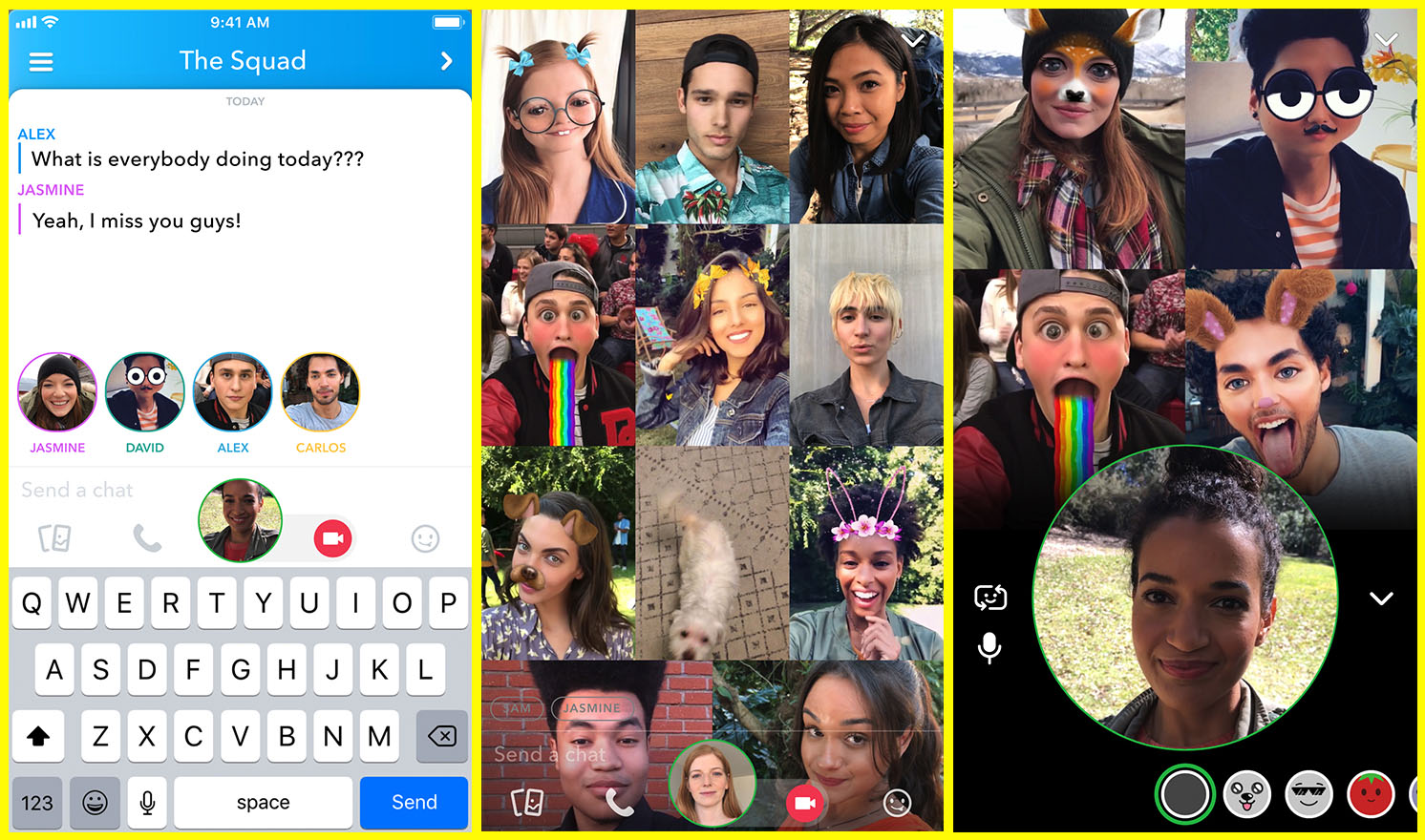
    Group chat has been available for a long while now, even in Snapchat, but now you can hang out with a large group of friends on video without ever leaving home. Snapchat’s new group video chat feature is now available and allows you to include 15 of your friends. You can sign on to a regular chat and add friends as you go or set the chat up with your large group from the beginning. Of course, Snapchat’s AR filters and masks will be available during these chats as well. Another feature that is available with this update is tagging or mentions. You can “@” tag a friend in your posts so they’ll be notified that you’re mentioning them.

    What Parents Should Know

    Parents should already know how much time their kids spend on social media. If unsupervised, they’ll chat with friends and creep their timelines all day long. In fact, many teens say they feel addicted to social media, while not doing anything to curb their own addictions. Addiction isn’t the only problem with extensive social media use. Social contact over our devices has proven to be far less beneficial than face to face interaction. There have been countless studies comparing video chat to actual conversations with someone in person and the conclusion is always the same. Spending time in the same room as someone is better for your development than only texting, calling, or video chatting. Take this excerpt summary from ScienceDirect.com’s 2014 study.

    When engaging in face-to-face communication, social information is conveyed by vocal and visual cues within the context of the situation. Nonverbal communication, defined as communication without words, includes apparent behaviors such as facial expression, eye contact, and tone of voice, as well as less obvious messages such as posture and spatial distance between two or more people (Knapp & Hall, 2010). The understanding of these kinds of nonverbal social cues is particularly important for social interaction because of the need to modify one’s own behavior in response to the reactions of others (Knapp & Hall, 2010). – ScienceDirect.com

    With apps such as Houseparty and Snapchat’s group chat out there, we have to be more intentional than ever about the time our kids spend on their screens. Hanging out with friends through our devices is becoming easier and more acceptable. Kids aren’t going out as much, the malls are closing, arcades are few and far between, and movie theaters are having to serve food like restaurants to attract the older generations because the younger ones aren’t as interested. Why go out when you can stay in and hang out with your friends online? Video chat can be an awesome way to stay in touch with long-distance family or friends but when our kids leave school and go home to do their homework while video chatting with six of their best buds all evening, something is missing from their life experience. We have to monitor their online activity and set time limits. Use unGlue or Circle to set some boundaries. Talk to your kids about the importance of face to face interaction. Don’t deny them opportunities to go spend time with friends (in families you trust). Drive them to that get-together or youth group event. Say yes when a friend wants to come over. Give them opportunities to spend face to face time with friends, outside of school, and you’ll be giving them the best chance you can to develop the skills they need to succeed.

  • Parent Guide: Farcry 5

    Parent Guide: Farcry 5

    Farcry 5 S.A.F.E. Rating

    Violence: 1 out of 5
    Language: 1 out of 5
    Sexual Content: 3 out of 5 (so far)
    Positive Message: 2 out of 5

    Total: 7 out of 20 = Adults Only!

    The Game

    The Farcry series is known to feature regular people type characters who are put in extraordinary situations and forced to fight their way out. Players try their hand at fighting crime lords, warlords, and drug cartels. In Farcry 5 you’re a sheriff deputy who is trying to overthrow a cult in the mountains of Montana. You team up with locals, wildlife, and even secret agents to eliminate the influence of “The Father,” a man who considers himself the spiritual leader of an entire group of religious followers.

    This game is set in an open world. There is a storyline but it isn’t linear, it unfolds as you explore different areas of the game. You can go around doing whatever you want, liberating outposts, saving citizens, hunting and fishing, all the while increasing your influence over the region through something called “resistance points.” These points allow you to unlock new areas and items and eventually lead you to your final showdown with the leader of the cult. The story of Farcry 5 is very interesting and well told. It is, however, a bit on the anti-religious side, albeit so extreme that it is hard to view it as a serious commentary on religion. The cult is very extreme and a caricature of anything it may be trying to actually represent. I wouldn’t take seriously any complaints about this game being anti-christian or anti-religion.

    Violence: (1)

    This game features extreme violence right from the start. You are attacking enemies with a large collection of different weapons. Melee, explosives, firearms, vehicles, and even animals can be used to take out your enemies. You can choose to use stealth to eliminate your enemies or you can go in guns and dynamite blazing and take ’em all out that way. The worst violence in the game takes place during the cinematic cut scenes. There are executions, eye gouging, and self harm/mutilation featured in the cinematic scenes that drive the story. The violence is used to show the extremity of the cult you are up against and it begins with the first cut scene at the beginning of the game.

    Farcry 5 scores a 1 for violence meaning it’s meant for Adults.

    Language: (1)

    Farcry 5 has multiple uses of every word imaginable right from the very beginning. It is rated M for Mature because of language and it is obvious early on in the game play.

    Farcry 5 scores a 1 for Language meaning it’s meant for Adults.

    Sexual:

    So far in my current, incomplete, walkthrough of Farcry 5 there isn’t any sexual content. The rating of the games mentions sexual themes but I haven’t seen it yet. I will update this post on this topic once my walkthrough has completed.

    Farcry 5 scores a 3 (so far) for sexual content meaning it depends on your child. 

    Message:

    Like most 1st person shooter games, Farcry 5 puts you in a position where your only option is to pick up a machine gun and start mowing people over. As mentioned before, this game is full of scripture and even some reimagining of some old church songs. They are used in a context that features the cult in a negative way. There is no positive message in this game, except maybe that you shouldn’t join a violent cult. The themes of this game are very grown up and explore what happens when people give themselves blindly to someone like “The Father.”

    Farcry 5 scores a 2 for message meaning it contains very mature themes. 

    Final Thoughts

    Farcry 5 isn’t meant for your 15 year old son. It’s a game made by adults for adults. It features very adult themes and content and doesn’t apologize for the gruesomeness of the violence or the complexity of the story. While there isn’t any sexual content that I’m aware of, it still ranks very low as far as its playability for even some older teens. I recommend keeping informed on the content of this game and know if your kids are playing it. Many kids will ask for it and some will get to buy it because their parents don’t know what the game consists of. My advice is that you share this review with other parents and let them know what content the game their kid is asking for contains. 

  • Your Gun Video Searches May Take You to Pornography Sites

    Your Gun Video Searches May Take You to Pornography Sites

    After the shooting in February, many user generated content sites are making changes to how they handle media about firearms. YouTube is the latest to make changes to their guidelines with an emphasis on videos about assembling, building, and customizing guns.

    Videos that feature “instructions on manufacturing a firearm, ammunition, high capacity magazine, homemade silencers/suppressors, or certain firearms accessories … This also includes instructions on how to convert a firearm to automatic or simulated automatic firing capabilities.” are not permitted on YouTube. – Youtube Guidelines

    Since these changes have taken effect, some of the channels that feature firearms are going to be making changes to how they broadcast their content. Obviously, their videos are no longer welcome on YouTube so some are looking for a different outlet. PornHub, one of the leading adult video sites on the internet, is the destination of one popular firearm focused channel. InRangeTV, stating that “YouTube’s newly released vague and one-sided firearms policy makes it abundantly clear that YouTube cannot be counted upon to be a safe harbor for a wide variety of views and subject matter,” has begun to upload new and past content to PornHub as of this week.

    What Parent’s Should Know

    People of all ages are fascinated by guns. I’ve had dads and teens and even older elementary aged kids ask me if filters that they have installed would block their favorite gun videos and sites. The fact, now, is that more of those niche interest videos will be moving onto sites like PornHub.

    Even Google searches for gun videos will likely now result in links to sites that feature pornography and other extreme content. This brings a subject that is often considered interesting by many conservatives of all ages into the world of content that they would not consider appropriate. So what should parents do?

    My recommendation, if your kids enjoy watching videos about guns and will follow them anywhere the Internet takes them, is to install accountability software and a filter to any of their devices. A filter will block content you don’t want them to see. Accountability software will help you find if they got a hold of any websites you don’t approve of. I recommend Accountable2You because they have frequent updates and their iOS app will scan any browser on an iPhone or iPad. And as far as filters go, Net Nanny is also a good quality option.

    Whatever your views on guns and the age appropriateness of videos about guns I think we can all agree that putting content kids may be interested in viewing on sites made explicitly for adults is a dangerous proposition. Be vigilant and do something to keep your kids off of the sites.

  • Get This Screen Time Management Subscription for 30% Off!

    Get This Screen Time Management Subscription for 30% Off!

    *FamilyTechBlog.com is an affiliate partner with unGlue

    We’ve shared unGlue with you before. It is a very good way to start helping your older kids learn to manage their screen time. Once it’s all set up you can let your kids decide how they manage the time you’ve given them on their devices. They can save it, earn more, or just use it all up. There’s a lot that unGlue can do and features are being added often. It’s affordable and useful. Best of all, you can use the monitoring tools for free and if you subscribe soon, you can save 30% during their spring sale. Learn more about unGlue below and click the links to check it out for yourself.

    How it Works

    [reposted] At home, unGlue works through your wifi. You install software on your main home computer (only works while turned on) and it mirrors your router traffic to see the web activities on the devices you have set up. While on the go, unGlue uses a VPN to keep track of what is being done online. These methods mean your time is managed everywhere you go. You can even set up guest access in your home. If you don’t have a home computer to set up unGlue on, they have a device called the unGlue Puck that will only cost you $30.

    Speaking of cost, you can download the unGlue app for free and start monitoring online time right away. If you want to set up and use the other features you can subscribe for $9.99 per month or $84 per year. Both subscription options include full-featured access to unGlue. For a limited time, you can subscribe for 30% off.


  • The “Grown Up Fortnite,” PUBG, is Now FREE on iOS and Android

    The “Grown Up Fortnite,” PUBG, is Now FREE on iOS and Android

    If your kid doesn’t play Fortnite, they’ve asked if they can. It’s a battle royale game that combines the third person shooter genre with crafting and resource gathering. You parachute onto an island and battle against 99 other players to the last man. Along the way, you collect resources, weapons, and armor. You use your resources to craft walls, towers, and such to help you fight against other players. Fortnite is made with cartoon style graphics and no blood or gore. You do, however, play against or with players online from all over the world.

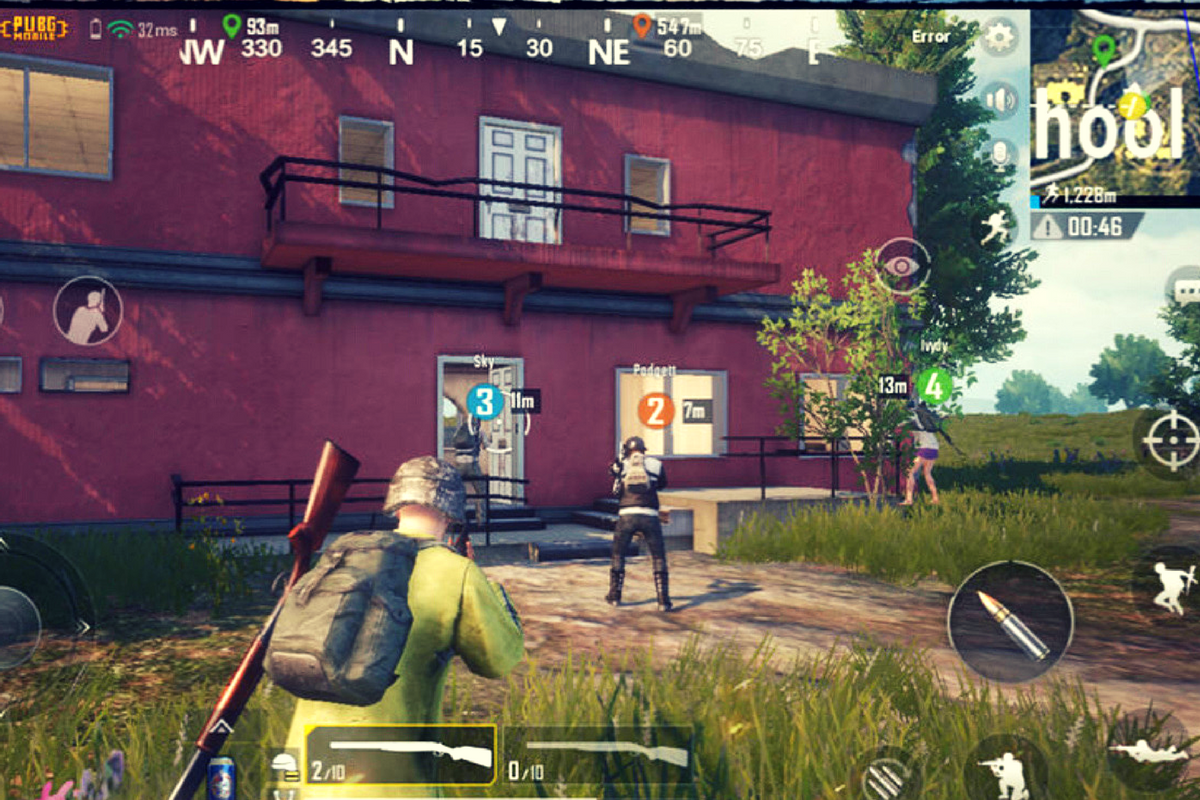
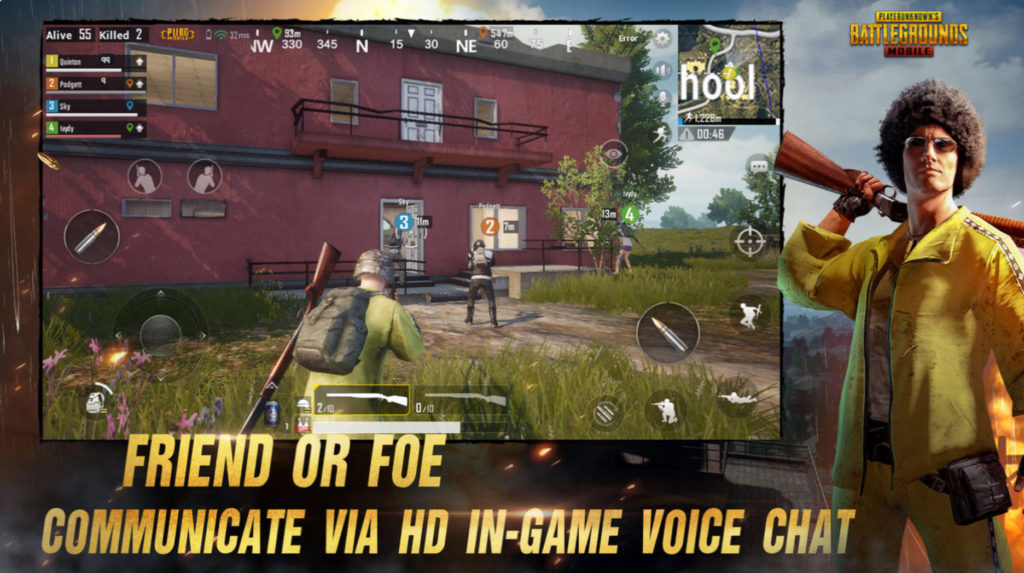
    Player Unknown’s Battleground started the battle royale genre hype. It follows the same model as Fortnite, minus the crafting and resource collection. The biggest difference, however, is the realism. While it still plays like a game, it is a third person shooter with plenty of violence and blood. You don’t build and craft, you just run around avoiding enemies until you have to battle it out. Then, the choice is to kill or be killed. The game wasn’t made for young kids. It is now available for free in mobile app stores so more kids can have access to it.

    CHECK OUT: Podcast – Boys and Video Game Addictions

    What Parents Should Know

    My advice is to use something like Family Share or Android FamilyLink (if available) to keep an eye on what apps your kids are downloading. I’m not one to say that kids playing violent video games will immediately lead to them committing violence themselves, but I do know that there are psychological effects on young boys who experience the intensity of simulated battle while their brains are developing. I recommend not allowing your kids to download this app. Fortnite is questionable, but to me, PUBG is a definite no.

  • PODCAST: Social Media isn’t For the Users Anymore

    PODCAST: Social Media isn’t For the Users Anymore

    Family Tech Update: Entertainment Software Rating Board will Warn Parents of In-Game Purchases in Video Games – Movie Pass Reveals that They Collect Much More of Your Data than You Thought – Netflix Testing “Patches” to Reward Kids’ Binge-Watching – and Social Media isn’t For Users Anymore!

    Show Notes:

    Facebook’s algorithm change
    Instagram never going back to chronological
    Pay for reach…
    For Parents
    there’s a system behind social media
    marketers are paid to manipulate the system
    Companies make decisions based on marketing opportunities
    Social Media isn’t made for the user anymore
    No social media until 17…

    Social Media Links

    Facebook: http://facebook.com/BecauseFamily
    Instagram: http://instagram.com/becausefamily
    Twitter: http://twitter.com/becausefamily

    Newsletter Sign up

    Ministry Updates:: http://eepurl.com/R7Btr
    Weekly Blog Posts:: http://eepurl.com/cvnhXD

    Websites

    Ministry Site:: http://becausefamily.org
    Tech Blog:: https://safe.becausefamily.org
    Michael’s Speaking Info:: http://kmichaelprince.org

    Donate and Affiliate Links

    http://BecauseFamily.org/partnership

    Music Creative Commons

  • Netflix Testing “Patches” to Reward Kids’ Binge Watching

    Netflix Testing “Patches” to Reward Kids’ Binge Watching

    Saying they are trying to achieve a more “interactive experience,” Netflix has begun testing patches on kids shows. These digital badges will be given as rewards for watching certain episodes or a certain number of episodes of a Netflix original show. Patches don’t unlock any extra content. They are meant to be their own reward.

    There has been some backlash from parents and others on Twitter who are concerned about kids binge-watching more shows. I can attest to the difficulty of convincing your kids that it’s time to turn off their shows and move on to some other activity. I agree that the last thing we need is the collection of badges or patches as another excuse for our kids to get sucked into episode after episode.

    Netflix has tried in the past to increase interactivity for viewers with their choose your own adventure content. These movies contained built-in pauses to ask the viewer what the main character should do. The story developed into different scenes based on the choices of the viewer. While the end of the story seemed to be the same no matter your choice, it provided a bit of interactivity as opposed to just sitting and watching a story play out on the screen. There haven’t been very many more of these shows since the original test episodes came out.

    What Parents Should Know

    Too much screen time is always a concern for parents these days and I would be surprised if the response to badges for watching shows is positive at all. The goal is pretty obvious: Netflix wants to increase viewership. I imagine that the testing phase will end with the removal of patches and badges. Parents are becoming more and more aware of the amount of time their kids are spending online and watching video content and setting stricter boundaries. Hopefully, Netflix gets wise to that fact and allows it to inform their decisions.