Tag: internet safety

  • VIDEO: Three iOS 11 Features Parents Need to Know

    VIDEO: Three iOS 11 Features Parents Need to Know

    More than half of all iPhone users are now using iOS 11 and there are some major changes. The biggest change is the control center. This has become a lot more useful with the iOS 11 update and there are some features that parents should know so that they can use them to further protect their kids.

    Screen Recording

    Screen recording hasn’t been built into iPhone until this update. It’s a way to capture what’s happening on your screen and then save it as a video in your photos. This feature is cool and very useful for projects like making this video but there is a bit of a concern with kids sending messages and them being recorded without their knowledge. Keep your eye on this one.

    Quick Guided Access Button

    Guided access is an awesome way to keep you younger kids safe. The quick access button allows you to get to you GA settings quickly and use the feature to keep your kids safe. Do Not Disturb While Driving

    Do Not Disturb While Driving

    This is one that’s been needed for a while. The Do Not Disturb While Driving feature lets you just tap a simple button in your control center and not be distracted by texts until you turn it off. Pretty good idea, even if it has been a long time coming.

    There are more details and some screen capture of these features in use in the video below:


  • Families Receive Threatening Messages after Iowa School Network Hacked

    Families Receive Threatening Messages after Iowa School Network Hacked

    A school district in Iowa canceled a day of classes after a network breach allowed hackers to send hateful messages to families from the public school. The messages contained personal details about students and threatened to do harm to them and their families. Apparently, the threats weren’t credible except to stir up fear and make a show of their ability to access the information. There is a theory that this could be an attempt to threaten people as to warn the FBI to stop investigating them.

    The group is called “thedarkoverlord” and they’ve been responsible for recent info leaks and hacks of organizations like Netflix and Larson Studios. They have been under investigation for these hacks and could have performed this recent “attack” as a warning. They even tweeted out links to the contact information of the students from the school district, stating that predators can now use that information to plan their targets.

    With the student directory from JCSD we released, any child predator can now easily acquire new targets and even plan based on grade level.

    — thedarkoverlord (@tdo_hackers) October 5, 2017

    What Parents Should Know

    Network security is becoming a more and more serious issue. We live in a world where all of your personal information is available in multiple locations online. If you, as a digital citizen, aren’t thinking about important tools like passwords and usernames your information can end up in dangerous hands. The best advice I can give you is to ask your school district if they have someone responsible for the security of their network and if so if they can keep something like what happened in Iowa from happening at your school. Then make sure you follow some simple network security rules yourself. Use different passwords for different sites. Use passwords or passphrases that, while easy for you to remember, aren’t easy to guess, and don’t ever use default passwords on websites, routers, modems, or computers. 

  • “Anonymous” Polling Apps Your Kids ARE Using

    “Anonymous” Polling Apps Your Kids ARE Using

    I wrote about Sarahah and even discussed it on our podcast a while back but there are competitors for the anonymous messaging app now and they’re climbing the App Store charts. Polly and TBH (To Be Honest) are taking the social media category by storm. These apps are made to allow people to communicate with each other anonymously and share their deepest secrets. They encourage downloads with phrases like “Learn who likes you.” or “What do your friends really think?” Are these apps harmless or is this a disaster waiting to happen?

    Polly

    Polly is a polling app that allows you to create a link to questions you want your friends to answer and share a link in Snapchat. Polls are recommended at random and range from “What’s my spirit animal?” to “What is something I’m really good at?” Or you can create your own. One of the samples on the app store images is the question “What am I to you?” with answers like “Friend, Enemy, and Crush.” Polly boasts the following features:

    • Create a Polly lightning fast
    • Add your Bitmoji to be more stylish
    • Customize your Polly’s look & feel to reflect your vibe
    • Just 1-tap to add it to your Snapchat Story
    • Get notified when your friends vote
    • Track the results to all of your Pollys in one place
    • Share a screenshot of the results with your friends

    Polly is rated for ages 4 plus. 


    TBH

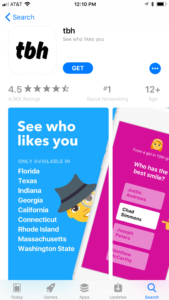
    TBH, which stands for To Be Honest, calls the app a combination of ask.fm and Sarahah. TBH allows you to ask people questions about you and allow them to answer anonymously. You can add yourself and your friends as answers to the questions so you can be voted on by your friends. The testimonials in the app highlight the fact that users feel good about themselves because they’ve been picked in the polls they’ve set up.

    From the app store description: “That tbh app makes me feel so good about myself”
    “tbh is really having a positive impact on people”

    TBH is only available in ten states because you have to choose your school from a list when you sign up for the app. This means you’re polling the people who attend school with you. The app basically sets up a network of high school and college kids who attend the same school and allows them to secretly say what they really feel about each other.

    What Parents Should Know

    The question stands, what do we, as parents, think about our teens posting anonymous messages about each other. Is it a good idea for our kids to be revealing their deepest thoughts about their friends. Sometimes, yes, it could lead to kids starting or strengthening their friendships, but how likely is that to be the norm? Remember what it was like when you were a teenager. Remember the jealousy and shallowness of your feelings toward the other kids around you? In a world ruled by hormones and feelings, it’s tough for me to see anonymous messages, question and answer sessions, and polls as a good way for our kids to communicate. Maybe we should be encouraging them to make eye contact and speak to their friends and potential romantic interests in a way that puts everything on the line.

    Your kids need to understand two things. First of all, nothing is ever truly anonymous online. The sense of secrecy in these apps is really a facade and someone knows who they are. Secondly, the words they say and the votes they cast may seem fun and silly but they can have very real consequences. The teenage psyche can be fragile. Putting someone’s emotions out there waiting to be crushed with too many negative votes in an anonymous poll seems, at least to me, to be a very dangerous proposition. I’m going to recommend uninstalling these apps if you see them. Disagree? Leave me a comment. I’d love to hear why.

  • You May Soon Share Your Instagram Stories on Facebook

    You May Soon Share Your Instagram Stories on Facebook

    Facebook Stories still hasn’t taken off. Despite putting them on the desktop site and constantly encouraging you to use the feature in the app, Facebook hasn’t been able to increase usership of their stories feature. In fact, if you look at the top of your Facebook timeline you will probably notice that only one or two of your six hundred Facebook friends have actually posted a story for you to look at. In their latest attempt to lure users onto stories, Facebook may soon allow you to share your Instagram story to Facebook. 

    Instagram is testing a “share to facebook” feature in the story camera. Once you’ve taken your video or photo for Instagram stories, you’ll then be able to share it to Facebook or share screenshots to Twitter. This is one of the first times we’ve seen Instagram test a feature that will integrate directly into Facebook, even though both networks are run by the same company. We haven’t seen them cross over much since Facebook bought Instagram in 2012.

    What Parents Should Know

    Instagram stories is still the most popular feature of its kind in social media. Hundreds and millions of teens and adults alike use stories every day to share what’s been going on and what they’re into. Facebook, while they are obviously reaping the benefits of Instagram’s success, they’re also wanting to block Snapchat out of the picture completely. Pulling the 2 billion Facebook users into the story feature could go a long way to make Facebook’s social media selections stand far above those of Snapchat. Most likely, however, your kids are still going to be using the service that their friends are on and the fact that parents don’t really “get” Snapchat makes it more appealing to them. Be sure you spend some time using Snapchat, Instagram, and Facebook so you’re familiar with all of the social media options available to your kids and teens. Set notifications so you’ll know when your kids are posting, and you can even log in as their accounts on some of the social media services. Whatever method you use, don’t be outside of the loop when it comes to your kids’ social media preferences. Talk to them about it, follow them on their favorite social media accounts, and use their login information to stay informed as they post and receive private messages.

  • YouTube Rebrand and New Style Is Going Live Today

    YouTube Rebrand and New Style Is Going Live Today

    YouTube has launched an update for their app and their in-browser site. The update features a whole new theme (dark-mode,) a new logo, speed controls, and more compatibility with different video dimensions. The logo and dark mode are welcomed changes among YouTube users and the ability to work better with verticle smartphone videos seems to be a no brainer these days. Much of the update has been available as a beta test for some users but the availability went public today. New gesture controls allow you to fast forward or rewind videos and they’re hinting at the ability to swipe between previous and next videos. Finally, they are continuing to update the app to feature recommended videos on the lower third of the screen during playback. While you may only watch YouTube videos within your Facebook timeline when your friends share them. Your kids are using YouTube every single day and it’s one of the top search engines in the world. This update is a big deal.

    What Parents Should Know

    Many of our kids spend hours per day watching videos on YouTube. Some of them even produce their own content. You can guarantee that they have noticed (or were anticipating) this update. Why not use the knowledge you learned in this article to start up a conversation with them about their activity on the site and app. Ask them about their channel. How many subscribers do they have? What kind of content do they produce? What kind of things do people say in comments? You should know these things and this update is a welcome way to bring up the topic.

    Here is some advice for you to wrap up this article. I recommend subscribing to your kids’ YouTube channel if they have one. If you don’t know if they have one or not you should ask. Even better is the option or logging in to their account on your own device so that you get notifications whenever they get comments and messages. Maybe you could share a channel or account with them. Then you can see their viewing history and know what kinds of videos they are watching based on what’s being recommended by YouTube. Either way, you should be involved with what video content your kids are taking in and producing. Using this latest update to spark the conversation is a great idea.

  • The S.A.F.E. Approach to Raising Digital Natives

    The S.A.F.E. Approach to Raising Digital Natives

    The globalization of our world has led to so many benefits for our children. Endless information at their fingertips, education can be more exciting and entertaining, and distant family and friends are only a few screen taps away. With every benefit, however, comes a new challenge. Adult content, cyberbullying, sexting, and access to strangers and predators are changing statistics in our world and not for the better. Physiologists are calling our kids digital natives. They will never know a world that isn’t ruled by the screen, the like button, the selfie, and the Google search. It can seem like such a scary world but there are ways to keep our kids safe. We, as parents, just have to take the initiative to learn and apply a strategy. We at BecauseFamily.org call that strategy S.A.F.E.

    S.A.F.E. stands for Setup, Accountability, Filtering, and Education. It should be an easy way to remember the steps you must take to give your kids access to the technology that can enhance their lives while still setting boundaries that will keep them from the dangers of being always connected to the entire world. Let’s unpack the S.A.F.E. strategy.

    Setup

    The developers of your computer, tablet, and smartphone know that you need some sort of way to keep your kids safe while they use their device. Because of this, almost every device on the market now has some sort of Parental Controls built into the operating system. This means that parents should be able to implement some sort of safety strategy on their devices without spending any money or downloading any extra software.

    There are some exceptions, for instance, Android phones didn’t get built in parental controls until the 7.1 version of the operating system and Windows didn’t get it right until Windows 8. My advice is to find out what operating system your device is running and do a google search for parental controls on that OS. Once you’ve found what’s available, set them up immediately. This will give you, while basic, some protections on the tech that your children use.

    Accountability

    The easiest way to explain the benefit of accountability software is by describing a high-security building. The alarm is set, the doors and windows are closed, locked and break proof. There is even a super high tech laser grid that will set off the alarm if you cross its path. There are still, however, cameras installed. The cameras show you what went on when the rest of the security breaks down. Accountability software is the security camera of your internet safety plan. Accountability software doesn’t block content, it reports inappropriate websites to a pre-determined accountability “partner” through a text or email. This allows you to see what has gone on if something unsavory has been accessed on a computer or other device under your care. When you’ve seen what was found you will be able to have conversations with those you’re holding accountable and take the necessary actions to keep that kind of “breach in security” from happening again.

    Filtering

    Web filters DO block content. The idea is to let the good things in the internet pass through while filtering out the bad. There are three levels of filtering available on most devices. The first is the built in filters, these are usually pretty basic with an on off switch and not much customizability.

    Secondly is the option to purchase and download third party software that will block content. These options usually give you a bit more control and let you set filter levels by age, ratings, or content type and keywords.

    Third, you have your whitelist and blacklist settings. Most built in filters have this option but it takes your filter to the next level. Putting a website link in your black list will make it inaccessible on the device that the filter is set up on. This is useful if a site doesn’t necessarily have adult or dangerous content on it but you don’t want your kid or teen visiting the site. For instance, they watch too much YouTube and got bad grades. You can just blacklist the YouTube website on their devices and watch the studying commence.

    Whitelisting is the opposite. This allows you to either give a free pass to sites that have been blocked previously by your filter or some filters let you set up a browser to only view websites on the whitelist. I use this for my older kids to use my laptop. They only use three or four websites so that’s all that’s on the whitelist. The rest of the internet is completely closed to them. Filters are the initial protection phase of internet safety. It’s your first line of defense and should be the second step you take…the first is education.

    Education

    This phase really has two parts to it: research and conversation. Parents should give time every day to researching some of the latest information pertaining to internet safety. One good way to do this is the tech blog that I write found at safe.BecauseFamily.org. This site has daily tech news, up to date tutorials, and even a podcast recapping the week’s family relevant technology stories. I also recommend doing a regular Google search for a “dangerous app list.” You’ll often find some of the accountability and filtering resources have put together lists to help parents identify misleading or dangerous apps.

    Conversation is the key to this entire plan. If you aren’t transparent with your kids or teens about your plan for internet safety it will not work. I never recommend sneaking around to monitor your kids’ internet activity. In my experience, you’re much better off having them on your team. Discuss healthy tech habits with your kids and let them help you work through your plan and consequences for breaking the boundaries you’ve set up.

    Finally, remember that this plan is fluid. It’s going to work if you put effort into it but things do change. It’s critical that you stay informed on what’s going on in the technology world. When I do workshops to help families with these tech topics the questions are the most relevant and interesting part of the meetings. I recommend looking up our website and shooting us an email if you have any questions. Definitely, keep an eye on our blog at safe.BecauseFamily.org and learn all you can about the digital world your kids are growing up in. It can be hard work and seem overwhelming but there is no task that will bring more positive change.

    Bio

    K. Michael Prince is a husband, father of 4, blogger, speaker, author, and podcaster. He wrote “What’s in Your Pocket? A parents guide to protecting your children online.” and is the lead editor for a family tech blog (safe.BecauseFamily.org.) He is the director of BecauseFamily, a non-profit that works to empower and equip parents to be the first influence in their kids lives and train parents on raising digital natives.

    To learn more about how to host a workshop (in person or skype) at your home, church, or organization, contact us using the info below.

    Email: BecauseFamily@gmail.com

    Or go online to BecauseFamily.org

  • How Your Kids Can Hide Texts

    How Your Kids Can Hide Texts

    One of the major issues facing our teens these days is sexting. Statistics say that one of every ten teenagers admits to having sent naked pictures of themselves to someone. Sometimes our kids use social media to do this. They’ll send photos and inappropriate messages in the private messaging features of these social media platforms. Sometimes, though, your kids just use text messaging to do it. There are several tools out there to allow you to monitor what texts your kids are sending but there are a few ways they can hide their texts, even from the security you’ve set up. Here’s what they’re doing.

    Deleting text history.

    This seems pretty obvious but you’d be surprised how oblivious some parents can be. If there aren’t any text messages in your kids’ messaging app, or if it looks like they’ve only chatted with you, they’ve probably deleted their messages. This doesn’t always mean they’re up to something naughty but it does mean you should be having a conversation with them. Deleting their messages is a bad habit to allow them to get into for a number of reasons. First, it looks like they’re hiding something. They don’t want you to be suspicious of them any more than you want to creep around and spy on them. Secondly, they could be deleting conversations that can come back in the future. It’s not a bad thing to have written (or typed) evidence of these conversations, especially if they’re ever contacted by someone they don’t know. I advise you to encourage your kids not to delete texts. If you’re using a monitoring software that uses the iCloud backup (TeenSafe, mSPY) to monitor their texts then you could be missing what they’ve texted if they deleted them while outside of wifi and before a backup to the cloud. If you have a suspicion that text messages are being deleted then you should disallow the use of texting on their phone. If you can’t disable texting then don’t be afraid to take the phone away for a while. Most of all talk to your kids about the risks associated with keeping their conversations hidden. You should be here to help them and they need to understand that.

    Using Dummy Phone Numbers and Private Texting Apps

    Apps like TextBurner, Anonymous Texting, Buffalo Private Texting, and Smiley Private Texting can easily be used by kids and teens to hide the conversations they’ve been having. Not only do these apps require a pin number to access the text messages but many of them also allow you to set up a new phone number so that you can send and receive texts of calls anonymously. The apps descriptions mention job searches, Craigs List, and dating as some of the main uses for these private texting and dummy phone numbers. They do, however, advise against certain usese of the app and even warn of some of their policies for dealing with those who don’t follow guidelines:


    Screenshot from the Anonymous Texting App


    Check out this list of private texting apps for iOS.     —      Here’s a list of private texting apps for Android.

    Notice the warning about the age requirement? It says you must be 13 years old. If that’s so then why is the app rated for ages 4+? If you do a scan of all of the apps like this in iOS you’ll find that they’re all rated 4+. If you have your app store settings allowing your kid to download apps rated 9+ or lower or even 4+, they’d be able to download one of these apps, create a private and secret phone number that you don’t even know about and begin texting whoever they’d like. This is why I recommend using Family Link (for android phones OS 7 or higher) and iTunes Family Share to require your child to ask permission to download new apps. If you see any kind of app that says secret or private, or anonymous in the description I’d think twice about allowing them to download it. We have a major issue on our hands of kids sending images and texts that are very adult oriented. You, honestly, can’t keep an eye on every message they send on every app. This is why it’s important to limit which apps they’re allowed to use. It may cause that knockdown, drag out fight you’ve been trying to avoid but it’s better than filing a police report about some stranger who has been sending nasty pictures to your child.


  • PODCAST: Is Sarahah Meant for Your Teens?

    PODCAST: Is Sarahah Meant for Your Teens?

    Subscribe on iTunes: https://itunes.apple.com/us/podcast/family-tech-weekly/id1231177225?mt=2 

    Sarahaha is an interesting app and it’s still gaining in popularity. In this episode, Michael and Melinda discuss the appeal of Sarahaha, the meaning of the word, and what we think parents should do about it.


    Social Media Links

    Facebook: http://facebook.com/4pointfamilies

    Instagram: http://instagram.com/becausefamily

    Twitter: http://twitter.com/becausefamily

    Newsletter Signup

    Ministry Updates:: http://eepurl.com/R7Btr

    Weekly Blog Posts:: http://eepurl.com/cvnhXD

    Websites

    Ministry Site:: http://becausefamily.org

    Tech Blog:: https://safe.becausefamily.org

    Michael’s Speaking Info:: http://kmichaelprince.org

    Donate and Affiliate Links

    http://patreon.com/becausefamily

    http://BecauseFamily.org/partnership

  • YouTube Adding Private Messaging

    YouTube Adding Private Messaging

    I spoke to a mother just a few days ago who was lamenting the idea of her son having his own YouTube channel. He didn’t post much but she was concerned about people finding him or learning about him through his videos. She was also concerned about bullying in the comments of his videos which is a real concern since YouTube commenters are notoriously ruthless. YouTube’s most recent update is going to either help solve or intensify these problems.

    YouTube begins rolling out a new update today that will bring private messaging to the video streaming app. The feature is an attempt to keep people on the YouTube app to discuss and share videos they’re viewing on YouTube. Currently, these videos are shared on other social media sites and discussed there but YouTube wants to play a larger role in the social game. Private sharing and chat will allow users to discuss videos and respond with more comments and even reply with another video. The biggest concern with this feature is that you can’t block users who try to contact you. You can, however, deny their requests to chat.

    What Parents Should Know

    Any app that allows private messaging should be taken seriously by parents. Kids of all ages love YouTube and the dangers of allowing them unsupervised access to user uploaded internet videos have been well documented. Adding the ability to send and receive private messages, while it can allow them to discuss videos with people they know without the risk of comment trolls bullying them, provides an opportunity for strangers or who knows who to contact our kids through YouTube. Since predators use social media to learn about and groom their victims, YouTube’s private messages could be a way for those ill meaning individuals to do their work.

    I advise that you allow your kids to watch YouTube on YouTube Kids only. If the videos they like aren’t available there then only let them watch on a browser on a computer. The other option is to share the YouTube account with your children and install the app on your own device. This way you can see who they’re messaging, what they’re talking about, and even be alerted when they receive a new message. I don’t ever recommend spying on your kids. My advice is that you discuss your parental control and monitoring methods with them so they know you’re there to look out for them. You’re supposed to be the safe place.

  • Should Your Kids Use Sarahah?

    Should Your Kids Use Sarahah?

    Sarahah is an app that snuck up the charts over the past weeks. It was originally put on the app store in June but is already sitting at number one on the free app charts in iOS. This app allows you to leave anonymous comments about people. The idea is that, since it’s completely anonymous, you can be honest and say what you really think. This can obviously lead to some really encouraging and uplifting posts, maybe it could cause a crush to reveal themselves, but definitely, it will cause mean people to do what mean people do. The risk of bullying on this app is very very high.

    This isn’t the first app of its kind but none have risen in popularity so quickly. “Sarahah” is the Arabic word for honesty, the app’s website describes the goal of the app simply:

    “Sarahah helps you in discovering your strengths and areas for improvement by receiving honest feedback from your employees and your friends in a private manner.”

    Again, the app is very new but development is happening fast (five updates since its June 13th release) and the app promises more features to come. Something like a planet icon on the bottom of the screen seems to hint at a future explore or discover page and they mention on their site that they’re studying an option to allow users to reply to the comments that come through Sarahah. The appeal of the app is obvious, most of us wish we could say whatever we are thinking to someone and there are also those of us that wish we could hear exactly what people think of us all the time. This may be fun or even cathartic for grown adults, but when teens and tweens are in the throes of development, hormones, and emotion, is this app a good idea?

    What Parents Should Know

    My Facebook feed has begun to blow up with Sarahah messages that have been screenshotted and shared. Most of the ones I see are people celebrating a super nice comment they got from someone but I’ve seen a few that were laughing at the commenter who was being a jerk. Those I’ve seen on Sarahah were adults, mostly because I don’t follow many young people on Facebook but there is no doubt, seeing this app climb the charts like it did, that there are younger users too. Parents should be cautioned that this app is rated 17+ for unrestricted web access, profanity, and adult humor. The issue is that since anyone who wants can post whatever they want (it’s called user generated content) it’s next to impossible to ensure there will be no adult content on the app. Secondly, I warn parents, as I did above, about the dangers of bullying through this app. The bully follows our kids around in their pocket and this app gives them the ability to say whatever they want without any way to identify who they are.

    There is already an epidemic of kids feeling like they can say whatever they want online without consequence. Unfortunately, that isn’t the case because the one reading what is written feels real emotions based on what’s been said. The ability to be completely anonymous could cause kids to be even crueler and could even lead to kids who wouldn’t say anything mean to some one actually doing it because they don’t see how they can be identified as the culprit. You can block users who you don’t want to message you anymore but once you’ve done that the damage could already be done.

    My advice is to disallow this app on your kids’ phones. You can do it the old fashion way by looking at their phone yourself and uninstalling that app if you see it. You can also set age restrictions in the app store or parental control/restrictions options on your kids’ devices. This should block Sarahah since it’s rated 17+. As an adult, maybe you enjoy this app, I would advise caution to you too. Not only are you putting yourself out there to be spoken to anonymously by anyone who could say whatever they want but you’re also setting an example for your kids.