Social Media can be a dangerous place. Especially for our kids and pre-teens. More and more parents are allowing their kids to be social on the internet. Kids have channels on youtube, they share pictures on instagram, record publicly accessible music videos on Musical.ly, some even send disappearing images on Snapchat. LEGO is starting their own Social Media site that is focused on keeping kids safe while they share.
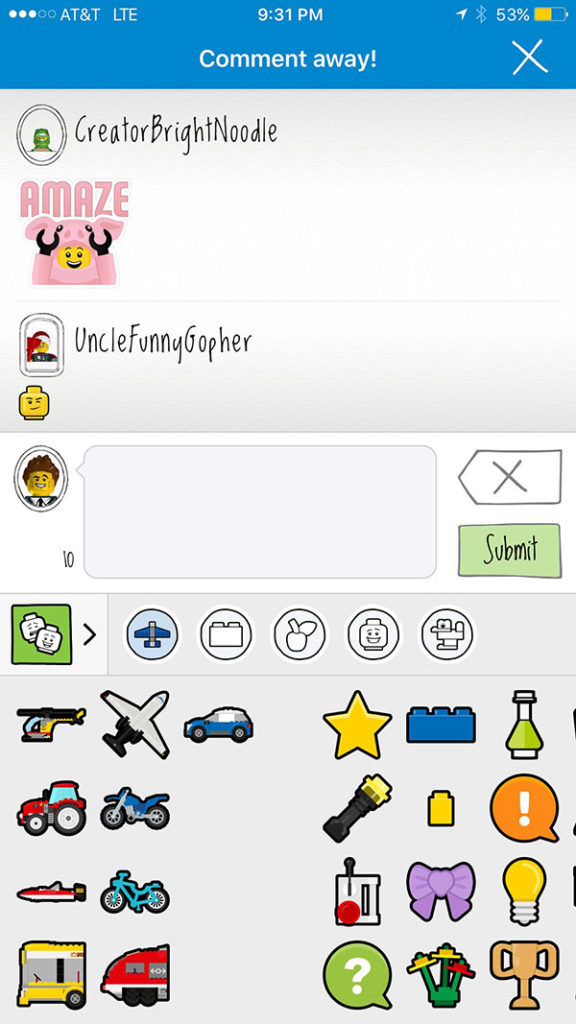 LEGO Life is a new app by LEGO that allow children and their parents to share their LEGO creations in a safe and positive environment. The app’s safety focus is made obvious right away. You are required to create an account to share or comment on anything on the app and your account has to be approved by a parent through an email sent to their address. Also, while you can put a description and a title on your photos, comments are only allowed to be done in LEGO emoji’s and stickers. There will be no dumb kid telling your son that his makeshift Tie Fighter is stupid looking. Nope, only positivity and encouragement is allowed.
Other safety features include the profile names and image restrictions. You are only allowed to share with a randomly generated name that you choose when you set-up your account. Images can only be of LEGOs. The app has algorithms and even live moderators keeping photos of people off of the app. You can only share what you’ve built. These features keep kids safe from bullying, predators, and the unfortunately all too common trend of inappropriate images being uploaded to photo sharing sites.
As far as usage of the app, it’s pretty fun. You can upload pictures of your favorite builds and see photos of other users as well. You can search by theme (i.e. StarWars, Minecraft, LEGO City) or characters and even watch videos from LEGO right in the app. The coolest part, in my opinion are the challenges. Building inspiration from the folks at LEGO to help your children reimagine what they want to create. Fun ideas like, “Put a Minifig in Your Favorite Place to Be” and “Build a Super Bowl Party” are highlighted in the app as you scroll down the different categories. Recently LEGO used the challenges as a way to teach kids about internet safety by asking them questions about how to post positively on social media. LEGO Life is a pretty great idea and I installed it on my phone to check it out for this post but it’s probably on there to stay. I should probably tell my kids it’s on there too.
What Should a Parent Know
LEGO Life is a great example of someone creating a social media experience with kids in mind. The precautions they take to protect children are mostly unprecedented. The inability to privately message users and the use of LEGO emojis for commenting makes it a place free from cyberbullies and predators. The algorithm and moderators that keeps watch over images posted protect children from seeing something inappropriate as well. I have a hard time not recommending an app like this for parents of kids who love LEGO. It’s our kids’ favorite toy so you know it’s on my phone. I still am not allowing any of my children to have their own account on it. We post pictures of what they build on an account on my phone,that I monitor. I don’t think this app will turn out to be as dangerous as most other social media but I’m always going to err on the side of caution when it comes to my children posting anything online.
My final thought and really only potential criticism is the merchandising and advertising aspect of an app like LEGO Life. Obviously it’s a very easy way for LEGO to promote their new products and they are definitely doing that. In between posts you’ll see banner ads for new LEGO sets and themes and some of the videos are basically entertaining ads for some of their other products. If you don’t want your kids to fall for the advertising game played in this app then you may not be so quick to allow them to use it. As far as my family goes, we are already so far down the LEGO rabbit hole that there isn’t much more damage that can be done. We will absolutely be posting our favorite creations to LEGO life, albeit together.
