Tag: internet safety

  • PODCAST: What’s the Deal With Let’s Play Videos?

    PODCAST: What’s the Deal With Let’s Play Videos?

    Apple and Android are each getting a new OS, teaching healthy tech habits, and the eSports debate.

    FAMILY TECH WEEKLY EPISODE 8

    Social Media Links

    Facebook: http://facebook.com/4pointfamilies

    Instagram: http://instagram.com/becausefamily

    Twitter: http://twitter.com/becausefamily

    Newsletter Signup

    Ministry Updates:: http://eepurl.com/R7Btr

    Weekly Blog Posts:: http://eepurl.com/cvnhXD

    Websites

    Ministry Site:: http://becausefamily.org

    Tech Blog:: https://safe.becausefamily.org

    Michael’s Speaking Info:: http://kmichaelprince.org

    Donate and Affiliate Links

    http://BecauseFamily.org/partnership

  • Here’s Why Your Kids Watch Other People Play Video Games

    Here’s Why Your Kids Watch Other People Play Video Games

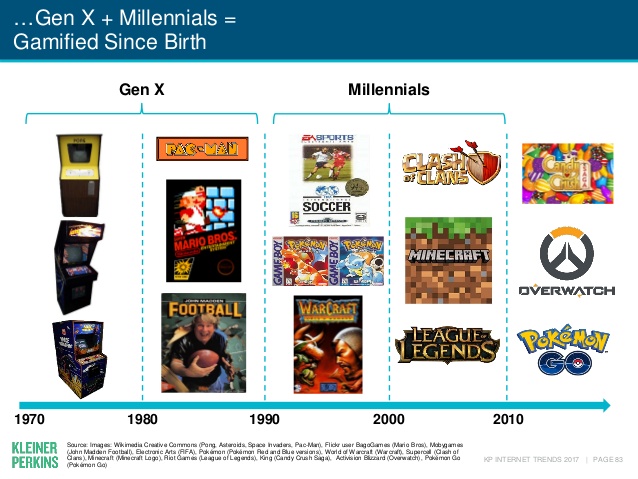
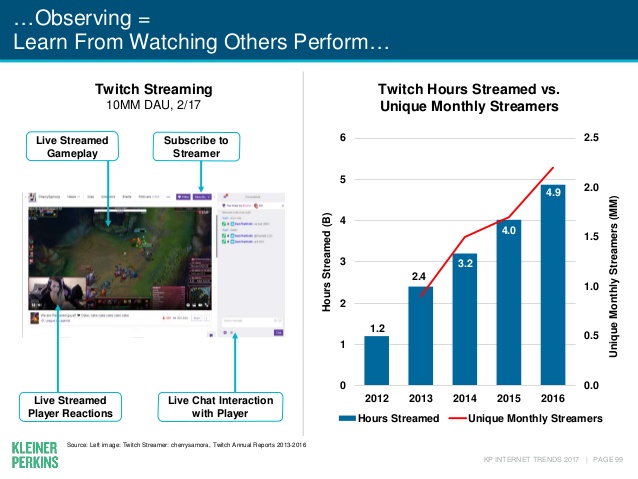
    Watching other people play video games may not be something that you, as a parent, understand. The truth, however, is that it isn’t weird. It’s called esports and its popularity has grown in leaps and bounds. In fact, the recently released Kleiner Perkins 2017 Internet Trends report states that the popularity of esports has grown 40% every year. Also, 40% of the demographic that your kids belong in (millennials) even state that they prefer esports to traditional sports.

    Esports is growing all over the world it allows those with video game skills to test their abilities against the best on our globe. Most esport competitions begin with online qualifying matches and then culminate in an actual tournament style playoff in front of a live, and online audience. You can find an esports league for pretty much any video game you play. There are sports gaming leagues, Role Playing Game leagues, first person shooter game leagues, and even leagues and competitions for the most casual of puzzle games.

    Not all video gaming entertainment is competition based. “Let’s Play” video games on YouTube and LiveStreams on Twitch have also seen a massive increase in popularity. These videos feature gamers playing their favorite games and narrating their experience while thousands of fans watch and comment on the videos. On Twitch, streamers react in real time to the comment section or “twitch chat” allowing them to engage with their viewers and even let those watching help them make in-game decisions and strategies. These Let’s Play gamers build large communities that are extremely faithful and supportive. Many have even been able to make gaming their full time job because of ad revenue and the generosity of their viewing community. 

    What Parents Should Know

    First of all I recommend you take the idea of esports being a fad out of your mind completely. The truth is that esports is simply the next phase of the same video game culture that started while or before you were even a child. When people start to do something that takes any level of skill, opportunities to measure your skill against opponents will soon follow. Then, of course comes the chance to play for money since these competitions will surely draw a crowd who will pay for the privilege to be entertained by your tournament. Just think about poker or chess or cheerleading. These are all things that many start out doing as a hobby but there is a real competitive culture for these activities and therefore, a real industry. Video Gaming is no different.

    As far as your kids’ safety, I recommend that you know what games and gamers they like to watch. Get into that world a little bit for yourself and learn who these people are that your kid is watching play. There are adults that play games you kids love on YouTube but they don’t use very kid friendly language while they play. There are also people on YouTube who play very adult oriented games. You should have a general idea who your kids are viewing and what kind of content they share. The best way to do this is to share their YouTube and Twitch account and keep an eye on who they follow or subscribe to and their viewing history. I know this just adds more pieces to the internet safety puzzle but it’s worth the effort.

  • 5 Apps that are Tech Safety Expert Approved!

    5 Apps that are Tech Safety Expert Approved!

    When I do Digital Boundaries Workshops I begin by sharing all of the dangers of unsupervised internet and mobile device use. I then walk through the best practices for keeping your kids safe in the digital landscape they are navigating. I also, spend a lot of time answering questions. I received a question this week that I hadn’t been asked ever before. “What are some apps that you would recommend for my family.” Huh…I hadn’t thought of that as much. I spend so much time looking at the dangers that are so prevalent online that I often ignore some of the resources that can be fun for families. Here’s a list of five apps that I approve of.

    Social Media

    Instagram

    While I always recommend parents keep to the age restrictions recommended by the terms of agreements on a social media platform (usually 13 plus;) I also know how popular social media is and that your teen is going to want to open an account as soon as you’ll allow them. When you’re ready to give them permission, I recommend you start with Instagram. The first reason is pretty simple. Instagram is easy to monitor. You can easily put your kids’ account(s) on your installation of Instagram and keep close tabs on what they’re doing on it. You can even use that method to be notified when they get a direct message.

    Any social media opens you up for some problems. They say it isn’t great for self image and self esteem and there is always inappropriate content that can be accessed because of the fact the content is posted by users but if you’re going to give in and allow some form of Social Media then Instagram is a better starting point than Snapchat or Twitter. There a a lot of reasons and I’ve written about most of those already.

    Gaming

    Ballz

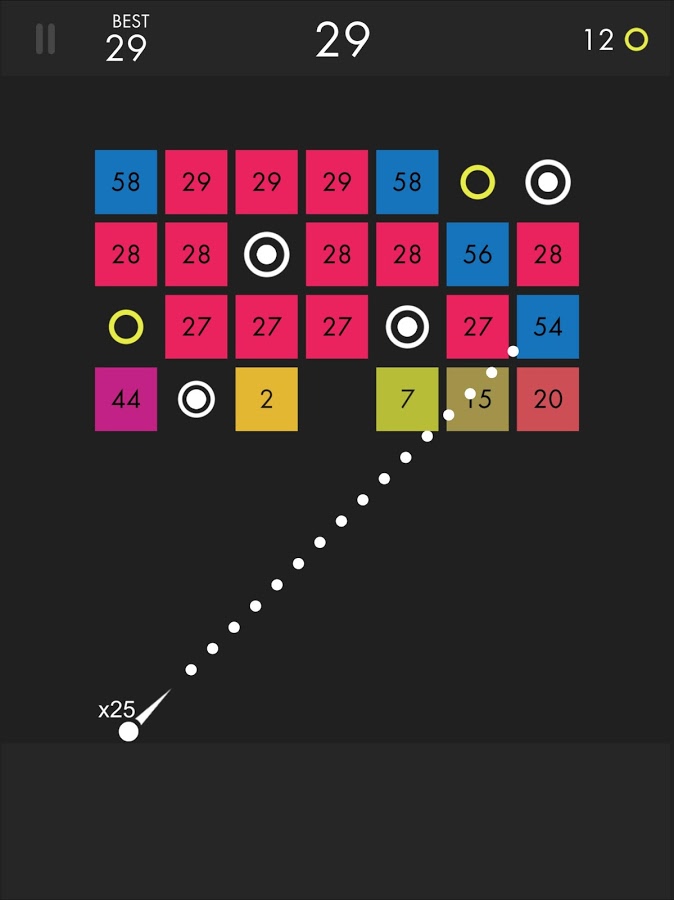
    This game is super fun and addictive. It’s a pretty basic concept. You swipe back and release to launch a ball to bounce around the game-board and break up blocks. The blocks have numbers on them that show how many times you need to hit the block to make it go away. You collect more “ballz” and launch them all at the same time. (I’ve launched as many as 110 at once.) This becomes extremely satisfying when you fire all of the balls towards the blocks and watch the numbers on them decrease as quickly as the block is hit by each ball. Like I said, while it’s satisfying, it’s also very very addicting.

    This game is approved because, while it has ads, the ones I’ve seen have all been for more games by the same developer. This has kept anything inappropriate from creeping up as a banner ad. I approve because it should be pretty safe and because it is just so darn fun to watch all those little balls bounce around and devastate the the game-board full of blocks.

    Research/Education

    Kiddle

    Kiddle isn’t an app. It’s a website. You can very easily save the site to be an icon on the home screen of your phone and then tell your kids to use it as their search engine. I’ve written quite a bit about Kiddle already, so go read about how the search engine works and let your kids research and learn without fear of coming up on anything nasty or scary.

    Entertaiment

    Amazon Prime and Freetime

    Amazon Prime’s kids profiles are some of the best because the shows are curated by human editors. That means that actual people have looked at the shows and determined that they are actually safe for kids. Freetime is a special way to subscribe to only kids content so that you can be sure that they’re not seeing and adult targeted shows. If you don’t have Freetime you won’t have access to kids profiles but you can still set parental controls so that content above a certain age range won’t be accessible without a pin number. Kids can’t see these shows and movies without the pin but they’ll still be able to see the thumbnail image in their “carousel.”

    YouTube Kids

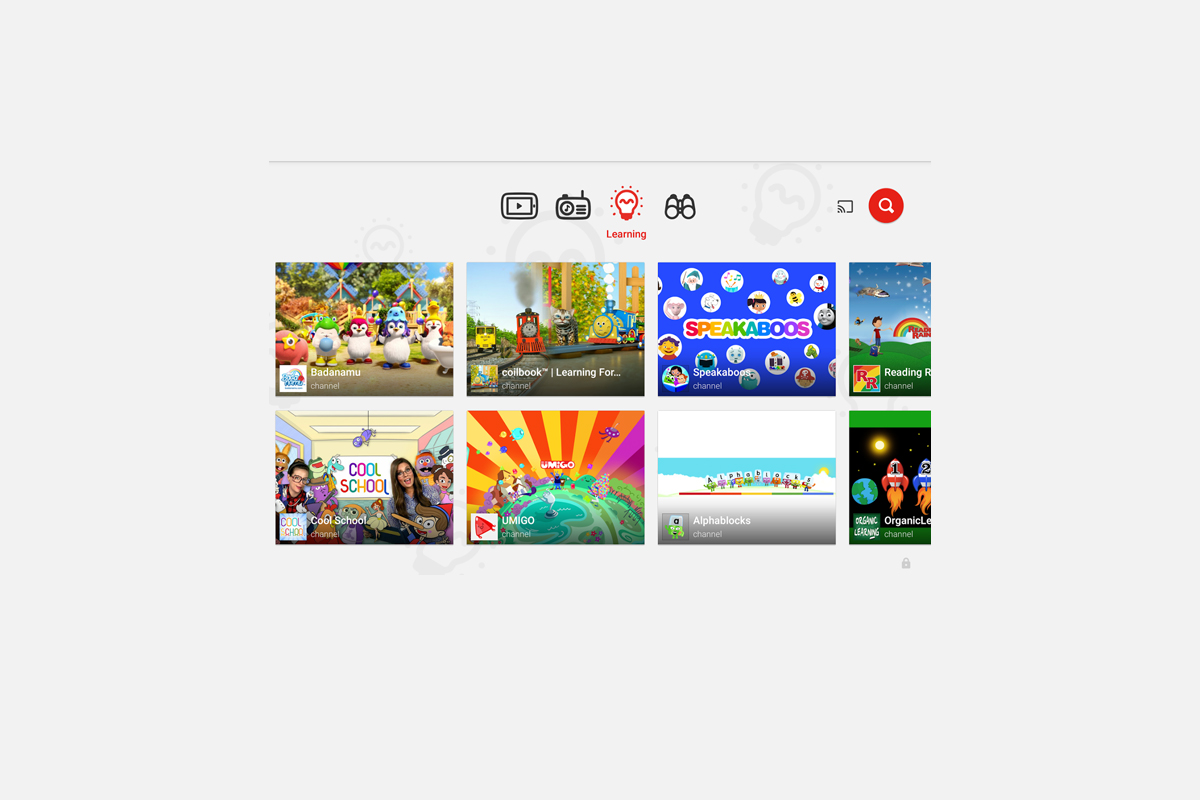
    YouTube kids is a good option simply because of the popularity of YouTube for our children. Kids love watching all different kinds of content on YouTube and YouTube Kids makes it possible to allow them to watch their favorite channels without potentially finding videos that aren’t appropriate for their age. YouTube Kids separates their content by topics like music, education, and shows so kids can find what they want pretty easily. The only downside to YouTube Kids is that it’s monitored with an algorithm and depends on reports from parents to remove suspicious and inappropriate content. This has caused some concern for parents in the past but if you are going to allow you kids to watch YouTube then YouTube Kids is absolutely a better option.

    That Being Said

    I’m not used to thinking about what apps parents should install but I’m grateful for the question this week to give me the idea for this article. Please remember that all of these apps constantly add new content and features and sometimes that makes them less appropriate for kids. As for right now, though, I give these five apps a green light for your kids’ devices as long as you and they use the apps in the way they’re designed to be used.

  • Uninstall Instagram? Your Kid Can Still Use It!

    Uninstall Instagram? Your Kid Can Still Use It!

    Many of the tools parents use to protect their children depend on being notified what apps they have and are using most often. When it comes to social media, being able to monitor posts and direct messages is critical. Sometimes, finding something you didn’t want to see will result in forcing your child to uninstall the app from their device. Until recently, Instagram has been a social media platform that only allows users to post from within the app. Therefore, uninstalling was a good solution for parents who wanted to give their kids some sort of time out. Instagram has just updated their mobile site and it’s going to ruin everything.

    Instagram’s mobile browser update allows users to post photos and use the explore feature without having the app installed. This means that the most major features of the app are available. You still aren’t able to send direct messages through the mobile site, which is a good thing, but posting, viewing posts and accounts, and finding new accounts through search and explore are now accessible. This update is meant to give access to Instagram in countries and areas who have limited  access to app stores or network services. Being able to use Instagram without an app means that more and more people across the country and the world will have an opportunity to share pictures of their lunch or coffee.

    What Parents Should Know

    There is a simple way to monitor what your kids are doing on Instagram, whether it’s on the app or in the browser. I recommend installing Instagram on your own device and adding their account. Even if you have an account of your own, you can add another one and see everything they have been doing. Using the mobile browser will definitely affect your ability to “ground” your kid from social media but there are ways to avoid that to. Here are a couple of options.

    1. Remove access to browsers within the parental controls or restrictions of their device or your parental control apps.
    2. Put instagram.com on the blacklist in your filters or in the “red flag list” on your accountability software.
    3. Take the entire device from your child until the grounding is over. Make them use the family computer for any online activities they must do. This will really give an extra impact to the punish.

    Instagram isn’t inherently bad, of course. Just like any site or app with user generated content you’re going to find inappropriate content. These things can’t usually be filtered so monitoring what they are doing is critical. The most common issue is time spent on social media. Teens are spending upwards of six hours a day online and many of those hours are on some form of social media. If time is your concern, then a simple uninstall of the app won’t cut it anymore. You have to lock down some of the browser options as well. Otherwise, you’re only keeping them from a couple of the features of Instagram, not the entire platform.


  • How To Control What You See on Every Social Media Timeline

    How To Control What You See on Every Social Media Timeline

    One of the most common complaints I hear from parents is that they never see the posts they want to see on their social media timelines. They will scroll through their Facebook or Instagram feed looking for an interesting post, something from family, or even their own children and instead be bombarded with articles about politics or silly memes or chain letter type posts that want you to click like and share for some reason. If your feed is crowded with this sort of chatter it makes enjoying the purpose of social media very difficult. If you’re like me, you use your social media feeds as a way to keep up with friends and family, to promote the work that you do, and to be entertained and laugh at silly internet things. Well, the algorithms designed by those who build these social media platforms are created to give you the best experience. The problem is that it’s all based on your behavior on the site or in the app. If your behavior contributes to the clutter then you’re just going to get more clutter. Here are some tips to help you sort out the mess that may be your social media feeds.

    Remember who is on what social media service.

    There are different audiences on different social media sites. The split is based on a number of factors. Age, career, and gender are the major contributors. Twitter, for instance is more popular for young professionals looking to network and build a community of like minded business people. Instagram is a whole lot of young people and young parents who got tired of the clutter in Facebook and Twitter and just enjoy sharing photos. Facebook has a very large middle aged demographic and has seen a major decrease in young users over the past several years. Snapchat is full of youngsters but is growing rapidly in the 18-25 demographic. The reasons that people choose the platform that they choose can seem pretty obvious and it’s important to keep those reasons in mind as you use social media. You aren’t going to care too much about the photos of a ton of young parents and teens if you’re a middle aged parent who’s adult kids who have no children of their own yet so you may not open an Instagram account. As soon as your 22 year old daughter and son-in-law have a baby, though, and post photos of her online. Instagram is where you’ll want to be.

    Don’t like and join every FB page or group you’re invited to.

    Facebook Pages are created for advertising and promotion. They all link to a business, blog, or something of that nature. Because of this they’ll post nonstop and any time you react to one of their posts in any way you’re telling Facebook to show you more of what they post. So, if you’re a follow of a Facebook page, say the BecauseFamily Page, for instance, and you want to see more of the great resources and articles that they share, you’ll want to interact with their posts more. If you follow a page like Silly Kittens Playing Piano (I think I made that up but it’s probably out there somewhere) that posts fifty pictures a day that you don’t really even find that funny, you’re going to see more of those photos than you see most other things. Especially if you have ever clicked the like button on any of them.

    You see, the algorithm on Facebook gives you posts from the pages and groups you’re apart of based on how often you react to those posts. When you click the like button on every kitten picture you see, you’ll eventually see almost nothing but cat pictures on your Facebook feed. Now, if that’s what you want then awesome, but if you’re trying to keep tabs on what your kids are posting online, those cats are going to get in the way. You should probably click like a lot less. That’s my next tip.

    Leave the Like Button Alone!

    The like button on Facebook or the heart icon on Instagram and Twitter is basically a little “show me more” button. This is you telling the algorithm that you enjoy that kind of content and want to keep seeing it. The problem with this is we treat the Like button as passive aggressive head nod toward the content we’re seeing. You have to understand, it’s more than a head nod. It’s a subscription. You may be seeing tons of posts that you think are stupid or posts from people you barely even know. If you are, it’s because you’ve been clicking like as if it’s the same thing as a casual grin across the room. I’m sorry to say it but it’s your own fault.

    A couple of years ago I swore off of the the like button. I decided that if a post isn’t worth a comment, I wouldn’t react at all. After a couple months of that behavior, my Facebook feed started to become enjoyable. I see the geeky stuff that I like more than I see anything else, I don’t see much annoying click bait content anymore, and my friends and family are front and center and they don’t even have to tag me in their posts. I’ll often show my wife something hilarious that has come across my Facebook feed and she’ll ask me why my feed is so awesome. I don’t click like on ANYTHING I will tell her. Now, I will add that likes on comments within a post are an exception. I’ll often click like on a reply to one of my comments. That doesn’t add to the clutter since it’s on a post I have already commented on, thus deeming it worthy of being filed with the algorithm as something I’d like to see more of.

    Lastly on this topic, it’s important to remember that nobody gets blessed, goes to heaven, or receives better medical care because of a Facebook like. That’s called click bait and it only exists to help the page that shared it get more traffic and sell more advertising. 

    Only open posts from people you want to hear more from.

    Sometimes we see a post that peaks our interest and before we know it we’ve dived head first down a rabbit hole. When you click on a post on Facebook or Twitter, the algorithm remembers it and feeds you more posts by that poster. That means the rabbit hole doesn’t end when you’ve closed the article. It will continue on your feed from now on. The most important thing when deciding what links to click on on social media is who is posting it. If you don’t want to see more from that person or poster then you shouldn’t click the link. Also, it’s important to consider the original poster, not just the person who shared it. This info can help you populate your feed with only people who’s word you trust and respect and fewer of the random and nonsensical articles that seem to be so prevalent in our social media feeds these days.

    Use the “Follow,” “Notifications,” or “See First” options. 

    A great way to make sure you don’t miss a post by someone you care about is to tell Facebook you’d like to “See if First.” You can also tell Instagram or Twitter to notify you when someone you want to follow posts something. You can watch this video to see how to set up notifications on most of your accounts.

    Take Control

    Social Media algorithms are often treated like an enemy that we struggle to fight against. Every time Twitter or Instagram or Facebook changes the way they order your news feed petitions start showing up to put it back the way it was. The truth, though, is that these algorithms are tools. It’s a form of artificial intelligence that was designed to give you more of what it thinks you want. It decides what you want based on how you act. This means that if you don’t like what you’re seeing on your timelines, you need to change what you’re doing on your social media accounts. I’ll ignore the obvious life application here and just recommend that you apply some of the above advice to how you handle your online experience. Get back to me in six months and you can thank me for how much more “well behaved” your timeline has been recently.

  • Android’s New Instant Apps Can Undermine Your Monitoring Software

    Android’s New Instant Apps Can Undermine Your Monitoring Software

    If you follow my recommendations on this site you’ve got some sort of monitoring software installed to allow you to see what your kids are doing on their devices. This is important because you can’t help you children navigate the digital world they’re growing up in if you don’t know what they’re doing online. Every now and then, though, a super cool new update comes out for our phones, computers, or tablets that will undermine the goals you have for monitoring your kid’s devices. Android’s “Instant Apps” is one such update.

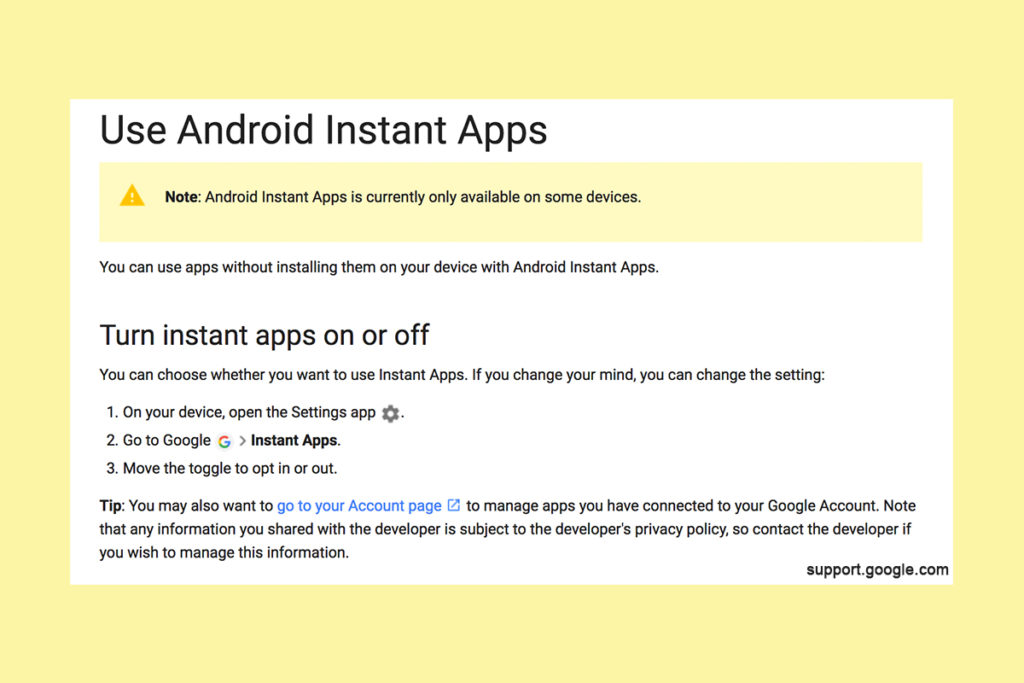
    Instant apps is a great idea. It’s a really cool way to share new apps and a great way for app developers to give brief access for someone who wants to see something that’s been shared but doesn’t want to download an app to see it. Usually when you see a cool post on social media or someone sends you a link in a direct message you have to use a browser to see the mobile website version of what they’re sharing, Instant Apps makes it easier to see the what’s being shared. For example if I’m creeping Amazon and see the Blu Ray for that super cool movie we saw together and want to share it with you. I can text you a link and when you open it the product will open in the “instant” version of the Amazon app. This will provide you with a much easier and smoother transition to possibly purchasing that product. The instant app permissions won’t allow it to run in the background and will disable some features that would be available if you downloaded the full app but it’s a cool intro to software you haven’t installed yet. Cool idea, yes, but maybe not for our kids.

    What Parents Should Know

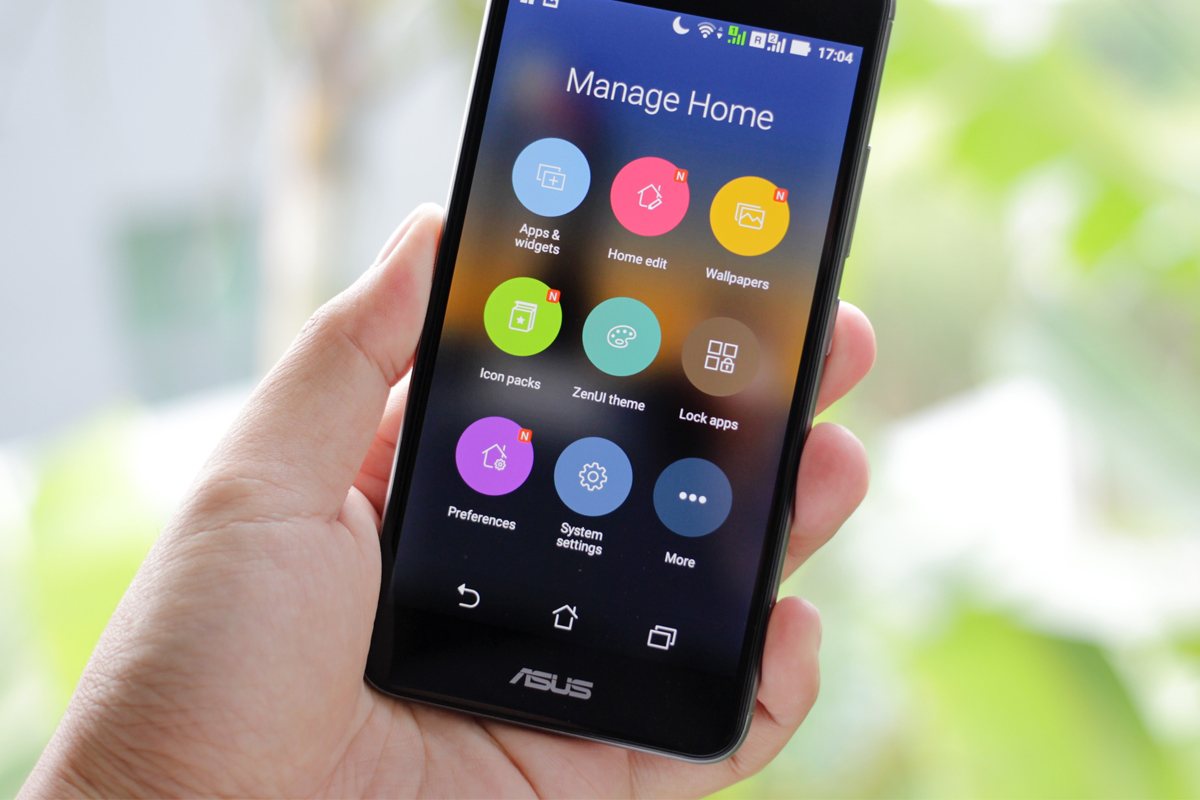
    Being able to see content from an app that isn’t even installed could be troublesome for parents who are trying to monitor their kids online activity. If you have uninstalled apps from your kids’ devices to keep them from seeing what is shared in that app you aren’t going to want them to be able to see the content in instant apps. I recommend disabling Instant Apps in on your kids’ devices if they have it. If you can’t find anything about Instant Apps in the settings of their phone or tablet then it isn’t available for their device and you don’t have to worry about it. If you do see it, follow the steps below to turn it off.


    Whether you’re using an accountability software like Accountable2You, a filter like NetNanny, or monitoring the entire device with something like Mobicip, the Instant App feature could give your child access to the very content you are trying to keep away from them. Be sure to give yourself opportunity to look over their phone or tablet whenever possible and check for the Instant App option. There aren’t very many apps developed with the feature yet but it has been opened up to most developers. More and more apps will be using Instant Apps to allow folks to share content in the near future. Turn it off now and get ahead of the game.


  • YouTube Kids Coming to Your Smart TV

    YouTube Kids Coming to Your Smart TV

    The kids version of YouTube kids has been talked about a lot. Mostly because of breaches in their algorithm based filtering system. Cartoons are disguised as silly kid shows and take a turn towards the inappropriate. The way YouTube Kids governs their content has been under scrutiny for months with mere apologies as a response. Well, now this service may be coming to your Smart TV.

    Specifically, the app will come to the following TVs: all 2015-2017 LG webOS TVs (via the LG content store); all 2013-2017 Samsung Smart TVs and Blu-ray players (via the Samsung App Store); and, following a firmware update, 2016-2017 Sony TVs (with the exception of Android TV, which is coming soon). – Techcrunch

    YouTube Kids is an effort to allow children to gain access to the content that’s appropriate for them without coming in contact with more inappropriate videos. YouTube has even launched some original content, featuring some successful kid related YouTube entertainers. Millions have adopted this service and use it as a way to entertain their children. As mentioned above, there is always a concern when algorithms are used to filter adult content. I recommend parents eyes are on YouTube Kids often. In fact, I had a little rant about it the other day.

    Follow Us On Facebook

    What Parents Should Know

    As I said, Parents shouldn’t accept YouTube’s algorithm as a foolproof way to keep your kids from seeing something they don’t want them see. There are those out there who disguise their more adult oriented entertainment as kid shows for whatever reason. Moms and dads should be checking in on what their kids are watching. I think the move to smart tvs is a good thing because making the screen bigger allows parents to more easily see what is being viewed. If YouTube Kids is available on your tv, maybe you could let them watch their toy unboxing videos on there next time and peak in on what they’re watching every now and them.

  • They’re Buying My Silence

    They’re Buying My Silence

    I’m not easily influenced and I am absolutely not for sale. I do, however, run this blog by myself and do free workshops and tech safety clinics for families. This is my full time endeavor. As the director of BecauseFamily, our non profit, my other responsibility is keeping our domain name in our possession, bills paid, and the family fed. (Four kids eat a lot.) That is why we are doing our HUSHATHON. The vision of BecauseFamily and the Safe Family Tech Blog is to be a free resource to parents to help them stay informed on the digital world their kids are growing up in. This means our income is solely based on donations. Below is the information for our HUSHATHON fundraiser. As a reader who benefits from our work, consider buying a few minutes of my silence to keep this thing going and free.

    For Families

    Michael Prince , editor


    One minute = $3.50 – Five Minutes = $17.50 – Ten Minutes = $35

    Twenty Minutes = $70 – Half Hour = $105 – One Hour = $210

    GIVE ONLINE NOW

    The quiet days will be during the first weekend of May.

    The deadline to give is May 3.

    Buy Time Online Right Now

    Checks can be snail mailed to PO Box 75 Hollister MO 65673


    Rules:

    Donations: Minutes cost $3.50 each. Donors may sponsor as many minutes as they’d like. Donations must be given through the paypal link above or in check form directly to Michael or Melinda Prince. Donations over $25 will be tax deductible and a receipt will be mailed to the donor around six weeks after the donation is made. Donations that are given will go to benefit BecauseFamily and facilitate the non-profit’s work with families. Michael and Melinda Prince, as the founders and directors of BecauseFamily, have the right to determine what constitutes proper spending of monies raised by any fundraiser sponsored by BecauseFamily. All funds will be spent in accordance to non profit law of the United States and spending may include reimbursement or compensation for Michael Prince for performing the job of Director of BecauseFamily.

    Quiet Days: During the selected quiet days Michael must not speak or post on social media during the hours of 8am to 11 pm until the amount of time purchased by donors has been met. If Michael breaks his silence prematurely at any point during this time two more hours will be added to the end of the sponsored time as a penalty. The quiet days will be documented and featured on the BecauseFamily social media pages and YouTube channel.

    More friends and family videos coming very soon…

  • The Hooked App is as Addictive as it Sounds

    The Hooked App is as Addictive as it Sounds

    We all want our kids to read more so an app that claims to have had users reading for over 500,000 hours sounds like a godsend. It is, in fact, a great idea and a pretty original way to get it’s users to read. The Hooked app isn’t new, having launched in 2014, but it’s rating number 6 in the iOS app store today. It’s popularity is growing fast.

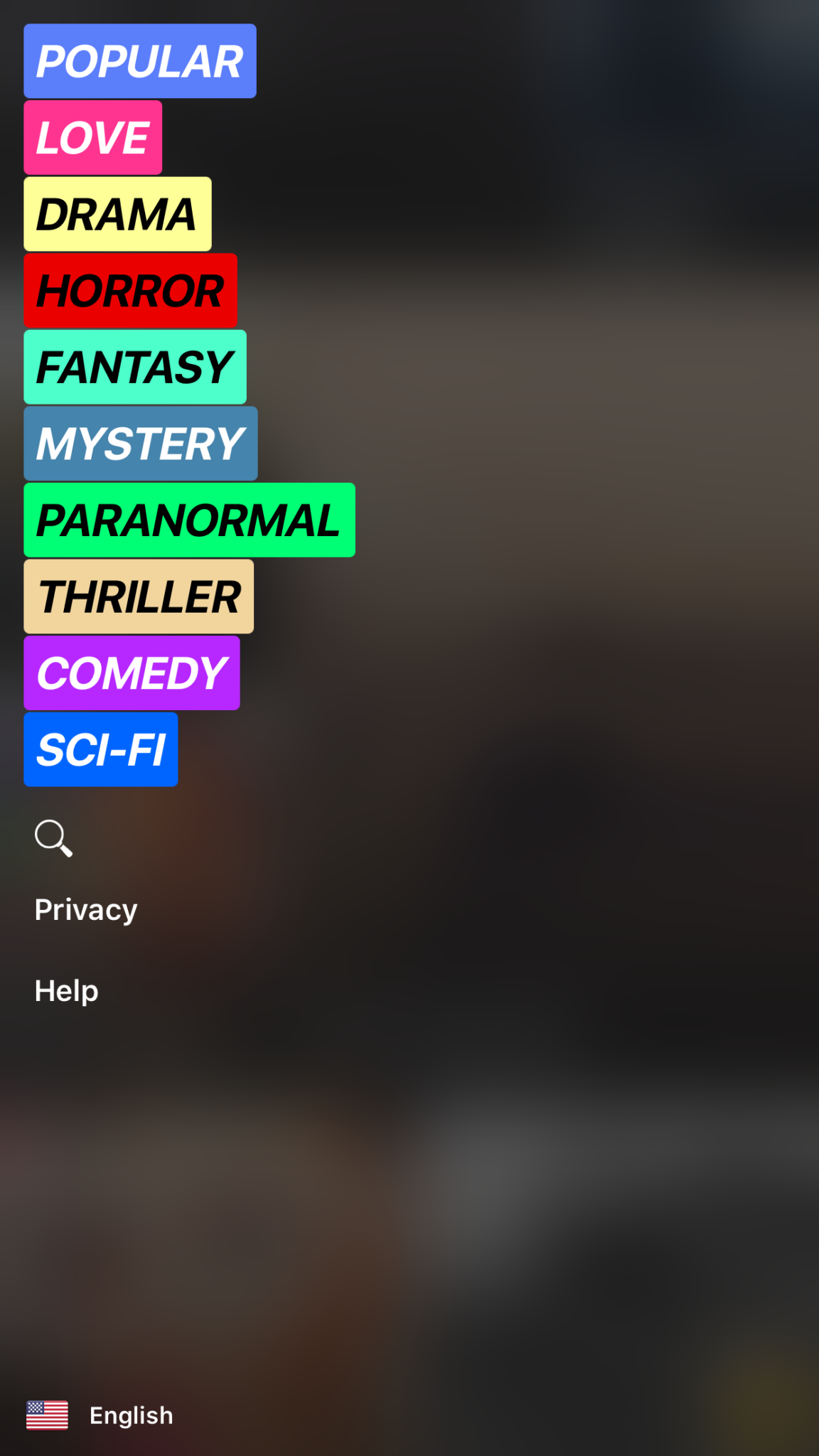
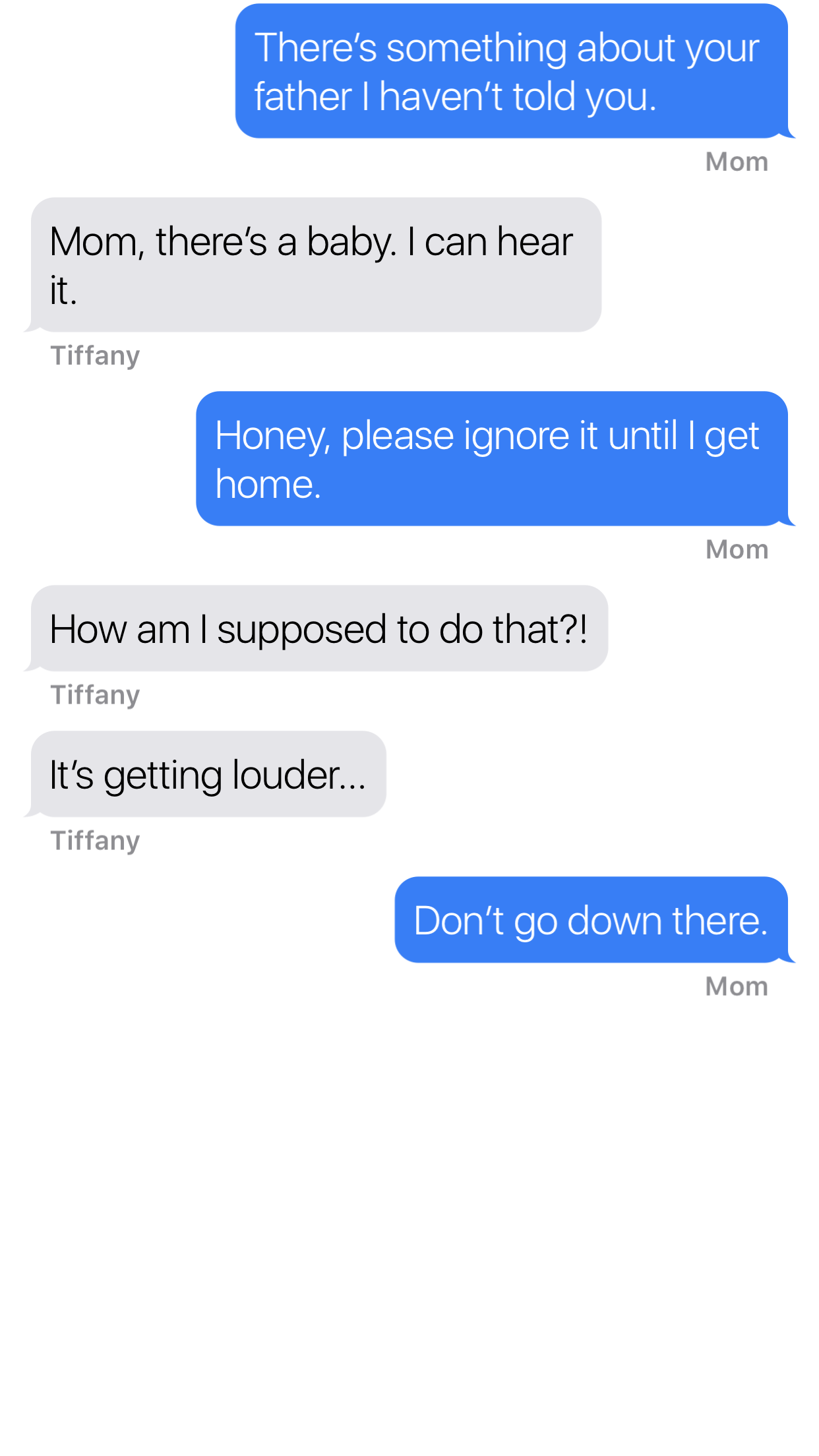
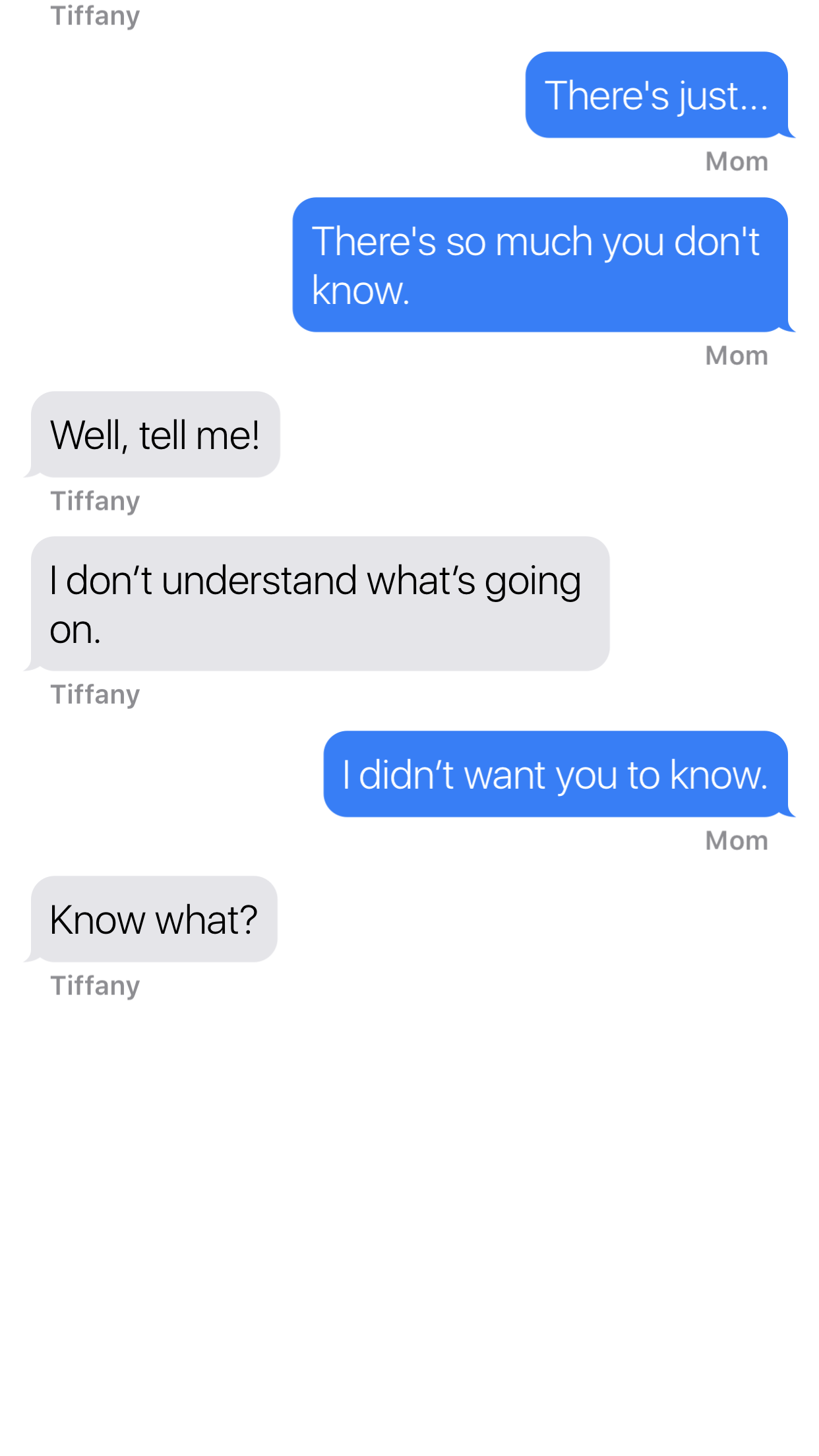
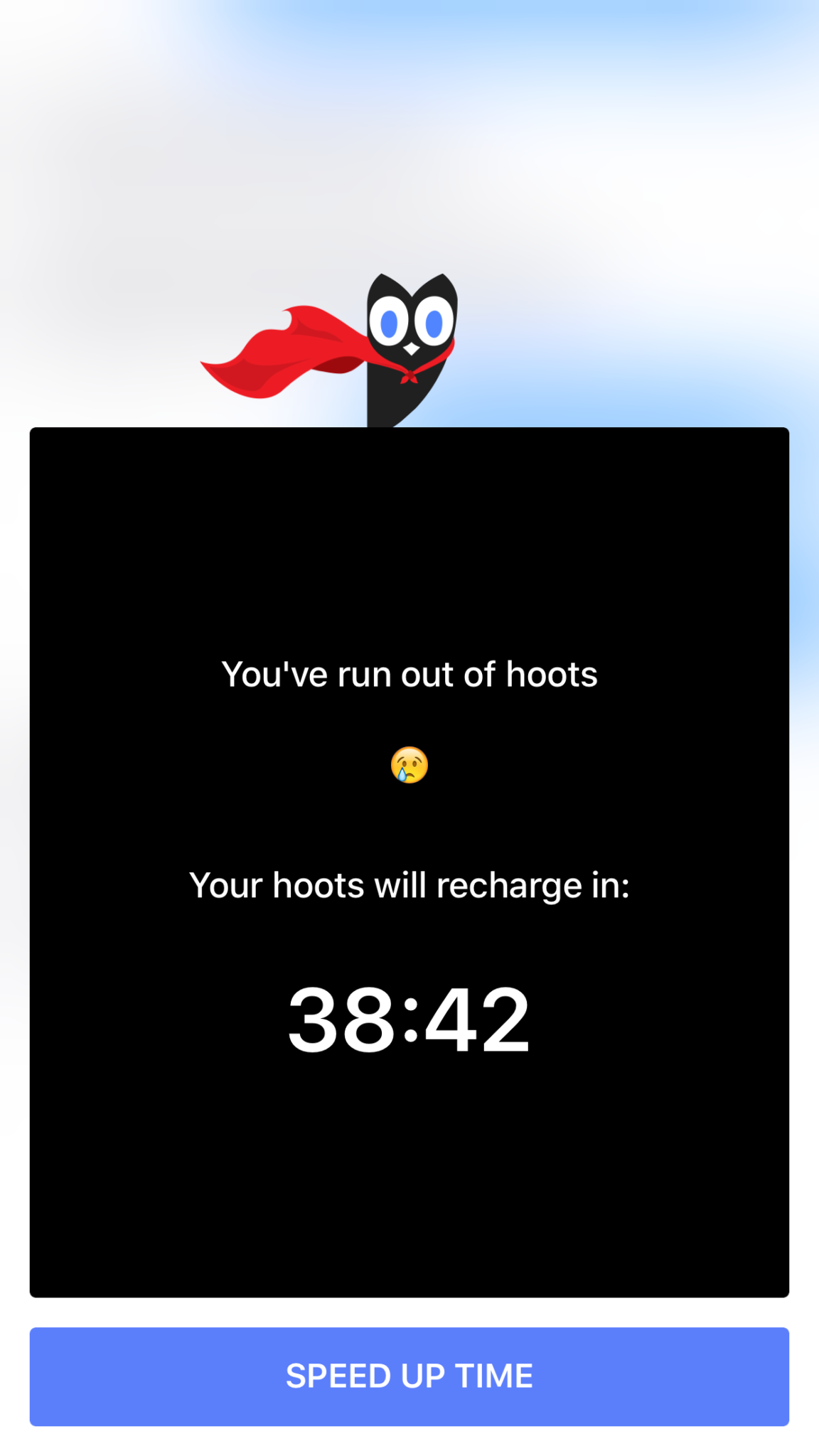
    Hooked is an app that tells stories in the form of text messaging conversations. The story topics include comedy, horror, fantasy, and sci fi. Each story has a title page photo, many of which feature a pretty girl or couple in a romantic or suggestive pose. When you’ve made your choice the story unfolds one text message at a time, usually in the form of a conversation between a couple of people. You can tap the screen to reveal the next message and you may find yourself in a tapping frenzy to reach the next plot twist. Then, however, you’ll suddenly be halted by the Hooked Owl asking you to pay for more “Hoots.” A “Hoot” is a click/tap and you only have a certain amount of them every hour. Once you’ve used them up you’ll be prompted to buy more or sign up for a weekly or monthly subscription to get unlimited “Hoots.” If you’re like me and not ready to invest fiscally in finding out the next line of the story you can just wait until the next hour begins.

    The Hooked app cashes in on the obvious popularity of texting by using it as a storytelling venue. This makes it very appealing to the younger aged adults and teenagers. The target audience for the Hooked app is ages 13-24 but I wouldn’t just look over the app if I saw it on my teen’s phone.

    What Parents Should Know

    The Hooked app consists of some very mature themed stories but is targeting younger teens.  The stories are delivered in a way that your teens and tweens will definitely find appealing. I found myself anxious to find read the next message as the story progressed. Obviously the story really started to climax right before I ran out of “Hoots” so I would have to wait a while to continue reading. While this did get me to close the app for a while, the $7.99 per month for unlimited “Hoots” is a low price tag for being able to sit all day long and click through these stories.

    My issue isn’t really with the way the stories are delivered, it’s actually a creative way to tell these tales. The “one post at a time” method lends itself to a lot of suspense and a pretty entertaining read. The problem I have is the addictive nature of this app, if you can tap an unlimited number of times and go from story to story you’d very easily find yourself reading through a hundred of these stories in just a few days. Also, these stories can be pretty mature, dramatic, and suspenseful. The categories feature love and thriller options and the stories get quite intense at times. The texting storytelling method also makes them a bit more eerie. Users can also write stories which makes for a completely new potential problem there. Any time you’re dealing with User Generated Content it’s hard to be sure what your kids may read.

    My advice is to know your child and their maturity level well before you let them use Hooked. I wouldn’t go by the 9+ rating it has in the app store, I would assume your child should be a bit older. Keep in mind that many of these stories are written by users of the app. Since the content can’t be guaranteed to be safe for any age group, you should help your teen or tween by involving yourself in their decision to use Hooked. If they do read on the app, I recommend asking them what the stories are about and what they like about them. Keep yourself in the loop and informed as much as possible.