
When I do Digital Boundaries Workshops I begin by sharing all of the dangers of unsupervised internet and mobile device use. I then walk through the best practices for keeping your kids safe in the digital landscape they are navigating. I also, spend a lot of time answering questions. I received a question this week that I hadn’t been asked ever before. “What are some apps that you would recommend for my family.” Huh…I hadn’t thought of that as much. I spend so much time looking at the dangers that are so prevalent online that I often ignore some of the resources that can be fun for families. Here’s a list of five apps that I approve of.
Social Media
While I always recommend parents keep to the age restrictions recommended by the terms of agreements on a social media platform (usually 13 plus;) I also know how popular social media is and that your teen is going to want to open an account as soon as you’ll allow them. When you’re ready to give them permission, I recommend you start with Instagram. The first reason is pretty simple. Instagram is easy to monitor. You can easily put your kids’ account(s) on your installation of Instagram and keep close tabs on what they’re doing on it. You can even use that method to be notified when they get a direct message.
Any social media opens you up for some problems. They say it isn’t great for self image and self esteem and there is always inappropriate content that can be accessed because of the fact the content is posted by users but if you’re going to give in and allow some form of Social Media then Instagram is a better starting point than Snapchat or Twitter. There a a lot of reasons and I’ve written about most of those already.
Gaming
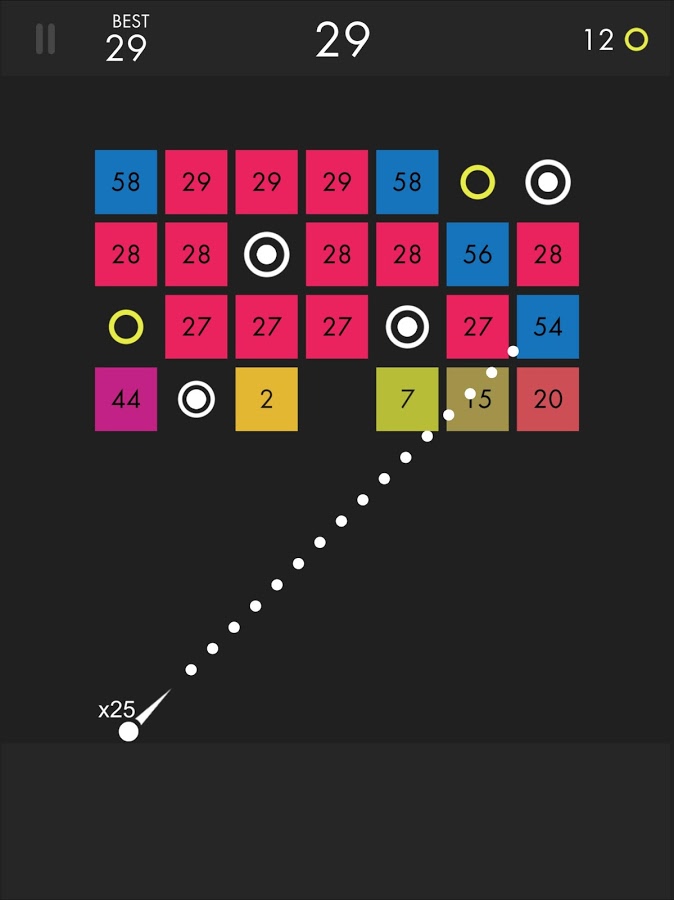 Ballz
Ballz
This game is super fun and addictive. It’s a pretty basic concept. You swipe back and release to launch a ball to bounce around the game-board and break up blocks. The blocks have numbers on them that show how many times you need to hit the block to make it go away. You collect more “ballz” and launch them all at the same time. (I’ve launched as many as 110 at once.) This becomes extremely satisfying when you fire all of the balls towards the blocks and watch the numbers on them decrease as quickly as the block is hit by each ball. Like I said, while it’s satisfying, it’s also very very addicting.
This game is approved because, while it has ads, the ones I’ve seen have all been for more games by the same developer. This has kept anything inappropriate from creeping up as a banner ad. I approve because it should be pretty safe and because it is just so darn fun to watch all those little balls bounce around and devastate the the game-board full of blocks.
Research/Education
Kiddle isn’t an app. It’s a website. You can very easily save the site to be an icon on the home screen of your phone and then tell your kids to use it as their search engine. I’ve written quite a bit about Kiddle already, so go read about how the search engine works and let your kids research and learn without fear of coming up on anything nasty or scary.
Entertaiment
Amazon Prime and Freetime
Amazon Prime’s kids profiles are some of the best because the shows are curated by human editors. That means that actual people have looked at the shows and determined that they are actually safe for kids. Freetime is a special way to subscribe to only kids content so that you can be sure that they’re not seeing and adult targeted shows. If you don’t have Freetime you won’t have access to kids profiles but you can still set parental controls so that content above a certain age range won’t be accessible without a pin number. Kids can’t see these shows and movies without the pin but they’ll still be able to see the thumbnail image in their “carousel.”
YouTube Kids
YouTube kids is a good option simply because of the popularity of YouTube for our children. Kids love watching all different kinds of content on YouTube and YouTube Kids makes it possible to allow them to watch their favorite channels without potentially finding videos that aren’t appropriate for their age. YouTube Kids separates their content by topics like music, education, and shows so kids can find what they want pretty easily. The only downside to YouTube Kids is that it’s monitored with an algorithm and depends on reports from parents to remove suspicious and inappropriate content. This has caused some concern for parents in the past but if you are going to allow you kids to watch YouTube then YouTube Kids is absolutely a better option.
That Being Said
I’m not used to thinking about what apps parents should install but I’m grateful for the question this week to give me the idea for this article. Please remember that all of these apps constantly add new content and features and sometimes that makes them less appropriate for kids. As for right now, though, I give these five apps a green light for your kids’ devices as long as you and they use the apps in the way they’re designed to be used.

