Tag: filters

  • How Can Artificial Intelligence Protect My Family?

    How Can Artificial Intelligence Protect My Family?

    How AI Works

    When you think of artificial intelligence it’s natural to imagine Skynet or some similar software that is running things for us some day. While that could be the overall goal someday, right now AI is nowhere near that smart. Currently artificial intelligence isn’t intelligent at all. While it does learn from the input that is fed to it, there is currently no way for AI to decide what it needs to learn on its own. There is a very large gap between software algorithms that can learn and an intelligent software that makes its own decisions.

    At CES in 2018 I watched a robot named Aeolus glide across a room cleaning up. It took it a solid three minutes to move from one side of the makeshift living room, reach down and pick up a wii remote, and roll to the table to set it down. It was nothing like we have been promised by television and movies but I guess it was still cool. What parents should understand is that while the developers of an AI can make promises of their algorithms learning and behaving as if they have intelligence, that is not the same as being actually intelligent. Humans still have to do the thinking.

    While it isn’t foolproof and is definitely not sentient, artificial intelligence is a good tool. There are many ways AI is useful and much of the latest hardware and software use AI  to do some of their most minor functions. Here are some of the interesting ways AI can make your parental control and accountability tools even better.

    Filters

    There was a day when an internet filter depended solely on the web or ip address of the site you were visiting to tell if there would be inappropriate content or not. There was a master list that had to be updated continually with new websites and key words. AI is different than that because the filter is based on images and other content that the AI was “fed” over and over again the algorithm then detects actual images, text, and videos on web pages instead of just the address of the site you are visiting. This can be helpful if a website doesn’t typically contain adult content but a certain article or comment section features material that would cross the line. A traditional filter couldn’t catch that but one that uses an AI can.

    Circle (meetcircle.com) and NetNanny (netnanny.com) are examples of filters that use smart algorithm to block web content.

    Accountability

    Accountability software works very similarly to filters except that when it sees something inappropriate it will not block it but alert whoever is on the list to alert. AI has revolutionized this sort of software because it allows parents to receive only lists of unwanted sites instead of having to sort through everything that has been viewed by the person they are keeping accountable. The software I recommend, Accountable2You (accountable2you.com promo code BecauseFamily,) is updated constantly to allow it’s algorithm to properly and effectively scan for adult content. It works very well. You may get occasional alerts for content that shouldn’t be considered adult, but it’s not too often and it’s worth it for the peace of mind.

    Privacy and Security

    Finally, when we discuss AI and algorithms we must talk about privacy and security. Algorithms may have been the beginning of many of our privacy problems but it may also be providing some solutions. Tools like BitDefender can be used to protect your home network. The AI can tell the difference between forgotten passwords and malicious login attempts. Our home networks are becoming increasingly worthy of being targets of hackers and encrypting your web traffic with AI can protect your from that kind of attack.

    I hear a few different reactions when I talk about artificial intelligence. Most people roll their eyes or glaze over because they aren’t even interested. It’s some tech term that they don’t think they can fully understand so they’d rather not talk about it. The other group is super interested, always wanting to learn more about it and understand it better. These are my nerd friends. I love them. Finally there’s the group that just freaks out. They immediately think of the movies and tv shows and just want to move into the woods and unplug. Which person are you? Are you willing to let AI work to your benefit in your family? Is it all too much for you? Let me know in the comments below.

  • Now ANYONE Can Make a Facebook Camera Filter!

    Now ANYONE Can Make a Facebook Camera Filter!

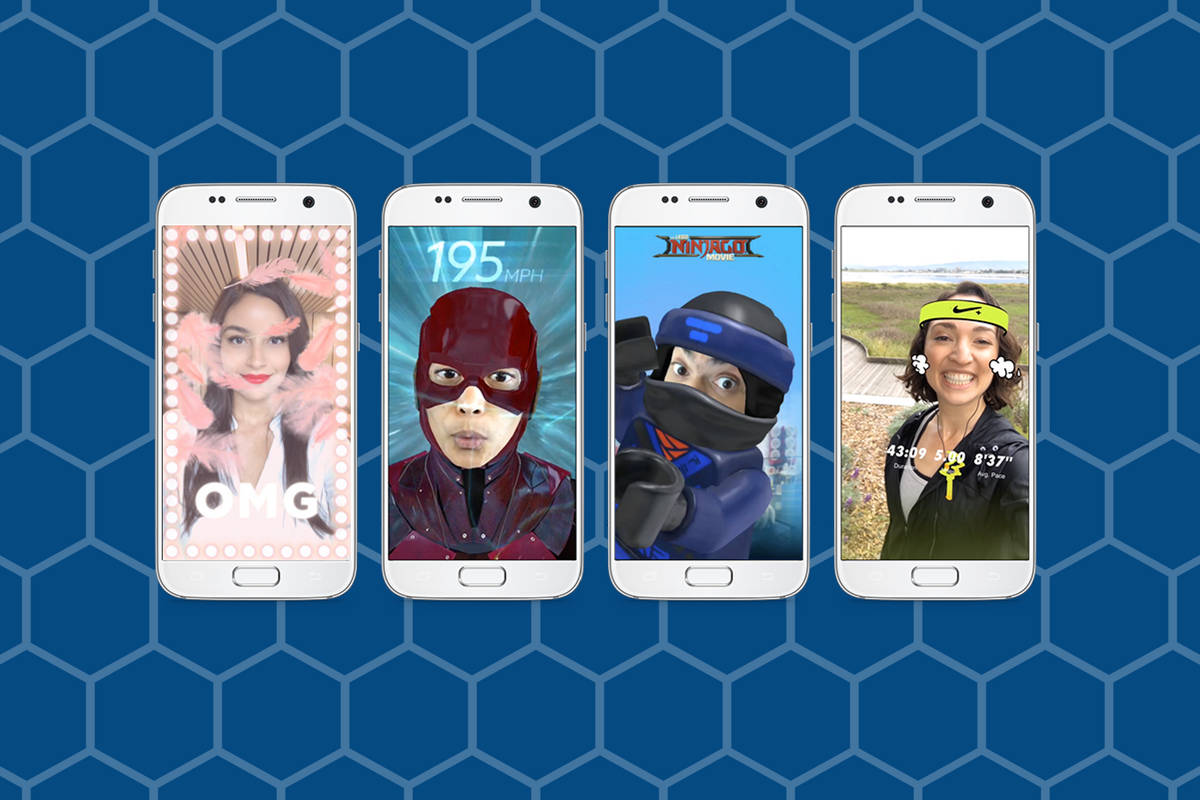
    Augmented Reality (AR) and Location Filters have become a mainstay of the social media camera. Snapchat started and Instagram, Facebook quickly followed suit, and before you know it, we’re all posting images and videos of ourselves with animated beards, mustaches, and hats. Your favorite fancy additions to your photos have always been created by select developers or advertisers so that those who run our favorite social media outlets can keep tabs on what’s being allowed on their platform. That has now, officially, changed. Facebook has opened up their public Filter and AR creator tools.

    “Starting today, we’re expanding availability of the platform and the AR Studio creative tool to everyone.” – https://www.facebook.com/FacebookforDevelopers/

    It’s truly as simple as going to the facebook developers site and downloading the AR software. Making non-AR overlays is even easier. The tool is built into the website. You simply upload your images and move them around wherever you’d like on the screen. You can use the tools to resize and edit your image as well as to remove the background so you get a transparent effect. While making a 3D mask takes some coding and design experience, making an overlay is a pretty simple process that just about anyone should be able to do.


    What Parents Should Know

    Obviously, there is no stopping the “AR train.” We all love taking photos with those crazy filters and it’s so neat to put some strange creature on your countertop and film it playing the guitar. Until now, we could trust that content being posted as filters on the Facebook camera had been created by legitimate developers and didn’t contain anything that wasn’t allowed by Facebook’s guidelines. Allowing public access to these tools basically makes filters and AR User Generated Content. I made one for FamilyTechBlog in about six minutes. There was no approval process (as far as I could tell) which leads me to believe that inappropriate content will only be identified by a “user flag and review” system. This could lead to who knows what kind of violent or adult-oriented filters showing up on our Facebook (and most likely eventually Instagram) camera.

    My advice for parents is to continue to talk to your kids about what content they use and see on their social media accounts. User Generated Content means that most of what has been posted hasn’t been edited or reviewed by anyone who can pull down non-approved posts. Algorithms and a flag system can only get so far in protecting our families from dangerous content. Parents should always be seeing what is posted by their kids and what their kids are seeing in the apps they use.


  • Snapchat’s New Filters Can Recognize Items in your Photos

    Snapchat’s New Filters Can Recognize Items in your Photos


    Snapchat’s new camera filters can now identify items in your photo and recommend AR graphics, borders, or stickers for you to add. The action is automatic and will insert recommendations into the filter carousel. To my knowledge you cannot turn off this feature, it is now a stock part of the Snapchat camera. The camera can recognize pets, sports equipment or events, food, and even specific locations.

    These are powerful tools for Snapchat users, especially paired with their geofilters which is strictly based on your location data. Besides just making your recommended filters more relevant, these new filters will make it easier for advertisers to target their ads more specifically. Turning off your location information won’t be enough anymore, your camera can now give advertisers clues (automatically based on software and algorithms) as to where you spend your time. This is big news for advertisers and even bigger news for tech safety and security specialists. 

    What Parents Should Know

    My advice is to always turn off the location data on your kid and young teen’s phone. I recommend only sharing location information when you’ve left somewhere, never while you’re there. There are many reasons for that advice, including not alerting people that you aren’t home and not making it easier for predators to figure out where you spend your time. If your camera is using the things in your photos to tag your location then you have lost control over your location data. That, to me, is a problem. Snapchat has been on my uninstall list for a while and this news just strengthens my case against it. Snapchat’s goal is to service financially and they are now making decisions to make their product the best advertising tool available to brands all over the world. This means forsaking the privacy and security of their users and most of their users are your teens. Uninstall Snapchat now. There…I said it.

  • Superzoom on Instagram and Share Links in Snapchat

    Superzoom on Instagram and Share Links in Snapchat

    Every update announced by the developers of the apps your kids use isn’t earth shattering but you should still know what’s going on. This week has been a pretty slow internet safety update week but some teen favorite social media platforms have released some updates in the last couple of days.  These updates are mostly cosmetic seasonal features but they’ll be interesting to your kids so they’re worth learning about.


    Instagram Superzoom

    Remember the dramatic chipmunk? He’s the cute little guy on the youtube video that gave an epic, three-level zoom, dramatic (and comical) look. There was a song and everything. Instagram has added a feature to their camera that can give you that same hilarious zoom in effect. The product manager for Instagram said they’ve seen users making funny “zoom in” videos in their story and wanted to give them a tool to make this easier. The feature zooms into whatever you’ve told the camera to focus on, it will work on the front or rear facing camera, and even features the dramatic orchestration you’d expect to hear from such an epic shot. This feature comes today along with some Halloween filters and masks.

    Snapchat Link Sharing

    Snapchat will now let you share links from other apps in iOS. Pulling up the “share sheet” or sharing menu will now show you the option to share in Snapchat. This is a pretty big change for Snapchat who previously didn’t do much to affect usage outside of the app itself. Links will still open within Snapchat’s web browser but more and more content can now make its way into the app through the accessibility of link sharing. Also, Snapchat is changing the way you view Snaps from within the app by letting you press and hold a friend’s name anywhere in the app to open their Story. Finally, there is a new feature that will allow you to go into “Ghost mode” temporarily, setting your location to stay hidden for 3 hours, 24 hours, or “until I turn it off.”

    What Parents Should Know

    Every update brings more features that our kids love on their social media apps. We should know what these features are and what they mean for how our kids use the app. Camera effects and modes add interest and fun but may cause the young kid you’ve been keeping off of social media to ask you even more if they can join. Truthfully, Snapchat is late in the game when it comes to link sharing. It’s been possible in so pretty much every other social media app out there for a long time. Being able to bring links into Snapchat from any other app increases the potential for it to be used to share different sites between users. This could include sites you’d consider inappropriate. My advice is to turn on built-in filters on your iOS devices as they should make it harder if not impossible to access adult content on any browser on the phone.


  • Snapchat News: Are You Being Recorded?

    Snapchat News: Are You Being Recorded?

    Snapchat has been busy with updates lately. The latest numbers show their user numbers barely rising when compared to Social Media giants like Facebook and Instagram. Some of these features are just to lure more users and some are to increase revenue. Either way, you should know what they’ve added.

    Sky and AR Filters

    Snap Inc. is working very hard to highlight the creative possibilities with their Snapchat camera. The sky filter allows you to change what the sky looks like. This feature shows off the ability for the Snapchat camera to detect what’s being photographed and then apply effects. You can turn a clear sky cloudy, a day sky to night, or just add a rainbow. Augmented reality filters were updated last week and you can now place your bitmoji (an animated character that you make look like you) onto different spaces in your photo or video and record different animations.

    iOS Update Allows Capturing of Your “Private” Snaps

    iOS 11 was released last week and it includes the ability to record your screen by simply tapping a button in your control panel. This has been cause for concern for Snapchat users. Especially for those who use Snapchat for very private or personal conversations. As of the publishing of this article, Snapchat currently has no way to alert you that what you’re sending or even your live chat is being recorded. This means that as our kids are chatting with their friends, those friends can record their messages and then post them later. This could be a pretty big problem. It is likely that Snap Inc. will eventually add the ability to be notified when someone is screen recording your Snaps. You’ll see an article about it here, for sure, when that happens.

    Ads will Open New Games, Videos, and Interactive Ads

    Snapchat also announced a partnership with content creators who will be providing new ways for Snapchat users to experience ads. The new format for ads will include videos, interactive ads, and built-in games. Their goal is to cause users to interact more with advertising in Snapchat and lure more marketers to the platform. 

    What Parents Should Know

    Snapchat continues to be a popular social media platform for teens and preteens. Internet Safety experts show concern about Snapchat because of its Discover page, private messaging and video messaging, and disappearing photos and videos. It is important to stay informed as to what the app is capable of when they release updates. Hopefully, this information can help you make a quality decision on what to do with your teen’s Snapchat account.

  • Five Internet Safety Mistakes Parents Make

    Five Internet Safety Mistakes Parents Make

    I spend most days trying to help parents make and implement an internet safety plan. Too often I run into hurdles that I have to jump over in order to help them out. Here are five of the most common mistakes that get in the way of parents’ internet safety strategy.

    1. Secrecy

    Parents of older kids want to give their kids freedom on their devices but keep an eye on them at the same time. I’m often asked how to do that without the kids knowing mom and dad are watching. My answer is usually, “don’t do that.” The goal is building trust and a better understanding of responsible technology use and internet accountability. Sneaking around and spying on your kid, while it may seem like a good way to see what they’re actually in to, is an even better way to ensure they won’t ever come to you when they need to talk to someone about what they’ve seen or experienced online. Obviously, if they know you’re watching and you approach them about something you didn’t approve of then they’ll know it’s coming and will be ready to have that discussion. If you have to talk with them about something you caught them doing while you were sneaking around they’ll see that as a breach of trust and you’ll find yourself with a much harder road to travel from then on. The best thing about transparency is that your kids are more likely to make better decisions when they know they’ll be held accountable for those decisions. Telling them you’re watching them can lead to better responsibility.

    2. Giving Up

    Setting digital boundaries is not easy. There will be arguments, sneaky kids, tutorial videos, and lots and lots of research. The key is to never give up. Things change fast and it truly is difficult to keep up. You have to find the resources that you trust that can help you stay informed. You should find the people you know can help you set your boundaries up to fit your needs. You have to keep reading up on what’s going on in the digital world your kids live in. If you give up you will get left behind and that means you’re not keeping your children safe.

    3. Sharing Passwords

    As obvious as this may seem, I have to say it. You must resist the temptation to reveal passwords to your kids. What happens is that kids (especially the younger ones) get tired of what they’re doing very quickly. When they are playing a game and you have it set with guided access or something like it that won’t allow them to back out of the app you will have to be the one who has to switch apps for them. Unless you just tell them the password. More convenient? Maybe. Safe? Absolutely not! There is honestly no reason at all to have any kind of boundaries set up if you are easily urged to hand over the passwords to the tools you use to establish those boundaries. Passwords are meant to keep the parental controls within the controls of the parents. Again, seems obvious, but you would be shocked at how many people have to be reminded of this truth.

    4. Not Starting

    The hardest step to take in protected your family online is the first one. Creating your internet safety plan begins with assessing the current situation in your home. That can be overwhelming at best, and extremely discouraging at worst. Some families don’t even know how many devices are in their home or who they all belong to. I worked with a family once that was shocked when their kids kept bringing phones down out of their rooms over and over again. Come to find out, their friends would give them their old phones and they’d use them on wifi when they were grounded from their own. Yes, it is discouraging but it is absolutely necessary. You need to have a plan and you must have conversations with your kids about that plan. You can’t do anything, though, if you never start. Begin today! Email me if you’d like. I will help you get started.

    5. Never Updating Software

    I covered this in a recent post but I have to reiterate because its one of the most common mistakes I see parents make. If your accountability software, filter, or devices are not updated regularly then they aren’t as secure as you’re needing them to be. If you pay monthly for these apps and software then you aren’t getting what you’re paying for, you’re only getting part of it. Updating the software when you see the notification is critical for keeping your internet safety tools in full working order. Filters use updates to load the latest information that lets the filter know what sites should be blocked and what shouldn’t, other apps like accountability software use the updates to keep their “red-flagged sites” lists up to par with what’s out there. If you aren’t updating you are eliminating an entire piece of your digital boundaries puzzle.

    Don’t let yourself fall victim to any of these blunders of internet safety planning. Read all you can on this site and subscribe to our mailing list so you see the latest news. Keep track of internet safety news with other blogs and websites as well. Keep your software updated, talk to your kids about your plan, and for the love of facepalm emojis, get started as soon as you can.

  • New Filters, Reactions, and Screenshot Controls in FB Messenger

    New Filters, Reactions, and Screenshot Controls in FB Messenger

    Facebook is updating their camera in Messenger so you can have some new AR filters while video chatting. The first is Filters which will add color schemes and other effects to your video feed. Reactions will allow you to use the like/love/emoji reactions you can use on FB posts to enhance your live video chat experience. Finally the screenshot button will let you take a still image of your chat with a simple tap of the screen instead of having to fumble around with the hardware buttons on your phone.

    Obviously Facebook is doing its best to separate itself from the rest of the video chatting market. These new features make Facebook live video chatting more interesting than Skype or FaceTime and definitely go a long way to compete against Snapchat’s offerings. What will this all mean for our families? Well, the main thing to remember is that your kids should only be chatting with people they know.

    What Parents Should Know

    It’s important that your kids understand the dangers of video chatting with anyone they don’t know. Messenger uses your friends list to populate your contacts so, in theory, your kids should only be chatting with friends. These augmented reality filters and reactions will add to the reasons to want to upgrade a text messaging session to video chat so if you’re against video chatting by principle then you’ll want to keep them off of FB Messenger. I recommend keeping an eye on who your kids have been messaging no matter what platform they use or if it’s by text, images, or videos. You can do this a number of ways but none is better than having their passwords and checking in on their account regularly. As always I recommend you have a conversation with your children about what they are and aren’t allowed to do on messenger and why. Let them know you’re keeping an eye on things and don’t sneak around. You want your kids on your team.

    Want to get exclusive content and support our work to keep you more informed about your kid’s digital culture? You can partner with us at Patreon.com/BecauseFamily.

  • Interactive Advertising Coming to Snapchat

    Interactive Advertising Coming to Snapchat

    I’ve heard marketers say that it is their job to ruin everything. Well, the cameras and filters built into our favorite social media platforms are proving that. Today Snapchat announced they’re launching advertiser access to their Geo filters and camera “lenses.” This means that you can use the augmented reality settings to not just make yourself look like a puppy but also to advertise for your favorite restaurant, the latest movie coming out, or a special event.

    A few weeks ago Facebook announced that they would be opening up the lenses to more developers. This will also increase advertiser use of these products. So now Instagram, Snapchat, and Facebook will all be serving up interactive advertising to our kids.


    What Parents Should Know

    These updates are just one more way that advertising can get to our kids. We know that marketers are only after our money, that’s no surprise and should be expected. However, we have to know our kids and decide if we are OK with them being advertised to in this way.

    My advice is that parents take a look at these Geo filters and lenses and see what they could potential be advertising to your kids. Again, Snapchat is on our uninstall list and advertising is the main reason. Today’s news only strengthens that position.

  • Parental Control Options for Your Kids’ Chromebook

    Parental Control Options for Your Kids’ Chromebook

    The Chromebook is unique because it isn’t really a full fledge computer. They are designed to just run a browser so you can access the internet. This makes them affordable and easy to use. Because of this the Chromebook is often the chosen computer for schools. So your child may have been assigned a Chromebook when they were enrolled in school. While they must have content controls set while they are on school property there aren’t any regulations requiring schools to keep them protected while off campus. Here are some options for how you can protect your kids while they use their Chromebooks.

    Supervised User

    UPDATE: Google has discontinued Supervised User in favor of FamilyLink.

    This is an account based system that’s built into the Chrome browser. It allows you to set filters, monitor sites visited, prevent installation of apps, turn on safesearch, and change settings. You do have to use blacklists or whitelists to block websites, there is not an automatic filter built in. I recommend using THIS LIST of blacklist sites provided by a University in France. It’s a pretty extensive set of blacklists and will take some effort to set up but if you don’t want to just set the Chromebook to only access a few domains then copy pasting sites from these lists is your best option. You can access the supervised accounts by going to chrome.google.com/manage.

    Click THIS LINK to see Google’s set up instructions for a supervised user account.

    MobiCip

    One of the only full service filter and monitoring apps for Chromebook, Mobicip offers a plugin that you can download from the Chrome app store. Mobicip will give you customizable filters, time limit controls, and usage reports and its pretty easy to set up. You just download the extension from the Chrome app store and then login. It takes you through the setup steps and lets you set your desired filter levels. Once it’s all set up you can make changes from anywhere using their web based controls dashboard. Their SUPPORT page has good How-To resources to walk you through the process.

    If you want more controls than the Supervised User option gives you then Mobicip is a pretty good choice. It’s $39.99 per year for all of the features mentioned above for up to five devices. If you are going to need to protect more than twenty devices (I’ve met families with upwards of 30) then you’ll have to get a quote for their “Enterprise” option. Mobicip is a good option and will give you quite a bit of control.

    Accountable2You

    The final option is an accountability software. This, combined, with the Supervised User Account may be all you need.  Accountability software doesn’t block content. This software will keep an eye on what’s being viewed and then red flag and report anything that it deems inappropriate. This allows you to more easily see when something questionable has been viewed. Otherwise you’ll spend time sifting through link after unrecognizable link to find something that may be naughty. You can even set up Accountable2You to send you a text message when an inappropriate site was accessed. The software works across all of your devices including Chromebook and is $6.99 per month for six devices and $9.99 per month for twenty devices. They have easy setup instructions on their SUPPORT page and have excellent customer service.

    Whether your kids got Chromebooks from you to help with schoolwork or they were school issued, it’s critical that you have some sort of parental control solution set up. I recommend using one or more of these to set up a plan to help your kids be safer online. The statistics say that only one out of every three kids who saw something inappropriate online was looking for it. The fact that you have well behaved children doesn’t apply here. The internet isn’t well behaved and we have to make the effort to keep them safe.

    This article contains affiliate links…

  • These Games Let Your Tween Play Out Their Own Soap Opera

    These Games Let Your Tween Play Out Their Own Soap Opera

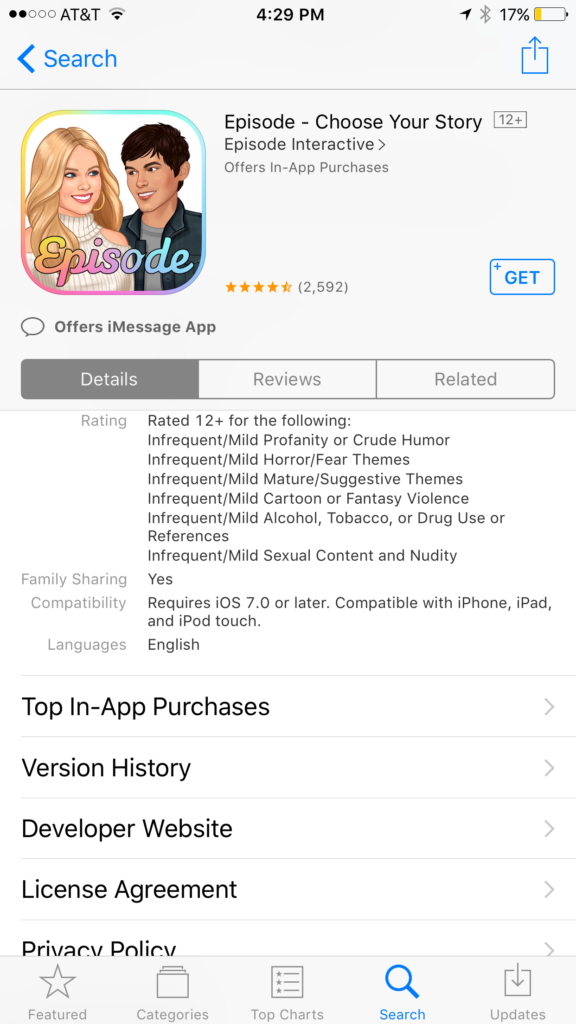
    I was doing research for an app to write about when an ad came up. The ad was for a game called Episode and it featured cartoon animated teen girls in situations that would only come from some mid-day television show. For example there was one girl deciding whether or not to perform CPR on her shirtless and handsome male companion. He winks at the “camera” and she thinks he may be faking so the player gets to chose her next move. “Perform CPR” or “Kiss him to find out.” This scenario is one of thousand available on these games that are developed by a company called Episode Interactive.

    Their apps are all interactive story games that put the player in control of the choices of the main characters. Each app features thousands of stories to play out. The scenarios feature romance, mystery, comedy, family, and a bunch more. The situations that the character is placed in during the stories can often be very adult oriented. Decisions whether or not to have sex. A choice to run away from a potential mugger or try to attack them back. There are some very dramatic and grown up themes in these games. A look at the description will tell you that the games are rated for ages twelve and over for various reasons including, sexual themes, drugs and alcohol, violence, and nudity.

    These games are a choose your own adventure of sorts for the new generations. They target young tweens with the glam of what it’s like to be a teenager or what High School life is like. It’s all obviously very fictitious but our kids buy these messages hook, line, and sinker. Think of apps like this as romance novels that are targeting your ten to twelve year old daughter. I say it’s targeting tweens because the app I was reviewing when I saw the ad for Episode was one that is obviously mostly populated with young girls. Your daughters will believe a message about who they are and what gives them value. Apps like this are speaking to a certain version of that message. We as parents must play defence against the wrong message to successfully teach the correct message.

    What Parents Can Do

    My advice is to make sure your child is far older than the recommended age for these games before you let them play. They are obviously meant to mimic the soap operas of our parent’s days and they feature exactly the same types of themes. The maturity of your child is best understood by you, their parent. It is usually not a good idea to take the age recommendation of an app, game, or other form of entertainment as the law and gospel. You have to use your own judgement. Unfortunately for some kids these themes are mild compared to things they’ve dealt with in real life. But for many of our ten, eleven, and twelve year olds, these games can introduce topics that they may not be mature enough yet to navigate. That’s why it’s so important for you as a parent to step in and see what they’re doing on their phone or tablet.

    Apps like Episode are easy to spot because they don’t hide their themes in the ads on the app store. It’s pretty obvious what they feature in your game. My advice is to use something like Google Play’s parental settings, or Apple’s Family Sharing to ensure you’re seeing every app being installed by your kids. If you see something that looks like it could be a choose your own adventure style of soap opera game then think seriously about the potential questions your child will be asked while they play it.


    Get Our Latest Posts in Your Inbox

    * indicates required