The battle for the best messenger and photo messenger app continues and this time Snapchat has launched a counter assault. Excuse my military history illustration, I know I’m a nerd. While Facebook has been building up the features list on their popular messenger app, their photo app Instagram, and their texting app, WhatsApp, Snapchat has been working on some updates of their own.
Let’s take a look at what today’s update has and what it will allow your kids/teens to do while in the app. Then we’ll chat about what parent’s response to this app should be after the latest update is installed. It’s super important to stay in the know, even if some of the updates may not be potentially dangerous. Here’s our breakdown:
Snapchat’s New Features
 Paintbrush and Scissors
These artistic new tools will allow you to do more customization than ever before. Paintbrush is a bit novelty and is just a way to make your photos look different but scissors is actually a pretty cool idea. This feature allows you to take “cut out” portions of a post or photo and save them to use later as a “sticker.” This feature gives you be the ability to become your own emoji. I am kind of looking forward to one of the apps I actually use copying the Scissors feature. It’s pretty awesome.
Shazam
You, most likely, are familiar with Shazam. It’s an app that allow you to identify whatever song you’re listening to by allowing the app to “listen” to it and then give you the details. This update allows you to use Shazam right in Snapchat. You just open the camera, hold your finger down, and the option to find the song will come up. Once the song is identified you’ll be asked if you’d like to purchase the song. Shazam has been around for a long time, this integration is a pretty unique idea and will keep users from closing one app to use another one.
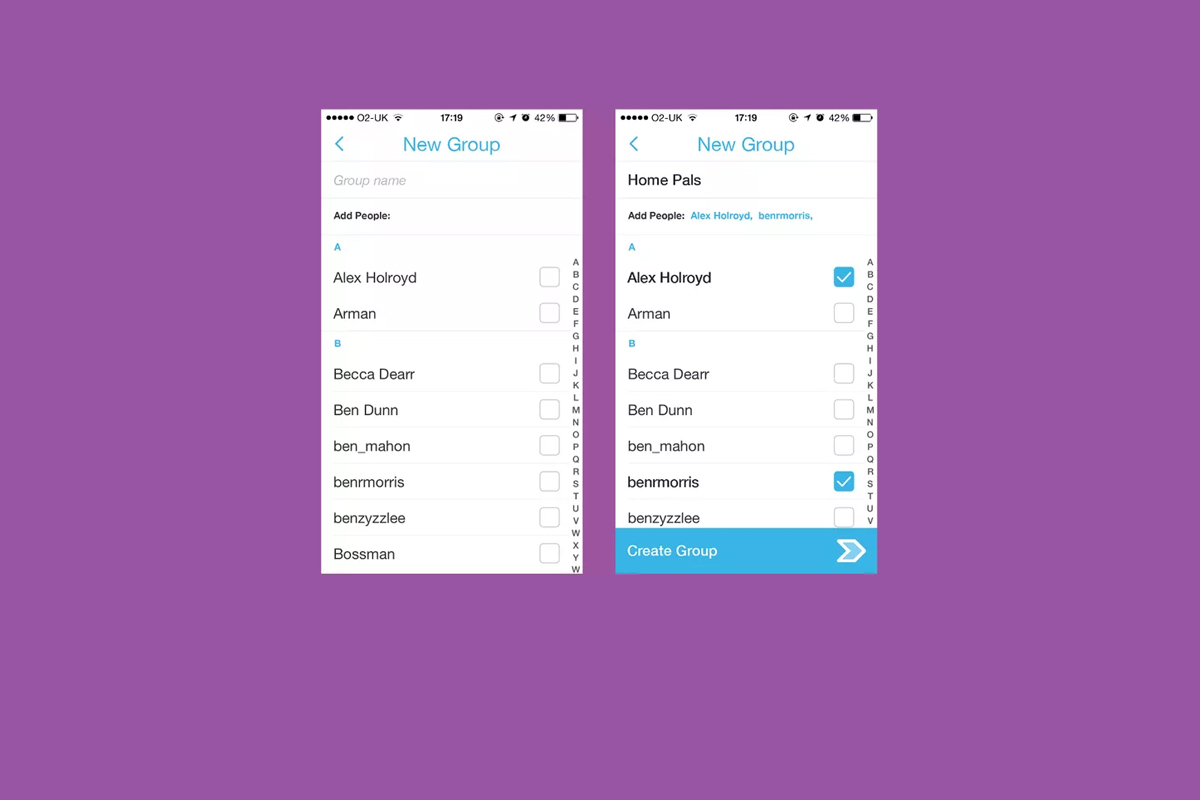
Group Chat
Group Chat is self explanatory. You can chat with up to 16 people at a time and set up your chats in groups. This allows users to keep their most common friends together in one group so they can have quick access to their conversations. Your teenagers are socializing online now so this allows them to do so in a larger group.
Every feature included in this update is another step towards Snapchat becoming the catch all app for young people. The most common users are ages 18-35 but there are many high schoolers who have already been snapping their friends for years. If they haven’t already, these updates are sure to lure them in.
What Should Parents Know?
As I’ve mentioned before. My main concern with Snapchat isn’t the messaging or photos, it’s the advertising. Their curated “discover” page has been and always will be a deal breaker for me. I know you may not agree so regardless of your reasons for being safe here are my tips for parents of Snapchat users.
Don’t allow Snapchat if you’re uncomfortable.
It’s important to remember that you have to have a say over what your kids are doing online. If what Snapchat does makes you feel uncomfortable you shouldn’t allow it on your child’s phone. Whether you’re afraid of what people may send them or what they could see on a public story. Maybe you’re just concerned about people they don’t know getting ahold of pictures of them. You also could simply be trying to keep the marketing gurus who are publishing content straight to your child’s phone from turning them into the consumer they want them to be. No matter your reason, be true to that instinct and hold firm to your position. Your teen won’t understand and will argue but you have to trust yourself on these issues.
Use family sharing to know when apps are installed.

I walked through family sharing and how to set it up in THIS tutorial. This is a great way to keep track of what apps are being installed on everyone’s devices. You can even set it up to ask you permission before something is installed. If you have decided to take a stand against your teen joining the Snapchat trend Family Sharing is a great way to be sure they’re sticking to those rules.
Follow your kids’ “Story”.
If your teen is using or wants to use Snapchat and you’re ok with it I recommend you get an account as well, even if it’s only to keep tabs on their “Story” yourself. This isn’t spying since you will communicate with them that you’re following them. Let them know it’s not that you don’t trust them, it’s that you have a responsibility to protect them from those who won’t use the social media service in the safest way.
Talk to your kids about how they use Snapchat.
Now comes the inevitable plea to be transparent with your children. Be open with them and honest about your concerns with Snapchat. Let them know you want to protect them from whatever it is you’re concerned about. Boundaries become stupid rules if there is no relationship. If you’re going to be following the on their account they need to know about it and know why. If you’ve decided not to allow it at all then you’ll have to be honest about why. Let them talk to you about why they want to use it. “Because it’s how my friends talk to each-other is a legitimate concern for a teenager. Social connection is the most important thing during that time of their lives. That shouldn’t cause you to back down from your rules but instead help you show empathy and compassion while you are patient enough to give them time to adjust to the rule.
These new updates are being discussed in the tech world as another big “shot across the bow” to Facebook and Twitter and other social media giants. You can expect more and more features to roll out on all of these services. Also expect to be asked by your child if they can start an account and be ready ahead of time with your answer.