A school district in Iowa canceled a day of classes after a network breach allowed hackers to send hateful messages to families from the public school. The messages contained personal details about students and threatened to do harm to them and their families. Apparently, the threats weren’t credible except to stir up fear and make a show of their ability to access the information. There is a theory that this could be an attempt to threaten people as to warn the FBI to stop investigating them.
The group is called “thedarkoverlord” and they’ve been responsible for recent info leaks and hacks of organizations like Netflix and Larson Studios. They have been under investigation for these hacks and could have performed this recent “attack” as a warning. They even tweeted out links to the contact information of the students from the school district, stating that predators can now use that information to plan their targets.
With the student directory from JCSD we released, any child predator can now easily acquire new targets and even plan based on grade level.
— thedarkoverlord (@tdo_hackers) October 5, 2017
What Parents Should Know
Network security is becoming a more and more serious issue. We live in a world where all of your personal information is available in multiple locations online. If you, as a digital citizen, aren’t thinking about important tools like passwords and usernames your information can end up in dangerous hands. The best advice I can give you is to ask your school district if they have someone responsible for the security of their network and if so if they can keep something like what happened in Iowa from happening at your school. Then make sure you follow some simple network security rules yourself. Use different passwords for different sites. Use passwords or passphrases that, while easy for you to remember, aren’t easy to guess, and don’t ever use default passwords on websites, routers, modems, or computers.
Musical.ly announced earlier this summer that they are going to be featuring original shows from networks like NBC, Seventeen Magazine, and Viacom. We’ve written before about how we don’t like their lack of age verification even though the CEO seems to think it’s no big deal. The lip-syncing video app’s newest update will put more previously unseen and original content in front of your kids. The updates include a “Watch Next” feature that will use what’s called “computer vision” to see what they are watching and make a decision about what other videos (original content or user generated) to recommend they view next.
The No. 1 goal of the new app design is to make “a wide range of content more accessible,” Hofmann said. – Variety.com
This update also includes a new look and feel to the app and some new ways to personalize your profile page. The most interesting addition, from a parental control standpoint, is the idea that an algorithm is going to be recommending more videos for your kids to watch.
What Parents Should Know
This feature isn’t entirely new to streaming apps. You’ve seen Netflix, Amazon, Hulu, and YouTube feature videos or shows that they think you might enjoy. Their recommendations are based on what you’ve been watching, just like those in the Musical.ly app. The concern, here, is some of what may be available on Musical.ly and the fact that most parents don’t keep an eye on what their kids do on the app.
I still don’t recommend parents allow this app on their kids’ and young teenager’s phones because of the lack of age verification. It’s still on our uninstall list and will remain there until they take the risk of predators contacting kids on this app more seriously.
Everyone has an idea of how you should safely view today’s eclipse. Use the glasses, don’t use the glasses, use a pinhole projector (we’ve made ours) watch live coverage. However you want to view the eclipse in person, you need to know a few things before choosing which live stream coverage you’re wanting to use. For some reason, those who cover events like the eclipse aren’t always scientists or educators and they may give dumb, or even dangerous advice. They might even have non-age appropriate language or other content in their videos, coverage, or advertising. Here are a few of the channels and videos that we recommend so that you can learn about and enjoy live coverage of today’s total eclipse.
Live Feed
NASA:
I’m only listing this one option. They have a pre-show with more science facts than you can handle and then live coverage from multiple parts of the country. You know the information and advice will be good because these are some of our country’s absolute best scientists. Enjoy!
Some great educational videos about the eclipse and other science facts. National Geographic is a trusted source for nature and science information and education.
Sci Show Space has great scientific learning videos as well and is perfect for those who are a bit older. The link above is to a search for the eclipse videos on their channel.
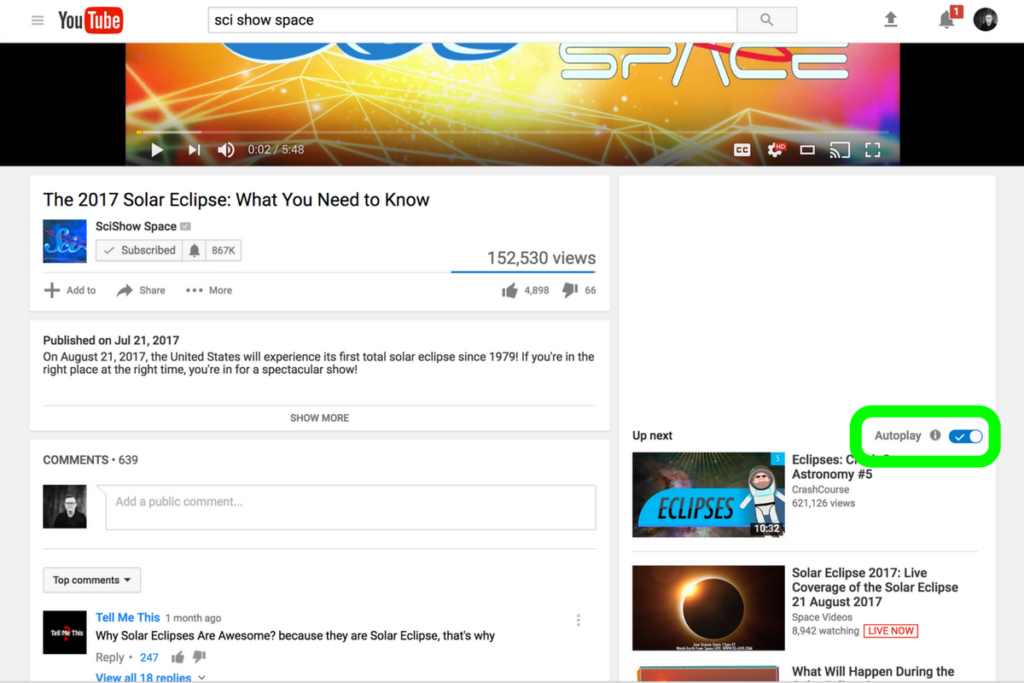
Be smart about what videos you show your kids and whether or not you allow follow-up videos to autoplay. Turn autoplay off to avoid accidentally exposing them to content you didn’t expect and aren’t ready for them to see. The eclipse is a great opportunity to teach your children some science facts but you have to be wise with what tools you use. Hopefully, the resources listed in this article will give you an idea of where to start. Be safe, and have fun.
One of the most popular questions I get when I do tech safety workshops for parents is “how do I set restrictions for my older teen?” I think the most important thing to remember is that you’re not just setting restrictions, you’re teaching healthy habits. The brain of an adolescent is developing in such a way that your guidance is critical as they navigate these murky digital waters.
I like the term healthy when it comes to internet use because right and wrong is subjective. Your sixteen year old may believe that it’s ok to watch YouTube videos for five hours on a Saturday afternoon but you can use facts to help him understand that it may not be healthy. Our conversation with our teenagers shouldn’t be about what digital habits are right and wrong but what is healthy. Here are three critical factors to keep in mind while teaching healthy tech habits.
Relationship
Boundaries without relationship become rules and rules were made to be broken. Because of your healthy relationship you can help your teenager understand that the rules exist to protect them. You can create a safe place for them to come to when they need guidance on their tech habits, about how they’ve been treated online, or about regrets regarding something they’ve seen or done online.
As parents we shouldn’t close the door to conversation with instant judgement or constant nagging about the time they spend online. I recommend using digital means to keep track (with their knowledge) of what they do online and only bringing it up when it becomes a consistant problem. Relationship is the most important part of any internet safety strategy.
Transparency
Openness and transparency is key, not just on your teen’s part but on your part as well. It is critical that you are transparent with them about your tech habits. They need to understand that you’re trying to get it right as well and that the habits they develop now will affect them as they grow older. The best way for them to learn this is by watching you and hearing about how you’re having to deal with these same issues now. Whether you’re trying to keep them from dangerous content or help them avoid tech addiction, they should understand that you’re trying to protect yourself from those things too. The quickest way to cause your teen or young adult child to stop taking you seriously is for you to not practice what you preach.
Time Management
Obviously time management will be critical as your child graduates high school and enters college. Between jobs, studying, and extra activities they’ve probably already had to develop some form of time management skill. The lure and appeal of constantly available video, music, and gaming entertainment can make time management more difficult now than it’s ever been.
You have to help your teen understand what good time management looks like. Point them towards content on the tech that they enjoy, like YouTube videos, podcasts, or productivity apps and other tools that will help them learn more about healthier time management habits. Encourage them to use these tools alongside some of the entertainment they consume.
All three of these steps are related to each other and will greatly impact one another. If you don’t have a good relationship with your child that encourages communication, if you aren’t being a good example, and if you aren’t teaching and showing time management skills your kids are going to have a hard time navigating healthy tech habits. Online life is a real part of our world and it’s too important to ignore so utilize these steps and let me know what others you have used that have been successful.
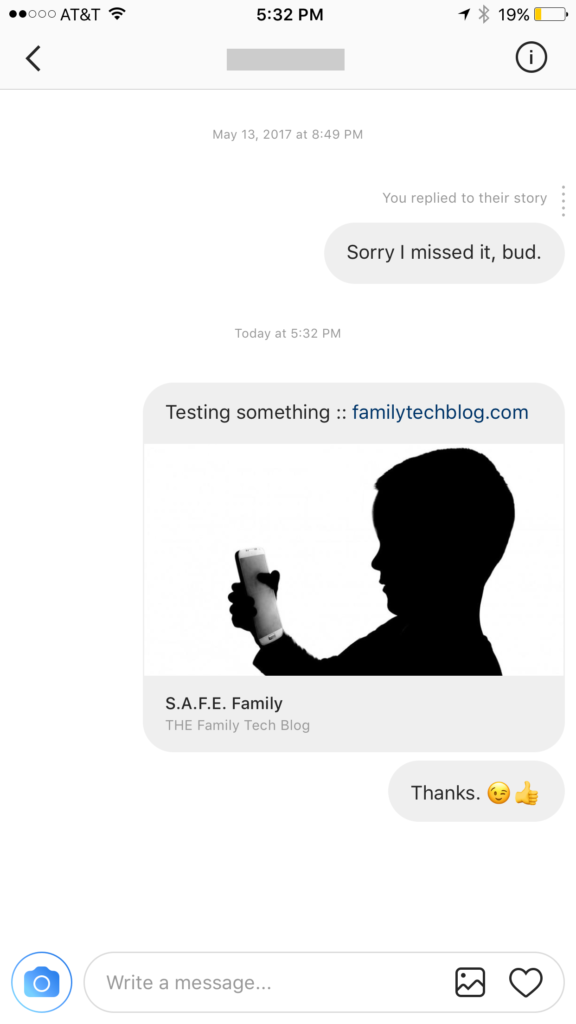
Instagram has launched their seemingly weekly major update today with a focus on their direct messaging feature. Now it’s possible to see previews of links and to send full size images. (Not just squares.) While most of Instagram’s updates have focused on it’s Stories feature, the DM gets quite a bit of attention every now and then too. There seems to be a race between Instagram and Snapchat to develop the best private messaging option out there. Features like link previews and removing the image dimension limits will go a long way to make Instagram a serious contender for direct messages.
Link previews look a lot like in FB Messenger.
What Parents Should Know
Obviously it’s important to know who your kids are talking to online. Private messages open up the possibility for kids to contact people they don’t really know very well. This can lead to full, private conversations with videos and images that are difficult for parents to monitor. There is no way to disable direct messaging in the Instagram app so if your kids are using the service they have the ability to contact people in private. These messages won’t show up on their image timeline and images won’t be stored on their phones unless they manually save them. This can result in private messaging that may cross your line of what’s appropriate.
Links that show up in Instagram will open in the Instagram browser when clicked. This means some accountability software and filters won’t take affect. You should keep that in mind when deciding whether or not to allow them to use Instagram.
My advice, as always, is to take whatever measures you’re most comfortable with to monitor your kids Instagram activity. The only way to monitor their private messaging is to have their login information. I show you how to log in as them on your own device in a video here. Prevention, monitoring, and conversation are the most important things you can do to keep your kids from unwanted material online.
Is there porn on Pinterest? Does Pinterest allow porn? I’ve heard both of these questions many times and the answers are very very different. Today, as Pinterest announced their new approach to advertising videos on their site and app, I’m reminded of the many parents who have discussed the potential dangers of Pinterest with me at workshops and other events. Lets unpack a few of those dangers, what Pinterest’s approach is, and what parents can do about it.
There IS porn on Pinterest.
I can confirm that there is pornography on Pinterest in two ways. First of all, I started some searches for inappropriate topics and (without having to click through to results) could see that there was porn available. Just typing the first few letters of these search terms produced recommended searches that told the entire story.
These results pretty much let you know what is available on the site and in the app. Searching more specific terms would, obviously, produce more specific results.
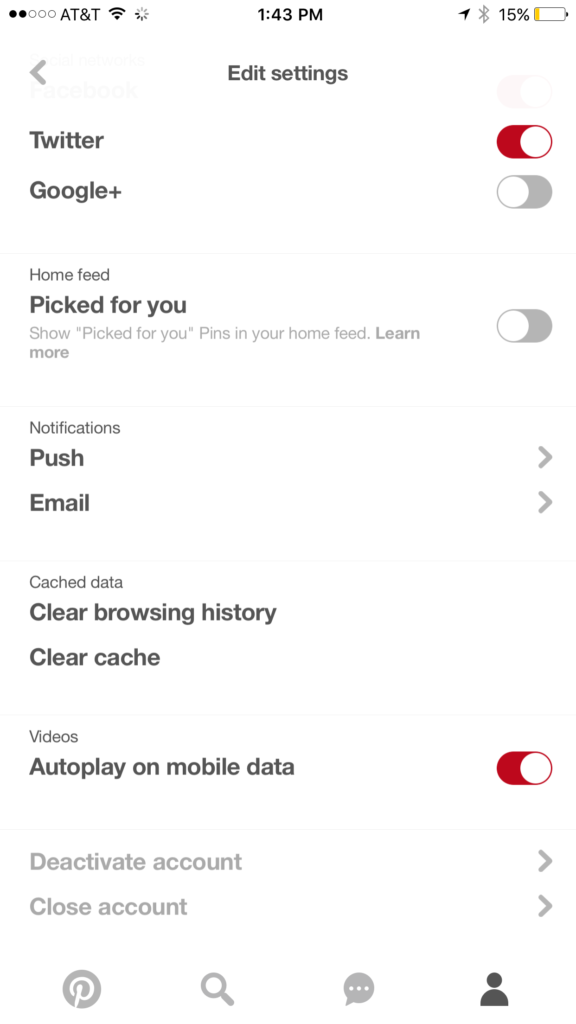
While this covers intentionally searching for content, your kids may not be the type to have been in to that before so you don’t expect them to go searching for it. This is where it gets a bit tricky. Pinterest feeds you new content in two different ways. They show you pins from people you’ve decided to follow and they show you pins that have been “picked for you.” Pinterest uses what you do in their app and site as well as what you do on other websites to recommend different things to you. If you’ve liked art before then you’ll start to get more art posts. If you’re into geeky quotes, you’ll see pins from people you don’t follow based on what you’ve pinned or viewed in the past. This can lead to being shown pinners who’s pins may not line up with what you’d consider “safe” for your kids. There is, however, a way to turn off the “picked for you” option. See the image below:
Go into your profile, then settings, and you can turn off personalization AND picked for you.
Pinterest Doesn’t Allow “Explicit Content.”
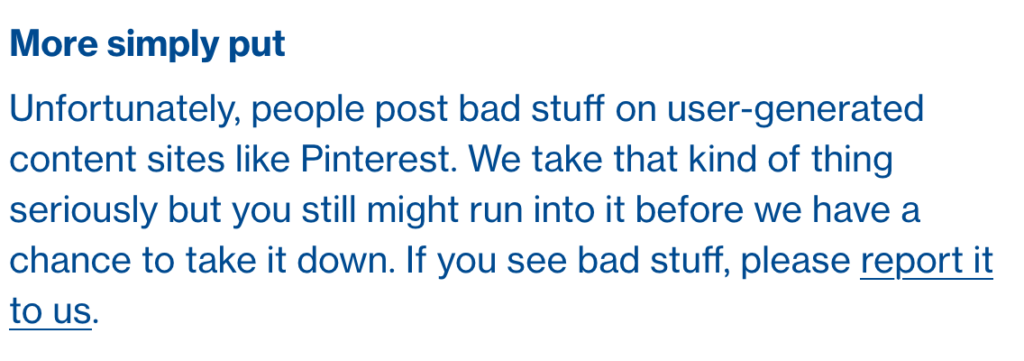
From Pinterest’s terms of service.
Pinterest’s rules don’t allow explicit pornography to be posted but it relies on reporting from users to identify and remove the offending pins. This means that the post can be up for days or weeks before it gets enough reports to have it taken down. Another thing to keep in mind is that Pinterest will still use their own definition of “explicit.” You may think something is not good for your 14 year old son to view while they view it as art or expression. This means you have to truly stay on top of what they’re seeing.
What Parents Should Know
Again, much is left to interpretation. Some parents may say a photo of a nude statue is artistic and cultural and some might say it’s inappropriate. While some folks think any nudity should be considered explicit, there are parents who would disagree unless it’s in a sexual situation or atmosphere. There are many factors that keep photo sharing sites like Pinterest from making a blanket NO NUDITY rule.
I would prefer if there were some way to turn off nudity as an option for users but as of right now that isn’t possible. It also isn’t easy to monitor what content is being viewed in the Pinterest apps. Yes, the service is built to work best on the mobile apps, my recommendation is that you limit your younger teen (over 13 to comply with the service agreement) to using Pinterest on a browser. Use something like Accountable2You to monitor their activity so you can be alerted if they’ve come across something inappropriate. This could help keep you from difficult situations stemming from your kids happening upon something adult oriented on Pinterest.
So, to answer the question, is Pinterest safe for your kid or teen? The answer is no and yes. No it isn’t recommended for your child. The age restriction to get an account is 13. I would, however, begin to ease up on a strict anti-Pinterest rule as my kids enter their teen years but I would monitor their usage in the most effective way possible. Just because you’ve never seen anything when you creep Pinterest doesn’t mean it isn’t there. Know that this risk is real and that your kids are as susceptible as any. Take precautions BEFORE anything regretful happens.
How does a tech safety expert keep his own kids safe online? Is Instagram accessible without the app? What was in the big Snapchat update? What’s with fidget spinners in the app store?
Many of the tools parents use to protect their children depend on being notified what apps they have and are using most often. When it comes to social media, being able to monitor posts and direct messages is critical. Sometimes, finding something you didn’t want to see will result in forcing your child to uninstall the app from their device. Until recently, Instagram has been a social media platform that only allows users to post from within the app. Therefore, uninstalling was a good solution for parents who wanted to give their kids some sort of time out. Instagram has just updated their mobile site and it’s going to ruin everything.
Instagram’s mobile browser update allows users to post photos and use the explore feature without having the app installed. This means that the most major features of the app are available. You still aren’t able to send direct messages through the mobile site, which is a good thing, but posting, viewing posts and accounts, and finding new accounts through search and explore are now accessible. This update is meant to give access to Instagram in countries and areas who have limited access to app stores or network services. Being able to use Instagram without an app means that more and more people across the country and the world will have an opportunity to share pictures of their lunch or coffee.
You can browse instagram.
You can see the “EXPLORE” tab.
You can post from your browser.
What Parents Should Know
There is a simple way to monitor what your kids are doing on Instagram, whether it’s on the app or in the browser. I recommend installing Instagram on your own device and adding their account. Even if you have an account of your own, you can add another one and see everything they have been doing. Using the mobile browser will definitely affect your ability to “ground” your kid from social media but there are ways to avoid that to. Here are a couple of options.
Remove access to browsers within the parental controls or restrictions of their device or your parental control apps.
Put instagram.com on the blacklist in your filters or in the “red flag list” on your accountability software.
Take the entire device from your child until the grounding is over. Make them use the family computer for any online activities they must do. This will really give an extra impact to the punish.
Instagram isn’t inherently bad, of course. Just like any site or app with user generated content you’re going to find inappropriate content. These things can’t usually be filtered so monitoring what they are doing is critical. The most common issue is time spent on social media. Teens are spending upwards of six hours a day online and many of those hours are on some form of social media. If time is your concern, then a simple uninstall of the app won’t cut it anymore. You have to lock down some of the browser options as well. Otherwise, you’re only keeping them from a couple of the features of Instagram, not the entire platform.
If you follow my recommendations on this site you’ve got some sort of monitoring software installed to allow you to see what your kids are doing on their devices. This is important because you can’t help you children navigate the digital world they’re growing up in if you don’t know what they’re doing online. Every now and then, though, a super cool new update comes out for our phones, computers, or tablets that will undermine the goals you have for monitoring your kid’s devices. Android’s “Instant Apps” is one such update.
Instant apps is a great idea. It’s a really cool way to share new apps and a great way for app developers to give brief access for someone who wants to see something that’s been shared but doesn’t want to download an app to see it. Usually when you see a cool post on social media or someone sends you a link in a direct message you have to use a browser to see the mobile website version of what they’re sharing, Instant Apps makes it easier to see the what’s being shared. For example if I’m creeping Amazon and see the Blu Ray for that super cool movie we saw together and want to share it with you. I can text you a link and when you open it the product will open in the “instant” version of the Amazon app. This will provide you with a much easier and smoother transition to possibly purchasing that product. The instant app permissions won’t allow it to run in the background and will disable some features that would be available if you downloaded the full app but it’s a cool intro to software you haven’t installed yet. Cool idea, yes, but maybe not for our kids.
What Parents Should Know
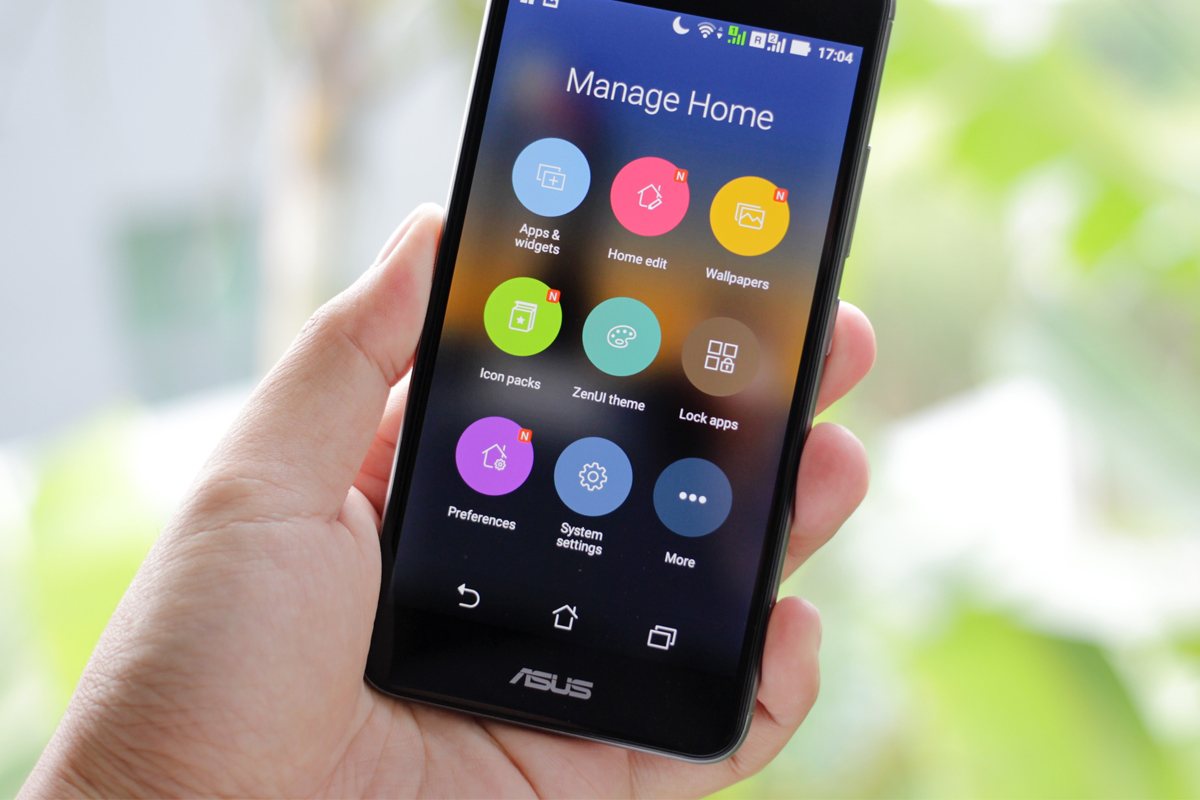
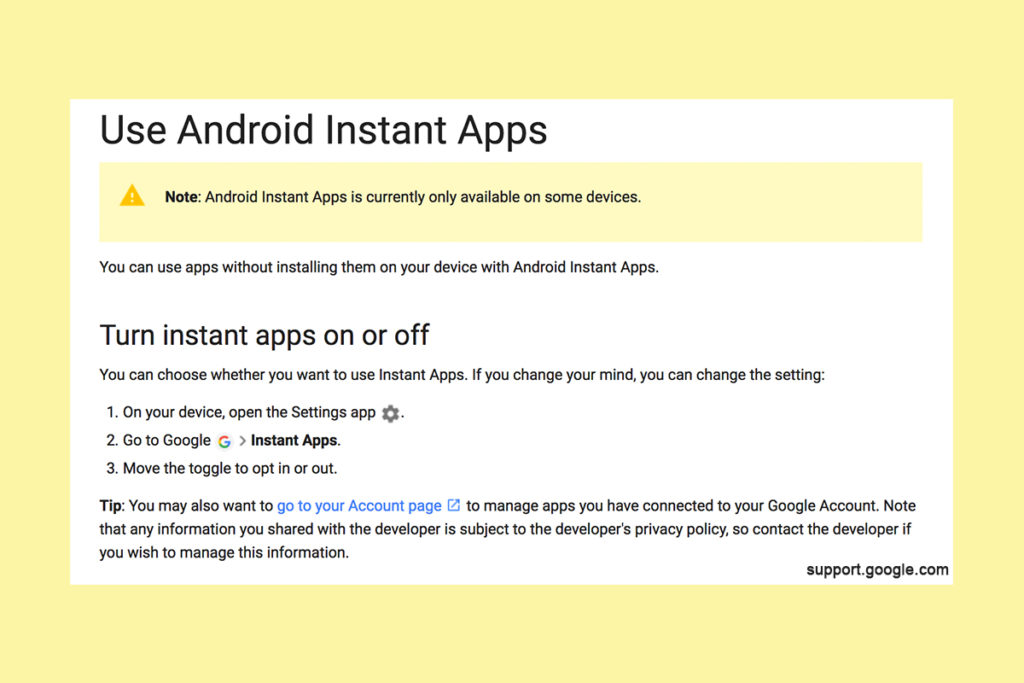
Being able to see content from an app that isn’t even installed could be troublesome for parents who are trying to monitor their kids online activity. If you have uninstalled apps from your kids’ devices to keep them from seeing what is shared in that app you aren’t going to want them to be able to see the content in instant apps. I recommend disabling Instant Apps in on your kids’ devices if they have it. If you can’t find anything about Instant Apps in the settings of their phone or tablet then it isn’t available for their device and you don’t have to worry about it. If you do see it, follow the steps below to turn it off.
Whether you’re using an accountability software like Accountable2You, a filter like NetNanny, or monitoring the entire device with something like Mobicip, the Instant App feature could give your child access to the very content you are trying to keep away from them. Be sure to give yourself opportunity to look over their phone or tablet whenever possible and check for the Instant App option. There aren’t very many apps developed with the feature yet but it has been opened up to most developers. More and more apps will be using Instant Apps to allow folks to share content in the near future. Turn it off now and get ahead of the game.






 Obviously time management will be critical as your child graduates high school and enters college. Between jobs, studying, and extra activities they’ve probably already had to develop some form of time management skill. The lure and appeal of constantly available video, music, and gaming entertainment can make time management more difficult now than it’s ever been.